azure arc
245 TopicsAdvancing sovereign AI with Foundry Local and Azure Local
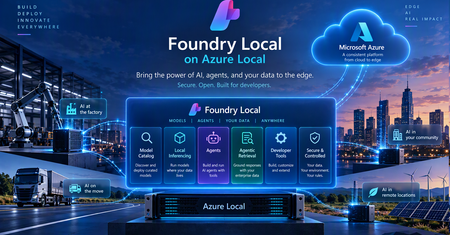
The next chapter of AI is about more than powerful models. It’s about bringing AI closer to the data, applications, and systems that organizations depend on every day. For governments, regulated industries, and organizations operating critical infrastructure, this means making AI accessible in environments where data is sensitive, connectivity may be limited, and greater operational control is essential. Microsoft’s approach to sovereign AI starts with the requirements of each workload. Our vision is to give organizations the choice and flexibility to determine where AI runs, which models they use, and how their data and infrastructure are managed. Depending on the workload, this can include control over where data and models reside, who can access and operate the environment, how AI workloads are governed, and whether critical operations can continue when cloud connectivity is restricted or unavailable. The goal is to help organizations meet their security, regulatory, and operational requirements while maintaining access to modern cloud and AI capabilities. With Foundry Local, entering general availability on Azure Local at Ignite, we're bringing advanced AI capabilities to customer-controlled environments. This enables organizations to build and run AI applications closer to their data, with greater control over how AI workloads are deployed and operated, extending the possibilities of AI beyond the public cloud. Bringing the Microsoft Foundry experience to customer-controlled environments AI delivers the greatest value when organizations can connect it securely to the data, applications, and processes that power their business. Microsoft Foundry is our unified platform for building, optimizing, and governing AI applications and agents. Foundry Local extends these capabilities to customer-controlled environments, allowing organizations to deploy and run supported AI models on Azure Local infrastructure, with local inference, model management, and GPU acceleration. Built on Azure Arc-enabled Kubernetes, Foundry Local supports CPU- and GPU-backed deployments, model lifecycle management, and OpenAI-compatible APIs. Developers can select from an integrated model catalog or bring their own supported models. Models and inference workloads can run locally, including in supported disconnected environments. We're also expanding what organizations can build with Foundry Local, moving beyond standalone inference toward intelligent applications and agents that can securely interact with enterprise data. These capabilities include: Model catalog (general available): Offers a curated model catalog, making it easy to discover and deploy AI models optimized for local and edge environments. Gives organizations greater flexibility to select models based on capability, performance, latency, resource requirements, and the sovereignty needs of individual workloads. Agentic Retrieval (general available): Enables applications to ground responses in enterprise knowledge through local data ingestion, indexing, and multistep retrieval, with citations that allow users to verify the underlying sources. Agents and enterprise connectors (available in preview): Emerging capabilities for orchestrating agents and connecting them to enterprise systems, including on-premises Exchange Server, SharePoint Server, and SQL databases through Model Context Protocol (MCP). Configurable AI guardrails (available in preview): Support for applying safety and compliance controls to local AI workloads, with flexibility to select guardrail models based on security requirements and available compute resources. Together, these capabilities help organizations build AI applications where the data lives instead of requiring the data to move to the AI. From local inference to sovereign AI applications Running AI models locally is an important first step, but sovereign AI extends beyond inference. Organizations need to connect models to enterprise knowledge, build intelligent applications and agents, and maintain control over how those applications are developed, deployed, and operated. Foundry Local helps make this possible by bringing AI capabilities closer to enterprise data and applications. Developers can use familiar Microsoft tools and technologies to build AI applications across cloud and customer-controlled environments, with greater flexibility over where models run and how they interact with organizational data. Azure Local provides the infrastructure foundation for running these workloads across datacenters, distributed locations, and edge environments, including sovereign private cloud scenarios. For organizations requiring greater operational independence, Azure Local disconnected operations enables supported infrastructure and services to operate through a local control plane without continuous connectivity to the public cloud. Sovereignty also extends to the software development lifecycle. With GitHub Enterprise Local, becoming generally available at Ignite, organizations can bring familiar GitHub development capabilities to customer-controlled infrastructure on Azure Local. Developers can manage source code, collaborate, and automate build and deployment processes using GitHub Actions and self-hosted runners while maintaining greater control over their repositories, workflows, and artifacts. Foundry Local can also provide locally hosted models for AI-assisted development scenarios in supported disconnected environments. Together, Foundry Local, Azure Local, and GitHub Enterprise Local provide a foundation for building, deploying, and operating AI applications within customer-controlled environments, extending sovereignty from the infrastructure to the models, applications, and development processes that run on it. What this means for customers The significance of these capabilities is ultimately about what they enable organizations to do. Keep sensitive data in the environment they control. Organizations can bring AI to data that may need to remain within a specific facility, geography, security boundary, or operational environment. Run AI where decisions need to happen. Manufacturers, retailers, transportation providers, healthcare organizations, governments, and others can bring intelligence closer to physical operations and distributed locations rather than depending on every interaction traveling to a remote cloud service. Support environments with limited or disconnected connectivity. Organizations operating in remote, isolated, or highly controlled environments can continue to pursue AI scenarios where constant public cloud connectivity may not be appropriate or possible. Maintain greater control over the AI stack. Customers can make deliberate choices across infrastructure, data, models, applications, operations, and governance based on the requirements of individual workloads. Turn enterprise data into useful AI experiences. Retrieval, connectors, agents, and model capabilities can help organizations build AI experiences grounded in their own information and business processes while keeping those capabilities closer to the systems they support. Most importantly, customers do not have to define a single architecture for every workload. Some AI workloads will benefit from the scale and rapid innovation of the public cloud. Others will require greater local control. Many organizations will need both. Our strategy is to give customers the flexibility to choose the right architecture for each workload while maintaining a consistent foundation across their environments. Sovereignty that enables innovation As AI becomes more deeply embedded across applications, operations, and critical infrastructure, organizations will need architecture that give them both powerful AI capabilities and meaningful control over how those capabilities are deployed. With Azure Local and Foundry Local, we’re continuing to bring Microsoft AI innovation to the places customers need it, from the cloud to customer-controlled datacenters and edge locations. That is the foundation of our approach to sovereign AI: giving every organization the control and choice to pursue its AI ambitions on its own terms. Resources Join us at Microsoft Ignite in San Francisco to explore the latest innovations across Microsoft AI, Azure Local, and sovereign cloud. Learn about AI workloads on Azure Local Explore digital sovereignty at Microsoft Learn more about Microsoft Sovereign Private Cloud63Views0likes0CommentsGitHub Enterprise Local: Bringing modern development to environments you control
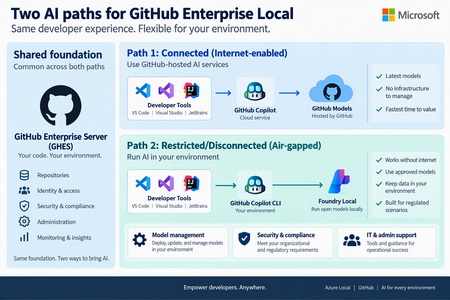
Today at the Frontier Tour in Paris, we’re announcing the next milestone for GitHub Enterprise Local, which will become generally available at Microsoft Ignite. GitHub Enterprise Local brings the GitHub Enterprise Server experience to organizations’ own environments, helping them keep source code and development workflows close to where their business operates. This is especially valuable for regulated industries, sovereign environments, remote locations, and organizations that need to continue working with limited or no internet connectivity. What's New Simpler deployment: A guided Azure experience brings the key deployment steps together and reduces manual configurations. Using AI for connected and disconnected environments: Customers can use GitHub Copilot when cloud connectivity is available or locally hosted models through Foundry Local when AI processing must remain within their environment, subject to current availability and requirements. A simpler way to deploy GitHub Enterprise Local GitHub Enterprise Local now uses Workload Orchestration to provide a guided, user-friendly deployment experience in Azure. Instead of coordinating separate tools and steps, administrators can enter the required settings in one workflow and let the platform prepare the core infrastructure and GitHub Enterprise Server appliance. Deployment secrets are securely stored in Azure Key Vault, helping organizations protect sensitive information and manage access within their environment. The result is a more consistent and repeatable deployment process, with fewer opportunities for configuration errors. Organizations still retain control over important choices such as networking, naming, security, and the environment in which GitHub Enterprise Local runs. This streamlined experience also makes it easier to establish a consistent operating model across multiple locations. Platform teams can apply repeatable deployment practices, protect deployment secrets in Azure Key Vault, and give application teams a familiar GitHub environment wherever the infrastructure is located. Choose the AI experience that fits your environment Organizations do not all operate with the same connectivity, security, or data requirements. GitHub Enterprise Local keeps repositories and core development workflows on customer-controlled Azure Local infrastructure, while giving customers a clear choice for adding AI assistance. Connected environments: use GitHub Copilot When controlled internet access is available, developers can use GitHub Copilot in supported development tools while their repositories remain hosted on GitHub Enterprise Local. To use GitHub Copilot in connected environments GitHub.com identity and license is required. This option is a good fit for organizations that allow managed outbound connectivity and want the broader GitHub Copilot experience without moving their source-code hosting away from their Azure Local environment. Restricted or disconnected environments: use local AI In environments where GitHub Cloud connectivity is unavailable or not permitted, Foundry Local can run approved AI models on Azure Local. AI requests are processed inside the customer-controlled environment, helping organizations support local data boundaries and disconnected operations. Developers can access the local AI endpoint through supported GitHub tooling, while administrators manage the models, security, certificates, and access controls within their own environment. Foundry Local provides a focused local AI option rather than the full cloud-backed GitHub Copilot experience. Availability and supported capabilities may vary, so customers should review the latest product documentation when planning their deployment. Find the right fit Environment Recommended AI path Key consideration Connected GitHub Copilot with GitHub-hosted services Best when approved internet access and GitHub Copilot licensing are available. Restricted / hybrid Use GitHub Copilot for approved connected work, or local models where data must remain in the environment. Choose the AI path based on network policy and data sensitivity. Disconnected Foundry Local with approved models running on Azure Local Designed for environments that cannot depend on GitHub Cloud connectivity. Built for hybrid, sovereign, and disconnected operations GitHub Enterprise Local brings together the familiar GitHub developer experience and the flexibility of Azure Local. Customers can keep code and development workflows in their own environment, deploy the solution through a more consistent process, and choose an AI approach that matches their connectivity and data requirements. Customers can begin with the operating model that best fits their current needs and expand over time. A connected site can use GitHub Copilot through approved cloud access, while a restricted site can keep AI processing local—both supported by the same Azure Local foundation and a consistent approach to management. GitHub Enterprise Local is entering general availability at Ignite. To get started, explore the product information, review deployment requirements, and work with your Microsoft account team to plan the right Azure Local environment for your organization. Learn more about GitHub Enterprise Local105Views0likes0Comments
Sovereign Private Cloud: Bringing more choice and control to AI and cloud infrastructure
To identify which sovereign cloud solution may fit your organization’s needs, take the Microsoft Sovereign Cloud assessment Digital sovereignty is essential for organizations as they modernize critical infrastructure and bring AI into more sensitive and regulated environments. We’re hearing from our customers in Europe and beyond that they want to take advantage of cloud and AI innovation while maintaining greater control over where their data, applications, and infrastructure operate. Microsoft Sovereign Private Cloud, built on Azure Local, extends cloud capabilities into customer-controlled environments, helping organizations meet sovereignty, regulatory, and operational requirements while continuing to modernize applications, infrastructure, data, and AI. At Microsoft Frontier Tour stops this month in London, Paris and Cologne, we’re showcasing exciting new capabilities that expand what our customers can achieve with Sovereign Private Cloud and Azure Local. These advancements range from running frontier AI models locally to strengthening resiliency and workload isolation, enhancing security, and improving developer productivity. Run AI where your data lives with Foundry Local Foundry Local, generally available on Azure Local at Ignite, brings the Microsoft Foundry stack into customer-controlled environments, extending AI capabilities to on-premises infrastructure. Organizations can deploy and run AI models close to their data, enabling local inference while maintaining greater control over their infrastructure, data, and operations. With Foundry Local, organizations can bring the Foundry experience to connected and disconnected environments, giving them greater flexibility in where and how they deploy AI. This enables customers to bring AI to locations and workloads where cloud connectivity, data residency, latency, or operational requirements make local processing important. We’re continuing to expand the Foundry Local model catalog, giving organizations greater choice in the models they can deploy and run locally. Developers can select models based on the needs of their applications while keeping inference close to their data, applications, and operations. Beyond model inference, Foundry Local is expanding to support agentic AI scenarios on Azure Local into public preview. Agentic Retrieval provides local data ingestion, indexing and search, along with agents, tool calling, and Model Context Protocol (MCP) server, and a built-in chat experience with citations. Together, these capabilities enable developers to build AI applications that can use locally available enterprise knowledge, interact through conversational experiences, and connect agents with tools through MCP. This extends Foundry Local from local model inference to a broader foundation for building grounded AI applications and agents in customer-controlled environments. Learn more about Foundry Local on Azure Local. Strengthen resilience and operational flexibility across Azure Local environments Sovereign environments need to remain resilient and adaptable while supporting different teams, tenants, and workloads across shared infrastructure. We’re bringing more choice over how and where our customers can operate infrastructure based on their sovereignty, connectivity, and operational requirements. Azure Local is expanding the ways organizations can operate in their environments. The ability to move from connected to disconnected Azure Local operations is entering public preview, enabling organizations to rehome Azure-connected infrastructure and workloads to a fully disconnected Azure Local environment while maintaining operational continuity and governance. The process includes safeguards such as phased execution, user approval stages, and secure environment back-ups that ensure the safe and accurate migration of both infrastructure resources and workloads to the Azure Local disconnected environment. This empowers customers to more easily transition their environments to Azure Local disconnected operations and meet their evolving operational requirements related to connectivity to the cloud and data sovereignty. Multitenancy, coming soon to Azure Local, provides greater flexibility provides greater flexibility in how organizations use and allocate shared infrastructure. Through logical isolation, organizations can consolidate workloads and make more efficient use of available capacity while maintaining separation across tenants, teams, and workloads. Initial access will be limited to qualified customer opportunities. Together, these capabilities help organizations build Sovereign Private Cloud environments that are more resilient, adaptable, and capable of supporting a diverse range of workloads and operating models. Protect sensitive workloads with confidential computing Protecting data at rest and in transit is critical. For highly sensitive workloads, organizations may also need stronger protections while data is actively being processed. With confidential virtual machines on Azure Local, now generally available, organizations can extend confidential computing protections to customer-controlled infrastructure. Confidential virtual machines provide hardware-encrypted memory and hardware-based isolation between the virtual machine, hypervisor, and host management environment, helping protect sensitive data while it is in use. Hardware-rooted attestation provides additional assurance by enabling the integrity of the platform and workload to be verified before sensitive data or keys are released. Customers can also use integrity protection for the guest operating system to help protect the OS disk and boot chain from unauthorized modification. For organizations running regulated, sensitive, or mission-critical workloads, these capabilities provide an additional layer of protection within Sovereign Private Cloud. By combining customer-controlled infrastructure with hardware-enforced isolation and attestation, organizations can strengthen protection for sensitive workloads while maintaining greater control over where their data and applications run. Learn more about confidential virtual machines on Azure Local. Bring development and DevOps into the sovereign boundary with GitHub Enterprise Local Sovereignty extends beyond production infrastructure. Organizations also need to consider where applications are developed and how development environments are operated. GitHub Enterprise Local, entering general availability at Ignite, brings GitHub Enterprise Server into Azure Local and Sovereign Private Cloud environments. This enables organizations to support local development and DevOps while keeping development environments within their sovereign operational boundary. Delivered as a prebuilt virtual appliance on Azure Local, it keeps repositories, metadata, CI/CD workflows, and development artifacts within the organization’s infrastructure and security boundaries. Developers can use familiar GitHub capabilities including private repositories, pull requests, code reviews, issues, GitHub Actions with self-hosted runners, GitHub Packages, and GitHub Advanced Security, while organizations maintain control over identity, networking, security policies, upgrades, and administration. GitHub Enterprise Local supports both connected and fully disconnected environments. GitHub Enterprise Local supports AI-enabled developer experiences across connectivity models. In connected environments, developers can continue using cloud-connected capabilities such as GitHub Copilot, while in disconnected environments, Foundry Local on Azure Local can provide locally hosted AI models for AI-assisted development scenarios. The general availability of GitHub Enterprise Local expands Microsoft’s Sovereign Private Cloud platform beyond infrastructure and workloads to the tools developers use to build and manage applications. Learn more about GitHub Enterprise Local. Run critical data workloads locally At FabCon, we announced the general availability of SQL Server on Azure Local across connected and disconnected environments, expanding the options organizations have to run critical data workloads where they need greater control over their data and infrastructure. We are continuing to expand the data services available on Sovereign Private Cloud with DocumentDB on Azure Local and Blob Storage on Azure Local, both entering public preview at Ignite. DocumentDB on Azure Local brings a MongoDB-compatible, open-source document database to customer-controlled environments, giving organizations more flexibility to run document and JSON workloads locally. Blob Storage on Azure Local provides cloud-native object storage for unstructured data while keeping the data local, giving organizations more flexibility to store and access data within sovereign environments. Together with SQL Server, these capabilities expand Azure Local beyond infrastructure to support a broader data estate across relational databases, document databases, and object storage. For Sovereign Private Cloud customers, that means greater flexibility to modernize applications and data while keeping critical workloads and data in customer-controlled environments. Resources Learn more about Azure Local Explore digital sovereignty at Microsoft Learn more about Microsoft Sovereign Private Cloud Join us at Microsoft Ignite in San Francisco this November To identify which sovereign cloud solution may fit your organization’s needs, take the Microsoft Sovereign Cloud assessment174Views1like0Comments
End of Lifecycle for Windows Server 2012 and 2012 R2
On October 13, 2026, the Extended Security Updates (ESU) program for Windows Server 2012 and Windows Server 2012 R2 ended. This closes the three-year extended coverage period that began when these operating systems reached end of support in October 2023. After today, Microsoft will no longer provide security updates for Windows Server 2012 or Windows Server 2012 R2. How we got here Windows Server 2012 and 2012 R2 reached end of support on October 10, 2023. To give customers time to modernize, Microsoft offered up to three additional years of ESU for eligible servers. Over that time, ESU gave organizations a way to keep receiving critical security updates for workloads that needed more time to upgrade, migrate or modernize. What this means for you Servers still running Windows Server 2012 or 2012 R2 will no longer receive security updates from Microsoft. Unsupported operating systems become harder to secure and maintain over time and running them in production adds security and compliance risk. Unsupported infrastructure shouldn't be a long-term strategy. What to do next If you still have Windows Server 2012 or 2012 R2 workloads in production, start with these steps: Identify affected servers. Inventory your datacenter, edge and cloud environments to find where Windows Server 2012 and 2012 R2 are still running. Understand your dependencies. Many remaining deployments support business-critical applications. Validate what depends on each server before you decide what to do with it. Choose a path for each workload. Options include upgrading to a supported version of Windows Server, migrating workloads to Azure, modernizing applications onto Azure services, or adopting a hybrid approach. Set a timeline and prioritize. Move business-critical and highest-risk workloads first to reduce operational and security exposure. Get help. Engage your Microsoft account team and trusted partners to build a transition plan that fits your environment. Why modernizing is worth it Moving to a supported platform is the best way to stay secure, and it also gives you the following: A stronger security posture, with ongoing security updates and support Better operational efficiency through modern management capabilities The latest performance, reliability and resiliency improvements Less technical debt and lower long-term infrastructure risk Access to new AI, cloud and hybrid capabilities Looking ahead Microsoft is committed to helping you modernize on your terms, whether you're upgrading on-premises infrastructure, migrating to Azure or taking a hybrid approach. To learn more about support lifecycle information and modernization paths, see Overview of Extended Security Updates for Windows Server 2012 and 2012 R2 on Microsoft Learn.394Views0likes0CommentsEpisode 2: Reduce restarts with Hotpatch for Windows Server 2025 | The Azure Arc Check-In
Once a month, the Azure Arc team releases an episode covering a new hybrid and multicloud management scenario. To request a topic or view additional episodes, visit aka.ms/the-azure-arc-check-in. Scenario: Your infrastructure team needs to apply monthly security updates across hybrid Windows servers, but every restart creates another maintenance window and potential workload interruption. Hotpatch can reduce that restart-driven effort while helping you keep eligible servers protected. Try now in Azure aka.ms/aaci-episode2 Why Hotpatch matters Security updates are essential, but coordinating restarts across a distributed server estate takes time and can disrupt workloads. Hotpatch updates Windows security code in memory, allowing eligible security updates to take effect without requiring a restart. For Azure Arc-enabled Windows Server 2025 machines, enabling and using Hotpatch is available at no additional charge. Hotpatch reduces restart frequency, but it does not eliminate every restart. Baseline updates and updates outside the Hotpatch program can still require one. Confirm that your server is eligible Before enabling Hotpatch, confirm that the machine meets the operating system, Azure Arc, and security prerequisites. The server must: Run Windows Server 2025 Standard or Datacenter, build 26100.1742 or later. Run a generally available release. Preview and Windows Server Insider builds are not supported. Meet the Azure Connected Machine agent prerequisites and be connected to Azure Arc. Support virtualization-based security and Virtual Secure Mode. Use Unified Extensible Firmware Interface (UEFI) with Secure Boot enabled. Be a Generation 2 virtual machine when hosted on Hyper-V. Windows Server 2025 Datacenter: Azure Edition follows a different path because Hotpatch is enabled by default and does not require Azure Arc connectivity. For the latest requirements, see Enable Hotpatch for Azure Arc-enabled servers. Verify Virtual Secure Mode Run the following PowerShell command on the server to check its Virtual Secure Mode status: Get-CimInstance -Namespace 'root/Microsoft/Windows/DeviceGuard' -ClassName 'win32_deviceGuard' | Select-Object -ExpandProperty 'VirtualizationBasedSecurityStatus' A result of 2 means Virtual Secure Mode is configured and running. If the result is not 2, resolve the prerequisite before enrolling the machine in Hotpatch. Enabling Virtual Secure Mode requires a server restart, so make that change during a planned maintenance window. Enable Hotpatch through Azure Arc After confirming the prerequisites, enroll the server from the Azure portal: Open Azure Arc, then select Machines. Select the eligible server. Select Hotpatch. Review the confirmation, then select Confirm. Allow about ten minutes for the changes to apply. Verify that enrollment completes and the status is no longer pending. The portal enrollment is intentionally short. Most of the work is making sure the server meets the prerequisites before you begin. Choose how to manage updates Hotpatch enrollment and update installation are separate. After enrollment, continue to manage available updates according to your organization's patch policy and change-control process. Supported options for Arc-connected machines include: Windows Update Azure Update Manager Group Policy SConfig Supported non-Microsoft patch-management solutions Choose the method that fits your existing operations model. Enrolling a server in Hotpatch does not, by itself, install every available update automatically. Plan for the restart cadence Hotpatch changes the monthly update rhythm, but restart planning still matters. Every three months, Microsoft releases a planned baseline with the latest cumulative update. Installing a baseline requires a restart. Hotpatch releases normally follow during the next two months, allowing eligible security updates to be applied without a restart. An unplanned baseline can replace a scheduled Hotpatch release when necessary and will also require a restart. Updates outside the Hotpatch program can require restarts as well, including: Nonsecurity Windows updates .NET updates Drivers Firmware Other non-Windows updates The practical operating model is fewer restart-driven maintenance windows, not a server that never needs to restart. FAQs 1. Does Hotpatch mean I never need to restart the server? No. Planned baselines arrive every three months and require a restart. Unplanned baselines and updates outside the Hotpatch program can also require restarts. Hotpatch reduces restart frequency for eligible security updates; it does not eliminate restart planning. See Hotpatch for Windows Server. 2. Is Hotpatch an extra-cost service for Azure Arc-enabled Windows Server 2025? Enabling and using Hotpatch on eligible Azure Arc-enabled Windows Server 2025 machines is available at no additional charge. Optional Azure management services may have separate pricing. 3. Does enrolling in Hotpatch install every update automatically? No. Enrollment makes the machine eligible to receive Hotpatch updates. Continue using Windows Update or a supported patch-management tool, such as Azure Update Manager, Group Policy, SConfig, or a non-Microsoft solution, to manage available updates according to your patch policy. 4. Can I use Hotpatch with Windows Server Core? Yes. Both Server Core and Server with Desktop Experience are supported when the machine meets all other Hotpatch prerequisites. 5. What does a Virtual Secure Mode status of 2 mean? For the documented Device Guard PowerShell query, a result of 2 means Virtual Secure Mode is configured and running. If you receive another result, resolve the prerequisite before attempting enrollment. Review the current Hotpatch enablement guidance and Hotpatch concepts and update cadence, then visit The Azure Arc Check-in for more episodes.320Views2likes0Comments
Azure Local Storage: Choose the Architecture That Fits Your Business
Organizations modernize infrastructure in different ways. Some prioritize a simple, integrated platform; others need to preserve SAN investments, scale storage independently, or support workloads with different storage requirements. In this post, we'll explore the storage options available in Azure Local, when to use each one, and the business benefits they unlock. One Platform, Multiple Storage Architectures Azure Local brings multiple storage choices into a consistent, cloud-connected platform experience. Hyperconverged Infrastructure (Storage Spaces Direct) Storage Spaces Direct (S2D) provides a hyperconverged architecture where compute and storage are integrated into the same cluster. This model is ideal for customers looking for streamlined deployment experience, with infrastructure managed as a single platform and fewer organizational dependencies. Disaggregated Architecture (SAN Only) Azure Local supports validated external storage arrays connected through Fibre Channel or iSCSI. This architecture enables organizations to leverage existing storage investments and advanced storage services while independently scaling compute to support higher-capacity requirements. This gives customers the flexibility to work with supported storage vendors—including Dell, HPE, Hitachi, Lenovo, NetApp, and Everpure—while using the Fibre Channel or iSCSI connectivity already supported by Azure Local. Hybrid Architecture (Storage Spaces Direct + SAN) Customers can also combine Storage Spaces Direct and external storage to support different workload requirements within the same environment. This approach offers maximum flexibility, allowing organizations to align storage choices with application needs. Which Storage Option Should You Choose? If your goal is... Consider Simple integrated infrastructure Hyperconverged Expand an existing Azure Local cluster storage capacity Hybrid Reuse existing storage investments Hybrid or Disaggregated Independent compute and storage scaling Disaggregated Consolidate storage across workloads Disaggregated Advanced storage efficiency capabilities Disaggregated Flexible workload placement Hybrid Traditional three-tier architecture modernization Disaggregated Minimize infrastructure replacement Disaggregated Higher-scale compute clusters with more than 16 nodes Disaggregated Ready to size your solution? Use ODIN for Azure Local to translate workload, resiliency, growth, compute, and storage requirements into an example solution design. Use ODIN as a planning aid and validate the proposed configuration against official Azure Local documentation and with your preferred hardware and storage partners. Before finalizing your design, review External storage support for Azure Local for supported architectures and protocols, and Supported SAN solutions on Azure Local for validated storage partners and configurations. Use the comparison above to identify the most suitable architecture, then use ODIN, official Azure Local documentation, and partner guidance to validate workload sizing, supported configurations, and operational requirements. Modern Infrastructure Demands More Storage Flexibility Storage architecture decisions increasingly depend on more than capacity and performance. Organizations must also account for operational processes, maintenance planning, existing infrastructure, efficiency services, resiliency, and expected growth. These priorities influence whether an organization chooses an integrated, disaggregated, or hybrid architecture—and which benefits matter most in its environment. The following benefits explain where external storage can add value within that decision. Benefits of External Storage with Azure Local Protect Existing Investments Many organizations already operate enterprise storage platforms that support critical business applications. Azure Local enables customers to modernize compute infrastructure while continuing to leverage existing storage investments, operational expertise, backup strategies, and storage management processes. Get More Value from Every Terabyte Storage efficiency is becoming increasingly important as organizations scale virtualized environments, desktop infrastructure, databases, and application workloads. Many enterprise storage platforms offer advanced services such as compression, deduplication, thin provisioning, and capacity optimization. Organizations can leverage these capabilities while maintaining consistent Azure Local management experience. Spend Less Time Maintaining Infrastructure Operational efficiency is often just as important as infrastructure capabilities. Because compute and storage are separated in SAN-based architectures, organizations can independently manage storage and compute infrastructure. This can help simplify maintenance planning and reduce storage-related operational activities during maintenance events. Customers frequently cite more predictable maintenance windows, simplified update planning, mature storage monitoring practices, and reduced operational complexity. Scale on Your Terms One of the primary reasons organizations adopt external storage is flexibility. In hyperconverged environments, compute and storage typically scale together. With disaggregated storage, organizations can expand storage capacity independently from compute resources. This can be particularly valuable when storage growth outpaces CPU or memory requirements. Designed for Enterprise Resiliency Azure Local pairs cloud-connected infrastructure with the storage maturity Windows Server has refined over many generations. For external storage, that means working with the same well-understood technologies you already rely on—Fibre Channel and iSCSI connectivity, MPIO, dual fabrics, redundant controllers, and Cluster Shared Volumes—applied to the Azure Local platform. Because these are proven, standard building blocks, you have the flexibility to design highly available storage that fits your existing SAN investments and operational practices, rather than adapt to an unfamiliar model. For implementation requirements and configuration steps—including Fibre Channel, iSCSI, MPIO, array-side configuration, and presenting SAN-backed volumes as Cluster Shared Volumes see : Connect an external storage array to Azure Local. Real-World Scenarios Streamlined Infrastructure for Distributed Locations Retail stores, branch offices, and back-office environments can use a hyperconverged architecture to run applications on an integrated compute and storage platform. This approach simplifies deployment and day-to-day operations for locations that need consistent infrastructure without dedicated storage teams. Flexible Workload Placement Manufacturing and healthcare organizations can use a hybrid architecture when some workloads are best served by integrated Storage Spaces Direct and others require external SAN capacity or established storage services. This allows application teams to place workloads on the storage option that best meets their performance, resiliency, and operational requirements. Modernizing while Preserving SAN Investments A manufacturing organization, financial institution, or enterprise datacenter with established SAN platforms and processes can use a disaggregated architecture to modernize compute without redesigning storage operations, retraining teams, or immediately replacing proven infrastructure. Scaling Storage as Data Needs Grow Data-intensive environments—including manufacturing, fintech, and enterprise datacenters—may find that storage capacity grows faster than compute demand. A disaggregated architecture allows them to scale storage and compute independently, helping optimize infrastructure investments over time. Cost and Licensing Considerations Azure Local uses a monthly service fee based on the deployment configuration: Hyperconverged deployments (S2D only): Compute and storage are integrated in the same cluster using Storage Spaces Direct, with no external SAN storage. A monthly service fee of $10 per physical core/month applies. Disaggregated (SAN only), and hybrid storage configurations (S2D with SAN): Disaggregated deployments use external SAN storage instead of Storage Spaces Direct, while hybrid deployments with external storage combine Storage Spaces Direct with external SAN storage. Using external SAN storage has a monthly service fee of $20.1 per physical core/month applies. Prices are subjected to change. For current pricing details and applicable terms, visit Azure Local Pricing | Microsoft Azure. Choosing the Right Fit for Your Business Start with the operating model and workload requirements you need to support, then choose the architecture that best fits them. Azure Local provides a consistent platform experience across hyperconverged, disaggregated, and hybrid deployments. That consistency lets organizations modernize without treating storage architecture as a one-time, irreversible choice. The right storage strategy is the one that fits your workloads, operations, and growth plans. Learn more: Storage Spaces Direct overview; External storage support for Azure Local; Supported SAN solutions on Azure Local; Connect an external storage array to Azure Local; Azure Local pricing; and Azure Hybrid Benefit for Azure Local.613Views2likes3Comments
Workload Orchestration in the Azure portal is now available: Deploy in minutes, scale with ease
Edge deployments rarely stay simple for long. What begins as an application running on a single Kubernetes cluster can quickly expand across stores, factories, branches, or other distributed locations, each having different configuration needs. That is exactly where workload orchestration for Azure Arc comes in. Workload orchestration helps teams manage that complexity by providing a centralized approach to consistently define, configure, and deploy applications across distributed cloud, on-premises, and edge environments, all while catering to custom configuration needs of individual sites and deployment targets. See the experience in action Evaluating a new deployment approach often starts slowly: study the documentation, package an application, complete the setup, and only then decide whether it fits. The Azure portal reverses that order with its jumpstart onboarding experience. Bring your Azure Arc-enabled Kubernetes cluster and deploy a pre-packaged application in minutes. Whether you are validating a proof of concept or introducing the product to your broader team, the new portal onboarding experience turns the end-to-end workflow into something you can quickly try on your own cluster. Scale from first deployment to production Once you have validated the first deployment, you can evolve the same approach for production. Onboard your infrastructure into workload orchestration, organize your deployment sites into hierarchies, and define shared configurations for all deployments – all without leaving the portal. This lets you expand from one cluster to a distributed fleet while retaining centralized governance, repeatability, and site-level flexibility. Ready to try it? Try now by deploying your first application with workload orchestration in the Azure portal. Explore the product documentation for the complete set of capabilities.461Views0likes0CommentsGenerally Available: Transition to WS2012 / R2 ESUs enabled by Azure Arc from Volume Licensing
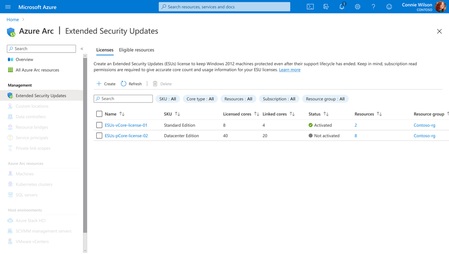
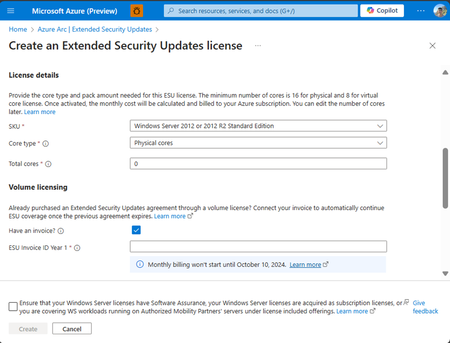
Customers that have enrolled in WS2012/ R2 ESUs through Volume Licensing for Year 1 can transition to Azure Arc for Year 2 of the program by specifying their Volume Licensing entitlements (Invoice Ids) in provisioning new Azure Arc WS2012/R2 ESU licenses. Extended Security Updates afford customers with critical security patches for end of support Windows Server 2012/R2 machines.6.3KViews3likes4CommentsFive Key Updates on WS2012 ESUs enabled by Azure Arc
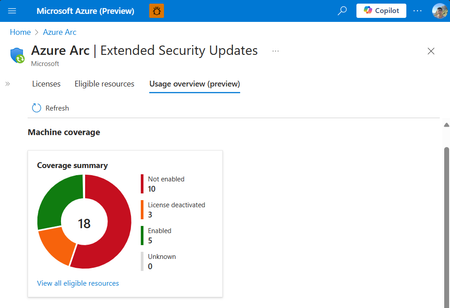
We’re excited to announce the public preview of the Azure Arc ESU Usage View and Transition Scenario from Year 1 Volume Licensing. Additionally, we have made a breadth of improvements to pre-requisites, billing service, and included capabilities.4.2KViews4likes3Comments