azure app testing
3 Topics
Bring managed browser automation to your agent applications
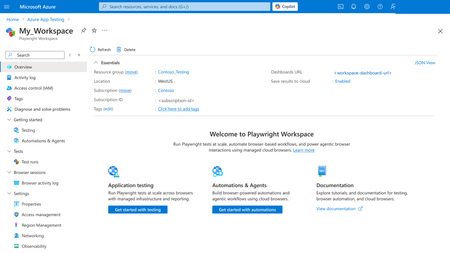
AI agents become more useful when they can move beyond conversation and complete real workflows. Playwright Cloud Browsers provides managed, on-demand browser capacity that agent applications can access through Model Context Protocol (MCP). You can connect Playwright Cloud Browsers to agent applications, including coding agents such as the GitHub Copilot app and Visual Studio Code: when they support custom remote MCP servers. Once connected, an agent can navigate an approved application, complete forms, verify results, capture evidence, and close the managed browser session. Your team gets browser automation without maintaining browsers in every user or agent environment. In this example, we use the GitHub Copilot app to show the connection and workflow. You can extend the same approach to other compatible applications by adding the Playwright workspace endpoint through their custom remote MCP configuration. Example: Follow one registration request from start to finish If your team processes employee registrations for approved training programs, each request can involve several repetitive steps: open the portal, enter employee and course information, check required fields, review the details, submit the form, and retain confirmation evidence. After you connect the workspace MCP endpoint, you can ask your agent application to handle the browser steps. In the GitHub Copilot app, for example, you could use this prompt: "Use Playwright Cloud Browsers to open <approved-registration-portal-url> and process case <number>. Enter the employee and course information I provide, validate all required fields, and show me a structured summary. Do not submit until I approve it. After approval, submit once, verify the confirmation number and success message, capture a screenshot, and close the browser session. If submission times out, inspect the page before deciding whether a retry is safe." The prompt defines the outcome, approved destination, human decision point, evidence, and cleanup expectation. The agent handles repetitive browser interaction while you remain in control of the consequential submission. Connect managed browser capacity in minutes Every Playwright workspace provides a workspace-scoped MCP endpoint: https://<region>.mcp.playwright.microsoft.com/playwrightworkspaces/<workspace-id>/mcp Provision a Playwright workspace in the Azure portal. Open the workspace and copy its MCP endpoint. In the GitHub Copilot app, open Customize, select Add, and then select MCP. Choose HTTP, enter a server name, paste the endpoint, and select Save. For this illustrated setup, only the server name and workspace endpoint are entered. Follow your organization's authentication and access policies for the workspace. Figure 1. Open the Playwright workspace Overview page in the Azure portal Figure 2. Copy the workspace-scoped MCP endpoint Figure 3. Open Customize in the GitHub Copilot app Figure 4. Select 'MCP' Tab, and add the workspace endpoint as a custom HTTP MCP server This article demonstrates Add > MCP in the GitHub Copilot app. Other compatible applications use their own custom remote MCP configuration. Using another compatible application? In Visual Studio Code or another client that supports custom remote MCP servers, add the same workspace endpoint through that application’s MCP configuration. The interface can differ, but the endpoint and connection model remain the same. Features of Playwright Cloud Browsers 1. Watch the agent complete the form When the task begins, the agent creates a managed browser session and uses its browserSessionId throughout the registration flow. Session creation might also return a liveViewUrl; Live View availability depends on the session. When available, Live View lets you watch while the agent opens the portal, finds the registration fields, and enters the supplied information. The agent follows an observe-act-verify loop: inspect the page, enter the required values, wait for validation or dependent fields, and observe the page again. If you need to intervene rather than observe, Playwright Cloud Browsers provides Take Control for supported active sessions. An authorized operator can interact directly with the running browser to address an unexpected page state, complete an action that requires human judgment, or help troubleshoot the flow. Control can then return to automation. 2. Review before the consequential action Before submission, the agent presents a structured summary with the case ID, employee name, selected course, date, contact information, required acknowledgements, and any validation warning. It waits for explicit approval. Automation removes repetitive entry and navigation, while you retain authority over the action that creates the registration. After approval, the agent submits once. It verifies the success message and confirmation identifier, captures a screenshot when evidence is required, and reports the outcome. 3. Investigate errors before retrying A timeout or disconnected caller does not prove that submission failed. Repeating a non-idempotent action can create a duplicate registration. If the result is unclear, the agent first checks the page for a confirmation number, success message, changed status, or validation error. It retries only when the page state shows that repeating the action is safe. Console messages and network activity can explain client-side errors, failed requests, authentication problems, or validation behavior. Playwright Cloud Browsers also provides built-in observability and browser session data, including logs, traces, screenshots, recordings, and execution artifacts. Availability depends on the workflow, session, and configuration. 4. Close the session and monitor the result The agent closes the browser session whether the registration succeeds, fails, or is cancelled. Closed or expired sessions cannot be reopened. Explicit cleanup releases browser capacity promptly and reduces unexpected activity. Figure 5. Review MCP created sessions in the Azure portal Browser activity log Use Browser sessions > Browser activity log to review MCP-created sessions, source, start time, and duration. The result is one connected workflow: your agent application provides the conversational or coding experience, MCP provides the connection, and Playwright Cloud Browsers provides managed execution, visibility, human intervention, evidence, diagnostics, and auditability. Responsible use: Use browser automation only with approved websites, accounts, and data. Retain human review before consequential submissions, and never place workspace credentials, access tokens, or sensitive form data in prompts, source control, screenshots, or logs. Learn more Azure portal: https://portal.azure.com/ What is Playwright Workspaces?: https://learn.microsoft.com/azure/app-testing/playwright-workspaces/overview-what-is-microsoft-playwright-workspaces Create and manage a workspace: https://learn.microsoft.com/azure/app-testing/playwright-workspaces/how-to-manage-playwright-workspace Playwright Workspaces remote MCP server: https://learn.microsoft.com/en-us/azure/app-testing/playwright-cloud-browsers/quickstart-automate-browser-tasks-remote-mcp Manage workspace access tokens: https://learn.microsoft.com/azure/app-testing/playwright-workspaces/how-to-manage-access-tokens Customize the GitHub Copilot app: https://docs.github.com/copilot/how-tos/github-copilot-app/customize-github-copilot-app Add and manage MCP servers in Visual Studio Code: https://code.visualstudio.com/docs/agent-customization/mcp-servers59Views0likes0CommentsComparing Three Approaches to AI Agent Evaluation and Observability
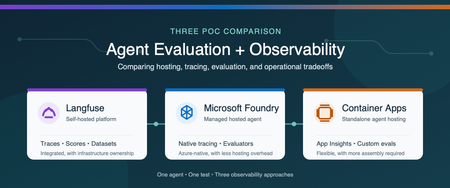
Why evaluation and observability belong together Agent evaluation and observability answer two related questions: Is the agent producing the right result? What happened from the initial request through every model and tool call? Evaluation measures quality with repeatable scores (is our system working), such as task completion, tool-call accuracy, groundedness, or safety. Observability captures the end-to-end execution flow, including prompts, model responses, tool calls, latency, token usage, and errors. You need both. A score can tell you that an agent failed, while a trace helps you understand why. Microsoft provides several ways to host and monitor agents. You can use a Microsoft Foundry hosted agent with integrated tracing and evaluation, or run the agent independently on a service such as Azure Container Apps and connect it to Azure Monitor. Open-source platforms such as Langfuse provide another option and can be self-hosted in Azure. We built three proofs of concept (POCs) to compare these approaches: Self-hosted Langfuse A Microsoft Foundry hosted agent A standalone agent on Azure Container Apps The best choice depends on more than features. Authentication, networking, security boundaries, operational ownership, and the existing Azure architecture all affect the decision. Note These findings come from one controlled comparison, not a general performance benchmark. We used the same agent image, model deployment, prompt, tools, and synthetic test data in all three POCs. The common test The test agent summarized a synthetic portfolio. It had to call three deterministic tools in a fixed order: Load the dataset Validate its schema Compute the summary The expected answer was known in advance, which allowed us to evaluate both the final result and the tool trajectory. We also created a deterministic tool-call-accuracy score so we could compare how each platform stored and displayed the same custom metric. POC 1: Self-hosted Langfuse For the Langfuse POC, one private Azure virtual machine ran the agent and the Langfuse stack with Docker Compose. The deployment included Langfuse web and worker services, PostgreSQL, ClickHouse, Redis, MinIO, and an OpenTelemetry Collector. Azure Bastion provided private administrative access, and a managed identity retrieved secrets from Azure Key Vault. The main advantage was the integrated experience. Traces, scores, datasets, experiments, annotations, latency, token usage, and cost appeared in one application. We could move from the original prompt to each tool call, the final response, and the evaluation score without building a separate dashboard. That capability comes with operational responsibility. A production self-hosted deployment requires patching, scaling, backup, recovery, data retention, access control, and monitoring for the Langfuse services and their data stores. Choose this approach when a unified, open-source AI engineering platform and deployment control are higher priorities than minimizing platform operations. POC 2: Microsoft Foundry hosted agent For the Foundry POC, Microsoft Foundry hosted the agent from a pinned container image. Application Insights and Log Analytics stored the telemetry. We used Foundry's Traces experience for agent trajectories and added an Azure Workbook for custom evaluation metrics. Foundry provided the strongest Azure-native developer experience. Its trace view displayed model and tool activity as an agent trajectory, and its evaluation capabilities included built-in and custom evaluators. The underlying traces still flowed to Application Insights, where they could be queried and used in Azure Monitor visualizations. The tradeoff is architectural alignment. The application must fit the customer's Foundry account, identity, networking, and deployment model. Custom business metrics can also require additional emission and visualization work beyond the native evaluation experience. Choose this approach when managed agent hosting, Foundry-native tracing, and Azure-native evaluation are the priorities. POC 3: Standalone agent on Azure Container Apps For the third POC, we removed Foundry from the hosting path. The same image ran as an Azure Container App and used a managed identity to pull from Azure Container Registry and call Azure OpenAI. OpenTelemetry sent agent activity to Application Insights and Log Analytics. This POC demonstrated that the Azure Monitor foundation is not limited to Foundry-hosted agents. Application Insights still provided an end-to-end transaction waterfall showing model calls, tool executions, latency, and errors, along with agent-level monitoring views. The difference was the amount of assembly required. The team owns application instrumentation, the evaluation runner, custom metric emission, dashboards, and CI integration. The result offers more control over hosting, authentication, ingress, and network placement, but it requires more engineering than the Foundry-native experience. Choose this approach when the agent must fit an existing container platform or custom security architecture and the team is prepared to build the evaluation workflow around it. Side-by-side comparison Decision area Langfuse Foundry hosted agent Azure Container Apps Agent hosting Customer-operated in this POC Microsoft-managed hosted agent Customer-managed container app Primary trace experience Native Langfuse tracing Foundry Traces plus Application Insights Application Insights Evaluation Native scores, evaluators, datasets, and experiments Foundry built-in and custom evaluators Custom runner or separate evaluation service Custom metrics Native scores and dashboards Emit to Azure Monitor and visualize as needed Emit to Azure Monitor and visualize as needed Infrastructure ownership Highest Lowest for agent hosting Moderate Architecture flexibility High, but the platform must be operated Aligned to Foundry architecture Highest for the application hosting layer Best fit Integrated open-source AI engineering platform Managed Azure-native agent experience Existing container and security architecture What we learned All three approaches can support meaningful evaluation and observability. The real difference is where the capabilities live and how much the customer must assemble and operate. Langfuse provided the most integrated tracing and evaluation experience in this comparison, but we owned the platform infrastructure. Foundry reduced hosting operations and provided a purpose-built agent trace and evaluation experience. Azure Container Apps provided the greatest hosting flexibility while preserving Azure Monitor observability, but required us to supply the evaluation and custom visualization layers. Because all three POCs used the same model, prompt, and tool sequence, the LLM token cost for an equivalent run was effectively the same. Platform and infrastructure costs were not equivalent and require a separate estimate based on scale, retention, networking, support, and operational requirements. The decision should start with the customer's constraints: Does the agent fit the Foundry hosting and identity model? Does the organization want to operate an open-source observability platform? Does the agent need to run inside an existing container and network architecture? Which evaluation capabilities must be available before deployment and in production? Who will own instrumentation, dashboards, storage, upgrades, and incident response? There is no single correct platform for every agent. The right choice is the one that provides the required evidence about quality and behavior while fitting the customer's security, architecture, and operating model. Learn more Set up tracing for agents in Microsoft Foundry Monitor AI agents with Application Insights Review Microsoft Foundry agent evaluators Collect OpenTelemetry data in Azure Container Apps Explore Langfuse observability Explore Langfuse evaluation Deploy Langfuse on Azure152Views2likes0CommentsAzure Container Apps Express is now Generally Available
For many web apps and APIs, a container image should be enough to get started. Developers should not have to choose and configure an environment before the first deployment. Today, Azure Container Apps Express reaches general availability. It is the fastest way to go from a container image to a production-ready app on Azure, with instant provisioning, startup optimized for sub-second performance, and scale-from-zero. Customers created many thousands of Express apps during public preview and told us, clearly and often, what was missing. That feedback set the priorities for general availability, and it continues to guide what comes next. From container image to running app Express starts with the application. Bring a container image, choose a region, add the configuration your app needs, and deploy. In the Express experience, there is no environment to stand up first. Azure provisions the underlying compute, ingress, and scaling. That shorter path matters when you are shipping a web app or API. It matters even more when the thing doing the shipping is an agent: AI-assisted workflows can create and update apps far faster than anyone can configure infrastructure by hand. Speed continues after deployment. Express apps can scale to zero when idle and are optimized for sub-second startup when traffic returns. For a measured look at that experience, see Express scale from zero. Broad regional availability At general availability, Express is available in more than 40 Azure regions, covering almost every public region where Azure Container Apps is offered. You get the same direct deployment experience while placing applications close to users and data. See the current list in the Express region availability documentation. Built on Azure Container Apps Sandboxes Azure Container Apps Express runs on Azure Container Apps Sandboxes, the isolated compute layer behind its provisioning and startup speed. Developers can also use Sandboxes directly to build agent platforms, secure code-execution services, and other systems that need isolated compute on demand. The Azure Container Apps Sandboxes announcement covers the compute platform underneath Express. Where Express goes next We launched Express in public preview while its focused feature set was still taking shape. That gave customers access sooner and let real usage shape the work that followed. Since preview, we have expanded regional availability, strengthened Express for production workloads, and added capabilities that fit its direct application model. General availability makes Express ready for production use. We will continue adding features while preserving its focus on fast, simple deployment. Express offers a focused subset of Azure Container Apps capabilities. Choose Express when speed and simplicity matter most. Choose a standard Container Apps environment when you need greater control over networking, GPU compute, advanced configuration, or environment-level capabilities such as Dapr. Deploy your first Express app Ready to try it? Create an Azure Container Apps Express app. Then read the Express documentation, see Express scale from zero, or learn about Azure Container Apps Sandboxes.979Views0likes0Comments