azure ai
313 TopicsTech Accelerator: Azure security and AI adoption
Plan, build, manage and optimize your Azure deployments and AI projects with a security-first mindset. Learn how Microsoft protects its platform and get in-depth technical guidance from Microsoft experts about how you can use various products and tools to identify security risks in your Azure environments, protect your infrastructure from security threats, secure your AI workloads, and more! April 22, 2025 - now on demand Q&A will remain open for all sessions through Friday, April 25! Security: An essential part of your Azure and AI journey Secure by design: Azure datacenter and hardware security AMA: Azure platform security Enhancing security for cloud migration How to secure your AI environment How to design and build secure AI projects Safeguard AI applications with Microsoft Defender for Cloud9.1KViews22likes5CommentsTranslator within Azure Cognitive Services AMA
We are very excited to announce a Translator within Cognitive Services AMA! An AMA is a live text-based online event similar to a “YamJam” on Yammer or an “Ask Me Anything” on Reddit. This AMA gives you the opportunity to connect with Microsoft product experts who will be on hand to answer your questions and listen to feedback. Feel free to post your questions anytime in the comments below beforehand, if it fits your schedule or time zone better, though questions will not be answered until the live hour.5.7KViews11likes38CommentsBring all your workloads to the edge with AKS Edge Essentials. Now Generally Available!
Announcing the General Availability (GA) of Azure Kubernetes Service (AKS) Edge Essentials! AKS Edge Essentials has been developed as a managed Kubernetes for the operational edge on small-footprint devices to orchestrated workloads and drive business optimization.18KViews9likes1CommentBeyond Prompts: How Agentic AI is Redefining Human-AI Collaboration
The Shift from Reactive to Proactive AI As a passionate innovator in AI education, I’m on a mission to reimagine how we learn and build with AI—looking to craft intelligent agents that move beyond simple prompts to think, plan, and collaborate dynamically. Traditional AI systems rely heavily on prompt-based interactions—you ask a question, and the model responds. These systems are reactive, limited to single-turn tasks, and lack the ability to plan or adapt. This becomes a bottleneck in dynamic environments where tasks require multi-step reasoning, memory, and autonomy. Agentic AI changes the game. An agent is a structured system that uses a looped process to: Think – analyze inputs, reason about tasks, and plan actions. Act – choose and execute tools to complete tasks. Learn – optionally adapt based on feedback or outcomes. Unlike static workflows, agentic systems can: Make autonomous decisions Adapt to changing environments Collaborate with humans or other agents This shift enables AI to move from being a passive assistant to an active collaborator—capable of solving complex problems with minimal human intervention. What Is Agentic AI? Agentic AI refers to AI systems that go beyond static responses—they can reason, plan, act, and adapt autonomously. These agents operate in dynamic environments, making decisions and invoking tools to achieve goals with minimal human intervention. Some of the frameworks that can be used for Agentic AI include LangChain, Semantic Kernel, AutoGen, Crew AI, MetaGPT, etc. The frameworks can use Azure OpenAI, Anthropic Claude, Google Gemini, Mistral AI, Hugging Face Transformers, etc. Key Traits of Agentic AI Autonomy Agents can independently decide what actions to take based on context and goals. Unlike assistants, which support users, agents' complete tasks and drive outcomes. Memory Agents can retain both long-term and short-term context. This enables personalized and context-aware interactions across sessions. Planning Semantic Kernel agents use function calling to plan multi-step tasks. The AI can iteratively invoke functions, analyze results, and adjust its strategy—automating complex workflows. Adaptability Agents dynamically adjust their behavior based on user input, environmental changes, or feedback. This makes them suitable for real-world applications like task management, learning assistants, or research copilots. Frameworks That Enable Agentic AI Semantic Kernel: A flexible framework for building agents with skills, memory, and orchestration. Supports plugins, planning, and multi-agent collaboration. More information here: Semantic Kernel Agent Architecture. Azure AI Foundry: A managed platform for deploying secure, scalable agents with built-in governance and tool integration. More information here: Exploring the Semantic Kernel Azure AI Agent. LangGraph: A JavaScript-compatible SDK for building agentic apps with memory and tool-calling capabilities, ideal for web-based applications. More information here: Agentic app with LangGraph or Azure AI Foundry (Node.js) - Azure App Service. Copilot Studio: A low-code platform to build custom copilots and agentic workflows using generative AI, plugins, and orchestration. Ideal for enterprise-grade conversational agents. More information here: Building your own copilot with Copilot Studio. Microsoft 365 Copilot: Embeds agentic capabilities directly into productivity apps like Word, Excel, and Teams—enabling contextual, multi-step assistance across workflows. More information here: What is Microsoft 365 Copilot? Why It Matters: Real-World Impact Traditional Generative AI is like a calculator—you input a question, and it gives you an answer. It’s reactive, single-turn, and lacks context. While useful for quick tasks, it struggles with complexity, personalization, and continuity. Agentic AI, on the other hand, is like a smart teammate. It can: Understand goals Plan multi-step actions Remember past interactions Adapt to changing needs Generative AI vs. Agentic Systems Feature Generative AI Agentic AI Interaction Style One-shot responses Multi-turn, goal-driven Context Awareness Limited Persistent memory Task Execution Static Dynamic and autonomous Adaptability Low High (based on feedback/input) How Agentic AI Works — Agentic AI for Students Example Imagine a student named Alice preparing for her final exams. She uses a Smart Study Assistant powered by Agentic AI. Here's how the agent works behind the scenes: Skills / Functions These are the actions or the callable units of logic the agent can invoke to perform. The assistant has functions like: Summarize lecture notes Generate quiz questions Search academic papers Schedule study sessions Think of these as plug-and-play capabilities the agent can call when needed. Memory The agent remembers Alice’s: Past quiz scores Topics she struggled with Preferred study times This helps the assistant personalize recommendations and avoid repeating content she already knows. Planner Instead of doing everything at once, the agent: Breaks down Alice’s goal (“prepare for exams”) into steps Plans a week-by-week study schedule Decides which skills/functions to use at each stage It’s like having a tutor who builds a custom roadmap. Orchestrator This is the brain that coordinates everything. It decides when to use memory, which function to call, and how to adjust the plan if Alice misses a study session or scores low on a quiz. It ensures the agent behaves intelligently and adapts in real time. Conclusion Agentic AI marks a pivotal shift in how we interact with intelligent systems—from passive assistants to proactive collaborators. As we move beyond prompts, we unlock new possibilities for autonomy, adaptability, and human-AI synergy. Whether you're a developer, educator, or strategist, understanding agentic frameworks is no longer optional - it’s foundational. Here are the high-level steps to get started with Agentic AI using only official Microsoft resources, each with a direct link to the relevant documentation: Get Started with Agentic AI Understand Agentic AI Concepts - Begin by learning the fundamentals of AI agents, their architecture, and use cases. See: Explore the basics in this Microsoft Learn module Set Up Your Azure Environment - Create an Azure account and ensure you have the necessary roles (e.g., Azure AI Account Owner or Contributor). See: Quickstart guide for Azure AI Foundry Agent Service Create Your First Agent in Azure AI Foundry - Use the Foundry portal to create a project and deploy a default agent. Customize it with instructions and test it in the playground. See: Step-by-step agent creation in Azure AI Foundry Build an Agentic Web App with Semantic Kernel or Foundry - Follow a hands-on tutorial to integrate agentic capabilities into a .NET web app using Semantic Kernel or Azure AI Foundry. See: Tutorial: Build an agentic app with Semantic Kernel or Foundry Deploy and Test Your Agent - Use GitHub Codespaces or Azure Developer CLI to deploy your app and connect it to your agent. Validate functionality using OpenAPI tools and the agent playground. See: Deploy and test your agentic app For Further Learning: Develop generative AI apps with Azure OpenAI and Semantic Kernel Agentic app with Semantic Kernel or Azure AI Foundry (.NET) - Azure App Service AI Agent Orchestration Patterns - Azure Architecture Center Configuring Agents with Semantic Kernel Plugins Workflows with AI Agents and Models - Azure Logic Apps About the author: I'm Juliet Rajan, a Lead Technical Trainer and passionate innovator in AI education. I specialize in crafting gamified, visionary learning experiences and building intelligent agents that go beyond traditional prompt-based systems. My recent work explores agentic AI, autonomous copilots, and dynamic human-AI collaboration using platforms like Azure AI Foundry and Semantic Kernel.1.3KViews7likes2CommentsTech Accelerator: Mastering Azure and AI adoption
Join us to learn about the essential guidance, resources, products and tooling you need to accelerate your next Azure and AI project or enhance your existing Azure deployments. Get in-depth technical guidance from Microsoft experts to enhance the reliability, security and ongoing performance of your Azure workloads. Learn more about AMD products and solutions to accelerate cloud adoption. Now on demand! Best practices for secure and reliable Azure projects Govern, manage and secure your AI deployments How to run a successful Azure migration project Advance cloud infrastructure: Essentials with AMD on Azure Essentials to build and modernize AI applications on Azure Proactively design, deploy & monitor resilient Azure workloads Cloud platform security in an evolving threat landscape6.5KViews7likes4CommentsBeyond the Model: Empower your AI with Data Grounding and Model Training
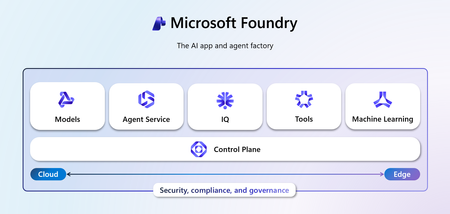
Discover how Microsoft Foundry goes beyond foundational models to deliver enterprise-grade AI solutions. Learn how data grounding, model tuning, and agentic orchestration unlock faster time-to-value, improved accuracy, and scalable workflows across industries.1.4KViews6likes4CommentsFoundry IQ: Unlocking ubiquitous knowledge for agents
Introducing Foundry IQ by Azure AI Search in Microsoft Foundry. Foundry IQ is a centralized knowledge layer that connects agents to data with the next generation of retrieval-augmented generation (RAG). Foundry IQ includes the following features: Knowledge bases: Available directly in the new Foundry portal, knowledge bases are reusable, topic-centric collections that ground multiple agents and applications through a single API. Automated indexed and federated knowledge sources – Expand what data an agent can reach by connecting to both indexed and remote knowledge sources. For indexed sources, Foundry IQ delivers automatic indexing, vectorization, and enrichment for text, images, and complex documents. Agentic retrieval engine in knowledge bases – A self-reflective query engine that uses AI to plan, select sources, search, rank and synthesize answers across sources with configurable “retrieval reasoning effort.” Enterprise-grade security and governance – Support for document-level access control, alignment with existing permissions models, and options for both indexed and remote data. Foundry IQ is available in public preview through the new Foundry portal and Azure portal with Azure AI Search. Foundry IQ is part of Microsoft's intelligence layer with Fabric IQ and Work IQ.45KViews6likes4CommentsContext-Aware RAG System with Azure AI Search to Cut Token Costs and Boost Accuracy
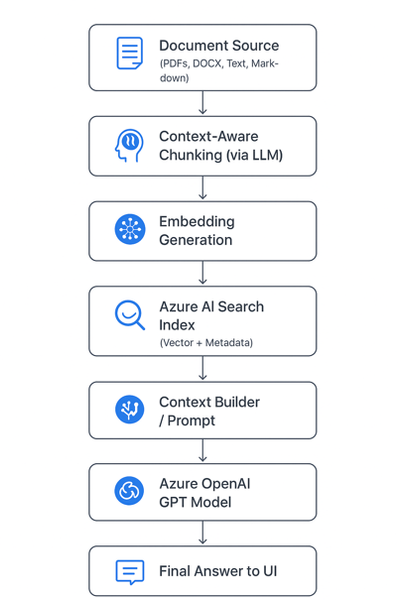
🚀 Introduction As AI copilots and assistants become integral to enterprises, one question dominates architecture discussions: “How can we make large language models (LLMs) provide accurate, source-grounded answers — without blowing up token costs?” Retrieval-Augmented Generation (RAG) is the industry’s go-to strategy for this challenge. But traditional RAG pipelines often use static document chunking, which breaks semantic context and drives inefficiencies. To address this, we built a context-aware, cost-optimized RAG pipeline using Azure AI Search and Azure OpenAI, leveraging AI-driven semantic chunking and intelligent retrieval. The result: accurate answers with up to 85% lower token consumption. Majorly in this blog we are considering: Tokenization Chunking The Problem with Naive Chunking Most RAG systems split documents by token or character count (e.g., every 1,000 tokens). This is easy to implement but introduces real-world problems: 🧩 Loss of context — sentences or concepts get split mid-idea. ⚙️ Retrieval noise — irrelevant fragments appear in top results. 💸 Higher cost — you often send 5× more text than necessary. These issues degrade both accuracy and cost efficiency. 🧠 Context-Aware Chunking: Smarter Document Segmentation Instead of breaking text arbitrarily, our system uses an LLM-powered preprocessor to identify semantic boundaries — meaning each chunk represents a complete and coherent concept. Example Naive chunking: “Azure OpenAI Service offers… [cut] …integrates with Azure AI Search for intelligent retrieval.” Context-aware chunking: “Azure OpenAI Service provides access to models like GPT-4o, enabling developers to integrate advanced natural language understanding and generation into their applications. It can be paired with Azure AI Search for efficient, context-aware information retrieval.” ✅ The chunk is self-contained and semantically meaningful. This allows the retriever to match queries with conceptually complete information rather than partial sentences — leading to precision and fewer chunks needed per query. Architecture Diagram Chunking Service: Purpose: Transforms messy enterprise data (wikis, PDFs, transcripts, repos, images) into structured, model-friendly chunks for Retrieval-Augmented Generation (RAG). ChallengeChunking FixLLM context limitsBreaks docs into smaller piecesEmbedding sizeKeeps within token boundsRetrieval accuracyGranular, relevant sections onlyNoiseRemoves irrelevant blocksTraceabilityChunk IDs for auditabilityCost/latencyRe-embed only changed chunks The Chunking Flow (End-to-End) The Chunking Service sits in the ingestion pipeline and follows this sequence: Ingestion: Raw text arrives from sources (wiki, repo, transcript, PDF, image description). Token-aware splitting: Large text is cut into manageable pre-chunks with a 100-token overlap, ensuring no semantic drift across boundaries. Semantic segmentation: Each pre-chunk is passed to an Azure OpenAI Chat model with a structured prompt. Output = JSON array of semantic chunks (sectiontitle, speaker, content). Optional overlap injection: Character-level overlap can be applied across chunks for discourse-heavy text like meeting transcripts. Embedding generation: Each chunk is passed to Azure OpenAI Embeddings API (text-embedding-3-small), producing a 1536-dimension vector. Indexing: Chunks (text + vectors) are uploaded to Azure AI Search. Retrieval: During question answering or document generation, the system pulls top-k chunks, concatenates them, and enriches the prompt for the LLM. Resilience & Traceability The service is built to handle real-world pipeline issues. It retries once on rate limits, validates JSON outputs, and fails fast on malformed data instead of silently dropping chunks. Each chunk is assigned a unique ID (chunk_<sequence>_<sourceTag>), making retrieval auditable and enabling selective re-embedding when only parts of a document change. ☁️ Why Azure AI Search Matters Here Azure AI Search (formerly Cognitive Search) is the heart of the retrieval pipeline. Key Roles: Vector Search Engine: Stores embeddings of chunks and performs semantic similarity search. Hybrid Search (Keyword + Vector): Combines lexical and semantic matching for high precision and recall. Scalability: Supports millions of chunks with blazing-fast search latency. Metadata Filtering: Enables fine-grained retrieval (e.g., by document type, author, section). Native Integration with Azure OpenAI: Allows a seamless, end-to-end RAG pipeline without third-party dependencies. In short, Azure AI Search provides the speed, scalability, and semantic intelligence to make your RAG pipeline enterprise-grade. 💡 Importance of Azure OpenAI Azure OpenAI complements Azure AI Search by providing: High-quality embeddings (text-embedding-3-large) for accurate vector search. Powerful generative reasoning (GPT-4o or GPT-4.1) to craft contextually relevant answers. Security and compliance within your organization’s Azure boundary — critical for regulated environments. Together, these two services form the retrieval (Azure AI Search) and generation (Azure OpenAI) halves of your RAG system. 💰 Token Efficiency By limiting the model’s input to only the most relevant, semantically meaningful chunks, you drastically reduce prompt size and cost. Approach Tokens per Query Typical Cost Accuracy Full-document prompt ~15,000–20,000 Very high Medium Fixed-size RAG chunks ~5,000–8,000 Moderate Medium-high Context-aware RAG (this approach) ~2,000–3,000 Low High 💰 Token Cost Reduction Analysis Let’s quantify it: Step Naive Approach (no RAG) Your Approach (Context-Aware RAG) Prompt context size Entire document (e.g., 15,000 tokens) Top 3 chunks (e.g., 2,000 tokens) Tokens per query ~16,000 (incl. user + system) ~2,500 Cost reduction — ~84% reduction in token usage Accuracy Often low (hallucinations) Higher (targeted retrieval) That’s roughly an 80–85% reduction in token usage while improving both accuracy and response speed. 🧱 Tech Stack Overview Component Service Purpose Chunking Engine Azure OpenAI (GPT models) Generate context-aware chunks Embedding Model Azure OpenAI Embedding API Create high-dimensional vectors Retriever Azure AI Search Perform hybrid and vector search Generator Azure OpenAI GPT-4o Produce final answer Orchestration Layer Python / FastAPI / .NET c# Handle RAG pipeline 🔍 The Bottom Line By adopting context-aware chunking and Azure AI Search-powered RAG, you achieve: ✅ Higher accuracy (contextually complete retrievals) 💸 Lower cost (token-efficient prompts) ⚡ Faster latency (smaller context per call) 🧩 Scalable and secure architecture (fully Azure-native) This is the same design philosophy powering Microsoft Copilot and other enterprise AI assistants today. 🧪 Real-Life Example: Context-Aware RAG in Action To bring this architecture to life, let’s walk through a simple example of how documents can be chunked, embedded, stored in Azure AI Search, and then queried to generate accurate, cost-efficient answers. Imagine you want to build an internal knowledge assistant that answers developer questions from your company’s Azure documentation. ⚙️ Step 1: Intelligent Document Chunking We’ll use a small LLM call to segment text into context-aware chunks — rather than fixed token counts //Context Aware Chunking //text can be your retrieved text from any page/ document private async Task<List<SemanticChunk>> AzureOpenAIChunk(string text) { try { string prompt = $@" Divide the following text into logical, meaningful chunks. Each chunk should represent a coherent section, topic, or idea. Return the result as a JSON array, where each object contains: - sectiontitle - speaker (if applicable, otherwise leave empty) - content Do not add any extra commentary or explanation. Only output the JSON array. Do not give content an array, try to keep all in string. TEXT: {text}" var client = GetAzureOpenAIClient(); var chatCompletionsOptions = new ChatCompletionOptions { Temperature = 0, FrequencyPenalty = 0, PresencePenalty = 0 }; var Messages = new List<OpenAI.Chat.ChatMessage> { new SystemChatMessage("You are a text processing assistant."), new UserChatMessage(prompt) }; var chatClient = client.GetChatClient( deploymentName: _appSettings.Agent.Model); var response = await chatClient.CompleteChatAsync(Messages, chatCompletionsOptions); string responseText = response.Value.Content[0].Text.ToString(); string cleaned = Regex.Replace(responseText, @"```[\s\S]*?```", match => { var match1 = match.Value.Replace("```json", "").Trim(); return match1.Replace("```", "").Trim(); }); // Try to parse the response as JSON array of chunks return CreateChunkArray(cleaned); } catch (JsonException ex) { _logger.LogError("Failed to parse GPT response: " + ex.Message); throw; } catch (Exception ex) { _logger.LogError("Error in AzureOpenAIChunk: " + ex.Message); throw; } } 🧠 Step 2: Adding Overlaps for better result We are adding overlapping between chunks for better and accurate answers. Overlapping window can be modified based on the documents. public List<SemanticChunk> AddOverlap(List<SemanticChunk> chunks, string IDText, int overlapChars = 0) { var overlappedChunks = new List<SemanticChunk>(); for (int i = 0; i < chunks.Count; i++) { var current = chunks[i]; string previousOverlap = i > 0 ? chunks[i - 1].Content[^Math.Min(overlapChars, chunks[i - 1].Content.Length)..] : ""; string combinedText = previousOverlap + "\n" + current.Content; var Id = $"chunk_{i + '_' + IDText}"; overlappedChunks.Add(new SemanticChunk { Id = Regex.Replace(Id, @"[^A-Za-z0-9_\-=]", "_"), Content = combinedText, SectionTitle = current.SectionTitle }); } return overlappedChunks; } 🧠 Step 3: Generate and Store Embeddings in Azure AI Search We convert each chunk into an embedding vector and push it to an Azure AI Search index. public async Task<List<SemanticChunk>> AddEmbeddings(List<SemanticChunk> chunks) { var client = GetAzureOpenAIClient(); var embeddingClient = client.GetEmbeddingClient("text-embedding-3-small"); foreach (var chunk in chunks) { // Generate embedding using the EmbeddingClient var embeddingResult = await embeddingClient.GenerateEmbeddingAsync(chunk.Content).ConfigureAwait(false); chunk.Embedding = embeddingResult.Value.ToFloats(); } return chunks; } public async Task UploadDocsAsync(List<SemanticChunk> chunks) { try { var indexClient = GetSearchindexClient(); var searchClient = indexClient.GetSearchClient(_indexName); var result = await searchClient.UploadDocumentsAsync(chunks); } catch (Exception ex) { _logger.LogError("Failed to upload documents: " + ex); throw; } } 🤖 Step 4: Generate the Final Answer with Azure OpenAI Now we combine the top chunks with the user query to create a cost-efficient, context-rich prompt. P.S. : Here in this example we have used semantic kernel agent , in real time any agent can be used and any prompt can be updated. var context = await _aiSearchService.GetSemanticSearchresultsAsync(UserQuery); // Gets chunks from Azure AI Search //here UserQuery is query asked by user/any question prompt which need to be answered. string questionWithContext = $@"Answer the question briefly in short relevant words based on the context provided. Context : {context}. \n\n Question : {UserQuery}?"; var _agentModel = new AgentModel() { Model = _appSettings.Agent.Model, AgentName = "Answering_Agent", Temperature = _appSettings.Agent.Temperature, TopP = _appSettings.Agent.TopP, AgentInstructions = $@"You are a cloud Migration Architect. " + "Analyze all the details from top to bottom in context based on the details provided for the Migration of APP app using Azure Services. Do not assume anything." + "There can be conflicting details for a question , please verify all details of the context. If there are any conflict please start your answer with word - **Conflict**." + "There might not be answers for all the questions, please verify all details of the context. If there are no answer for question just mention - **No Information**" }; _agentModel = await _agentService.CreateAgentAsync(_agentModel); _agentModel.QuestionWithContext = questionWithContext; var modelWithResponse = await _agentService.GetAnswerAsync(_agentModel); 🧠 Final Thoughts Context-aware RAG isn’t just a performance optimization — it’s an architectural evolution. It shifts the focus from feeding LLMs more data to feeding them the right data. By letting Azure AI Search handle intelligent retrieval and Azure OpenAI handle reasoning, you create an efficient, explainable, and scalable AI assistant. The outcome: Smarter answers, lower costs, and a pipeline that scales with your enterprise. Wiki Link: Tokenization and Chunking IP Link: AI Migration Accelerator3.5KViews6likes1CommentThe Future of AI: Computer Use Agents Have Arrived
Discover the groundbreaking advancements in AI with Computer Use Agents (CUAs). In this blog, Marco Casalaina shares how to use the Responses API from Azure OpenAI Service, showcasing how CUAs can launch apps, navigate websites, and reason through tasks. Learn how CUAs utilize multimodal models for computer vision and AI frameworks to enhance automation. Explore the differences between CUAs and traditional Robotic Process Automation (RPA), and understand how CUAs can complement RPA systems. Dive into the future of automation and see how CUAs are set to revolutionize the way we interact with technology.15KViews6likes0Comments