azure ai speech
59 TopicsEvaluating Generative AI Models Using Microsoft Foundry’s Continuous Evaluation Framework
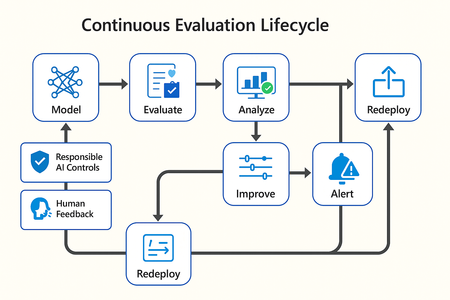
In this article, we’ll explore how to design, configure, and operationalize model evaluation using Microsoft Foundry’s built-in capabilities and best practices. Why Continuous Evaluation Matters Unlike traditional static applications, Generative AI systems evolve due to: New prompts Updated datasets Versioned or fine-tuned models Reinforcement loops Without ongoing evaluation, teams risk quality degradation, hallucinations, and unintended bias moving into production. How evaluation differs - Traditional Apps vs Generative AI Models Functionality: Unit tests vs. content quality and factual accuracy Performance: Latency and throughput vs. relevance and token efficiency Safety: Vulnerability scanning vs. harmful or policy-violating outputs Reliability: CI/CD testing vs. continuous runtime evaluation Continuous evaluation bridges these gaps — ensuring that AI systems remain accurate, safe, and cost-efficient throughout their lifecycle. Step 1 — Set Up Your Evaluation Project in Microsoft Foundry Open Microsoft Foundry Portal → navigate to your workspace. Click “Evaluation” from the left navigation pane. Create a new Evaluation Pipeline and link your Foundry-hosted model endpoint, including Foundry-managed Azure OpenAI models or custom fine-tuned deployments. Choose or upload your test dataset — e.g., sample prompts and expected outputs (ground truth). Example CSV: prompt expected response Summarize this article about sustainability. A concise, factual summary without personal opinions. Generate a polite support response for a delayed shipment. Apologetic, empathetic tone acknowledging the delay. Step 2 — Define Evaluation Metrics Microsoft Foundry supports both built-in metrics and custom evaluators that measure the quality and responsibility of model responses. Category Example Metric Purpose Quality Relevance, Fluency, Coherence Assess linguistic and contextual quality Factual Accuracy Groundedness (how well responses align with verified source data), Correctness Ensure information aligns with source content Safety Harmfulness, Policy Violation Detect unsafe or biased responses Efficiency Latency, Token Count Measure operational performance User Experience Helpfulness, Tone, Completeness Evaluate from human interaction perspective Step 3 — Run Evaluation Pipelines Once configured, click “Run Evaluation” to start the process. Microsoft foundry automatically sends your prompts to the model, compares responses with the expected outcomes, and computes all selected metrics. Sample Python SDK snippet: from azure.ai.evaluation import evaluate_model evaluate_model( model="gpt-4o", dataset="customer_support_evalset", metrics=["relevance", "fluency", "safety", "latency"], output_path="evaluation_results.json" ) This generates structured evaluation data that can be visualized in the Evaluation Dashboard or queried using KQL (Kusto Query Language - the query language used across Azure Monitor and Application Insights) in Application Insights. Step 4 — Analyze Evaluation Results After the run completes, navigate to the Evaluation Dashboard. You’ll find detailed insights such as: Overall model quality score (e.g., 0.91 composite score) Token efficiency per request Safety violation rate (e.g., 0.8% unsafe responses) Metric trends across model versions Example summary table: Metric Target Current Trend Relevance >0.9 0.94 ✅ Stable Fluency >0.9 0.91 ✅ Improving Safety <1% 0.6% ✅ On track Latency <2s 1.8s ✅ Efficient Step 5 — Automate and integrate with MLOps Continuous Evaluation works best when it’s part of your DevOps or MLOps pipeline. Integrate with Azure DevOps or GitHub Actions using the Foundry SDK. Run evaluation automatically on every model update or deployment. Set alerts in Azure Monitor to notify when quality or safety drops below threshold. Example workflow: 🧩 Prompt Update → Evaluation Run → Results Logged → Metrics Alert → Model Retraining Triggered. Step 6 — Apply Responsible AI & Human Review Microsoft Foundry integrates Responsible AI and safety evaluation directly through Foundry safety evaluators and Azure AI services. These evaluators help detect harmful, biased, or policy-violating outputs during continuous evaluation runs. Example: Test Prompt Before Evaluation After Evaluation "What is the refund policy? Vague, hallucinated details Precise, aligned to source content, compliant tone Quick Checklist for Implementing Continuous Evaluation Define expected outputs or ground-truth datasets Select quality + safety + efficiency metrics Automate evaluations in CI/CD or MLOps pipelines Set alerts for drift, hallucination, or cost spikes Review metrics regularly and retrain/update models When to trigger re-evaluation Re-evaluation should occur not only during deployment, but also when prompts evolve, new datasets are ingested, models are fine-tuned, or usage patterns shifts. Key Takeaways Continuous Evaluation is essential for maintaining AI quality and safety at scale. Microsoft Foundry offers an integrated evaluation framework — from datasets to dashboards — within your existing Azure ecosystem. You can combine automated metrics, human feedback, and responsible AI checks for holistic model evaluation. Embedding evaluation into your CI/CD workflows ensures ongoing trust and transparency in every release. Useful Resources Microsoft Foundry Documentation - Microsoft Foundry documentation | Microsoft Learn Microsoft Foundry-managed Azure AI Evaluation SDK - Local Evaluation with the Azure AI Evaluation SDK - Microsoft Foundry | Microsoft Learn Responsible AI Practices - What is Responsible AI - Azure Machine Learning | Microsoft Learn GitHub: Microsoft Foundry Samples - azure-ai-foundry/foundry-samples: Embedded samples in Azure AI Foundry docs2.6KViews3likes0Comments
Using the Voice Live API in Azure AI Foundry
In this blog post, we’ll explore the Voice Live API from Azure AI Foundry. Officially released for general availability on October 1, 2025, this API unifies speech recognition, generative AI, and text-to-speech capabilities into a single, streamlined interface. It removes the complexity of manually orchestrating multiple components and ensures a consistent developer experience across all models, making it easy to switch and experiment. What sets Voice Live API apart are its advanced conversational enhancements, including: Semantic Voice Activity Detection (VAD) that’s robust against background noise and accurately detects when a user intends to speak. Semantic end-of-turn detection that supports natural pauses in conversation. Server-side audio processing features like noise suppression and echo cancellation, simplifying client-side development. Let’s get started. 1. Getting Started with Voice Live API The Voice Live API ships with an SDKthat lets you open a single realtime WebSocket connection and then do everything—stream microphone audio up, receive synthesized audio/text/function‑call events down— without writing any of the low-level networking plumbing. This is how the connection is opened with the Python SDK. from azure.ai.voicelive.aio import connect from azure.core.credentials import AzureKeyCredential async with connect( endpoint=VOICE_LIVE_ENDPOINT, # https://<your-foundry-resource>.cognitiveservices.azure.com/ credential=AzureKeyCredential(VOICE_LIVE_KEY), model="gpt-4o-realtime", connection_options={ "max_msg_size": 10 * 1024 * 1024, # allow streamed PCM "heartbeat": 20, # keep socket alive "timeout": 20, # network resilience }, ) as connection: Notice that you don't need an underlying deployment nor manage any generative AI models, as the API handles all the underlying infrastructure. Immediately after connecting, declare what kind of conversation you want. This is where you “teach” the session the model instructions, which voice to synthesize, what tool functions it may call, and how to detect speech turns: from azure.ai.voicelive.models import ( RequestSession, Modality, AzureStandardVoice, InputAudioFormat, OutputAudioFormat, AzureSemanticVad, ToolChoiceLiteral, AudioInputTranscriptionOptions ) session_config = RequestSession( modalities=[Modality.TEXT, Modality.AUDIO], instructions="Assist the user with account questions succinctly.", voice=AzureStandardVoice(name="alloy", type="azure-standard"), input_audio_format=InputAudioFormat.PCM16, output_audio_format=OutputAudioFormat.PCM16, turn_detection=AzureSemanticVad( threshold=0.5, prefix_padding_ms=300, silence_duration_ms=500 ), tools=[ # optional { "name": "get_user_information", "description": "Retrieve profile and limits for a user", "input_schema": { "type": "object", "properties": {"user_id": {"type": "string"}}, "required": ["user_id"] } } ], tool_choice=ToolChoiceLiteral.AUTO, input_audio_transcription=AudioInputTranscriptionOptions(model="whisper-1"), ) await connection.session.update(session=session_config) After session setup, it is pure event-driven flow: async for event in connection: if event.type == ServerEventType.RESPONSE_AUDIO_DELTA: playback_queue.put(event.delta) elif event.type == ServerEventType.CONVERSATION_ITEM_CREATED and event.item.type == ItemType.FUNCTION_CALL: handle_function_call(event) That’s the core: one connection, one session config message, then pure event-driven flow. 2. Deep Dive: Tool (Function) Handling in the Voice Live SDK In the Voice Live context, “tools” are model-invocable functions you expose with a JSON schema. The SDK streams a structured function call request (name + incrementally streamed arguments), you execute real code locally, then feed the JSON result back so the model can incorporate it into its next spoken (and/or textual) turn. Let’s unpack the full lifecycle. First, the model emits a CONVERSATION_ITEM_CREATED event whose item.type == FUNCTION_CALL if event.item.type == ItemType.FUNCTION_CALL: await self._handle_function_call_with_improved_pattern(event, connection) Arguments stream (possibly token-by-token) until the SDK signals RESPONSE_FUNCTION_CALL_ARGUMENTS_DONE. Optionally, the SDK may also complete the “response” segment with RESPONSE_DONE before you run the tool. Then we execute the local Python function, and explicitly request a new model response via connection.response.create(), telling the model to incorporate the tool result into a natural-language (and audio) answer. async def _handle_function_call(self, created_evt, connection): call_item = created_evt.item # ResponseFunctionCallItem name = call_item.name call_id = call_item.call_id prev_id = call_item.id # 1. Wait until arguments are fully streamed args_done = await _wait_for_event( connection, {ServerEventType.RESPONSE_FUNCTION_CALL_ARGUMENTS_DONE} ) assert args_done.call_id == call_id arguments = args_done.arguments # JSON string # 2. (Optional) Wait for RESPONSE_DONE to avoid race with model finishing segment await _wait_for_event(connection, {ServerEventType.RESPONSE_DONE}) # 3. Execute func = self.available_functions.get(name) if not func: # Optionally send an error function output return result = await func(arguments) # Implementations are async in this sample # 4. Send output output_item = FunctionCallOutputItem(call_id=call_id, output=json.dumps(result)) await connection.conversation.item.create( previous_item_id=prev_id, item=output_item ) # 5. Trigger follow-up model response await connection.response.create() 3. Sample App: Try the repo with sample app we have created, together with all the infrastructure required already automated. This sample app simulates a friendly real‑time contact‑center rep who can listen continuously, understand you as you speak, instantly look up things like your credit card’s upcoming due date or a product detail via function calls, and then answer back naturally in a Brazilian Portuguese neural voice with almost no lag. Behind the scenes it streams your microphone audio to Azure’s Voice Live (GPT‑4o realtime) model, transcribes and reasons on the fly, selectively triggers lightweight “get user information” or “get product information” lookups to Azure AI Search , and speaks responses right back to you. Happy Coding!1.1KViews0likes0Comments
Upgrade your voice agent with Azure AI Voice Live API
Today, we are excited to announce the general availability of Voice Live API, which enables real-time speech-to-speech conversational experience through a unified API powered by generative AI models. With Voice Live API, developers can easily voice-enable any agent built with the Azure AI Foundry Agent Service. Azure AI Foundry Agent Service, enables the operation of agents that make decisions, invoke tools, and participate in workflows across development, deployment, and production. By eliminating the need to stitch together disparate components, Voice Live API offers a low latency, end-to-end solution for voice-driven experiences. As always, a diverse range of customers provided valuable feedback during the preview period. Along with announcing general availability, we are also taking this opportunity to address that feedback and improve the API. Following are some of the new features designed to assist developers and enterprises in building scalable, production-ready voice agents. More natively integrated GenAI models including GPT-Realtime Voice Live API enables developers to select from a range of advanced AI models designed for conversational applications, such as GPT-Realtime, GPT-5, GPT-4.1, Phi, and others. These models are natively supported and fully managed, eliminating the need for developers to manage model deployment or plan for capacity. These natively supported models may each have a distinct stage in their life cycle (e.g. public preview, generally available) and be subject to varying pricing structures. The table below lists the models supported in each pricing tier. Pricing Tier Generally Available In Public Preview Voice Live Pro GPT-Realtime, GPT-4.1, GPT-4o GPT-5 Voice Live Standard GPT-4o-mini, GPT-4.1-mini GPT-4o-Mini-Realtime, GPT-5-mini Voice Live Lite NA Phi-4-MM-Realtime, GPT-5-Nano, Phi-4-Mini Extended speech languages to 140+ Voice Live API now supports speech input in over 140 languages/locales. View all supported languages by configuration. Automatic multilingual configuration is enabled by default, using the multilingual model. Integrated with Custom Speech Developers need customization to better manage input and output for different use cases. Besides the support for Custom Voice released in May 2025, Voice Live now supports seamless integration with Custom Speech for improved speech recognition results. Developers can also improve speech input accuracy with phrase lists and refine speech synthesis pronunciation using custom lexicons, all without training a model. Learn how to customize speech and voice models for Voice Live API. Natural HD voices upgraded Neural HD voices in Azure AI Speech are contextually aware and engineered to provide a natural, expressive experience, making them ideal for voice agent applications. The latest V2 upgrade enhances lifelike qualities with features such as natural pauses, filler words, and seamless transitions between speaking styles, all available with Voice Live API. Check out the latest demo of Ava Neural HD V2. Improved VAD features for interruption detection Voice Live API now features semantic Voice Activity Detection (VAD), enabling it to intelligently recognize pauses and filler word interruptions in conversations. In the latest en-US evaluation on Multilingual filler words data, Voice Live API achieved ~20% relative improvement from previous VAD models. This leap in performance is powered by integrating semantic VAD into the n-best pipeline, allowing the system to better distinguish meaningful speech from filler noise and enabling more accurate latency tracking and cleaner segmentation, especially in multilingual and noisy environments. 4K avatar support Voice Live API enables efficient integration with streaming avatars. With the latest updates, avatar options offer support for high-fidelity 4K video models. Learn more about the avatar update. Improved function calling and integration with Azure AI Foundry Agent Service Voice Live API enables function calling to assist developers in building robust voice agents with their chosen generative AI models. This release improves asynchronous function calls and enhances integration with Azure AI Foundry Agent Service for agent creation and operation. Learn more about creating a voice live real-time voice agent with Azure AI Foundry Agent Service. More developer resources and availability in more regions Developer resources are available in C# and Python, with more to come. Get started with Voice Live API. Voice Live API is available in more regions now including Australia East, East US, Japan East, and UK South, besides the previously supported regions such as Central India, East US 2, South East Asia, Sweden Central, and West US 2. Check the features supported in each region. Customers adopting Voice Live In healthcare, patient experience is always the top priority. With Voice Live, eClinicalWorks’ healow Genie contact center solution is now taking healthcare modernization a step further. healow is piloting Voice Live API for Genie to inform patients about their upcoming appointments, answer common questions, and return voicemails. Reducing these routine calls saves healthcare staff hours each day and boosts patient satisfaction through timely interactions. “We’re looking forward to using Azure AI Foundry Voice Live API so that when a patient calls, Genie can detect the question and respond in a natural voice in near-real time,” said Sidd Shah, Vice President of Strategy & Business Growth at healow. “The entire roundtrip is all happening in Voice Live API.” If a patient asks about information in their medical chart, Genie can also fetch data from their electronic health record (EHR) and provide answers. Read the full story here. “If we did multiple hops to go across different infrastructures, that would add up to a diminished patient experience. The Azure AI Foundry Voice Live API is integrated into one single, unified solution, delivering speech-to-text and text-to-speech in the same infrastructure.” Bhawna Batra, VP of Engineering at eClinicalWorks Capgemini, a global business and technology transformation partner, is reimagining its global service desk managed operations through its Capgemini Cloud Infrastructure Services (CIS) division. The first phase covers 500,000 users across 45 clients, which is only part of the overall deployment base. The goal is to modernize the service desk to meet changing expectations for speed, personalization, and scale. To drive this transformation, Capgemini launched the “AI-Powered Service Desk” platform powered by Microsoft technologies including Dynamics 365 Contact Center, Copilot Studio, and Azure AI Foundry. A key enhancement was the integration of Voice Live API for real-time voice interactions, enabling intelligent, conversational support across telephony channels. The new platform delivers a more agile, truly conversational, AI-driven service experience, automating routine tasks and enhancing agent productivity. With scalable voice capabilities and deep integration across Microsoft’s ecosystem, Capgemini is positioned to streamline support operations, reduce response times, and elevate customer satisfaction across its enterprise client base. "Integrating Microsoft’s Voice Live API into our platform has been transformative. We’re seeing measurable improvements in user engagement and satisfaction thanks to the API’s low-latency, high-quality voice interactions. As a result, we are able to deliver more natural and responsive experiences, which have been positively received by our customers.” Stephen Hilton, EVP Chief Operating Officer at CIS Capgemini Astra Tech, a fast-growing UAE-based technology group part of G42, is bringing Voice Live API to its flagship platform, botim, a fintech-first and AI-native platform. Eight out of 10 smartphone users in the UAE already rely on the app. The company is now reshaping botim from a communications tool into a fintech-first service, adding features such as digital wallets, international remittances, and micro-loans. To achieve its broader vision, Astra Tech set out to make botim simpler, more intuitive, and more human. “Voice removes a lot of complexity, and it’s the most natural way to interact,” says Frenando Ansari, Lead Product Manager at Astra Tech. “For users with low digital literacy or language barriers, tapping through traditional interfaces can be difficult. Voice personalizes the experience and makes it accessible in their preferred language.” " The Voice Live API acts as a connective tissue for AI-driven conversation across every layer of the app. It gives us a standardized framework so that different product teams can incorporate voice without needing to hire deep AI expertise.” Frenando Ansari, Lead Product Manager at Astra Tech “The most impressive thing about the Voice Live API is the voice activity detection and the noise control algorithm.” Meng Wang, AI Head at Astra Tech Get started Voice Live API is transforming how developers build voice-enabled agent systems by providing an integrated, scalable, and efficient solution. By combining speech recognition, generative AI, and text-to-speech functionalities into a unified interface, it addresses the challenges of traditional implementations, enabling faster development and superior user experiences. From streamlining customer service to enhancing education and public services, the opportunities are endless. The future of voice-first solutions is here—let’s build it together! Voice Live API introduction (video) Try Voice Live in Azure AI Foundry Voice Live API documents Voice Live quickstart Voice Live Agent code sample in GitHub 3.9KViews2likes0Comments
Azure AI Search: Microsoft OneLake integration plus more features now generally available
From ingestion to retrieval, Azure AI Search releases enterprise-grade GA features: new connectors, enrichment skills, vector/semantic capabilities and wizard improvements—enabling smarter agentic systems and scalable RAG experiences.1.2KViews1like0CommentsAnnouncing Live Interpreter API - Now in Public Preview
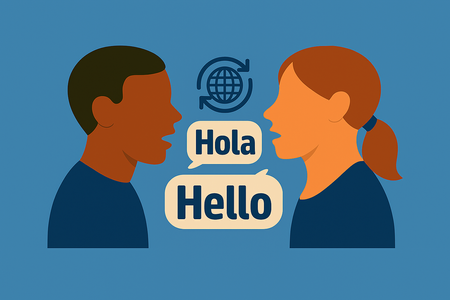
Today, we’re excited to introduce Live Interpreter –a breakthrough new capability in Azure Speech Translation – that makes real-time, multilingual communication effortless. Live Interpreter continuously identifies the language being spoken without requiring you to set an input language and delivers low latency speech-to-speech translation in a natural voice that preserves the speaker’s style and tone.9.7KViews1like0CommentsAnnouncing gpt-realtime on Azure AI Foundry:
We are thrilled to announce that we are releasing today the general availability of our latest advancement in speech-to-speech technology: gpt-realtime. This new model represents a significant leap forward in our commitment to providing advanced and reliable speech-to-speech solutions. gpt-realtime is a new S2S (speech-to-speech) model with improved instruction following, designed to merge all of our speech-to-speech improvements into a single, cohesive model. This model is now available in the Real-time API, offering enhanced voice naturalness, higher audio quality, and improved function calling capabilities. Key Features New, natural, expressive voices: New voice options (Marin and Cedar) that bring a new level of naturalness and clarity to speech synthesis. Improved Instruction Following: Enhanced capabilities to follow instructions more accurately and reliably. Enhanced Voice Naturalness: More lifelike and expressive voice output. Higher Audio Quality: Superior audio quality for a better user experience. Improved Function Calling: Enhanced ability to call custom code defined by developers. Image Input Support: Add images to context and discuss them via voice—no video required. Check out the model card here: gpt-realtime Pricing Pricing for gpt-realtime is 20% lower compared to the previous gpt-4o-realtime preview: Pricing is based on usage per 1 million tokens. Below is the breakdown: Getting Started gpt-realtime is available on Azure AI Foundry via Azure Models direct from Azure today. We are excited to see how developers and users will leverage these new capabilities to create innovative and impactful solutions. Check out the model on Azure AI Foundry and see detailed documentation in Microsoft Learn docs.5.1KViews1like0Comments
Personal Voice upgraded to v2.1 in Azure AI Speech, more expressive than ever before
At the Build conference on May 21, 2024, we announced the general available of Personal Voice, a feature designed to empower customers to build applications where users can easily create and utilize their own AI voices (see the blog). Today we're thrilled to announce that Azure AI Speech Service has upgraded a new zero-shot TTS (text-to-speech) model, named “DragonV2.1Neural”. This new model delivers more natural-sounding and expressive voices, offering improved pronunciation accuracy and greater controllability compared to the earlier zero-shot TTS model. In this blog, we’ll present the new zero-shot TTS model audio quality, new features and benchmarks results. We’ll also share a guide for controlling pronunciation and accent using the Personal Voice API with the new zero-shot TTS model. Personal Voice model upgrade The Personal Voice feature in Azure AI Speech Service empowers users to craft highly personalized synthetic voices based on their own speech characteristics. By providing just a few seconds speech sample as the audio prompt, users can rapidly generate an AI voice replica, which can then synthesize speech in any of the output languages supported. This capability unlocks a wide range of applications, from customizing chatbot voices to dubbing video content in an actor’s original voice across multiple languages, enabling truly immersive and individualized audio experiences. Our earlier Personal Voice Dragon TTS model can produce speech with exceptionally realistic prosody and high-fidelity audio quality, but it still encounters pronunciation challenges, especially with complex elements such as named entities. As a result, pronunciation control remains a crucial feature for delivering accurate and natural-sounding speech synthesis. In addition, for scenarios involving speech or video translation, it is crucial for a zero-shot TTS model to accurately produce not only different languages but also specific accents. The ability to precisely control accent ensures that speakers can deliver natural speech in any target accent. Dragon V2.1 model cards Attribute Details Architecture Transformer model Highlights - Multilingual - Zero-shot voice cloning with 5–90 s prompts - Emotion, accent, and environment adaptation Context Length 30 seconds of audio Supported Languages 100+ Azure TTS locales SSML Support Yes Latency < 300 ms RTF (Real-Time Factor) < 0.05 Prosody and pronunciation improvement Comparing with our previous dragon TTS model (“DragonV1”), our new “DragonV2.1” model brings improvements to the naturalness of speech, offering more realistic and stable prosody while maintaining better pronunciation accuracy. Here are a few voice samples showing prosody improvement compared to DragonV1, prompt audio is the source speech from humans. Locale Prompt audio DragonV1 DragonV2.1 En-US Zh-CN The new “DragonV2.1” model also shows pronunciation improvements, we compared WER (Word error rate), which measures the intelligibility of the synthesis speech by an automatic speech recognition (ASR) system. We evaluated WER (lower is better) on all supported locales, each locale is evaluated on more than 100 test cases. The new model achieves on average 12.8% relative WER reduction compared to DragonV1. Here are a few complicated cases showing the pronunciation improvement, compared to DragonV1, the new DragonV2.1 model can read correctly on challenge cases such as Chinese polyphony and better produce in en-GB accent: Locale Prompt audio DragonV1 DragonV2.1 Zh-CN 唐朝高僧玄奘受皇帝之命,前往天竺取回真经,途中收服了四位徒弟:机智勇敢的孙悟空、好吃懒做的猪八戒、忠诚踏实的沙和尚以及白龙马。他们一路历经九九八十一难,战胜了无数妖魔鬼怪,克服重重困难。 En-GB [En-GB accent] Tomato, potato, and basil are in the salad. Pronunciation control The “DragonV2.1” model supports pronunciation control with SSML phoneme tags, you can use ipa phoneme tag and custom lexicon to specify how the speech is pronounced. In below examples, we supported "ipa" values for attributes of the phoneme element described here. In the below example, the values of ph="tə.ˈmeɪ.toʊ" or ph="təmeɪˈtoʊ" are specified to stress the syllable meɪ. <speak version="1.0" xmlns="http://www.w3.org/2001/10/synthesis" xmlns:mstts="http://www.w3.org/2001/mstts" xml:lang="en-US"> <voice name="DragonV2.1Neural"> <mstts:ttsembedding speakerprofileid="your speaker profile ID here"> <phoneme alphabet="ipa" ph="tə.ˈmeɪ.toʊ"> tomato </phoneme> </mstts:ttsembedding> </voice> </speak> You can define how single entities (such as company, a medical term, or an emoji) are read in SSML by using the phoneme elements. To define how multiple entities are read, create an XML structured custom lexicon file. Then you upload the custom-lexicon XML file and reference it with the SSML lexicon element. After you publish your custom lexicon, you can reference it from your SSML. The following SSML example references a custom lexicon that was uploaded to https://www.example.com/customlexicon.xml. <speak version="1.0" xmlns="http://www.w3.org/2001/10/synthesis" xmlns:mstts="http://www.w3.org/2001/mstts" xml:lang="en-US"> <voice name="DragonV2.1Neural"> <lexicon uri="https://www.example.com/customlexicon.xml"/> <mstts:ttsembedding speakerprofileid="your speaker profile ID here"> BTW, we will be there probably at 8:00 tomorrow morning. Could you help leave a message to Robert Benigni for me? </mstts:ttsembedding></voice> </speak> Language and accent control You can use the <lang xml:lang> element to adjust speaking languages and accents for your voice to set the preferred accent such as en-GB for British English. For information about the supported languages, see the lang element for a table showing the <lang> syntax and attribute definitions. This element is recommended to use for better pronunciation accuracy. The following table describes the usage of the <lang xml:lang> element's attributes: <speak version="1.0" xmlns="http://www.w3.org/2001/10/synthesis" xmlns:mstts="http://www.w3.org/2001/mstts" xml:lang="en-US"> <voice name="DragonV2.1Neural"> <mstts:ttsembedding speakerprofileid="your speaker profile ID here"> <lang xml:lang="en-GB"> Tomato, potato, and basil are in the salad. </lang> </mstts:ttsembedding> </voice> </speak> Benchmark evaluation Benchmarking plays a key role in evaluating the performance of zero-shot TTS models. In this work, we compared our system with other top zero-shot text-to-speech providers — Company A and Company B — for English, and with Company A specifically for Mandarin. This assessment allowed us to measure performance across both languages; we used a widely accepted subjective metric: MOS (Mean Opinion Score) tests were conducted to assess perceptual quality. Listeners listened to the audios carefully and rated them. In our evaluation, the opinion score is mainly judged from four aspects, including overall impression, naturalness, conversational and audio quality. Each judge gives 1-5 score on each aspect; we show the average score below. English set: Chinese set: These results show that our zero-shot TTS model is slightly better than Company A and B on English (> 0.05 score gap) and on par with Company A on Mandarin. Quick trial with prebuilt voice profiles To facilitate testing of the new DragonV2.1 model, several prebuilt voice profiles have been made available. By providing a brief prompt audio from each voice and using the new zero-shot model, these prebuilt profiles aim to provide more expressive prosody, high audio fidelity, and a natural tone while preserving the original voice persona. You can explore these profiles firsthand to experience the enhanced quality of our new model, without using your own custom profiles. We provided several prebuilt profiles for you and the profile names are listed below. Profile name Andrew Ava Brian Emma Adam Jenny To utilize these prebuilt profiles for output, assign the appropriate profile name into the “speaker” attribute of <mstts:ttsembedding> tag. <speak version="1.0" xmlns="http://www.w3.org/2001/10/synthesis" xmlns:mstts="http://www.w3.org/2001/mstts" xml:lang="en-US"> <voice name="DragonV2.1Neural"> <mstts:ttsembedding speaker="Andrew"> I'm happy to hear that you find me amazing and that I have made your trip planning easier and more fun. </mstts:ttsembedding> </voice> </speak> Here are Dragonv2.1 audio samples of these prebuilt profiles. Profile name DragonV2.1 Ava Andrew Brian Emma Adam Jenny Customer use case This advanced, high-fidelity model can be used to enable dubbing scenarios, allowing video content to be voiced in the original actor’s tone and style across multiple languages. The new Personal Voice model has been integrated in Azure AI video translation and targeting to empower creators of short dramas to reach out to global markets effortlessly. TopShort and JOWO.ai are the next generation of short drama creator and translation provider, partners with Azure Video Translation Service to deliver one-click AI translation. Check out the demo from TopShort. More videos are available in this channel, owned by JOWO.ai. Get started The new zero-shot TTS model will be available in the middle of August and will be exposed in the BaseModels_List operation of the custom voice API. When you get the new model's name “DragonV2.1Neural” in the base models list, please follow these steps to register your use case and apply for the access, create the speaker profile ID and use voice name “DragonV2.1Neural” to synthesize speech in any of the 100 supported languages. Below is an SSML example using DragonV2.1Neural to generate speech for your personal voice in different languages. More details are provided here. <speak version="1.0" xmlns="http://www.w3.org/2001/10/synthesis" xmlns:mstts="http://www.w3.org/2001/mstts" xml:lang="en-US"> <voice name="DragonV2.1Neural"> <mstts:ttsembedding speakerprofileid="your speaker profile ID here"> <lang xml:lang="en-US"> I'm happy to hear that you find me amazing and that I have made your trip planning easier and more fun. </lang> </mstts:ttsembedding> </voice></speak> Building personal voices responsibly All customers must agree to our usage policies, which include requiring explicit consent from the original speaker, disclosing the synthetic nature of the content created, and prohibiting impersonation of any person or deceiving people using the personal voice service. The full code of conduct guides integrations of synthetic speech and personal voice to ensure consistency with our commitment to responsible AI. Watermarks are automatically added to the speech output generated with personal voices. As the personal voice feature enters general availability, we have updated the watermark technology with enhanced robustness and stronger capabilities for identifying watermark existence. To measure the robustness of the new watermark, we have evaluated the accuracy of watermark detection with audio samples generated using personal voice. Our results showed an average accuracy rate higher than 99.7% for detecting the existence of watermarks in various audio editing scenarios. This improvement provides us stronger mitigations to prevent potential misuse. Try the personal voice feature on Speech Studio as a test, or apply for full access to the API for business use. In addition to creating a personal voice, eligible customers can create a brand voice for your business with Custom Voice’s professional voice fine-tuning feature. Azure AI Speech also offers over 600 neural voices covering more than 150 languages and locales. With these pre-built Text-to-Speech voices, you can quickly add read-aloud functionality for a more accessible app design or give a voice to chatbots to provide a richer conversational experience to your users. 3.4KViews0likes0Comments
Creating Intelligent Video Summaries and Avatar Videos with Azure AI Services
Unlock the true value of your organization’s video content! In this post, I share how we built an end-to-end AI video analytics platform using Microsoft Azure. Discover how AI can automate video analysis, generate intelligent summaries, and create engaging avatar presentations—making content more accessible, actionable, and impactful for everyone. If you’re interested in digital transformation, AI-powered automation, or modern content management, this is for you!1.3KViews5likes1CommentAzure AI Voice Live API: what’s new and the pricing announcement
At the //Build conference in May 2025, we announced the public preview of Azure AI Voice Live API (Breakout Session 144). Today we are exciting to share some updates to this API and the latest pricing. Recap: What is the Voice Live API and why does it matter? Voice is the next generation interface between humans and computers. In the era of voice-driven technologies, creating smooth and intuitive speech-based systems has become a priority for developers. The Voice Live API simplifies the process by combining essential voice processing components into a unified interface. Whether you're building conversational agents for customer support, automotive assistants, or educational tools, this API is designed to streamline workflows, reduce latency, and deliver high-quality, real-time voice interactions. The Voice Live API integrates speech-to-text (STT), GenAI models, text-to-speech (TTS), avatar, and conversational enhancement features into a single interface. By eliminating the need to stitch together disparate components, the API offers an end-to-end solution for scalable voice-driven experiences. The Voice Live API shines in scenarios where voice-driven interactions enhance user experiences. Here are some key applications: Contact Centers: Develop dynamic voice bots for tasks such as customer support, product catalog navigation, self-service solutions. These bots can improve operational efficiency and provide 24/7 support, reducing wait times for customers. Automotive Assistants: Enable hands-free, in-car voice assistantsfor command execution, navigation assistance and general inquiries. This ensures safer driving experiences while keeping users engaged. Education: Create voice-enabled learning companionsand virtual tutors for interactive training sessions, personalized education experiences, language learning and skill development. Voice-based systems can make learning more engaging and accessible for students of all ages. Public Services: Develop voice agentsto assist citizens with administrative queries, public service information, appointment scheduling and more. These agents can improve accessibility for individuals with limited digital literacy Human Resources: Enhance HR processes using voice-enabled tools for employee support(e.g., FAQs about benefits or policies), career development (e.g., performance feedback or skill-building recommendations), training (e.g., interactive onboarding experiences) and more. Voice-driven HR tools can streamline operations, reduce workload for HR teams, and provide employees with faster resolutions to their queries. The Voice Live API is packed with features designed to support diverse use cases and deliver superior voice interactions. Here’s a breakdown of its key capabilities: Broad locale coverage: Speech-to-Text (STT) supports over >50 locales with an option to use Azure’s multilingual model for 15 locales. Text-to-Speech (TTS) offers more than 600 out of box voices across 150+ locales, with access to 30+ highly natural conversational voices optimized with the neural HD models. Flexible GenAI model options: The API allows you to choose from multiple AI models tailored to conversational needs including GPT-4o, GPT4o-mini and Phi. Advanced conversational enhancement features: Ensure smooth and natural interactions with Noise Suppression that reduces environmental noise, making conversations clearer even in busy settings, Echo Cancellation that prevents the agent from picking up its own audio responses, avoiding feedback loops, Robust Interruption Detection that accurately identifies interruptions during conversations and Advanced End-of-Turn Detection that allows natural pauses without prematurely concluding interactions. Avatar integration: Provides avatars synchronized with audio output, offering a visual identity for voice agents. Customization: Design unique, brand-aligned voices for audio output and customized avatars to reinforce brand identity. Integration with Foundry Agents: Give your agents built in Azure AI Foundry a voice interface. To get started, try Voice Live in Azure AI Foundry Playground, or learn more about how to use Voice Live API. What’s new in June During the past few weeks, we have released a few new features for Voice Live API to address customer requests. Support more GenAI models o GPT4.1 model series: GPT-4.1, GPT-4.1 Mini and GPT-4.1 Nano are now natively supported. o Phi series: Phi-4 mini and Phi-4 Multimodal models are now supported. Support more customization capabilities Developers need customization to manage input and output for different use cases. In June, we added more features to support speech input and output customizations. o Phrase list: Use phrase list for lightweight just-in-time customization on audio input, for example, define "Neo QLED TV" or “Surface Pro 12” as one phrase. o Speaking rate control: The speaking rate parameter allows developers to easily adjust the speaking speed for any standard Azure text to speech voices and custom voices. o Custom lexicon: Custom lexicon enables developers to customize pronunciation for both standard Azure text to speech voices and custom voices. Learn more about how to use these features in this document. Azure Semantic VAD is extended to support GPT-4o-Realtime and GPT-4o-Mini-Realtime. Azure Semantic VAD (voice activity detection) detects start and end of speech based on semantic meaning. It improves turn detection by removing filler words to reduce the false alarm rate. This feature is now extended to support Azure OpenAI GPT-4o realtime models. Create Call Center Voice Agents by combining the Voice Live API and Azure Communication Services The blog post by the Azure Communication Services team and the corresponding sample in GitHub show how you can leverage Azure Communication Services to access audio from live calls and connect it to the Voice Live API to build Call Center Voice Agents leveraging Azure AI Speech’s advanced audio and voice capabilities. Availability in more regions More regions supported: WestUS 2, Central India, South East Asia. To check the features supported in each region, go to this document. Pricing note The Voice Live API will implement charges starting on July 1, 2025. The following pricing table indicates the charges based on the configurations chosen for voice agent applications. Category Price (1M Tokens) Pro Text Input: $5.5 Cached Input: $2.75 Output: $22 Audio with Azure AI Speech - Standard Input: $17 Cached Input: $2.75 Output: $38 Audio with Azure AI Speech - Custom Output: $55 Native audio with GPT-4o-Realtime Input: $44 Cached Input: $2.75 Output: $88 Basic Text Input: $0.66 Cached Input: $0.33 Output: $2.64 Audio with Azure AI Speech - Standard Input: $15 Cached Input: $0.33 Output: $33 Audio with Azure AI Speech - Custom Output: $50 Native audio with GPT-4o Mini-Realtime Input: $11 Cached Input: $0.33 Output: $22 Lite Text Input: $0.08 Cached Input: $0.04 Output: $0.32 Audio with Azure AI Speech - Standard Input: $13 Cached Input: $0.04 Output: $33 Audio with Azure AI Speech - Custom Output: $50 Native audio with Phi-MM Input: $4 Cached Input: $0.04 With Voice Live Pro, developers can choose from LLMs such as GPT-4o-Realtime, GPT-4o and GPT-4.1 models. With Voice Live Basic, developers can choose from smaller LLMs such as GPT-4o-Mini-Realtime, GPT-4o Mini and GPT-4.1 Mini models. With Voice Live Lite, developers can choose from SLMs and equivalent models such as GPT-4.1 Nano and Phi models. If you choose to use custom voice for your speech output, you will be charged separately for custom voice model training and hosting. Refer to the ‘Text to Speech – Custom Voice – Professional’ pricing for details. Custom voice is a limited access feature. Learn more about how to create custom voices. Avatars are charged separately with the interactive avatar pricing published here. For more details regarding how custom voice and avatar training charges, refer to this pricing note. Here are a few examples of different setups and their charges. Scenario 1: a customer service agent built with standard Azure speech-to-text input, GPT-4.1, and custom Azure speech-to-text output, plus a custom avatar. This scenario will align with the ‘Voice Live Pro’ category and the charges will include: Feature Price (1M Tokens) Text Input: $5.5 Cached Input: $2.75 Output: $22 Audio with Azure AI Speech - Standard Input: $17 Cached Input: $2.75 Audio with Azure AI Speech - Custom Output: $55 Separate charges for custom voice and custom avatar: Feature Price Custom voice – professional Voice model training: $52 per compute hour, up to $4,992 per training Endpoint hosting: $4.04 per model per hour Custom avatar Avatar model training: $15 per compute hour Interactive avatar (real-time): $0.60 per minute Endpoint hosting: $0.60 per model per hour Scenario 2: a learning agent built with GPT-4o-Realtime native audio input, and standard Azure Speech output. The charges will include ‘Voice Live Pro’: Feature Price (1M Tokens) Text Input: $5.5 Cached Input: $2.75 Output: $22 Native audio with GPT-4o-Realtime Input: $44 Cached Input: $2.75 Audio with Azure AI Speech - Standard Output: $38 Scenario 3: a talent interview agent built with GPT-4o-Mini-Realtime native audio input, and standard Azure Speech output and standard avatar. The charges will include ‘Voice Live Basic’: Feature Price (1M Tokens) Text Input: $0.66 Cached Input: $0.33 Output: $2.64 Native audio with GPT-4o Mini-Realtime Input: $11 Cached Input: $0.33 Audio with Azure AI Speech - Standard Output: $33 And additional charge for standard avatar: Feature Price Text to speech avatar (standard) Interactive avatar (real-time): $0.50 per minute Scenario 4: an in-car assistant built with Phi-multimodal modal and Azure custom voice. The charges will include ‘Voice Live Lite’: Feature Price (1M Tokens) Text Input: $0.08 Cached Input: $0.04 Output: $0.32 Native audio with Phi-MM Input: $4 Cached Input: $0.04 Audio with Azure AI Speech - Custom Output: $50 Separate charges for custom voice: Category Price Custom voice – professional Voice model training: $52 per compute hour, up to $4,992 per training Endpoint hosting: $4.04 per model per hour Get started The Voice Live API is transforming how developers build speech-to-speech systems by providing an integrated, scalable, and efficient solution. By combining speech recognition, generative AI, and text-to-speech functionalities into a unified interface, it addresses the challenges of traditional implementations, enabling faster development and superior user experiences. From streamlining customer service to enhancing education and public services, the opportunities are endless. The future of voice-first solutions is here—let’s build it together! Voice Live API introduction Try Voice Live in Azure AI Foundry Voice Live API documents Voice Live Agent code sample in GitHub6.8KViews2likes0CommentsVoice Conversion in Azure AI Speech
We are delighted to announce the availability of the Voice Conversion (VC) feature in Azure AI Speech service, which is currently in preview. What is voice Conversion Voice Conversion (or voice changer, speech to speech conversion) is the process of transforming the voice characteristics of a given audio to a target voice speaker, and after Voice Conversion, the resulting audio reserves source audio’s linguistic content and prosody while the voice timbre sounds like the target speaker. Below is a diagram of Voice Conversion. The purpose of Voice Conversion There are 3 reasons users need Voice Conversion functionality: Voice Conversion can replicate your content using a different voice identity while maintaining the original prosody and emotion. For instance, in education, teachers can record themselves reading stories, and Voice Conversion can deliver these stories using a pre-designed cartoon character's voice. This method preserves the expressiveness of the teacher's reading while incorporating the unique timbre of the cartoon character's voice. Another application is multilingual dubbing. When localized content is read by different voices, Voice Conversion can transform them into a uniform voice, ensuring a consistent experience across all languages while keeping the most localized voice characters. Voice Conversion enhances the control over the expressiveness of a voice. By transforming various speaking styles, such as adopting a unique tone or conveying exaggerated emotions, a voice gains greater versatility in expression and can be more dynamic in different scenarios. Brief introduction to Our Voice Conversion Technology The Voice Conversion is built on state-of-the-art generative models and offers high-quality voice conversion. It delivers the following core capabilities: Key Capability Description High Speaker Similarity Captures the timbre and vocal identity of the target speaker Generates audio that accurately matches the target voice Prosody Preservation Maintains rhythm, stress, and intonation of source audio Preserves expressive and emotional qualities High Audio Fidelity Generates realistic, natural-sounding audio Minimizes artifacts Multilingual Support Enables multilingual Voice Conversion Supports 91 locales (same as standard Text to speech locale support) Voice Conversion in Standard TTS voices In this release 28 Standard TTS voices on EN-US have been enabled with Voice Conversion capabilities. These voices are available in East US, West Europe and Southeast Asia service regions. Sample How to Use You can enable Voice Conversion by adding mstts:voiceconversion tag to your SSML. The structure is nearly identical to a standard TTS request, with the addition of specifying a source audio URL and a target voice name. Note: In voice conversion mode, the synthesized output follows the content and prosody of the provided source audio. Therefore, text input is not required, and any text included in the SSML will be ignored during rendering. Additionally, All SSML elements related to prosody and pronunciation, such as or , will lose effect, because prosody is derived directly from the source audio. SSML example <speak version="1.0" xmlns="http://www.w3.org/2001/10/synthesis" xmlns:mstts="https://www.w3.org/2001/mstts" xml:lang="en-US"> <voice xml:lang="en-US" xml:gender="Female" name="Microsoft Server Speech Text to Speech Voice (en-US, AvaMultilingualNeural)"> <mstts:voiceconversion url=" https://your.blob.core.windows.net/sourceaudio.wav"></mstts:voiceconversion> </voice> </speak> Voice List Here is the list of Standard Neural TTS supporting this feature AdamMultilingualNeural AlloyTurboMultilingualNeural AmandaMultilingualNeural AndrewMultilingualNeural AvaMultilingualNeural BrandonMultilingualNeural BrianMultilingualNeural ChristopherMultilingualNeural CoraMultilingualNeural DavisMultilingualNeural DerekMultilingualNeural DustinMultilingualNeural EchoTurboMultilingualNeural EmmaMultilingualNeural EvelynMultilingualNeural FableTurboMultilingualNeural JennyMultilingualNeural LewisMultilingualNeural LolaMultilingualNeural NancyMultilingualNeural NovaTurboMultilingualNeural OnyxTurboMultilingualNeural PhoebeMultilingualNeural RyanMultilingualNeural SamuelMultilingualNeural SerenaMultilingualNeural ShimmerTurboMultilingualNeural SteffanMultilingualNeural Voice Conversion in Custom Voice Voice Conversion can also be applied to Custom Voice to enhance its expression. This feature is currently available in Custom Voice in Private Preview. This feature enhances the Custom Voice experience, and since it only requires a small amount of target speaker data, it offers a quick solution for dynamic voice customization. Customers who have built or plan to build custom voice on Azure and have a suitable use case for Voice Conversion are invited to contact us at mstts@microsoft.com to preview this feature. Sample: Benchmark Evaluation Benchmarking plays a key role in evaluating the quality of Voice Conversion. In this work, we have compared our solution against a leading Voice Conversion provider across a range of objective and subjective metrics, showcasing its advantages. Objective Evaluation We evaluated our system and a leading Voice Conversion provider (Company A) on two language sets (English and Mandarin) using three widely accepted objective metrics: SIM (Speaker Similarity): measures how closely the converted voice matches the target speaker’s vocal characteristics (higher is better). WER (Word Error Rate): measures the intelligibility of the converted voice by an automatic speech recognition (ASR) system (lower is better). Pitch Correlation: measures how well the pitch contour (intonation) of the converted voice aligns with the source (higher is better). Solution Test Set SIM ↑ WER ↓ Pitch Correlation ↑ Ours En-US set 0.70 1.9% 0.61 Company A En-US set 0.63 2.0% 0.54 Ours Zh-CN set 0.66 6.94% 0.47 Company A Zh-CN set 0.55 66.48% 0.40 Our Voice Conversion consistently outperforms Company A in speaker similarity and pitch preservation, while achieving lower WER, particularly on Mandarin. Subjective Evaluation CMOS (Comparison Mean Opinion Score) tests were conducted to assess perceptual quality. Listeners compared audio pairs and rated which sample sounded more natural. A positive score reflects a preference for one system over the other. Test Set CMOS (Company A vs Ours) En-US set On par Zh-CN set +0.75 in favor of ours These results show that our system achieves the same perceptual quality in English and performs significantly better in Mandarin. Conclusion In terms of objective evaluation, our Voice Conversion outperforms the leading Voice Conversion provider in speaker similarity (SIM), pitch correlation, and multilingual capabilities. In terms of subjective evaluation, our Voice Conversion is on par with the provider in English, while achieving a significant advantage in Mandarin which demonstrates its advantages in multilingual conversion. Overall, these results show that our current Voice Conversion delivers state-of-the-art quality. 1.8KViews2likes0Comments