azure ai search
14 TopicsIntegrating Microsoft Foundry with OpenClaw: Step by Step Model Configuration
Step 1: Deploying Models on Microsoft Foundry Let us kick things off in the Azure portal. To get our OpenClaw agent thinking like a genius, we need to deploy our models in Microsoft Foundry. For this guide, we are going to focus on deploying gpt-5.2-codex on Microsoft Foundry with OpenClaw. Navigate to your AI Hub, head over to the model catalog, choose the model you wish to use with OpenClaw and hit deploy. Once your deployment is successful, head to the endpoints section. Important: Grab your Endpoint URL and your API Keys right now and save them in a secure note. We will need these exact values to connect OpenClaw in a few minutes. Step 2: Installing and Initializing OpenClaw Next up, we need to get OpenClaw running on your machine. Open up your terminal and run the official installation script: curl -fsSL https://openclaw.ai/install.sh | bash The wizard will walk you through a few prompts. Here is exactly how to answer them to link up with our Azure setup: First Page (Model Selection): Choose "Skip for now". Second Page (Provider): Select azure-openai-responses. Model Selection: Select gpt-5.2-codex , For now only the models listed (hosted on Microsoft Foundry) in the picture below are available to be used with OpenClaw. Follow the rest of the standard prompts to finish the initial setup. Step 3: Editing the OpenClaw Configuration File Now for the fun part. We need to manually configure OpenClaw to talk to Microsoft Foundry. Open your configuration file located at ~/.openclaw/openclaw.json in your favorite text editor. Replace the contents of the models and agents sections with the following code block: { "models": { "providers": { "azure-openai-responses": { "baseUrl": "https://<YOUR_RESOURCE_NAME>.openai.azure.com/openai/v1", "apiKey": "<YOUR_AZURE_OPENAI_API_KEY>", "api": "openai-responses", "authHeader": false, "headers": { "api-key": "<YOUR_AZURE_OPENAI_API_KEY>" }, "models": [ { "id": "gpt-5.2-codex", "name": "GPT-5.2-Codex (Azure)", "reasoning": true, "input": ["text", "image"], "cost": { "input": 0, "output": 0, "cacheRead": 0, "cacheWrite": 0 }, "contextWindow": 400000, "maxTokens": 16384, "compat": { "supportsStore": false } }, { "id": "gpt-5.2", "name": "GPT-5.2 (Azure)", "reasoning": false, "input": ["text", "image"], "cost": { "input": 0, "output": 0, "cacheRead": 0, "cacheWrite": 0 }, "contextWindow": 272000, "maxTokens": 16384, "compat": { "supportsStore": false } } ] } } }, "agents": { "defaults": { "model": { "primary": "azure-openai-responses/gpt-5.2-codex" }, "models": { "azure-openai-responses/gpt-5.2-codex": {} }, "workspace": "/home/<USERNAME>/.openclaw/workspace", "compaction": { "mode": "safeguard" }, "maxConcurrent": 4, "subagents": { "maxConcurrent": 8 } } } } You will notice a few placeholders in that JSON. Here is exactly what you need to swap out: Placeholder Variable What It Is Where to Find It <YOUR_RESOURCE_NAME> The unique name of your Azure OpenAI resource. Found in your Azure Portal under the Azure OpenAI resource overview. <YOUR_AZURE_OPENAI_API_KEY> The secret key required to authenticate your requests. Found in Microsoft Foundry under your project endpoints or Azure Portal keys section. <USERNAME> Your local computer's user profile name. Open your terminal and type whoami to find this. Step 4: Restart the Gateway After saving the configuration file, you must restart the OpenClaw gateway for the new Foundry settings to take effect. Run this simple command: openclaw gateway restart Configuration Notes & Deep Dive If you are curious about why we configured the JSON that way, here is a quick breakdown of the technical details. Authentication Differences Azure OpenAI uses the api-key HTTP header for authentication. This is entirely different from the standard OpenAI Authorization: Bearer header. Our configuration file addresses this in two ways: Setting "authHeader": false completely disables the default Bearer header. Adding "headers": { "api-key": "<key>" } forces OpenClaw to send the API key via Azure's native header format. Important Note: Your API key must appear in both the apiKey field AND the headers.api-key field within the JSON for this to work correctly. The Base URL Azure OpenAI's v1-compatible endpoint follows this specific format: https://<your_resource_name>.openai.azure.com/openai/v1 The beautiful thing about this v1 endpoint is that it is largely compatible with the standard OpenAI API and does not require you to manually pass an api-version query parameter. Model Compatibility Settings "compat": { "supportsStore": false } disables the store parameter since Azure OpenAI does not currently support it. "reasoning": true enables the thinking mode for GPT-5.2-Codex. This supports low, medium, high, and xhigh levels. "reasoning": false is set for GPT-5.2 because it is a standard, non-reasoning model. Model Specifications & Cost Tracking If you want OpenClaw to accurately track your token usage costs, you can update the cost fields from 0 to the current Azure pricing. Here are the specs and costs for the models we just deployed: Model Specifications Model Context Window Max Output Tokens Image Input Reasoning gpt-5.2-codex 400,000 tokens 16,384 tokens Yes Yes gpt-5.2 272,000 tokens 16,384 tokens Yes No Current Cost (Adjust in JSON) Model Input (per 1M tokens) Output (per 1M tokens) Cached Input (per 1M tokens) gpt-5.2-codex $1.75 $14.00 $0.175 gpt-5.2 $2.00 $8.00 $0.50 Conclusion: And there you have it! You have successfully bridged the gap between the enterprise-grade infrastructure of Microsoft Foundry and the local autonomy of OpenClaw. By following these steps, you are not just running a chatbot; you are running a sophisticated agent capable of reasoning, coding, and executing tasks with the full power of GPT-5.2-codex behind it. The combination of Azure's reliability and OpenClaw's flexibility opens up a world of possibilities. Whether you are building an automated devops assistant, a research agent, or just exploring the bleeding edge of AI, you now have a robust foundation to build upon. Now it is time to let your agent loose on some real tasks. Go forth, experiment with different system prompts, and see what you can build. If you run into any interesting edge cases or come up with a unique configuration, let me know in the comments below. Happy coding!12KViews2likes2CommentsAI Agents: Mastering Agentic RAG - Part 5
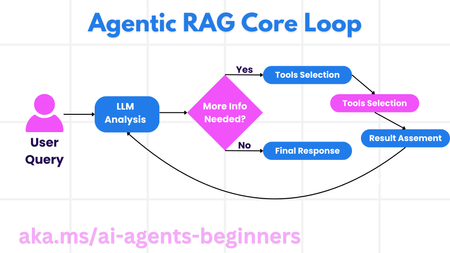
This blog post, Part 5 of a series on AI agents, explores Agentic RAG (Retrieval-Augmented Generation), a paradigm shift in how LLMs interact with external data. Unlike traditional RAG, Agentic RAG allows LLMs to autonomously plan their information retrieval process through an iterative loop of actions and evaluations. The post highlights the importance of the LLM "owning" the reasoning process, dynamically selecting tools and refining queries. It covers key implementation details, including iterative loops, tool integration, memory management, and handling failure modes. Practical use cases, governance considerations, and code examples demonstrating Agentic RAG with AutoGen, Semantic Kernel, and Azure AI Agent Service are provided. The post concludes by emphasizing the transformative potential of Agentic RAG and encourages further exploration through linked resources and previous blog posts in the series.4KViews1like0Comments[pt2] Choosing the right Data Storage Source (Under Preview) for Azure AI Search
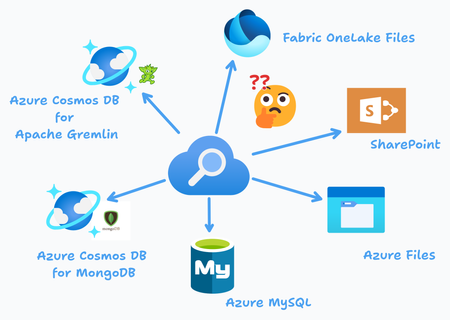
This blog introduces new preview data sources for Azure AI Search, including Fabric OneLake Files, Azure Cosmos DB for Gremlin, Azure Cosmos DB for MongoDB, SharePoint, and Azure Files. Each data source supports incremental indexing, metadata extraction, and AI enrichment, making Azure AI Search more powerful for enterprise search applications.389Views1like0Comments[pt1] Choosing the right Data Storage Source (Generally available) for Azure AI Search
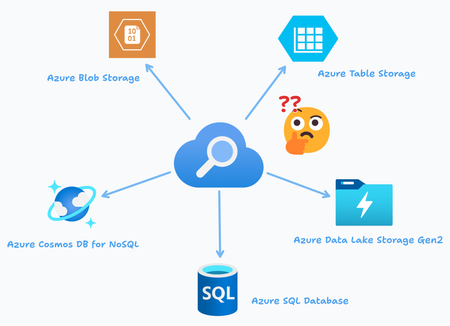
When integrating Azure AI Search into your solutions, choosing the right data storage and data sources is crucial for efficient and scalable indexing. This blog dives into three primary data source connectors for Azure AI Search: Azure Blob Storage, Azure Cosmos DB for NoSQL, and Azure SQL Database. Each data source type offers distinct advantages and use cases depending on the structure of your data and the desired search functionality.641Views0likes0Comments
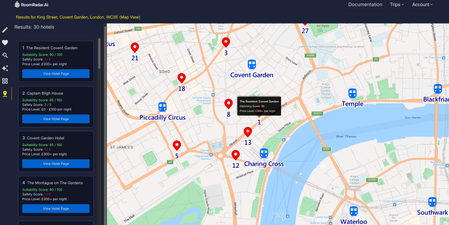
RoomRadar.ai: Revolutionising Hotel Search with Azure Maps and Azure AI Services
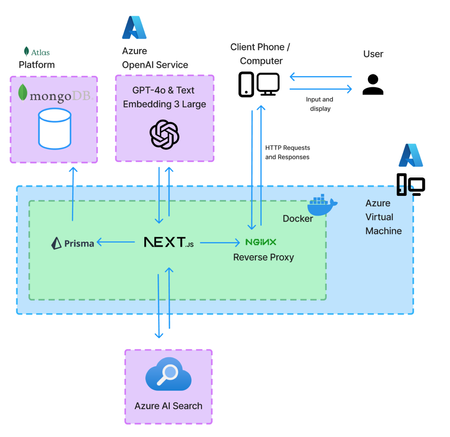
Explore how RoomRadar.ai leverages Azure Maps and AI Search to transform hotel hunting. From interactive map views with route planning to finding hotels based on visual preferences with AI, RoomRadar.ai showcases the future of travel planning. Dive into the technical details for this UCL-Microsoft collaboration.1.8KViews2likes0CommentsEnhancing Applications with AI - RoomRadar.Ai's Chatbot, Search, and Recommendation Systems
Learn how to build AI-powered applications using Microsoft Azure’s AI services. This article discusses RoomRadar.Ai, a hotel search system, as an example to guide developers to help create personalized user experiences with AI technologies. Within, the GPT-4o chatbot, search, and recommendation (similarity search) systems are discussed.1.6KViews1like0CommentsTeach ChatGPT to Answer Questions: Using Azure AI Search & Azure OpenAI (Semantic Kernel)
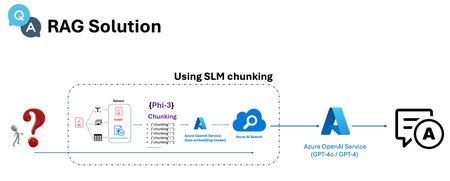
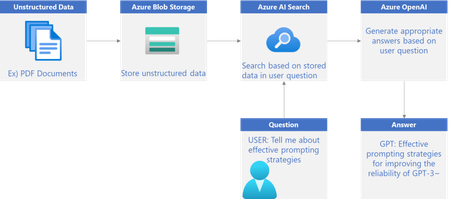
In this two-part series, we will explore how to build intelligent service using Azure. In Series 1, we'll use Azure AI Search to extract keywords from unstructured data stored in Azure Blob Storage. In Series 2, we'll Create a feature to answer questions based on PDF documents using Azure OpenAI26KViews4likes3CommentsProtect PII information in your Microsoft Fabric Lakehouse with Responsible AI
Data analysts and data scientists need to protect the personally identifiable information (PII) of their clients, such as names, addresses, emails, phone numbers, or social security numbers, that they use to build reports and dashboards. PII can pose risks to both the data subjects and the data holders and can introduce biases that affect the decisions made based on the data. One way to protect PII is to use Responsible AI, which is a set of principles and practices that help to mask PII with synthetic or anonymized data that preserves the statistical properties and structure of the original data but does not reveal the identity or attributes of the individuals.2.1KViews0likes0CommentsThe future of LLM: Scopriamo la RAG
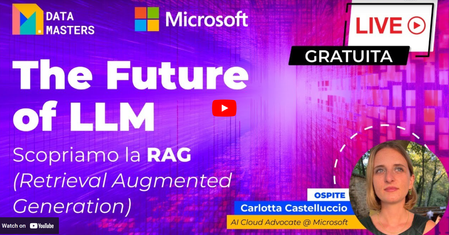
La Retrieval Augmented Generation (RAG) rappresenta una svolta paradigmatica nell’ambito dell’intelligenza artificiale, offrendo una soluzione rivoluzionaria ai tradizionali Large Language Models (LLM). Mentre gli LLM hanno dimostrato un’eccezionale capacità di generare testi coerenti e informativi, la RAG spinge i confini dell’AI combinando queste capacità con un meccanismo avanzato di recupero delle informazioni da fonti esterne.1.4KViews0likes0Comments