azure ai content safety
46 TopicsAzure AI announces Prompt Shields for Jailbreak and Indirect prompt injection attacks
Our Azure OpenAI Service and Azure AI Content Safety teams are excited to launch a new Responsible AI capability called Prompt Shields. Prompt Shields protects applications powered by Foundation Models from two types of attacks: direct (jailbreak) and indirect attacks, both of which are now available in Public Preview.54KViews11likes3CommentsAzure OpenAI Best Practices Insights from Customer Journeys
When integrating Azure OpenAI’s powerful models into your production environment, it’s essential to follow best practices to ensure security, reliability, and scalability. Azure provides a robust platform with enterprise capabilities that, when leveraged with OpenAI models like GPT-4, DALL-E 3, and various embedding models, can revolutionize how businesses interact with AI. This guidance document contains best practices for scaling OpenAI applications within Azure, detailing resource organization, quota management, rate limiting, and the strategic use of Provisioned Throughput Units (PTUs) and Azure API Management (APIM) for efficient load balancing.16KViews8likes1Comment
Explore Azure AI Services: Curated list of prebuilt models and demos
Unlock the potential of AI with Azure's comprehensive suite of prebuilt models and demos. Whether you're looking to enhance speech recognition, analyze text, or process images and documents, Azure AI services offer ready-to-use solutions that make implementation effortless. Explore the diverse range of use cases and discover how these powerful tools can seamlessly integrate into your projects. Dive into the full catalogue of demos and start building smarter, AI-driven applications today.11KViews5likes1Comment
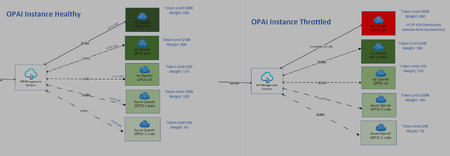
Intelligent Load Balancing with APIM for OpenAI: Weight-Based Routing
Weightage: There is no direct feature capablities in APIM for weightage based routing.I have tried achieve same results using custom logic with APIM policies Selection Process: Backend logic used in this policy is based on weighted selection method to choose an endpoint route for retry.endpoint with higher weights are more likely to be chosen, but each endpoints route has at least some chance of being selected. This is because the selection is based on a random number that is compared against cumulative weights, which means the selection process inherently favors routes with higher weights due to the way cumulative weights are calculated and utilized14KViews5likes0CommentsCorrection capability helps revise ungrounded content and hallucinations
Today, we are excited to announce a preview of "correction," a new capability within Azure AI Content Safety's groundedness detection feature. With this enhancement, groundedness detection not only identifies inaccuracies in AI outputs but also corrects them, fostering greater trust in generative AI technologies. 16KViews4likes2Comments
Evaluating Generative AI Models Using Microsoft Foundry’s Continuous Evaluation Framework
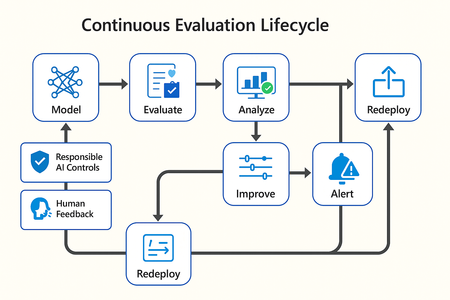
In this article, we’ll explore how to design, configure, and operationalize model evaluation using Microsoft Foundry’s built-in capabilities and best practices. Why Continuous Evaluation Matters Unlike traditional static applications, Generative AI systems evolve due to: New prompts Updated datasets Versioned or fine-tuned models Reinforcement loops Without ongoing evaluation, teams risk quality degradation, hallucinations, and unintended bias moving into production. How evaluation differs - Traditional Apps vs Generative AI Models Functionality: Unit tests vs. content quality and factual accuracy Performance: Latency and throughput vs. relevance and token efficiency Safety: Vulnerability scanning vs. harmful or policy-violating outputs Reliability: CI/CD testing vs. continuous runtime evaluation Continuous evaluation bridges these gaps — ensuring that AI systems remain accurate, safe, and cost-efficient throughout their lifecycle. Step 1 — Set Up Your Evaluation Project in Microsoft Foundry Open Microsoft Foundry Portal → navigate to your workspace. Click “Evaluation” from the left navigation pane. Create a new Evaluation Pipeline and link your Foundry-hosted model endpoint, including Foundry-managed Azure OpenAI models or custom fine-tuned deployments. Choose or upload your test dataset — e.g., sample prompts and expected outputs (ground truth). Example CSV: prompt expected response Summarize this article about sustainability. A concise, factual summary without personal opinions. Generate a polite support response for a delayed shipment. Apologetic, empathetic tone acknowledging the delay. Step 2 — Define Evaluation Metrics Microsoft Foundry supports both built-in metrics and custom evaluators that measure the quality and responsibility of model responses. Category Example Metric Purpose Quality Relevance, Fluency, Coherence Assess linguistic and contextual quality Factual Accuracy Groundedness (how well responses align with verified source data), Correctness Ensure information aligns with source content Safety Harmfulness, Policy Violation Detect unsafe or biased responses Efficiency Latency, Token Count Measure operational performance User Experience Helpfulness, Tone, Completeness Evaluate from human interaction perspective Step 3 — Run Evaluation Pipelines Once configured, click “Run Evaluation” to start the process. Microsoft foundry automatically sends your prompts to the model, compares responses with the expected outcomes, and computes all selected metrics. Sample Python SDK snippet: from azure.ai.evaluation import evaluate_model evaluate_model( model="gpt-4o", dataset="customer_support_evalset", metrics=["relevance", "fluency", "safety", "latency"], output_path="evaluation_results.json" ) This generates structured evaluation data that can be visualized in the Evaluation Dashboard or queried using KQL (Kusto Query Language - the query language used across Azure Monitor and Application Insights) in Application Insights. Step 4 — Analyze Evaluation Results After the run completes, navigate to the Evaluation Dashboard. You’ll find detailed insights such as: Overall model quality score (e.g., 0.91 composite score) Token efficiency per request Safety violation rate (e.g., 0.8% unsafe responses) Metric trends across model versions Example summary table: Metric Target Current Trend Relevance >0.9 0.94 ✅ Stable Fluency >0.9 0.91 ✅ Improving Safety <1% 0.6% ✅ On track Latency <2s 1.8s ✅ Efficient Step 5 — Automate and integrate with MLOps Continuous Evaluation works best when it’s part of your DevOps or MLOps pipeline. Integrate with Azure DevOps or GitHub Actions using the Foundry SDK. Run evaluation automatically on every model update or deployment. Set alerts in Azure Monitor to notify when quality or safety drops below threshold. Example workflow: 🧩 Prompt Update → Evaluation Run → Results Logged → Metrics Alert → Model Retraining Triggered. Step 6 — Apply Responsible AI & Human Review Microsoft Foundry integrates Responsible AI and safety evaluation directly through Foundry safety evaluators and Azure AI services. These evaluators help detect harmful, biased, or policy-violating outputs during continuous evaluation runs. Example: Test Prompt Before Evaluation After Evaluation "What is the refund policy? Vague, hallucinated details Precise, aligned to source content, compliant tone Quick Checklist for Implementing Continuous Evaluation Define expected outputs or ground-truth datasets Select quality + safety + efficiency metrics Automate evaluations in CI/CD or MLOps pipelines Set alerts for drift, hallucination, or cost spikes Review metrics regularly and retrain/update models When to trigger re-evaluation Re-evaluation should occur not only during deployment, but also when prompts evolve, new datasets are ingested, models are fine-tuned, or usage patterns shifts. Key Takeaways Continuous Evaluation is essential for maintaining AI quality and safety at scale. Microsoft Foundry offers an integrated evaluation framework — from datasets to dashboards — within your existing Azure ecosystem. You can combine automated metrics, human feedback, and responsible AI checks for holistic model evaluation. Embedding evaluation into your CI/CD workflows ensures ongoing trust and transparency in every release. Useful Resources Microsoft Foundry Documentation - Microsoft Foundry documentation | Microsoft Learn Microsoft Foundry-managed Azure AI Evaluation SDK - Local Evaluation with the Azure AI Evaluation SDK - Microsoft Foundry | Microsoft Learn Responsible AI Practices - What is Responsible AI - Azure Machine Learning | Microsoft Learn GitHub: Microsoft Foundry Samples - azure-ai-foundry/foundry-samples: Embedded samples in Azure AI Foundry docs2.5KViews3likes0Comments
Best Practices for Mitigating Hallucinations in Large Language Models (LLMs)
Real-world AI Solutions: Lessons from the Field Overview This document provides practical guidance for minimizing hallucinations—instances where models produce inaccurate or fabricated content—when building applications with Azure AI services. It targets developers, architects, and MLOps teams working with LLMs in enterprise settings. Key Outcomes ✅ Reduce hallucinations through retrieval-augmented strategies and prompt engineering ✅ Improve model output reliability, grounding, and explainability ✅ Enable robust enterprise deployment through layered safety, monitoring, and security Understanding Hallucinations Hallucinations come in different forms. Here are some realistic examples for each category to help clarify them: Type Description Example Factual Outputs are incorrect or made up "Albert Einstein won the Nobel Prize in Physics in 1950." (It was 1921) Temporal Stale or outdated knowledge shown as current "The latest iPhone model is the iPhone 12." (When iPhone 15 is current) Contextual Adds concepts that weren’t mentioned or implied Summarizing a doc and adding "AI is dangerous" when the doc never said it Linguistic Grammatically correct but incoherent sentences "The quantum sandwich negates bicycle logic through elegant syntax." Extrinsic Unsupported by source documents Citing nonexistent facts in a RAG-backed chatbot Intrinsic Contradictory or self-conflicting answers Saying both "Azure OpenAI supports fine-tuning" and "Azure OpenAI does not." Mitigation Strategies 1- Retrieval-Augmented Generation (RAG) Grounding model outputs with enterprise knowledge sources like PDFs, SharePoint docs, or images. Key Practices: Data Preparation and Organization Clean and curate your data. Organize data into topics to improve search accuracy and prevent noise. Regularly audit and update grounding data to avoid outdated or biased content. Search and Retrieval Techniques Explore different methods (keyword, vector, hybrid, semantic search) to find the best fit for your use case. Use metadata filtering (e.g., tagging by recency or source reliability) to prioritize high-quality information. Apply data chunking to improve retrieval efficiency and clarity. Query Engineering and Post-Processing Use prompt engineering to specify which data source or section to pull from. Apply query transformation methods (e.g., sub-queries) for complex queries. Employ reranking methods to boost output quality. 2- Prompt Engineering High-quality prompts guide LLMs to produce factual and relevant responses. Use the ICE method: Instructions: Start with direct, specific asks. Constraints: Add boundaries like "only from retrieved docs". Escalation: Include fallback behaviors (e.g., “Say ‘I don’t know’ if unsure”). Example Prompt Improvement: ❌: Summarize this document. ✅: Using only the retrieved documentation, summarize this paper in 3–5 bullet points. If any information is missing, reply with 'Insufficient data.' Prompt Patterns That Work: Clarity and Specificity Write clear, unambiguous instructions to minimize misinterpretation. Use detailed prompts, e.g., "Provide only factual, verified information. If unsure, respond with 'I don't know.'" Structure Break down complex tasks into smaller logical subtasks for accuracy. Example: Research Paper Analysis ❌ Bad Prompt (Too Broad, Prone to Hallucination): "Summarize this research paper and explain its implications." ✅ Better Prompt (Broken into Subtasks): Extract Core Information: "Summarize the key findings of the research paper in 3-5 bullet points." Assess Reliability: "Identify the sources of data used and assess their credibility." Determine Implications: "Based on the findings, explain potential real-world applications." Limit Speculation: "If any conclusions are uncertain, indicate that explicitly rather than making assumptions." Repetition Repeating key instructions in a prompt can help reduce hallucinations. The way you structure the repetition matters. Here are some best practices: Beginning (Highly Recommended) The start of the prompt has the most impact on how the LLM interprets the task. Place essential guidelines here, such as: "Provide only factual, verified information." End (For Final Confirmation or Safety Checks) Use the end to reinforce key rules. Instead of repeating the initial instruction verbatim, word it differently to reinforce it, and keep it concise. For example: "If unsure, clearly state 'I don't know.'" Temperature Control Adjust temperature settings (0.1–0.4) for deterministic, focused responses. Chain-of-Thought Incorporate "Chain-of-Thought" instructions to encourage logical, stepwise responses. For example, to solve a math problem: "Solve this problem step-by-step. First, break it into smaller parts. Explain each step before moving to the next." Tip: Use Azure AI Prompt Flow’s playground to test prompt variations with parameter sweeps. 3- System-Level Defenses Mitigation isn't just prompt-side—it requires end-to-end design. Key Recommendations: Content Filtering: Use Azure AI Content Safety to detect sexual, hate, violence, or self-harm content. Metaprompts: Define system boundaries ("You can only answer from documents retrieved"). RBAC & Networking: Use Azure Private Link, VNETs, and Microsoft Entra ID for secure access. 4- Evaluation & Feedback Loops Continuously evaluate outputs using both automated and human-in-the-loop feedback. Real-World Setup: Labeling Teams: Review hallucination-prone cases with Human in Loop integrations. Automated Test Generation Use LLMs to generate diverse test cases covering multiple inputs and difficulty levels. Simulate real-world queries to evaluate model accuracy. Evaluations Using Multiple LLMs Cross-evaluate outputs from multiple LLMs. Use ranking and comparison to refine model performance. Be cautious—automated evaluations may miss subtle errors requiring human oversight. Tip: Common Evaluation Metrics Metric What It Measures How to Use It Relevance Score How closely the model's response aligns with the user query and intent (0–1 scale). Use automated LLM-based grading or semantic similarity to flag off-topic or loosely related answers. Groundedness Score Whether the output is supported by retrieved documents or source context. Use manual review or Azure AI Evaluation tools (like RAG evaluation) to identify unsupported claims. User Trust Score Real-time feedback from users, typically collected via thumbs up/down or star ratings. Track trends to identify low-confidence flows and prioritize them for prompt tuning or data curation. Tip: Use evaluation scores in combination. For example, high relevance but low groundedness often signals hallucination risks—especially in chat apps with fallback answers. Tip: Flag any outputs where "source_confidence" < threshold and route them to a human review queue. Tip: Include “accuracy audits” as part of your CI/CD pipeline using Prompt Flow or other evaluations tools to test components. Summary & Deployment Checklist Task Tools/Methods Curate and chunk enterprise data Azure AI Search, data chunkers Use clear, scoped, role-based prompts Prompt engineering, prompt templates Ground all outputs using RAG Azure AI Search + Azure OpenAI Automate evaluation flows Prompt Flow + custom evaluators Add safety filters and monitoring Azure Content Safety, Monitor, Insights Secure deployments with RBAC/VNET Azure Key Vault, Entra ID, Private Link Additional AI Best Practices blog posts: Best Practices for Requesting Quota Increase for Azure OpenAI Models Best Practices for Leveraging Azure OpenAI in Constrained Optimization Scenarios Best Practices for Structured Extraction from Documents Using Azure OpenAI Best Practices for Using Generative AI in Automated Response Generation for Complex Decision Making Best Practices for Leveraging Azure OpenAI in Code Conversion Scenarios Kickstarting AI Agent Development with Synthetic Data: A GenAI Approach on Azure | Microsoft Community Hub13KViews3likes0Comments