azure ai agent service
31 TopicsEvaluating Generative AI Models Using Microsoft Foundry’s Continuous Evaluation Framework
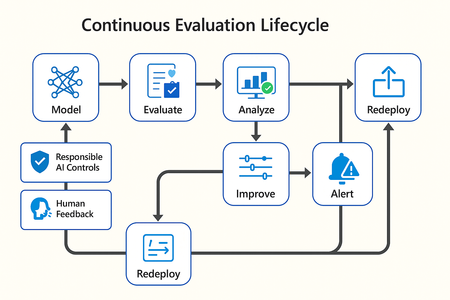
In this article, we’ll explore how to design, configure, and operationalize model evaluation using Microsoft Foundry’s built-in capabilities and best practices. Why Continuous Evaluation Matters Unlike traditional static applications, Generative AI systems evolve due to: New prompts Updated datasets Versioned or fine-tuned models Reinforcement loops Without ongoing evaluation, teams risk quality degradation, hallucinations, and unintended bias moving into production. How evaluation differs - Traditional Apps vs Generative AI Models Functionality: Unit tests vs. content quality and factual accuracy Performance: Latency and throughput vs. relevance and token efficiency Safety: Vulnerability scanning vs. harmful or policy-violating outputs Reliability: CI/CD testing vs. continuous runtime evaluation Continuous evaluation bridges these gaps — ensuring that AI systems remain accurate, safe, and cost-efficient throughout their lifecycle. Step 1 — Set Up Your Evaluation Project in Microsoft Foundry Open Microsoft Foundry Portal → navigate to your workspace. Click “Evaluation” from the left navigation pane. Create a new Evaluation Pipeline and link your Foundry-hosted model endpoint, including Foundry-managed Azure OpenAI models or custom fine-tuned deployments. Choose or upload your test dataset — e.g., sample prompts and expected outputs (ground truth). Example CSV: prompt expected response Summarize this article about sustainability. A concise, factual summary without personal opinions. Generate a polite support response for a delayed shipment. Apologetic, empathetic tone acknowledging the delay. Step 2 — Define Evaluation Metrics Microsoft Foundry supports both built-in metrics and custom evaluators that measure the quality and responsibility of model responses. Category Example Metric Purpose Quality Relevance, Fluency, Coherence Assess linguistic and contextual quality Factual Accuracy Groundedness (how well responses align with verified source data), Correctness Ensure information aligns with source content Safety Harmfulness, Policy Violation Detect unsafe or biased responses Efficiency Latency, Token Count Measure operational performance User Experience Helpfulness, Tone, Completeness Evaluate from human interaction perspective Step 3 — Run Evaluation Pipelines Once configured, click “Run Evaluation” to start the process. Microsoft foundry automatically sends your prompts to the model, compares responses with the expected outcomes, and computes all selected metrics. Sample Python SDK snippet: from azure.ai.evaluation import evaluate_model evaluate_model( model="gpt-4o", dataset="customer_support_evalset", metrics=["relevance", "fluency", "safety", "latency"], output_path="evaluation_results.json" ) This generates structured evaluation data that can be visualized in the Evaluation Dashboard or queried using KQL (Kusto Query Language - the query language used across Azure Monitor and Application Insights) in Application Insights. Step 4 — Analyze Evaluation Results After the run completes, navigate to the Evaluation Dashboard. You’ll find detailed insights such as: Overall model quality score (e.g., 0.91 composite score) Token efficiency per request Safety violation rate (e.g., 0.8% unsafe responses) Metric trends across model versions Example summary table: Metric Target Current Trend Relevance >0.9 0.94 ✅ Stable Fluency >0.9 0.91 ✅ Improving Safety <1% 0.6% ✅ On track Latency <2s 1.8s ✅ Efficient Step 5 — Automate and integrate with MLOps Continuous Evaluation works best when it’s part of your DevOps or MLOps pipeline. Integrate with Azure DevOps or GitHub Actions using the Foundry SDK. Run evaluation automatically on every model update or deployment. Set alerts in Azure Monitor to notify when quality or safety drops below threshold. Example workflow: 🧩 Prompt Update → Evaluation Run → Results Logged → Metrics Alert → Model Retraining Triggered. Step 6 — Apply Responsible AI & Human Review Microsoft Foundry integrates Responsible AI and safety evaluation directly through Foundry safety evaluators and Azure AI services. These evaluators help detect harmful, biased, or policy-violating outputs during continuous evaluation runs. Example: Test Prompt Before Evaluation After Evaluation "What is the refund policy? Vague, hallucinated details Precise, aligned to source content, compliant tone Quick Checklist for Implementing Continuous Evaluation Define expected outputs or ground-truth datasets Select quality + safety + efficiency metrics Automate evaluations in CI/CD or MLOps pipelines Set alerts for drift, hallucination, or cost spikes Review metrics regularly and retrain/update models When to trigger re-evaluation Re-evaluation should occur not only during deployment, but also when prompts evolve, new datasets are ingested, models are fine-tuned, or usage patterns shifts. Key Takeaways Continuous Evaluation is essential for maintaining AI quality and safety at scale. Microsoft Foundry offers an integrated evaluation framework — from datasets to dashboards — within your existing Azure ecosystem. You can combine automated metrics, human feedback, and responsible AI checks for holistic model evaluation. Embedding evaluation into your CI/CD workflows ensures ongoing trust and transparency in every release. Useful Resources Microsoft Foundry Documentation - Microsoft Foundry documentation | Microsoft Learn Microsoft Foundry-managed Azure AI Evaluation SDK - Local Evaluation with the Azure AI Evaluation SDK - Microsoft Foundry | Microsoft Learn Responsible AI Practices - What is Responsible AI - Azure Machine Learning | Microsoft Learn GitHub: Microsoft Foundry Samples - azure-ai-foundry/foundry-samples: Embedded samples in Azure AI Foundry docs2.7KViews3likes0CommentsFoundry Agent Service at Ignite 2025: Simple to Build. Powerful to Deploy. Trusted to Operate.
The upgraded Foundry Agent Service delivers a unified, simplified platform with managed hosting, built-in memory, tool catalogs, and seamless integration with Microsoft Agent Framework. Developers can now deploy agents faster and more securely, leveraging one-click publishing to Microsoft 365 and advanced governance features for streamlined enterprise AI operations.11KViews3likes1CommentIntroducing Microsoft Agent Factory
Microsoft Agent Factory is a new program designed for organizations that want to move from experimentation to execution faster. With a single plan, organizations can build agents with Work IQ, Fabric IQ, and Foundry IQ using Microsoft Foundry and Copilot Studio. They can also deploy their agents anywhere, including Microsoft 365 Copilot, with no upfront licensing and provisioning required. Eligible organizations can also tap into hands-on engagement from top AI Forward Deployed Engineers (FDEs) and access tailored role-based training to boost AI fluency across teams.36KViews13likes0CommentsContext-Aware RAG System with Azure AI Search to Cut Token Costs and Boost Accuracy
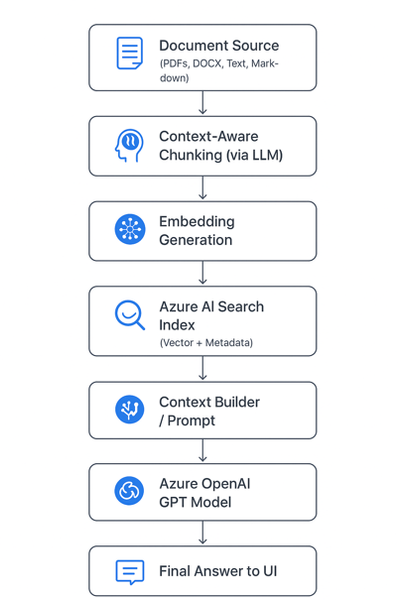
🚀 Introduction As AI copilots and assistants become integral to enterprises, one question dominates architecture discussions: “How can we make large language models (LLMs) provide accurate, source-grounded answers — without blowing up token costs?” Retrieval-Augmented Generation (RAG) is the industry’s go-to strategy for this challenge. But traditional RAG pipelines often use static document chunking, which breaks semantic context and drives inefficiencies. To address this, we built a context-aware, cost-optimized RAG pipeline using Azure AI Search and Azure OpenAI, leveraging AI-driven semantic chunking and intelligent retrieval. The result: accurate answers with up to 85% lower token consumption. Majorly in this blog we are considering: Tokenization Chunking The Problem with Naive Chunking Most RAG systems split documents by token or character count (e.g., every 1,000 tokens). This is easy to implement but introduces real-world problems: 🧩 Loss of context — sentences or concepts get split mid-idea. ⚙️ Retrieval noise — irrelevant fragments appear in top results. 💸 Higher cost — you often send 5× more text than necessary. These issues degrade both accuracy and cost efficiency. 🧠 Context-Aware Chunking: Smarter Document Segmentation Instead of breaking text arbitrarily, our system uses an LLM-powered preprocessor to identify semantic boundaries — meaning each chunk represents a complete and coherent concept. Example Naive chunking: “Azure OpenAI Service offers… [cut] …integrates with Azure AI Search for intelligent retrieval.” Context-aware chunking: “Azure OpenAI Service provides access to models like GPT-4o, enabling developers to integrate advanced natural language understanding and generation into their applications. It can be paired with Azure AI Search for efficient, context-aware information retrieval.” ✅ The chunk is self-contained and semantically meaningful. This allows the retriever to match queries with conceptually complete information rather than partial sentences — leading to precision and fewer chunks needed per query. Architecture Diagram Chunking Service: Purpose: Transforms messy enterprise data (wikis, PDFs, transcripts, repos, images) into structured, model-friendly chunks for Retrieval-Augmented Generation (RAG). ChallengeChunking FixLLM context limitsBreaks docs into smaller piecesEmbedding sizeKeeps within token boundsRetrieval accuracyGranular, relevant sections onlyNoiseRemoves irrelevant blocksTraceabilityChunk IDs for auditabilityCost/latencyRe-embed only changed chunks The Chunking Flow (End-to-End) The Chunking Service sits in the ingestion pipeline and follows this sequence: Ingestion: Raw text arrives from sources (wiki, repo, transcript, PDF, image description). Token-aware splitting: Large text is cut into manageable pre-chunks with a 100-token overlap, ensuring no semantic drift across boundaries. Semantic segmentation: Each pre-chunk is passed to an Azure OpenAI Chat model with a structured prompt. Output = JSON array of semantic chunks (sectiontitle, speaker, content). Optional overlap injection: Character-level overlap can be applied across chunks for discourse-heavy text like meeting transcripts. Embedding generation: Each chunk is passed to Azure OpenAI Embeddings API (text-embedding-3-small), producing a 1536-dimension vector. Indexing: Chunks (text + vectors) are uploaded to Azure AI Search. Retrieval: During question answering or document generation, the system pulls top-k chunks, concatenates them, and enriches the prompt for the LLM. Resilience & Traceability The service is built to handle real-world pipeline issues. It retries once on rate limits, validates JSON outputs, and fails fast on malformed data instead of silently dropping chunks. Each chunk is assigned a unique ID (chunk_<sequence>_<sourceTag>), making retrieval auditable and enabling selective re-embedding when only parts of a document change. ☁️ Why Azure AI Search Matters Here Azure AI Search (formerly Cognitive Search) is the heart of the retrieval pipeline. Key Roles: Vector Search Engine: Stores embeddings of chunks and performs semantic similarity search. Hybrid Search (Keyword + Vector): Combines lexical and semantic matching for high precision and recall. Scalability: Supports millions of chunks with blazing-fast search latency. Metadata Filtering: Enables fine-grained retrieval (e.g., by document type, author, section). Native Integration with Azure OpenAI: Allows a seamless, end-to-end RAG pipeline without third-party dependencies. In short, Azure AI Search provides the speed, scalability, and semantic intelligence to make your RAG pipeline enterprise-grade. 💡 Importance of Azure OpenAI Azure OpenAI complements Azure AI Search by providing: High-quality embeddings (text-embedding-3-large) for accurate vector search. Powerful generative reasoning (GPT-4o or GPT-4.1) to craft contextually relevant answers. Security and compliance within your organization’s Azure boundary — critical for regulated environments. Together, these two services form the retrieval (Azure AI Search) and generation (Azure OpenAI) halves of your RAG system. 💰 Token Efficiency By limiting the model’s input to only the most relevant, semantically meaningful chunks, you drastically reduce prompt size and cost. Approach Tokens per Query Typical Cost Accuracy Full-document prompt ~15,000–20,000 Very high Medium Fixed-size RAG chunks ~5,000–8,000 Moderate Medium-high Context-aware RAG (this approach) ~2,000–3,000 Low High 💰 Token Cost Reduction Analysis Let’s quantify it: Step Naive Approach (no RAG) Your Approach (Context-Aware RAG) Prompt context size Entire document (e.g., 15,000 tokens) Top 3 chunks (e.g., 2,000 tokens) Tokens per query ~16,000 (incl. user + system) ~2,500 Cost reduction — ~84% reduction in token usage Accuracy Often low (hallucinations) Higher (targeted retrieval) That’s roughly an 80–85% reduction in token usage while improving both accuracy and response speed. 🧱 Tech Stack Overview Component Service Purpose Chunking Engine Azure OpenAI (GPT models) Generate context-aware chunks Embedding Model Azure OpenAI Embedding API Create high-dimensional vectors Retriever Azure AI Search Perform hybrid and vector search Generator Azure OpenAI GPT-4o Produce final answer Orchestration Layer Python / FastAPI / .NET c# Handle RAG pipeline 🔍 The Bottom Line By adopting context-aware chunking and Azure AI Search-powered RAG, you achieve: ✅ Higher accuracy (contextually complete retrievals) 💸 Lower cost (token-efficient prompts) ⚡ Faster latency (smaller context per call) 🧩 Scalable and secure architecture (fully Azure-native) This is the same design philosophy powering Microsoft Copilot and other enterprise AI assistants today. 🧪 Real-Life Example: Context-Aware RAG in Action To bring this architecture to life, let’s walk through a simple example of how documents can be chunked, embedded, stored in Azure AI Search, and then queried to generate accurate, cost-efficient answers. Imagine you want to build an internal knowledge assistant that answers developer questions from your company’s Azure documentation. ⚙️ Step 1: Intelligent Document Chunking We’ll use a small LLM call to segment text into context-aware chunks — rather than fixed token counts //Context Aware Chunking //text can be your retrieved text from any page/ document private async Task<List<SemanticChunk>> AzureOpenAIChunk(string text) { try { string prompt = $@" Divide the following text into logical, meaningful chunks. Each chunk should represent a coherent section, topic, or idea. Return the result as a JSON array, where each object contains: - sectiontitle - speaker (if applicable, otherwise leave empty) - content Do not add any extra commentary or explanation. Only output the JSON array. Do not give content an array, try to keep all in string. TEXT: {text}" var client = GetAzureOpenAIClient(); var chatCompletionsOptions = new ChatCompletionOptions { Temperature = 0, FrequencyPenalty = 0, PresencePenalty = 0 }; var Messages = new List<OpenAI.Chat.ChatMessage> { new SystemChatMessage("You are a text processing assistant."), new UserChatMessage(prompt) }; var chatClient = client.GetChatClient( deploymentName: _appSettings.Agent.Model); var response = await chatClient.CompleteChatAsync(Messages, chatCompletionsOptions); string responseText = response.Value.Content[0].Text.ToString(); string cleaned = Regex.Replace(responseText, @"```[\s\S]*?```", match => { var match1 = match.Value.Replace("```json", "").Trim(); return match1.Replace("```", "").Trim(); }); // Try to parse the response as JSON array of chunks return CreateChunkArray(cleaned); } catch (JsonException ex) { _logger.LogError("Failed to parse GPT response: " + ex.Message); throw; } catch (Exception ex) { _logger.LogError("Error in AzureOpenAIChunk: " + ex.Message); throw; } } 🧠 Step 2: Adding Overlaps for better result We are adding overlapping between chunks for better and accurate answers. Overlapping window can be modified based on the documents. public List<SemanticChunk> AddOverlap(List<SemanticChunk> chunks, string IDText, int overlapChars = 0) { var overlappedChunks = new List<SemanticChunk>(); for (int i = 0; i < chunks.Count; i++) { var current = chunks[i]; string previousOverlap = i > 0 ? chunks[i - 1].Content[^Math.Min(overlapChars, chunks[i - 1].Content.Length)..] : ""; string combinedText = previousOverlap + "\n" + current.Content; var Id = $"chunk_{i + '_' + IDText}"; overlappedChunks.Add(new SemanticChunk { Id = Regex.Replace(Id, @"[^A-Za-z0-9_\-=]", "_"), Content = combinedText, SectionTitle = current.SectionTitle }); } return overlappedChunks; } 🧠 Step 3: Generate and Store Embeddings in Azure AI Search We convert each chunk into an embedding vector and push it to an Azure AI Search index. public async Task<List<SemanticChunk>> AddEmbeddings(List<SemanticChunk> chunks) { var client = GetAzureOpenAIClient(); var embeddingClient = client.GetEmbeddingClient("text-embedding-3-small"); foreach (var chunk in chunks) { // Generate embedding using the EmbeddingClient var embeddingResult = await embeddingClient.GenerateEmbeddingAsync(chunk.Content).ConfigureAwait(false); chunk.Embedding = embeddingResult.Value.ToFloats(); } return chunks; } public async Task UploadDocsAsync(List<SemanticChunk> chunks) { try { var indexClient = GetSearchindexClient(); var searchClient = indexClient.GetSearchClient(_indexName); var result = await searchClient.UploadDocumentsAsync(chunks); } catch (Exception ex) { _logger.LogError("Failed to upload documents: " + ex); throw; } } 🤖 Step 4: Generate the Final Answer with Azure OpenAI Now we combine the top chunks with the user query to create a cost-efficient, context-rich prompt. P.S. : Here in this example we have used semantic kernel agent , in real time any agent can be used and any prompt can be updated. var context = await _aiSearchService.GetSemanticSearchresultsAsync(UserQuery); // Gets chunks from Azure AI Search //here UserQuery is query asked by user/any question prompt which need to be answered. string questionWithContext = $@"Answer the question briefly in short relevant words based on the context provided. Context : {context}. \n\n Question : {UserQuery}?"; var _agentModel = new AgentModel() { Model = _appSettings.Agent.Model, AgentName = "Answering_Agent", Temperature = _appSettings.Agent.Temperature, TopP = _appSettings.Agent.TopP, AgentInstructions = $@"You are a cloud Migration Architect. " + "Analyze all the details from top to bottom in context based on the details provided for the Migration of APP app using Azure Services. Do not assume anything." + "There can be conflicting details for a question , please verify all details of the context. If there are any conflict please start your answer with word - **Conflict**." + "There might not be answers for all the questions, please verify all details of the context. If there are no answer for question just mention - **No Information**" }; _agentModel = await _agentService.CreateAgentAsync(_agentModel); _agentModel.QuestionWithContext = questionWithContext; var modelWithResponse = await _agentService.GetAnswerAsync(_agentModel); 🧠 Final Thoughts Context-aware RAG isn’t just a performance optimization — it’s an architectural evolution. It shifts the focus from feeding LLMs more data to feeding them the right data. By letting Azure AI Search handle intelligent retrieval and Azure OpenAI handle reasoning, you create an efficient, explainable, and scalable AI assistant. The outcome: Smarter answers, lower costs, and a pipeline that scales with your enterprise. Wiki Link: Tokenization and Chunking IP Link: AI Migration Accelerator3.5KViews6likes1CommentGPT-5 Model Family Now Powers Azure AI Foundry Agent Service
The GPT-5 model family is now available in Azure AI Foundry Agent Service, which is generally available for enterprise customers. This means developers and enterprises can move beyond “just models” to build production-ready AI agents with: GPT-5’s advanced reasoning, coding, and multimodal intelligence Enterprise-grade trust, governance, and AgentOps built in Open standards and multi-agent orchestration for real-world workflows From insurance claims to supply chain optimization, Foundry enterprise agents are ready to power mission-critical AI at scale.2.3KViews0likes0CommentsKeeping Agents on Track: Introducing Task Adherence in Azure AI Foundry
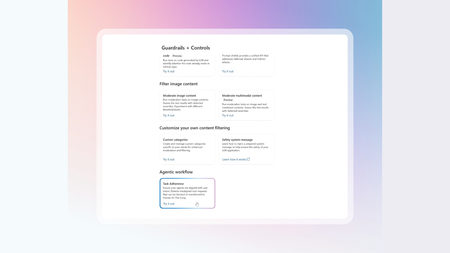
Task Adherence is coming soon to public preview in both the Azure AI Content Safety API and Azure AI Foundry. It helps developers ensure AI agents stay aligned with their assigned tasks, preventing drift, misuse, or unsafe tool calls.1.6KViews0likes0Comments
Azure AI Foundry: Advancing OpenTelemetry and delivering unified multi-agent observability
Microsoft is enhancing multi-agent observability by introducing new semantic conventions to OpenTelemetry, developed collaboratively with Outshift, Cisco’s incubation engine. These additions—built upon OpenTelemetry and W3C Trace Context—establish standardized practices for tracing and telemetry within multi-agent systems, facilitating consistent logging of key metrics for quality, performance, safety, and cost. This systematic approach enables more comprehensive visibility into multi-agent workflows, including tool invocations and collaboration. These advancements have been integrated into Azure AI Foundry, Microsoft Agent Framework, Semantic Kernel, and Azure AI packages for LangChain, LangGraph, and the OpenAI Agents SDK, enabling customers to get unified observability for agentic systems built using any of these frameworks with Azure AI Foundry. The additional semantic conventions and integration across different frameworks equip developers to monitor, troubleshoot, and optimize their AI agents in a unified solution with increased efficiency and valuable insights. “Outshift, Cisco's Incubation Engine, worked with Microsoft to add new semantic conventions in OpenTelemetry. These conventions standardize multi-agent observability and evaluation, giving teams comprehensive insights into their AI systems.” Giovanna Carofiglio, Distinguished Engineer, Cisco Multi-agent observability challenges Multi-agent systems involve multiple interacting agents with diverse roles and architectures. Such systems are inherently dynamic—they adapt in real time by decomposing complex tasks into smaller, manageable subtasks and distributing them across specialized agents. Each agent may invoke multiple tools, often in parallel or sequence, to fulfill its part of the task, resulting in emergent workflows that are non-linear and highly context dependent. Given the dynamic nature of multi-agent systems and the management across agents, observability becomes critical for debugging, performance tuning, security, and compliance for such systems. Multi-agent observability presents unique challenges that traditional GenAI telemetry standards fail to address. Traditional observability conventions are optimized for single-agent reasoning path visibility and lack the semantic depth to capture collaborative workflows across multiple agents. In multi-agent systems, tasks are often decomposed and distributed dynamically, requiring visibility into agent roles, task hierarchies, tool usage, and decision-making processes. Without standardized task spans and a unified namespace, it's difficult to trace cross-agent coordination, evaluate task outcomes, or analyze retry patterns. These gaps hinder white-box observability, making it hard to assess performance, safety, and quality across complex agentic workflows. Extending OpenTelemetry with multi-agent observability Microsoft has proposed new spans and attributes to OpenTelemetry semantic convention for GenAI agent and framework spans. They will enrich insights and capture the complexity of agent, tool, tasks and plans interactions in multi-agent systems. Below is a list of all the new additions proposed to OpenTelemetry. New Span/Trace/Attributes Name Purpose New span execute_task Captures task planning and event propagation, providing insights into how tasks are decomposed and distributed. New child spans under “invoke_agent” agent_to_agent_interaction Traces communication between agents agent.state.management Effective context, short or long term memory management agent_planning Logs the agent’s internal planning steps agent orchestration Capture agent-to-agent orchestration New attributes in invoke_agent span tool_definitions Describes the tool’s purpose or configuration llm_spans Records model call spans New attributes in “execute_tool” span tool.call.arguments Logs the arguments passed during tool invocation tool.call.results Records the results returned by the tool New event Evaluation - attributes (name, error.type, label) Enables structured evaluation of agent performance and decision-making More details can be found in the following pull-requests merged into OpenTelemetry Add tool definition plus tool-related attributes in invoke-agent, inference, and execute-tool spans Capture evaluation results for GenAI applications Azure AI Foundry delivers unified observability for Microsoft Agent Framework, LangChain, LangGraph, OpenAI Agents SDK Agents built with Azure AI Foundry (SDK or portal) get out-of-the box observability in Foundry. With the new addition, agents built on different frameworks including Microsoft Agent Framework, Semantic Kernel, LangChain, LangGraph and OpenAI Agents SDK can use Foundry for monitoring, analyzing, debugging and evaluation with full observability. Agents built on Microsoft Agent Framework and Semantic Kernel get out-of-box tracing and evaluations support in Foundry Observability. Agents built with LangChain, LangGraph and OpenAI Agents SDK can use the corresponding packages and detailed instructions listed in the documentation to get tracing and evaluations support in Foundry Observability. Customer benefits With standardized multi-agent observability and support across multiple agent frameworks, customers get the following benefits: Unified Observability Platform for Multi-agent systems: Foundry Observability is the unified multi-agent observability platform for agents built with Foundry SDK or other agent frameworks like Microsoft Agent Framework, LangGraph, Lang Chain, OpenAI SDK. End-to-End Visibility into multi-agent systems: Customers can see not just what the system did, but how and why—from user request, through agent collaboration, tool usage, to final output. Faster Debugging & Root Cause Analysis: When something goes wrong (e.g., wrong answer, safety violation, performance bottleneck), customers can trace the exact path, see which agent/tool/task failed, and why. Quality & Safety Assurance: Built-in metrics and evaluation events (e.g. task success and validation scores) help customers monitor and improve the quality and safety of their AI workflows. Cost & Performance Optimization: Detailed metrics on token usage, API calls, resource consumption, and latency help customers optimize efficiency and cost. Get Started today with end-to-end agent observability with Foundry Azure AI Foundry Observability is a unified solution for evaluating, monitoring, tracing, and governing the quality, performance, and safety of your AI systems end-to-end— all built into your AI development loop and backed by the power of Azure Monitor for full stack observability. From model selection to real-time debugging, Foundry Observability capabilities empower teams to ship production-grade AI with confidence and speed. It’s observability, reimagined for the enterprise AI era. With the above OpenTelemetry enhancements Azure AI Foundry now provides detailed multi-agent observability for agents built with different frameworks including Azure AI Foundry, Microsoft Agent Framework, LangChain, LangGraph and OpenAI Agents SDK. Learn more about Azure AI Foundry Observability and get end-to-end agent observability today!8.2KViews4likes0CommentsUpgrade your voice agent with Azure AI Voice Live API
Today, we are excited to announce the general availability of Voice Live API, which enables real-time speech-to-speech conversational experience through a unified API powered by generative AI models. With Voice Live API, developers can easily voice-enable any agent built with the Azure AI Foundry Agent Service. Azure AI Foundry Agent Service, enables the operation of agents that make decisions, invoke tools, and participate in workflows across development, deployment, and production. By eliminating the need to stitch together disparate components, Voice Live API offers a low latency, end-to-end solution for voice-driven experiences. As always, a diverse range of customers provided valuable feedback during the preview period. Along with announcing general availability, we are also taking this opportunity to address that feedback and improve the API. Following are some of the new features designed to assist developers and enterprises in building scalable, production-ready voice agents. More natively integrated GenAI models including GPT-Realtime Voice Live API enables developers to select from a range of advanced AI models designed for conversational applications, such as GPT-Realtime, GPT-5, GPT-4.1, Phi, and others. These models are natively supported and fully managed, eliminating the need for developers to manage model deployment or plan for capacity. These natively supported models may each have a distinct stage in their life cycle (e.g. public preview, generally available) and be subject to varying pricing structures. The table below lists the models supported in each pricing tier. Pricing Tier Generally Available In Public Preview Voice Live Pro GPT-Realtime, GPT-4.1, GPT-4o GPT-5 Voice Live Standard GPT-4o-mini, GPT-4.1-mini GPT-4o-Mini-Realtime, GPT-5-mini Voice Live Lite NA Phi-4-MM-Realtime, GPT-5-Nano, Phi-4-Mini Extended speech languages to 140+ Voice Live API now supports speech input in over 140 languages/locales. View all supported languages by configuration. Automatic multilingual configuration is enabled by default, using the multilingual model. Integrated with Custom Speech Developers need customization to better manage input and output for different use cases. Besides the support for Custom Voice released in May 2025, Voice Live now supports seamless integration with Custom Speech for improved speech recognition results. Developers can also improve speech input accuracy with phrase lists and refine speech synthesis pronunciation using custom lexicons, all without training a model. Learn how to customize speech and voice models for Voice Live API. Natural HD voices upgraded Neural HD voices in Azure AI Speech are contextually aware and engineered to provide a natural, expressive experience, making them ideal for voice agent applications. The latest V2 upgrade enhances lifelike qualities with features such as natural pauses, filler words, and seamless transitions between speaking styles, all available with Voice Live API. Check out the latest demo of Ava Neural HD V2. Improved VAD features for interruption detection Voice Live API now features semantic Voice Activity Detection (VAD), enabling it to intelligently recognize pauses and filler word interruptions in conversations. In the latest en-US evaluation on Multilingual filler words data, Voice Live API achieved ~20% relative improvement from previous VAD models. This leap in performance is powered by integrating semantic VAD into the n-best pipeline, allowing the system to better distinguish meaningful speech from filler noise and enabling more accurate latency tracking and cleaner segmentation, especially in multilingual and noisy environments. 4K avatar support Voice Live API enables efficient integration with streaming avatars. With the latest updates, avatar options offer support for high-fidelity 4K video models. Learn more about the avatar update. Improved function calling and integration with Azure AI Foundry Agent Service Voice Live API enables function calling to assist developers in building robust voice agents with their chosen generative AI models. This release improves asynchronous function calls and enhances integration with Azure AI Foundry Agent Service for agent creation and operation. Learn more about creating a voice live real-time voice agent with Azure AI Foundry Agent Service. More developer resources and availability in more regions Developer resources are available in C# and Python, with more to come. Get started with Voice Live API. Voice Live API is available in more regions now including Australia East, East US, Japan East, and UK South, besides the previously supported regions such as Central India, East US 2, South East Asia, Sweden Central, and West US 2. Check the features supported in each region. Customers adopting Voice Live In healthcare, patient experience is always the top priority. With Voice Live, eClinicalWorks’ healow Genie contact center solution is now taking healthcare modernization a step further. healow is piloting Voice Live API for Genie to inform patients about their upcoming appointments, answer common questions, and return voicemails. Reducing these routine calls saves healthcare staff hours each day and boosts patient satisfaction through timely interactions. “We’re looking forward to using Azure AI Foundry Voice Live API so that when a patient calls, Genie can detect the question and respond in a natural voice in near-real time,” said Sidd Shah, Vice President of Strategy & Business Growth at healow. “The entire roundtrip is all happening in Voice Live API.” If a patient asks about information in their medical chart, Genie can also fetch data from their electronic health record (EHR) and provide answers. Read the full story here. “If we did multiple hops to go across different infrastructures, that would add up to a diminished patient experience. The Azure AI Foundry Voice Live API is integrated into one single, unified solution, delivering speech-to-text and text-to-speech in the same infrastructure.” Bhawna Batra, VP of Engineering at eClinicalWorks Capgemini, a global business and technology transformation partner, is reimagining its global service desk managed operations through its Capgemini Cloud Infrastructure Services (CIS) division. The first phase covers 500,000 users across 45 clients, which is only part of the overall deployment base. The goal is to modernize the service desk to meet changing expectations for speed, personalization, and scale. To drive this transformation, Capgemini launched the “AI-Powered Service Desk” platform powered by Microsoft technologies including Dynamics 365 Contact Center, Copilot Studio, and Azure AI Foundry. A key enhancement was the integration of Voice Live API for real-time voice interactions, enabling intelligent, conversational support across telephony channels. The new platform delivers a more agile, truly conversational, AI-driven service experience, automating routine tasks and enhancing agent productivity. With scalable voice capabilities and deep integration across Microsoft’s ecosystem, Capgemini is positioned to streamline support operations, reduce response times, and elevate customer satisfaction across its enterprise client base. "Integrating Microsoft’s Voice Live API into our platform has been transformative. We’re seeing measurable improvements in user engagement and satisfaction thanks to the API’s low-latency, high-quality voice interactions. As a result, we are able to deliver more natural and responsive experiences, which have been positively received by our customers.” Stephen Hilton, EVP Chief Operating Officer at CIS Capgemini Astra Tech, a fast-growing UAE-based technology group part of G42, is bringing Voice Live API to its flagship platform, botim, a fintech-first and AI-native platform. Eight out of 10 smartphone users in the UAE already rely on the app. The company is now reshaping botim from a communications tool into a fintech-first service, adding features such as digital wallets, international remittances, and micro-loans. To achieve its broader vision, Astra Tech set out to make botim simpler, more intuitive, and more human. “Voice removes a lot of complexity, and it’s the most natural way to interact,” says Frenando Ansari, Lead Product Manager at Astra Tech. “For users with low digital literacy or language barriers, tapping through traditional interfaces can be difficult. Voice personalizes the experience and makes it accessible in their preferred language.” " The Voice Live API acts as a connective tissue for AI-driven conversation across every layer of the app. It gives us a standardized framework so that different product teams can incorporate voice without needing to hire deep AI expertise.” Frenando Ansari, Lead Product Manager at Astra Tech “The most impressive thing about the Voice Live API is the voice activity detection and the noise control algorithm.” Meng Wang, AI Head at Astra Tech Get started Voice Live API is transforming how developers build voice-enabled agent systems by providing an integrated, scalable, and efficient solution. By combining speech recognition, generative AI, and text-to-speech functionalities into a unified interface, it addresses the challenges of traditional implementations, enabling faster development and superior user experiences. From streamlining customer service to enhancing education and public services, the opportunities are endless. The future of voice-first solutions is here—let’s build it together! Voice Live API introduction (video) Try Voice Live in Azure AI Foundry Voice Live API documents Voice Live quickstart Voice Live Agent code sample in GitHub 4KViews2likes0Comments
Integrating Azure AI Foundry with Copilot Studio: A Strategic and Technical Overview
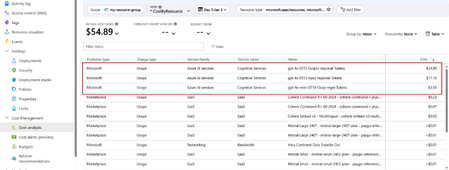
As organizations accelerate their AI adoption, the need for flexible, scalable, and secure platforms becomes paramount. My previous article, Navigating AI Solutions: Microsoft Copilot Studio vs. Azure AI Foundry | Microsoft Community Hub, represented two powerful yet distinct approaches to building AI agents. While Copilot Studio offers a low-code/no-code interface for rapid deployment, targeting any kind of business user, Azure AI Foundry provides a pro-code environment with deep customization and orchestration capabilities, targeting developer audiences. But what if you would not need to decide between one or the other, but benefit from integrating both platforms and unlock transformative business value across all teams? This is exactly the question I got asked increasingly while I was teaching our “Copilot, Copilot Studio and Azure AI Foundry” Instructor Led Training courses as a Microsoft Technical Trainer. This article starts with the business rationale for integration. From there, I will continue with detailing the influence of cost and ROI parameters as part of decision-making. Last, I will guide you through multiple technical integration capabilities available today, and how both platforms can complement each other. Business Rationale for Integration Copilot Studio is primarily designed for business users to build conversational agents quickly. It excels in rapid prototyping, using a graphical workflow-style interface, identical to Power Automate. Users don’t require much development skills to build such agents. Azure AI Foundry, on the other hand, is tailored for developers and data scientists who are typically in need of model orchestration, customized tool integration and enterprise-grade scalability and governance. Integrating both platforms allows organizations to bridge the gap between business agility and technical depth, enabling the ones closer to the business to prototype while developers can focus on custom features, refining and scale. For example, organizations can start with Copilot Studio for customer-facing bots or internal assistants, but then later, transition to Azure AI Foundry for more complex workflows, multi-agent orchestration or custom model integration. This layered approach supports progressive AI maturity, allowing teams to evolve from simple agents to fully sophisticated AI ecosystems. Cost and ROI Considerations Copilot Studio billing vs Azure AI Foundry consumption cost billing As users interact with Copilot Studio agents, or as the agents perform tasks on behalf of users, users consume Copilot Studio messages. Copilot Studio messages are the key component influencing the monthly cost of using Copilot Studio. Capabilities are available via the Copilot Studio pay-as-you-go meter (pay per message) and the Copilot Studio message pack subscription (25,000 messages monthly) license, or a combination of both. These license options are active on tenant-level. Any user with a Microsoft 365 Copilot license gets access to Copilot Studio, with no message-based charge. More details are available in the Microsoft Copilot Studio Licensing Guide. Azure AI Foundry is part of Azure’s consumption-based model, where you do not get charged for Azure AI Foundry itself, but you get charged a consumption cost for the different models your applications use. This charge can be listed as Microsoft (e.g. Azure OpenAI) or charged through the Azure marketplace (e.g. Cohere). Image: Azure AI Foundry model cost consumption overview from within Azure Cost Analysis Depending on the AI solution architecture your application workloads are based on, you should also take other Azure costs into account such as Azure Storage Accounts, Azure AI Search, Azure App Services, Azure Key Vault and alike. Since Azure AI Foundry charges are identical to any other Azure Resource charges, managing these is not different than your current Azure Cost Analysis approach. ROI and Budget alignment From the previous section, it should be clear that allocating the right budget can become complex, depending on the AI platforms used. By integrating both platforms, organizations can achieve cost optimization, by using Copilot Studio for lightweight tasks but scaling via Azure AI Foundry for compute-intensive operations. Given the lower complexity of building applications with Copilot Studio, they tend to result in early ROI, through Copilot Studio’s fast deployment. Azure AI Foundry’s robust and extensible infrastructure could lead to a longer-term value of ROI optimization. Technical Integration Capabilities HTTP Request Trigger One integration method involves using Copilot Studio’s HTTP Request feature to trigger Foundry Agents. This allows for Natural language prompts in Studio to initiate backend processes in Azure AI Foundry. This allows users to benefit from a seamless flow between conversational UI and enterprise logic, to consult business data, run data analytics or retrieve information across different enterprise application backends. Image: HTTP Request setup within Copilot Studio Topic MCP Protocol Azure AI Foundry now supports Model Context Protocol (MCP), an open standard enabling seamless interaction between large language models (LLMs) and external tools, systems or data sources. MCP provides a model-agnostic interface for tasks such as reading files, executing functions, and handling contextual prompts. Its primary goal is to simplify the integration of LLMs with third-party systems by addressing the complexity of building custom connectors for each tool or data source. MCP Tools can be integrated into your AI solutions using Azure AI Foundry Agent Service or through common development language SDKs or REST API. Check this Microsoft Learn module for more technical details on how to configure this or check out MCP-for beginners on YouTube https://aka.ms/MCP-for-beginners. Recently, the Model Context Protocol (MCP) Connector also became available as a new tool directly within Copilot Studio. Image: Model Context Protocol Connector Tool in Copilot Studio By integrating MCP Tools from within either Foundry Agent Service or through Copilot Studio, the organization can benefit from the standardized approach to allow connectivity to different enterprise systems, data endpoints or external applications. Simplifying the complexity and providing a smooth interaction irrespective of the AI platform used, provides major benefits to both business users and developer teams building these applications. Azure AI Foundry Models available to Copilot Studio (preview feature) Azure AI Foundry Models provides +11,000 models for you to choose from, offered by both Microsoft and an extensive range of model providers such as OpenAI, DeepSeek, Black Forest Labs, Meta and many more. On top of existing models offered, organizations can also create their own customized models by fine-tuning from within Azure AI Foundry. For example, imagine an organization building an IT support agent, which interacts with end-users using a chat interface and natural language. Users might be able to provide screenshots of errors, as well as describe technical issues in their own words. Traditional LLMs could struggle with recognizing specific screenshot details or business-specific terminology used by custom in-house developed applications, as they are not trained in this kind of information. That’s where fine-tuned models could be a solution. At the time of writing this article, a new preview feature became available to Copilot Studio customers, allowing them to use any Azure AI Foundry model, both catalog and fine-tuned ones, as the primary model for their Copilot Studio Agents. (FYI, follow this link for all details on the Copilot Studio Roadmap and features list) Image: Copilot Studio New Feature setting to enable AI Foundry model integration Conclusion Integrating Copilot Studio and Azure AI Foundry is not just a technical exercise, but rather a strategic move which aligns business goals, cost efficiency, and adoption readiness. By leveraging the strengths of both platforms, organizations can build AI solutions that are agile, scalable, and secure. Your business can focus on developing (or ‘making’ if not code-based) AI Agents, without facing bottlenecks or unneeded complexity or isolation of workloads. Instead of asking the question of which platform to use for building AI applications, organizations should invest in and benefit from a tight integration between both platforms, quickly enabling teams from both the business side as well as developers, to create AI-influenced applications that provide immediate business value, without compromise. #MicrosoftLearn #SkilledByMTT9.2KViews2likes0Comments