azure advisor
33 TopicsNews and updates from FinOps X 2024: How Microsoft is empowering organizations
Last year, I shared a broad set of updates that showcased how Microsoft is embracing FinOps practitioners through education, product improvements, and innovative solutions that help organizations achieve more. with AI-powered experiences like Copilot and Microsoft Fabric. Whether you’re an engineer working in the Azure portal or part of a business or finance team collaborating in Microsoft 365 or analyzing data in Power BI, Microsoft Cloud has the tools you need to accelerate business value for your cloud investments.12KViews8likes0Comments
Announcing savings plan for databases: flexible savings for modern, evolving workloads
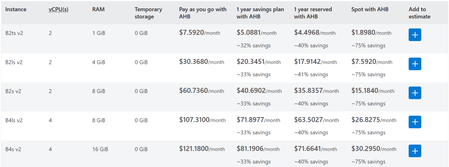
As organizations modernize their data platforms, database environments are constantly changing. Teams migrate between services, scale across regions, and evolve architectures to support new applications and AI driven workloads. But optimizing costs in these environments can be challenging, especially when savings options require locking into specific services, regions, or configurations. To help with these challenges, we’re introducing savings plan for databases, a new way to save on eligible database services while maintaining the flexibility needed to modernize and grow your business. Savings plan for databases helps IT, engineering, and FinOps teams reduce database costs with a simple, spend based commitment—without slowing down architectural change. New: Choose a 3-year term for longer-term planning Savings plan for databases now gives you more choice in how you plan for your database investments, with 1-year and 3-year commitment options. Both terms provide the same discounted pricing, so the choice is less about finding a different discount and more about selecting the commitment period that best aligns with your business plans, workload lifecycle, and cloud strategy. The 3-year option can be a strong fit for organizations with longer-term database migration, modernization, or optimization initiatives. It provides a longer planning horizon for organizations that want predictable savings aligned to a multi-year database roadmap, while reducing the need to make a new commitment decision each year. If your database needs are changing more quickly or you prefer to reassess your commitments annually, the 1-year option may be a better fit. Choose the commitment term that matches your planning horizon: 1 year: Greater flexibility to reassess your database strategy and commitments annually. 3 years: Greater continuity for longer-term database strategies, migration and modernization programs, and multi-year planning. Whichever term you choose, savings plan for databases continues to give you the flexibility to save as your eligible database usage evolves. What is savings plan for databases? Savings plan for databases is a spend based pricing model that enables customers to save on eligible database services by committing to a fixed hourly spend for one year. In return, customers receive lower prices—up to 35% compared to pay-as-you go pricing on select services*. Instead of committing to a specific database service, region, or configuration, customers commit to an hourly dollar amount (for example, $5 per hour). The plan automatically applies savings to eligible database usage each hour, prioritizing the usage that delivers the greatest savings first—across services and regions—until the hourly commitment is met. Any usage beyond the commitment continues at pay-as-you go rates, ensuring flexibility as needs change. Pricing is for illustrative purposes only. Benefits designed for modern database workloads Flexibility as environments evolve Savings plan for databases is designed for change. Savings continue to apply as workloads modernize or move across regions—without requiring customers to repurchase or reconfigure commitments. This makes it well suited for dynamic environments where architectures are expected to evolve over time. Automatic cost optimization With a single hourly commitment, customers unlock discounted prices on eligible database usage. Savings are applied automatically each hour, ensuring customers get the most value from their commitment without manual management or constant tuning. Predictable budgeting and forecasting A fixed hourly spend replaces variable pay-as-you-go costs with a predictable commitment, making it easier for FinOps and IT finance teams to forecast spend, plan budgets, and manage cloud investments with confidence. What services that are covered with the savings plan for databases: Savings plan for databases pricing How to purchase a savings plan for databases Getting started is simple: Review personalized recommendations in the Azure portal based on recent database usage. Choose an hourly commitment and scope it into a subscription, resource group, management group, or entire account. Select a payment option—pay monthly or upfront at no additional cost—and optionally enable auto‑renewal. Once purchased, savings are applied automatically to eligible database usage every hour. Learn more here on how to purchase a savings plans here. Example: saving while modernizing Consider a team running a global application that uses Azure SQL Database and Azure Database for PostgreSQL today, with plans to expand into additional regions over the next year. Instead of purchasing individual reservations tied to specific services or regions, the team purchases a 1‑year savings plan for databases with a $5/hour commitment. As usage shifts across database services and regions, Azure automatically applies discounted prices to eligible usage up to the hourly commitment. The team continues modernizing without disruption—while benefiting from predictable savings. Summary Savings plan for databases provides a new way to optimize database costs —without locking into fixed architectures. With hourly commitments, automatic optimization, and predictable costs, it’s designed to support modernization today and continued growth tomorrow. Get started You can begin saving today: View your recommendation in Azure Advisor Purchase a plan in Azure portal Visit the Savings plan homepage Review the Microsoft Documentation Watch demo videos at the Azure Essentials Show *Customers may see savings estimated to be between 0% and 35%. The 35% savings estimate is based on one Azure SQL Database serverless running for 12 months at a pay-as-you-go rate vs. a reduced rate for a 1-year savings plan. Based on Azure pricing as of March 2026. Prices are subject to change. Actual savings may vary based on location, database service, and/or usage. ** Note that savings plan for databases will also be consumed by SQL Server on Azure Virtual Machines and SQL Server enabled by Azure Arc hourly license at the normal pay-go price.9.7KViews2likes0CommentsHow to choose the right reserved instance in Azure
Are you considering committing to a reserved instance in Azure? Our guide will help you make an informed decision by providing insights on the benefits, flexibility, and limitations of reserved instances. Learn about the steps to evaluate and purchase a reserved instance, the tools and services to optimize and manage them, and the alternative options available. Make the most of your investment with our comprehensive guide to Azure Reserved Instances.9.6KViews1like28Comments