azure advisor
33 Topics
You Get One Exchange Left: Rethinking Azure Commitments Before February 2027
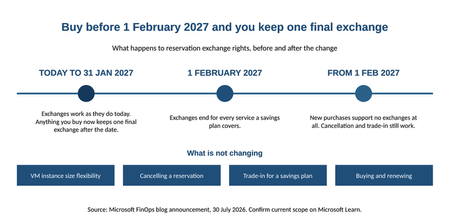
Azure gives you two main ways to pay less by committing up front. A reservation gets you the deepest discount, but you are locking in a specific SKU in a specific region. A savings plan gives up some of that discount in exchange for freedom: you are only committing to spend a certain amount per hour on compute and database services, and it does not care which region you spend it in. Until now, a reservation could move with you. If your infrastructure or database environment changed, or a workload had to move to a new region, you exchanged the reservation for one that matched where things had landed. That flexibility is why teams could commit early and adjust as the environment evolved. That flexibility is changing. From February 1, 2027, you can no longer exchange a reservation for any service that a savings plan covers. Neither product is changing. What is changing is how much room you have to adjust a commitment after your environment shifts, which means the order you make these decisions in matters a lot more than it used to. What's changing Here is what is affected as of the announcement. Compute: Azure Virtual Machines (including swapping between non-premium and premium storage), Azure Dedicated Host, and Azure App Service. Databases: Azure Database for PostgreSQL, Azure Database for MySQL, Azure DocumentDB, Azure Cosmos DB, Azure SQL Database, and Azure SQL Managed Instance. That list will grow. As savings plans start covering more services, reservations for those services automatically fall under the same rule. Products that are being retired are excluded, and so are clouds where savings plans are not offered. Two details really matter. If you own a reservation for one of these services and you bought it before February 1, 2027, you get one final exchange after that date. Just one. Buy on or after that date and you get none. Full details, including the FAQ, are in the official announcement: "Reservation exchanges for Azure services covered by savings plans end starting Feb. 1, 2027". What's staying exactly the same This is worth spelling out, because it is easy to read more into the announcement than is actually there. All of this still works. VM instance size flexibility is untouched. Cancelling a reservation is untouched. Trading a reservation in for a savings plan is still there. Buying and renewing reservations is still available, and still the right call for steady workloads. Reservations are not going anywhere. The only thing changing is your ability to swap one for another when your environment moves underneath it. The part most teams get backwards You cannot think clearly about timing without this, and it is the thing people most often have wrong: reservations and savings plans are not a choice between two options. You can use both. They stack, and they apply in a set order every hour. Reservations go first, on anything they match. The savings plan picks up what is left, up to your hourly commitment. Whatever is still uncovered bills at pay-as-you-go, using your negotiated rate. Here is one hour, made concrete. Say you have reservations covering $10 an hour of matching VMs, plus a savings plan committed at $5 an hour. In an hour where you use $18 of eligible compute, $10 gets reservation pricing, $5 gets savings plan pricing, and the last $3 bills pay-as-you-go. The savings plan did not fight the reservation for that spend. It caught the overflow. Two things people assume that are not true. The terms do not have to match: a three-year reservation and a one-year savings plan work fine side by side. And you do not tag or assign anything. Once you buy a savings plan, it looks across whatever scope you bought it at and applies itself wherever it finds a fit. That flexibility is the whole point. A savings plan ties you to an hourly amount, not to a SKU or a region. A reservation ties you to both. Before February 2027 that difference was mostly about how big a discount you got. After, it also decides how easily your commitment can follow the environment as it changes. Three rules for buying from here on Lean on savings plans while things are still moving Before you commit to anything, ask what is going to change in the next ninety days. If a team is midway through centralizing their networking and is about to delete every per-subscription VPN gateway, any recommendation you generate this week will be wrong next month. Azure Advisor rescans every day and rewrites its recommendations as your environment shifts. If a workload is mid-migration, mid-consolidation, or mid-anything, a savings plan gets you a similar discount without locking you in. Move it to a reservation once it is genuinely settled. A domain controller running around the clock in one region is the textbook reservation. Something still being actively built is not. Start short, and know why that matters now Three years gets you the best rate. Starting with one year and extending as you get more confident was always the sensible approach. Now it carries more weight, because a reservation can no longer be exchanged when your environment moves. If one stops matching, your options are to cancel it under the existing policy, or trade it in for a savings plan. That is the whole list. Buy at the business-unit level, not the tenant level Buy everything centrally and you take away each team's ability to pick what suits their own workloads. Then, when a team wants more coverage than the central purchase gives them, they go and buy their own at subscription level, and now you are paying for the same thing twice. Buying per business unit also makes chargeback far easier, because the discount ends up sitting where the spending happens. Clean up before you commit There is a step that comes before all of this, and it is not new advice. Azure Advisor already flags unattached disks, idle virtual network gateways, and VMs that should be resized or switched off. If you have not done that sweep, "Identify your savings potential in Azure" walks through the tools properly. What is new is what happens if you skip it. Leftover and idle resources do not just eat into your savings. They inflate the number you size your commitment against. Commit against a messy environment and you have just locked in one to three years of spend on resources that should not be running. Up to now, an exchange gave you a way to adjust that later. Cleaning up used to be good housekeeping. Once you cannot exchange out of a reservation, it is genuinely about limiting risk. The same goes for the workloads you are keeping. Switch off VMs outside business hours before you buy a reservation, not after. Reservations only pay off on workloads that run constantly, and once you have bought one you owe the money whether the VM is running or deallocated. Scaling up and never scaling back down is the same problem wearing a different hat. How to check it actually worked Your reservation and savings plan discounts show up on the invoice under amortized cost. Three columns tell the story. Pay-as-you-go price is the list price. Unit price is your negotiated discount, before reservations are applied. Effective price is what you genuinely paid once reservations and savings plans were counted. There is no neat query for this. You read it off the invoice. It is the clunkiest part of the whole process and it is the first thing your finance partner will ask about, so get it into your reporting now rather than during your first chargeback cycle. What to do in the next ninety days List every active reservation you hold for an affected service. Work out which ones no longer match the workload. Those are your candidates for that one remaining exchange. Decide deliberately where that one exchange does the most good. Clean up orphaned disks, idle gateways, over-replicated storage, and scale-ups nobody scaled back down. Re-baseline your commitment sizing against the tidied-up environment. Buy at business-unit level, leaning toward savings plans anywhere the workload is still changing. The takeaway Reservations and savings plans both still work, and both still save you real money. What changes on February 1, 2027 is that a reservation can no longer be exchanged when your environment moves, so the decision has to be right at the point you make it rather than adjusted afterwards. That puts the weight on sequence: clean up first, size the commitment against what is actually running, use savings plans while a workload is still settling, and move to a reservation once it has stopped moving. The deadline is not something to panic about. It is a good excuse to finally do the bit most cost programs skip.989Views0likes0Comments
Announcing savings plan for databases: flexible savings for modern, evolving workloads
As organizations modernize their data platforms, database environments are constantly changing. Teams migrate between services, scale across regions, and evolve architectures to support new applications and AI driven workloads. But optimizing costs in these environments can be challenging, especially when savings options require locking into specific services, regions, or configurations. To help with these challenges, we’re introducing savings plan for databases, a new way to save on eligible database services while maintaining the flexibility needed to modernize and grow your business. Savings plan for databases helps IT, engineering, and FinOps teams reduce database costs with a simple, spend based commitment—without slowing down architectural change. New: Choose a 3-year term for longer-term planning Savings plan for databases now gives you more choice in how you plan for your database investments, with 1-year and 3-year commitment options. Both terms provide the same discounted pricing, so the choice is less about finding a different discount and more about selecting the commitment period that best aligns with your business plans, workload lifecycle, and cloud strategy. The 3-year option can be a strong fit for organizations with longer-term database migration, modernization, or optimization initiatives. It provides a longer planning horizon for organizations that want predictable savings aligned to a multi-year database roadmap, while reducing the need to make a new commitment decision each year. If your database needs are changing more quickly or you prefer to reassess your commitments annually, the 1-year option may be a better fit. Choose the commitment term that matches your planning horizon: 1 year: Greater flexibility to reassess your database strategy and commitments annually. 3 years: Greater continuity for longer-term database strategies, migration and modernization programs, and multi-year planning. Whichever term you choose, savings plan for databases continues to give you the flexibility to save as your eligible database usage evolves. What is savings plan for databases? Savings plan for databases is a spend based pricing model that enables customers to save on eligible database services by committing to a fixed hourly spend for one year. In return, customers receive lower prices—up to 35% compared to pay-as-you go pricing on select services*. Instead of committing to a specific database service, region, or configuration, customers commit to an hourly dollar amount (for example, $5 per hour). The plan automatically applies savings to eligible database usage each hour, prioritizing the usage that delivers the greatest savings first—across services and regions—until the hourly commitment is met. Any usage beyond the commitment continues at pay-as-you go rates, ensuring flexibility as needs change. Pricing is for illustrative purposes only. Benefits designed for modern database workloads Flexibility as environments evolve Savings plan for databases is designed for change. Savings continue to apply as workloads modernize or move across regions—without requiring customers to repurchase or reconfigure commitments. This makes it well suited for dynamic environments where architectures are expected to evolve over time. Automatic cost optimization With a single hourly commitment, customers unlock discounted prices on eligible database usage. Savings are applied automatically each hour, ensuring customers get the most value from their commitment without manual management or constant tuning. Predictable budgeting and forecasting A fixed hourly spend replaces variable pay-as-you-go costs with a predictable commitment, making it easier for FinOps and IT finance teams to forecast spend, plan budgets, and manage cloud investments with confidence. What services that are covered with the savings plan for databases: Savings plan for databases pricing How to purchase a savings plan for databases Getting started is simple: Review personalized recommendations in the Azure portal based on recent database usage. Choose an hourly commitment and scope it into a subscription, resource group, management group, or entire account. Select a payment option—pay monthly or upfront at no additional cost—and optionally enable auto‑renewal. Once purchased, savings are applied automatically to eligible database usage every hour. Learn more here on how to purchase a savings plans here. Example: saving while modernizing Consider a team running a global application that uses Azure SQL Database and Azure Database for PostgreSQL today, with plans to expand into additional regions over the next year. Instead of purchasing individual reservations tied to specific services or regions, the team purchases a 1‑year savings plan for databases with a $5/hour commitment. As usage shifts across database services and regions, Azure automatically applies discounted prices to eligible usage up to the hourly commitment. The team continues modernizing without disruption—while benefiting from predictable savings. Summary Savings plan for databases provides a new way to optimize database costs —without locking into fixed architectures. With hourly commitments, automatic optimization, and predictable costs, it’s designed to support modernization today and continued growth tomorrow. Get started You can begin saving today: View your recommendation in Azure Advisor Purchase a plan in Azure portal Visit the Savings plan homepage Review the Microsoft Documentation Watch demo videos at the Azure Essentials Show *Customers may see savings estimated to be between 0% and 35%. The 35% savings estimate is based on one Azure SQL Database serverless running for 12 months at a pay-as-you-go rate vs. a reduced rate for a 1-year savings plan. Based on Azure pricing as of March 2026. Prices are subject to change. Actual savings may vary based on location, database service, and/or usage. ** Note that savings plan for databases will also be consumed by SQL Server on Azure Virtual Machines and SQL Server enabled by Azure Arc hourly license at the normal pay-go price.9.7KViews2likes0CommentsReservation exchanges for Azure services covered by savings plans end starting Feb. 1, 2027
Starting February 1, 2027, Azure reservation exchanges will no longer be available for services covered by savings plans. This change aligns reservation exchange policy with the flexibility already offered by savings plans, and it gives you a clear, predictable framework for choosing the right commitment-based discount for each workload. This post walks through what's changing, who's affected, what stays the same, and the actions you can take today to plan ahead. What's changing If a service supports Azure savings plans, the corresponding reservation for that service will no longer support exchanges as of February 1, 2027. This change excludes products or services that are deprecated and approaching end of life, as well as cloud environments that don't currently support savings plans. The policy is forward-looking, as savings plan coverage expands, reservations for those services will follow the same policy and will not support exchanges. Affected services At the time of this announcement, the change applies to reservations for the following services: Compute services Azure Virtual Machines — including exchanges between non-premium and premium storage Azure Dedicated Host Azure App Service Database services Azure Database for PostgreSQL Azure Database for MySQL Azure DocumentDB Azure Cosmos DB Azure SQL Database Azure SQL Managed Instance Important details to plan around One final exchange. Each active reservation for an impacted service, purchased before February 1, 2027, will retain the right to one final exchange after that date. Plan how and when you want to use it. New purchases. Reservations for impacted services purchased on or after February 1, 2027, will not support exchanges. Expanding scope. As savings plan eligibility grows, additional services will automatically fall under this policy. What's not changing Reservations remain the right choice for predictable, stable workloads, and you can continue to purchase them. Specifically: Instance size flexibility for virtual machines is not impacted by this change. The reservation cancellation policy is not impacted by this change. Recommended action If you need flexibility across services and regions, consider evaluating savings plans as a discount option for dynamic and evolving workloads. Savings plans can help provide cost savings on consistent spend across compute and database services, regardless of region. You can also trade in your existing reservations for a savings plan. Alternatively, reservations remain the appropriate option for predictable, stable workloads, and you can continue to purchase them. To compare your options, see decide between a savings plan and a reservation. Frequently Asked Questions What is changing? Starting February 1, 2027, Azure reservation exchanges will no longer be available for services covered by Azure savings plans. Reservations for these services will continue to be available for purchase and renewal. Which services are affected? At the time of this announcement, the policy applies to reservations for: Compute services Azure Virtual Machines (including exchanges between non-premium and premium storage) Azure Dedicated Host Azure App Service Database services Azure Database for PostgreSQL Azure Database for MySQL Azure DocumentDB Azure Cosmos DB Azure SQL Database Azure SQL Managed Instance As Azure savings plan coverage expands, additional savings plan-eligible services may become subject to this policy. Does this apply to all Azure cloud environments? No. This change applies only to cloud environments where Azure savings plans are available. Can I still exchange reservations before February 1, 2027? Yes. Reservation exchanges will continue to be available under the current policy until February 1, 2027. Does this affect reservations I already own? Active reservations for impacted services purchased before February 1, 2027, will retain the right to one final exchange after that date. What happens after I use my final exchange? Once the final exchange is used, the resulting reservation cannot be exchanged again. Can I still purchase or renew reservations? Yes. Reservations remain available and continue to be a valuable option for stable, predictable workloads. Is Azure retiring reservations? No. Reservations remain an important commitment-based discount offering. This change affects exchangeability only. What is not changing? The following capabilities remain available: VM instance size flexibility Reservation cancellations under existing policies Reservation-to-savings-plan trade-in Reservation purchases and renewals When should I choose a savings plan instead of a reservation? Review our guidance on how to decide between a savings plan and a reservation. What should I do before February 1, 2027? Review your reservation portfolio, evaluate future flexibility needs, consider Azure savings plans where appropriate, and plan how you want to use the one final exchange available to eligible active reservations. Where can I learn more? For more information, see: Changes to the Azure reservation exchange policy Exchanges and refunds for Azure reservations Trade in reservations for a savings plan Azure savings plans Decide between a savings plan and a reservation. Policy details are subject to change and may vary based on service eligibility and contractual terms.3.9KViews0likes0CommentsRight‑sizing Azure Savings Plans, one hour at a time
Most of us have, at some point, sized a commitment the same way we order food for a team offsite: estimate, round up, and hope nobody complains. It works for pizza. It is a less robust strategy for a three‑year Savings Plan. Azure Cost Management already produces commitment recommendations for you, and they are a great starting point. But the headline dollar figure on the portal hides the most useful signal a FinOps team can get its hands on: the hourly Pay‑As‑You‑Go (PAYG) usage that the recommendation engine actually looked at. Once you have that signal in a spreadsheet, "right‑sized" stops being a vibe and starts being a number you can defend in a steering meeting. This post walks through how to pull that data out of the Cost Management REST API, and shares a small companion PowerShell script that does the heavy lifting and produces analyst‑friendly CSV and Markdown outputs. Why a single recommended number isn't enough A Savings Plan recommendation is, at its core, an optimisation against a distribution of hourly compute spend over a lookback window. The portal typically surfaces the single commitment level that maximises savings under a "reasonable utilisation" assumption. That's a sensible default, but it answers only one question. The questions FinOps practitioners also want to answer include: What does my PAYG demand actually look like hour‑by‑hour? Smooth and predictable, or spiky and seasonal? How does coverage and savings change if I commit a bit less, or a bit more? Will the recommended commitment leave me with wastage on weekends or overnight? Can I correlate the hourly profile with maintenance windows, batch jobs, or business hours? You cannot answer those questions with a single dollar figure. You can answer all of them with the hourly series and the alternative commitment levels — and the API exposes both. What the Benefit Recommendations API gives you The endpoint is the Benefit Recommendations - List operation (api-version=2025-03-01). Pointed at any of the supported scopes — Billing Account (EA), Billing Profile (MCA), Subscription, or Resource Group — it returns one or more recommendations for the chosen lookBackPeriod (Last7Days, Last30Days, Last60Days) and term (P1Y, P3Y). The two $expand options are where the magic lives: $expand=properties/allRecommendationDetails returns an array of alternative commitment levels (AllSavingsBenefitDetails). Each entry includes commitmentAmount, coveragePercentage, benefitCost, overageCost, savingsAmount, savingsPercentage, wastageCost, and averageUtilizationPercentage. $expand=properties/usage returns the hourly PAYG charge series (usage.charges) that the engine used. Combined with properties.firstConsumptionDate and properties.lastConsumptionDate, you get a complete time‑aligned view of demand. Both expansions are cheap and worth requesting every time. They turn a single recommendation into a small, complete data product. Meet the script: Export-BenefitRecommendations.ps1 To make this useful in five minutes rather than an afternoon, there is a PowerShell script on GitHub that wraps the API call and produces ready‑to‑use artifacts. It is interactive, so there is nothing to memorise: === Azure Benefit Recommendations Export === Select billing scope kind: * [1] Billing Account (EA) [2] Billing Profile (MCA) [3] Subscription [4] Resource Group Enter choice 1-4 (default 1): 1 Billing Account ID: <your-EA-billing-account-id> Select lookback period: [1] Last7Days * [2] Last30Days [3] Last60Days Enter choice 1-3 (default 2): 3 Select term: * [1] P1Y [2] P3Y Enter choice 1-2 (default 1): 2 ... Retrieved 1 recommendation(s). It authenticates via the Az.Accounts module, always requests both $expand options, follows nextLink pagination, verifies API access up front (translating 401/403/404 into actionable hints), and writes four files using a predictable name pattern: yyyy-MM-dd-<scope>-<lookback>-<term>-AllRecommendationDetails.csv — one row per commitment alternative, ready for pivot tables. yyyy-MM-dd-<scope>-<lookback>-<term>-TopRecommendation.md — a Markdown brief on the top recommendation, including the recommended commitment row and the full alternatives table. yyyy-MM-dd-<scope>-<lookback>-<term>-HourlyUsage.csv — hour‑by‑hour PAYG usage for the top recommendation, aligned to the API's actual data window (no padding, no trailing blanks). yyyy-MM-dd-<scope>-<lookback>-<term>-Raw.json — optional full response dump, for archival or downstream tooling. The naming convention is intentional: paste a folder of these into Power BI and the dates, scopes, and terms are already in the filename. A worked example Here is a real shape from a sample Last60Days / P3Y export against an EA billing account. The AllRecommendationDetails CSV gives us four commitment alternatives: averageUtilizationPercentage,coveragePercentage,commitmentAmount,overageCost,benefitCost,savingsAmount,savingsPercentage,totalCost,wastageCost 100.000,28.868,4.124,30914.280,5889.072,6656.889,15.317,36803.352,0.000 100.000,39.168,5.848,26437.791,8350.944,8671.506,19.953,34788.735,0.000 9.984,97.883,16.359,919.948,23360.652,19179.641,44.131,24280.600,3.767 98.684,98.900,16.806,477.956,23998.968,18983.317,43.680,24476.924,315.907 Read those rows like an interactive lever: Commit $4.124/hr → 28.9% coverage, 15.3% savings, zero wastage. Safe, but most of your spend is still PAYG. Commit $5.848/hr → 39.2% coverage, 19.9% savings. Still safe, still conservative. Commit $16.359/hr → 97.9% coverage, 44.1% savings, ~$3.77 of wastage. This is the sweet spot the engine flags as recommended. Commit $16.806/hr → 98.9% coverage, 43.7% savings, but wastage jumps to $315.9 over the window. You bought more coverage and the engine charged you for it. The hourly CSV is what makes the recommendation defensible. It contains 1,428 rows — one per hour from 2026-04-11T00:00 through 2026-06-09T11:00 (the API's reported data range, not "now minus 60 days"): DateTime,HourlyPayGoUsage 2026-04-11T00:00,29.5350191832771 2026-04-11T01:00,29.566694701744 ... 2026-06-09T11:00,32.7312920192344 Drop that into Excel or Power BI, lay a horizontal line at the recommended commitmentAmount ($16.359/hr), and you immediately see how often demand sits above the line (covered by PAYG overage) versus below it (where the commitment is technically idle but, given the savings rate, still net‑positive). You can also slice by hour‑of‑day to spot weekend troughs or batch‑job spikes that change how you interpret "average utilisation." Try it yourself The script and full documentation live at github.com/DirkBrinkmann/azure-savingsplan-insights. Quickstart: git clone https://github.com/DirkBrinkmann/azure-savingsplan-insights.git cd azure-savingsplan-insights Install-Module Az.Accounts -Scope CurrentUser # if you don't already have it #Connect to Azure Connect-AzAccount #Run the script .\Export-BenefitRecommendations.ps1 You will need read permission on the scope you target — Cost Management Reader on a subscription, or Billing Reader at the billing account / billing profile level, is enough. Give it a spin against your own scope and tell us how it goes. The repo at github.com/DirkBrinkmann/azure-savingsplan-insights has Issues and Discussions enabled — bug reports, edge cases ("my response shape looks different"), feature ideas, and "I plotted this in Power BI and learned X" stories are all welcome. The script will only get better with real‑world data behind it, and yours is the kind we want to hear about. Closing nudge In FinOps terms, this is squarely an Inform phase activity: turning a black‑box recommendation into a transparent dataset your team can challenge, chart, and align on. The API has had this data all along; the script just makes it boring to extract — which is exactly what you want a FinOps tool to be. Pull a Last60Days / P3Y export for your top‑spending scope, plot the hourly line, and decide your next Savings Plan with a number you can point to. Your future self (and your finance partner) will thank you.1.3KViews2likes2CommentsOptimize your Azure costs with our expert guidance, pricing tools, and resources
Efficient management of cloud resources is pivotal for controlling costs and building resilient infrastructure. Taking a strategic approach not only maximizes return on investment but also positions your organization to innovate and manage risk. Recognizing the needs of our customers to bolster their cloud management practices, Microsoft recently launched Azure Essentials as an all-in-one showcase for prescriptive guidance, expert training, and AI-assisted solutions.7.4KViews1like1CommentHow to choose the right reserved instance in Azure
Are you considering committing to a reserved instance in Azure? Our guide will help you make an informed decision by providing insights on the benefits, flexibility, and limitations of reserved instances. Learn about the steps to evaluate and purchase a reserved instance, the tools and services to optimize and manage them, and the alternative options available. Make the most of your investment with our comprehensive guide to Azure Reserved Instances.9.7KViews1like28CommentsStreamline Analytics Spend on Microsoft Fabric with Azure Reservations
Introduction As organizations accelerate their cloud adoption, optimizing spend while maintaining performance and scalability is a top priority. Microsoft Fabric, our all-in-one, software-as-a-service data platform, is designed to help teams accomplish any data project. But how can you ensure your investment delivers maximum value? In this post, we’ll explore how Azure reservations for Microsoft Fabric can help you optimize costs, simplify purchasing, and streamline your data analytics spend. What Is Microsoft Fabric? Microsoft Fabric is an end-to-end data platform that brings together data orchestration, transformation, machine learning, real-time event processing, reporting, and databases in a single SaaS experience. It’s designed for data engineers, scientists, analysts, and business users, offering role-specific workloads and integrated AI experiences, all backed by a unified data lake—OneLake. Unlike traditional services that require managing different pricing and capacities for each workload, Fabric simplifies this with a single capacity model. You purchase Fabric Capacity Units (CUs), which power all workloads, and jobs consume CUs at different rates depending on your compute needs. How Azure reservations Work with Fabric Azure reservation is a pricing model that helps you save when you commit to a specific resource, region, and term - ideal for stable, predictable workloads. Reservations don’t affect capacity or runtime; they simply provide discount benefits. Azure analyzes your usage and recommends reservation options, and tools like Azure Advisor guide you toward the right purchase. You may be familiar with how reservations work with virtual machines, but Azure reservations can also apply to other services such as Microsoft Fabric. When purchasing Fabric, you can choose a pay-as-you-go model for flexible usage or save substantially with Azure reservations for consistent workloads. For example, if you deploy an F64 SKU in Fabric for ongoing reporting and analytics, buying an Azure reservation for this SKU ensures you pay the discounted rate for your consistent usage. How to Purchase a Reservation for Microsoft Fabric Let’s look at how you can purchase a reservation for Microsoft Fabric. Follow these steps below or watch this video: 1. Start in the Microsoft Marketplace or Azure Portal: Visit the Microsoft Marketplace and look up Microsoft Fabric. Click “Get it now” and it will take you to the Azure Portal. 2. Create Fabric Capacity: Select Configuration: In Azure Portal, on the Create Fabric Capacity page, select your subscription and resource group, name your capacity, and select your region. Select Size: Use the Fabric SKU estimator to determine the right capacity for your workloads, or start with a free trial and monitor usage with the capacity metrics app. You can always upgrade or create multiple capacities as needed. Organize with Tags: Use Azure tags to track costs and automate management across environments. 3. Buy Fabric Reservations: In the Azure portal, search for and select “Reservations.” On the Reservations page, click “Add” and select Microsoft Fabric. Choose your scope and subscription, select Fabric Capacity with upfront or monthly payments, and adjust the quantity as needed. Best Practices for Maximizing Savings To get the most value from your reservations, follow these best practices: Estimate Carefully: Avoid over-committing (which leads to wasted resources) or under-committing (which leads to higher costs). Understand your resource needs and usage and use Azure Advisor recommendations to make informed decisions. Enable Auto-Renew: Ensure your reservations automatically renew so you don’t lose the discount but adjust your reservation needs as workloads change. Monitor Usage: Use Azure Cost Management to continuously track reservation usage. Choose the Right Scope: Align reservation benefits with your organizational structure to maximize savings. Conclusion: Microsoft Fabric and Azure reservations empower organizations to streamline analytics spend, simplify purchasing, and unlock significant savings without sacrificing performance or scalability. Following best practices and leveraging the right tools ensures your cloud investments deliver maximum value. Get started today by visiting the Microsoft Marketplace and Azure Portal to purchase Fabric Capacity units and reservations or read Save costs with Microsoft Fabric Capacity reservations - Microsoft Cost Management | Microsoft Learn to learn more.559Views2likes0CommentsSmarter Cloud, Smarter Spend: How Azure Powers Cost-Efficient Innovation
In today’s dynamic business environment, organizations are under pressure to innovate rapidly while managing costs effectively. The cloud, especially with AI at the forefront, is driving transformation across industries. But with rising cloud spend and economic uncertainty, cost efficiency has become a top priority. To help customers navigate this challenge, Microsoft commissioned Forrester Consulting to conduct a Total Economic Impact™ (TEI) study. The study reveals how organizations can unlock significant financial and operational benefits by leveraging Microsoft Azure’s tools and strategic pricing offers, especially when migrating to the cloud and adopting AI. Cloud Migration: Accelerating Modernization with Azure Migrating to the cloud is a foundational step for digital transformation. But many organizations initially struggled with cost overruns, lack of visibility, and inefficient resource usage. The TEI study shows how Azure’s native tools and strategic pricing offers helped overcome these challenges. Key Enablers of Cost-Efficient Migration: Azure Hybrid Benefit: Allows organizations to optimize savings in their migration journey by giving a discount on server licenses and subscriptions and granting hosting and outsourcing benefits Azure reservations: A commitment model that enables customers to save on their spend when they commit to a specific resource, in a region, and for a specific term. Azure savings plan for compute: A flexible pricing model that enables customers to save on their cost when they commit to a spend a fixed hourly amount for a specific term. Microsoft Cost Management & Azure Advisor: Provide real-time insights and optimization recommendations. Azure Pricing Calculator: Accurately estimate migration costs and forecast budgets. “Azure reservations and Azure Hybrid Benefit facilitate moving to the cloud. With these offers and better cost management, we are saving 30% to 35%. Managing our costs without these tools would be an unpredictable nightmare.” — Senior IT Director, Manufacturing Quantified Impact*: 25% reduction in cloud spending in Year 1 using Microsoft tools. $4.9M in direct savings over three years from tool-based optimization. $3.8M in additional savings from strategic pricing offers. AI Adoption: Driving Innovation with Cost-Efficient Azure Solutions Once migrated, organizations are increasingly turning to AI to drive innovation and competitive advantage. Azure doesn’t just support AI workloads, it makes them more cost-effective and scalable. Key Enablers of AI Adoption: Azure AI Foundry Provisioned Throughput reservations: Get cost savings compared to provisioned throughput (PTU) hourly pricing. Microsoft Cost Management & Azure Advisor: Help forecast and optimize AI-related cloud spend. Strategic Pricing Offers: Enable predictable budgeting and reinvestment into AI initiatives. “Leveraging Microsoft tools and strategic pricing offers is not only increasing profitability but also putting those savings into more interesting projects like AI with fraud prevention work and the customer experience.” — VP of Analytics Engineering, Financial Services “Azure reservations for AI projects using PTUs has helped our AI initiatives. It has helped better predict costs.” — CIO, Healthcare Unquantified Benefits: Increased cloud insights and visibility. Improved governance and accountability. Enhanced productivity (24% by Year 3). The Bottom Line: Unified Transformation with Azure The TEI study concludes that Azure delivers a unified approach to cloud computing, enabling organizations to: Migrate to the cloud efficiently with cost control Adopt AI rapidly by reinvesting savings into innovation Achieve a net present value (NPV) of $8.7 million over three years Realize a 35% reduction in cloud spending in Year 1 “With Microsoft tools, we can focus on higher value projects. Instead of reviewing reports and conducting cost audits, we can build new tools and build with genAI. We can innovate faster.” — Vice President of Analytics Engineering, Financial Services Ready to Dive Deeper? This blog is just the beginning. The full Forrester TEI study is packed with insights, customer stories, and financial modeling to help you build your business case for Azure. Read the full study here *To understand benefits, costs, and risks, Forrester interviewed eight decision-makers with experience using the evaluated Azure solutions. For the purposes of this study, Forrester aggregated the results from these decision-makers into a single composite organization.865Views2likes0CommentsAugust 2025 Recap: Azure Database for PostgreSQL
Hello Azure Community, August was an exciting month for Azure Database for PostgreSQL! We have introduced updates that make your experience smarter and more secure. From simplified Entra ID group login to integrations with LangChain and LangGraph, these updates help with improving access control and seamless integration for your AI agents and applications. Stay tuned as we dive deeper into each of these feature updates. Feature Highlights Enhanced Performance recommendations for Azure Advisor - Generally Available Entra-ID group login using user credentials - Public Preview New Region Buildout: Austria East LangChain and LangGraph connector Active-Active Replication Guide Enhanced Performance recommendations for Azure Advisor - Generally Available Azure Advisor now offers enhanced recommendations to further optimize PostgreSQL server performance, security, and resource management. These key updates are as follows: Index Scan Insights: Detection and recommendations for disabled index and index-only scans to improve query efficiency. Audit Logging Review: Identification of excessive logging via the pgaudit.log parameter, with guidance to reduce overhead. Statistics Monitoring: Alerts on server statistics resets and suggestions to restore accurate performance tracking. Storage Optimization: Analysis of storage usage with recommendations to enable the Storage Autogrow feature for seamless scaling. Connection Management: Evaluation of workloads for short-lived connections and frequent connectivity errors, with recommendations to implement PgBouncer for efficient connection pooling. These enhancements aim to provide deeper operational insights and support proactive performance tuning for PostgreSQL workloads. For more details read the Performance recommendations documentation. Entra-ID group login using user credentials - Public Preview The public preview for Entra-ID group login using user credentials is now available. This feature simplifies user management and improves security within the Azure Database for PostgreSQL. This allows administrators and users to benefit from a more streamlined process like: Changes in Entra-ID group memberships are synchronized on a periodic 30min basis. This scheduled syncing ensures that access controls are kept up to date, simplifying user management and maintaining current permissions. Users can log in with their own credentials, streamlining authentication, and improving auditing and access management for PostgreSQL environments. As organizations continue to adopt cloud-native identity solutions, this update represents a major improvement in operational efficiency and security for PostgreSQL database environments. For more details read the documentation on Entra-ID group login. New Region Buildout: Austria East New region rollout! Azure Database for PostgreSQL flexible server is now available in Austria East, giving customers in and around the region lower latency and data residency options. This continues our mission to bring Azure PostgreSQL closer to where you build and run your apps. For the full list of regions visit: Azure Database for PostgreSQL Regions. LangChain and LangGraph connector We are excited to announce that native LangChain & LangGraph support is now available for Azure Database for PostgreSQL! This integration brings native support for Azure Database for PostgreSQL into LangChain or LangGraph workflows, enabling developers to use Azure PostgreSQL as a secure and high-performance vector store and memory store for their AI agents and applications. Specifically, this package adds support for: Microsoft Entra ID (formerly Azure AD) authentication when connecting to your Azure Database for PostgreSQL instances, and, DiskANN indexing algorithm when indexing your (semantic) vectors. This package makes it easy to connect LangChain to your Azure-hosted PostgreSQL instances whether you're building intelligent agents, semantic search, or retrieval-augmented generation (RAG) systems. Read more at https://aka.ms/azpg-agent-frameworks Active-Active Replication Guide We have published a new blog article that guides you through setting up active-active replication in Azure Database for PostgreSQL using the pglogical extension. This walkthrough covers the fundamentals of active-active replication, key prerequisites for enabling bi-directional replication, and step-by-step demo scripts for the setup. It also compares native and pglogical approaches helping you choose the right strategy for high availability, and multi-region resilience in production environments. Read more about the active-active replication guide on this blog. Azure Postgres Learning Bytes 🎓 Enabling Zone-Redundant High Availability for Azure Database for PostgreSQL Flexible Server Using APIs. High availability (HA) is essential for ensuring business continuity and minimizing downtime in production workloads. With Zone-Redundant HA, Azure Database for PostgreSQL Flexible Server automatically provisions a standby replica in a different availability zone, providing stronger fault tolerance against zone-level failures. This section will guide you on how to enable Zone-Redundant HA using REST APIs. Using REST APIs gives you clear visibility into the exact requests and responses, making it easier to debug issues and validate configurations as you go. You can use any REST API client tool of your choice to perform these operations including Postman, Thunder Client (VS Code extension), curl, etc. to send requests and inspect the results directly. Before enabling Zone-Redundant HA, make sure your server is on the General Purpose or Memory Optimized tier and deployed in a region that supports it. If your server is currently using Same-Zone HA, you must first disable it before switching to Zone-Redundant. Steps to Enable Zone-Redundant HA: Get an ARM Bearer token: Run this in a terminal where Azure CLI is signed in (or use Azure Cloud Shell) az account get-access-token --resource https://management.azure.com --query accessToken -o tsv Paste token in your API client tool Authorization: `Bearer <token>` </token> Inspect the server (GET) using the following URL: https://management.azure.com/subscriptions/{{subscriptionId}}/resourceGroups/{{resourceGroup}}/providers/Microsoft.DBforPostgreSQL/flexibleServers/{{serverName}}?api-version={{apiVersion}} In the JSON response, note: sku.tier → must be 'GeneralPurpose' or 'MemoryOptimized' properties.availabilityZone → '1' or '2' or '3' (depends which availability zone that was specified while creating the primary server, it will be selected by system if the availability zone is not specified) properties.highAvailability.mode → 'Disabled', 'SameZone', or 'ZoneRedundant' properties.highAvailability.state → e.g. 'NotEnabled','CreatingStandby', 'Healthy' If HA is currently SameZone, disable it first (PATCH) using API. Use the same URL in Step 3, in the Body header insert: { "properties": { "highAvailability": { "mode": "Disabled" } } } Enable Zone Redundant HA (PATCH) using API: Use the same URL in Step 3, in the Body header insert: { "properties": { "highAvailability": { "mode": "ZoneRedundant" } } } Monitor until HA is Healthy: Re-run the GET from Step 3 every 30-60 seconds until you see: "highAvailability": { "mode": "ZoneRedundant", "state": "Healthy" } Conclusion That’s all for our August 2025 feature updates! We’re committed to making Azure Database for PostgreSQL better with every release, and your feedback plays a key role in shaping what’s next. 💬 Have ideas, questions, or suggestions? Share them with us: https://aka.ms/pgfeedback 📢 Want to stay informed about the latest features and best practices? Follow us here for the latest announcements, feature releases, and best practices: Azure Database for PostgreSQL Blog More exciting improvements are on the way—stay tuned for what’s coming next!1.3KViews2likes0Comments