azure ad federation services
21 Topics
PHS staged rollout works for existing users but not new synced users
We are troubleshooting an Entra ID PHS staged rollout issue with a federated domain using a third-party WS-Fed IdP. The intended behavior is that normal federated users redirect to the IdP, while users in the PHS staged rollout group receive the Microsoft/Entra password prompt instead. Existing users in the staged rollout group continue to work correctly. They enter their UPN and receive the Microsoft password prompt. One known-good test user is not provisioned in the third-party IdP and still signs in successfully through the Entra password prompt, so the working path does not require the user to exist in the IdP. The issue is only with newly created AD-synced users. Newly synced users in the same staged rollout group are still being routed to the federated IdP at HRD instead of receiving the Entra password prompt. We’ve verified the staged rollout policy and group membership from Graph, confirmed the affected users are properly AD-synced with clean immutableID/sourceAnchor, and confirmed PHS is working. Federation metadata and HRD policies also look clean. Seamless SSO/AZUREADSSOACC was checked and remediated, but the behavior did not change. For failed attempts, there is no Entra sign-in log entry, including tenant-wide interactive and non-interactive logs. However, the federated IdP logs show a WS-Fed inbound request from login.microsoftonline.com for the affected user. That makes it look like Entra HRD is routing the user to federation before sign-in logging or token issuance. The issue started around an Entra Connect AD connector/DC-path change. We have since reverted the connector to the previous known-good configuration. After reverting, we created a clean-room test user with the correct UPN set before first sync, confirmed sync/PHS/sourceAnchor, added the user directly to the staged rollout group, and waited 60+ minutes. The clean-room user still redirected to the federated IdP instead of getting the Entra password prompt. So the current behavior is that established staged-rollout users still get the Entra password prompt, but newly created synced staged-rollout users are sent to the federated IdP by HRD. Has anyone seen staged rollout get into this state, where existing users work but new synced users remain on the federated HRD path despite valid rollout policy, group membership, synced password hash, and clean immutableID/sourceAnchor? Is there any known backend cache/state reset or escalation path for HRD/staged rollout routing?479Views1like5Comments
Can External ID (CIAM) federate to an Azure AD/Entra ID tenant using SAML?
What I'm trying to achieve I'm setting up SAML federation FROM my External ID tenant (CIAM) TO a partner's Entra ID tenant (regular organizational tenant) for a hybrid CIAM/B2B setup where: Business users authenticate via their corporate accounts (OIDC or SAML) Individual customers use username/password or social providers (OIDC) Tenant details / Terminology: CIAM tenant: External ID tenant for customer-facing applications IdP tenant: Example Partner's organizational Entra ID tenant with business accounts Custom domain: mycustomdomain.com (example domain for the IdP tenant) Configuration steps taken Step 1: IdP Tenant (Entra ID) - Created SAML App Set up Enterprise App with SAML SSO Entity ID: https://login.microsoftonline.com/<CIAM_TENANT_ID>/ Reply URL: https://<CIAM_TENANT_ID>.ciamlogin.com/login.srf NameID: Persistent format Claim mapping: emailaddress → user.mail Step 2: CIAM Tenant (External ID) - Added SAML IdP (Initially imported from the SAML metadata URL from the above setup) Federating domain: mycustomdomain.com Issuer URI: https://sts.windows.net/<IDP_TENANT_ID>/ Passive endpoint: https://login.microsoftonline.com/mycustomdomain.com/saml2 DNS TXT record added: DirectFedAuthUrl=https://login.microsoftonline.com/mycustomdomain.com/saml2 Step 3: Attached to User Flow Added SAML IdP to user flow under "Other identity providers" Saved configuration and waited for propagation The problem It doesn't work. When testing via "Run user flow": No SAML button appears (should display "Sign in with mycustomdomain") Entering email address removed for privacy reasons doesn't trigger federation The SAML provider appears configured but never shows up in the actual flow Also tried using the tenant GUID in the passive endpoint instead of the domain - same result My question Is SAML federation from External ID to regular Entra ID tenants actually possible? I know OIDC federation to Microsoft tenants is (currently, august 2025) explicitly blocked (microsoftonline.com domains are rejected). Is SAML similarly restricted? The portal lets me configure everything without throwing any errors, but it never actually works. Am I missing something in my configuration? The documentation for this use case is limited and I've had to piece together the setup from various sources. Or is this a fundamental limitation where External ID simply can't federate to ANY Microsoft tenant regardless of the protocol used?520Views1like4Comments
User Identities in EntraID - how to remove?
I have a user that shows up with multiple identities. No other users are like this and we believe its stopping him from logging in with his alias email address. When i run get-entrauser it returns the following under Identities: {@{signInType=federated; issuer=MicrosoftAccount; issuerAssignedId=}, @{signInType=federated; issuer=MicrosoftAccount; issuerAssignedId=}, @{signInType=userPrincipalName; issuer=OURPRIMARYDOMAIN.onmicrosoft.com; issuerAssignedId=UPN}} Every other account just has this @{signInType=userPrincipalName; issuer=OURPRIMARYDOMAIN.onmicrosoft.com; issuerAssignedId=UPN}} How would i go about removing those identies from that user? Struggling to find any info online.483Views0likes1Comment
Enable MFA method
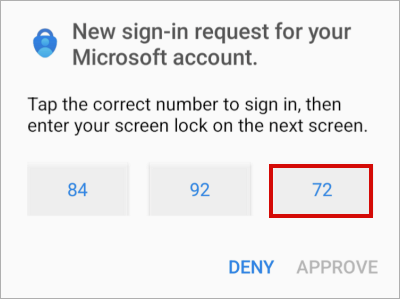
Dear, Currently in our company, the authentication methods policy > Microsoft Authenticator defaults to “any”. Either “passwordless” or “Push”. It is possible to enable the following authentication method through a conditional access policy, currently it is enabled for some users. Desired authentication method: The current method is as follows: Can it be enabled for professional accounts or is it only focused on personal accounts? Thanks in advance.266Views0likes1CommentEntra SSO with Google as IdP
I tried to configure SSO between Entra and Google IdP. Here is the documentation of the steps I followed: https://apps.google.com/supportwidget/articlehome?hl=en&article_url=https%3A%2F%2Fsupport.google.com%2Fa%2Fanswer%2F6363817%3Fhl%3Den&assistant_id=generic-unu&product_context=6363817&product_name=UnuFlow&trigger_context=a In step 3, namely Set up Office 365 as a SAML Service Provider (SP), where I was asked to execute the script on the M365 side, it failed. Here is the script I used (of course the value of each variable has been adjusted): $dom = "ourDomain.com" $BrandName = "Whatever you want it to be" $LogOnUrl = GoogleSSOURL $LogOffUrl = "https://accounts.google.com/logout" $ecpUrl = GoogleSSOURL $MyURI = GoogleEntityID $MySigningCert = CertFromGoogle $Protocol = "SAMLP" Set-MsolDomainAuthentication -DomainName $dom -FederationBrandName $BrandName -Authentication Federated -PassiveLogOnUri $LogOnUrl -ActiveLogOnUri $ecpUrl -SigningCertificate $MySigningCert -IssuerUri $MyURI -LogOffUri $LogOffUrl -PreferredAuthenticationProtocol $Protocol The Result : I don't know why this is happening, please advise thank you.160Views0likes0CommentsGeneral Question About Federation
Hello, We have a federated domain and to my knowledge this means that all authentication for this domain will be send to ADFS and will not be directly handled in Azure Entra ID. Is the following statement correct: When I register an APP in Entra ID the authentication will still be handed off to ADFS. (when my user types in mailto:email address removed for privacy reasons. I will first go to microsoft that will then hand it off to ADFS. Will there by any additional config required on the ADFS server for the registered application? If i would like to bypass this federated authentication the only way to do this is change it to a managed domain removing the federation or do a staged rollout as described below https://learn.microsoft.com/en-us/entra/identity/hybrid/connect/how-to-connect-staged-rollout189Views0likes1Comment
Federating multiple domains with Google Workspace (IdP)
We have 2 domains in our org, with these being added and verified in our Google Workspace and M365 tenants. We've setup federation between our Entra ID (SP) and Google Workspace (IdP) for one of our domains using the steps in https://learn.microsoft.com/en-us/education/windows/configure-aad-google-trust However, when repeating the same steps to add our other domain we run into the following error. New-MgDomainFederationConfiguration_CreateExpanded: Resource already exists. I've found https://learn.microsoft.com/en-us/entra/identity/hybrid/connect/how-to-connect-install-multiple-domains, but it looks to be only applicable to on-prem AD and uses deprecated PowerShel modules (which don't work on Mac). Has anyone managed to federate multiple domains with Entra ID and Google Workspace?942Views0likes0CommentsIs it Possible to Create a Conditional Access Policy for Non-Interactive Sign-Ins Based on Location?
Hi everyone, I'm looking to create a Conditional Access policy in Azure AD that targets non-interactive sign-ins based on the user's location. Specifically, I want to restrict non-interactive logins if they originate from outside a specific geographic region. Is it possible to configure such a policy? If so, what are the necessary steps and considerations? Any guidance or documentation links would be greatly appreciated! Thanks!880Views0likes1Comment
Microsoft Entra Hybrid Join – Devices Stuck in "Pending" Status
Hello Team, We are facing an issue with our on-premises Active Directory (AD) integrated with Active Directory Federation Services (AD FS). We have correctly configured Microsoft Entra hybrid join using Microsoft Entra Connect, following the official documentation. However, we have observed that all our devices are showing up in Microsoft Entra devices with a status of "Pending", and this status remains unchanged indefinitely. To troubleshoot, we have already tried running the following command: dsregcmd /leave. After rebooting the PCs, the issue persists. Running the below command, results in the following output: C:\Users\abc> dsregcmd /debug /join DsrCLI: logging initialized. DsrCLI: logging initialized. DsrCmdJoinHelper::Join: ClientRequestId: e58946ab-b851-1759-3658-69824b6857fDsrCmdAccountMgr::IsDomainControllerAvailable: DsGetDcName success { domain:contoso.local forest:contoso.local domainController:\\dc1.contoso.local isDcAvailable:true } PreJoinChecks Complete. preCheckResult: Join deviceKeysHealthy: undefined isJoined: undefined isDcAvailable: YES isSystem: YES keyProvider: undefined keyContainer: undefined dsrInstance: undefined elapsedSeconds: 1 resultCode: 0x0 Automatic device join pre-check tasks completed. TenantInfo::Discover: Call to DsrBeginDiscover failed before wait. 0x80070057 DsrCmdJoinHelper::Join: TenantInfo::Discover failed with error code 0x80070057. DSREGCMD_END_STATUS AzureAdJoined : NO EnterpriseJoined : NO We also ran the DSRegTool PowerShell script but did not encounter any significant errors. Given the error code 0x80070057 and the devices not registering with Azure AD, we suspect there could be an issue either with the tenant discovery process or with certain configuration steps that might have been overlooked. Has anyone encountered this error before or have any insights into further troubleshooting steps to resolve this issue? Any guidance would be greatly appreciated. Thanks1.2KViews0likes1CommentAdmin roles for external collaboration settings not working
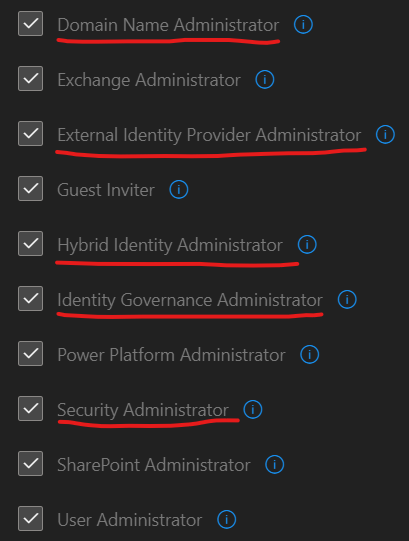
We are attempting to grant access to the external collaboration settings in Entra to facilitate adding and removing domains. We've gone over all the documentation and tried every single role that supposedly grants this access, but none of them work. Those underlined below have some sort of domain changing access according to Microsoft's documentation. Even with all these roles, the screen remains completely grayed out. Even on the Entra side of things, we can see all the respective roles assigned to the user, but it still doesn't work. Are we missing something here? Maybe some sort of dependency role for these other ones to work?Solved2.4KViews0likes2Comments