azure active directory (aad)
1588 Topics
Microsoft Entra ID Authentication Request Types
Hello! I'm currently investigating Microsoft Entra ID sign-in logs and would like to understand the following authentication request types: CredentialAuthenticationController:UnifiedPlatformCredentialChallenge RiskPhoneVerify:AcmaRiskPhoneVerify I have searched the available Microsoft documentation but haven't found references that explicitly explain these identifiers. I'd like to ask for some help to clarify the following: What do these request types represent? What authentication processes or security mechanisms trigger them? Are these expected during normal user authentication, MFA, or risk-based verification? Do these events indicate an authentication challenge, an actual credential submission, or a verification attempt? Is there any official Microsoft documentation or reference explaining these identifiers? My objective is to properly interpret these events during security monitoring and avoid incorrectly classifying legitimate authentication activity as suspicious. Any technical references or clarification would be greatly appreciated. Thank you!74Views0likes1Comment
Single group for TEAM AND Lighthouse (Security Group + 'Unified' group)
Trying to simplify our groups, since we are a 20+ year old firm, the variety of groups we have has bloated over the years. I'm trying to clean these up, but I've met a hitch. Our Service Desk dept has their own Internal team. Aka a 365 Group. Aka a 'unified' group. We use Lighthouse, which only takes Security Groups - it can't take the above 365 Group. First instinct is to create a Security group that can be used for both. But I can't seem to find a way to do this. The 365 Group is unable to nest a Security group. The Security group is unable to nest a 365 Group. So there's no single source of truth. I thought I could use Dynamic Grouping as a workaround - using the MemberOf property. But according to this, this Preview Feature is being abandoned and disabled. Anyone have workarounds/advice? Here's the output I get, when trying to do this via EOM PS C:\Users\lmtpo\Downloads> New-MgGroupMember -GroupID (team) -DirectoryObjectId (sec) New-MgGroupMember : Non-Unified Security Groups cannot be added to Unified Groups. paramName: Members, paramValue... PS C:\Users\lmtpo\Downloads> New-MgGroupMember -GroupID (sec) -DirectoryObjectId (team) New-MgGroupMember : A Unified Group cannot be added as a member of a Distribution List or Security Group or Elevated Group. paramName: Members, paramValue: , objectType: Microsoft.Online.DirectoryServices.Group228Views0likes1Comment
Need Microsoft support to resolve a historical tenant association with a domain I recently acquired
Hello, I recently became the legitimate and independent registrant of a domain that had previously been owned or used by an unrelated organization. I have no affiliation whatsoever with the previous domain holder or that organization. I have now received a Microsoft Power Platform notification at an email address under my domain concerning a Default environment belonging to the previous organization. The notification includes a Tenant ID and Environment ID, and the environment name corresponds to that organization. I do not own, administer, or have access to this tenant or Power Platform environment, and I am not seeking access to or control over it. My main concern is that there may still be a historical association between my domain or its email addresses and the previous organization's Microsoft tenant or related services. I would like Microsoft to investigate this and, where necessary, properly separate my domain and its email addresses from any unrelated historical Microsoft accounts, tenants, directories, or services. Most importantly, I want to ensure that this historical association will not adversely affect my ability in the future to use my domain and its business email addresses to create, verify, and use my own Microsoft 365, Microsoft Entra, Power Platform, or other Microsoft business services. At present, I do not have a Microsoft business account, Microsoft 365 tenant, or Power Platform tenant of my own. As a result, I appear to be unable to use some of the normal business support channels that require an existing tenant or administrator account. Could someone please advise me on the appropriate way to get this matter reviewed by Microsoft Support? If a Microsoft employee or official support representative can assist or direct me to the appropriate private support channel, I would greatly appreciate it. For privacy and security reasons, I have intentionally not posted the actual domain name, email address, Tenant ID, or Environment ID publicly. I am happy to provide all of the relevant details privately to an authorized Microsoft support representative if required. Thank you for any guidance.563Views0likes1CommentDisabled account OU
Hello We have a scenario for which I need help User account was disabled and was in Disabled account OU when she joined back it was enabled and moved to proper user account OU.This is synched from onpremise in O365 The earlier mailbox is converted from user mailbox to a cloud mailbox.This is a incloud object How do we proceed here We want the shared mailbox to be linked to the user account which was disabled earlier. Regards,562Views0likes2Comments
Best practices: Open OneDrive/SharePoint sharing but restrict Teams guest access by domain
Hi all, Since SharePoint Online and OneDrive moved fully to Microsoft Entra B2B for external sharing, we've run into a policy conflict and would like to hear how others are handling it. Our requirements Enable OneDrive and SharePoint file sharing with external users, regardless of their email domain. Restrict Microsoft Teams guest access to a predefined list of approved partner domains. Continue allowing Teams external access (federated chat and meetings) for all domains. The problem: Teams guests, SharePoint guests, and OneDrive guests are now governed by the same Microsoft Entra B2B invitation framework and the single Collaboration restrictions allow/deny list under: External Identities → External collaboration settings As a result, restricting guest invitations by domain also restricts OneDrive and SharePoint sharing for domains not on the allowlist. According to Microsoft's response in the following Q&A, this behavior is currently by design: https://learn.microsoft.com/en-us/answers/questions/5954975/onedrive-external-sharing-no-longer-working-with-a Questions to the community Has anyone implemented a solution where OneDrive/SharePoint sharing remains open to all domains while Teams guest access is restricted to approved domains only? Are there recommended approaches using Entitlement Management, Access Packages, Connected Organizations, or other Entra capabilities? Is there any roadmap item for workload-specific collaboration restrictions (e.g., separate policies for Teams guest invitations and SharePoint/OneDrive sharing)? Any real-world experience or best practices would be greatly appreciated. Thanks, Bejhan884Views0likes6Comments
Made a self-hosted Entra ID governance portal for app/identity sprawl (open source)
Our tenant ended up with hundreds of app registrations and enterprise apps, and the native portal makes you dig through a separate blade for every basic question. Who owns this app? Which secrets die next month? What hasn't been signed into in a year? Which ones have scary Graph permissions? There's no single view for any of it, and half the ownership info was missing anyway. Entra ID Governance, access reviews, PIM all exist, but they felt heavy (and licensed) for what I actually wanted, which was just a fast list I could scan for routine cleanup. So I built one. Lightweight portal that runs entirely in your own subscription: One grid for App Registrations, Enterprise Apps, Managed Identities and Privileged Users Risk flags per identity: expiring/expired creds, high-risk permissions, no owner, stale sign-in, no CA coverage Ownership tracking, review and owner-change workflow, CSV export Tenant health score and a consent posture dashboard Optional expiry email notifications (needs a SendGrid key) Reads Graph through a managed identity, so no app secrets for data access and nothing leaves your tenant Runs about $26-30/month (one B2 App Service plan). B1 is also supported, but it's noticeably slower. It's not a replacement for Entra ID Governance or PIM, more of a cheap everyday hygiene thing. Full disclosure, I used AI building this and writing this up. I designed the architecture and functionality, tested it and ran it against my own tenant. It's open source and deployable with Azure DevOps or an Azure CLI script. Data never leaves your own tenant. Repo (screenshots + setup): https://github.com/nicolaibaralmueller/entra-identity-governance-portal Would love feedback, especially what you'd want it to flag that it doesn't, or where the risk scoring feels off. Been building it on and off for a few months with a lot of iteration. Hopefully this could be useful for others as well.663Views0likes2CommentsPHS staged rollout works for existing users but not new synced users
We are troubleshooting an Entra ID PHS staged rollout issue with a federated domain using a third-party WS-Fed IdP. The intended behavior is that normal federated users redirect to the IdP, while users in the PHS staged rollout group receive the Microsoft/Entra password prompt instead. Existing users in the staged rollout group continue to work correctly. They enter their UPN and receive the Microsoft password prompt. One known-good test user is not provisioned in the third-party IdP and still signs in successfully through the Entra password prompt, so the working path does not require the user to exist in the IdP. The issue is only with newly created AD-synced users. Newly synced users in the same staged rollout group are still being routed to the federated IdP at HRD instead of receiving the Entra password prompt. We’ve verified the staged rollout policy and group membership from Graph, confirmed the affected users are properly AD-synced with clean immutableID/sourceAnchor, and confirmed PHS is working. Federation metadata and HRD policies also look clean. Seamless SSO/AZUREADSSOACC was checked and remediated, but the behavior did not change. For failed attempts, there is no Entra sign-in log entry, including tenant-wide interactive and non-interactive logs. However, the federated IdP logs show a WS-Fed inbound request from login.microsoftonline.com for the affected user. That makes it look like Entra HRD is routing the user to federation before sign-in logging or token issuance. The issue started around an Entra Connect AD connector/DC-path change. We have since reverted the connector to the previous known-good configuration. After reverting, we created a clean-room test user with the correct UPN set before first sync, confirmed sync/PHS/sourceAnchor, added the user directly to the staged rollout group, and waited 60+ minutes. The clean-room user still redirected to the federated IdP instead of getting the Entra password prompt. So the current behavior is that established staged-rollout users still get the Entra password prompt, but newly created synced staged-rollout users are sent to the federated IdP by HRD. Has anyone seen staged rollout get into this state, where existing users work but new synced users remain on the federated HRD path despite valid rollout policy, group membership, synced password hash, and clean immutableID/sourceAnchor? Is there any known backend cache/state reset or escalation path for HRD/staged rollout routing?1.2KViews1like5Comments'Registering user becomes local admin on Joined Devices' - WHAT
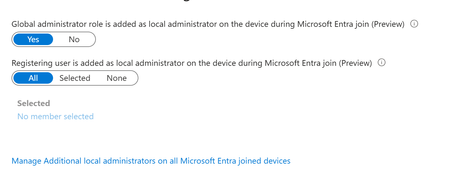
Stumbled on a tenant with 'JOIN' available for all users. Haven't worked with this much - most tenants I see only have registration. But then I noticed the horrifying 'Registering user is added as local administrator on the device during Microsoft Entra join' option was ALSO set to ALL. This is a tenant we just took on, but I've never seen that control before. This is terrifying, considering AFAIK, there is no real way for a registering user to know if they're registering or joining. Beneath it is an option to 'Manage Additional local administrators on all Microsoft Entra joined devices', which leads to the Role page for Device Administrators, which is empty. Under Description, this describes what APPEARS to be to be the same thing mentioned in the previous control - 'Users with this role become local machine administrators on all Windows 10 devices that are joined to Microsoft Entra'. But no one is assigned this. Conveniently, on my own tenant, I happened to let someone JOIN yesterday. We have this limited to 2 (now 3) people - most just register... But this user Joined, and the 'Joining user becomes local admin' option was on ALL. But I can't validate that the user ever become local admin. They don't have the role, their device shows as joined, but there's no additional roles. The audit logs don't look weird. They're not in that 'Device Administrators' group, which describes itself as 'Users with this role become local machine administrators on all Windows 10 devices that are joined to Microsoft Entra'. Thoughts? Freaking out, honestly. We have a mix of DC and Cloud users. I've inherited them all, and had the understanding that Join was essentially registration but with Org ownership. I've tried to get some input from Copilot, but he has basically waffled between 'No, this setting is just badly named' and 'no, actually it's this other setting' and 'no, you know what, it all makes sense somehow'. 1. Does that option actually set the joining user as global admin? Is that really the default setting? 2. can you validate this ANYWHERE in Entra? Or does it just disappear? 3. what is that Device Admin group? A separate group, independent of these two settings, that gives local admin? 4. Is there a graph endpoint that can be used to set this? Thanks1.1KViews0likes2CommentsHybrid Join Lifecycle Model
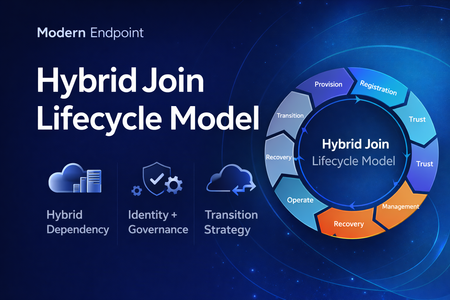
Microsoft Entra hybrid join is still a common reality in enterprise environments. For many organizations, it remains necessary because legacy applications still rely on Active Directory machine authentication, Group Policy is still in use, and on-premises operational dependencies have not fully been retired. At the same time, the long-term direction for endpoint identity is increasingly cloud-native. That creates an important architectural question: Should hybrid join be treated as a permanent device state, or as a lifecycle stage in a broader modernization journey? In practice, hybrid join is often discussed as a binary condition: the device is either hybrid joined or it is not. But from an operational perspective, that view is too limited. In real enterprise environments, hybrid join behaves much more like a lifecycle. A device moves through provisioning, registration, trust establishment, management attachment, steady-state operation, recovery, retirement, and eventually transition. That distinction matters because most hybrid join issues do not fail loudly. They usually appear as stale objects, pending registrations, broken trust, inconsistent management ownership, and environments that remain temporarily hybrid far longer than intended. Why a lifecycle model is useful Treating hybrid join as a lifecycle helps explain why so many organizations struggle with it even when the initial implementation appears technically correct. The challenge is usually not the first successful join. The challenge is everything that happens around it: Provisioning quality Trust validation Management ownership Drift detection Stale object cleanup Exit criteria for transition to Entra join Without that lifecycle view, hybrid join often becomes a static design decision with no clear operational model behind it. The eight phases 1. Provisioning The lifecycle starts when the device is built, imaged, or provisioned. This stage is more important than it looks. If the device is provisioned from a contaminated image, or if cloning and snapshot practices are not handled carefully, later identity issues are often inherited rather than newly created. Provisioning should be treated as an identity-controlled event, not just an OS deployment task. 2. Registration The device becomes known to Microsoft Entra. This is where many environments confuse visibility with readiness. A device object may exist in the cloud, but that does not automatically mean the hybrid identity state is healthy or operationally usable. 3. Trust Establishment This is the point where hybrid join becomes real. A device should not be considered fully onboarded until both sides of trust are present and healthy. In operational terms, this means the device is not only registered, but also capable of supporting the expected sign-in and identity flows. 4. Management Attachment Once trust exists, governance becomes the next question. Many organizations still balance Group Policy, Configuration Manager, Intune, and legacy application dependencies at the same time. That is exactly why hybrid join often persists. But if management ownership is not clearly defined, organizations end up with overlapping policy planes, inconsistent control, and unclear accountability. 5. Operational Steady State Hybrid join does not stop at successful registration. The device must remain healthy over time, and that means monitoring trust health, registration state, token health, line-of-sight to required infrastructure, and management consistency. A device that was healthy once is not necessarily healthy now. 6. Recovery Every real environment eventually encounters drift. Pending states, broken trust, orphaned records, reimaged devices, and inconsistent registration scenarios should not be treated as unusual edge cases. They should be expected and handled with formal recovery playbooks. Recovery is not an exception to the lifecycle. It is part of the lifecycle. 7. Retirement Retirement is one of the weakest areas in many hybrid environments. Devices are replaced or decommissioned, but their identity records often remain behind. That leads to stale objects, inventory noise, and administrative confusion. A proper lifecycle model should include a controlled retirement sequence rather than ad hoc cleanup. 8. Transition This is the most important strategic phase. The key question is no longer whether a device can remain hybrid joined, but whether there is still a justified reason to keep it there. Hybrid join may still be necessary in many environments today, but in many cases it should be treated as transitional architecture rather than the target end state. Practical takeaway Looking at hybrid join as a lifecycle creates a more useful framework for architecture decisions, operational ownership, troubleshooting, directory hygiene, governance, and transition planning toward Microsoft Entra join. That is the real value of this model. It does not replace technical implementation guidance, but it helps organizations think more clearly about why hybrid join exists, how it should be operated, and when it should eventually be retired. Final thought Hybrid join is still relevant in many enterprise environments, but it should not automatically be treated as a default destination. In many cases, it works best when it is managed as a lifecycle-driven operating model with defined phases, controls, and exit criteria. That makes it easier to stabilize operations today, while also creating a clearer path toward a more cloud-native endpoint identity model tomorrow. Full article: https://www.modernendpoint.tech/hybrid-join-lifecycle-model392Views1like0CommentsIntroducing the Entra Helpdesk Portal: A Zero-Trust, Dockerized ITSM Interface for Tier 1 Support
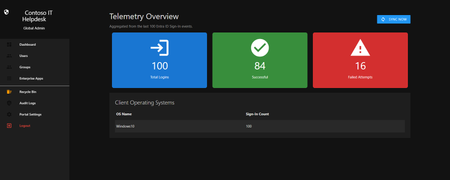
Hello everyone, If you manage identity in Microsoft Entra ID at an enterprise scale, you know the struggle: delegating day-to-day operational tasks (like password resets, session revocations, and MFA management) to Tier 1 and Tier 2 support staff is inherently risky. The native Azure/Entra portal is incredibly powerful, but it’s complex and lacks mandatory ITSM enforcement. Giving a helpdesk technician the "Helpdesk Administrator" role grants them access to a portal where a single misclick can cause a major headache. To solve this, I’ve developed the Entra Helpdesk Portal (Community Edition)—an open-source, containerized application designed to act as an isolated "airlock" between your support team and your Entra ID tenant. Why This Adds Value to Your Tenant Instead of having technicians log into the Azure portal, they log into this clean, Material Design web interface. It leverages a backend Service Principal (using MSAL and the Graph API) to execute commands on their behalf. Strict Zero Trust: Logging in via Microsoft SSO isn’t enough. The app intercepts the token and checks the user’s UPN against a hardcoded ALLOWED_ADMINS whitelist in your Docker environment file. Mandatory ITSM Ticketing: You cannot enforce ticketing in the native Azure Portal. In this app, every write action prompts a modal requiring a valid ticket number (e.g., INC-123456). Local Audit Logging: All actions, along with the actor, timestamp, and ticket number, are written to an immutable local SQLite database (audit.db) inside the container volume. Performance: Heavy Graph API reads are cached in-memory with a Time-To-Live (TTL) and smart invalidation. Searching for users or loading Enterprise Apps takes milliseconds. What Can It Do? Identity Lifecycle: Create users, auto-generate secure 16-character passwords, revoke sign-in sessions, reset passwords, and delete specific MFA methods to force re-registration. Diagnostics: View a user's last 5 sign-in logs, translating Microsoft error codes into plain English. Group Management: Add/remove members to Security and M365 groups. App/SPN Management: Lazy-load raw requiredResourceAccess Graph API payloads to audit app permissions, and instantly rotate client secrets. Universal Restore: Paste the Object ID of any soft-deleted item into the Recycle Bin tab to instantly resurrect it. How Easy Is It to Setup? I wanted this to be universally deployable, so I compiled it as a multi-architecture Docker image (linux/amd64 and linux/arm64). It will run on a massive Windows Server or a simple Raspberry Pi. Setup takes less than 5 minutes: Create an App Registration in Entra ID and grant it the necessary Graph API Application Permissions (e.g., User.ReadWrite.All, AuditLog.Read.All). Create a docker-compose.yml file. Define your feature toggles. You can literally turn off features (like User Deletion) by setting an environment variable to false. version: '3.8' services: helpdesk-portal: image: jahmed22/entra-helpdesk:latest container_name: entra_helpdesk restart: unless-stopped ports: - "8000:8000" environment: # CORE IDENTITY - TENANT_ID=your_tenant_id_here - CLIENT_ID=your_client_id_here - CLIENT_SECRET=your_client_secret_here - BASE_URL=https://entradesk.jahmed.cloud - ALLOWED_ADMINS=email address removed for privacy reasons # CUSTOMIZATION & FEATURE FLAGS - APP_NAME=Entra Help Desk - ENABLE_PASSWORD_RESET=true - ENABLE_MFA_MANAGEMENT=true - ENABLE_USER_DELETION=false - ENABLE_GROUP_MANAGEMENT=true - ENABLE_APP_MANAGEMENT=true volumes: - entra_helpdesk_data:/app/static/uploads - entra_helpdesk_db:/app volumes: entra_helpdesk_data: entra_helpdesk_db: 4.Run docker compose up -d and you are done! I built this to give back to the community and help secure our Tier 1 operations. If you are interested in testing it out in your dev tenants or want to see the full architecture breakdown, you can read the complete documentation on my website here I’d love to hear your thoughts, feedback, or any feature requests you might have!341Views0likes0Comments