awareness
8 Topics
Enable per‑user language selection for phishing simulation emails and landing pages
We use Attack Simulation Training to deliver phishing simulations to a global, multilingual user base. While Microsoft Defender supports multi‑language content, phishing simulation emails and landing pages are currently delivered in a single selected language per campaign. We are requesting a feature that allows phishing simulation emails and associated landing pages (including credential‑harvest pages) to automatically render in each user’s preferred language, based on: Outlook mailbox language settings, and/or Microsoft Entra ID user language preferences This capability would: Improve realism and accuracy of phishing simulations Ensure users experience simulations in the same language they normally work in Improve behavioral measurement in global organizations Reduce the need to create and manage multiple parallel simulations by language Providing consistent, per‑user language alignment across simulation emails, landing pages, and follow‑up training would significantly enhance the effectiveness of Attack Simulation Training for large, multilingual enterprises.231Views2likes2CommentsAttack Simulator: Company Logo not showing on landingspage
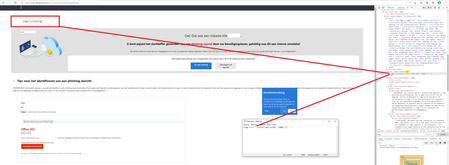
Hi All, I have the following issue: the uploaded company logo (PNG or JPEG) is not shown on the landings page once the user clicks on the phishing link. See the attached screenshot; the image source is empty. I tried this multiple times with different logos and landingpages, but the results are the same. During the upload of the logo, there is no confirmation that the logo has been uploaded successfully.... You only click next during the creation of the simulation..... When clicking on the preview-button (during simulation creation), the logo is shown.1.9KViews1like0Comments