automation
6 Topics
Automate Defender for Cloud settings: FIM, Vulnerability Assessment, and Guest Configuration Agent
I’m working on automating the configuration of Microsoft Defender for Cloud – Server Plans across multiple subscriptions (100+), including any newly deployed subscriptions. The goal is to avoid manual changes and ensure compliance from day one. Current Setup: I’ve used the built-in policy: Configure Microsoft Defender for Servers plan, which successfully enables: Defender for Cloud Plan P2 Endpoint Protection Agentless scanning I attempted to copy this policy and add parameters for Vulnerability Assessment, but the assignment fails with an error. What I’ve Tried: For File Integrity Monitor: Policy name → Configure ChangeTracking Extension for Windows virtual machines For Vulnerability Assessment: Policy name → Configure machines to receive a vulnerability assessment provider Assigning these policies works on my non-prod subscription, but the toggle in Defender for Cloud → Environment Settings remains No. Challenge: How can I ensure these options (File Integrity Monitoring, Vulnerability Assessment, and preferably Guest Configuration Agent) are automatically enabled for: All existing subscriptions Any new subscriptions created in the future Goal: No manual intervention in Defender for Cloud portal Fully automated via Azure Policy or another recommended approach uestions: Is there a way to extend the built-in policy or create a custom initiative that enforces these settings at the subscription level? Are there ARM templates, Bicep modules, Powershell scripts or REST API calls that can toggle these settings programmatically? Any best practices for ensuring compliance across multiple subscriptions? Any help is much appreciated and looking forward to your expertise! Thank you in advance. Best Regards, Pascal Slot305Views1like0Comments
New Blog | Simplifying Onboarding to Microsoft Defender for Cloud with Terraform
If you are looking for a way to onboard Microsoft Defender for Cloud (MDC) with Terraform, you are in luck! In this blog post, we will introduce you to a new Terraform module that simplifies and enhances the onboarding experience for MDC in Azure. This module allows you to configure MDC plans for your Azure subscriptions or management groups with just a few lines of code. You will also learn how to use this module in different scenarios, such as onboarding a single subscription, multiple subscriptions, or all subscriptions where you have owner permissions. By the end of this blog post, you will be able to onboard MDC with Terraform in a fast and easy way. Read the full blog post here: Simplifying Onboarding to Microsoft Defender for Cloud with Terraform - Microsoft Community Hub684Views0likes0CommentsE2E Bootstrap Solution for Malicious File Scanning Using Microsoft Defender for Storage in Azure
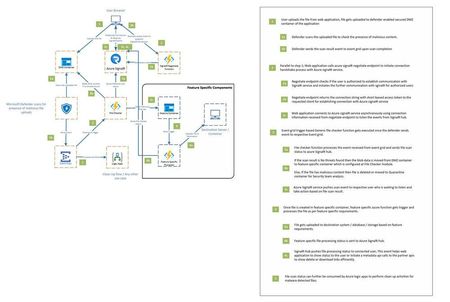
The following blog post elucidates one of the architectural patterns that can be employed for efficiently monitoring the malware scan status while utilizing Microsoft Defender for storage malware scanning. Read the full blog here: Malicious File Scanning Using Microsoft Defender for Storage in Azure696Views0likes0CommentsRegulatory Reports automation on multiple subscriptions
Hi Is there a way to get the Regulatory Compliance report on subscriptions (like the "Downloadable") in Microsoft Defender for Cloud, sent out pr. Email in a specified interval? as we have the option to download the report but I'm unable to find an option to automate the same.1.4KViews0likes2CommentsSeeking your input on Azure Security Center Features: Workflow Automation & Continuous Export
Azure Security Center recently made two new features generally available: Workflow Automation & Continuous Export. If you have tried one or both of these features, we would love to hear from you! We value your opinion, and want to make sure that the experience answers your needs and helps you manage your workflows and security data in an effective way. Please help us understand your experience by taking one or both of these 3-min surveys: Workflow Automation Feedback Survey Continuous Export Feedback Survey Responses will be accepted through May 7th 2020. Thank you in advance!845Views0likes0Comments