automation
46 Topics
More security around using Custom Script Extensions and Session Host Configuration
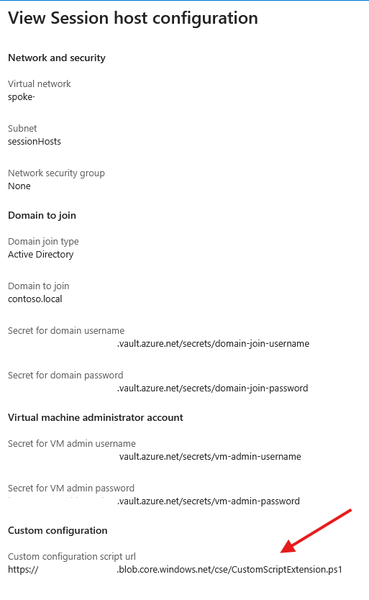
We are currently implementing and testing the new Session Host Configuration and Session Host Management features. We rely on Custom Script Extensions to implement some functionality immediately to the newly deployed Session Hosts instead of waiting for GPOs or other to take effect. We don't add these changes to the golden images. Currently the Custom Script Extensions functionality definable in the Session Host Configuration only allows to define a script URL. What is the intended mechanism of authentication for this solution? Currently it seems that its only possible to use an anonymous access level Blob. Defining a token within the script URL is not great due to the fact that the URL is viewable in plain text via the Azure Portal. Neither of those will satisfy. Key vault references are used when defining credentials for domain join and local admin accounts for the Session Hosts. Would it be possible to have key vault references for CSE Storage Account Name/Key or SAS token or the possibility to define a Managed Identity instead. These can be defined when deploying the CSEs manually. Please guide me as to what the best solution would be to this topic. Many thanks in advance.
Update 'Update-AzWvdSessionHost' cmdlet
Today via the PowerShell cmdlet 'Update-AzWvdSessionHost', an administrator can assign a user to a session host without the user being assigned to the applicationgroup. This can cause some confusion to administrators if they are able to perform this task as the user will not be able to see the host in the Windows App. The suggestion would be to either put in a check which denies the assignment if the user is not associated with the applicationgroup directly or indirectly via group association. Or, update the cmdlet to also add an assignment to the application group by adding a required parameter which would assign the user to the application group. It's a small tweak but it may help with the overall stability of the Desktop.Virtualization PowerShell stack. Thanks!99Views0likes0Comments
Fslogix. Add a command line to release the profile.
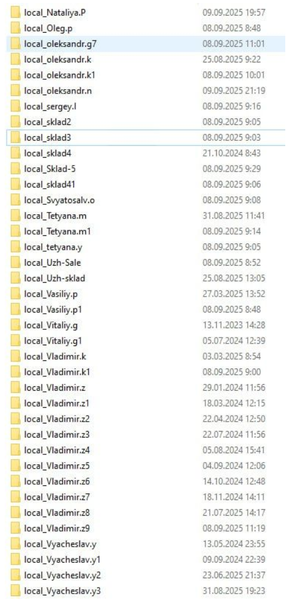
Hello. Add a command line with arguments to be able to release frozen folders in FSlogix. If you don't want to fix the problem, let me automate it myself. In large RDS installations, constant freezes and further duplication of local_%username% folders cause problems.110Views1like0Comments
Expose AVD registration status on Azure VM objects
In enterprise environments, it's difficult to determine whether a VM is successfully registered with Azure Virtual Desktop (AVD) without querying the host pool or relying on indirect signals. Please consider surfacing the AVD registration status (e.g., Registered, Not Registered, Pending) directly on the Azure VM object, accessible via: Azure Portal Azure Resource Graph Azure PowerShell / CLI REST API This would simplify automation, monitoring, and remediation workflows across large-scale deployments. Thanks for considering this! Vu75Views0likes0Comments
AVD Hibernate on Azure Local
We're working to deploy AVD on Azure Local to improve performance of our apps. We have a set of users that work infrequently, but have a need to keep their session persistent between "Shifts". In a personal host pool setup, we're finding our current options cost prohibitive with the avd management costs for azure local based deployments. A solution that would allow hibernating the VMs during periods of inactivity would be the best case for our needs.60Views0likes0Comments
Need insight to domain join failures for session host configuration
We are trying to use the session host configuration for a new AVD host pool. We have confirmed that it can join computer to the specified OU without difficulty when we do it manually, and that the key vault access is intact since the local admin is created without issue. But any new session hosts fail to join to the domain. They're created with all other specifications. If we try to add them manually it seems to create some kind of instability in the FSLogix where it will then permanently hang for users when trying to log off. It would be good if we had insight to the domain join failures so we don't have to manually join them. In the deployment I can see the network, the VM, and a DSC, but that DSC is only for joining to the AVD Host pool. I don't see anything in it to join using the key vault credentials.355Views0likes2CommentsIntegrate AVD Session Launch at the Windows Login Screen (Similar to Windows 365 Boot)
I propose that Azure Virtual Desktop (AVD) be integrated directly into the Windows login process, similar to how Windows 365 Boot operates. Currently, users must first log in locally and then manually start the AVD client. By enabling AVD to launch as part of the initial login (with Single Sign-On support), the transition from the local environment to the cloud-hosted desktop would become seamless, mirroring the convenience provided by Windows 365 Boot. (https://learn.microsoft.com/en-us/windows-365/enterprise/windows-365-boot-overview) Benefits: Enhanced User Experience: Users would access their AVD session immediately after logging in, streamlining their workflow. Simplified Process: Eliminates the need for additional login steps or manual client launches, reducing complexity and potential errors. Efficiency Gains: Particularly beneficial for thin clients and shared environments, this integration would lead to a more efficient deployment and use of resources.248Views2likes0Comments