automation
78 TopicsMicrosoft Sentinel MCP Entity Analyzer: Explainable risk analysis for URLs and identities
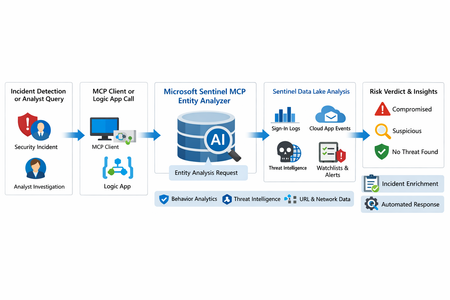
What makes this release important is not just that it adds another AI feature to Sentinel. It changes the implementation model for enrichment and triage. Instead of building and maintaining a chain of custom playbooks, KQL lookups, threat intel checks, and entity correlation logic, SOC teams can call a single analyzer that returns a reasoned verdict and supporting evidence. Microsoft positions the analyzer as available through Sentinel MCP server connections for agent platforms and through Logic Apps for SOAR workflows, which makes it useful both for interactive investigations and for automated response pipelines. Why this matters First, it formalizes Entity Analyzer as a production feature rather than a preview experiment. Second, it introduces a real cost model, which means organizations now need to govern usage instead of treating it as a free enrichment helper. Third, Microsoft’s documentation is now detailed enough to support repeatable implementation patterns, including prerequisites, limits, required tables, Logic Apps deployment, and cost behavior. From a SOC engineering perspective, Entity Analyzer is interesting because it focuses on explainability. Microsoft describes the feature as generating clear, explainable verdicts for URLs and user identities by analyzing multiple modalities, including threat intelligence, prevalence, and organizational context. That is a much stronger operational model than simple point-enrichment because it aims to return an assessment that analysts can act on, not just more raw evidence What Entity Analyzer actually does The Entity Analyzer tools are described as AI-powered tools that analyze data in the Microsoft Sentinel data lake and provide a verdict plus detailed insights on URLs, domains, and user entities. Microsoft explicitly says these tools help eliminate the need for manual data collection and complex integrations usually required for investigation and enrichment hat positioning is important. In practice, many SOC teams have built enrichment playbooks that fetch sign-in history, query TI feeds, inspect click data, read watchlists, and collect relevant alerts. Those workflows work, but they create maintenance overhead and produce inconsistent analyst experiences. Entity Analyzer centralizes that reasoning layer. For user entities, Microsoft’s preview architecture explains that the analyzer retrieves sign-in logs, security alerts, behavior analytics, cloud app events, identity information, and Microsoft Threat Intelligence, then correlates those signals and applies AI-based reasoning to produce a verdict. Microsoft lists verdict examples such as Compromised, Suspicious activity found, and No evidence of compromise, and also warns that AI-generated content may be incorrect and should be checked for accuracy. That warning matters. The right way to think about Entity Analyzer is not “automatic truth,” but “high-value, explainable triage acceleration.” It should reduce analyst effort and improve consistency, while still fitting into human review and response policy. Under the hood: the implementation model Technically, Entity Analyzer is delivered through the Microsoft Sentinel MCP data exploration tool collection. Microsoft documents that entity analysis is asynchronous: you start analysis, receive an identifier, and then poll for results. The docs note that analysis may take a few minutes and that the retrieval step may need to be run more than once if the internal timeout is not enough for long operations. That design has two immediate implications for implementers. First, this is not a lightweight synchronous enrichment call you should drop carelessly into every automation branch. Second, any production workflow should include retry logic, timeouts, and concurrency controls. If you ignore that, you will create fragile playbooks and unnecessary SCU burn. The supported access path for the data exploration collection requires Microsoft Sentinel data lake and one of the supported MCP-capable platforms. Microsoft also states that access to the tools is supported for identities with at least Security Administrator, Security Operator, or Security Reader. The data exploration collection is hosted at the Sentinel MCP endpoint, and the same documentation notes additional Entity Analyzer roles related to Security Copilot usage. The prerequisite many teams will miss The most important prerequisite is easy to overlook: Microsoft Sentinel data lake is required. This is more than a licensing footnote. It directly affects data quality, analyzer usefulness, and rollout success. If your organization has not onboarded the right tables into the data lake, Entity Analyzer will either fail or return reduced-confidence output. For user analysis, the following tables are required to ensure accuracy: AlertEvidence, SigninLogs, CloudAppEvents, and IdentityInfo. also notes that IdentityInfo depends on Defender for Identity, Defender for Cloud Apps, or Defender for Endpoint P2 licensing. The analyzer works best with AADNonInteractiveUserSignInLogs and BehaviorAnalytics as well. For URL analysis, the analyzer works best with EmailUrlInfo, UrlClickEvents, ThreatIntelIndicators, Watchlist, and DeviceNetworkEvents. If those tables are missing, the analyzer returns a disclaimer identifying the missing sources A practical architecture view An incident, hunting workflow, or analyst identifies a high-interest URL or user. A Sentinel MCP client or Logic App calls Entity Analyzer. Entity Analyzer queries relevant Sentinel data lake sources and correlates the findings. AI reasoning produces a verdict, evidence narrative, and recommendations. The result is returned to the analyst, incident record, or automation workflow for next-step action. This model is especially valuable because it collapses a multi-query, multi-tool investigation pattern into a single explainable decisioning step. Where it fits in real Sentinel operations Entity Analyzer is not a replacement for analytics rules, UEBA, or threat intelligence. It is a force multiplier for them. For identity triage, it fits naturally after incidents triggered by sign-in anomaly detections, UEBA signals, or Defender alerts because it already consumes sign-in logs, cloud app events, and behavior analytics as core evidence sources. For URL triage, it complements phishing and click-investigation workflows because it uses TI, URL activity, watchlists, and device/network context. Implementation path 1: MCP clients and security agents Microsoft states that Entity Analyzer integrates with agents through Sentinel MCP server connections to first-party and third-party AI runtime platforms. In practice, this makes it attractive for analyst copilots, engineering-side investigation agents, and guided triage experiences The benefit of this model is speed. A security engineer or analyst can invoke the analyzer directly from an MCP-capable client without building a custom orchestration layer. The tradeoff is governance: once you make the tool widely accessible, you need a clear policy for who can run it, when it should be used, and how results are validated before action is taken. Implementation path 2: Logic Apps and SOAR playbooks For SOC teams, Logic Apps is likely the most immediately useful deployment model. Microsoft documents an entity analyzer action inside the Microsoft Sentinel MCP tools connector and provides the required parameters for adding it to an existing logic app. These include: Workspace ID Look Back Days Properties payload for either URL or User The documented payloads are straightforward: { "entityType": "Url", "url": "[URL]" } And { "entityType": "User", "userId": "[Microsoft Entra object ID or User Principal Name]" } Also states that the connector supports Microsoft Entra ID, service principals, and managed identities, and that the Logic App identity requires Security Reader to operate. This makes playbook integration a strong pattern for incident enrichment. A high-severity incident can trigger a playbook, extract entities, invoke Entity Analyzer, and post the verdict back to the incident as a comment or decision artifact. The concurrency lesson most people will learn the hard way Unusually direct guidance on concurrency: to avoid timeouts and threshold issues, turn on Concurrency control in Logic Apps loops and start with a degree of parallelism of . The data exploration doc repeats the same guidance, stating that running multiple instances at once can increase latency and recommending starting with a maximum of five concurrent analyses. This is a strong indicator that the correct implementation pattern is selective analysis, not blanket analysis. Do not analyze every entity in every incident. Analyze the entities that matter most: external URLs in phishing or delivery chains accounts tied to high-confidence alerts entities associated with high-severity or high-impact incidents suspicious users with multiple correlated signals That keeps latency, quota pressure, and SCU consumption under control. KQL still matters Entity Analyzer does not eliminate KQL. It changes where KQL adds value. Before running the analyzer, KQL is still useful for scoping and selecting the right entities. After the analyzer returns, KQL is useful for validation, deeper hunting, and building custom evidence views around the analyzer’s verdict. For example, a simple sign-in baseline for a target user: let TargetUpn = "email address removed for privacy reasons"; SigninLogs | where TimeGenerated between (ago(7d) .. now()) | where UserPrincipalName == TargetUpn | summarize Total=count(), Failures=countif(ResultType != "0"), Successes=countif(ResultType == "0"), DistinctIPs=dcount(IPAddress), Apps=make_set(AppDisplayName, 20) by bin(TimeGenerated, 1d) | order by TimeGenerated desc And a lightweight URL prevalence check: let TargetUrl = "omicron-obl.com"; UrlClickEvents | where TimeGenerated between (ago(7d) .. now()) | search TargetUrl | take 50 Cost, billing, and governance GA is where technical excitement meets budget reality. Microsoft’s Sentinel billing documentation says there is no extra cost for the MCP server interface itself. However, for Entity Analyzer, customers are charged for the SCUs used for AI reasoning and also for the KQL queries executed against the Microsoft Sentinel data lake. Microsoft further states that existing Security Copilot entitlements apply The April 2026 “What’s new” entry also explicitly says that starting April 1, 2026, customers are charged for the SCUs required when using Entity Analyzer. That means every rollout should include a governance plan: define who can invoke the analyzer decide when playbooks are allowed to call it monitor SCU consumption limit unnecessary repeat runs preserve results in incident records so you do not rerun the same analysis within a short period Microsoft’s MCP billing documentation also defines service limits: 200 total runs per hour, 500 total runs per day, and around 15 concurrent runs every five minutes, with analysis results available for one hour. Those are not just product limits. They are design requirements. Limitations you should state clearly The analyze_user_entity supports a maximum time window of seven days and only works for users with a Microsoft Entra object ID. On-premises Active Directory-only users are not supported for user analysis. Microsoft also says Entity Analyzer results expire after one hour and that the tool collection currently supports English prompts only. Recommended rollout pattern If I were implementing this in a production SOC, I would phase it like this: Start with a narrow set of high-value use cases, such as suspicious user identities and phishing-related URLs. Confirm that the required tables are present in the data lake. Deploy a Logic App enrichment pattern for incident-triggered analysis. Add concurrency control and retry logic. Persist returned verdicts into incident comments or case notes. Then review SCU usage and analyst value before expanding coverage.1.4KViews8likes0CommentsNinja Cat Giveaway: Episode 3 | Sentinel integration
For this episode, your opportunity to win a plush ninja cat is the following - Reply to this thread with: what was your favorite feature Javier presented? Oh and what does UEBA stand for? This offer is non-transferable and cannot be combined with any other offer. This offer ends on April 14 th , 2023, or until supplies are exhausted and is not redeemable for cash. Taxes, if there are any, are the sole responsibility of the recipient. Any gift returned as non-deliverable will not be re-sent. Please allow 6-8 weeks for shipment of your gift. Microsoft reserves the right to cancel, change, or suspend this offer at any time without notice. Offer void in Cuba, Iran, North Korea, Sudan, Syria, Region of Crimea, Russia, and where prohibited.55KViews6likes38Comments
How to stop incidents merging under new incident (MultiStage) in defender.
Dear All We are experiencing a challenge with the integration between Microsoft Sentinel and the Defender portal where multiple custom rule alerts and analytic rule incidents are being automatically merged into a single incident named "Multistage." This automatic incident merging affects the granularity and context of our investigations, especially for important custom use cases such as specific admin activities and differentiated analytic logic. Key concerns include: Custom rule alerts from Sentinel merging undesirably into a single "Multistage" incident in Defender, causing loss of incident-specific investigation value. Analytic rules arising from different data sources and detection logic are merged, although they represent distinct security events needing separate attention. Customers require and depend on distinct, non-merged incidents for custom use cases, and the current incident correlation and merging behavior undermines this requirement. We understand that Defender’s incident correlation engine merges incidents based on overlapping entities, timelines, and behaviors but would like guidance or configuration best practices to disable or minimize this automatic merging behavior for our custom and analytic rule incidents. Our goal is to maintain independent incidents corresponding exactly to our custom alerts so that hunting, triage, and response workflows remain precise and actionable. Any recommendations or advanced configuration options to achieve this separation would be greatly appreciated. Thank you for your assistance. Best regardsSolved1.5KViews4likes7Comments
Observed Automation Discrepancies
Hi Team ... I want to know the logic behind the Defender XDR Automation Engine . How it works ? I have observed Defender XDR Automation Engine Behavior contrary to expectations of identical incident and automation handling in both environments, discrepancies were observed. Specifically, incidents with high-severity alerts were automatically closed by Defender XDR's automation engine before reaching their SOC for review, raising concerns among clients and colleagues. Automation rules are clearly logged in the activity log, whereas actions performed by Microsoft Defender XDR are less transparent . A high-severity alert related to a phishing incident was closed by Defender XDR's automation, resulting in the associated incident being closed and removed from SOC review. Wherein the automation was not triggered by our own rules, but by Microsoft's Defender XDR, and sought clarification on the underlying logic.583Views2likes4Comments
KQL script report last reboot/reset endpoint devices (Workstations/Laptops)
Hello everyone, I'm reaching out for assistance with a challenge I'm facing in Microsoft Defender. In my organization, we have numerous endpoint devices with vulnerabilities, and I suspect that the issues may stem from either inadequate patching or misconfigured Group Policy Object (GPO) settings preventing updates or reboots. To investigate further, I need a KQL script that can generate a report showing when each endpoint device was last rebooted or reset, along with the computer name and the last user who logged in to that device. I've attempted to use the following KQL script in different ways without success: DeviceEvents | where ActionType == "Restarted" or ActionType == "Shutdown" | summarize LastReboot = max(EventTime) by DeviceName Despite trying various approaches and searching through online forums, I haven't been able to obtain the desired results. I'm unsure if this information can be retrieved through Defender or if there's an alternative method I should explore. Any guidance or suggestions would be greatly appreciated as I work to identify and resolve these issues. Thank you for your assistance! Best regards, Sergio2.9KViews2likes0CommentsNinja Cat Giveaway: Episode 6 | SaaS security posture management (SSPM)
For this episode, your opportunity to win a plush ninja cat is the following - Reply to this thread with: Share with us the most valuable piece of information you gained from David's demo on SSPM! This offer is non-transferable and cannot be combined with any other offer. This offer ends on April 14 th , 2023, or until supplies are exhausted and is not redeemable for cash. Taxes, if there are any, are the sole responsibility of the recipient. Any gift returned as non-deliverable will not be re-sent. Please allow 6-8 weeks for shipment of your gift. Microsoft reserves the right to cancel, change, or suspend this offer at any time without notice. Offer void in Cuba, Iran, North Korea, Sudan, Syria, Region of Crimea, Russia, and where prohibited.Solved4.6KViews2likes19Comments
Looking for a simple deployment guide
MS Learn is a great starting point, but it just doesn't seem to cover the steps needed to get up and running safely. I have concerns about adding or setting something that suddenly creates a vulnerability or exposure. Where is the installation guide that installs and configures the solution then tells you, "You are now protected". Do I really want to set my own policies? Why aren't the default set of rules good enough, safe enough. I can't have a solution that is so complicated I need to hire a team to manage it 24 hours a day. I am okay investigating an alert and helping a user solve a pop-up question. Why is every major corporation around the world required to re-invent the same or similar policies the company next door is creating to make this tool work? I want to onboard all of our Intune devices and monitor anything that CAN'T be stopped by default security measures. Just the fact that Sentinel appears to be changing as an embedded tool within Defender gives me hope that this will be getting closer to a more manageable tool. But that still seems a way off. I am ready to do the reading and research to get this set up but I am hoping for a guide that is specific enough to achieve a final result. Thank for understanding my challenges here.499Views1like2Comments
Full Automation Capabilities in Linux OS
Hello eveyone, We have configured Defender to detect viruses, and our goal is that if one of our assets downloads or encounters a virus, it is automatically hidden or removed. Based on the documentation regarding the automation levels in Automated Investigation and Remediation capabilities, we have set it to "Full - remediate threats automatically." While this works correctly on Windows devices, we have noticed that on Linux devices, the defender still detect the virus but it was not prevented. I was wondering if anyone has encountered this issue and, if so, how it was resolved? Additionally, as I am new to the Defender platform, I wanted to ask if could this issue potentially be resolved through specific Linux policies or functionalities? Best regards Mathiew305Views1like1Comment
Advanced Hunting along with a Custom Detection Rule
Good afternoon, I need some help setting up a KQL query in Advanced Hunting along with a Custom Detection Rule to automatically isolate devices where a virus or ransomware is detected. The rule must run at NRT (Near Real-Time) frequency. We are using Microsoft Defender for Business, which is included in the Microsoft 365 Business Premium license. Would any kind community member be able to provide me with a starting point for this? Thank you in advance!Solved1.1KViews1like3Comments