automation and dsc
12 Topics 1.4KViews0likes0Comments
Azure Automation DSC agent not working
Hi All, I was trying to setUp OMS agent using Azure DSC following this below link -: https://docs.microsoft.com/en-us/azure/automation/automation-dsc-getting-started#importing-a-configuration-into-azure-automation It takes a lot of time for the VM to register and then says Agent is a problem . Please help4.8KViews0likes1Commentazure-quickstart-templates for sql server 2016 cluster
Hi, i was try to install this microsoft template (https://github.com/MSBrett/azure-quickstart-templates/tree/master/sql-server-2016-fci-existing-vnet-and-ad). i'm using Azure AD domain services the users i'm using are member of (AAD DC Administrators) for installation. while deploying i'm getting the following errors. any support highly appreciated. OPERATION ID 56DD0C954C942078 TRACKING ID db38a95d-a600-4d58-a982-3054b152ccab STATUS Conflict PROVISIONING STATE Failed TIMESTAMP 1/17/2018, 2:11:04 PM DURATION 18 minutes 3 seconds TYPE Microsoft.Compute/virtualMachines/extensions RESOURCE ID /subscriptions/96d29ba6-0c18-4d27-9d75-01b68e33f0f2/resourceGroups/RCT_RCI_PROD/providers/Microsoft.Compute/virtualMachines/rctdbcls-fci-1/extensions/sfciPrep STATUSMESSAGE { "status": "Failed", "error": { "code": "ResourceDeploymentFailure", "message": "The resource operation completed with terminal provisioning state 'Failed'.", "details": [ { "code": "VMExtensionProvisioningError", "message": "VM has reported a failure when processing extension 'sfciPrep'. Error message: \"DSC Configuration 'PrepSFCI' completed with error(s). Following are the first few: PowerShell DSC resource MSFT_xWaitForADDomain failed to execute Set-TargetResource functionality with error message: Domain 'riskcontroltech.com' NOT found after 20 attempts. The SendConfigurationApply function did not succeed.\"." } ] } } RESOURCE rctdbcls-fci-1/sfciPrep4.7KViews0likes7CommentsAzure DSC extension fails to installed "ParentResourceNotFound"
I am unable to add VMs as DSC Nodes in my Azure Automation Account. So I tried to install the dsc extension using the powershell cmdlet "Register-AzureRmAutomationDscNode". This failed with the error (Somes details removed and replaced with < .. >) eploymentName : 20171227013800 ResourceGroupName :<RG NAME> ProvisioningState : Failed Timestamp : 27/12/2017 13:38:05 Mode : Incremental TemplateLink : Uri : https://eus2oaasibizamarketprod1.blob.core.windows.net/automationdscpreview/ azuredeployV2.json ContentVersion : 1.0.0.0 Parameters : Name Type Value =============== ========================= ========== vmName String <VMNAME> location String uksouth modulesUrl String https://eus2oaasibizamarketprod1.blob.core.window s.net/automationdscpreview/RegistrationMetaConfigV2.zip configurationFunction String RegistrationMetaConfigV2.ps1\RegistrationMetaConfigV2 registrationKey SecureString registrationUrl String https://uks-agentservice-prod-1.azure-automation. net/accounts/<A GUID> nodeConfigurationName String configurationMode String ApplyAndAutocorrect configurationModeFrequencyMins Int 15 refreshFrequencyMins Int 30 rebootNodeIfNeeded Bool False actionAfterReboot String ContinueConfiguration allowModuleOverwrite Bool False timestamp String 27/12/2017 13:38:00 Outputs : DeploymentDebugLogLevel : I can see that this is an ARM error, but I can't understand why im getting it. The target VM exists and I have also tried pulling the name straight from the get-azurermvm cmdlet. Any ideas?Solved5.3KViews0likes3Comments
PowerShell script for stop application in remote server, which is domain joined. Not workgrou server
Hello Team, I am working one of the customer enterprise environment azure cloud automation tasks. From azure perspective past couple of days working and trying to setup lot of things including Azure Runbook. I am trying to create a powershell script/workflow to place in Azure Runbooks and then execute. The Runbook(script) will be scheduled, once executed it's need to stop running application inside remote server. The remote server is domain joined not an work group. Similar way in coming days decided to create disk space cleanup using script through Runbook. I have searched many articles and not able to find any sample scripts and there is no proper guidance with steps to follow and create. So can you please check and let me know, this kind of functionality is available in azure Runbooks or not?. If the answer is YES then share me exact scripts which ever available from your team. Otherwise share some ideas with sample commands to connect the machine and stop running application .exe. Other one cleaning temporary files in C:\ drive, Let me know this post is not understandable or any clarification required. Thanks Jaga3.4KViews1like2Comments
Is it possible to autoscale an azure server that is not a part of an availability set?
Good day, I created a server for a client but would need the RAM to be increased from 8GB to 16GB for 2 weeks out of the month then revert to 8GB automatically. Is it possible to do so if the server is not a part of an availability set? A shutdown to do the increase would be fine. We would just schedule it.1.7KViews0likes2CommentsPowerShell: Find VNet of an ARM VM
Hi everyone, it took me quite some time to find a way to get the VNet an ARM VM belongs to by using PowerShell. I don't think this is the perfect solution, but I would like to share it in order someone else needs to find out. I would be interested in better ways of getting attached networks. I will start the discussion with this code snippet $vnets= Get-AzureRmVirtualNetwork $vm = Get-AzureRmVM -name $newVm.Name -ResourceGroupName $newRG $vmIPId = $vm.NetworkProfile.NetworkInterfaces.Id foreach ($vnet in $vnets){ $vnetIPId = $vnet.Subnets.IpConfigurations.Id if ($vnetIPId.Startswith($vmIPId) ){ $vnetName = $vnet.Name return } } Cheers Christian9.9KViews3likes6CommentsAzure Automation overview
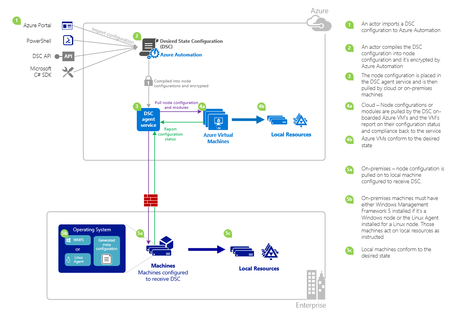
Microsoft Azure Automation provides a way for users to automate the manual, long-running, error-prone, and frequently repeated tasks that are commonly performed in a cloud and enterprise environment. It saves time and increases the reliability of regular administrative tasks and even schedules them to be automatically performed at regular intervals. You can automate processes using runbooks or automate configuration management using Desired State Configuration. This article provides brief overview of Azure Automation and answers some common questions about automation and Desired State Configuration (DSC) .3.9KViews1like0Comments