automation & control
92 TopicsIntegrating ServiceNow with Azure DevOps: Use Cases That Actually Show Up in Practice
I have been working in the integration space for quite some time. Though I work as a Content Manager, I am always curious to see how users handle integrations between multiple systems. Usually, the service desk runs on ServiceNow, and the build happens in Azure DevOps. But these tools aren't inherently connected, and someone has to manually relay information between them. So, the records never show consistent data. You need a way for the data to pass automatically between them. Even within this setup, a lot of scenarios come forth: from a single ServiceNow instance connecting to a single Azure DevOps org, up to companies running six or seven orgs off a shared service layer. Here's the full range of use cases I keep seeing, organized by what they're actually solving. Native Tools vs. a Dedicated Integration Layer Before the use cases, it's worth being clear on when you need more than what's built in. ServiceNow's IntegrationHub can push data through flows, and there's a spoke for looking up and creating basic Azure DevOps work items. Azure DevOps also has a native extension for pipeline-to-change-management syncing. These native options work fine when the integration is simple: one team, clean field mappings, developers on hand to maintain it. They start to struggle once you're crossing org boundaries, crossing company lines, or dealing with fields and states that don't line up between the two systems. At that point, a dedicated integration layer that handles the mapping and keeps each side's access separate is usually the better fit. Core Sync Use Cases 1. Sync ServiceNow Requests to Azure DevOps User Stories Current setup: Support or service teams work in ServiceNow. When a request needs development, someone has to get it onto an Azure DevOps board as a User Story. Problem: A person creates the work item by hand, copies the request details, and checks back later for updates. When the work item closes, the ServiceNow request often doesn't reflect that, so the requester never hears back. The two records aren't linked. Solution: A trigger, filtered by assignment group, category, or a manual send action, creates the User Story automatically. The link between the two records gets stored on both sides. Updates to the work item flow back to the request, and closing one side closes the other. 2. Sync Comments and State Back to ServiceNow Current setup: ServiceNow holds the ticket the requester sees. Azure DevOps holds the actual dev work. Problem: When the work item moves in Azure DevOps, the ServiceNow ticket's state doesn't follow. Comments the dev team adds stay in Azure DevOps, so the service team keeps pinging developers for status. Solution: As the work item's state changes, it updates the linked ServiceNow ticket. Comments from the dev side sync back too. The service team sees progress without opening Azure DevOps or chasing anyone. 3. Sync ServiceNow Catalog Items to Azure DevOps Current setup: Users order catalog items in ServiceNow. Fulfilling some of them takes real development work tracked in Azure DevOps. Problem: The catalog task sits in ServiceNow while the work happens somewhere the requester can't see. Someone bridges the two manually, and the catalog item's status stops meaning anything. Solution: The catalog item creates a matching work item in Azure DevOps with the request details attached. As the dev team works, status and comments sync back, so the catalog task shows real progress and closes when the work item does. 4. Cut Duplication Between Incidents and User Stories Current setup: Incidents land in ServiceNow. Some get tracked as User Stories in Azure DevOps so the dev team can work them alongside the rest of the backlog. Problem: The same information gets documented twice, updated twice, and the two records drift apart over time. Solution: Incidents create linked User Stories automatically, with comments and status syncing both ways. Update one side and the other reflects it, so nobody's working the same incident twice without realizing it. 5. Sync Bugs with Attachments Across Multiple Orgs Current setup: Bugs get raised in ServiceNow, often by a separate first-line support team, while product teams work across several distinct Azure DevOps orgs. Problem: Recreating bugs by hand loses attachments and context, and there's no clean way to route each bug to the right org out of several. When a bug's fixed, ServiceNow doesn't hear about it. Solution: A bug creates a matching Bug work item in the correct Azure DevOps org, attachments included. Status and comments flow back to ServiceNow when it's resolved. Each connection runs independently, so the first-line team stays in ServiceNow without needing access to the other side. 6. Project-to-Hypercare Handover Current setup: During a build, everyone works in Azure DevOps. Once it goes live and moves into maintenance, incidents and requests need to land in ServiceNow, sometimes a brand-new instance. Problem: Teams used to living in Azure DevOps now need a maintenance process in ServiceNow, with no link back to the developers who built the thing. Solution: Incidents raised during hypercare reach the dev team in Azure DevOps, and fixes flow back to ServiceNow. Because the connection is independent of either team's existing workflow, you can add it without disrupting how people already work. 7. Bidirectional Field and Lifecycle Sync Current setup: A demand owner in ServiceNow needs to track a Feature as it moves through scoping, active work, testing, and deployment in Azure DevOps. Problem: If effort, status, and assignment only live in Azure DevOps, the ServiceNow record goes stale. Fields on each side use different names and values, so a raw pass-through just creates mismatches. Solution: Key fields sync in both directions with explicit mappings. From Azure DevOps: iteration path, change reference, estimated effort, assignment, and lifecycle status. From ServiceNow: design documents, portfolio area, demand type, and requirement details. As the Feature moves through its stages, the ServiceNow record updates in real time. 8. Multiple Azure DevOps Orgs to a Central ServiceNow Instance Current setup: Each business unit runs its own Azure DevOps org, often from an acquisition or separate supplier setup. A central ServiceNow layer needs visibility across all of them without forcing a shared workflow. Problem: Without a sync, someone manually pulls data between systems and chases updates. It doesn't scale as orgs get added. Solution: Each org gets its own connection, configured independently, feeding the central ServiceNow instance. Every org keeps its own states and fields while leadership gets a single view across all of them. 9. Selective Field Sharing Between Separately Hosted Environments Current setup: One side runs cloud-hosted, the other on-prem or in a regulated environment, and neither can open full network-level access to the other. Problem: A basic integration either oversprays fields it shouldn't, or requires a network connection security won't approve. Each side wants control over exactly what leaves its environment. Solution: Outgoing and incoming rules configured independently on each side let each admin decide what leaves and what gets accepted. The two environments sync over a secured channel without either side getting direct access to the other's system. 10. Handling Closed and Read-Only Tickets Cleanly Current setup: ServiceNow access controls block updates to closed incidents. Your sync runs across tickets through their full lifecycle, including closure. Problem: A basic sync throws errors every time it tries to write to something already closed. Solution: Filter closed tickets out of the sync entirely so they never trigger a write, or let the errors surface where your team can see and review them. Which approach you pick is a team decision, not a technical constraint. 11. MSP Routing by Assignment Group Current setup: An MSP runs ServiceNow as its operational layer. Clients work in their own delivery tools, some in Azure DevOps, some elsewhere. Manual handoffs work for a couple of clients and fall apart past a handful. Problem: An engineer resolves an incident and forgets to update the client's system. A comment added on one side never reaches the other. Status shows "in progress" on one side long after it's resolved on the other. As client count grows, the gap between what your team knows and what clients see widens. Solution: An automated rule sends each incident to the right client system based on the ServiceNow assignment group. Set a filter (for example, database issues route to one client's system, network issues to another), and connections run independently with no crossover between clients. The original incident reference gets written into the client ticket, and status values map across cleanly. A couple of related patterns worth knowing: Internal notes can be filtered separately from customer-facing updates, so only what the client should see crosses over. A new client typically reuses your existing ServiceNow authentication, so onboarding is closer to registering their system and setting a routing rule than rebuilding the integration from scratch. 12. Conditional Escalation from Multiple ServiceNow Instances Current setup: Several ServiceNow instances feed a single Azure DevOps org. Only tickets that genuinely need developer attention should reach the board. Problem: Escalating everything floods the board with tickets the dev team shouldn't be handling. Solution: A conditional trigger escalates only tickets meeting a specific condition, so agents push what actually qualifies and everything else stays put. Multiple instances can each feed the same Azure DevOps org under their own trigger logic. 13. Demand Management to Feature Delivery Current setup: A demand process runs in ServiceNow end to end: submission, review, approval, and an approved Requirement. The build happens in Azure DevOps as a Feature, through scoping, active work, testing, deployment, and closure. Problem: Once a Requirement's approved, there's no automatic handoff. Someone recreates the Feature by hand and keeps both sides updated manually. The demand owner can't see effort, status, or assignment as work progresses, so the Requirement goes stale. When the Feature closes in Azure DevOps, the Requirement stays open until someone remembers to close it. Solution: A bidirectional sync connects the full flow. Feature creation: A Requirement creates a Feature automatically, carrying demand context (design sign-off, demand reference, portfolio area, stakeholders, description) so developers get what they need without opening ServiceNow. Field sync: Updates flow both ways, each field mapped to a specific direction. Azure DevOps to ServiceNow: iteration path, change reference, effort, priority, assignment, lifecycle state. ServiceNow to Azure DevOps: the demand and design fields above. Lifecycle feedback: As the Feature moves through its stages, effort, status, and assignment feed back into the Requirement in real time. Closure: When the Feature closes, the linked Requirement closes with it, and the demand gets marked fulfilled. ServiceNow stays the system of record for demand, Azure DevOps for execution, and each side keeps authority over what it owns. What Actually Makes These Work A few capabilities show up across almost every use case above: Attachment sync. Bugs and incidents depend on screenshots and logs. If attachments don't carry over, developers end up back on email. Custom field mappings. Out-of-the-box mappings only go so far. Real setups need custom fields like portfolio area or demand type mapped explicitly, with values transformed, not just copied. State mappings. ServiceNow states and Azure DevOps states don't share vocabulary. Map them explicitly, and decide upfront which side is authoritative when a state changes after creation. Selective sync. Filter by assignment group, area path, work item type, or a custom field. Fewer records crossing means less to govern and less risk of leaking internal data across a boundary. Security and access. For most Azure DevOps admins, this comes down to what gets checked in a security review anyway: Entra ID or OAuth over shared credentials, role-based access, audit logging, and real isolation between connections when multiple clients or companies are involved. For a single team with clean, one-direction mappings, a native option usually covers it. Once you're crossing orgs, crossing companies, or running a full demand-to-delivery flow with real field transformations, that's when a dedicated integration layer kind of becomes necessary. Let's discuss whether any of these match what you're dealing with, or if you've hit an edge case that isn't on this list.287Views1like2Comments
Should AI agents receive permissions dynamically instead of having fixed access?
Hi everyone, As AI agents move from simple chat-based assistants toward performing real actions—such as querying databases, creating resources, modifying configurations, sending notifications, or executing workflows—I have been thinking about how their permissions should be designed. A traditional application typically has a relatively well-defined permission model. An AI agent, however, may perform different tasks depending on the conversation and the user's request. For example: • Task A may only require read access. • Task B may require creating a resource. • Task C may require modifying an existing configuration. • Task D may involve a potentially destructive operation. This raises an interesting security question: Should an AI agent have a fixed set of permissions for its entire lifetime, or should permissions be granted progressively based on the task it is currently performing? For example: User → AI Agent → Read-only permissions Then, if the user explicitly requests a change: User approval → Temporary elevated permission → AI Agent performs the operation → Permission revoked I see some potential advantages to this approach: 1. Reduced blast radius if the agent behaves unexpectedly. 2. Better alignment between permissions and the actual task. 3. Easier auditing of elevated operations. 4. Reduced risk from prompt injection or unintended actions. 5. Human approval could be required only for high-impact operations. However, it also introduces additional complexity around identity, token issuance, approval workflows, session management, and auditing. I'm curious how others are approaching this. Would you prefer: A. Fixed least-privilege permissions for each agent B. Dynamic/task-based permissions C. Fixed permissions with human approval for sensitive operations D. A combination depending on the workload For production AI agents, which model do you think provides the best balance between security and usability? Would be particularly interested in experiences from people implementing agents in enterprise environments.48Views0likes0CommentsEngineering an Azure Data Layer for Odoo Analytics Without Changing the ERP
One thing I have learned from working on ERP-driven data projects is that the ERP is rarely the place where you want to solve every analytics problem. We saw this firsthand in a manufacturing engagement where Odoo was being used across finance, inventory, procurement, and manufacturing, but reporting still involved substantial manual extraction and Excel-based consolidation. The interesting engineering question wasn't “How do we replace the ERP?” It was: “How do we build a reliable analytical layer around it without changing the transactional system?” That shaped the architecture. We used Odoo APIs and Azure Data Factory for ingestion, landing the data in Azure Data Lake Storage Gen2. From there, the data was organized into Bronze, Silver, and Gold layers: Bronze: Source-aligned Odoo data was retained with minimal transformation. Silver: Data was cleansed, standardized, and prepared across finance, inventory, procurement, and manufacturing domains. Gold: Analytics-ready data was prepared for downstream reporting and consumption. Azure Databricks with Spark handled transformation and KPI standardization, while Synapse/SQL layers provided structured analytical models for reporting. Power BI datasets consumed the prepared data, with Row-Level Security applied for role-based access. Why did this separation matter for the project? The important architectural boundary was: Odoo → transactional operations Azure data platform → ingestion, storage, transformation, standardization Power BI → analytical consumption That separation meant the reporting layer did not have to repeatedly extract and reshape data directly from the ERP. It also gave us a dedicated place to handle historical data and standardize information across business domains before it reached the reporting layer. What changed? The implementation automated 15+ Odoo-based reports and provided governed Power BI dashboards to 60+ business users. More importantly, teams moved away from repeated ERP extraction and spreadsheet consolidation toward a reusable analytical data layer. For our team, the bigger takeaway was that ERP modernization does not necessarily mean modifying the ERP. For teams building Azure data platforms around ERP systems, how are you drawing the boundary between API ingestion, historical storage, transformation, and analytical modeling?80Views0likes0Comments
"Authorization failed" error for Logic app writing a comment to Sentinel Incident
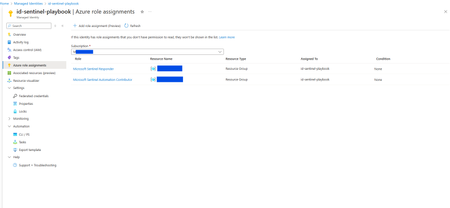
I have created a managed identity named id-sentinel-playbook that is used in 2 logic apps. Both the logic apps retrieve information from different external apis and writes the results as comments into the Sentinel incident. The managed identity id-sentinel-playbook has been assigned 2 roles - Microsoft Sentinel Responder and Microsoft Sentinel Automation Contributor role (See screenshot). However when one of the logic apps transacts with Sentinel such as checking the watchlist or writing comment into a Sentinel incident, there is the 403 forbidden error (See screenshot). It works fine when I use my Azure account as connection for the logic app. The other logic app also works fine when the same managed identity id-sentinel-playbook is used as connection to Sentinel. I have compared the identity of both the logic apps and they are the same. I have also searched online for existing answers and all point to the managed identity having insufficient roles, however id-sentinel-playbook already has the Microsoft Sentinel Responder role and strangely the other logic app that writes comments into the Sentinel incident as well, works. Here is the screenshot of the logic app having the user managed identity. The other logic app has the same. Please help. I spent 2 days investigating this and have no more ideas on how to further investigate this😓.661Views0likes2CommentsApplying DevOps Principles on Lean Infrastructure. Lessons From Scaling to 102K Users.
Hi Azure Community, I'm a Microsoft Certified DevOps Engineer, and I want to share an unusual journey. I have been applying DevOps principles on traditional VPS infrastructure to scale to 102,000 users with 99.2% uptime. Why am I posting this in an Azure community? Because I'm planning migration to Azure in 2026, and I want to understand: What mistakes am I already making that will bite me during migration? THE CURRENT SETUP Platform: Social commerce (West Africa) Users: 102,000 active Monthly events: 2 million Uptime: 99.2% Infrastructure: Single VPS Stack: PHP/Laravel, MySQL, Redis Yes - one VPS. No cloud. No Kubernetes. No microservices. WHY I HAVEN'T USED AZURE YET Honest answer: Budget constraints in emerging market startup ecosystem. At our current scale, fully managed Azure services would significantly increase monthly burn before product-market expansion. The funding we raised needs to last through growth milestones. The trade: I manually optimize what Azure would auto-scale. I debug what Application Insights would catch. I do by hand what Azure Functions would automate. DEVOPS PRACTICES THAT KEPT US RUNNING Even on single-server infrastructure, core DevOps principles still apply: CI/CD Pipeline (GitHub Actions) • 3-5 deployments weekly • Zero-downtime deploys • Automated rollback on health check failures • Feature flags for gradual rollouts Monitoring & Observability • Custom monitoring (would love Application Insights) • Real-time alerting • Performance tracking and slow query detection • Resource usage monitoring Automation • Automated backups • Automated database optimization • Automated image compression • Automated security updates Infrastructure as Code • Configs in Git • Deployment scripts • Environment variables • Documented procedures Testing & Quality • Automated test suite • Pre-deployment health checks • Staging environment • Post-deployment verification KEY OPTIMIZATIONS Async Job Processing • Upload endpoint: 8 seconds → 340ms • 4x capacity increase Database Optimization • Feed loading: 6.4 seconds → 280ms • Strategic caching • Batch processing Image Compression • 3-8MB → 180KB (94% reduction) • Critical for mobile users Caching Strategy • Redis for hot data • Query result caching • Smart invalidation Progressive Enhancement • Server-rendered pages • 2-3 second loads on 4G WHAT I'M WORRIED ABOUT FOR AZURE MIGRATION This is where I need your help: Architecture Decisions • App Service vs Functions + managed services? • MySQL vs Azure SQL? • When does cost/benefit flip for managed services? Cost Management • How do startups manage Azure costs during growth? • Reserved instances vs pay-as-you-go? • Which Azure services are worth the premium? Migration Strategy • Lift-and-shift first, or re-architect immediately? • Zero-downtime migration with 102K active users? • Validation approach before full cutover? Monitoring & DevOps • Application Insights - worth it from day one? • Azure DevOps vs GitHub Actions for Azure deployments? • Operational burden reduction with managed services? Development Workflow • Local development against Azure services? • Cost-effective staging environments? • Testing Azure features without constant bills? MY PLANNED MIGRATION PATH Phase 1: Hybrid (Q1 2026) • Azure CDN for static assets • Azure Blob Storage for images • Application Insights trial • Keep compute on VPS Phase 2: Compute Migration (Q2 2026) • App Service for API • Azure Database for MySQL • Azure Cache for Redis • VPS for background jobs Phase 3: Full Azure (Q3 2026) • Azure Functions for processing • Full managed services • Retire VPS QUESTIONS FOR THIS COMMUNITY Question 1: Am I making migration harder by waiting? Should I have started with Azure at higher cost to avoid technical debt? Question 2: What will break when I migrate? What works on VPS but fails in cloud? What assumptions won't hold? Question 3: How do I validate before cutting over? Parallel infrastructure? Gradual traffic shift? Safe patterns? Question 4: Cost optimization from day one? What to optimize immediately vs later? Common cost mistakes? Question 5: DevOps practices that transfer? What stays the same? What needs rethinking for cloud-native? THE BIGGER QUESTION Have you migrated from self-hosted to Azure? What surprised you? I know my setup isn't best practice by Azure standards. But it's working, and I've learned optimization, monitoring, and DevOps fundamentals in practice. Will those lessons transfer? Or am I building habits that cloud will expose as problematic? Looking forward to insights from folks who've made similar migrations. --- About the Author: Microsoft Certified DevOps Engineer and Azure Developer. CTO at social commerce platform scaling in West Africa. Preparing for phased Azure migration in 2026. P.S. I got the Azure certifications to prepare for this migration. Now I need real-world wisdom from people who've actually done it!389Views0likes1Comment
How to Fix Azure Event Grid Entra Authentication issue for ACS and Dynamics 365 integrated Webhooks
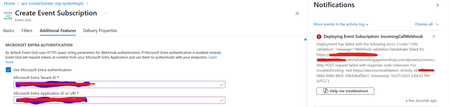
Introduction: Azure Event Grid is a powerful event routing service that enables event-driven architectures in Azure. When delivering events to webhook endpoints, security becomes paramount. Microsoft provides a secure webhook delivery mechanism using Microsoft Entra ID (formerly Azure Active Directory) authentication through the AzureEventGridSecureWebhookSubscriber role. Problem Statement: When integrating Azure Communication Services with Dynamics 365 Contact Center using Microsoft Entra ID-authenticated Event Grid webhooks, the Event Grid subscription deployment fails with an error: "HTTP POST request failed with unknown error code" with empty HTTP status and code. For example: Important Note: Before moving forward, please verify that you have the Owner role assigned on app to create event subscription. Refer to the Microsoft guidelines below to validate the required prerequisites before proceeding: Set up incoming calls, call recording, and SMS services | Microsoft Learn Why This Happens: This happens because AzureEventGridSecureWebhookSubscriber role is NOT properly configured on Microsoft EventGrid SP (Service Principal) and event subscription entra ID or application who is trying to create event grid subscription. What is AzureEventGridSecureWebhookSubscriber Role: The AzureEventGridSecureWebhookSubscriber is an Azure Entra application role that: Enables your application to verify the identity of event senders Allows specific users/applications to create event subscriptions Authorizes Event Grid to deliver events to your webhook How It Works: Role Creation: You create this app role in your destination webhook application's Azure Entra registration Role Assignment: You assign this role to: Microsoft Event Grid service principal (so it can deliver events) Either Entra ID / Entra User or Event subscription creator applications (so they can create event grid subscriptions) Token Validation: When Event Grid delivers events, it includes an Azure Entra token with this role claim Authorization Check: Your webhook validates the token and checks for the role Key Participants: Webhook Application (Your App) Purpose: Receives and processes events App Registration: Created in Azure Entra Contains: The AzureEventGridSecureWebhookSubscriber app role Validates: Incoming tokens from Event Grid Microsoft Event Grid Service Principal Purpose: Delivers events to webhooks App ID: Different per Azure cloud (Public, Government, etc.) Public Azure: 4962773b-9cdb-44cf-a8bf-237846a00ab7 Needs: AzureEventGridSecureWebhookSubscriber role assigned Event Subscription Creator Entra or Application Purpose: Creates event subscriptions Could be: You, Your deployment pipeline, admin tool, or another application Needs: AzureEventGridSecureWebhookSubscriber role assigned Although the full PowerShell script is documented in the below Event Grid documentation, it may be complex to interpret and troubleshoot. Azure PowerShell - Secure WebHook delivery with Microsoft Entra Application in Azure Event Grid - Azure Event Grid | Microsoft Learn To improve accessibility, the following section provides a simplified step-by-step tested solution along with verification steps suitable for all users including non-technical: Steps: STEP 1: Verify/Create Microsoft.EventGrid Service Principal Azure Portal → Microsoft Entra ID → Enterprise applications Change filter to Application type: Microsoft Applications Search for: Microsoft.EventGrid Ideally, your Azure subscription should include this application ID, which is common across all Azure subscriptions: 4962773b-9cdb-44cf-a8bf-237846a00ab7. If this application ID is not present, please contact your Azure Cloud Administrator. STEP 2: Create the App Role "AzureEventGridSecureWebhookSubscriber" Using Azure Portal: Navigate to your Webhook App Registration: Azure Portal → Microsoft Entra ID → App registrations Click All applications Find your app by searching OR use the Object ID you have Click on your app Create the App Role: Display name: AzureEventGridSecureWebhookSubscriber Allowed member types: Both (Users/Groups + Applications) Value: AzureEventGridSecureWebhookSubscriber Description: Azure Event Grid Role Do you want to enable this app role?: Yes In left menu, click App roles Click + Create app role Fill in the form: Click Apply STEP 3: Assign YOUR USER to the Role Using Azure Portal: Switch to Enterprise Application view: Azure Portal → Microsoft Entra ID → Enterprise applications Search for your webhook app (by name) Click on it Assign yourself: In left menu, click Users and groups Click + Add user/group Under Users, click None Selected Search for your user account (use your email) Select yourself Click Select Under Select a role, click None Selected Select AzureEventGridSecureWebhookSubscriber Click Select Click Assign STEP 4: Assign Microsoft.EventGrid Service Principal to the Role This step MUST be done via PowerShell or Azure CLI (Portal doesn't support this directly as we have seen) so PowerShell is recommended You will need to execute this step with the help of your Entra admin. # Connect to Microsoft Graph Connect-MgGraph -Scopes "AppRoleAssignment.ReadWrite.All" # Replace this with your webhook app's Application (client) ID $webhookAppId = "YOUR-WEBHOOK-APP-ID-HERE" #starting with c5 # Get your webhook app's service principal $webhookSP = Get-MgServicePrincipal -Filter "appId eq '$webhookAppId'" Write-Host " Found webhook app: $($webhookSP.DisplayName)" # Get Event Grid service principal $eventGridSP = Get-MgServicePrincipal -Filter "appId eq '4962773b-9cdb-44cf-a8bf-237846a00ab7'" Write-Host " Found Event Grid service principal" # Get the app role $appRole = $webhookSP.AppRoles | Where-Object {$_.Value -eq "AzureEventGridSecureWebhookSubscriber"} Write-Host " Found app role: $($appRole.DisplayName)" # Create the assignment New-MgServicePrincipalAppRoleAssignment ` -ServicePrincipalId $eventGridSP.Id ` -PrincipalId $eventGridSP.Id ` -ResourceId $webhookSP.Id ` -AppRoleId $appRole.Id Write-Host "Successfully assigned Event Grid to your webhook app!" Verification Steps: Verify the App Role was created: Your App Registration → App roles You should see: AzureEventGridSecureWebhookSubscriber Verify your user assignment: Enterprise application (your webhook app) → Users and groups You should see your user with role AzureEventGridSecureWebhookSubscriber Verify Event Grid assignment: Same location → Users and groups You should see Microsoft.EventGrid with role AzureEventGridSecureWebhookSubscriber Sample Flow: Analogy For Simplification: Lets think it similar to the construction site bulding where you are the owner of the building. Building = Azure Entra app (webhook app) Building (Azure Entra App Registration for Webhook) ├─ Building Name: "MyWebhook-App" ├─ Building Address: Application ID ├─ Building Owner: You ├─ Security System: App Roles (the security badges you create) └─ Security Team: Azure Entra and your actual webhook auth code (which validates tokens) like doorman Step 1: Creat the badge (App role) You (the building owner) create a special badge: - Badge name: "AzureEventGridSecureWebhookSubscriber" - Badge color: Let's say it's GOLD - Who can have it: Companies (Applications) and People (Users) This badge is stored in your building's system (Webhook App Registration) Step 2: Give badge to the Event Grid Service: Event Grid: "Hey, I need to deliver messages to your building" You: "Okay, here's a GOLD badge for your SP" Event Grid: *wears the badge* Now Event Grid can: - Show the badge to Azure Entra - Get tokens that say "I have the GOLD badge" - Deliver messages to your webhook Step 3: Give badge to yourself (or your deployment tool) You also need a GOLD badge because: - You want to create event grid event subscriptions - Entra checks: "Does this person have a GOLD badge?" - If yes: You can create subscriptions - If no: "Access denied" Your deployment pipeline also gets a GOLD badge: - So it can automatically set up event subscriptions during CI/CD deployments Disclaimer: The sample scripts provided in this article are provided AS IS without warranty of any kind. The author is not responsible for any issues, damages, or problems that may arise from using these scripts. Users should thoroughly test any implementation in their environment before deploying to production. Azure services and APIs may change over time, which could affect the functionality of the provided scripts. Always refer to the latest Azure documentation for the most up-to-date information. Thanks for reading this blog! I hope you found it helpful and informative for this specific integration use case 😀968Views4likes1Comment
Azure automation feature, improvements and bugs
This is by no means meant as critic as i love the Azure Automation Account product and its current features but these are thing that i would love to see as an offering/fixed for the future. Source Control (I can only speak for Github as that is what i use): Bugs: Tags being overwritten / removed by source controll both on full sync but also on incremential syncs (Already reported in case #2508010040002105) Features: Runbooks in source control is not being deleted in automation account when they have been deleted in source control. Support for diffrent sync types other than PowerShell 5.1 (Personally we will not consider upgrading to a newer version before there is source control implemented) Support for syncing the full repository instead of only a specific folder. So recursive source control for easier organisation in repositories I know we can setup multiple source control in azure automation but that seems a bit redundant and more maintance as the source control integration expires after 1 year does not matter if your PAT token is set to never expires Add support for syncing synopsis / description for at least PowerShell scripts so it grabs it directly from the given script and inputs it into the description field. Just the output of get-help .\ScriptName.ps1 Logging: Bugs: From time to time we see that logs is being displayed twice after each other so lets say you get the first result of logs. For this example lets say the first 10 entries in the All log page and scroll down further then the same 10 entries are repeated again and again and again this can also be seen by the time stamp of the log entry. (No new network requests for logs is being made so i believe this might be a bug in a javascript without being 100% certain) The most often time we see this bug is when a runbook is still running so it might be the log output stream that messes this up. And just to provide a picture for refrence without exposing anything sensitive the bug can be seen based on timestamps here: PowerShell 7 and above log outputs seems to contain some non escaped ASCI characters which makes the logs harder to read and also makes a log object being split into multiple log entries in Azure automation Log outputs Seems to have been fixed since i last tested Features: Searching for a specific job id in the general job list. Currently there is a work arround by going into a specific runbook - go to jobs - Press "Find job" and then you can lookup a jobid globally but the UI is not being updated correctly as displayed here: Would love to see a button here or be able to search for a jobid Formatting log outputs so you can do multi line output in a single log output entry E.G. "Write-output "New´r´nLine" So the output entry contains multiple lines for easier human readable log outputs Runbook page: Bugs: Searching for runbook names seems a bit buggy as far as i have seen there is 3 diffrent results for the end user Base image intialy looking at all runbooks One option is that it is not able to find a runbook with that name I have not been able to replicate it to get a picture of it. Another is that it displays a list of runbooks none of which matches what you searched for Third is that when you have searched for something and remove your search it does not return the original view Features: Ability to go to a previous job and re-run it/restart it with the same parameters. Think a bit like the way you can restart a github action run Scheduling: Features: More of a feature request but adding the schedule for a runbook directly in the code is awesome. (This is something we currently do by adding a parameter that contains the scheduling information then we have a runbook going over all our runbooks every hour and looking for this parameter and then constructing a schedule if it does not exist and links the runbook to the schedule and finally we also add a tag mentioning If the schedule name is enabled or not (*back to the issue in source control removing the tag*)) Hybrid workers: Features: I personally would love the ability to pause a hybrid worker in a hybrid worker group - Why? - Well we currently have 4 hybrid workers all running windows and have monthly patch windows and if a job hits a hybrid worker that is in patch then the jobs would go into a suspended state and not be picked up again Now we could remove the hybrid worker from the group but that would also remove the extension which would be reinstalled when added and then we would hit this https://learn.microsoft.com/en-us/azure/automation/troubleshoot/extension-based-hybrid-runbook-worker#scenario-runbooks-go-into-a-suspended-state-on-a-hybrid-runbook-worker-when-using-a-custom-account-on-a-server-with-user-account-control-uac-enabled This is an issue we originally started experiencing when we migrated from agent-based hybrid workers to extension based due to the discontinuation of agent-based. Another great reason is when needing to troubleshoot something on a specific hybrid worker or even when needing to update modules on a specific hybrid worker as this can not be done while the hybrid worker is still running jobs unless you use force or hit a time that it is not running or by manually stopping the service and then again end up with suspended jobs that is not being picked up again. Additional features that i personally would love to see as an offering: A front end for azure automation for end users (Think self-service portal) as some kind of add-on feature allowing a specific group of people to start a given runbook but supplying a more user friendly front end for it while also including some more limitations for end user groupings. I know there is already third party solutions for this and tbh I almost created one my self on my last maternity leave but my company chose not to pursue it further as the statement is we have 1 self service platform being servicenow can be viewed https://github.com/Mynster9361/Self-Service-Frontend-Azure-Automation just to give some inspiration if needed RBAC permissions for individual runbooks (as far as i remember this can already be done through cli) A General overview management blade for managing webhooks and the associated runbooks Currently there is no way to know which runbooks has an active / inactive webhook assigned to them as the only way to see this is by going to a runbook go to the webhooks blade and look if there is one or not. Personally i would love to see a blade on the general overview called "Webhooks" that looks similar to this table maybe: RunbookNameExpirationLast triggeredStatusRunbook1 (Clickable to get directly to the runbook)Custom_name_for_this webhook02/01/2022 16:00 EnabledRunbook2webhook211/11/2026 16:00TodayDisabledRunbook3webhook311/11/2027 16:00TodayEnabled Instead of webhook being a gentleman agreemnet on when you can enable and when you shouldn't enable and naming and such you have 1 general overview of all webhooks which would give value in regards to security and easier management of webhooks The things i see as most critical or highest on my wish list: To list 2 things i would like to see sooner rather than later Source control definitely needs to be updated/revamped so it both supports other languages/versions and also does not remove tags. Another thing that would be nice to have is to force it to follow source control so if i delete something that is in source control it is also deleted in azure automation Hybrid workers in maintenance mode so it completes running jobs and you are able to work on the hybrid worker whether it be bugs or just regular updates.346Views2likes1CommentBuilding Multi-Agent Orchestration Using Microsoft Semantic Kernel: A Complete Step-by-Step Guide
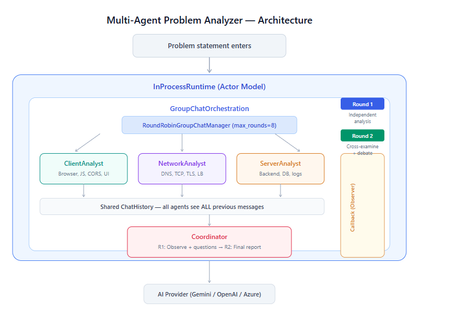
What You Will Build By the end of this guide, you will have a working multi-agent system where 4 specialist AI agents collaborate to diagnose production issues: ClientAnalyst — Analyzes browser, JavaScript, CORS, uploads, and UI symptoms NetworkAnalyst — Analyzes DNS, TCP/IP, TLS, load balancers, and firewalls ServerAnalyst — Analyzes backend logs, database, deployments, and resource limits Coordinator — Synthesizes all findings into a root cause report with a prioritized action plan These agents don't just run in sequence — they debate, cross-examine, and challenge each other's findings through a shared conversation, producing a diagnosis that's better than any single agent could achieve alone. Table of Contents Why Multi-Agent? The Problem with Single Agents Architecture Overview Understanding the Key SK Components The Actor Model — How InProcessRuntime Works Setting Up Your Development Environment Step-by-Step: Building the Multi-Agent Analyzer The Agent Interaction Flow — Round by Round Bugs I Found & Fixed — Lessons Learned Running with Different AI Providers What to Build Next 1. Why Multi-Agent? The Problem with Single Agents A single AI agent analyzing a production issue is like having one doctor diagnose everything — they'll catch issues in their specialty but miss cross-domain connections. Consider this problem: "Users report 504 Gateway Timeout errors when uploading files larger than 10MB. Started after Friday's deployment. Worse during peak hours." A single agent might say "it's a server timeout" and stop. But the real root cause often spans multiple layers: The client is sending chunked uploads with an incorrect Content-Length header (client-side bug) The load balancer has a 30-second timeout that's too short for large uploads (network config) The server recently deployed a new request body parser that's 3x slower (server-side regression) The combination only fails during peak hours because connection pool saturation amplifies the latency No single perspective catches this. You need specialists who analyze independently, then debate to find the cross-layer causal chain. That's what multi-agent orchestration gives you. The 5 Orchestration Patterns in SK Semantic Kernel provides 5 built-in patterns for agent collaboration: SEQUENTIAL: A → B → C → Done (pipeline — each builds on previous) CONCURRENT: ↗ A ↘ Task → B → Aggregate ↘ C ↗ (parallel — results merged) GROUP CHAT: A ↔ B ↔ C ↔ D ← We use this one (rounds, shared history, debate) HANDOFF: A → (stuck?) → B → (complex?) → Human (escalation with human-in-the-loop) MAGENTIC: LLM picks who speaks next dynamically (AI-driven speaker selection) We use GroupChatOrchestration with RoundRobinGroupChatManager because our problem requires agents to see each other's work, challenge assumptions, and build on each other's analysis across two rounds. 2. Architecture Overview Here's the complete architecture of what we're building: 3. Understanding the Key SK Components Before we write code, let's understand the 5 components we'll use and the design pattern each implements: ChatCompletionAgent — Strategy Pattern The agent definition. Each agent is a combination of: name — unique identifier (used in round-robin ordering) instructions — the persona and rules (this is the prompt engineering) service — which AI provider to call (Strategy Pattern — swap providers without changing agent logic) description — what other agents/tools understand about this agent agent = ChatCompletionAgent( name="ClientAnalyst", instructions="You are ONLY ClientAnalyst...", service=gemini_service, # ← Strategy: swap to OpenAI with zero changes description="Analyzes client-side issues", ) GroupChatOrchestration — Mediator Pattern The orchestration defines HOW agents interact. It's the Mediator — agents don't talk to each other directly. Instead, the orchestration manages a shared ChatHistory and routes messages through the Manager. RoundRobinGroupChatManager — Strategy Pattern The Manager decides WHO speaks next. RoundRobinGroupChatManager cycles through agents in a fixed order. SK also provides AutomaticGroupChatManager where the LLM decides who speaks next. max_rounds is the total number of messages per agent or cycle. With 4 agents and max_rounds=8, each agent speaks exactly twice. InProcessRuntime — Actor Model Abstraction The execution engine. Every agent becomes an "actor" with its own kind of mailbox (message queue). The runtime delivers messages between actors. Key properties: No shared state — agents communicate only through messages Sequential processing — each agent processes one message at a time Location transparency — same code works in-process today, distributed tomorrow agent_response_callback — Observer Pattern A function that fires after EVERY agent response. We use it to display each agent's output in real-time with emoji labels and round numbers. 4. The Actor Model — How InProcessRuntime Works The Actor Model is a concurrency pattern where each entity is an isolated "actor" with a private mailbox. Here's what happens inside InProcessRuntime when we run our demo: runtime.start() │ ├── Creates internal message loop (asyncio event loop) │ orchestration.invoke(task="504 timeout...", runtime=runtime) │ ├── Creates Actor[Orchestrator] → manages overall flow ├── Creates Actor[Manager] → RoundRobinGroupChatManager ├── Creates Actor[ClientAnalyst] → mailbox created, waiting ├── Creates Actor[NetworkAnalyst] → mailbox created, waiting ├── Creates Actor[ServerAnalyst] → mailbox created, waiting └── Creates Actor[Coordinator] → mailbox created, waiting Manager receives "start" message │ ├── Checks turn order: [Client, Network, Server, Coordinator] ├── Sends task to ClientAnalyst mailbox │ → ClientAnalyst processes: calls LLM → response │ → Response added to shared ChatHistory │ → callback fires (displayed in Notebook UI) │ → Sends "done" back to Manager │ ├── Manager updates: turn_index=1 ├── Sends to NetworkAnalyst mailbox │ → Same flow... │ ├── ... (ServerAnalyst, Coordinator for Round 1) │ ├── Manager checks: messages=4, max_rounds=8 → continue │ ├── Round 2: same cycle with cross-examination │ └── After message 8: Manager sends "complete" → OrchestrationResult resolves → result.get() returns final answer runtime.stop_when_idle() → All mailboxes empty → clean shutdown The Actor Model guarantees: No race conditions (each actor processes one message at a time) No deadlocks (no shared locks to contend for) No shared mutable state (agents communicate only via messages) 5. Setting Up Your Development Environment Prerequisites Python 3.11 or 3.12 (3.13+ may have compatibility issues with some SK connectors) Visual Studio Code with the Python and Jupyter extensions An API key from one of: Google AI Studio (free), OpenAI Step 1: Install Python Download from python.org. During installation, check "Add Python to PATH". Verify: python --version # Python 3.12.x Step 2: Install VS Code Extensions Open VS Code, go to Extensions (Ctrl+Shift+X), and install: Python (by Microsoft) — Python language support Jupyter (by Microsoft) — Notebook support Pylance (by Microsoft) — IntelliSense and type checking Step 3: Create Project Folder mkdir sk-multiagent-demo cd sk-multiagent-demo Open in VS Code: code . Step 4: Create Virtual Environment Open the VS Code terminal (Ctrl+`) and run: # Create virtual environment python -m venv sk-env # Activate it # Windows: sk-env\Scripts\activate # macOS/Linux: source sk-env/bin/activate You should see (sk-env) in your terminal prompt. Step 5: Install Semantic Kernel For Google Gemini (free tier — recommended for getting started): pip install semantic-kernel[google] python-dotenv ipykernel For OpenAI (paid API key): pip install semantic-kernel openai python-dotenv ipykernel For Azure AI Foundry (enterprise, Entra ID auth): pip install semantic-kernel azure-identity python-dotenv ipykernel Step 6: Register the Jupyter Kernel python -m ipykernel install --user --name=sk-env --display-name="Semantic Kernel (Python 3.12)" You can also select if this is already available from your environment from VSCode as below: Step 7: Get Your API Key Option A — Google Gemini (FREE, recommended for demo): Go to https://aistudio.google.com/apikey Click "Create API Key" Copy the key Free tier limits: 15 requests/minute, 1 million tokens/minute — more than enough for this demo. Option B — OpenAI: Go to https://platform.openai.com/api-keys Create a new key Copy the key Option C — Azure AI Foundry: Deploy a model in Azure AI Foundry portal Note the endpoint URL and deployment name If key-based auth is disabled, you'll need Entra ID with permissions Step 8: Create the .env File In your project root, create a file named .env: For Gemini: GOOGLE_AI_API_KEY=AIzaSy...your-key-here GOOGLE_AI_GEMINI_MODEL_ID=gemini-2.5-flash For OpenAI: OPENAI_API_KEY=sk-...your-key-here OPENAI_CHAT_MODEL_ID=gpt-4o For Azure AI Foundry: AZURE_OPENAI_ENDPOINT=https://your-resource.cognitiveservices.azure.com AZURE_OPENAI_CHAT_DEPLOYMENT_NAME=gpt-4o AZURE_OPENAI_API_KEY=your-key Step 9: Create the Notebook In VS Code: Click File > New File Save as multi_agent_analyzer.ipynb In the top-right of the notebook, click Select Kernel Choose Semantic Kernel (Python 3.12) (or your sk-env) Your environment is ready. Let's build. 6. Step-by-Step: Building the Multi-Agent Analyzer Cell 1: Verify Setup import semantic_kernel print(f"Semantic Kernel version: {semantic_kernel.__version__}") from semantic_kernel.agents import ( ChatCompletionAgent, GroupChatOrchestration, RoundRobinGroupChatManager, ) from semantic_kernel.agents.runtime import InProcessRuntime from semantic_kernel.contents import ChatMessageContent print("All imports successful") Cell 2: Load API Key and Create Service For Gemini: import os from dotenv import load_dotenv load_dotenv() from semantic_kernel.connectors.ai.google.google_ai import ( GoogleAIChatCompletion, GoogleAIChatPromptExecutionSettings, ) from semantic_kernel.contents import ChatHistory GEMINI_API_KEY = os.getenv("GOOGLE_AI_API_KEY") GEMINI_MODEL = os.getenv("GOOGLE_AI_GEMINI_MODEL_ID", "gemini-2.5-flash") service = GoogleAIChatCompletion( gemini_model_id=GEMINI_MODEL, api_key=GEMINI_API_KEY, ) print(f"Service created: Gemini {GEMINI_MODEL}") # Smoke test settings = GoogleAIChatPromptExecutionSettings() test_history = ChatHistory(system_message="You are a helpful assistant.") test_history.add_user_message("Say 'Connected!' and nothing else.") response = await service.get_chat_message_content( chat_history=test_history, settings=settings ) print(f"Model says: {response.content}") For OpenAI: import os from dotenv import load_dotenv load_dotenv() from semantic_kernel.connectors.ai.open_ai import ( OpenAIChatCompletion, OpenAIChatPromptExecutionSettings, ) from semantic_kernel.contents import ChatHistory service = OpenAIChatCompletion( ai_model_id=os.getenv("OPENAI_CHAT_MODEL_ID", "gpt-4o"), ) print(f"Service created: OpenAI {os.getenv('OPENAI_CHAT_MODEL_ID', 'gpt-4o')}") # Smoke test settings = OpenAIChatPromptExecutionSettings() test_history = ChatHistory(system_message="You are a helpful assistant.") test_history.add_user_message("Say 'Connected!' and nothing else.") response = await service.get_chat_message_content( chat_history=test_history, settings=settings ) print(f"Model says: {response.content}") Cell 3: Define All 4 Agents This is the most important cell — the prompt engineering that makes the demo work: from semantic_kernel.agents import ChatCompletionAgent # ═══════════════════════════════════════════════════ # AGENT 1: Client-Side Analyst # ═══════════════════════════════════════════════════ client_agent = ChatCompletionAgent( name="ClientAnalyst", description="Analyzes problems from the client-side: browser, JS, CORS, caching, UI symptoms", instructions="""You are ONLY **ClientAnalyst**. You must NEVER speak as NetworkAnalyst, ServerAnalyst, or Coordinator. Every word you write is from ClientAnalyst's perspective only. You are a senior front-end and client-side diagnostics expert. When given a problem statement, analyze it EXCLUSIVELY from the client side: 1. **Browser & Rendering**: DOM issues, JavaScript errors, CSS rendering, browser compatibility, memory leaks, console errors. 2. **Client-Side Caching**: Stale cache, service worker issues, local storage corruption. 3. **Network from Client View**: CORS errors, preflight failures, request timeouts, client-side retry storms, fetch/XHR configuration. 4. **Upload Handling**: File API usage, chunk upload implementation, progress tracking, FormData construction, content-type headers. 5. **UI/UX Symptoms**: What the user sees, error messages displayed, loading states. ROUND 1: Provide your independent analysis. Do NOT reference other agents. List your top 3 most likely causes with evidence. Every response MUST be at least 200 words. ROUND 2: You MUST: - Reference NetworkAnalyst and ServerAnalyst BY NAME - State specifically where you AGREE or DISAGREE with their findings - Answer the Coordinator's questions from your perspective - Add NEW cross-layer insights you see from the client perspective - Do NOT just say 'I agree' — provide substantive technical reasoning Be specific, evidence-based, and prioritize findings by likelihood.""", service=service, ) # ═══════════════════════════════════════════════════ # AGENT 2: Network Analyst # ═══════════════════════════════════════════════════ network_agent = ChatCompletionAgent( name="NetworkAnalyst", description="Analyzes problems from the network side: DNS, TCP, TLS, firewalls, load balancers, latency", instructions="""You are ONLY **NetworkAnalyst**. You must NEVER speak as ClientAnalyst, ServerAnalyst, or Coordinator. Every word you write is from NetworkAnalyst's perspective only. You are a senior network infrastructure diagnostics expert. When given a problem statement, analyze it EXCLUSIVELY from the network layer: 1. **DNS & Resolution**: DNS TTL, propagation delays, record misconfigurations. 2. **TCP/IP & Connections**: Connection pooling, keep-alive, TCP window scaling, connection resets, SYN floods. 3. **TLS/SSL**: Certificate issues, handshake failures, protocol version mismatches. 4. **Load Balancers & Proxies**: Sticky sessions, health checks, timeout configs, request body size limits, proxy buffering. 5. **Firewall & WAF**: Rule blocks, rate limiting, request inspection delays, geo-blocking, DDoS protection interference. ROUND 1: Provide your independent analysis. Do NOT reference other agents. List your top 3 most likely causes with evidence. Every response MUST be at least 200 words. ROUND 2: You MUST: - Reference ClientAnalyst and ServerAnalyst BY NAME - State specifically where you AGREE or DISAGREE with their findings - Answer the Coordinator's questions from your perspective - Add NEW cross-layer insights you see from the network perspective - Do NOT just say 'I am ready to proceed' — provide substantive technical analysis Be specific, evidence-based, and prioritize findings by likelihood.""", service=service, ) # ═══════════════════════════════════════════════════ # AGENT 3: Server-Side Analyst # ═══════════════════════════════════════════════════ server_agent = ChatCompletionAgent( name="ServerAnalyst", description="Analyzes problems from the server side: backend app, database, logs, resources, deployments", instructions="""You are ONLY **ServerAnalyst**. You must NEVER speak as ClientAnalyst, NetworkAnalyst, or Coordinator. Every word you write is from ServerAnalyst's perspective only. You are a senior backend and infrastructure diagnostics expert. When given a problem statement, analyze it EXCLUSIVELY from the server side: 1. **Application Server**: Error logs, exception traces, thread pool exhaustion, memory leaks, CPU spikes, garbage collection pauses. 2. **Database**: Slow queries, connection pool saturation, lock contention, deadlocks, replication lag, query plan changes. 3. **Deployment & Config**: Recent deployments, configuration changes, feature flags, environment variable mismatches, rollback candidates. 4. **Resource Limits**: File upload size limits, request body limits, disk space, temporary file cleanup, storage quotas. 5. **External Dependencies**: Upstream API timeouts, third-party service degradation, queue backlogs, cache (Redis/Memcached) issues. ROUND 1: Provide your independent analysis. Do NOT reference other agents. List your top 3 most likely causes with evidence. Every response MUST be at least 200 words. ROUND 2: You MUST: - Reference ClientAnalyst and NetworkAnalyst BY NAME - State specifically where you AGREE or DISAGREE with their findings - Answer the Coordinator's questions from your perspective - Add NEW cross-layer insights you see from the server perspective - Do NOT just say 'I agree' — provide substantive technical reasoning Be specific, evidence-based, and prioritize findings by likelihood.""", service=service, ) # ═══════════════════════════════════════════════════ # AGENT 4: Coordinator # ═══════════════════════════════════════════════════ coordinator_agent = ChatCompletionAgent( name="Coordinator", description="Synthesizes all specialist analyses into a final root cause report with prioritized action plan", instructions="""You are ONLY **Coordinator**. You must NEVER speak as ClientAnalyst, NetworkAnalyst, or ServerAnalyst. You synthesize — you do NOT do domain-specific analysis. You are the lead engineer who synthesizes the team's findings. ═══ ROUND 1 BEHAVIOR (your first turn, message 4) ═══ Keep this SHORT — maximum 300 words. - Note 2-3 KEY PATTERNS across the three analyses - Identify where specialists AGREE (high-confidence) - Identify where they CONTRADICT (needs resolution) - Ask 2-3 SPECIFIC QUESTIONS for Round 2 Round 1 MUST NOT: assign tasks, create action plans, write reports, or tell agents what to take lead on. Observation + questions ONLY. ═══ ROUND 2 BEHAVIOR (your final turn, message 8) ═══ Keep this FOCUSED — maximum 800 words. Produce a structured report: 1. **Root Cause** (1 paragraph): The #1 most likely cause with causal chain across layers. Reference specific findings from each specialist. 2. **Confidence** (short list): - HIGH: Areas where all 3 agreed - MEDIUM: Areas where 2 of 3 agreed - LOW: Disagreements needing investigation 3. **Action Plan** (numbered, max 6 items): For each: - What to do (specific) - Owner (Client/Network/Server team) - Time estimate 4. **Quick Wins vs Long-term** (2 short lists) Do NOT repeat what specialists already said verbatim. Synthesize, don't echo.""", service=service, ) # ═══════════════════════════════════════════════════ # All 4 agents — order = RoundRobin order # ═══════════════════════════════════════════════════ agents = [client_agent, network_agent, server_agent, coordinator_agent] print(f"{len(agents)} agents created:") for i, a in enumerate(agents, 1): print(f" {i}. {a.name}: {a.description[:60]}...") print(f"\nRoundRobin order: {' → '.join(a.name for a in agents)}") Cell 4: Run the Analysis from semantic_kernel.agents import GroupChatOrchestration, RoundRobinGroupChatManager from semantic_kernel.agents.runtime import InProcessRuntime from semantic_kernel.contents import ChatMessageContent from IPython.display import display, Markdown # ╔══════════════════════════════════════════════════════════╗ # ║ EDIT YOUR PROBLEM STATEMENT HERE ║ # ╚══════════════════════════════════════════════════════════╝ PROBLEM = """ Users are reporting intermittent 504 Gateway Timeout errors when trying to upload files larger than 10MB through our web application. The issue started after last Friday's deployment and seems worse during peak hours (2-5 PM EST). Some users also report that smaller file uploads work fine but the progress bar freezes at 85% for large files before timing out. """ # ════════════════════════════════════════════════════════════ agent_responses = [] def agent_response_callback(message: ChatMessageContent) -> None: name = message.name or "Unknown" content = message.content or "" agent_responses.append({"agent": name, "content": content}) emoji = { "ClientAnalyst": "🖥️", "NetworkAnalyst": "🌐", "ServerAnalyst": "⚙️", "Coordinator": "🎯" }.get(name, "🔹") round_num = (len(agent_responses) - 1) // len(agents) + 1 display(Markdown( f"---\n### {emoji} {name} (Message {len(agent_responses)}, Round {round_num})\n\n{content}" )) MAX_ROUNDS = 8 # 4 agents × 2 rounds = 8 messages exactly task = f"""## Problem Statement {PROBLEM.strip()} ## Discussion Rules You are in a GROUP DISCUSSION with 4 members. You can see ALL previous messages. There are exactly 2 rounds. ### ROUND 1 (Messages 1-4): Independent Analysis - ClientAnalyst, NetworkAnalyst, ServerAnalyst: Analyze from YOUR domain only. Give your top 3 most likely causes with evidence and reasoning. - Coordinator: Note patterns across the 3 analyses. Ask 2-3 specific questions. Do NOT assign tasks yet. ### ROUND 2 (Messages 5-8): Cross-Examination & Final Report - ClientAnalyst, NetworkAnalyst, ServerAnalyst: You MUST reference the OTHER specialists BY NAME. State where you agree, disagree, or have new insights. Answer the Coordinator's questions. Provide SUBSTANTIVE analysis. - Coordinator: Produce the FINAL structured report: root cause, confidence levels, prioritized action plan with owners and time estimates. IMPORTANT: Each agent speaks as THEMSELVES only. Never impersonate another agent.""" display(Markdown(f"## Problem Statement\n\n{PROBLEM.strip()}")) display(Markdown(f"---\n## Discussion Starting — {len(agents)} agents, {MAX_ROUNDS} rounds\n")) # Build and run orchestration = GroupChatOrchestration( members=agents, manager=RoundRobinGroupChatManager(max_rounds=MAX_ROUNDS), agent_response_callback=agent_response_callback, ) runtime = InProcessRuntime() runtime.start() result = await orchestration.invoke(task=task, runtime=runtime) final_result = await result.get(timeout=300) await runtime.stop_when_idle() display(Markdown(f"---\n## FINAL CONCLUSION\n\n{final_result}")) Cell 5: Statistics and Validation print("═" * 55) print(" ANALYSIS STATISTICS") print("═" * 55) emojis = {"ClientAnalyst": "🖥️", "NetworkAnalyst": "🌐", "ServerAnalyst": "⚙️", "Coordinator": "🎯"} agent_counts = {} agent_chars = {} for r in agent_responses: agent_counts[r["agent"]] = agent_counts.get(r["agent"], 0) + 1 agent_chars[r["agent"]] = agent_chars.get(r["agent"], 0) + len(r["content"]) for agent, count in agent_counts.items(): em = emojis.get(agent, "🔹") chars = agent_chars.get(agent, 0) avg = chars // count if count else 0 print(f" {em} {agent}: {count} msg(s), ~{chars:,} chars (avg {avg:,}/msg)") print(f"\n Total messages: {len(agent_responses)}") total_chars = sum(len(r['content']) for r in agent_responses) print(f" Total analysis: ~{total_chars:,} characters") # Validation print(f"\n Validation:") import re identity_issues = [] for r in agent_responses: other_agents = [a.name for a in agents if a.name != r["agent"]] for other in other_agents: pattern = rf'(?i)as {re.escape(other)}[,:]?\s+I\b' if re.search(pattern, r["content"][:300]): identity_issues.append(f"{r['agent']} impersonated {other}") if identity_issues: print(f" Identity confusion: {identity_issues}") else: print(f" No identity confusion detected") thin = [r for r in agent_responses if len(r["content"].strip()) < 100] if thin: for t in thin: print(f" Thin response from {t['agent']}") else: print(f" All responses are substantive") Cell 6: Save Report from datetime import datetime timestamp = datetime.now().strftime("%Y%m%d_%H%M%S") filename = f"analysis_report_{timestamp}.md" with open(filename, "w", encoding="utf-8") as f: f.write(f"# Problem Analysis Report\n\n") f.write(f"**Generated:** {datetime.now().strftime('%Y-%m-%d %H:%M:%S')}\n") f.write(f"**Agents:** {', '.join(a.name for a in agents)}\n") f.write(f"**Rounds:** {MAX_ROUNDS}\n\n---\n\n") f.write(f"## Problem Statement\n\n{PROBLEM.strip()}\n\n---\n\n") for i, r in enumerate(agent_responses, 1): em = emojis.get(r['agent'], '🔹') round_num = (i - 1) // len(agents) + 1 f.write(f"### {em} {r['agent']} (Message {i}, Round {round_num})\n\n") f.write(f"{r['content']}\n\n---\n\n") f.write(f"## Final Conclusion\n\n{final_result}\n") print(f"Report saved to: {filename}") 7. The Agent Interaction Flow — Round by Round Here's what actually happens during the 8-message orchestration: Round 1: Independent Analysis (Messages 1-4) Msg Agent What They See What They Do 1 ClientAnalyst Problem statement only Analyzes from client perspective: upload chunking, progress bar freezing at 85%, CORS, content-type headers 2 NetworkAnalyst Problem + ClientAnalyst's analysis Gives INDEPENDENT analysis despite seeing msg 1: load balancer timeouts, proxy body size limits, TCP window scaling 3 ServerAnalyst Problem + msgs 1-2 Gives INDEPENDENT analysis: recent deployment regression, request body parser, thread pool exhaustion, disk space 4 Coordinator Problem + msgs 1-3 Observes patterns: "All three mention timeout configuration. ClientAnalyst and NetworkAnalyst both point to body size. Question: Was the deployment a backend-only change or did it include infra?" Round 2: Cross-Examination (Messages 5-8) Msg Agent What They Do 5 ClientAnalyst "I agree with NetworkAnalyst that the load balancer timeout is likely a factor — the 85% freeze point matches the 30-second LB timeout for a 10MB upload on our average upload speed. However, I disagree with ServerAnalyst about thread pool exhaustion because the UI shows a clean 504, not a connection reset." 6 NetworkAnalyst "ServerAnalyst's point about the recent deployment is critical — if the new request parser is 3x slower, that would push uploads past the LB timeout. I can confirm the LB has a 30s idle timeout. The fix is both: increase LB timeout AND optimize the parser." 7 ServerAnalyst "Responding to Coordinator's question: The deployment was backend-only — a new multipart parser using streaming instead of buffered reads. ClientAnalyst is correct that the 504 is from the LB, not the app. The app itself returns 200 after 45 seconds, but the LB kills the connection at 30." 8 Coordinator Produces final structured report with root cause: "The backend deployment introduced a slower multipart parser (45s vs 15s for 10MB). The load balancer's 30s timeout kills the connection at ~85% progress. Fix: immediate — increase LB timeout to 120s. Short-term — optimize parser. Long-term — implement chunked uploads with progress resumption." Notice: The Round 2 analysis is dramatically better than Round 1. Agents reference each other by name, build on each other's findings, and the Coordinator can synthesize a cross-layer causal chain that no single agent could have produced. I made a small adjustment to the issue with Azure Web Apps. Please find the details below from testing carried out using Google Gemini: 8. Bugs I Found & Fixed — Lessons Learned Building this demo taught me several important lessons about multi-agent systems: Bug 1: Agents Speaking Only Once Symptom: Only 4 messages instead of 8. Root cause: The agents list was missing the Coordinator. It was defined in a separate cell and wasn't included in the members list. Fix: All 4 agents must be in the same list passed to GroupChatOrchestration. Bug 2: NetworkAnalyst Says "I'm Ready to Proceed" Symptom: NetworkAnalyst's Round 2 response was just "I'm ready to proceed with the analysis" — no actual content. Root cause: The Coordinator's Round 1 message was assigning tasks ("NetworkAnalyst, please check the load balancer config"), and the agent was acknowledging the assignment instead of analyzing. Fix: Added explicit constraint to Coordinator: "Round 1 MUST NOT assign tasks — observation + questions ONLY." Bug 3: ServerAnalyst Says "As NetworkAnalyst, I..." Symptom: ServerAnalyst's response started with "As NetworkAnalyst, I believe..." Root cause: LLM identity bleeding. When agents share ChatHistory, the LLM sometimes loses track of which agent it's currently playing. This is especially common with Gemini. Fix: Identity anchoring at the very top of every agent's instructions: "You are ONLY ServerAnalyst. You must NEVER speak as ClientAnalyst, NetworkAnalyst, or Coordinator." Bug 4: Gemini Gives Thin/Empty Responses Symptom: Some agents responded with just one sentence or "I concur." Root cause: Gemini 2.5 Flash is more concise than GPT-4o by default. Without explicit length requirements, it takes shortcuts. Fix: Added "Every response MUST be at least 200 words" and "Answer the Coordinator's questions" to every specialist's instructions. Bug 5: Coordinator's Report is 18K Characters Symptom: The Coordinator's Round 2 response was absurdly long — repeating everything every specialist said. Fix: Added word limits: "Round 1 max 300 words, Round 2 max 800 words" and "Synthesize, don't echo." Bug 6: MAX_ROUNDS Math Symptom: With MAX_ROUNDS=9, ClientAnalyst spoke a 3rd time after the Coordinator's final report — breaking the clean 2-round structure. Fix: MAX_ROUNDS must equal (number of agents × number of rounds). For 4 agents × 2 rounds = 8. 9. Running with Different AI Providers The beauty of SK's Strategy Pattern is that you change ONE LINE to switch providers. Everything else — agents, orchestration, callbacks, validation — stays identical. Gemini setup: from semantic_kernel.connectors.ai.google.google_ai import GoogleAIChatCompletion service = GoogleAIChatCompletion( gemini_model_id="gemini-2.5-flash", api_key=os.getenv("GOOGLE_AI_API_KEY"), ) OpenAI Setup from semantic_kernel.connectors.ai.open_ai import OpenAIChatCompletion service = OpenAIChatCompletion( ai_model_id="gpt-4o", api_key=os.getenv("OPEN_AI_API_KEY"), ) 10. What to Build Next Add Plugins to Agents Give agents real tools — not just LLM reasoning - looks exciting right ;) class NetworkDiagnosticPlugin: (description="Pings a host and returns latency") def ping(self, host: str) -> str: result = subprocess.run(["ping", "-c", "3", host], capture_output=True, text=True) return result.stdout class LogSearchPlugin: (description="Searches server logs for error patterns") def search_logs(self, pattern: str, hours: int = 1) -> str: # Query your log aggregator (Splunk, ELK, Azure Monitor) return query_logs(pattern, hours) Add Filters for Governance Intercept every agent call for PII redaction and audit logging: .filter(filter_type=FilterTypes.FUNCTION_INVOCATION) async def audit_filter(context, next): print(f"[AUDIT] {context.function.name} called by agent") await next(context) print(f"[AUDIT] {context.function.name} returned") Try Different Orchestration Patterns Replace GroupChat with Sequential for a pipeline approach: # Instead of debate, each agent builds on the previous orchestration = SequentialOrchestration( members=[client_agent, network_agent, server_agent, coordinator_agent] ) Or Concurrent for parallel analysis: # All specialists analyze simultaneously, Coordinator aggregates orchestration = ConcurrentOrchestration( members=[client_agent, network_agent, server_agent] ) Deploy to Azure Move from InProcessRuntime to Azure Container Apps for production scaling. The agent code doesn't change — only the runtime. Summary The key insight from building this demo: multi-agent systems produce better results than single agents not because each agent is smarter, but because the debate structure forces cross-domain thinking that a single prompt can never achieve. The Coordinator's final report consistently identifies causal chains that span client, network, and server layers — exactly the kind of insight that production incident response teams need. Semantic Kernel makes this possible with clean separation of concerns: agents define WHAT to analyze, orchestration defines HOW they interact, the manager defines WHO speaks when, the runtime handles WHERE it executes, and callbacks let you OBSERVE everything. Each piece is independently swappable — that's the power of SK from Microsoft. Resources: GitHub: github.com/microsoft/semantic-kernel Docs: learn.microsoft.com/semantic-kernel Orchestration Patterns: learn.microsoft.com/semantic-kernel/frameworks/agent/agent-orchestration Discord: aka.ms/sk/discord Disclaimer: The sample scripts provided in this article are provided AS IS without warranty of any kind. The author is not responsible for any issues, damages, or problems that may arise from using these scripts. Users should thoroughly test any implementation in their environment before deploying to production. Azure services and APIs may change over time, which could affect the functionality of the provided scripts. Always refer to the latest Azure documentation for the most up-to-date information. Thanks for reading this blog! I hope you found it helpful and informative for building AI agents with SK (Semantic Kernel) 😀958Views3likes1Comment
Building a Production-Ready Azure Lighthouse Deployment Pipeline with EPAC
Recently I worked on an interesting project for an end-to-end Azure Lighthouse implementation. What really stood out to me was the combination of Azure Lighthouse, EPAC, DevOps, and workload identity federation. The deployment model was so compelling that I decided to build and validate the full solution hands-on in my own personal Azure tenants. The result is a detailed article that documents the entire journey, including pipeline design, implementation steps, and the scripts I prepared along the way. You can read the full article here314Views0likes1Comment
RHEL In-place upgrades and Azure Update Manager
Following the process in this article will cause a disconnection between the data plane and the control plane of the virtual machine (VM). Azure capabilities such as Auto guest patching, Auto OS image upgrades, Hotpatching, and Azure Update Manager won't be available. To utilize these features, it's recommended to create a new VM using your preferred operating system instead of performing an in-place upgrade. According to https://learn.microsoft.com/en-us/azure/virtual-machines/workloads/redhat/redhat-in-place-upgrade, Azure Update Manager will break if any RHEL in-place upgrades are performed due to data/control plane disconnect. As a Microsoft product, this dilemma seems to defeat the benefits of AUM if you're someone like me who uses Redhat 'pet' VMs (as opposed to 'cattle' VMs) for work, and would frankly like to centralize all operations within the lifecycle of a Linux box inside the Azure tenant (patching, upgrading, rollback, any possible automation/application deployment etc). Unfortunately it would seem that this issue is largely something outside of the Azure customer's control. So, to anyone with esoteric Azure knowledge: what gives? Why and how is there a data disconnect between the control planes? What does the process look like from a bird's eye view? Given that the issue exists in the first place I would imagine that there is some kind of developmental contradiction, otherwise a feature like this probably would have been figured out a while ago (or that it is, as I suspect, simply not high priority enough despite a solution which may already exist in development). Furthermore, for those who may have more intimate info on the matter, does any sort of discussion or planning of a solution for this issue exist? With kindness, MadDogOfShimano618Views0likes2Comments