attestation
2 Topics
Hardware program missing from Registered programs after vetting status changed to Authorized
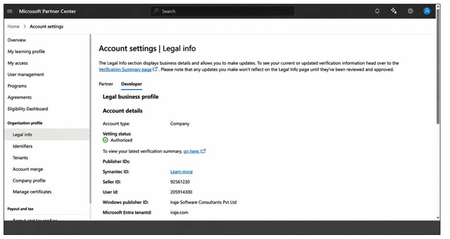
Dear JillArmourMicrosoft JillArmourMicrosoftFollowing up on an earlier concern I raised regarding our legal profile vetting status — with your guidance, that issue is now resolved and both profiles show as Authorized. Thank you for the help. However, we are still unable to see the Hardware program that we registered for, which we need in order to submit drivers for Microsoft attestation signing. Because the earlier escalation had been raised specifically for the vetting status, the support team archived that ticket once vetting was resolved. The Hardware program issue, however, remains open. We would appreciate your guidance on how to proceed. ACCOUNT Company: Iraje Software Consultants Pvt Ltd Windows publisher ID: Iraje Software Consultants Pvt Ltd Seller ID: 92561230 Entra tenant domain: iraje.com (Tenant ID and the previous case reference available on request.) CURRENT STATE - Account settings > Legal info > Developer tab: Account type = Company, Vetting status = AUTHORIZED - Account settings > Legal info > Partner tab: Vetting status = AUTHORIZED - Account settings > Programs > Registered programs shows only: * Microsoft AI Cloud Partner Program (registered 2/12/2019) * Microsoft Collaborate (registered 7/17/2026) The Windows Hardware Developer Program is NOT listed. - As a result we have no Hardware workspace and cannot submit drivers for attestation signing. WHAT WE ARE ASKING 1. Please confirm whether a Windows Hardware Developer Program enrollment exists on this account in a deactivated state, or whether no enrollment exists at all. 2. If an enrollment exists, please reactivate the existing one. We do not want a duplicate enrollment created. 3. If no enrollment exists, please confirm this so that we can complete the registration ourselves without creating a conflicting record. 4. If the registration is pending on the business questionnaire or the EV certificate upload, please let us know which step is outstanding and which email address the questionnaire was sent to, so that we can locate it. Thank you for your support.22Views0likes2Comments
Attestation/Automation Setup
Hi There! Not sure if this should go into this particular group or a different one, so I tossed it on here to start. I'm trying to find a way to setup a Quarterly Attestation Option for my Managers so they'll be alerted, can hop onto Sharepoint via a link, confirm the users on their part of the attestation spreadsheet, and then close it/save the changes when they're done. Let me know if any of you have any experience setting up something similar to this, or if not, might have any idea where to direct me to so I can try and build this out. Thanks in advance!4.4KViews0likes4Comments