armchair architects
39 Topics
So, you want to be an architect?
Architects are typically revered throughout the organization and are often astute, technologically capable, and often must "walk and chew gum simultaneously”! Are you interested in exploring a career in technical architecture? In this episode of Armchair Architects, Eric Charran and Uli Homann (both highly revered architects within Microsoft) delve into the traits, behaviors, and proclivities of this rare breed.15KViews10likes4CommentsArmchair Architects: How Architecture Is Changing - Part 1
Architectures are changing all of the time...and the rate of change has accelerated dramatically with cloud architectures and massive innovation at all levels. In a four-part video series on Azure Enablement Channel, Uli Homann and Eric Charran explore for hot topic areas that you won't want to miss. But if you're looking for some cliff notes, check on this two-part blog posts.6.6KViews5likes0CommentsMulti-Cloud Architecture for ISVs: A Guide
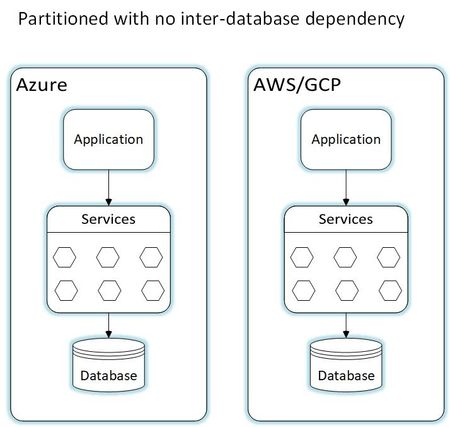
Discover the power of multi-cloud architecture. As technology evolves, Independent Software Vendors (ISVs) are harnessing multiple cloud computing services from providers like Azure, AWS, and GCP to meet diverse needs. This strategy offers tailored solutions in cloud selection, security, scalability, and flexibility, highlighting a growing trend among ISVs to stay competitive. Explore the world of ISV solutions, from pure SaaS to customer-deployed and dual-deployment SaaS models.11KViews4likes0Comments
From Prompt to Production: Building Azure Architecture Diagrams with AI
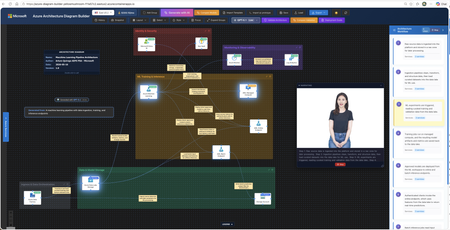
Author: Arturo Quiroga, Senior Partner Solutions Architect — Microsoft Cloud architects spend significant time translating ideas into architecture diagrams. They toggle between Visio, draw.io, pricing calculators, and documentation. According to the 2024 Stack Overflow Developer Survey, 61% of developers spend more than 30 minutes a day searching for answers or solutions, time lost to context-switching rather than design. What if you could describe your architecture in plain English and get a diagram, cost estimate, and deployment guide in minutes? The Challenge: Fragmented Architecture Workflows Designing Azure architectures today typically involves multiple disconnected steps: Sketch the architecture in a diagramming tool Look up official Azure icons and drag them into place Research pricing across regions using the Azure Pricing Calculator Validate the design against the Well-Architected Framework (WAF) Write deployment documentation and Infrastructure as Code templates Compare alternative designs manually Each step lives in a different tool, and keeping them in sync as designs evolve is costly. The Azure Architecture Diagram Builder brings these workflows together in a single browser-based experience. How It Works Describe your architecture in natural language, for example "A HIPAA-compliant healthcare platform with FHIR APIs, event-driven processing, and multi-region disaster recovery", and the AI generates a diagram with grouped services, data flow connections, and logical organization. Figure 1. Enter a natural-language prompt describing your architecture. Curated example prompts help you get started, and you can optionally upload an existing diagram for the AI to analyze. The tool uses Azure OpenAI to power generation across multiple models, enabling you to choose the model that best fits your scenario — from fast iterations to deeper reasoning. Key Features AI-Powered Architecture Generation Describe what you need in plain English, and the AI creates an architecture diagram with: 714 official Azure service icons across 29 categories Smart grouping: services are logically organized (Frontend, Backend, Data, Security) Data flow connections: labeled edges showing how data moves through the system 13 curated example prompts: from simple web apps to complex enterprise scenarios like Zero Trust networks, Industrial IoT with 5,000+ sensors, and global multiplayer gaming backends Figure 2. A generated industrial IoT architecture. Top: the clean diagram view as initially produced. Bottom: the same diagram with per-service monthly cost overlays toggled on, plus a running subscription total in the toolbar. Architecture Image Import Already have an architecture on a whiteboard or in a screenshot? Upload the image and let the AI analyze it, mapping services to official Azure icons and recreating the architecture as an editable, interactive diagram. Figure 3. Upload a photo of a whiteboard sketch (top-right reference panel) and the AI recreates it as an editable diagram with official Azure service icons and labeled data flow connections. ARM Template Import Import existing ARM templates to visualize your current infrastructure. The AI parses resource definitions and dependencies, groups related resources into logical layers, and produces a meaningful diagram of what you actually have deployed — a fast way to document an inherited environment or sanity-check a template before deployment. Figure 4. ARM template import in action. Top: the parser status banner while resources and dependencies are being analyzed. Bottom: the resulting diagram, with resources auto-grouped into logical layers (Web Tier, Data Layer, Container Platform, Observability & Logging) and a Generated from: ARM Template badge linking the diagram back to its source file. Well-Architected Framework Validation Validate your architecture against all five WAF pillars — Security, Reliability, Performance Efficiency, Cost Optimization, and Operational Excellence. The validator provides: An overall WAF score with pillar-level breakdowns Specific findings with severity levels Actionable recommendations you can select and apply Select the recommendations you agree with, and the AI regenerates an improved architecture incorporating those changes. Figure 5. WAF validation results showing the overall score, per-pillar breakdowns, and individual findings with severity badges. Tick the recommendations you want and the AI rebuilds the diagram with those changes applied. Multi-Model Comparison Run the same architecture prompt through multiple AI models side-by-side and compare: Architecture Comparison: service counts, connection counts, groups, token usage, and latency Validation Comparison: WAF scores across models, severity breakdowns, and finding counts Apply Winner: pick the best result and apply it to the canvas with one click Present Critique: a talking avatar narrates the AI-generated ranking with live closed captions Figure 6. Multi-model comparison. Top: select the models and reasoning effort, then enter the prompt. Bottom: side-by-side results across all selected models with service counts, latency, token usage, and Fastest / Cheapest / Most Thorough badges. Multi-Region Cost Estimation Get cost estimates from the Azure Retail Prices API across 8 Azure regions: East US 2, Australia East, Canada Central, Brazil South, Mexico Central, West Europe, Sweden Central, and Southeast Asia. Features include: Color-coded cost legend (green / yellow / red thresholds) SKU and tier information for each service Export options: CSV, JSON, plain-text summary, and an analysis report with top cost drivers, Reserved Instance flags, and a ranked multi-region comparison table Figure 7. The cost legend overlay shows per-service pricing with color-coded thresholds. The region selector in the toolbar lets you re-price the entire architecture in any of eight Azure regions. Deployment Guide Generation with Bicep Generate step-by-step deployment documentation including: Prerequisites and Azure resource requirements Step-by-step deployment instructions Bicep templates for each service (Infrastructure as Code) Post-deployment verification steps Security configuration recommendations Figure 8. Each generated Deployment Guide opens with the architecture name, an estimated deployment time, and a prerequisites checklist covering subscription roles, CLI versions, Microsoft Entra ID permissions, and region requirements, followed by numbered, copy-ready deployment steps. Figure 9. The Infrastructure as Code section produces a main.bicep orchestrator plus a per-service module (Log Analytics, Key Vault, Cosmos DB, SQL Database, Event Hubs, Azure Functions, and more). The Download All Templates button packages everything into a ready-to-deploy folder. Workflow Animation & Avatar Presenter Visualize how data flows through your architecture with step-by-step animations that highlight services on the canvas as each step plays. When the Azure Speech Service is configured, a photorealistic talking avatar can narrate the workflow or present model comparison results, with live word-by-word closed captions in a draggable, resizable panel. Figure 10. A workflow step is highlighted on the canvas as the Avatar Presenter narrates that step. Live word-by-word closed captions appear in a draggable, resizable panel, useful for accessibility and stakeholder demos. Export Options Figure 11. A single-slide PowerPoint export, available in dark or light theme, ready to drop straight into a stakeholder deck. Format Use Case PNG Documentation, presentations SVG Scalable vector graphics PPTX Single PowerPoint slide (dark or light theme) Draw.io Edit in diagrams.net JSON Backup, version control CSV / ZIP Cost analysis with multi-region comparison Highlights The Azure Architecture Diagram Builder unifies the architecture design lifecycle in a single tool: End-to-end workflow: from natural-language description to deployable Bicep templates without tool switching Official Azure icons: 714 icons across 29 categories, mapped directly from the Azure service catalog Live pricing: queries the Azure Retail Prices API at design time rather than relying on static estimates WAF-integrated validation: architectural best practices built into the design loop rather than applied after the fact Multi-model flexibility: choose the AI model that best suits each task, with fast models for iteration and reasoning models for complex designs Open source: the source code is available for customization and contribution One-Command Deploy with Azure Developer CLI The fastest way to get your own instance running is with azd : # Install azd (once) brew tap azure/azd && brew install azd # macOS winget install microsoft.azd # Windows # Clone, configure, and deploy git clone https://github.com/Arturo-Quiroga-MSFT/azure-architecture-diagram-builder cd azure-architecture-diagram-builder azd auth login azd env set AZURE_OPENAI_ENDPOINT "https://your-resource.openai.azure.com/" azd env set AZURE_OPENAI_API_KEY "your-key" azd up # Provisions infrastructure + builds + deploys (~8 min) azd up provisions the following via Bicep: Resource Purpose Azure Container Registry Stores the Docker image Azure Container Apps Runs the app (nginx + token server) Log Analytics + Application Insights Monitoring and telemetry Azure Speech (S0) Avatar Presenter (optional, keyless auth via managed identity) Try It Today The Azure Architecture Diagram Builder is available now: Live demo: https://aka.ms/diagram-builder Source code: GitHub repository Documentation: See the Getting Started Guide for detailed setup instructions We welcome feedback and contributions. Use the GitHub Issues page to report bugs, suggest features, or share your experience. Tags: artificial intelligence · application · apps & devops · well architected · infrastructure5.3KViews2likes4CommentsCloud Native Platforms: Build
Audience: Cloud architects, platform engineers, engineering leaders making design decisions Reading time: 8 minutes Series: Cloud Native Platforms. Build, Run, Evolve. This is Part 1 of 3. Most engineering teams can build systems. Few can scale them without rebuilding them. As platforms grow, complexity does not increase linearly. It multiplies across users, services, tenants, regions, and integrations. The systems that struggle and the systems that scale are rarely separated by which cloud they run on. They are separated by a handful of design choices made early and applied consistently. This post is about those choices. The differentiator is not the cloud Scalable platforms are not built with the right tools. They are built with the right design choices. Cloud services have closed the gap on infrastructure. The differentiator is no longer which managed service a team picks. It is whether the platform is designed to absorb change, tolerate failure, and support visibility from day one. Five engineering disciplines determine whether a platform scales gracefully or collects technical debt while it grows. Figure 1. The five disciplines compound into platform scale. Any one neglected becomes the constraint that forces a rewrite later. 1. Flexibility is the foundation of scale Hard-coded systems work until they do not. The first request to add a tenant, a region, a SKU (a sellable product variant), or a regulatory variant is the moment a rigid design starts to bend. Each subsequent request adds weight. Scalable platforms move behavior out of code: Configuration replaces conditional logic Feature flags enable safer, tenant-scoped rollouts APIs evolve through versioning, not breaking changes Schemas evolve additively. Breaking changes go through versioned contracts with a deprecation window long enough that consumers can migrate without downtime. In practice The pattern that works: configuration in a managed store, feature flags with tenant scope, and APIs versioned per consumer contract. Cost is the discipline of treating configuration as code (versioned, reviewed, audited). The return is that releases stop being events and start being routine. A change that previously needed a coordinated deployment can be executed in minutes, gated to a single tenant for verification, and rolled out broadly only after the signal is clean. Most platforms reach this state by retrofit, not by design. Doing it earlier costs less than waiting. If a change requires a redeploy, it should require a very good reason. 2. Failures are normal. Resilience is a choice. Distributed systems will fail in unpredictable ways. The real question is not how to prevent failure. It is how the system responds when failure happens. Resilience is engineered, not inherited from the platform. The patterns that move the needle are well known and consistently applied: Idempotent operations (safe to call multiple times with the same result) that make retries safe Reliable messaging patterns such as the transaction outbox (writing the message to the same database transaction as the business change, then publishing asynchronously) to avoid lost or duplicated events Decoupled services that contain blast radius (the scope of damage when one component fails) Timeouts, retries, and circuit breakers (a wrapper around a dependency that stops calling it for a cool-off window after repeated failures) tuned per dependency Bulkheads (isolation pools, often a separate compute or queue lane per workload class) that keep noisy neighbours from starving critical paths of resources In practice The pattern that works: every write that can be retried carries an idempotency key, every queue consumer is safe to replay, every event published goes through an outbox in the same transactional unit as the business change. When peak load triggers retries, duplicates collapse cleanly instead of producing duplicate orders, double-charged customers, or split-brain state. The contract changes outwards: callers can retry without thinking, queues can be at-least-once instead of exactly-once, and recovery moves from a manual cleanup task to a property of the system. Most teams that adopt this pattern stop seeing certain classes of incident entirely. Implementation note An idempotent API is not just a design preference. It changes how the rest of the system can be built. Once writes are safe to repeat, retries become cheap, queues become trustworthy, and recovery becomes automatic. The naive implementation (read the key, if absent process and save) has a race. Two concurrent requests with the same key both miss the lookup, both call the processor, and both attempt to save. That is the failure mode idempotency exists to prevent. The pattern that survives production is an atomic reserve-then-execute: insert a row keyed by the idempotency key with a unique constraint before doing any work. The first writer wins. Concurrent callers either wait for the original to complete and read its result, or they receive a conflict response. // Contract for the idempotency store. The two key methods are TryReserveAsync // (atomic insert with unique-key constraint) and CompleteAsync (record the // result of the first writer). GetCompletedResultAsync polls until the first // writer commits or returns 409 Conflict if the in-flight window exceeds the // configured deadline. public interface IIdempotencyStore { Task<Reservation> TryReserveAsync( string idempotencyKey, string requestHash, CancellationToken ct); Task CompleteAsync( string idempotencyKey, OrderResult result, CancellationToken ct); Task<OrderResult> GetCompletedResultAsync( string idempotencyKey, CancellationToken ct, TimeSpan? maxWait = null); } public readonly record struct Reservation( bool IsFirstWriter, string RequestHash); // Idempotency via atomic reserve-then-execute. // First writer wins; replays return the original result; concurrent // duplicates lose the race and read the winner's outcome (or get 409). public async Task<OrderResult> CreateOrderAsync( Order order, string idempotencyKey, CancellationToken ct) { var requestHash = StableHash(order); // canonical content hash // Atomic insert: succeeds for the first caller, fails for the rest. var reserved = await _store.TryReserveAsync( idempotencyKey, requestHash, ct); if (!reserved.IsFirstWriter) { if (reserved.RequestHash != requestHash) throw new IdempotencyKeyReusedException(); // A previous run committed (return its result) or is in-flight // (poll with a bounded deadline; 409 if exceeded). return await _store.GetCompletedResultAsync( idempotencyKey, ct, maxWait: TimeSpan.FromSeconds(5)); } // We are the first writer. Execute, persist, mark complete. var result = await _processor.ProcessAsync(order, ct); await _store.CompleteAsync(idempotencyKey, result, ct); return result; } Three production details matter: TTL or compaction on the idempotency record. Without it, the store grows forever. Most teams retain records for the request retry window plus a safety margin (commonly 24 to 72 hours). Stable content hash, not the default object hash code. The request hash detects key reuse with a different body, so a client that reuses an idempotency key with a different payload receives IdempotencyKeyReusedException rather than silently getting the wrong result. Canonicalise field ordering, locale, and null handling before hashing. Bound the in-flight window explicitly. The genuinely hard case is when the processor succeeded but the store write failed. Production-grade implementations either run the side-effect and the store write in the same transaction (when the processor and store share a database) or use the transaction outbox pattern to bridge them. The poll-with-deadline in GetCompletedResultAsync handles the duplicate-arrives-mid-flight case; the transactional boundary handles everything else. 3. Observability is not optional Without observability, teams operate blind. As systems grow, the price of guessing rises faster than the price of seeing. At build time, observability is a design property. The decisions made before the system reaches production are what determine whether it can be operated at all. The dashboards, alerts, and incident practices covered in Part 2 of this series rely on instrumentation choices made here. The build-time work that pays off in production: Request identifiers propagated through every service hop, every queue, every async boundary, so a single user action can be traced end to end Structured logging with a consistent schema (event name, correlation id, tenant, severity) rather than free-form strings Metrics emitted at the boundaries that matter (every external call, every queue read or write, every database operation), not only at the entry point Tracing libraries integrated at the framework or middleware layer so coverage is automatic, not opt-in Schemas designed so business signals (orders, sessions, transactions) and system signals (CPU, latency, errors) share the same identifiers and can be correlated later In practice The pattern that works: a single request id flowing through every service hop, every queue, every async boundary, propagated automatically at the framework layer rather than per-call. Add one structured logging schema across services (event name, correlation id, tenant, severity), so that a single query joins business events with system events. The investment is hours of upfront framework wiring. The return is that production diagnosis stops being archaeology. Cross-service questions become single dashboards; postmortems shrink from days to hours; and the dashboards in Part 2 actually work because the data underneath is shaped to support them. 4. Delivery practices set the ceiling Scaling teams requires scaling delivery. Small inefficiencies in pipelines, environments, and release coordination compound into measurable drag. Delivery maturity that pays off at scale: Pipelines as code, reviewed and versioned like application code Parallel deployments across services and regions where dependencies allow Infrastructure as code with shared modules, not hand-managed environments Automated quality gates: tests, security scans, dependency checks Trunk-based development (developers commit to a single shared branch many times a day) with short-lived feature branches and progressive delivery. Important caveat: trunk-based works only when test automation and feature flags are already in place. Adopting it before those foundations exist tends to amplify production incidents rather than reduce them. In practice The pattern that works: pipelines run in parallel where dependencies allow, infrastructure provisioning is templated rather than per-environment, and quality gates run automatically rather than as discretionary steps. Sequential deployment of a multi-service platform across three environments takes hours; parallelised deployment of the same change takes minutes. The payback is not only release speed. It is the compounding cost reduction of every wait state for every engineer on every release. Teams that treat pipelines as a product feature, not an afterthought, ship more confidently and recover from bad changes faster because the rollback path was exercised, not invented during an incident. Slow pipelines are not a tooling problem. They are a design problem. 5. Cost discipline is engineering work Cloud platforms can become expensive quickly when cost is treated as someone else's problem. Cost is a property of the design, not a quarterly review. The teams that get this right treat cost the same way they treat performance: Elastic compute and storage tiers chosen per workload pattern Non-production environments with automated scale-down windows (the easiest savings to leave on the table) Tagging discipline so cost can be attributed to a service, a feature, a tenant Egress and data-tier choices, not compute, dominate cloud bills past a certain scale. Right-size storage tiers (hot vs cool vs archive), eliminate cross-region chatter, and watch egress on the data plane more closely than compute on the request path. Budgets and usage alerts wired into the same channels as reliability alerts Cost reviews built into design discussions, not deferred to FinOps (Financial Operations: the practice of managing cloud spend as an engineering concern) In practice The pattern that works: non-production environments scale down automatically outside business hours, storage tiers match access patterns (hot, cool, archive), and tagging is enforced so every dollar can be attributed to a service or feature. Cost reviews happen at design time, not after the bill arrives. The biggest savings come from data plane decisions, not compute: cross-region egress, oversized storage tiers, and forgotten test environments dominate cloud bills past a certain scale. Treat cost as a first-class non-functional requirement, alongside latency and availability, and the discipline compounds in every design discussion that follows. A scenario that ties it together Figure 2. A reference architecture that puts the disciplines into one shape. The request path is decoupled, the data layer is purpose-fit, identity is brokered by managed identity throughout, private endpoints isolate the data tier from public networks, and observability runs as a first-class lane. Picture a multi-tenant platform at a growth inflection. Onboarding a new tenant takes weeks because tenant-specific behaviour is hard-coded across services. Every release carries risk because there is no way to roll out a change to one tenant without affecting the rest. Incidents linger because logs and metrics live in different tools and nobody can correlate them in production. Do not start with a rewrite. Start with the smallest set of changes that unlocks the next year of growth: extract configuration out of code, introduce tenant-aware feature flags, wire a unified observability view into the existing services, and parallelise the pipelines. None of these are architectural revolutions. They are design choices applied with discipline, in the order the disciplines compound. Eighteen months in, onboarding a tenant takes hours instead of weeks. Releases move from monthly events to weekly increments. Incidents are caught earlier and resolved faster. The platform did not get bigger. It got more capable. The five disciplines did the work; the team made the choice to apply them. What teams get wrong The common pattern is architecting for the system you have, not the system you are growing into. It looks like progress because the current sprint ships. Pillars get postponed because they feel like overhead. The cost surfaces later. Each shortcut becomes a constraint. The constraints compound, and three releases later the team is debating a rewrite. The fix is not premature abstraction. It is small, deliberate investments in flexibility, resilience, observability, delivery, and cost from day one. The discipline is to make these investments before they are urgent. Where to start when you cannot do everything at once Five disciplines is a wall, and real teams cannot fund all five at once. The right order depends on whether the platform is being built fresh or already running. For a system already in production and already in pain, the SRE community's hierarchy of reliability needs gives the most defensible starting order: monitoring and observability first (you cannot fix what you cannot see), then incident response (close the bleeding cleanly), then resilience patterns (idempotency, retries, decoupling) so the bleeding has fewer reasons to start, then flexibility and delivery so safe change can travel at speed. Cost discipline runs alongside throughout, never as the headline. For a system being built fresh, the order in this post (flexibility, resilience, observability, delivery, cost) reflects the Azure Well-Architected Framework's emphasis on designing for change, failure, and visibility before scaling teams or workloads. Both orders are defensible. What is not defensible is leaving any of the five for later. The most concrete starter from this post: request id propagation. A single correlation identifier travelling through every service hop, every queue, every async boundary, costs hours up front and pays back every time someone has to debug production for the rest of the platform's life. It is the smallest unit of the observability discipline and the foundation that the dashboards, traces, and incident response in Part 2 all depend on. The shift The most important transformation in scaling a platform is not technical. It is mindset. The shift is from project thinking to platform thinking: Build reusable capabilities, not one-off solutions Design systems for long-term evolution, not the next release Enable other teams, not just deliver for one team Tools change. Cloud services evolve. The architectural fashions of this year will not be the architectural fashions of the next. What persists is the discipline behind the choices. Scalable systems are not built by tools. They are built by teams that treat design as continuous work. The same discipline shows up again in Part 2 (operating these systems) and Part 3 (using AI to augment that work). The tools change. The disciplines do not. Want to discuss? What single design choice has paid the most dividends in the platforms you run? Drop a comment with patterns you have seen in your environment. Every reply gets read. Next in this series: Running Cloud Native Platforms: Why Day 2 Decides Everything. Building is half the journey. The next post looks at what it takes to operate these platforms once they are in production.929Views2likes1CommentArmchair Architects: What Is Responsible AI?
They we will dive deeper into the meaning of “what is responsible AI?” and what it entails. It sounds like a cool concept, but let’s have the armchair architects share their views on it as it may not necessarily be well understood.3.3KViews2likes0CommentsArmchair Architects: Considerations for Ethical and Responsible Use of AI in Applications
David Blank-Edelman and our armchair architects Uli Homann and Eric Charran will be discussing the ethical and responsible considerations architects should consider when using large language models (LLMs) in their applications, including the risks of leaking confidential information, societal biases, and increasing regulations.3.4KViews2likes0Comments