application
116 TopicsHow to Delete Microsoft Teams Cache for All Users via PowerShell
Improve Microsoft Teams performance by deleting the cache for all users. This article provides detailed steps on how to clear the cache, which can reduce clutter and improve application speed. By following these steps, you can ensure that your Microsoft Teams application is running smoothly and efficiently.42KViews0likes9CommentsAzure Course Blueprints
Each Blueprint serves as a 1:1 visual representation of the official Microsoft instructor‑led course (ILT), ensuring full alignment with the learning path. This helps learners: see exactly how topics fit into the broader Azure landscape, map concepts interactively as they progress, and understand the “why” behind each module, not just the “what.” Formats Available: PDF · Visio · Excel · Video Every icon is clickable and links directly to the related Learn module. Layers and Cross‑Course Comparisons For expert‑level certifications like SC‑100 and AZ‑305, the Visio Template+ includes additional layers for each associate-level course. This allows trainers and students to compare certification paths at a glance: 🔐 Security Path SC‑100 side‑by‑side with SC‑200, SC‑300, SC‑500 🏗️ Infrastructure; Ai & Dev Path AZ‑305 alongside Ai-103, AZ‑104, Ai‑200, AZ‑700, AZ‑140 This helps learners clearly identify: prerequisites, skill gaps, overlapping modules, progression paths toward expert roles. Because associate certifications (e.g., SC‑300 → SC‑100 or AZ‑104 → AZ‑305) are often prerequisites or recommended foundations, this comparison layer makes it easy to understand what additional knowledge is required as learners advance. Benefits for Students 🎯 Defined Goals Learners clearly see the skills and services they are expected to master. 🔍 Focused Learning By spotlighting what truly matters, the Blueprint keeps learners oriented toward core learning objectives. 📈 Progress Tracking Students can easily identify what they’ve already mastered and where more study is needed. 📊 Slide Deck Topic Lists (Excel) A downloadable .xlsx file provides: a topic list for every module, links to Microsoft Learn, prerequisite dependencies. This file helps students build their own study plan while keeping all links organized. Download links Associate Level PDF - Demo Visio Contents AZ-104 Azure Administrator Associate R: 12/14/2023 U: 12/17/2025 Blueprint Demo Video Layer of Visio+ Excel Ai-103 Developing AI Apps and Agents on Azure R: 05/20/2026 Blueprint Inludes Ai-200 Layer of Visio+ Ai-200 Azure Developer Associate R: 11/05/2024 U: 12/17/2025 Blueprint Demo Layer of Visio+ Excel SC-500 Azure Security Engineer Associate R: 01/09/2024 U: 05/20/2026 Blueprint Demo Layer of Visio+ Excel AZ-700 Azure Network Engineer Associate R: 01/25/2024 U: 12/17/2025 Blueprint Demo Layer of Visio+ Excel SC-200 Security Operations Analyst Associate R: 04/03/2025 U:04/09/2025 Blueprint Demo Layer of Visio+ Excel SC-300 Identity and Access Administrator Associate R: 10/10/2024 Blueprint Demo Layer of Visio+ Excel Specialty PDF Visio AZ-140 Azure Virtual Desktop Specialty R: 01/03/2024 U: 12/17/2025 Blueprint Demo Layer of Visio+ Excel Expert level PDF Visio AZ-305 Designing Microsoft Azure Infrastructure Solutions R: 05/07/2024 U: 05/20/2026 Blueprint Demo Visio+ AZ-104 AZ-700 AZ-140 Ai-103 Ai-200 Excel SC-100 Microsoft Cybersecurity Architect R: 10/10/2024 U: 05/20/2026 Blueprint Demo Visio+ SC-500 SC-300 SC-200 Excel Skill based Credentialing PDF AZ-1002 Configure secure access to your workloads using Azure virtual networking R: 05/27/2024 Blueprint Visio Excel AZ-1003 Secure storage for Azure Files and Azure Blob Storage R: 02/07/2024 U: 02/05/2024 Blueprint Excel Subscribe if you want to get notified of any update like new releases or updates. Author: Ilan Nyska, Microsoft Technical Trainer My email ilan.nyska@microsoft.com LinkedIn https://www.linkedin.com/in/ilan-nyska/ I’ve received so many kind messages, thank-you notes, and reshares — and I’m truly grateful. But here’s the reality: 💬 The only thing I can use internally to justify continuing this project is your engagement — through this survey https://lnkd.in/gnZ8v4i8 ___ Benefits for Trainers: Trainers can follow this plan to design a tailored diagram for their course, filled with notes. They can construct this comprehensive diagram during class on a whiteboard and continuously add to it in each session. This evolving visual aid can be shared with students to enhance their grasp of the subject matter. Explore Azure Course Blueprints! | Microsoft Community Hub Visio stencils Azure icons - Azure Architecture Center | Microsoft Learn ___ Are you curious how grounding Copilot in Azure Course Blueprints transforms your study journey into smarter, more visual experience: 🧭 Clickable guides that transform modules into intuitive roadmaps 🌐 Dynamic visual maps revealing how Azure services connect ⚖️ Side-by-side comparisons that clarify roles, services, and security models Whether you're a trainer, a student, or just certification-curious, Copilot becomes your shortcut to clarity, confidence, and mastery. Navigating Azure Certifications with Copilot and Azure Course Blueprints | Microsoft Community Hub Azure Course Blueprints + Demo Deploy Demos are essential for achieving end‑to‑end understanding of Azure. To reduce preparation overhead, we collaborated with Peter De Tender to align each Blueprint with the official Trainer Demo Deploy scenarios. With a single click, trainers can deploy the full environment and guide learners through practical, aligned demonstrations. https://aka.ms/DemoDeployPDF40KViews15likes20CommentsPermit access only from Azure Front Door to Azure App Service as simply as possible
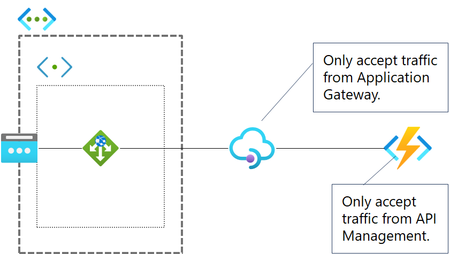
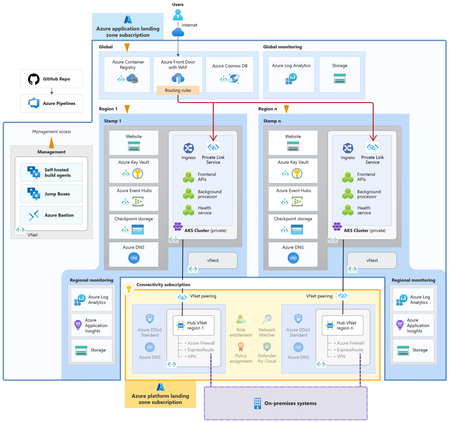
By default, each App Service has a public IP address and is accessible via FQDN from across the globe. If you simply deploy App Service(s) behind Azure Front Door, everyone can access App Service directly without using Azure Front Door. Therefore, we have to configure permit only access from Azure Front Door at App Service. If you were me, what do you think is a good solution?29KViews2likes2Comments
Managing and Rotating Secrets with Azure Key Vault, Managed Services, and some automation – Part 1
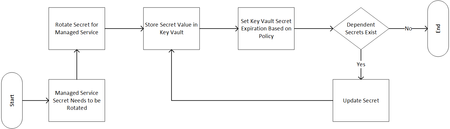
Secret rotation is not a new problem. In cloud-based environments many services implement secret-based authentication schemes. For many organizations, these secrets must be rotated on a regular schedule. In addition to the actual problem of rotating the access keys, there exists a problem of how these newly rotated credentials are propagated to all the applications and systems that utilize them. In this multi-part blog series, I will discuss a solution that, through automation, addresses both the scheduled rotation and dependency notification/update requirements.23KViews1like1Comment