application modernization
115 TopicsAccelerate Your Java Modernization Journey with the Azure Immersion Workshop
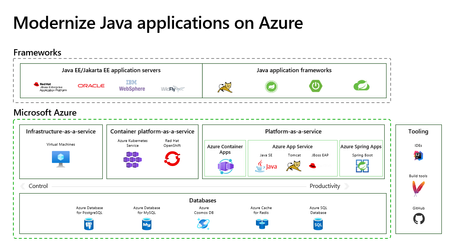
Join us for the latest version of the Azure Immersion Workshop - Modernize Java Apps. Get a comprehensive overview of Azure destinations for Java applications and a hands-on experience with Azure Spring Apps Enterprise.174KViews0likes0CommentsAn AI led SDLC: Building an End-to-End Agentic Software Development Lifecycle with Azure and GitHub.
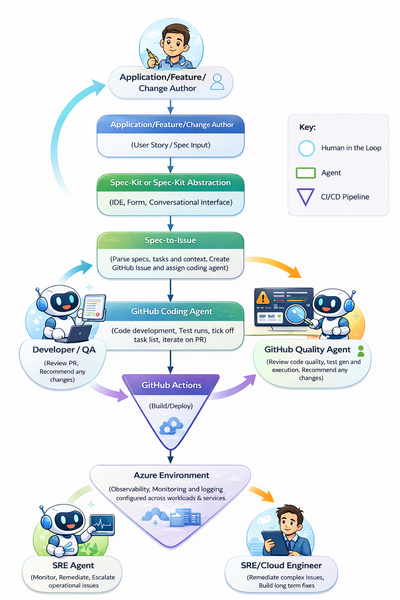
This is due to the inevitable move towards fully agentic, end-to-end SDLCs. We may not yet be at a point where software engineers are managing fleets of agents creating the billion-dollar AI abstraction layer, but (as I will evidence in this article) we are certainly on the precipice of such a world. Before we dive into the reality of agentic development today, let me examine two very different modules from university and their relevance in an AI-first development environment. Manual Requirements Translation. At university I dedicated two whole years to a unit called “Systems Design”. This was one of my favourite units, primarily focused on requirements translation. Often, I would receive a scenario between “The Proprietor” and “The Proprietor’s wife”, who seemed to be in a never-ending cycle of new product ideas. These tasks would be analysed, broken down, manually refined, and then mapped to some kind of early-stage application architecture (potentially some pseudo-code and a UML diagram or two). The big intellectual effort in this exercise was taking human intention and turning it into something tangible to build from (BA’s). Today, by the time I have opened Notepad and started to decipher requirements, an agent can already have created a comprehensive list, a service blueprint, and a code scaffold to start the process (*cough* spec-kit *cough*). Manual debugging. Need I say any more? Old-school debugging with print()’s and breakpoints is dead. I spent countless hours learning to debug in a classroom and then later with my own software, stepping through execution line by line, reading through logs, and understanding what to look for; where correlation did and didn’t mean causation. I think back to my year at IBM as a fresh-faced intern in a cloud engineering team, where around 50% of my time was debugging different issues until it was sufficiently “narrowed down”, and then reading countless Stack Overflow posts figuring out the actual change I would need to make to a PowerShell script or Jenkins pipeline. Already in Azure, with the emergence of SRE agents, that debug process looks entirely different. The debug process for software even more so… #terminallastcommand WHY IS THIS NOT RUNNING? #terminallastcommand Review these logs and surface errors relating to XYZ. As I said: breakpoints are dead, for now at least. Caveat – Is this a good thing? One more deviation from the main core of the article if you would be so kind (if you are not as kind skip to the implementation walkthrough below). Is this actually a good thing? Is a software engineering degree now worthless? What if I love printf()? I don’t know is my answer today, at the start of 2026. Two things worry me: one theoretical and one very real. To start with the theoretical: today AI takes a significant amount of the “donkey work” away from developers. How does this impact cognitive load at both ends of the spectrum? The list that “donkey work” encapsulates is certainly growing. As a result, on one end of the spectrum humans are left with the complicated parts yet to be within an agent’s remit. This could have quite an impact on our ability to perform tasks. If we are constantly dealing with the complex and advanced, when do we have time to re-root ourselves in the foundations? Will we see an increase in developer burnout? How do technical people perform without the mundane or routine tasks? I often hear people who have been in the industry for years discuss how simple infrastructure, computing, development, etc. were 20 years ago, almost with a longing to return to a world where today’s zero trust, globally replicated architectures are a twinkle in an architect’s eye. Is constantly working on only the most complex problems a good thing? At the other end of the spectrum, what if the performance of AI tooling and agents outperforms our wildest expectations? Suddenly, AI tools and agents are picking up more and more of today’s complicated and advanced tasks. Will developers, architects, and organisations lose some ability to innovate? Fundamentally, we are not talking about artificial general intelligence when we say AI; we are talking about incredibly complex predictive models that can augment the existing ideas they are built upon but are not, in themselves, innovators. Put simply, in the words of Scott Hanselman: “Spicy auto-complete”. Does increased reliance on these agents in more and more of our business processes remove the opportunity for innovative ideas? For example, if agents were football managers, would we ever have graduated from Neil Warnock and Mick McCarthy football to Pep? Would every agent just augment a ‘lump it long and hope’ approach? We hear about learning loops, but can these learning loops evolve into “innovation loops?” Past the theoretical and the game of 20 questions, the very real concern I have is off the back of some data shared recently on Stack Overflow traffic. We can see in the diagram below that Stack Overflow traffic has dipped significantly since the release of GitHub Copilot in October 2021, and as the product has matured that trend has only accelerated. Data from 12 months ago suggests that Stack Overflow has lost 77% of new questions compared to 2022… Stack Overflow democratises access to problem-solving (I have to be careful not to talk in past tense here), but I will admit I cannot remember the last time I was reviewing Stack Overflow or furiously searching through solutions that are vaguely similar to my own issue. This causes some concern over the data available in the future to train models. Today, models can be grounded in real, tested scenarios built by developers in anger. What happens with this question drop when API schemas change, when the technology built for today is old and deprecated, and the dataset is stale and never returning to its peak? How do we mitigate this impact? There is potential for some closed-loop type continuous improvement in the future, but do we think this is a scalable solution? I am unsure. So, back to the question: “Is this a good thing?”. It’s great today; the long-term impacts are yet to be seen. If we think that AGI may never be achieved, or is at least a very distant horizon, then understanding the foundations of your technical discipline is still incredibly important. Developers will not only be the managers of their fleet of agents, but also the janitors mopping up the mess when there is an accident (albeit likely mopping with AI-augmented tooling). An AI First SDLC Today – The Reality Enough reflection and nostalgia (I don’t think that’s why you clicked the article), let’s start building something. For the rest of this article I will be building an AI-led, agent-powered software development lifecycle. The example I will be building is an AI-generated weather dashboard. It’s a simple example, but if agents can generate, test, deploy, observe, and evolve this application, it proves that today, and into the future, the process can likely scale to more complex domains. Let’s start with the entry point. The problem statement that we will build from. “As a user I want to view real time weather data for my city so that I can plan my day.” We will use this as the single input for our AI led SDLC. This is what we will pass to promptkit and watch our app and subsequent features built in front of our eyes. The goal is that we will: - Spec-kit to get going and move from textual idea to requirements and scaffold. - Use a coding agent to implement our plan. - A Quality agent to assess the output and quality of the code. - GitHub Actions that not only host the agents (Abstracted) but also handle the build and deployment. - An SRE agent proactively monitoring and opening issues automatically. The end to end flow that we will review through this article is the following: Step 1: Spec-driven development - Spec First, Code Second A big piece of realising an AI-led SDLC today relies on spec-driven development (SDD). One of the best summaries for SDD that I have seen is: “Version control for your thinking”. Instead of huge specs that are stale and buried in a knowledge repository somewhere, SDD looks to make them a first-class citizen within the SDLC. Architectural decisions, business logic, and intent can be captured and versioned as a product evolves; an executable artefact that evolves with the project. In 2025, GitHub released the open-source Spec Kit: a tool that enables the goal of placing a specification at the centre of the engineering process. Specs drive the implementation, checklists, and task breakdowns, steering an agent towards the end goal. This article from GitHub does a great job explaining the basics, so if you’d like to learn more it’s a great place to start (https://github.blog/ai-and-ml/generative-ai/spec-driven-development-with-ai-get-started-with-a-new-open-source-toolkit/). In short, Spec Kit generates requirements, a plan, and tasks to guide a coding agent through an iterative, structured development process. Through the Spec Kit constitution, organisational standards and tech-stack preferences are adhered to throughout each change. I did notice one (likely intentional) gap in functionality that would cement Spec Kit’s role in an autonomous SDLC. That gap is that the implement stage is designed to run within an IDE or client coding agent. You can now, in the IDE, toggle between task implementation locally or with an agent in the cloud. That is great but again it still requires you to drive through the IDE. Thinking about this in the context of an AI-led SDLC (where we are pushing tasks from Spec Kit to a coding agent outside of my own desktop), it was clear that a bridge was needed. As a result, I used Spec Kit to create the Spec-to-issue tool. This allows us to take the tasks and plan generated by Spec Kit, parse the important parts, and automatically create a GitHub issue, with the option to auto-assign the coding agent. From the perspective of an autonomous AI-led SDLC, Speckit really is the entry point that triggers the flow. How Speckit is surfaced to users will vary depending on the organisation and the context of the users. For the rest of this demo I use Spec Kit to create a weather app calling out to the OpenWeather API, and then add additional features with new specs. With one simple prompt of “/promptkit.specify “Application feature/idea/change” I suddenly had a really clear breakdown of the tasks and plan required to get to my desired end state while respecting the context and preferences I had previously set in my Spec Kit constitution. I had mentioned a desire for test driven development, that I required certain coverage and that all solutions were to be Azure Native. The real benefit here compared to prompting directly into the coding agent is that the breakdown of one large task into individual measurable small components that are clear and methodical improves the coding agents ability to perform them by a considerable degree. We can see an example below of not just creating a whole application but another spec to iterate on an existing application and add a feature. We can see the result of the spec creation, the issue in our github repo and most importantly for the next step, our coding agent, GitHub CoPilot has been assigned automatically. Step 2: GitHub Coding Agent - Iterative, autonomous software creation Talking of coding agents, GitHub Copilot’s coding agent is an autonom ous agent in GitHub that can take a scoped development task and work on it in the background using the repository’s context. It can make code changes and produce concrete outputs like commits and pull requests for a developer to review. The developer stays in control by reviewing, requesting changes, or taking over at any point. This does the heavy lifting in our AI-led SDLC. We have already seen great success with customers who have adopted the coding agent when it comes to carrying out menial tasks to save developers time. These coding agents can work in parallel to human developers and with each other. In our example we see that the coding agent creates a new branch for its changes, and creates a PR which it starts working on as it ticks off the various tasks generated in our spec. One huge positive of the coding agent that sets it apart from other similar solutions is the transparency in decision-making and actions taken. The monitoring and observability built directly into the feature means that the agent’s “thinking” is easily visible: the iterations and steps being taken can be viewed in full sequence in the Agents tab. Furthermore, the action that the agent is running is also transparently available to view in the Actions tab, meaning problems can be assessed very quickly. Once the coding agent is finished, it has run the required tests and, even in the case of a UI change, goes as far as calling the Playwright MCP server and screenshotting the change to showcase in the PR. We are then asked to review the change. In this demo, I also created a GitHub Action that is triggered when a PR review is requested: it creates the required resources in Azure and surfaces the (in this case) Azure Container Apps revision URL, making it even smoother for the human in the loop to evaluate the changes. Just like any normal PR, if changes are required comments can be left; when they are, the coding agent can pick them up and action what is needed. It’s also worth noting that for any manual intervention here, use of GitHub Codespaces would work very well to make minor changes or perform testing on an agent’s branch. We can even see the unit tests that have been specified in our spec how been executed by our coding agent. The pattern used here (Spec Kit -> coding agent) overcomes one of the biggest challenges we see with the coding agent. Unlike an IDE-based coding agent, the GitHub.com coding agent is left to its own iterations and implementation without input until the PR review. This can lead to subpar performance, especially compared to IDE agents which have constant input and interruption. The concise and considered breakdown generated from Spec Kit provides the structure and foundation for the agent to execute on; very little is left to interpretation for the coding agent. Step 3: GitHub Code Quality Review (Human in the loop with agent assistance.) GitHub Code Quality is a feature (currently in preview) that proactively identifies code quality risks and opportunities for enhancement both in PRs and through repository scans. These are surfaced within a PR and also in repo-level scoreboards. This means that PRs can now extend existing static code analysis: Copilot can action CodeQL, PMD, and ESLint scanning on top of the new, in-context code quality findings and autofixes. Furthermore, we receive a summary of the actual changes made. This can be used to assist the human in the loop in understanding what changes have been made and whether enhancements or improvements are required. Thinking about this in the context of review coverage, one of the challenges sometimes in already-lean development teams is the time to give proper credence to PRs. Now, with AI-assisted quality scanning, we can be more confident in our overall evaluation and test coverage. I would expect that use of these tools alongside existing human review processes would increase repository code quality and reduce uncaught errors. The data points support this too. The Qodo 2025 AI Code Quality report showed that usage of AI code reviews increased quality improvements to 81% (from 55%). A similar study from Atlassian RovoDev 2026 study showed that 38.7% of comments left by AI agents in code reviews lead to additional code fixes. LLM’s in their current form are never going to achieve 100% accuracy however these are still considerable, significant gains in one of the most important (and often neglected) parts of the SDLC. With a significant number of software supply chain attacks recently it is also not a stretch to imagine that that many projects could benefit from "independently" (use this term loosely) reviewed and summarised PR's and commits. This in the future could potentially by a specialist/sub agent during a PR or merge to focus on identifying malicious code that may be hidden within otherwise normal contributions, case in point being the "near-miss" XZ Utils attack. Step 4: GitHub Actions for build and deploy - No agents here, just deterministic automation. This step will be our briefest, as the idea of CI/CD and automation needs no introduction. It is worth noting that while I am sure there are additional opportunities for using agents within a build and deploy pipeline, I have not investigated them. I often speak with customers about deterministic and non-deterministic business process automation, and the importance of distinguishing between the two. Some processes were created to be deterministic because that is all that was available at the time; the number of conditions required to deal with N possible flows just did not scale. However, now those processes can be non-deterministic. Good examples include IVR decision trees in customer service or hard-coded sales routines to retain a customer regardless of context; these would benefit from less determinism in their execution. However, some processes remain best as deterministic flows: financial transactions, policy engines, document ingestion. While all these flows may be part of an AI solution in the future (possibly as a tool an agent calls, or as part of a larger agent-based orchestration), the processes themselves are deterministic for a reason. Just because we could have dynamic decision-making doesn’t mean we should. Infrastructure deployment and CI/CD pipelines are one good example of this, in my opinion. We could have an agent decide what service best fits our codebase and which region we should deploy to, but do we really want to, and do the benefits outweigh the potential negatives? In this process flow we use a deterministic GitHub action to deploy our weather application into our “development” environment and then promote through the environments until we reach production and we want to now ensure that the application is running smoothly. We also use an action as mentioned above to deploy and surface our agents changes. In Azure Container Apps we can do this in a secure sandbox environment called a “Dynamic Session” to ensure strong isolation of what is essentially “untrusted code”. Often enterprises can view the building and development of AI applications as something that requires a completely new process to take to production, while certain additional processes are new, evaluation, model deployment etc many of our traditional SDLC principles are just as relevant as ever before, CI/CD pipelines being a great example of that. Checked in code that is predictably deployed alongside required services to run tests or promote through environments. Whether you are deploying a java calculator app or a multi agent customer service bot, CI/CD even in this new world is a non-negotiable. We can see that our geolocation feature is running on our Azure Container Apps revision and we can begin to evaluate if we agree with CoPilot that all the feature requirements have been met. In this case they have. If they hadn't we'd just jump into the PR and add a new comment with "@copilot" requesting our changes. Step 5: SRE Agent - Proactive agentic day two operations. The SRE agent service on Azure is an operations-focused agent that continuously watches a running service using telemetry such as logs, metrics, and traces. When it detects incidents or reliability risks, it can investigate signals, correlate likely causes, and propose or initiate response actions such as opening issues, creating runbook-guided fixes, or escalating to an on-call engineer. It effectively automates parts of day two operations while keeping humans in control of approval and remediation. It can be run in two different permission models: one with a reader role that can temporarily take user permissions for approved actions when identified. The other model is a privileged level that allows it to autonomously take approved actions on resources and resource types within the resource groups it is monitoring. In our example, our SRE agent could take actions to ensure our container app runs as intended: restarting pods, changing traffic allocations, and alerting for secret expiry. The SRE agent can also perform detailed debugging to save human SREs time, summarising the issue, fixes tried so far, and narrowing down potential root causes to reduce time to resolution, even across the most complex issues. My initial concern with these types of autonomous fixes (be it VPA on Kubernetes or an SRE agent across your infrastructure) is always that they can very quickly mask problems, or become an anti-pattern where you have drift between your IaC and what is actually running in Azure. One of my favourite features of SRE agents is sub-agents. Sub-agents can be created to handle very specific tasks that the primary SRE agent can leverage. Examples include alerting, report generation, and potentially other third-party integrations or tooling that require a more concise context. In my example, I created a GitHub sub-agent to be called by the primary agent after every issue that is resolved. When called, the GitHub sub-agent creates an issue summarising the origin, context, and resolution. This really brings us full circle. We can then potentially assign this to our coding agent to implement the fix before we proceed with the rest of the cycle; for example, a change where a port is incorrect in some Bicep, or min scale has been adjusted because of latency observed by the SRE agent. These are quick fixes that can be easily implemented by a coding agent, subsequently creating an autonomous feedback loop with human review. Conclusion: The journey through this AI-led SDLC demonstrates that it is possible, with today’s tooling, to improve any existing SDLC with AI assistance, evolving from simply using a chat interface in an IDE. By combining Speckit, spec-driven development, autonomous coding agents, AI-augmented quality checks, deterministic CI/CD pipelines, and proactive SRE agents, we see an emerging ecosystem where human creativity and oversight guide an increasingly capable fleet of collaborative agents. As with all AI solutions we design today, I remind myself that “this is as bad as it gets”. If the last two years are anything to go by, the rate of change in this space means this article may look very different in 12 months. I imagine Spec-to-issue will no longer be required as a bridge, as native solutions evolve to make this process even smoother. There are also some areas of an AI-led SDLC that are not included in this post, things like reviewing the inner-loop process or the use of existing enterprise patterns and blueprints. I also did not review use of third-party plugins or tools available through GitHub. These would make for an interesting expansion of the demo. We also did not look at the creation of custom coding agents, which could be hosted in Microsoft Foundry; this is especially pertinent with the recent announcement of Anthropic models now being available to deploy in Foundry. Does today’s tooling mean that developers, QAs, and engineers are no longer required? Absolutely not (and if I am honest, I can’t see that changing any time soon). However, it is evidently clear that in the next 12 months, enterprises who reshape their SDLC (and any other business process) to become one augmented by agents will innovate faster, learn faster, and deliver faster, leaving organisations who resist this shift struggling to keep up.58KViews9likes2CommentsAnnouncing the reliable web app pattern for .NET
Reliable web app pattern is a set of best practices built on the Azure Well-Architected Framework that helps developers successfully migrate web applications to the cloud and set a foundation for future modernization in Azure.55KViews11likes4CommentsCalculating Chargebacks for Business Units/Projects Utilizing a Shared Azure OpenAI Instance
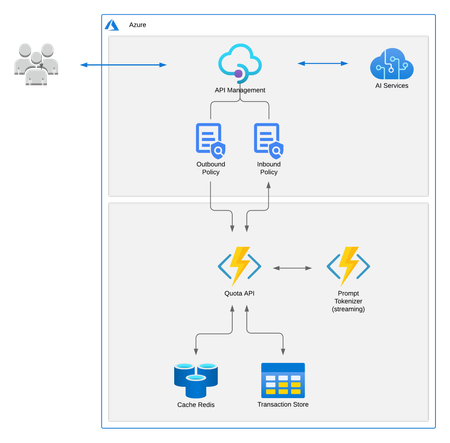
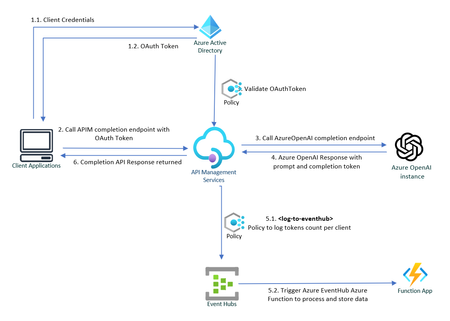
Azure OpenAI Service is at the forefront of technological innovation, offering REST API access to OpenAI's suite of revolutionary language models, including GPT-4, GPT-35-Turbo, and the Embeddings model series. Enhancing Throughput for Scale As enterprises seek to deploy OpenAI's powerful language models across various business units, they often require granular control over configuration and performance metrics. To address this need, Azure OpenAI Service is introducing dedicated throughput, a feature that provides a dedicated connection to OpenAI models with guaranteed performance levels. Throughput is quantified in terms of tokens per second (tokens/sec), allowing organizations to precisely measure and optimize the performance for both prompts and completions. The model of provisioned throughput provides enhanced management and adaptability for varying workloads, guaranteeing system readiness for spikes in demand. This capability also ensures a uniform user experience and steady performance for applications that require real-time responses. Resource Sharing and Chargeback Mechanisms Large organizations frequently provision a singular instance of Azure OpenAI Service that is shared across multiple internal departments. This shared use necessitates an efficient mechanism for allocating costs to each business unit or consumer, based on the number of tokens consumed. This article delves into how chargeback is calculated for each business unit based on their token usage. Leveraging Azure API Management Policies for Token Tracking Azure API Management Policies offer a powerful solution for monitoring and logging the token consumption for each internal application. The process can be summarized in the following steps: ** Sample Code: Refer to this GitHub repository to get a step-by-step instruction on how to build the solution outlined below : private-openai-with-apim-for-chargeback 1. Client Applications Authorizes to API Management To make sure only legitimate clients can call the Azure OpenAI APIs, each client must first authenticate against Azure Active Directory and call APIM endpoint. In this scenario, the API Management service acts on behalf of the backend API, and the calling application requests access to the API Management instance. The scope of the access token is between the calling application and the API Management gateway. In API Management, configure a policy (validate-jwt or validate-azure-ad-token) to validate the token before the gateway passes the request to the backend. 2. APIM redirects the request to OpenAI service via private endpoint. Upon successful verification of the token, Azure API Management (APIM) routes the request to Azure OpenAI service to fetch response for completions endpoint, which also includes prompt and completion token counts. 3. Capture and log API response to Event Hub Leveraging the log-to-eventhub policy to capture outgoing responses for logging or analytics purposes. To use this policy, a logger needs to be configured in the API Management: # API Management service-specific details $apimServiceName = "apim-hello-world" $resourceGroupName = "myResourceGroup" # Create logger $context = New-AzApiManagementContext -ResourceGroupName $resourceGroupName -ServiceName $apimServiceName New-AzApiManagementLogger -Context $context -LoggerId "OpenAiChargeBackLogger" -Name "ApimEventHub" -ConnectionString "Endpoint=sb://<EventHubsNamespace>.servicebus.windows.net/;SharedAccessKeyName=<KeyName>;SharedAccessKey=<key>" -Description "Event hub logger with connection string" Within outbound policies section, pull specific data from the body of the response and send this information to the previously configured EventHub instance. This is not just a simple logging exercise; it is an entry point into a whole ecosystem of real-time analytics and monitoring capabilities: <outbound> <choose> <when condition="@(context.Response.StatusCode == 200)"> <log-to-eventhub logger-id="TokenUsageLogger">@{ var responseBody = context.Response.Body?.As<JObject>(true); return new JObject( new JProperty("Timestamp", DateTime.UtcNow.ToString()), new JProperty("ApiOperation", responseBody["object"].ToString()), new JProperty("AppKey", context.Request.Headers.GetValueOrDefault("Ocp-Apim-Subscription-Key",string.Empty)), new JProperty("PromptTokens", responseBody["usage"]["prompt_tokens"].ToString()), new JProperty("CompletionTokens", responseBody["usage"]["completion_tokens"].ToString()), new JProperty("TotalTokens", responseBody["usage"]["total_tokens"].ToString()) ).ToString(); }</log-to-eventhub> </when> </choose> <base /> </outbound> EventHub serves as a powerful fulcrum, offering seamless integration with a wide array of Azure and Microsoft services. For example, the logged data can be directly streamed to Azure Stream Analytics for real-time analytics or to Power BI for real-time dashboards With Azure Event Grid, the same data can also be used to trigger workflows or automate tasks based on specific conditions met in the incoming responses. Moreover, the architecture is extensible to non-Microsoft services as well. Event Hubs can interact smoothly with external platforms like Apache Spark, allowing you to perform data transformations or feed machine learning models. 4: Data Processing with Azure Functions An Azure Function is invoked when data is sent to the EventHub instance, allowing for bespoke data processing in line with your organization’s unique requirements. For instance, this could range from dispatching the data to Azure Monitor, streaming it to Power BI dashboards, or even sending detailed consumption reports via Azure Communication Service. [Function("TokenUsageFunction")] public async Task Run([EventHubTrigger("%EventHubName%", Connection = "EventHubConnection")] string[] openAiTokenResponse) { //Eventhub Messages arrive as an array foreach (var tokenData in openAiTokenResponse) { try { _logger.LogInformation($"Azure OpenAI Tokens Data Received: {tokenData}"); var OpenAiToken = JsonSerializer.Deserialize<OpenAiToken>(tokenData); if (OpenAiToken == null) { _logger.LogError($"Invalid OpenAi Api Token Response Received. Skipping."); continue; } _telemetryClient.TrackEvent("Azure OpenAI Tokens", OpenAiToken.ToDictionary()); } catch (Exception e) { _logger.LogError($"Error occured when processing TokenData: {tokenData}", e.Message); } } } In the example above, Azure function processes the tokens response data in Event Hub and sends them to Application Insights telemetry, and a basic Dashboard is configured in Azure, displaying the token consumption for each client application. This information can conveniently be used to compute chargeback costs. A sample query used in dashboard above that fetches tokens consumed by a specific client: customEvents | where name contains "Azure OpenAI Tokens" | extend tokenData = parse_json(customDimensions) | where tokenData.AppKey contains "your-client-key" | project Timestamp = tokenData.Timestamp, Stream = tokenData.Stream, ApiOperation = tokenData.ApiOperation, PromptTokens = tokenData.PromptTokens, CompletionTokens = tokenData.CompletionTokens, TotalTokens = tokenData.TotalTokens Azure OpenAI Landing Zone reference architecture A crucial detail to ensure the effectiveness of this approach is to secure the Azure OpenAI service by implementing Private Endpoints and using Managed Identities for App Service to authorize access to Azure AI services. This will limit access so that only the App Service can communicate with the Azure OpenAI service. Failing to do this would render the solution ineffective, as individuals could bypass the APIM/App Service and directly access the OpenAI Service if they get hold of the access key for OpenAI. Refer to Azure OpenAI Landing Zone reference architecture to build a secure and scalable AI environment. Additional Considerations If the client application is external, consider using an Application Gateway in front of the Azure APIM If "streaming" is set to true, tokens count is not returned in response. In that that case libraries like tiktoken (Python), orgpt-3-encoder(javascript) for most GPT-3 models can be used to programmatically calculate tokens count for the user prompt and completion response. A useful guideline to remember is that in typical English text, one token is approximately equal to around 4 characters. This equates to about three-quarters of a word, meaning that 100 tokens are roughly equivalent to 75 words. (P.S. Microsoft does not endorse or guarantee any third-party libraries.) A subscription key or a custom header like app-key can also be used to uniquely identify the client as appId in OAuth token is not very intuitive. Rate-limiting can be implemented for incoming requests using OAuth tokens or Subscription Keys, adding another layer of security and resource management. The solution can also be extended to redirect different clients to different Azure OpenAI instances. For example., some clients utilize an Azure OpenAI instance with default quotas, whereas premium clients get to consume Azure Open AI instance with dedicated throughput. Conclusion Azure OpenAI Service stands as an indispensable tool for organizations seeking to harness the immense power of language models. With the feature of provisioned throughput, clients can define their usage limits in throughput units and freely allocate these to the OpenAI model of their choice. However, the financial commitment can be significant and is dependent on factors like the chosen model's type, size, and utilization. An effective chargeback system offers several advantages, such as heightened accountability, transparent costing, and judicious use of resources within the organization.22KViews10likes10Comments