application gateway
3 Topics
[Architecture Pattern] Scaling Sync-over-Async Edge Gateways by Bypassing Service Bus Sessions
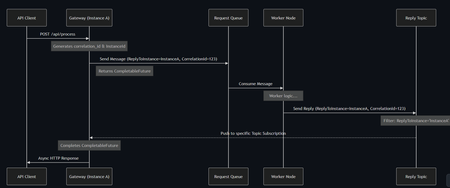
Hi everyone, I wanted to share an architectural pattern and an open-source implementation we recently built to solve a major scaling bottleneck at the edge: bridging legacy synchronous HTTP clients to long-running asynchronous AI workers. The Problem: Stateful Bottlenecks at the Edge When dealing with slow AI generation tasks (e.g., 45+ seconds), standard REST APIs will drop the connection resulting in 504 Gateway Timeouts. The standard integration pattern here is Sync-over-Async. The Gateway accepts the HTTP request, drops a message onto Azure Service Bus, waits for the worker to reply, and maps the reply back to the open HTTP connection. However, the default approach is to use Service Bus Sessions for request-reply correlation. At scale, this introduces severe limitations: 1. Stateful Gateways: The Gateway pod must request an exclusive lock on the session. It becomes tightly coupled to that specific request. 2. Horizontal Elasticity is Broken: If a reply arrives, it must go to the specific pod holding the lock. Other idle pods cannot assist. 3. Hard Limits: A traffic spike easily exhausts the namespace concurrent session limits (especially on the Standard tier). The Solution: Stateless Filtered Topics To achieve true horizontal scale, the API Gateway layer must be 100% stateless. We bypassed Sessions entirely by pushing the routing logic down to the broker using a Filtered Topic Pattern. How it works: 1. The Gateway injects a CorrelationId property (e.g., Instance-A-Req-1) into the outbound request. 2. Instead of locking a session, the Gateway spins up a lightweight, dynamic subscription on a shared Reply Topic with a SQL Filter: CorrelationId = 'Instance-A-Req-1'. 3. The AI worker processes the task and drops the reply onto the shared topic with the same property. 4. The Azure Service Bus broker evaluates the SQL filter and pushes the message directly to the correct Gateway pod. No session locks. No implicit instance affinity. Complete horizontal scalability. If a pod crashes, its temporary subscription simply drops—preventing locked poison messages. Open Source Implementation Implementing dynamic Service Bus Administration clients and receiver lifecycles is complex, so I abstracted this pattern into a Spring Boot starter for the community. It handles all the dynamic subscription and routing logic under the hood, allowing developers to execute highly scalable Sync-over-Async flows with a single line of code returning a CompletableFuture. GitHub Repository: https://github.com/ShivamSaluja/sentinel-servicebus-starter Full Technical Write-up: https://dev.to/shivamsaluja/sync-over-async-bypassing-azure-service-bus-session-limits-for-ai-workloads-269d I would love to hear from other architects in this hub. Have you run into similar session exhaustion limits when building Edge API Gateways? Have you adopted similar stateless broker-side routing, or do you rely on sticky sessions at your load balancers?132Views1like0CommentsPrivate AKS Deployment with Application Gateway: Leveraging Terraform and Azure Devops
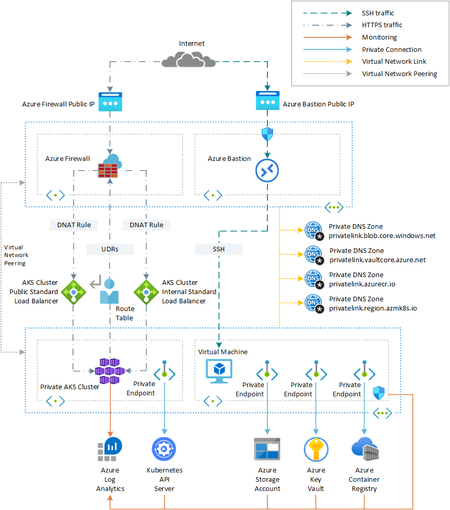
Introduction This repository provides a comprehensive guide and toolkit for creating a private Azure Kubernetes Service (AKS) cluster using Terraform. It showcases a detailed process for deploying a private AKS cluster with robust integrations including Azure Container Registry, Azure Storage Account, Azure Key Vault, and more, using Terraform as the infrastructure as code (IaC) tool. Repository For complete details and Terraform scripts, visit my GitHub repository at https://github.com/yazidmissaoui/PrivateAKSCluster-Terraform. This project mirrors the architecture suggested by Microsoft, providing a practical implementation of their recommended private AKS cluster setup. For further reference on the Microsoft architecture, visit their guide here: https://learn.microsoft.com/en-us/azure/architecture/example-scenario/aks-agic/aks-agic. Description This sample shows how to create a https://docs.microsoft.com/en-us/azure/aks/private-clusters using: https://www.terraform.io/intro/index.html as infrastructure as code (IaC) tool to build, change, and version the infrastructure on Azure in a safe, repeatable, and efficient way. https://docs.microsoft.com/en-us/azure/devops/pipelines/get-started/what-is-azure-pipelines?view=azure-devops to automate the deployment and undeployment of the entire infrastructure on multiple environments on the Azure platform. In a private AKS cluster, the API server endpoint is not exposed via a public IP address. Hence, to manage the API server, you will need to use a virtual machine that has access to the AKS cluster's Azure Virtual Network (VNet). This sample deploys a jumpbox virtual machine in the hub virtual network peered with the virtual network that hosts the private AKS cluster. There are several options for establishing network connectivity to the private cluster. Create a virtual machine in the same Azure Virtual Network (VNet) as the AKS cluster. Use a virtual machine in a separate network and set up Virtual network peering. See the section below for more information on this option. Use an Express Route or VPN connection. Creating a virtual machine in the same virtual network as the AKS cluster or in a peered virtual network is the easiest option. Express Route and VPNs add costs and require additional networking complexity. Virtual network peering requires you to plan your network CIDR ranges to ensure there are no overlapping ranges. For more information, see https://docs.microsoft.com/en-us/azure/aks/private-clusters. For more information on Azure Private Links, see https://docs.microsoft.com/en-us/azure/private-link/private-link-overview In addition, the sample creates a private endpoint to access all the managed services deployed by the Terraform modules via a private IP address: Azure Container Registry Azure Storage Account Azure Key Vault NOTE If you want to deploy a https://docs.microsoft.com/en-us/azure/aks/private-clusters#create-a-private-aks-cluster-with-a-public-dns-address to simplify the DNS resolution of the API Server to the private IP address of the private endpoint, you can use this project under my https://github.com/paolosalvatori/private-cluster-with-public-dns-zone account or on https://github.com/Azure/azure-quickstart-templates/tree/master/demos/private-aks-cluster-with-public-dns-zone. Architecture The following picture shows the high-level architecture created by the Terraform modules included in this sample: The following picture provides a more detailed view of the infrastructure on Azure. The architecture is composed of the following elements: A hub virtual network with three subnets: AzureBastionSubnet used by Azure Bastion AzureFirewallSubnet used by Azure Firewall A new virtual network with three subnets: SystemSubnet used by the AKS system node pool UserSubnet used by the AKS user node pool VmSubnet used by the jumpbox virtual machine and private endpoints The private AKS cluster uses a user-defined managed identity to create additional resources like load balancers and managed disks in Azure. The private AKS cluster is composed of a: System node pool hosting only critical system pods and services. The worker nodes have node taint which prevents application pods from beings scheduled on this node pool. User node pool hosting user workloads and artifacts. An Azure Firewall used to control the egress traffic from the private AKS cluster. For more information on how to lock down your private AKS cluster and filter outbound traffic, see: https://docs.microsoft.com/en-us/azure/aks/limit-egress-traffic https://docs.microsoft.com/en-us/azure/firewall/protect-azure-kubernetes-service An AKS cluster with a private endpoint to the API server hosted by an AKS-managed Azure subscription. The cluster can communicate with the API server exposed via a Private Link Service using a private endpoint. An Azure Bastion resource that provides secure and seamless SSH connectivity to the Vm virtual machine directly in the Azure portal over SSL An Azure Container Registry (ACR) to build, store, and manage container images and artifacts in a private registry for all types of container deployments. When the ACR SKU is equal to Premium, a Private Endpoint is created to allow the private AKS cluster to access ACR via a private IP address. For more information, see https://docs.microsoft.com/en-us/azure/container-registry/container-registry-private-link. A jumpbox virtual machine used to manage the Azure Kubernetes Service cluster A Private DNS Zone for the name resolution of each private endpoint. A Virtual Network Link between each Private DNS Zone and both the hub and spoke virtual networks A Log Analytics workspace to collect the diagnostics logs and metrics of both the AKS cluster and Vm virtual machine.3.9KViews2likes2Comments
Complicated Application Gateway Setup
Hi, I am looking to set up a complicated application gateway and seem to be struggling to get to get things right and am not sure if it something I am doing wrong or a limitation that I need to work around. What I want to do is have the gateway handle sub domain routing (pretty easy) and path based routing (on it's on pretty easy) and direct the traffic to app service end points (not sure if this is causing the problem due to multi tenancy) The sub domains are used currently to manage our different development environments (eg uat.contoso.com and dev.contoso.com) The path based routing is for the various applications that we run. (uat.contoso.com/application1 and uat.contoso.com/application2) I would love to change some of these things but the routing is legacy and a lot of stakeholders in the organisation are resistant to change. I have tried a few times to set things up the way I believe they should be set up but I get 404 errors or redirects to the app service url (which I am avoiding as I want to create and internal private url not a public one) Any pointers would be appreciated. -GraeSolved2.8KViews0likes5Comments