app services
217 TopicsHow to deploy n8n on Azure App Service and leverage the benefits provided by Azure.
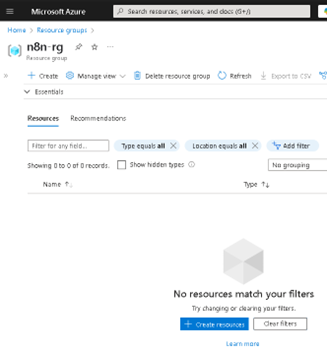
Lately, n8n has been gaining serious traction in the automation world—and it’s easy to see why. With its open-source core, visual workflow builder, and endless integration capabilities, it has become a favorite for developers and tech teams looking to automate processes without being locked into a single vendor. Given all the buzz, I thought it would be the perfect time to share a practical way to run n8n on Microsoft Azure using App Service. Why? Because Azure offers a solid, scalable, and secure platform that makes deployment easy, while still giving you full control over your container and configurations. Whether you're building a quick demo or setting up a production-ready instance, Azure App Service brings a lot of advantages to the table—like simplified scaling, integrated monitoring, built-in security features, and seamless CI/CD support. In this post, I’ll walk you through how to get your own n8n instance up and running on Azure—from creating the resource group to setting up environment variables and deploying the container. If you're into low-code automation and cloud-native solutions, this is a great way to combine both worlds. The first step is to create our Resource Group (RG); in my case, I will name it "n8n-rg". Now we proceed to create the App Service. At this point, it's important to select the appropriate configuration depending on your needs—for example, whether or not you want to include a database. If you choose to include one, Azure will handle the connections for you, and you can select from various types. In my case, I will proceed without a database. Proceed to configure the instance details. First, select the instance name, the 'Publish' option, and the 'Operating System'. In this case, it is important to choose 'Publish: Container', set the operating system to Linux, and most importantly select the region closest to you or your clients. Service Plan configuration. Here, you should select the plan based on your specific needs. Keep in mind that we are using a PaaS offering, which means that underlying compute resources like CPU and RAM are still being utilized. Depending on the expected workload, you can choose the most appropriate plan. Secondly—and very importantly—consider the features offered by each tier, such as redundancy, backup, autoscaling, custom domains, etc. In my case, I will use the Basic B1 plan. In the Database section, we do not select any option. Remember that this will depend on your specific requirements. In the Container section, under 'Image Source', select 'Other container registries'. For production environments, I recommend using Azure Container Registry (ACR) and pulling the n8n image from there. Now we will configure the Docker Hub options. This step is related to the previous one, as the available options vary depending on the image source. In our case, we will use the public n8n image from Docker Hub, so we select 'Public' and proceed to fill in the required fields: the first being the server, and the second the image name. This step is very important—use the exact same values to avoid issues. In the Networking section, we will select the values as shown in the image. This configuration will depend on your specific use case—particularly whether to enable Virtual Network (VNet) integration or not. VNet integration is typically used when the App Service needs to securely communicate with private resources (such as databases, APIs, or services) that reside within an Azure Virtual Network. Since this is a demo environment, we will leave the default settings without enabling VNet integration. In the 'Monitoring and Security' section, it is essential to enable these features to ensure traceability, observability, and additional security layers. This is considered a minimum requirement in production environments. At the very least, make sure to enable Application Insights by selecting 'Yes'. Finally, click on 'Create' and wait for the deployment process to complete. Now we will 'stop' our Web App, as we need to make some preliminary modifications. To do this, go to the main overview page of the Web App and click on 'Stop'. In the same Web App overview page, navigate through the left-hand panel to the 'Settings' section. Once there, click on it and select 'Environment Variables'. Environment variables are key-value pairs used to configure the behavior of your application without changing the source code. In the case of n8n, they are essential for defining authentication, webhook behavior, port configuration, timezone settings, and more. Environment variables within Azure specifically in Web Apps function the same way as they do outside of Azure. They allow you to configure your application's behavior without modifying the source code. In this case, we will add the following variables required for n8n to operate properly. Note: The variable APP_SERVICE_STORAGE should only be modified by setting it to true. Once the environment variables have been added, proceed to save them by clicking 'Apply' and confirming the changes. A confirmation dialog will appear to finalize the operation. Restart the Web App. This second startup may take longer than usual, typically around 5 to 7 minutes, as the environment initializes with the new configuration. Now, as we can see, the application has loaded successfully, and we can start using our own n8n server hosted on Azure. As you can observe, it references the host configured in the App Service. I hope you found this guide helpful and that it serves as a useful resource for deploying n8n on Azure App Service. If you have any questions or need further clarification, feel free to reach out—I'd be happy to help.8.6KViews4likes8Comments.NET Application Migration Using Azure App Services and Azure Containers: Deep Dive, Online Series
Designed for developers and solution architects who need to understand how to move business critical apps to the cloud, this online workshop series gets you hands-on with a proven process for migrating an existing ASP.NET based application to a container based application. Join us live for 90 minutes on Wednesday and Fridays from April 10 through May 3 to get expert guidance and to get your questions answered; the optional (but highly recommended) hands-on labs that accompany this series give you experience building a proof of concept (POC) that will deliver a multi-tiered web app solution from a Virtual Machine architecture into Azure, leveraging Azure Platform Services and different Azure container solutions available today. You will also migrate the underlying database from a SQL 2014 Virtual Machine architecture to SQL Azure. At the end of this series you will have a good understanding of container concepts, Docker architecture and operations, Azure Container Services, Azure Kubernetes Services and SQL Azure PaaS solutioning. Coming soon! Registration pages for each session will be live shortly. April 10 Part 1: Digital App Transformation with Azure April 12 Part 2: Infrastructure as Code using ARM templates April 17 Part 3: Azure Database Solutions – SQL Azure April 19 Part 4: Azure App Services – Azure Web Apps April 24 Part 5: Docker Containers April 26 Part 6: Azure Container Registry | Azure Container Instance May 1 Part 7: Container Orchestration with Azure Container Services and Azure Kubernetes Services May 3 Part 8: Managing and Monitoring Azure Kubernetes Services6.9KViews4likes9Comments
Is there no way to get better support for Azure - esp for SEV A tickets
We have had a sev A ticket open for over 5 days, and are incurring thousands in losses every day, and despite assurances from the Azure Support that it is being solved in hours and then having confirmations that it is solved, the issue is still not solved. I have asked numerous times to get our teams in touch with actual microsoft employees, not front end contractors, who is more like level 1 support, and just running messages between customer and back end team, and really are powerless to handle any suport issues themselves, and they are on complete mercy of "other teams" yet as a customer, apparantly we cant even get on a call with these other teams, and the poor front end contractors are getting the brunt of our pain. Absolutely are in the dark, as to what is actually happening in the back end, other than "trust me bro" we are working on it. No eta, no explanation.. hard to fathom how this can go on like this597Views3likes6CommentsHow to Learn Microsoft Azure in 2020
How to Learn Microsoft Azure in 2020 🎉☁🎓 The year 2019 is almost over, and usually, we take the time to look back at the year and also to find some New Year’s resolutions for the new year. Why not take all that energy and prepare for the cloud computing era and advance your career by learning Microsoft Azure. In this post, I try to give you a quick look at how you can get started to learn Microsoft Azure in 2020. You can read more here: https://www.thomasmaurer.ch/2019/12/how-to-learn-microsoft-azure-in-2020/2KViews3likes0Comments
Azure support team not responding to support request
I am posting here because I have not received a response to my support request despite my plan stating that I should hear back within 8 hours. It has now gone a day beyond that limit, and I am still waiting for assistance with this urgent matter. This issue is critical for my operations, and the delay is unacceptable. The ticket/reference number for my original support request was 2410100040000309. And I have created a brand new service request with ID 2412160040010160. I need this addressed immediately.1.6KViews2likes12CommentsAzure Functions Runtime 2.0 Preview - Update pending
If you are using the Preview of the Azure Functions Runtime 2.0, it's about to get an update. This GitHub link tells you how to pin any of your Function Apps to the current version, so they won't get automatically upgraded. This will give you time to separately test if your app will run without issues in the new version, once it's released. Any unpinned apps will have their Runtime environment automatically upgraded. https://github.com/Azure/app-service-announcements/issues/129885Views2likes0Comments[QUESTION] What is "ServicePrincipal_6387***" / Microsoft Substrate Management account?
Hello Everyone, We have a situation where looking at Audit Logs in our Azure. I found an account that was created (User Adde) by something called "ServicePrincipal_6387c64b-9a8b-4bf1-92e8-******" and I can't seem to find anything relate to this account. No Applications, nothing. I googled "Microsoft Substrate Management" witch is related to the account mentioned. But nothing found. If anyone could give a light on how can I find why users are been added by this account I would appreciate. Thank you all in advance.11KViews2likes10CommentsPDF generation in Azure App Service
I'm looking for a solid option for PDF generation that is compatible with running within the constraints of Azure App Service or Azure Functions. I know of several options but am curious what others are using and having solid reliable success with?7.6KViews2likes4CommentsToday on Azure Friday: App Service Domains
Matt Nielson joins Donovan Brown to show off a preview of App Service Domain, which gives you a first-class experience in the Azure portal to create and manage domains that will be hosted on Azure DNS for your Azure services such as Web Apps, Traffic Manager, Virtual Machines, and more. For more information, see: Announcing the preview of App Service domain (blog) Buy a custom domain name for Azure Web Apps (docs)797Views1like0Comments