api
561 TopicsWhich one is better? Skia API as the graphics API or OpenGL ES
I'm looking for pros and cons of each API, because Edge Canary version 83.0.467.0 has a new flag called: Skia API for compositing If enabled, the display compositor will use Skia as the graphics API instead of OpenGL ES. – Windows #enable-skia-renderer and I want to know what are the benefits of Skia API over OpenGL ES if i turn it on?Solved68KViews0likes5Comments
Get Accesstoken from Connect-MgGraph
Hello there I am using the PowerShell Graph SDK and connecting using the connect-mggraph cmdlet to authenticate to Azure (manual Login). I am assuming, this cmdlet somehow creates something like a temporary app registration and uses this for every further action. Now my question is, if I can somehow get to the access token that the SDK is using on behalf of my User. I then want to make calls to the Graph API with the invoke-restMethod cmdlet34KViews0likes3Comments
SDK command error - "The input is not a valid Base-64 string..."
Whenever I perform ANY SDK command (i.e. get-Mguser, invoke-MgGraphrequest), I receive the following error. Example 1: Get-MgUser : The input is not a valid Base-64 string as it contains a non-base 64 character, more than two padding characters, or an illegal character among the padding characters. At line:2 char:1 + Get-MgUser -Filter "userPrincipalName eq '$UPN'" + ~~~~~~~~~~~~~~~~~~~~~~~~~~~~~~~~~~~~~~~~~~~~~~~~ + CategoryInfo : NotSpecified: (:) [Get-MgUser_List1], FormatException + FullyQualifiedErrorId : Microsoft.Graph.PowerShell.Cmdlets.GetMgUser_List1 Example2: Invoke-MgGraphRequest : The input is not a valid Base-64 string as it contains a non-base 64 character, more than two padding characters, or an illegal character among the padding characters. At line:4 char:14 + ... response = (Invoke-MgGraphRequest -Uri $uri -Headers $headers -Method ... + ~~~~~~~~~~~~~~~~~~~~~~~~~~~~~~~~~~~~~~~~~~~~~~~~~~~~~~~~~ + CategoryInfo : InvalidOperation: (:) [Invoke-MgGraphRequest], FormatException + FullyQualifiedErrorId : NotSpecified,Microsoft.Graph.PowerShell.Authentication.Cmdlets.InvokeMgGraphRequest I am able to perform connect-mggraph and obtain the -scopes needed. I have done the following (and searched for the past few days): Executed VSCode/Poweshell ISE/pwsh.exe with Administrator privs Removed microsoft.graph modules and reinstalled version 1.10 I do not recall when this error began, but it's probably within the past week. I'm using Graph Explorer without error of course. I've had 2 Windows 10 updates on 6/20/2022. KB5014699 and Servicing Stack 10.0.19401.1737. I realize "It works on my machine. What did you do to yours" is the most common answer. 🙂 Any guidance, workaround, solutions to try would be most welcome.30KViews1like5CommentsAnnouncing the availability of TLS 1.3 in Azure API Management in Preview
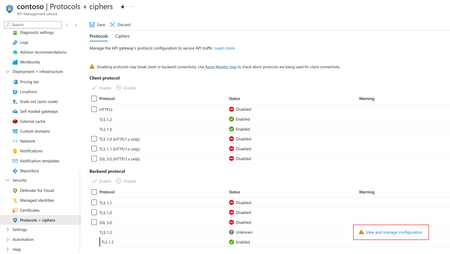
TLS 1.3 is the latest version of the internet’s most deployed security protocol, which encrypts data to provide a secure communication channel between two endpoints. TLS 1.3 support in Azure API Management is planned to rollout during the first week of February 2024. The rollout will happen in stages, this means some regions will get it first as we roll out globally.23KViews2likes6Comments
Customizing Delve profile
We have a customized version of SharePoint profiles along with the OOTB Delve profiles. Doing a comparison, this is what we don't find in the Delve profiles: 1. Skype for Business - possibility to initiate a call (you can initiate a chat but not a call). 2. Section - this is a customized field that displays the section we work in, not available in Delve. 3. Yammer - our cusomtized SP profiles include links to people's Yammer profiles and the list of groups they belong to. 4. Presence indicator - strangely not presence indicator enabled in Delve. My question: Is it possible to add custom fields in Delve profiles? and if not, is it on the roadmap?Solved21KViews0likes4CommentsNavigating Azure WAF Exclusions
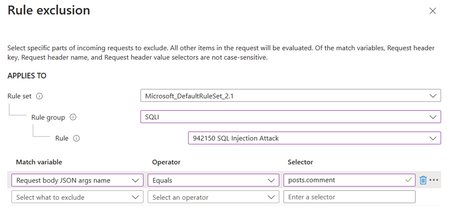
Exclusions in Azure WAF (Web Application Firewall) are a critical feature that allows administrators to fine-tune security rules by specifying elements that should not be evaluated by WAF rules. This capability is essential for reducing false positives and ensuring that legitimate traffic flows unimpeded. Exclusions are designed to fine-tune the WAF’s sensitivity, allowing legitimate traffic to pass through while maintaining robust security measures. They are particularly useful in scenarios where certain request attributes, such as specific cookie values or query strings, are known to be safe but might trigger WAF rules due to their content or structure.17KViews2likes0Comments