api management
231 Topics
From Form to Action: A Governed, Event-Driven AI Intake Pipeline with Azure Integration Services
A production-minded reference architecture using Azure Integration Services and Microsoft Foundry to turn document-heavy intake into governed, traceable work. TL;DR: Calling a model is one step in AI-powered intake. Production readiness depends on everything around the model: authenticated entry, controlled model consumption, durable asynchronous processing, explicit failure handling, and one correlation ID carried from the gateway to the final event. This post walks through a permit-intake reference architecture on Azure Integration Services and a companion repository you can run offline, without an Azure subscription. The Problem: Intake is where AI Prototypes Stall Many teams have built an AI prototype that reads a scanned form, extracts the key fields, and returns clean, structured data. That prototype proves the model can do the job. Taking it to production raises a different set of questions: Who is allowed to call this, and how many times per minute? What happens when the model returns a 429 or the CRM is down for maintenance? Which team consumed those tokens? Can you show me everything that happened to application #00417? Who is notified when a record is created, and what breaks when we add another subscriber? None of those questions is about the model, yet each one can decide whether the solution ships. The underlying customer problem is broader than “How do we read a form?” It’s “How do we accept responsibility for a submission, process it reliably across slow or unavailable dependencies, and give applicants and operators a trustworthy status?” That framing moves the design from a single AI call to a governed system of connected services. In this post, I use a fictional county’s building-permit intake as the running example. A resident submits a permit packet, and the county needs to validate it, extract the key fields, score it against intake policy, record it in a case system, and notify the right people, with a complete audit trail. The same shape appears in insurance first notice of loss, benefits enrollment, supplier onboarding, and claims intake. The repository keeps the domain in schemas and configuration: replace the schemas and labels, and keep the boundaries. My thesis is simple: the hard part of production AI intake is connecting the services around the model reliably and under governance, not calling the model. The model is one component of the system. It isn’t the system. Scope note: This is a production-minded reference architecture, not a production-ready template. The people, permit data, identifiers, and URLs in this post are synthetic, and the screenshots and trace rows show only that synthetic data. The repository favors demonstration clarity: public endpoints, simple SKUs, and simulated fallbacks. Architecture at a Glance Figure 1. The governed, event-driven permit-intake flow. One correlation ID follows the permit from the gateway to the published event. The design separates the acceptance path from the processing path. API Management owns the caller-facing contract and hands the work to a queue. Slow or failure-prone work happens after that hand-off. The flow reads left to right: Portal → API Management → Logic App → Service Bus → Function → Case system → Event Grid → Subscribers │ Document Intelligence + Foundry model (through the AI gateway) Responsibility Service Why this service Governed front door and AI gateway Azure API Management One policy boundary for business APIs and model APIs Low-code validation, enrichment, and routing Azure Logic Apps Business-visible run history; easy to change routing rules Durable hand-off and back-pressure Azure Service Bus Retries, duplicate detection, and dead-lettering Processing worker Azure Functions Scales with queue depth; runs the shared orchestrator Field extraction Azure Document Intelligence Layout and key-value extraction from the packet Policy-oriented scoring Azure OpenAI in Microsoft Foundry Models Rubric-based completeness and consistency review Fan-out to downstream consumers Azure Event Grid Decoupled subscribers via CloudEvents One correlation ID across the flow Application Insights End-to-end transactions plus one KQL join Discovery and reuse Azure API Center A catalog of the Permits and model APIs The case-system box is deliberately not a CRM product. The repository’s crm.py is an adapter: an in-memory stub by default, or an HTTP call to whatever CRM_BASE points at. Swap in Dynamics 365 or your records system without changing the orchestration contract. Let’s walk through the design decisions that matter most. API Management is more than a Proxy API Management is often introduced as a proxy. In this architecture, it’s the governance boundary, and it governs two surfaces. Figure 2. One gateway governs both the business API and the model API. Surface 1: The Permits API The Entra-protected variant of the inbound policy (permits-api.policy.xml, abridged) authenticates, throttles, and stamps a correlation ID before any backend code runs: <inbound> <base /> <validate-azure-ad-token tenant-id="{{tenant-id}}" failed-validation-httpcode="401"> <audiences><audience>api://ais-demo-permits</audience></audiences> </validate-azure-ad-token> <rate-limit-by-key calls="60" renewal-period="60" counter-key="@(context.Subscription?.Key ?? context.Request.IpAddress)" /> <set-variable name="correlationId" value="@(context.Request.Headers.GetValueOrDefault("X-Correlation-Id", Guid.NewGuid().ToString()))" /> <set-header name="X-Correlation-Id" exists-action="override"> <value>@((string)context.Variables["correlationId"])</value> </set-header> <set-backend-service backend-id="permit-intake-logicapp" /> </inbound> Three lines of intent are worth calling out: validate-azure-ad-token rejects missing, invalid, or expired Microsoft Entra tokens with a 401 at the edge, so unauthenticated requests are rejected before they reach the backend. It knows the Entra issuers and signing keys for your tenant, so there’s no OpenID configuration URL to maintain. rate-limit-by-key gives each consumer its own budget and returns 429 with Retry-After when it’s exceeded. The correlation ID is created here (or accepted from a trusted caller) and echoed back on the 202 Accepted response. That single value is how you’ll find this permit later. The deployed demo authenticates callers with API Management subscription keys and applies the same rate limit and correlation ID. To adopt the Entra variant, register an app for the api://ais-demo-permits audience, register a backend for the Logic App trigger, and then swap the policy. Surface 2: The Model API (The AI Gateway) The Function doesn’t call the model endpoint directly. It calls the Azure OpenAI v1 API through API Management, where a second policy applies (abridged): <inbound> <base /> <llm-content-safety backend-id="content-safety-backend" shield-prompt="true"> <categories output-type="EightSeverityLevels"> <category name="Hate" threshold="4" /> <category name="SelfHarm" threshold="4" /> <category name="Sexual" threshold="4" /> <category name="Violence" threshold="4" /> </categories> </llm-content-safety> <llm-token-limit counter-key="@(context.Subscription?.Id ?? "anonymous")" tokens-per-minute="20000" token-quota="2000000" token-quota-period="Monthly" estimate-prompt-tokens="false" /> <llm-emit-token-metric namespace="ais-demo-ai-gateway"> <dimension name="Subscription" value="@(context.Subscription?.Name ?? "unknown")" /> <dimension name="Department" value="@(context.Request.Headers.GetValueOrDefault("x-dept", "unknown"))" /> </llm-emit-token-metric> <set-header name="api-key" exists-action="delete" /> <authentication-managed-identity resource="https://cognitiveservices.azure.com" /> <set-backend-service backend-id="foundry-models-backend" /> </inbound> In order, that policy: llm-content-safety sends the prompt to Azure AI Content Safety, with Prompt Shields for injection attempts, and returns 403 for prompts that exceed the configured thresholds, before they reach the model. llm-token-limit gives each consumer a tokens-per-minute budget (429) and a monthly token quota (403). llm-emit-token-metric publishes token usage to Application Insights with a department dimension for showback or chargeback. Managed identity authenticates the gateway to the model. The caller’s API Management subscription key is stripped, and local (key) auth is disabled on the Foundry resource, so the Function doesn’t hold a model key, which helps reduce the risk of key leakage. The backend also has a circuit breaker that trips after three 429 or 5xx responses within a minute, pauses calls for a minute (or for the Retry-After period the model returns), and then resumes. The repository includes sample KQL for token monitoring and chargeback views. The key point: conventional APIs and AI endpoints share one governed boundary. Your security team reviews one set of policies, and your platform team gets one place to see who is calling what. Discovery: Azure API Center API Management governs runtime traffic; Azure API Center is where people find the APIs. The repository links API Center to API Management, so the Permits APIs and the model API are cataloged with their definitions, lifecycle stage, and environment. Before a team builds another intake API or model proxy, they search the catalog and still call API Management at runtime. API Center isn’t on the request path. Why the Flow is Asynchronous The Permits API returns 202 Accepted with a correlation ID. It doesn’t wait for extraction, scoring, or the case system. That’s deliberate: document analysis, model calls, record writes, and notifications all have different latency and failure behavior, and holding the caller’s request open couples the caller to each of them. Governance boundary: 202 means the platform durably accepted responsibility for the permit. It doesn’t mean extraction succeeded, a model approved anything, or a record was committed. The repository enforces that literally. On the direct route (POST /permits), API Management writes to Service Bus and checks the answer before it says yes: <send-request mode="new" response-variable-name="sbresponse" timeout="20" ignore-error="true"> <!-- POST to https://{namespace}.servicebus.windows.net/permits-in/messages with managed identity --> </send-request> <choose> <when condition="@(context.Variables.GetValueOrDefault<IResponse>("sbresponse") == null || context.Variables.GetValueOrDefault<IResponse>("sbresponse").StatusCode != 201)"> <return-response> <set-status code="503" reason="Service Unavailable" /> <!-- plus Retry-After --> </return-response> </when> </choose> <!-- only now: return 202 Accepted with X-Correlation-Id --> If Service Bus doesn’t confirm the write (an error status, a timeout, or no connection), the caller gets 503 with Retry-After, not a 202 for work that wasn’t queued. Logic Apps: Validate, Enrich, Route The Logic App workflow checks the payload, attaches the correlation ID, and hands the message to Service Bus with its own managed identity. If required fields are missing, it returns 400 immediately. Here’s the send step: "Send_to_Service_Bus": { "type": "Http", "inputs": { "method": "POST", "uri": "https://@{parameters('serviceBusNamespace')}.servicebus.windows.net/@{parameters('permitsQueue')}/messages", "headers": { "BrokerProperties": "@{string(outputs('Broker_properties'))}" }, "body": "@outputs('Enrich_message')", "authentication": { "type": "ManagedServiceIdentity", "audience": "https://servicebus.azure.net" } } } A preceding Broker_properties step sets MessageId to the parcel number and CorrelationId to the request’s correlation ID. Bicep loads this same workflow JSON when it deploys the Logic App, so each deployment applies the workflow definition from the repository. Business analysts can read the run history in the Azure portal. If the county adds a new permit type or a routing rule, that change happens in the workflow, not in Python. Design choice: The template deploys both routes. POST /permits-orchestrated goes through this Logic App. POST /permits uses a direct-enqueue policy that writes straight to Service Bus with the API Management managed identity; it’s the portal’s default and the route the trace below uses. Use the direct route when you don’t need low-code enrichment. Keep the Logic App when business users own the routing rules. Service Bus: The Durable Hand-off The permits-in queue is configured in Bicep with: maxDeliveryCount: 5, a message is delivered up to five times (the first attempt plus four retries) before it’s moved to the dead-letter subqueue. requiresDuplicateDetection: true with a 10-minute window, resubmitting the same messageId (the parcel number) doesn’t create a second message. See duplicate detection. deadLetteringOnMessageExpiration: true, expired messages are kept for inspection instead of being dropped. Functions: One Orchestrator, Many Hosts A Service Bus–triggered Function (Python 3.14 on Flex Consumption) reads the correlation ID from the message properties and runs a framework-agnostic orchestrator. A message without a permit type raises an error, so Service Bus retries it and then moves it to the dead-letter queue. The orchestrator does four things in order: extract → score → record → publish. def process_permit(permit: dict, correlation_id: str) -> ProcessResult: extracted = document_intelligence.extract_fields(permit) # Document Intelligence compliance = ai_gateway.score_compliance(extracted) # model via the API Management AI gateway status = "IntakeReview" if compliance.score >= settings.compliance_threshold else "NeedsAttention" permit_id = crm.create_permit_record(extracted, compliance, correlation_id, status) event_grid.publish_permit_created(PermitEvent(permitId=permit_id, complianceScore=compliance.score, correlationId=correlation_id)) ... Notice what the model doesn’t do: it doesn’t approve or deny anything. The score (0–100, against a rubric for completeness, consistency, and policy fit) only decides which human review state the permit lands in, IntakeReview or NeedsAttention, and that state is written to the case record. The call uses the Responses API on gpt-5.4-mini with structured output: the response must match a JSON schema (score, missing, flags), so downstream code receives a consistent, schema-validated shape. There’s no dated api-version to maintain: client = OpenAI( base_url=f"{apim_base}/openai/v1/", api_key=subscription_key, default_headers={"api-key": subscription_key, "x-dept": "permitting"}, ) review = client.responses.parse( model="gpt-5.4-mini", instructions=RUBRIC, input=fields_json, text_format=Review, reasoning={"effort": "low"}, store=False, ).output_parsed The caller authenticates to API Management, not to the model: the api-key header carries the caller’s API Management subscription key (the template renames this API’s subscription-key header to api-key). The OpenAI client requires api_key and also sends it as a bearer token, but the gateway replaces that header with its own managed-identity token before calling the model. For production, swap the subscription key for a Microsoft Entra token (api_key=token_provider) and validate it at the gateway. The same process_permit function is hosted by the Function, by a FastAPI service for the portal, and by the Python SDK walkthrough. That keeps the demo, the tests, and the deployed worker running the same code. Event Grid: Fan-out without Coupling After the CRM write, the Function publishes a PermitCreated CloudEvent. Two subscribers react independently: an analytics/audit queue and, when you supply a webhook URL, a resident notification webhook. Each subscription makes up to 30 delivery attempts over 24 hours. Adding a third subscriber, such as a GIS update or an inspector scheduling system, is a new subscription. It’s not a change to the permit flow. Commands and Events are Different Things Service Bus carries a command: “process this permit.” Event Grid carries a fact: “this permit was created,” published only after the record write succeeds. Keeping them separate makes retries, ownership, and subscriber behavior easier to reason about, a poison message can be retried and dead-lettered without a PermitCreated event going out for work that didn’t finish. Four rules follow: Message identity: a stable message ID (the parcel number) and the correlation ID as a message property. In the repository. Idempotency: a redelivered message must confirm earlier work, not create a duplicate record. Production work. Dead-letter ownership: someone watches the queue, reads the reason codes, and is authorized to replay. Operational. Status: callers need a status resource (accepted, processing, needs review, completed, failed) that doesn’t expose document contents. Production works the repository returns only the correlation ID. How Failures are Handled and What Still Needs Work A production-minded design makes failure behavior explicit before the happy path is trusted. The table separates what the repository does today from what still belongs on the production path: Failure What happens in the repository Still needed for production Caller has no valid token 401 at API Management (Entra policy variant); no backend call Entra validation on every public API Caller exceeds its rate limit 429 with Retry-After Per-consumer products and quotas Payload missing required fields Orchestrated route: 400 from the Logic App, passed back by API Management. Direct route: accepted, then dead-lettered by the Function if type is missing The same validation on the direct route Queue unavailable Direct route: 503 with Retry-After. Orchestrated route: the Logic App run fails and returns an error. Neither returns 202 An alert on enqueue failures Malformed message on the queue Delivered up to five times, then dead-lettered (MaxDeliveryCountExceeded) A named owner and a replay procedure Prompt blocked by content safety, or monthly token quota spent 403 from the gateway; Service Bus redelivers the message, then dead-letters it Route to NeedsAttention with a reason instead of dead-lettering Model unavailable (429 or 5xx from the gateway or model) The OpenAI client retries twice, then Service Bus redelivers the message and finally dead-letters it. The backend circuit breaker pauses calls to the model while it’s tripped Route to NeedsAttention with the reason model_unavailable, keeping the deterministic validation results Case system unavailable The Function fails before publishing; the message is redelivered An idempotency key on the record write Event Grid unavailable after the record write The Function fails; a retry can repeat the record write A transactional outbox for the event A notification subscriber is down Event Grid retries that subscriber only (30 attempts over 24 hours) — Two rows deserve a closer look. Model unavailable: today, a model failure retries and then dead-letters the permit. A better design keeps the deterministic validation results, routes the permit to NeedsAttention with a reason such as model_unavailable, and never treats a missing score as approval. Case system unavailable: the record write is the commit point for PermitCreated, so the event must never go out before it. Idempotency keys plus an outbox let a committed record and its event be reconciled. A prototype doesn’t need these safeguards; a production service does. AI is Optional and Bounded The non-AI capabilities like durable acceptance, extraction, deterministic validation, the case record, and events are useful with generative AI turned off. The model’s score is advisory: it prioritizes review and surfaces gaps. It must never quietly become the approval decision. Extraction output is evidence to validate, not ground truth. Deterministic rules own required fields, allowed values, and hard policy constraints. In the repository, the Logic App rejects a packet without name or type, and the Function dead-letters a message without type. The model doesn’t enforce either rule. The model’s output is schema-constrained (score, missing, flags) and labeled advisory. Low scores, conflicting evidence, and model failures route to people. Logs carry identifiers and stage outcomes, not document bodies. Before any real workload, evaluate the scorer in Microsoft Foundry with synthetic or properly governed labeled data. The scorer is a direct model call through API Management, not a Foundry agent, so use dataset-based evaluators and graders, and keep an authorized person in the loop for consequential decisions. Trace One Permit End to End Governance is only useful if you can prove what happened. Here’s one synthetic permit created through the demo environment. Submit. The client posts the permit to API Management: { "name": "[Applicant Name]", "type": "Building", "parcel": "AIS-TT-102242", "applicantEmail": "[Applicant Email]" } Govern and accept durably. On the direct /permits route, API Management applies its policies, stamps a correlation ID, writes the message to permits-in, and only after Service Bus answers 201, returns 202 Accepted with X-Correlation-Id: xxxxxxxx-xxxx-xxxx-xxxx-xxxxxxxx. Process. The Function picks up the message and extracts the fields. This run had no document attached, so it used the repository’s synthetic extraction fallback; attach a document URL to exercise Document Intelligence. Score, behind content safety. The Function calls the model through the AI gateway. Content Safety and Prompt Shields screen the prompt first; then gpt-5.4-mini returns a score of 22 and lists missing applicant contact details and a project description. Status: NeedsAttention, which is the expected result for a packet missing those details. (Simulated mode scores the same packet 100.) Record and publish. The case-system adapter creates P-E6980B0C, and the Function publishes PermitCreated; Event Grid delivers it to the analytics queue. Reconstruct. One query returns the whole journey. The portal shows the same journey to a business audience: Figure 3. The portal’s processing result and hop-by-hop trace. This screenshot is from simulated mode, so all values are synthetic and the applicant is shown as a placeholder. In Application Insights the journey is two operations. The intake operation is the API Management request and its Service Bus write. The processing operation is one end-to-end transaction: the Function, its call back through the AI gateway, the Content Safety checks, the model call, and the Event Grid publish. The Service Bus hop doesn’t carry W3C trace context, so the correlation ID is the join key, API Management logs it as a header, and the Function’s log lines name it. This query finds the operations that mention it: let cid = '<correlation-id>'; let hits = union AppRequests, AppDependencies, AppTraces, AppExceptions | where OperationId == cid or Message has cid or tostring(Properties) has cid; let ops = hits | where isnotempty(OperationId) and OperationId != '00000000000000000000000000000000' | distinct OperationId; union (union AppRequests, AppDependencies, AppExceptions | where OperationId in (ops)), (hits | where Type == 'AppTraces') | project TimeGenerated, Type, Name = coalesce(Name, Message, OuterMessage), ResultCode, DurationMs, AppRoleName | order by TimeGenerated asc For the permit above, it returned: Operation Hop Component Result Duration (ms) Intake POST /permits API Management 202 1,471 Intake POST /permits-in/messages Service Bus enqueue 201 177 Processing ServiceBusProcessor.ProcessMessage Azure Functions — 5,875 Processing POST /openai/v1/responses AI gateway (called by the Function) 200 4,542 Processing POST /contentsafety/text:analyze Content Safety 200 777 Processing POST /contentsafety/text:shieldPrompt Prompt Shields 200 235 Processing POST /openai/v1/responses Foundry model (gpt-5.4-mini) 200 2,705 Processing POST /api/events Event Grid publish 200 83 Durations come from one run in a demo environment, including cold starts. They aren’t performance figures. Figure 4. The processing operation for the same permit in Application Insights. The durations match the table above. Resource names and tenant identifiers are redacted. When a caseworker asks, “What happened to application #00417?”, the answer can come from one query instead of separate log searches across teams. Run it Locally, then Deploy it The repository is designed so you can understand the architecture before you spend anything on Azure. 1. Offline Simulation (no Azure Subscription) uv sync --extra dev # Python 3.14 cp .env.example .env # SIMULATED_MODE=true by default uv run ais-demo # runs steps B1–B8 end to end In simulated mode, each adapter (Service Bus, Document Intelligence, the model, CRM, Event Grid, Azure Monitor) is replaced by an in-memory stand-in with the same interface. The walkthrough submits a permit, enqueues it, extracts and scores it, writes the record, publishes the event, dead-letters a deliberately malformed message, and prints the correlated trace. The test suite (uv run pytest) covers the same paths. To see the business view, start the API and portal together: ./scripts/setup.sh ./scripts/app.sh start # API on :8000, portal on :5173 (Node.js 24 LTS) 2. Same Interface, Azure-backed Adapters Each adapter module checks one setting: if settings.simulated_mode or not settings.servicebus_fqdn: return _consume_simulated(handler) return _consume_live(handler, settings) # azure-servicebus + DefaultAzureCredential Set SIMULATED_MODE=false, provide the endpoints, and the same orchestrator talks to real services. Live adapters authenticate with DefaultAzureCredential, so the deployed Function uses its managed identity for Service Bus, Document Intelligence, Event Grid, and Azure Monitor. Both Python hosts export OpenTelemetry to Application Insights, and the Function’s log lines name the correlation ID. 3. Deploy with Bicep and Clean up az group create -n rg-ais-demo -l eastus2 az deployment group what-if -g rg-ais-demo \ --template-file infra/main.bicep --parameters infra/main.bicepparam az deployment group create -g rg-ais-demo \ --template-file infra/main.bicep --parameters infra/main.bicepparam # or: azd provision --preview && azd provision One deployment creates and wires the whole stack: Service Bus and Event Grid (with the analytics subscription, plus the notification webhook subscription when you pass notificationWebhookUrl), Document Intelligence, a Microsoft Foundry resource with the gpt-5.4-mini deployment, the Logic App workflow, a Flex Consumption Function App on Python 3.14, API Management with all three APIs (/permits, /permits-orchestrated, and /openai) and their policies, API Center, and the managed-identity role assignments it needs. Local (key) auth is disabled on Service Bus, Event Grid, Document Intelligence, and the Foundry resource. The template defaults to the BasicV2 tier of API Management; the sample main.bicepparam sets the classic Developer tier to match the existing demo environment, so change apimSku for a new environment. For a faster inner loop, pass deployApim=false. After provisioning, publish the Function code; the deployment guide has the details, and a GitHub Actions workflow runs the same what-if and provision steps with OpenID Connect. When you’re done: az group delete -n rg-ais-demo --yes --no-wait The repository also includes a demo track that tells the same story two ways: an Azure portal click-through for business stakeholders (steps A1–A15) and a Python SDK walkthrough for engineers (steps B1–B8). Production Boundaries: What this Reference doesn’t Do This repository is a production-minded reference architecture: it anticipates production concerns while staying candid about what it doesn’t prove. A production path starts from your organization’s requirements and platform standards. Here’s the gap: Area In the repository Before production Networking Public endpoints Private endpoints, virtual network integration, and a WAF in front of internal API Management (reference architecture) Identity Managed identity to Service Bus, Event Grid, Document Intelligence, and the Foundry resource, with local auth disabled; API Management subscription keys for callers (an Entra token policy is provided) Microsoft Entra token validation on every public API; the Function’s API Management subscription key in Key Vault or replaced by Entra auth AI safety Content Safety and Prompt Shields at the gateway; structured output; advisory-only scoring Tuned thresholds and blocklists, response-side checks, and offline and continuous evaluation gated in CI Data retention In-memory or simulated CRM A real system of record with retention, residency, and deletion policies agreed with records owners Consistency Retries, duplicate detection, and dead-lettering Idempotency keys and an outbox for the record write and event publish Caller status The correlation ID A status resource (accepted, processing, needs review, completed, failed) Access control One demo subscription Per-consumer products, least-privilege RBAC, and separated duties for operators and reviewers Operational ownership Demo scripts Dashboards, alerts on dead-letter depth and token budgets, runbooks, and named owners for every queue Human review Score routes to a review state Documented reviewer workflow, override capture, and periodic sampling of AI-assisted decisions Figure 5. The same services in a network-isolated API Management landing zone. The repository’s production path maps each of these items to the Azure Well-Architected Framework pillars. It also sketches how the AI gateway grows into a multi-region front door with backend pools, circuit breakers, and semantic caching, without changing the governance policies you already have. Map the Article to the Repository Article Repository location Shared pipeline src/ais_demo/orchestrator.py Governed intake (direct, orchestrated, Entra variant) apim/policies/permits-api*.xml AI gateway apim/policies/aoai-api.policy.xml Logic App workflow integration/logicapp/permit-intake-workflow.json Durable command and dead-lettering src/ais_demo/integrations/service_bus.py Extraction src/ais_demo/integrations/document_intelligence.py Advisory scoring src/ais_demo/integrations/ai_gateway.py Case-system adapter src/ais_demo/integrations/crm.py Events src/ais_demo/integrations/event_grid.py Trace join src/ais_demo/integrations/monitor.py Infrastructure infra/main.bicep and infra/modules/ Runbooks docs/deployment-guide.md and docs/demo-track.md Production path docs/production-path.md Key Takeaways Put the model behind the same gateway as your APIs. Content safety, token limits, usage metrics, and managed identity help turn model access into something you can govern and attribute. Accept fast, process durably and mean it. Return 202 only after the queue confirms the message. That helps shield residents from downstream outages and gives operators a dead-letter queue to inspect instead of a lost request. Keep AI advisory. Let the model route work to people. Don’t let it make the decision. Create one correlation ID at the edge and carry it through each hop. It’s one of the simplest audit trails you can build. Decouple what happens next. Event Grid lets new consumers subscribe without touching the intake flow. What to do Next Agree on the acceptance contract: exactly when 202 is returned and how callers check status. Run the simulated portal and Python walkthroughs with one synthetic correlation ID. Test the failure paths: queue unavailable, poison message, model unavailable, case system unavailable, and a trace gap. Add idempotent record writes and an outbox for event publication. Evaluate the advisory model separately from deterministic rules and human approval. Complete an architecture, privacy, security, and Well-Architected review for your subscription before using real data. Try It Repository: github.com/honestypugh2/ais-demo. Start with uv run ais-demo, no Azure subscription required. Adapt it: Change the schemas in src/ais_demo/schemas/permit.py, update USE_CASE_PROFILE and the samples in data/, and keep the topology. Go deeper: AI gateway capabilities in API Management · Service Bus dead-letter queues · Event-driven architecture style · Investigate transactions in Application Insights Related reading: Grounding Copilot Studio Agents with Azure AI Search and Foundry IQ Models will change. The work around them is what moves intake from form to action: a governed front door, durable hand-offs, advisory scoring, and one correlation ID from submission to the final event. Clone the repository, run it offline, and adapt the schemas to your own intake process. Comments and questions are welcome below. The sample code in this post and the companion repository is provided "as is" under the MIT license for demonstration purposes. It uses synthetic data only and isn't intended for production use without additional security, reliability, and compliance review. Nothing in this post is legal, compliance, security, or deployment assurance, and it doesn't represent a customer implementation. The county and applicant in this example are fictional. Check product availability, quotas, model access, and regional capabilities for your own subscription.307Views0likes0CommentsMicrosoft Agent 365 and Azure API Management integration for MCP governance
As agents gain access to enterprise tools, organizations need consistent ways to govern what those agents can access and enforce those decisions at runtime Today, we're announcing a new integration between Microsoft Agent 365 and Azure API Management now in public preview. The integration connects centralized governance in Agent 365 with runtime enforcement for MCP servers and tools through Azure API Management for V2 and AI Gateway tiers. With this integration, AI administrators can discover and govern gateway managed MCP servers and tools from Agent 365 and application platform teams use Azure API Management, to enforce those access decisions at runtime. Microsoft Defender and Microsoft Purview add additional layers of protection by evaluating tool requests and results for threats and sensitive information risks. Centralized governance, enforced at the gateway Agent 365 and Azure API Management play complementary roles. Agent 365 defines governance intent, maintains inventory, and manages access decisions. Azure API Management enforces those decisions inline for traffic to MCP servers and tools. Together, they connect the enterprise governance experience with the infrastructure platform teams already use to manage access to business systems. Administrators can make supported access decisions from Agent 365, while enforcement happens at the gateway in the customer's Azure environment. For agents already using a configured gateway endpoint, that connection remains in place. Customers can extend governance to their existing gateway-managed tools without rearchitecting those agents or moving tools out of their Azure subscriptions. Discover tools and control what agents can do The integration brings together four key capabilities: Discover existing gateways and MCP servers. After a one-time tenant-level consent, Agent 365 discovers supported Azure API Management resources and the MCP servers they expose, removing manual registration. Maintain a centralized inventory. Administrators can find gateway-managed MCP servers in Agent 365 and inspect available metadata, bringing these assets into a shared governance experience. Control access at the right level. Block or unblock an entire MCP server. With the Azure API Management AI Gateway tier (preview) they can apply more granular controls by blocking individual tools without disabling the server. Use runtime signals for oversight. Tool activity observability on AI Gateway tier supports monitoring, auditing, and incident investigation, connecting access decisions with what happens at runtime. Add protection before tools run and before results return Controlling which tools agents can access is one part of the governance model. Organizations also need protection for information flowing through those tools . The Agent 365 tool threat protection policy (supported in the AI Gateway tier) uses Microsoft Defender and Microsoft Purview capabilities to evaluate tool requests and results for risks such as malicious content, prompt injection, and exposure of sensitive information. Platform teams can configure evaluation before tool invocation, after invocation, or at both stages. With blocking configured, pre-invocation evaluation can prevent a disallowed call from executing. Post-invocation evaluation can withhold unsafe results before they reach the agent. Build on open standards and existing investments This integration connects centralized governance with enforcement where agents access tools, while building on the infrastructure organizations already operate. MCP provides a common interface for tool access. Azure API Management provides the gateway boundary for applying policy, security, and observability. Agent 365 brings those gateway-managed assets into a centralized governance experience, with Microsoft security capabilities adding protection along the tool-call path. The goal is not to make every agent use the same runtime. It is to help organizations apply governance to tools reached through supported gateway endpoints, bringing AI administrators, platform teams, and security teams closer together, while preserving the existing architecture. Get started API Management v2 tiers support centralized MCP inventory and server-level blocking and unblocking through Agent 365.The AI Gateway tier adds more granular capabilities including individual-tool blocking, tool activity observability, and tool threat protection . Start with the Agent 365 integration guide, explore tool threat protection with Defender and Purview, and configure your gateway in the AI Gateway portal.803Views0likes4Comments
Update network rules for the API Management service tag
To improve Azure API Management resiliency and scalability, we’re expanding our infrastructure and adding control-plane IP addresses. These addresses are included in the ApiManagement service tag. If you use VNet internal or VNET external with the classic (v1) tiers, check your network security groups (NSGs), user-defined routes (UDRs), and firewalls. Replace hard-coded API Management IP addresses with the service tag wherever supported. Make this change by November 30, 2026, to avoid disruption to management access. If network rules block connectivity to the management endpoint after that date, you may be unable to manage your API Management configuration—such as APIs, operations, and policies—from the Azure portal or CLI. This change affects management-plane traffic only. Runtime traffic, including API calls to your services, is not impacted. Find the ApiManagement tag in Microsoft’s Azure service tags overview or the latest Azure IP Ranges and Service Tags JSON download. If your firewall doesn’t support service tags, use the published list and keep your IP rules synchronized with its latest version. Don’t rely on a fixed, point-in-time IP list. During the transition, the service tag includes both existing and new addresses. For reference: Use API Management in an internal virtual networkLogic Apps Aviators Newsletter - October 2026
In this issue: Ace Aviator of the Month News from our product group News from our community Ace Aviator of the Month October 2026's Ace Aviator: Hicham Boutaleb & Azure Solution Architect @ 5-Nines Consulting What's your role and title? What are your responsibilities? I work as an Enterprise Integration Architect, helping organizations design, implement, and modernize integration platforms using Microsoft technologies. My responsibilities include defining architecture, leading technical delivery, supporting development teams, ensuring best practices around security and governance, and helping customers get the most value from Azure services such as Logic Apps, API Management, Service Bus, and Azure Functions. Can you give us some insights into your day-to-day activities and what a typical day in your role looks like? No two days are exactly the same, which is one of the things I enjoy most about my role. A typical day usually involves a mix of: - Designing integration and automation solutions. - Reviewing architectures and code with project teams. - Supporting customers in solving complex technical challenges. - Running workshops and knowledge-sharing sessions. - Evaluating new Azure capabilities and how they can benefit ongoing projects. - Collaborating with business stakeholders to translate requirements into scalable technical solutions. I also dedicate time to continuous learning because the cloud ecosystem evolves incredibly fast, and staying up to date is essential. What motivates and inspires you to be an active member of the Aviators/Microsoft community? The community is one of the best accelerators of professional growth. What motivates me most is the opportunity to learn from others while also giving back through sharing experiences, lessons learned, and practical solutions. I believe that technology is not just about tools—it's about people. The Microsoft community creates an environment where professionals can collaborate, innovate, and help each other succeed. Seeing someone solve a problem using knowledge I've shared is incredibly rewarding. Looking back, what advice do you wish you had been given earlier that you'd now share with those looking to get into STEM/technology? I would tell my younger self: Don't focus only on technology, focus on problem-solving and communication. Technical skills are important, but the ability to understand business challenges, communicate clearly, and work effectively with others often has an even greater impact on your career. I would also encourage people to: - Stay curious and never stop learning. - Build real projects rather than only collecting certifications. - Don't be afraid of failure—every mistake is an opportunity to learn. - Invest in your professional network early. The technology will change throughout your career, but adaptability and curiosity will always remain valuable. What has helped you grow professionally? Several factors have contributed to my growth: - Working on diverse and challenging projects. - Learning from experienced mentors and colleagues. - Being willing to step outside my comfort zone. - Participating in technical communities and events. - Maintaining a mindset of continuous improvement. Some of my biggest learning moments came from difficult projects where I had to solve problems I had never encountered before. Those experiences often teach more than success alone. If you had a magic wand that could create a feature in Logic Apps, what would it be and why? If I had a magic wand, I'd add an AI-powered end-to-end message tracking feature in Logic Apps that automatically follows a message across all workflows and Azure services it traverses. It would provide a single, intelligent view of the entire journey, making troubleshooting and root-cause analysis much faster and easier. News from our product group Your Certificate Renewed. Your Gateway Didn't Notice. Learn how certificate renewal can create outages when Azure Application Gateway does not detect an updated certificate in Azure Key Vault. The article explains certificate refresh behavior and practical steps for ensuring renewed certificates propagate reliably to dependent gateway infrastructure. How to Validate That Your BizTalk SB-Messaging Adapter Is Really Using AMQP Prepare BizTalk Server integrations for the retirement of the legacy Service Bus Messaging Protocol by confirming that the SB-Messaging adapter uses AMQP. This guide covers the required BizTalk Server 2020 hotfix and shows how to verify active AMQP-over-TLS connections on port 5671 across every relevant host and messaging configuration. Migrate Data Ingestion from Data Collector to Log Ingestion - Part 2 Continue migrating from the deprecated Data Collector API to the Azure Monitor Log Ingestion API by handling its smaller payload limit. The article demonstrates how to calculate and split large datasets into appropriately sized chunks in Azure Logic Apps so ingestion requests remain below the 1 MB limit. Bring Azure Logic Apps connectors into your .NET applications with the Azure Connectors SDK Explore the preview Azure Connectors SDK for calling Azure Logic Apps connectors directly from .NET applications without hosting a workflow. Strongly typed asynchronous clients, Azure Identity integration, and support for managed identities make it easier to connect application code to Microsoft and third-party services. Agentic Refactoring of Legacy Integration Workloads to Azure Logic Apps Standard See how agentic AI can accelerate the refactoring of legacy integration workloads into Azure Logic Apps Standard. This Microsoft Azure Developers video explores an AI-assisted modernization approach for analyzing existing solutions and moving them toward cloud-native workflows. Connect Azure Functions to SharePoint using Managed Connectors Learn how Azure Functions can connect to SharePoint using managed connectors. This Microsoft Azure Developers video demonstrates how connector capabilities simplify authentication and integration between function code and SharePoint. Connect SaaS & Enterprise Systems with Azure Functions This Microsoft Azure Developers video showcases how Azure Functions can use managed connectors for scalable, event-driven automation. It demonstrates integration with services such as SharePoint and Teams, highlighting how triggers and actions can reduce the need for manual polling and simplify authentication handling. The session walks through building practical workflows that connect SaaS and enterprise systems using Azure Functions. News from our community Logic Apps Community Day — 3 December 2026 Post by Ahmed Bayoumy Logic Apps Community Day returns on 3 December 2026 as a free, online event streamed live on YouTube. The program focuses on Logic Apps, the wider Azure integration stack, and AI patterns built on integration platforms. Organizers describe eight community speaking slots, combining longer sessions with lightning talks, and invite practitioners to submit examples, client cases, comparisons, or AI features. The event is intended for a worldwide audience and includes discussions, a published agenda, and opportunities for community members to share practical experience. Azure Logic Apps: Workflow Automation, Enterprise Integration, Connectors, B2B, Security, Networking, Monitoring, DevSecOps, Governance, and AI-Enable Post by Sanjeeve Kumar Gajadi This extensive guide presents Azure Logic Apps as an enterprise orchestration and integration layer rather than only a visual automation tool. It discusses Consumption and Standard hosting, triggers, actions, connectors, API Management, Service Bus, Event Grid, SAP, B2B protocols, managed identities, private networking, monitoring, reliability, DevOps, governance, and cost management. The article also considers AI-enabled orchestration and human approval patterns. Its central guidance is to design workflows around business processes, resilience, security, observability, and operational ownership while moving complex computation to suitable application services. Azure Logic Apps Handbook: 50 Expert Tips and Best Practices Post by Sandro Pereira Sandro Pereira introduces a free handbook containing 50 expert tips and best practices for Azure Logic Apps. The guide is aimed at architects, developers, integration specialists, DevOps engineers, and leaders working with cloud automation. Its coverage includes Logic Apps capabilities, practical use cases, workflow optimization, security, common pitfalls, and implementation strategies. The accompanying article explains that the handbook is intended to help readers design reliable, scalable, and maintainable workflows, and provides access to the downloadable resource through the linked publication. Build and Debug Logic Apps Standard Locally in VS Code Post by Stephen W. Thomas Stephen W. Thomas demonstrates how to build and debug Azure Logic Apps Standard workflows locally in Visual Studio Code without deploying resources to Azure. The walkthrough covers installing the extension, creating a stateful workflow with built-in operations, using local storage emulation, and sending a request from Postman. It also shows how to pause workflow execution at a breakpoint and inspect the results. The accompanying guide helps developers reproduce the setup and explore a practical local development loop while avoiding Azure charges during development and debugging. Azure API Management Premium v2 Workspaces and Dedicated Workspace Gateways in a Private Network Post by Şahin Özdemir Şahin Özdemir shares lessons from configuring Azure API Management Premium v2 workspaces and dedicated workspace gateways in a fully private network. The article covers Premium v2 virtual network integration, workspace isolation for multiple teams, internal-only workspace gateways, required Bicep resources and associations, and network security group rules. It also calls out deployment pitfalls and the less obvious Microsoft.ApiManagement/gateways/configConnections resource used to associate workspaces with gateways. The first part keeps API Management externally accessible while placing workspaces and their gateways inside the private network. Getting Started with Logic Apps Standard (in 2026) Video by Stephen W. Thomas Stephen W. Thomas shows how to set up Azure Logic Apps Standard locally in Visual Studio Code in under five minutes with no Azure charges. The updated installation brings in the Azure Functions runtime, Azure tooling, C# support, and storage emulators. The video creates a local workspace using built-in connectors, starts the workflow with F5, copies its callable URL, and sends a request from Postman. It also demonstrates breakpoints, debugger variables, action inputs, and stepping into custom in-process C# code for a complete local development experience.251Views0likes0Comments
Engineering an Azure Data Layer for Odoo Analytics Without Changing the ERP
One thing I have learned from working on ERP-driven data projects is that the ERP is rarely the place where you want to solve every analytics problem. We saw this firsthand in a manufacturing engagement where Odoo was being used across finance, inventory, procurement, and manufacturing, but reporting still involved substantial manual extraction and Excel-based consolidation. The interesting engineering question wasn't “How do we replace the ERP?” It was: “How do we build a reliable analytical layer around it without changing the transactional system?” That shaped the architecture. We used Odoo APIs and Azure Data Factory for ingestion, landing the data in Azure Data Lake Storage Gen2. From there, the data was organized into Bronze, Silver, and Gold layers: Bronze: Source-aligned Odoo data was retained with minimal transformation. Silver: Data was cleansed, standardized, and prepared across finance, inventory, procurement, and manufacturing domains. Gold: Analytics-ready data was prepared for downstream reporting and consumption. Azure Databricks with Spark handled transformation and KPI standardization, while Synapse/SQL layers provided structured analytical models for reporting. Power BI datasets consumed the prepared data, with Row-Level Security applied for role-based access. Why did this separation matter for the project? The important architectural boundary was: Odoo → transactional operations Azure data platform → ingestion, storage, transformation, standardization Power BI → analytical consumption That separation meant the reporting layer did not have to repeatedly extract and reshape data directly from the ERP. It also gave us a dedicated place to handle historical data and standardize information across business domains before it reached the reporting layer. What changed? The implementation automated 15+ Odoo-based reports and provided governed Power BI dashboards to 60+ business users. More importantly, teams moved away from repeated ERP extraction and spreadsheet consolidation toward a reusable analytical data layer. For our team, the bigger takeaway was that ERP modernization does not necessarily mean modifying the ERP. For teams building Azure data platforms around ERP systems, how are you drawing the boundary between API ingestion, historical storage, transformation, and analytical modeling?74Views0likes0CommentsLogic Apps Aviators Newsletter - September 2026
In this issue: Ace Aviator of the Month News from our product group News from our community Ace Aviator of the Month September 2026's Ace Aviator: Parth Talaviya What's your role and title? What are your responsibilities? AI-Powered Azure/.NET Solution Architect I work as an Azure/.NET Solution Architect, combining technical leadership with building a Microsoft-focused boutique company. My work mainly revolves around application modernization and migration, cloud architecture, integrations, and team leadership. I also stay hands-on with development, architecture reviews, production troubleshooting, and mentoring developers. Can you give us some insights into your day-to-day activities and what a typical day in your role looks like? My day usually starts with thinking about how we can add more value to our clients' businesses. It includes reviewing project priorities, solving technical challenges, discussing architecture, supporting developers, and collaborating with stakeholders. I mainly work across .NET, Azure, APIs, integrations, DevOps, and AI automation, so every day brings something new to learn and solve. What motivates and inspires you to be an active member of the Aviators/Microsoft community? What really motivates me is how active and supportive the Microsoft community is. People are genuinely willing to help each other, share experiences, and solve problems together. Being able to use my own experience to help someone overcome a challenge genuinely makes my day, while learning from others keeps me motivated to continuously improve. Looking back, what advice do you wish you had been given earlier that you'd now share with those looking to get into STEM/technology? You don’t have to do everything alone. In technology, especially when you are stuck on a very specific problem, it can sometimes feel that way. Asking questions, learning from the community, and collaborating with others can make a huge difference. I would also say: embrace AI early, but use it wisely. Don’t use AI only to generate code. Use it to understand concepts, challenge your thinking, explore better approaches, review your work, and become a better problem-solver. What has helped you grow professionally? Continuous learning and solving real-world challenges have helped me grow the most. Working on legacy modernization, cloud architecture, large-scale data systems, automation, and AI has taught me to think beyond writing code and understand the broader business impact. Being part of a strong technical community has also helped significantly. Whenever you are stuck, there is often someone who has faced a similar challenge and is willing to share their experience. If you had a magic wand that could create a feature in Logic Apps, what would it be and why? I would create an AI-powered Copilot troubleshooting and self-healing assistant for Logic Apps. It could analyze failed workflows, understand the execution context, identify the likely root cause, suggest a fix, and provide safe recovery options. For complex integrations, this could save significant troubleshooting time and allow developers to focus more on building solutions rather than spending hours finding where something went wrong. News from our product group Use connectors with Managed Identity in the Logic Apps Standard extension Managed Identity is Azure's built-in way to authenticate to Microsoft Entra-protected resources without storing credentials, secrets, or connection strings. Deployed Logic Apps have supported it for some time, and this post explains connector support in the Logic Apps Standard extension. Introducing dependency telemetry in Application Insights for Azure API Management policies Running API platforms at scale requires both handling load and understanding where inefficiencies occur. This post introduces dependency telemetry in Application Insights for Azure API Management policies to help teams identify performance bottlenecks. Power Azure SRE Agent with the tools it needs Azure SRE Agent is an AI-powered service designed to reduce operational toil. Teams can use it to investigate incidents, identify probable causes, and automate health-related operational work using connected tools. Give your Copilot agents real tools, without hand-wiring MCP GitHub Copilot coding agents can work independently on branches, but some tasks require access to external systems. This post shows how to equip agents with real tools without manually wiring Model Context Protocol integrations. Zonal redundancy in API management Standard v2 APIs power modern mobile experiences, microservices, AI-driven applications, and business-critical integrations. This post explains zonal redundancy in Azure API Management Standard v2 for improving resilience as customers modernize their API platforms. BizTalk Server 2020 End-of-Sale Announcement Microsoft announces that BizTalk Server 2020 and Host Integration Server 2020 sales are expected to end on March 31, 2027. Existing licensed deployments can continue to be used, while mainstream support for BizTalk Server 2020 is scheduled through April 12, 2028. An optional paid extended-mainstream support offering is planned for eligible customers through April 10, 2030, with final terms to be published later. The post recommends beginning migration planning now, evaluating Azure Logic Apps Standard or Azure Logic Apps Hybrid, inventorying dependencies, and using the Logic Apps Migration Agent to assess and convert supported workloads. Logic App Storage Inspector Logic App Storage Inspector is a read-only Kudu site extension for examining storage used by an Azure Logic App Standard application. It supports searching workflow action and trigger history by workflow, date, or text, with results exportable as CSV or JSON. Users can browse and compare workflow-definition versions, review table and queue information, and monitor health indicators and refresh status. The extension isolates access to the current Logic App site, uses asynchronous paged operations for large storage accounts, and can be installed from Kudu Site Extensions. News from our community Azure Logic Apps Automation – A Practical Infrastructure Lab with Agentic Remediation Post by João Paulo Costa João Paulo Costa tests Azure Logic Apps Automation through an after-hours virtual-machine remediation lab. The workflow uses an agent to inspect VM metadata, tags, and runtime state, then apply guardrails before deciding whether to deallocate the resource, leave it unchanged, or request review. The article contrasts agentic decision-making with deterministic workflows, documents tool and connector choices, and examines preview limitations such as runtime-state retrieval and managed-identity support. It also emphasizes constrained permissions, explicit policies, verification after actions, and negative testing for production, exemptions, missing ownership, and disabled remediation. Agentic Integration: Non-Deterministic Experience, Solid Core Post by Massimo Crippa Massimo Crippa examines whether agentic capabilities make enterprise integration non-deterministic. He separates an agent’s variable decision-making from the predictable integration layer that executes selected capabilities. The article highlights durable messaging, reliable contracts, idempotency, transactional boundaries, retries, compensation, governance, and observability as continuing requirements. It presents tools as the boundary between reasoning and execution: agents determine what should happen, while integration platforms control how operations are performed safely. Azure Logic Apps is positioned as both a deterministic integration foundation and a platform that can expose governed capabilities to emerging agentic experiences. Build AI Agents in Azure Logic Apps (Conversational + Autonomous) Video by Rafsan Huseynov Rafsan Huseynov presents a video on building conversational and autonomous AI agents with Azure Logic Apps. The session describes Logic Apps as more than a background integration layer, covering orchestration, managed identities, agent loops, and the use of workflows as MCP tools. Demonstrations explore connections with Document Intelligence, Blob Storage, Microsoft Foundry, and Copilot Studio workflows, alongside conversational and autonomous agent patterns. The video also introduces a separate low-code automation experience with scoped permissions, while noting that the demonstrations use synthetic data and that the experience remains in preview. BizTalk to Logic Apps migration (three things, everyone gets wrong) Post by Brajesh Sinha Brajesh Sinha explains why simple counts of BizTalk orchestrations and maps produce unreliable Logic Apps migration estimates. One orchestration can fan out into several Azure resources, supposedly simple maps may hide substantial transformation complexity, and operational requirements are often omitted from statements of work. The article highlights the architecture, mapping, and production-readiness effort that teams frequently underestimate. It encourages migration planners to assess actual behavior and dependencies rather than relying on inventory totals, helping create more realistic timelines, scope, and delivery expectations. Hybrid Logic Apps on RKE2: a self-managed cluster with MetalLB Post by Sonny Gillissen Sonny Gillissen demonstrates how to run Azure Logic Apps Hybrid on a self-managed RKE2 Kubernetes cluster. Because RKE2 does not include a native load balancer, the walkthrough uses MetalLB to assign the ingress IP required by the deployment. It covers creating the cluster, configuring networking, connecting the environment to Azure Arc, and handling the platform-specific details needed for Logic Apps. The article provides a practical alternative for teams evaluating hybrid integration workloads outside managed Kubernetes services, extending earlier guidance for OpenShift environments. An Introduction to Logic Apps Standard SDK Video by Marcel Medina Marcel Medina shares a Coding Night ANZ recording introducing the Logic Apps Standard SDK. The session shows how the SDK brings a modern, code-first .NET development experience to Azure Logic Apps while retaining the platform’s connectors, triggers, monitoring, and managed runtime. It is aimed at developers who want familiar tooling and stronger source-driven workflow development without giving up managed integration capabilities. The post also thanks the community for its questions and participation and provides the complete session recording for anyone who missed the live event. Managed Identity in Logic Apps Standard: A Zero Trust Read Post by Steef-Jan Wiggers Steef-Jan Wiggers examines new Managed Identity support for connectors in the Logic Apps Standard local development experience. Developers can now use a consistent authentication model from development through production instead of swapping connection strings before deployment, removing a common source of unmanaged secrets. The article frames this improvement through Zero Trust while stressing that authentication alone does not replace disciplined RBAC. A working azd sample demonstrates the setup and highlights a critical application setting whose absence causes the otherwise correctly configured connection, access policy, and role assignment to fail.682Views0likes0CommentsAI Gateway tier of Azure API Management — August 2026 updates
The August 2026 update for the AI Gateway tier (preview) of Azure API Management introduces new capabilities for observing AI workloads and governing model spend. Release highlights Richer OpenTelemetry observability: AI Gateway can now emit logs, distributed traces, token metrics, and estimated cost metrics through the OpenTelemetry Protocol. The built-in monitoring experience helps teams investigate model and MCP tool activity, policy execution, latency, errors, token consumption, and individual traces. Model cost monitoring and budget enforcement: Teams can review estimated model spend by API key and model, then use cost limit policies to set calendar-based budgets and block requests when configured limits are reached. The release also streamlines Microsoft Foundry model imports, refines provider onboarding, improves portal reliability and error guidance, expands Anthropic Messages compatibility, and adds an in-product What's new experience. For configuration guidance, important upgrade information, and the complete list of changes, read the full August 2026 release notes in the AI Gateway portal. Try the latest capabilities in the AI Gateway portal.837Views0likes0CommentsIntroducing APIOps CLI
APIOps CLI helps teams extract, version, review, preview, and publish Azure API Management configuration through source-controlled DevOps workflows. Today, we're excited to announce APIOps CLI, a new command-line experience designed to help organizations manage Azure API Management (APIM) using modern configuration-as-code and GitOps practices. As APIs become increasingly central to digital transformation, organizations need a reliable way to manage API definitions, policies, products, diagnostics, and gateway configuration across multiple environments. APIOps CLI provides a streamlined, developer-friendly approach to extract, version, review, and publish API Management configuration through familiar DevOps workflows. Why APIOps CLI? Traditional API management processes often rely on manual configuration changes, environment-specific customizations, and limited visibility into what changed and why. As API estates grow, these approaches become difficult to scale, audit, and govern. APIOps CLI addresses these challenges by enabling teams to manage API Management configuration as source-controlled artifacts. Every change can be reviewed through pull requests, tracked through Git history, and promoted consistently across development, test, and production environments. The result is improved governance, greater reliability, better collaboration between API developers and platform operators, and a simpler path toward enterprise-scale API operations. What APIOps CLI Enables APIOps CLI provides capabilities that help organizations adopt a true APIOps model: Extract API Management configuration into local artifact files Store and version configuration in Git repositories Review changes through standard pull request workflows Publish approved artifacts back into API Management environments Promote configuration consistently across environments Scaffold GitHub Actions and Azure DevOps pipelines Support automated CI/CD deployment patterns Enable auditable, repeatable API configuration management By treating API Management configuration as code, organizations gain the same operational excellence practices that software development teams have relied on for years. A Modern GitOps Workflow for APIs The APIOps CLI workflow follows a simple yet powerful pattern: Extract configuration from an existing API Management instance. Store the generated artifacts in source control. Review and approve changes through pull requests. Run automated validation and deployment pipelines. Publish approved configuration back to target API Management environments. This approach creates a clear separation between authoring, review, approval, and deployment while maintaining a complete audit trail of API platform changes. For organizations already practicing GitOps, APIOps CLI integrates naturally into existing development workflows and governance processes. Built for Real-World Enterprise Scenarios APIOps CLI is designed to support customers operating at enterprise scale. Common use cases include: Migrating away from manual API Management administration Standardizing deployments across multiple environments Establishing controlled promotion paths from development to production Implementing governance and compliance requirements Supporting platform engineering and API platform teams Managing large inventories of APIs, products, policies, and configurations Enabling self-service API development with centralized governance Whether you're operating a single API Management instance or managing a large multi-team API platform, APIOps CLI provides a foundation for consistent and repeatable operations. Integrated with Your Existing Toolchain APIOps CLI works alongside the tools teams already use: GitHub Azure DevOps Azure Pipelines GitHub Actions Azure CLI Existing Git repositories and branching strategies The tool can generate CI/CD scaffolding to accelerate adoption, helping teams move from manual operations to automated deployments with less effort. Open Source and Community Driven APIOps CLI is available as an open-source project under the Azure GitHub organization. The repository includes source code, architecture guidance, command documentation, CI/CD examples, walkthroughs, troubleshooting guidance, and reference material. By making the project open and community-driven, we are enabling customers, partners, and contributors to participate directly in the evolution of Azure API Management DevOps practices. Getting Started Getting started is straightforward: Install the APIOps CLI package. Authenticate with Azure. Extract an existing API Management instance into local artifacts. Commit those artifacts to a Git repository. Review and approve changes through pull requests. Publish approved changes back to Azure API Management. We recommend beginning with a non-production environment to establish your workflow, validate governance processes, and familiarize teams with the configuration-as-code model. Looking Ahead APIs have become a strategic asset for every organization. As API estates continue to expand, successful teams will increasingly adopt automation, governance, and GitOps practices to maintain speed without sacrificing control. APIOps CLI is an important step in that journey. It provides a modern foundation for managing Azure API Management configurations with the same rigor, automation, and reliability that organizations expect from modern software delivery practices. We invite you to explore APIOps CLI, try it in your environment, share feedback, and join us in shaping the future of API operations on Azure. Resources APIOps CLI GitHub repository: https://github.com/Azure/apiops-cli/tree/main Microsoft Learn: Manage API Management configuration with APIOps CLIBuild governed asynchronous APIs with Azure API Management and Azure Service Bus
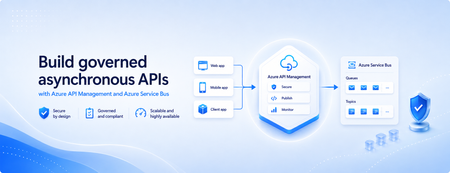
Many applications use Azure Service Bus to decouple services, handle traffic spikes, and process workloads asynchronously. However, securely exposing messaging capabilities to applications, partners, and internal teams can require custom middleware or messaging-specific client implementations. Today, we’re announcing the general availability of native Azure Service Bus integration in Azure API Management. With the send-service-bus-message policy, developers can publish messages directly from an Azure API Management gateway to an Azure Service Bus queue or topic. This provides a secure and governed HTTP interface for Service Bus workloads—without requiring teams to build and operate a separate adapter service. Connect APIs directly to Azure Service Bus Azure API Management can act as the governed entry point for applications that submit work to Azure Service Bus. A client sends a standard HTTP request to API Management. The gateway can authenticate and authorize the caller, validate or transform the request, and apply policies such as rate limits and quotas before publishing the message to a Service Bus queue or topic. Once the message is accepted, API Management can immediately respond to the caller while downstream services process the message asynchronously. Alternatively, message publication can be added to an existing API flow while the request continues to its primary backend. This integration brings together API governance in Azure API Management and reliable asynchronous messaging in Azure Service Bus—without adding another intermediary service. Greater control over Service Bus messages As part of general availability, we’re introducing additional controls for building production messaging workflows. 1. Control how messages are processed Developers can configure the following Service Bus message properties directly in the policy: Message IDs to correlate messages and support duplicate-detection or idempotent processing patterns. Session IDs to group related messages for ordered or stateful processing. Time-to-live to prevent messages from being processed after they are no longer relevant. These values can be generated dynamically using API Management policy expressions, allowing them to reflect request IDs, customer identifiers, transactions, or other application context. 2. Capture the send result The response-variable-name attribute captures information about the Service Bus send operation in an API Management context variable. Subsequent policies can use the result to add correlation information to an API response, emit telemetry, record an operational event, or apply conditional logic when a message cannot be sent. 3. Choose how failures affect the API Different messaging scenarios require different failure behavior. When publishing the message is the primary purpose of an API, a send failure can stop policy execution and invoke the API Management error-handling path. When publishing is secondary—such as sending an audit event or initiating optional downstream processing—the ignore-error option can allow the primary API request to continue. Information about the send operation remains available through the response variable for logging or subsequent policy logic. 4. Secure access with managed identity API Management authenticates to Azure Service Bus using a Microsoft Entra managed identity. Customers can use the system-assigned identity of the API Management service or specify a user-assigned managed identity. The selected identity is granted the Azure Service Bus Data Sender role for the appropriate namespace, queue, or topic. This removes the need to store Service Bus connection strings or shared access keys in API policies and makes it easier to apply least-privilege access using Azure role-based access control. Send a message with an API Management policy The following example sends the incoming request body to an orders queue. It assigns a message ID and expiration time, captures the result of the send operation, and treats successful publication as a required part of the API request. <send-service-bus-message queue-name="orders" namespace="contoso-messaging.servicebus.windows.net" message-id="@(context.RequestId.ToString())" time-to-live="00:10:00" response-variable-name="serviceBusResult" ignore-error="false"> <payload> @(context.Request.Body.As<string>(preserveContent: true)) </payload> </send-service-bus-message> A session ID can also be added when related messages need to be grouped for ordered or stateful processing. For a fully asynchronous API, the policy can be followed by return-response so that API Management acknowledges the request immediately after sending the message. For an existing API, the request can continue to its configured backend after the message is published. Common integration scenarios Create asynchronous APIs: Accept an order, document, or processing request through an HTTP API, publish it to a queue, and return immediately while downstream services complete the work. Govern partner integrations: Provide partners with a managed API contract instead of exposing the underlying Service Bus namespace. API Management can authenticate callers, validate requests, and apply quotas before publishing messages. Publish business events: Publish events to a Service Bus topic so multiple subscriptions and downstream services can process them independently. Handle bursts of incoming traffic: Use Service Bus to buffer messages when incoming API traffic temporarily exceeds the rate at which downstream services can process requests. Add events to existing API operations: Publish audit, notification, analytics, or workflow events while allowing the primary API request to continue to its configured backend. Preserve workflow affinity: Use Service Bus sessions to group related messages for ordered or stateful processing based on a customer, transaction, order, or workflow identifier. Get started To send messages from Azure API Management to Azure Service Bus: Create or select an Azure Service Bus queue or topic. Enable a system-assigned or user-assigned managed identity on the API Management service. Assign the identity the Azure Service Bus Data Sender role. Add the send-service-bus-message policy to an API operation. Configure the message payload, processing properties, output variable, and failure behavior. With native Azure Service Bus integration, Azure API Management provides a secure and governed way to connect HTTP APIs with asynchronous messaging workloads—without requiring additional middleware. Learn more Send Service Bus message policy reference Send messages to Azure Service Bus from Azure API Management Azure API Management June 2026 release notes Azure Service Bus documentation902Views0likes0CommentsZonal redundancy in API management Standard v2
APIs are the backbone of modern applications, powering everything from mobile experiences and microservices to AI-driven applications and business-critical integrations. As customers continue to modernize their platforms on Azure, they increasingly expect their API infrastructure to remain available even in the face of datacenter-level disruptions. With zone redundancy in Standard v2, Azure API Management now enables customers to increase resilience against Availability Zone failures while continuing to benefit from the simplicity, performance, and cost efficiency of the v2 platform. Why Zone Redundancy Matters Azure Availability Zones are physically separate locations within an Azure region, each with independent power, cooling, and networking infrastructure. By distributing API Management resources across multiple zones, organizations can reduce the impact of a single datacenter failure and improve service continuity for their APIs. Until now, customers who required built-in zone-level resiliency often needed to evaluate higher-end deployment options. With this enhancement, Standard v2 customers can now deploy API gateways across Availability Zones and benefit from improved reliability while maintaining the streamlined operational model of the v2 platform. What’s New Zone Redundancy for Standard v2 extends the platform's resiliency by distributing service capacity across multiple Availability Zones within a supported Azure region. Key benefits include: Higher Availability: API traffic continues to flow even if a single Availability Zone experiences an outage. Built-in Resiliency: Redundancy is provided at the platform layer, reducing the need for customers to design and manage complex intra-region failover solutions. Production-Ready Reliability: Customers can confidently run critical API workloads on Standard v2 with stronger availability guarantees. Operational Simplicity: The service automatically manages capacity distribution, health monitoring, and recovery behavior across zones. Cost-Effective Resilience: Customers gain zone-level protection without requiring an enterprise-tier deployment model. Built on the Modern v2 Platform The v2 platform was designed from the ground up to provide a faster, more reliable, and more scalable API Management experience. Standard v2 already delivers capabilities such as rapid deployment, simplified networking, workspace support, and flexible scaling. Zone Redundancy further strengthens the platform by expanding its reliability story for production workloads. This announcement builds on our broader investment in making Azure API Management more accessible to a wider range of organizations, from digital-native startups to large enterprises modernizing their application estates. Ideal Scenarios Zone Redundancy in Standard v2 is particularly valuable for customers who: Run business-critical APIs that must remain available during datacenter incidents. Consolidate multiple application workloads behind a single API gateway. Expose APIs consumed by mobile, partner, and customer-facing applications. Support AI applications and agent-based architectures that depend on highly available API endpoints. For organizations adopting modern cloud and AI native architectures, this capability helps ensure that API infrastructure remains aligned with broader application resiliency strategies. A Foundation for Reliable AI and API Platforms As AI-powered applications continue to proliferate, APIs increasingly become the critical connection layer between models, agents, business systems, and data platforms. Downtime at the API layer can have a direct impact on application availability, customer experience, and business operations. By bringing zone redundancy to Standard v2, we are making it easier for organizations to build highly resilient API platforms that can serve as the foundation for next-generation AI and digital transformation initiatives. Getting Started Zone Redundancy for Standard v2 can be enabled in supported Azure regions, allowing customers to deploy API Management with built-in protection against Availability Zone failures. We recommend reviewing your application's overall resiliency architecture, including backend redundancy, traffic management, and disaster recovery requirements, to maximize the benefits of zone-resilient API infrastructure. Enable Zone Redundancy in the Azure Portal Getting started with Zone Redundancy in Azure API Management Standard v2 is straightforward and can be configured during service creation. Create a New Standard v2 Instance with Zone Redundancy Sign in to the Azure portal. Select Create a Resource and search for Azure API Management. Choose Standard v2 as the service tier. Select a region that supports Availability Zones. In the Availability Zones section, enable Zone Redundancy. Review and create the service. After deployment, Azure API Management automatically distributes service capacity across multiple Availability Zones within the selected region, helping maintain API availability during a zone-level outage. Looking Ahead This release represents another step in our ongoing investment in the Azure API Management v2 platform. We remain committed to delivering the reliability, scalability, security, and developer experiences that organizations expect from a modern API management service. We are excited to see what our customers build with a more resilient Standard v2 platform and look forward to your feedback as you continue modernizing and scaling your API ecosystems on Azure. Learn more by visiting the Azure API Management documentation and exploring the latest reliability guidance for API Management deployments.