apache kafka
6 Topics
Optimize selective analytics reads in Azure Data Lake Storage with ABFS Vectored Read
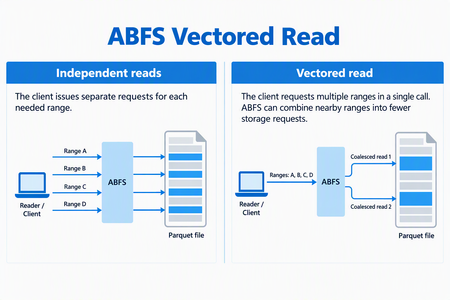
ABFS Vectored Read helps compatible analytics engines reduce request overhead when reading selected portions of columnar files in Azure Data Lake Storage. By coordinating multiple noncontiguous byte ranges through the Azure Blob File System (ABFS) driver, it can combine nearby ranges into fewer storage requests and execute those requests asynchronously. For data engineers working with selective Parquet queries, this brings the storage read pattern closer to what the query needs: a coordinated set of ranges rather than a collection of independent small reads. When the Parquet reader supports vectored I/O and the runtime includes a compatible ABFS client, Spark workloads that use higher-level APIs can enable this capability through configuration - without rewriting queries, changing application logic, or migrating data. Why selective reads need coordinated I/O Consider a query that selects a few columns from a Parquet dataset and filters out most row groups. The reader can skip much of the data the query doesn't need, but the data it needs may be spread across different parts of the file. Reading each range independently can create many small storage requests. Each request carries network and processing overhead, so selecting less data doesn't necessarily remove the cost of coordinating those reads. Vectored Read lets a compatible reader provide the ranges together, giving the client an opportunity to plan the I/O as a group. How ABFS Vectored Read works A compatible reader submits the file ranges it needs together. ABFS validates and sorts the ranges, combines nearby ranges when appropriate, and divides the resulting work to fit its read buffers. It then queues the storage requests asynchronously and returns the requested bytes to the corresponding range buffers. Illustrative request pattern, not a benchmark. Actual grouping depends on range layout and client configuration; coalesced storage requests can include bytes between the requested ranges. This is a client-side optimization. It does not change the file format or rewrite your stored data. The engine still receives the data for the ranges it requested. What this means for your workloads For compatible selective-read workloads, Vectored Read offers: Less request overhead: Combining nearby ranges can reduce separate storage requests and network round trips. Coordinated I/O: Asynchronous reads allow the client to work on multiple requested ranges without treating every range as an isolated operation. Configuration-based adoption: Compatible Spark workloads using the Hadoop Parquet and ABFS path can use the feature without rewriting their queries. The best starting point is a workload that reads selected portions of Parquet files through abfs:// or abfss://. Full sequential scans may see less benefit, and engines that bypass the Hadoop/ABFS path do not use this capability. Support depends on the Hadoop, hadoop-azure, and parquet-hadoop libraries included in the runtime, not only on the Spark version. See Availability and resources for the minimum versions and verification guidance. The benefit depends on the number, size, and spacing of requested ranges, the coalescing configuration, storage and network latency, concurrency and caching. Combining ranges can reduce requests and round trips, but it can also read additional bytes between noncontiguous requested ranges. Compare query duration, storage transactions, bytes read, and resource utilization against a controlled baseline using representative data and concurrency. Get started First, verify that your runtime contains Apache Hadoop 3.3.5 or later, including the hadoop-azure module, and parquet-hadoop 1.12.3 or later. The presence of an ABFS URI alone does not establish that the optimized implementation is installed. For Spark, enable the Parquet setting before the application starts, using the spark.hadoop. prefix: spark-submit \ --conf spark.hadoop.parquet.hadoop.vectored.io.enabled=true \ <other-options> \ <application> Replace the command placeholders with your normal submission options and application. Set the property explicitly rather than relying on a default, which can vary by packaged Parquet version. For managed services, use the service's supported cluster or session configuration mechanism. Availability and resources Azure Databricks does not currently support ABFS Vectored Read because its runtime ships an ABFS version that does not include this capability. In addition, Photon does not use the ABFS driver for data access, even when a workload uses an abfs:// or abfss:// URI. Therefore, the presence of an ABFS URI alone does not indicate that Vectored Read is available. For other packaged or managed runtimes, verify that the environment includes Apache Hadoop 3.3.5 or later with the hadoop-azure module, and parquet-hadoop 1.12.3 or later. Start with one representative selective-read workload and compare it with your baseline. For background, see the ABFS driver overview.143Views1like0Comments
Azure Stream Analytics Kafka Connectors is Now Generally Available!
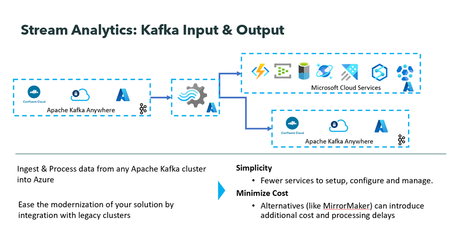
We are excited to announce that Kafka Input and Output with Azure Stream Analytics is now generally available! This marks a major milestone in our commitment to empowering our users with robust and innovative solutions. With Stream Analytics Kafka Connectors, users can natively read and write data to and from Kafka topics. This enables users to fully leverage Stream Analytics' rich capabilities and features even when the data resides outside of Azure. Azure Stream Analytics is a job service, so you do not have to spend time managing clusters, and downtime concerns are alleviated with a 99.99% SLA (Service Level Agreement) at the job level. Key Benefits: Stream Analytics job can ingest Kafka events from anywhere, process them and output them to any number of Azure services as well as to other Kafka clusters. No need to use workarounds such as MirrorMaker or Kafka extensions with Azure function to process data in Kafka with azure stream analytics. The solution is low code and entirely managed by the Azure Stream Analytics team at Microsoft. Getting Started: To get started with Stream Analytics Kafka input and output connector please refer to these links provided below: Stream data from Kafka into Azure Stream Analytics Kafka output from Azure Stream Analytics You can add Kafka input or output to a new or an existing Stream Analytics job in a few simple clicks. To add Kafka input, go to input under job topology, click Add input, and select Kafka. For Kafka output, go to output under job topology, click Add output, and select Kafka. Next, you will be presented with Kafka connection configuration. Once filled you will be able to test the connection with Kafka cluster. VNET Integration: You can connect to Kafka cluster from Azure Stream Analytics whether it is on cloud or on prem with a public endpoint. You can also securely connect to Kafka cluster inside a virtual network with Azure Stream Analytics. Visit the Run your Azure Stream Analytics job in an Azure Virtual Network documentation for more information. Automated deployment with ARM template ARM templates allow for quick and automated deployment of Stream Analytics jobs. To deploy a stream analytics job with Kafka Input or Output quickly and automatically, users can include the following sample snippet in their Stream Analytics job ARM template. "type": "Kafka", "properties": { "consumerGroupId": "string", "bootstrapServers": "string", "topicName": "string", "securityProtocol": "string", "securityProtocolKeyVaultName": "string", "sasl": { "mechanism": "string", "username": "string", "password": "string" }, "tls": { "keystoreKey": "string", "keystoreCertificateChain": "string", "keyPassword": "string", "truststoreCertificates": "string" } } We can’t wait to see what you’ll build with Azure Stream Analytics Kafka input and output connectors. Try it out today and let us know your feedback. Stay tuned for more updates as we continue to innovate and enhance this feature. Call to Action: For direct help with using the Azure Stream Analytics Kafka input, please reach out to askasa@microsoft.com. To learn more about Azure Stream Analytics click here502Views2likes0Comments
Dynamically adding partitions to a topic/event hub under Event Hubs namespace
Event Hubs provides partitions to scale consumers for parallel processing. The concept of partitions belongs to Topics under Event Hubs namespace. Topics helps categorize the incoming messages and consumer in a group processes the events from one of the Topic partitions. When a Topic is created, the number of partitions are specified at the time of creation. For some special cases though, you may have to add partitions after the Topic has been created. This requires you to dynamically accommodate the addition of partitions. This blog describes the behavior of adding partitions to an existing Topic with Event Hubs. Dynamic additions of partitions is available only on Dedicated Event Hubs clusters and not on Standard Event Hubs namespace.7.5KViews1like0CommentsNew Akka Streams and Apache Flink tutorials/samples for Event Hubs for Apache Kafka Ecosystems
First published on on Jun 13, 2018 Introducing two new Event Hubs for Apache Kafka Ecosystems tutorials - Akka Streams and Apache Flink!Event Hubs for Kafka Ecosystems combines the power and simplicity of Event Hubs with the wide ecosystem of Apache Kafka.3.6KViews1like1Comment