android
56 Topics
Phone Link Fails to Sync Properly
It has been 3 months or so that phone link stopped working properly with my Android Samsung S26+ and Samsung S24+ phones. The phones are on the latest android version and the phone to link app is also updated on both my PC and phone. I have spoken with customer service at microsoft and there seems to be no answer. I get msgs on my phone but they do not all display on the PC. Only select msgs show. If I mirror the phone however everything shows properly. Any advice on how to fix this issue? Could it be because android phones moved from the samsung default messaging app to the google RSS mssging app? Any fix for this? I tried installing and unistalling the phone on my pc as well as unlinked then linked the phone twice.125Views1like1Comment.NET
Hi everyone! 👋 I’m new to this community and currently learning .NET App Development. I’m really excited to join and connect with developers here. I believe the discussions and knowledge shared in this community are very valuable, especially for beginners like me. I’m looking forward to learning from your experiences and improving my development skills. If you have any tips, recommended resources, or advice for someone starting with .NET, I would really appreciate it. Happy to be part of this community! 😊421Views3likes2Comments
Is clean architecture overkill for small teams maintaining a single web app ?
I've been exploring clean architecture and while I appreciate its separation of concerns and testability, I can't help but wonder, it is over for small teams ( say 2-4 devs) maintaining a single, relatively stable web application ? Implementing clean architecture means more layers, more interfaces, and potenitally more ceremony, which might slow things down, especially if the team is trying to move quickly or lacks deep experience with the pattern. At the same time, I get the value of long-term maintainability and scalability, even for small projects that could grow. What pain points or benefits did you encounter ? Did it help or hinder onboarding, testing or refactoring ?Solved619Views5likes2Comments
MAUI Android API 35: Action Bar still visible despite NavBarIsVisible=False
Before API 35 it was ok. I am using .NET 9, Android API 35, using Shell, etc. I have tried: Shell.NavBarIsVisible, NavigationPage.HasNavigationBar, theme tweaks, etc. What’s still happening: Title bar remains visible on Android.217Views0likes0Comments
WebView download in .NET MAUI
Hi everyone, I'm Manuel. I need to create an application which downloads a file from web site. I used a WebViewer and allowed into AndroidManifest.xml external memory read and write. Everything works fine until I press the download button from the website: nothing happens. I simply defined a webview into my MainApp.xaml.cs file (because it must be dynamic) and added into my GridLayout. I tried to print external memory read/write permissions, but it says it's not allowed. Can anyone help me? I'm locked here from weeks and don't know how to solve. Thank you so much881Views0likes1CommentMaui How to upload a file to web API in .NET 9
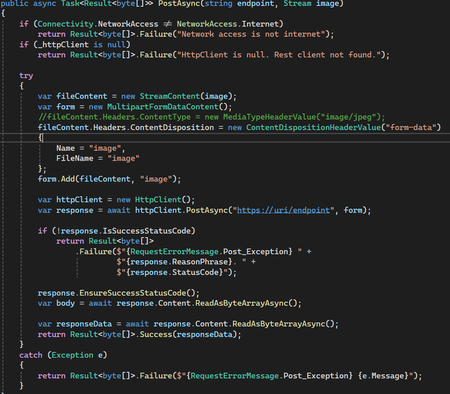
Hi, everyone I'm trying to upload an image to an API from a maui project. But when I send the file, the response is always BadRequest. However the API works if I use Postman. I create a client in a console project and it worked. So I don't know why the same code in .NET MAUI it doesn't work. Problem is not in URI or something. I hope you could help me. Reegrets. Victor Cueto API throws the next exception: Microsoft.AspNetCore.Http.BadHttpRequestException: Required parameter "IFormFile image" was not provided from form file. at lambda_method3(Closure, Object, HttpContext, Object) at Microsoft.AspNetCore.Http.RequestDelegateFactory.<>c__DisplayClass103_2.<<HandleRequestBodyAndCompileRequestDelegateForForm>b__2>d.MoveNext() --- End of stack trace from previous location --- at Microsoft.AspNetCore.Diagnostics.DeveloperExceptionPageMiddlewareImpl.Invoke(HttpContext context) code Minimal API: error:300Views0likes0Comments
Versioning my Maui Android App
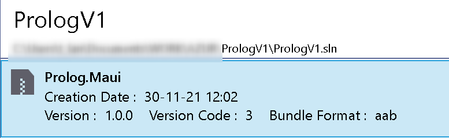
Previously the way to define version code for Android in Maui .csproj file was like this: <!-- Versions --> <ApplicationVersion>3.1.2</ApplicationVersion> <AndroidVersionCode>3</AndroidVersionCode> With the new release of Visual Studio Preview, this has changed to: <ApplicationVersion>3</ApplicationVersion> It works, from Visual Studio, I can bundle a new .aab package (see image below). We see the version code is defined to 3. Unfortunately the version is defined to 1.0.0 and I don't know how to change this. ...when imported on the Google Play Console, it look like this: Unfortunately, when imported I only see the versionCode 3 (which is defined in the .csproj file as ApplicationVersion). What about the versionName (in parentheses) ? Nothing is planned in the .csproj file ? When imported on the Google Play Console, I don't want to have 3 (1.0.0) but I want 3 (3.1.2)... https://developer.android.com/studio/publish/versioning versionCode — A positive integer used as an internal version number. versionName — A string used as the version number shown to users.28KViews0likes8Comments 213Views0likes2Comments
MAUI APP does not run, android-API34 issue ?
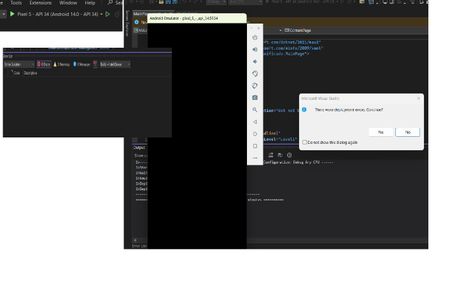
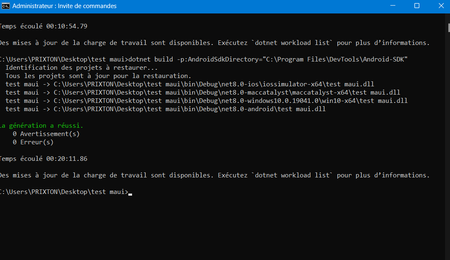
Hi everyone, i'm facing a problem using dotnet 8.0 and Maui. I read that an android api is automatically associated to a dotnet version. So for .Net 8.0 the android api is 34.0 I installed the Maui workload and created a new project, then i ran(build) it without any modifications and all the necessay packages installed without issues But when i go to the generated bin folder and run windows app it does'nt even show up, For android part i installed the signed-apk in virtual device and here is what i get : I found somewhere that this was the api 34 issue, i tried to install .Net 7.0-API 33 and .Net 9.0-API 35.0 but facing the same problem. What should i do now... please help me THNKS!!!872Views0likes2Comments