analytics
806 Topics
Understand New Sentinel Pricing Model with Sentinel Data Lake Tier
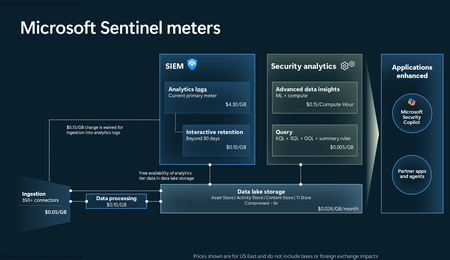
Introduction on Sentinel and its New Pricing Model Microsoft Sentinel is a cloud-native Security Information and Event Management (SIEM) and Security Orchestration, Automation, and Response (SOAR) platform that collects, analyzes, and correlates security data from across your environment to detect threats and automate response. Traditionally, Sentinel stored all ingested data in the Analytics tier (Log Analytics workspace), which is powerful but expensive for high-volume logs. To reduce cost and enable customers to retain all security data without compromise, Microsoft introduced a new dual-tier pricing model consisting of the Analytics tier and the Data Lake tier. The Analytics tier continues to support fast, real-time querying and analytics for core security scenarios, while the new Data Lake tier provides very low-cost storage for long-term retention and high-volume datasets. Customers can now choose where each data type lands—analytics for high-value detections and investigations, and data lake for large or archival types—allowing organizations to significantly lower cost while still retaining all their security data for analytics, compliance, and hunting. Please flow diagram depicts new sentinel pricing model: Now let's understand this new pricing model with below scenarios: Scenario 1A (PAY GO) Scenario 1B (Usage Commitment) Scenario 2 (Data Lake Tier Only) Scenario 1A (PAY GO) Requirement Suppose you need to ingest 10 GB of data per day, and you must retain that data for 2 years. However, you will only frequently use, query, and analyze the data for the first 6 months. Solution To optimize cost, you can ingest the data into the Analytics tier and retain it there for the first 6 months, where active querying and investigation happen. After that period, the remaining 18 months of retention can be shifted to the Data Lake tier, which provides low-cost storage for compliance and auditing needs. But you will be charged separately for data lake tier querying and analytics which depicted as Compute (D) in pricing flow diagram. Pricing Flow / Notes The first 10 GB/day ingested into the Analytics tier is free for 31 days under the Analytics logs plan. All data ingested into the Analytics tier is automatically mirrored to the Data Lake tier at no additional ingestion or retention cost. For the first 6 months, you pay only for Analytics tier ingestion and retention, excluding any free capacity. For the next 18 months, you pay only for Data Lake tier retention, which is significantly cheaper. Azure Pricing Calculator Equivalent Assuming no data is queried or analyzed during the 18-month Data Lake tier retention period: Although the Analytics tier retention is set to 6 months, the first 3 months of retention fall under the free retention limit, so retention charges apply only for the remaining 3 months of the analytics retention window. Azure pricing calculator will adjust accordingly. Scenario 1B (Usage Commitment) Now, suppose you are ingesting 100 GB per day. If you follow the same pay-as-you-go pricing model described above, your estimated cost would be approximately $15,204 per month. However, you can reduce this cost by choosing a Commitment Tier, where Analytics tier ingestion is billed at a discounted rate. Note that the discount applies only to Analytics tier ingestion—it does not apply to Analytics tier retention costs or to any Data Lake tier–related charges. Please refer to the pricing flow and the equivalent pricing calculator results shown below. Monthly cost savings: $15,204 – $11,184 = $4,020 per month Now the question is: What happens if your usage reaches 150 GB per day? Will the additional 50 GB be billed at the Pay-As-You-Go rate? No. The entire 150 GB/day will still be billed at the discounted rate associated with the 100 GB/day commitment tier bucket. Azure Pricing Calculator Equivalent (100 GB/ Day) Azure Pricing Calculator Equivalent (150 GB/ Day) Scenario 2 (Data Lake Tier Only) Requirement Suppose you need to store certain audit or compliance logs amounting to 10 GB per day. These logs are not used for querying, analytics, or investigations on a regular basis, but must be retained for 2 years as per your organization’s compliance or forensic policies. Solution Since these logs are not actively analyzed, you should avoid ingesting them into the Analytics tier, which is more expensive and optimized for active querying. Instead, send them directly to the Data Lake tier, where they can be retained cost-effectively for future audit, compliance, or forensic needs. Pricing Flow Because the data is ingested directly into the Data Lake tier, you pay both ingestion and retention costs there for the entire 2-year period. If, at any point in the future, you need to perform advanced analytics, querying, or search, you will incur additional compute charges, based on actual usage. Even with occasional compute charges, the cost remains significantly lower than storing the same data in the Analytics tier. Realized Savings Scenario Cost per Month Scenario 1: 10 GB/day in Analytics tier $1,520.40 Scenario 2: 10 GB/day directly into Data Lake tier $202.20 (without compute) $257.20 (with sample compute price) Savings with no compute activity: $1,520.40 – $202.20 = $1,318.20 per month Savings with some compute activity (sample value): $1,520.40 – $257.20 = $1,263.20 per month Azure calculator equivalent without compute Azure calculator equivalent with Sample Compute Conclusion The combination of the Analytics tier and the Data Lake tier in Microsoft Sentinel enables organizations to optimize cost based on how their security data is used. High-value logs that require frequent querying, real-time analytics, and investigation can be stored in the Analytics tier, which provides powerful search performance and built-in detection capabilities. At the same time, large-volume or infrequently accessed logs—such as audit, compliance, or long-term retention data—can be directed to the Data Lake tier, which offers dramatically lower storage and ingestion costs. Because all Analytics tier data is automatically mirrored to the Data Lake tier at no extra cost, customers can use the Analytics tier only for the period they actively query data, and rely on the Data Lake tier for the remaining retention. This tiered model allows different scenarios—active investigation, archival storage, compliance retention, or large-scale telemetry ingestion—to be handled at the most cost-effective layer, ultimately delivering substantial savings without sacrificing visibility, retention, or future analytical capabilities.1.5KViews2likes2CommentsMcasShadowItReporting / Cloud Discovery in Azure Sentinel
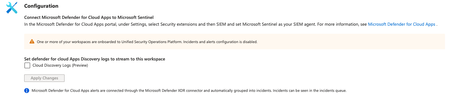
Hi! I´m trying to Query the McasShadowItReporting Table, for Cloud App DISCOVERYs The Table is empty at the moment, the connector is warning me that the Workspace is onboarded to Unified Security Operations Platform So I cant activate it here I cant mange it via https://security.microsoft.com/, too The Documentation ( https://learn.microsoft.com/en-us/defender-cloud-apps/siem-sentinel#integrating-with-microsoft-sentinel ) Leads me to the SIEM Integration, which is configured for (for a while) I wonder if something is misconfigured here and why there is no log ingress / how I can query them12Views0likes0CommentsEmpowering multi-modal analytics with the medical imaging capability in Microsoft Fabric
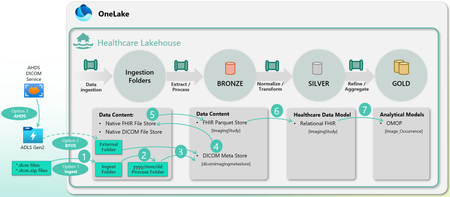
This blog is part of a series that explores the recent announcement of the public preview of healthcare data solutions in Microsoft Fabric. The DICOM® (Digital Imaging and Communications in Medicine) data ingestion capability within the healthcare data solutions in Microsoft Fabric enables the storage, management, and analysis of imaging metadata from various modalities, including X-rays, CT scans, and MRIs, directly within Microsoft Fabric. It fosters collaboration, R&D and AI innovation for healthcare and life science use cases. Our customers and partners can now integrate DICOM® imaging datasets with clinical data stored in FHIR® (Fast Healthcare Interoperability Resources) format. By making imaging pixels and metadata accessible alongside clinical history and laboratory data, it enables clinicians and researchers to interpret imaging findings in the appropriate clinical context. This leads to enhanced diagnostic accuracy, informative clinical decision-making, and ultimately, improved patient outcomes.Update: Changing the Account Name Entity Mapping in Microsoft Sentinel
The upcoming update introduces more consistent and predictable entity data across analytics, incidents, and automation by standardizing how the Account Name property is populated when using UPN‑based mappings in analytic rules. Going forward, Account Name property will consistently contain only the UPN prefix, with new dedicated fields added for the full UPN and UPN suffix. While this improves consistency and enables more granular automation, customers who rely on specific Account Name values in automation rules or Logic App playbooks may need to take action. Timeline Effective date: July 1, 2026. The change will apply automatically - no opt-in is required. Scope of impact Analytics Rules which include mapping of User Principal Name (UPN) to the Account Name entity field, where the resulting alerts are processed by Automation Rules or Logic App Playbooks that reference the AccountName property. What’s changing Currently When an Analytic Rule includes mapping of a full UPN (for example: 'user@domain.com') to the Account Name field, the resulting input value for the Automation Rule or/and Logic App Playbook is inconsistent. In some cases, it contains only the UPN prefix: 'user', and in other cases the full UPN ('user@domain.com'). After July 1, 2026 Account Name property will consistently contain only the UPN prefix The following new fields will be added to the entity object: AccountName (UPN prefix) UPNSuffix UserPrincipalName (full UPN) This change provides an enhanced filtering and automation logic based on these new fields. Example Before Analytics Rule maps: 'user@domain.com' Automation Rule receives: Account Name: 'user' or 'user@domain.com' (inconsistent) After Analytics Rule maps: 'user@domain.com' Automation Rule receives: Account Name: 'user' UPNSuffix: 'domain.com' Logic App Playbook and SecurityAlert table receives: AccountName: 'user' UPNSuffix: 'domain.com' UserPrincipalName: 'user@domain.com' Feature / Location Before After SecurityAlert table Logic App Playbook Entity Why does it matter? If your automation logic relies on exact string comparisons against the full UPN stored in Account Name, those conditions may no longer match after the update. This most commonly affects: Automation Rules using "Equals" condition on Account Name Logic App Playbooks comparing entity field 'accountName' to a full UPN value Call to action Avoid strict equality checks against Account Name Use flexible operators such as: Contains Starts with Leverage the new UPNSuffix field for clearer intent Example update Before - Account name will show as 'user' or 'user@domain.com' After - Account Name will show as 'user' Recommended changes: Account Name Contains/Startswith 'user' UPNSuffix Equals/Startswith/Contains 'domain.com' This approach ensures compatibility both before and after the change takes effect. Where to update Review any filters, conditions, or branching logic that depend on Account Name values. Automation Rules: Use the 'Account name' field Logic App Playbooks: Update conditions referencing the entity: 'accountName' For example: Automation Rule before the change: Automation Rule after the change: Summary A consistency improvement to Account Name mapping is coming on July 1, 2026 The change affects Automation Rules and Logic App Playbooks that rely on UPN to Account Name mappings New UPN related fields provide better structure and control Customers should follow the recommendations above before the effective change date655Views0likes0Comments
How Should a Fresher Learn Microsoft Sentinel Properly?
Hello everyone, I am a fresher interested in learning Microsoft Sentinel and preparing for SOC roles. Since Sentinel is a cloud-native enterprise tool and usually used inside organizations, I am unsure how individuals without company access are expected to gain real hands-on experience. I would like to hear from professionals who actively use Sentinel: - How do freshers typically learn and practice Sentinel? - What learning resources or environments are commonly used by beginners? - What level of hands-on experience is realistically expected at entry level? I am looking for guidance based on real industry practice. Thank you for your time.36Views0likes1Comment
How to Fix Azure Event Grid Entra Authentication issue for ACS and Dynamics 365 integrated Webhooks
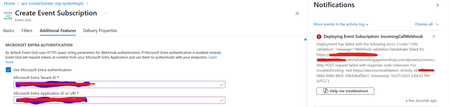
Introduction: Azure Event Grid is a powerful event routing service that enables event-driven architectures in Azure. When delivering events to webhook endpoints, security becomes paramount. Microsoft provides a secure webhook delivery mechanism using Microsoft Entra ID (formerly Azure Active Directory) authentication through the AzureEventGridSecureWebhookSubscriber role. Problem Statement: When integrating Azure Communication Services with Dynamics 365 Contact Center using Microsoft Entra ID-authenticated Event Grid webhooks, the Event Grid subscription deployment fails with an error: "HTTP POST request failed with unknown error code" with empty HTTP status and code. For example: Important Note: Before moving forward, please verify that you have the Owner role assigned on app to create event subscription. Refer to the Microsoft guidelines below to validate the required prerequisites before proceeding: Set up incoming calls, call recording, and SMS services | Microsoft Learn Why This Happens: This happens because AzureEventGridSecureWebhookSubscriber role is NOT properly configured on Microsoft EventGrid SP (Service Principal) and event subscription entra ID or application who is trying to create event grid subscription. What is AzureEventGridSecureWebhookSubscriber Role: The AzureEventGridSecureWebhookSubscriber is an Azure Entra application role that: Enables your application to verify the identity of event senders Allows specific users/applications to create event subscriptions Authorizes Event Grid to deliver events to your webhook How It Works: Role Creation: You create this app role in your destination webhook application's Azure Entra registration Role Assignment: You assign this role to: Microsoft Event Grid service principal (so it can deliver events) Either Entra ID / Entra User or Event subscription creator applications (so they can create event grid subscriptions) Token Validation: When Event Grid delivers events, it includes an Azure Entra token with this role claim Authorization Check: Your webhook validates the token and checks for the role Key Participants: Webhook Application (Your App) Purpose: Receives and processes events App Registration: Created in Azure Entra Contains: The AzureEventGridSecureWebhookSubscriber app role Validates: Incoming tokens from Event Grid Microsoft Event Grid Service Principal Purpose: Delivers events to webhooks App ID: Different per Azure cloud (Public, Government, etc.) Public Azure: 4962773b-9cdb-44cf-a8bf-237846a00ab7 Needs: AzureEventGridSecureWebhookSubscriber role assigned Event Subscription Creator Entra or Application Purpose: Creates event subscriptions Could be: You, Your deployment pipeline, admin tool, or another application Needs: AzureEventGridSecureWebhookSubscriber role assigned Although the full PowerShell script is documented in the below Event Grid documentation, it may be complex to interpret and troubleshoot. Azure PowerShell - Secure WebHook delivery with Microsoft Entra Application in Azure Event Grid - Azure Event Grid | Microsoft Learn To improve accessibility, the following section provides a simplified step-by-step tested solution along with verification steps suitable for all users including non-technical: Steps: STEP 1: Verify/Create Microsoft.EventGrid Service Principal Azure Portal → Microsoft Entra ID → Enterprise applications Change filter to Application type: Microsoft Applications Search for: Microsoft.EventGrid Ideally, your Azure subscription should include this application ID, which is common across all Azure subscriptions: 4962773b-9cdb-44cf-a8bf-237846a00ab7. If this application ID is not present, please contact your Azure Cloud Administrator. STEP 2: Create the App Role "AzureEventGridSecureWebhookSubscriber" Using Azure Portal: Navigate to your Webhook App Registration: Azure Portal → Microsoft Entra ID → App registrations Click All applications Find your app by searching OR use the Object ID you have Click on your app Create the App Role: Display name: AzureEventGridSecureWebhookSubscriber Allowed member types: Both (Users/Groups + Applications) Value: AzureEventGridSecureWebhookSubscriber Description: Azure Event Grid Role Do you want to enable this app role?: Yes In left menu, click App roles Click + Create app role Fill in the form: Click Apply STEP 3: Assign YOUR USER to the Role Using Azure Portal: Switch to Enterprise Application view: Azure Portal → Microsoft Entra ID → Enterprise applications Search for your webhook app (by name) Click on it Assign yourself: In left menu, click Users and groups Click + Add user/group Under Users, click None Selected Search for your user account (use your email) Select yourself Click Select Under Select a role, click None Selected Select AzureEventGridSecureWebhookSubscriber Click Select Click Assign STEP 4: Assign Microsoft.EventGrid Service Principal to the Role This step MUST be done via PowerShell or Azure CLI (Portal doesn't support this directly as we have seen) so PowerShell is recommended You will need to execute this step with the help of your Entra admin. # Connect to Microsoft Graph Connect-MgGraph -Scopes "AppRoleAssignment.ReadWrite.All" # Replace this with your webhook app's Application (client) ID $webhookAppId = "YOUR-WEBHOOK-APP-ID-HERE" #starting with c5 # Get your webhook app's service principal $webhookSP = Get-MgServicePrincipal -Filter "appId eq '$webhookAppId'" Write-Host " Found webhook app: $($webhookSP.DisplayName)" # Get Event Grid service principal $eventGridSP = Get-MgServicePrincipal -Filter "appId eq '4962773b-9cdb-44cf-a8bf-237846a00ab7'" Write-Host " Found Event Grid service principal" # Get the app role $appRole = $webhookSP.AppRoles | Where-Object {$_.Value -eq "AzureEventGridSecureWebhookSubscriber"} Write-Host " Found app role: $($appRole.DisplayName)" # Create the assignment New-MgServicePrincipalAppRoleAssignment ` -ServicePrincipalId $eventGridSP.Id ` -PrincipalId $eventGridSP.Id ` -ResourceId $webhookSP.Id ` -AppRoleId $appRole.Id Write-Host "Successfully assigned Event Grid to your webhook app!" Verification Steps: Verify the App Role was created: Your App Registration → App roles You should see: AzureEventGridSecureWebhookSubscriber Verify your user assignment: Enterprise application (your webhook app) → Users and groups You should see your user with role AzureEventGridSecureWebhookSubscriber Verify Event Grid assignment: Same location → Users and groups You should see Microsoft.EventGrid with role AzureEventGridSecureWebhookSubscriber Sample Flow: Analogy For Simplification: Lets think it similar to the construction site bulding where you are the owner of the building. Building = Azure Entra app (webhook app) Building (Azure Entra App Registration for Webhook) ├─ Building Name: "MyWebhook-App" ├─ Building Address: Application ID ├─ Building Owner: You ├─ Security System: App Roles (the security badges you create) └─ Security Team: Azure Entra and your actual webhook auth code (which validates tokens) like doorman Step 1: Creat the badge (App role) You (the building owner) create a special badge: - Badge name: "AzureEventGridSecureWebhookSubscriber" - Badge color: Let's say it's GOLD - Who can have it: Companies (Applications) and People (Users) This badge is stored in your building's system (Webhook App Registration) Step 2: Give badge to the Event Grid Service: Event Grid: "Hey, I need to deliver messages to your building" You: "Okay, here's a GOLD badge for your SP" Event Grid: *wears the badge* Now Event Grid can: - Show the badge to Azure Entra - Get tokens that say "I have the GOLD badge" - Deliver messages to your webhook Step 3: Give badge to yourself (or your deployment tool) You also need a GOLD badge because: - You want to create event grid event subscriptions - Entra checks: "Does this person have a GOLD badge?" - If yes: You can create subscriptions - If no: "Access denied" Your deployment pipeline also gets a GOLD badge: - So it can automatically set up event subscriptions during CI/CD deployments Disclaimer: The sample scripts provided in this article are provided AS IS without warranty of any kind. The author is not responsible for any issues, damages, or problems that may arise from using these scripts. Users should thoroughly test any implementation in their environment before deploying to production. Azure services and APIs may change over time, which could affect the functionality of the provided scripts. Always refer to the latest Azure documentation for the most up-to-date information. Thanks for reading this blog! I hope you found it helpful and informative for this specific integration use case 😀181Views2likes0CommentsSmart Pipelines Orchestration: Designing Predictable Data Platforms on Shared Spark
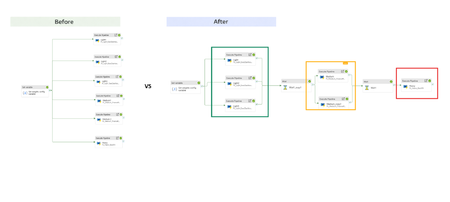
Introduction In mature data platforms, scaling compute is rarely the primary challenge. Shared, elastic Spark pools already provide sufficient processing capacity for most workloads. The harder problem is achieving predictable execution when multiple pipelines compete for the same resources. In Azure Synapse, Spark pools are commonly shared across pipelines to optimize cost and utilization. While this model is efficient, it introduces a key limitation: execution order is determined by scheduling behavior, not business priority. This post describes an orchestration pattern that makes priority explicit, allowing critical workloads to run predictably on shared Spark compute without modifying Spark code, configuration, or cluster capacity. Goal This work does not aim to optimize Spark performance. Its goal is to ensure that, when pipelines share a Spark pool: latency-sensitive workloads run first heavy backfills do not delay critical pipelines execution order is deterministic under contention All of this needed to be achieved without changes to Spark configuration, notebook logic, or cluster size. Why This Problem Occurs In a naïve orchestration model, pipelines are triggered in parallel. From Spark’s perspective: all jobs are equivalent all jobs attempt to acquire executors at the same time scheduling decisions are based on availability and timing As a result, priority is implicit and often incorrect. A heavy workload may acquire executors before a lightweight but critical one simply because it requests more resources earlier. This behavior is expected from Spark. The issue lies in orchestration, not in compute. Core Concept: Priority as Execution Ordering In shared Spark platforms, priority is enforced through execution ordering, not compute tuning. The orchestration layer controls when workloads are admitted to shared compute. Once execution begins, Spark processes each workload normally. This preserves Spark’s execution model while providing deterministic workload ordering. Step 1: Workload Classification In the demo presented in this blog, workloads are classified during configuration based on business impact: Category Description Priority example Light (critical) SLA sensitive dashboard and downstream consumers High priority , low resource weight(data volume) Medium (High) Core reporting workloads Medium priority Heavy(Best Effort) Backfills and historical computes Low priority, high resource weight(data volume) This classification is external to Spark and external to code. It represents business intent, not implementation. As a future phase, classification can be automated,for example, an agent may adjust priority based on observed failure rates or execution stability. Workload classification is expressed as orchestration metadata, for example: [ {"name":"ExecDashboard","pipeline":"PL_Light_ExecDashboard","weight":1,"tier":"Critical"}, {"name":"FinanceReporting","pipeline":"PL_Medium_FinanceReporting","weight":3,"tier":"High"}, {"name":"Backfill","pipeline":"PL_Heavy_Backfill","weight":8,"tier":"BestEffort"} ] What Runs in Each Workload Category All pipelines execute on the same shared Spark pool, but the work they perform differs in scope, data volume, and sensitivity to contention. Light workloads power SLA-sensitive dashboards and downstream consumers. Their notebooks perform targeted reads with strong filtering, limited joins, and small aggregations. Execution time is short, and overall pipeline duration is dominated by executor availability rather than computation. Medium workloads represent core reporting and analytics logic. These notebooks process larger datasets, perform joins across multiple sources, and apply aggregations that are more expensive than Light workloads but still time-bounded and business-critical. Heavy workloads are best-effort pipelines such as backfills and historical recomputation. Their notebooks scan large data volumes, apply expensive transformations, and are optimized for throughput rather than responsiveness. These workloads tolerate delay but place significant pressure on shared compute when admitted concurrently. All workloads use the same Spark pool, executor configuration, and runtime. The distinction reflects business intent and execution characteristics, not Spark tuning. Example notebooks for each category are available in the accompanying GitHub repository. Step 2: Naïve Orchestration (Baseline) The following pipeline run illustrates the baseline behavior when all workloads are triggered in parallel against a shared Spark pool. All Light, Medium, and Heavy pipelines are admitted concurrently. Executor acquisition and execution order depend on timing rather than business priority, resulting in non-deterministic behavior under contention. Although Light workloads require minimal compute, they are delayed by executor contention caused by Medium and Heavy pipelines entering the Spark pool at the same time. Step 3: Smart Orchestration (Priority-Aware) Orchestration Model The same child pipelines and notebooks are reused. The parent pipeline enforces admission order: Light (Critical) Medium (High) Heavy (Best Effort) Dependencies control admission to the Spark pool. Parallelism is preserved within a priority class. Effect on Shared Spark Light workloads enter the Spark pool without contention Medium workloads run after Light completes Heavy workloads are intentionally delayed Executor acquisition aligns with business priority Light pipelines execute first and complete before medium pipelines are admitted. Heavy workloads run last by design. No Spark configuration changes are introduced. The Spark pool, notebooks, and executor configuration are identical to the naïve run. Only the orchestration graph differs. Step 4: Impact on Light Workloads Light workloads are particularly sensitive to orchestration because their runtime is dominated by queueing time, not computation. Comparing the naïve and priority-aware runs shows that Spark execution time is unchanged, but pipeline duration improves due to earlier admission to the Spark pool and immediate executor access Naïve Execution Spark execution time: short and unchanged Pipeline duration: minutes under contention Delay caused by executor unavailability Smart Execution Spark execution time: unchanged Pipeline duration closely matches compute time Immediate access to executors The improvement comes from removing admission contention, not from increasing resources. Results and Performance Compared to naïve orchestration, priority-aware orchestration ensures that Light workloads complete in minutes rather than tens of minutes under contention, while Spark execution time itself remains unchanged. Heavy workloads no longer delay latency-sensitive pipelines, and execution order is deterministic across runs. These improvements are achieved solely by controlling admission to the shared Spark pool, without modifying Spark configuration, notebook logic, or cluster capacity. Next Steps: 1. Optimizing Heavy Workloads Once heavy workloads are isolated by priority, they can be optimized independently: retries with backoff tolerance for transient failures increased executor counts or larger pools Without admission control, these optimizations increase contention, with smart orchestration, they do not impact critical pipelines. 2. Moving Beyond Static Classification In this implementation, workload classification is static and configuration-driven, which is sufficient for stabilization. A next phase is adaptive classification: collect execution metrics and failure rates detect unstable pipelines reclassify pipelines that exceed thresholds (e.g., >20% failures in a rolling window) This prevents unstable workloads from impacting critical execution paths and makes the pipeline reliable with minimal maintenance. 3. Assisted Classification with Copilot agent At scale, priority decisions benefit from automation. A Copilot-style agent can use historical execution data to recommend classification changes, grounding decisions in observed behavior while keeping engineers in control. Example: Changing workload classification from Light to Medium Consider a pipeline initially classified as Light because it powers an SLA-sensitive dashboard and typically executes quickly with minimal resource usage. Over time, execution telemetry shows a change in behavior: The pipeline fails in 4 of the last 10 runs due to transient Spark errors Average duration has increased by 3×, even when admitted early Retry attempts amplify contention for other Light workloads Based on these signals, an automated agent flags the workload as unstable and recommends reclassifying it from Light to Medium. After reclassification: The pipeline is admitted after Light workloads but before Heavy workloads It no longer blocks latency-critical paths when retries occur Execution remains predictable, while instability is isolated from critical workloads The notebook logic and Spark configuration remain unchanged, only the workload’s admission priority is updated via orchestration metadata. This approach allows the platform to adapt to changing workload characteristics while preserving deterministic execution for critical pipelines. Conclusion Parallel execution is a default, not a strategy. In shared environments, orchestration must explicitly encode business intent rather than relying on scheduler behavior. Enforcing priority at the orchestration layer restores predictability without sacrificing efficiency and provides a foundation for adaptive, policy-driven execution as platforms evolve. Links Orchestrating data movement and transformation in Azure Data Factory - Training | Microsoft Learn How to Optimize Spark Jobs for Maximum Performance: A Complete Guide GitHub repo for notebook reference: sallydabbahmsft/Smart-pipelines-orchestration Feedback: Sally Dabbah | LinkedIn482Views1like2Comments
How do you investigate network anomaly related alerts?
Hello everyone. Using some of the built-in analytical rules such as "Anomaly was observed with IPv6-ICMP Traffic", when you go into the incident event details, its just some numbers of the expected baseline vs actual value. What do you do with this? Similar case with following rules: Anomaly found in Network Session Traffic (ASIM Network Session schema) Anomaly was observed with ESP Traffic Anomaly was observed with Outbound Traffic Anomaly was observed with Unassigned Traffic1.2KViews1like3CommentsServerless Workspaces are generally available in Azure Databricks
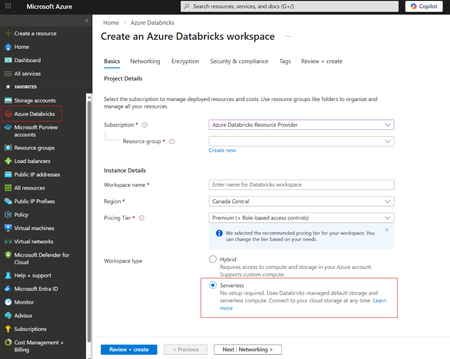
Recently, we announced that Serverless Workspaces in public preview. Today, we are excited to share that Serverless Workspaces are generally available in Azure Databricks. Azure Databricks now offers two workspace models: Serverless and Classic. With Serverless, Azure Databricks operates and maintains the entire environment on your behalf. You still configure governance elements like Unity Catalog, identity federation, and workspace-level policies, but the heavy lifting of infrastructure setup disappears. As a result, teams can start building immediately instead of waiting on networking or compute provisioning. Classic workspaces take the opposite approach. When creating a Classic workspace, you must design and deploy the full networking layout, determine how compute should be managed, establish storage patterns, and configure all inbound and outbound connectivity. These decisions are critical and have benefits in heavily regulated or secure industries, but they may create overhead for teams who simply want to start working with data. A Serverless Workspace eliminates that overhead entirely. Once created, it’s ready for use—no virtual network design, no storage configuration, and no cluster management. Serverless workspaces use serverless compute and default storage. Unity Catalog is automatically provisioned so that the same governance model applies. Key capabilities and consideration of Serverless workspaces Storage: Each Serverless workspace includes fully managed object storage called default storage. You can build managed catalogs, volumes, and tables without supplying your own storage accounts or credentials. Features like multi-key projection and restricted object-store access ensure that only authorized users can work with the data. Classic compute cannot interact with data assets in default storage. If you already have an Azure Blob Storage account (likely with hierarchical namespace enabled) or if your organization requires using your own storage due to security or compliance requirements, you can also create a connection between your storage account and Serverless Workspace. Compute: Workloads run on automatically provisioned serverless compute—no need to build or maintain clusters. Azure Databricks handles scaling and resource optimization so users can focus purely on data and analytics. Network: There’s no requirement to deploy NAT gateways, firewalls, or Private Link endpoints. Instead, you define serverless egress rules and serverless Private Link controls that apply uniformly to all workloads in the workspace. Unity Catalog access: Governed data remains accessible from the new workspace with existing permissions intact. Your data estate stays consistent and secure. Choosing between Serverless and Classic Azure Databricks supports both workspace types so organizations can select what best matches their needs. Use Serverless when rapid workspace creation, minimal configuration, and reduced operational overhead are priorities. It’s the fastest path to a fully governed environment. Use Classic when you require a custom VNet design, specific network topologies, finer grain security controls, or features that are not yet available in the serverless model. Some organizations also simply prefer to manage Azure resources directly, making Classic workspaces a suitable option. Note that Azure Databricks serverless workspaces are only available in regions that support serverless compute. To learn get started create your Serverless workspace today!556Views0likes0Comments