analytics
117 Topics
Data Vault 2.0 on Azure
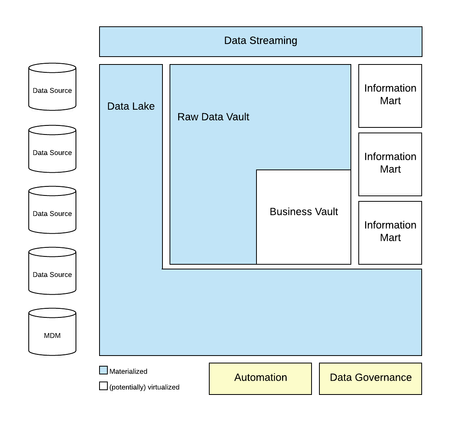
In our first article of this blog series, we have introduced the requirements of a modern data analytics platform. The foundation for this framework is the Data Vault 2.0 System of Business Intelligence. This article presents the Data Vault 2.0 reference architecture based on data lakes and we discuss how we implement it on the Microsoft Azure cloud. However, the architecture is not limited to the Azure cloud: the last article defined the data analytics platform as a distributed solution that can span across multiple environments. For example, our clients have implemented distributed platforms that span across multiple cloud regions, implement a multi-cloud scenario or integrate cloud solutions with on-premises solutions. In addition, the architecture is not limited to relational databases. Data Vault 2.0 is a concept increasingly used for NoSQL databases where semi-structured and unstructured data is processed.20KViews2likes3CommentsData Vault 2.0 using Databricks Lakehouse Architecture on Azure
This Article is about Data Vault 2.0 using Databricks Lakehouse Architecture on Azure and is presented in partnership with VaultSpeed and Scalefree our Microsoft Partner Network on Data Warehouse Automation and is part of Blog series. Please see the Landing Page here for more Articles. This Article is Authored By Jonas De Keuster & Koen Moermans from VaultSpeed and Co-authored with Michael Olschimke, co-founder and CEO at Scalefree International GmbH The Technical Review is done by Ian Clarke, Naveed Hussain, Irfan Maroof and Hajar Habjaoui – GBBs (Cloud Scale Analytics) for EMEA at Microsoft19KViews1like3CommentsData Vault 2.0 Modelling in Synapse Data Warehouse on Microsoft Fabric
The previous articles of this blog series discussed the Data Vault 2.0 architecture and methodology. The next articles will focus on another Data Vault 2.0 pillar: the Data Vault 2.0 model. The model has been developed specifically for enterprise data warehousing. It is an extensible model that can deal with structural changes in the data and can be extended over time by additional data (and business logic). Therefore, it fits well into agile methodologies such as Scrum. The model is also the basis for the automation capabilities of the Data Vault 2.0 approach. Software packages such as Vaultspeed rely on these patterns to generate the model in a data-driven approach. This helps enterprises to manage data flows at scale.17KViews0likes0CommentsPower BI - Connecting to Snowflake with Virtual Network Data Gateway
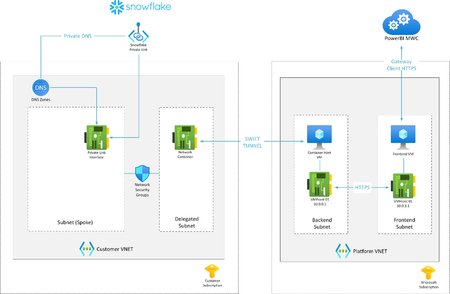
Power BI Virtual Network Gateway helps to connect from Microsoft Cloud services to your Azure data services within a VNet without the need of an on-premises data gateway. The VNet Data Gateway is currently in public preview and supports Snowflake as the Data Source.16KViews1like2Comments
Migration of Apache Spark from HDInsight 5.0 to HDInsight 5.1
Azure HDInsight Spark 5.0 to HDI 5.1 Migration A new version of HDInsight 5.1 is released with Spark 3.3.1. This release improves join query performance via Bloom filters, increases the Pandas API coverage with the support of popular Pandas features such as datetime.timedelta and merge_asof, simplifies the migration from traditional data warehouses by improving ANSI compliance and supporting dozens of new built-in functions. In this article we will discuss about the migration of user applications from HDInsight Spark 3.1 to HDInsight Spark 3.315KViews1like0CommentsImplementing Data Vault 2.0 on Fabric Data Warehouse
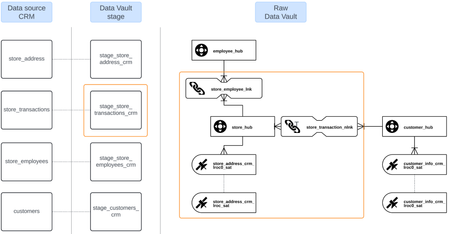
In the previous articles of this series, we have discussed how to model Data Vault on Microsoft Fabric. Our initial focus was on the basic entity types including hubs, links, and satellites; advanced entity types, such as non-historized links and multi-active satellites and the third article was modeling a more complete model, including a typical modeling process, for Microsoft Dynamics CRM data.13KViews1like1CommentIngest Azure Event Hub Telemetry Data with Apache PySpark Structured Streaming on Databricks.
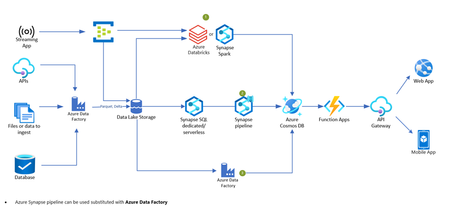
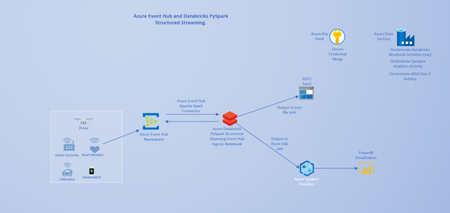
Overview. Ingesting, storing, and processing millions of telemetry data from a plethora of remote IoT devices and Sensors has become common place. One of the primary Cloud services used to process streaming telemetry events at scale is Azure Event Hub. Most documented implementations of Azure Databricks Ingestion from Azure Event Hub Data are based on Scala. So, in this post, I outline how to use PySpark on Azure Databricks to ingest and process telemetry data from an Azure Event Hub instance configured without Event Capture. My workflow and Architecture design for this use case include IoT sensors as the data source, Azure Event Hub, Azure Databricks, ADLS Gen 2 and Azure Synapse Analytics as output sink targets and Power BI for Data Visualization. Orchestration pipelines are built and managed with Azure Data Factory and secrets/credentials are stored in Azure Key Vault. Requirements. An Azure Event Hub service must be provisioned. I will not go into the details of provisioning an Azure Event Hub resource in this post. The steps are well documented on the Azure document site. Create an Azure Databricks workspace and provision a Databricks Cluster. To match the artifact id requirements of the Apache Spark Event hub connector: azure-eventhubs-spark_2.12, I have provisioned a Databricks cluster with the 7.5 runtime. To enable Databricks to successfully ingest and transform Event Hub messages, install the Azure Event Hubs Connector for Apache Spark from the Maven repository in the provisioned Databricks cluster. For this post, I have installed the version 2.3.18 of the connector, using the following maven coordinate: “com.microsoft.azure:azure-eventhubs-spark_2.12:2.3.18“. This library is the most current package at the time of this writing. Architecture. Azure Event Hub to Azure Databricks Architecture. Configuration and Notebook Code Prep. Create an Event Hub instance in the previously created Azure Event Hub namespace. Create a new Shared Access Policy in the Event Hub instance. Copy the connection string generated with the new policy. Note that this connection string has an “EntityPath” component , unlike the RootManageSharedAccessKey connectionstring for the Event Hub namespace. Install the Azure Event Hubs Connector for Apache Spark referenced in the Overview section. To authenticate and connect to the Azure Event Hub instance from Azure Databricks, the Event Hub instance connection string is required. The connection string must contain the EntityPath property. Please note that the Event Hub instance is not the same as the Event Hub namespace. The Event Hub namespace is the scoping container for the Event hub instance. The connection string located in the RootManageSharedAccessKey associated with the Event Hub namespace does not contain the EntityPath property, it is important to make this distinction because this property is required to successfully connect to the Hub from Azure Databricks. If the EntityPath property is not present, the connectionStringBuilder object can be used to make a connectionString that contains the required components. The connection string (with the EntityPath) can be retrieved from the Azure Portal as shown in the following screen shot: Event Hub Connection String Location. I recommend storing the Event Hub instance connection string in Azure Key Vault as a secret and retrieving the secret/credential using the Databricks Utility as displayed in the following code snippet: connectionString = dbutils.secrets.get("myscope", key="eventhubconnstr") An Event Hub configuration dictionary object that contains the connection string property must be defined. All configurations relating to Event Hubs are configured in this dictionary object. In addition, the configuration dictionary object requires that the connection string property be encrypted. # Initialize event hub config dictionary with connectionString ehConf = {} ehConf['eventhubs.connectionString'] = connectionString # Add consumer group to the ehConf dictionary ehConf['eventhubs.consumerGroup'] = "$Default" # Encrypt ehConf connectionString property ehConf['eventhubs.connectionString'] = sc._jvm.org.apache.spark.eventhubs.EventHubsUtils.encrypt(connectionString) Use the PySpark Streaming API to Read Events from the Event Hub. Now that we have successfully configured the Event Hub dictionary object. We will proceed to use the Structured Streaming readStream API to read the events from the Event Hub as shown in the following code snippet. # Read events from the Event Hub df = spark.readStream.format("eventhubs").options(**ehConf).load() # Visualize the Dataframe in realtime display(df) Using the Databricks display function, we can visualize the structured streaming Dataframe in real time and observe that the actual message events are contained within the “Body” field as binary data. Some transformation will be required to convert and extract this data. Visualize Events Dataframe in Real time. The goal is to transform the DataFrame in order to extract the actual events from the “Body” column. To achieve this, we define a schema object that matches the fields/columns in the actual events data, map the schema to the DataFrame query and convert the Body field to a string column type as demonstrated in the following snippet: # Write stream into defined sink from pyspark.sql.types import * import pyspark.sql.functions as F events_schema = StructType([ StructField("id", StringType(), True), StructField("timestamp", StringType(), True), StructField("uv", StringType(), True), StructField("temperature", StringType(), True), StructField("humidity", StringType(), True)]) decoded_df = df.select(F.from_json(F.col("body").cast("string"), events_schema).alias("Payload")) # Visualize the transformed df display(decoded_df) Further transformation is needed on the DataFrame to flatten the JSON properties into separate columns and write the events to a Data Lake container in JSON file format. # Flatten the JSON properties into separate columns df_events = decoded_df.select(decoded_df.Payload.id, decoded_df.Payload.timestamp, decoded_df.Payload.uv, decoded_df.Payload.temperature, decoded_df.Payload.humidity) # Write stream to Data Lake in JSON file formats df_out = df_events.writeStream\ .format("json")\ .outputMode("append")\ .option("checkpointLocation", "abfss://checkpointcontainer@adlstore.dfs.core.windows.net/checkpointapievents")\ .start("abfss://api-eventhub@store05.dfs.core.windows.net/writedata") Fully transformed DataFrame Specific business needs will require writing the DataFrame to a Data Lake container and to a table in Azure Synapse Analytics. The downstream data is read by Power BI and reports can be created to gain business insights into the telemetry stream. So far in this post, we have outlined manual and interactive steps for reading and transforming data from Azure Event Hub in a Databricks notebook. To productionize and operationalize these steps we will have to 1. Automate cluster creation via the Databricks Jobs REST API. 2. Automate the installation of the Maven Package. 3. Perhaps execute the Job on a schedule or to run continuously (this might require configuring Data Lake Event Capture on the Event Hub). To achieve the above-mentioned requirements, we will need to integrate with Azure Data Factory, a cloud based orchestration and scheduling service. As time permits, I hope to follow up with a post that demonstrates how to build a Data Factory orchestration pipeline productionizes these interactive steps. We could use a Data Factory notebook activity or trigger a custom Python function that makes REST API calls to the Databricks Jobs API. The complete PySpark notebook is available here.13KViews0likes0Comments