analytics
146 Topics
How to Fix Azure Event Grid Entra Authentication issue for ACS and Dynamics 365 integrated Webhooks
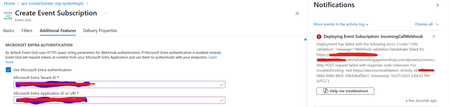
Introduction: Azure Event Grid is a powerful event routing service that enables event-driven architectures in Azure. When delivering events to webhook endpoints, security becomes paramount. Microsoft provides a secure webhook delivery mechanism using Microsoft Entra ID (formerly Azure Active Directory) authentication through the AzureEventGridSecureWebhookSubscriber role. Problem Statement: When integrating Azure Communication Services with Dynamics 365 Contact Center using Microsoft Entra ID-authenticated Event Grid webhooks, the Event Grid subscription deployment fails with an error: "HTTP POST request failed with unknown error code" with empty HTTP status and code. For example: Important Note: Before moving forward, please verify that you have the Owner role assigned on app to create event subscription. Refer to the Microsoft guidelines below to validate the required prerequisites before proceeding: Set up incoming calls, call recording, and SMS services | Microsoft Learn Why This Happens: This happens because AzureEventGridSecureWebhookSubscriber role is NOT properly configured on Microsoft EventGrid SP (Service Principal) and event subscription entra ID or application who is trying to create event grid subscription. What is AzureEventGridSecureWebhookSubscriber Role: The AzureEventGridSecureWebhookSubscriber is an Azure Entra application role that: Enables your application to verify the identity of event senders Allows specific users/applications to create event subscriptions Authorizes Event Grid to deliver events to your webhook How It Works: Role Creation: You create this app role in your destination webhook application's Azure Entra registration Role Assignment: You assign this role to: Microsoft Event Grid service principal (so it can deliver events) Either Entra ID / Entra User or Event subscription creator applications (so they can create event grid subscriptions) Token Validation: When Event Grid delivers events, it includes an Azure Entra token with this role claim Authorization Check: Your webhook validates the token and checks for the role Key Participants: Webhook Application (Your App) Purpose: Receives and processes events App Registration: Created in Azure Entra Contains: The AzureEventGridSecureWebhookSubscriber app role Validates: Incoming tokens from Event Grid Microsoft Event Grid Service Principal Purpose: Delivers events to webhooks App ID: Different per Azure cloud (Public, Government, etc.) Public Azure: 4962773b-9cdb-44cf-a8bf-237846a00ab7 Needs: AzureEventGridSecureWebhookSubscriber role assigned Event Subscription Creator Entra or Application Purpose: Creates event subscriptions Could be: You, Your deployment pipeline, admin tool, or another application Needs: AzureEventGridSecureWebhookSubscriber role assigned Although the full PowerShell script is documented in the below Event Grid documentation, it may be complex to interpret and troubleshoot. Azure PowerShell - Secure WebHook delivery with Microsoft Entra Application in Azure Event Grid - Azure Event Grid | Microsoft Learn To improve accessibility, the following section provides a simplified step-by-step tested solution along with verification steps suitable for all users including non-technical: Steps: STEP 1: Verify/Create Microsoft.EventGrid Service Principal Azure Portal → Microsoft Entra ID → Enterprise applications Change filter to Application type: Microsoft Applications Search for: Microsoft.EventGrid Ideally, your Azure subscription should include this application ID, which is common across all Azure subscriptions: 4962773b-9cdb-44cf-a8bf-237846a00ab7. If this application ID is not present, please contact your Azure Cloud Administrator. STEP 2: Create the App Role "AzureEventGridSecureWebhookSubscriber" Using Azure Portal: Navigate to your Webhook App Registration: Azure Portal → Microsoft Entra ID → App registrations Click All applications Find your app by searching OR use the Object ID you have Click on your app Create the App Role: Display name: AzureEventGridSecureWebhookSubscriber Allowed member types: Both (Users/Groups + Applications) Value: AzureEventGridSecureWebhookSubscriber Description: Azure Event Grid Role Do you want to enable this app role?: Yes In left menu, click App roles Click + Create app role Fill in the form: Click Apply STEP 3: Assign YOUR USER to the Role Using Azure Portal: Switch to Enterprise Application view: Azure Portal → Microsoft Entra ID → Enterprise applications Search for your webhook app (by name) Click on it Assign yourself: In left menu, click Users and groups Click + Add user/group Under Users, click None Selected Search for your user account (use your email) Select yourself Click Select Under Select a role, click None Selected Select AzureEventGridSecureWebhookSubscriber Click Select Click Assign STEP 4: Assign Microsoft.EventGrid Service Principal to the Role This step MUST be done via PowerShell or Azure CLI (Portal doesn't support this directly as we have seen) so PowerShell is recommended You will need to execute this step with the help of your Entra admin. # Connect to Microsoft Graph Connect-MgGraph -Scopes "AppRoleAssignment.ReadWrite.All" # Replace this with your webhook app's Application (client) ID $webhookAppId = "YOUR-WEBHOOK-APP-ID-HERE" #starting with c5 # Get your webhook app's service principal $webhookSP = Get-MgServicePrincipal -Filter "appId eq '$webhookAppId'" Write-Host " Found webhook app: $($webhookSP.DisplayName)" # Get Event Grid service principal $eventGridSP = Get-MgServicePrincipal -Filter "appId eq '4962773b-9cdb-44cf-a8bf-237846a00ab7'" Write-Host " Found Event Grid service principal" # Get the app role $appRole = $webhookSP.AppRoles | Where-Object {$_.Value -eq "AzureEventGridSecureWebhookSubscriber"} Write-Host " Found app role: $($appRole.DisplayName)" # Create the assignment New-MgServicePrincipalAppRoleAssignment ` -ServicePrincipalId $eventGridSP.Id ` -PrincipalId $eventGridSP.Id ` -ResourceId $webhookSP.Id ` -AppRoleId $appRole.Id Write-Host "Successfully assigned Event Grid to your webhook app!" Verification Steps: Verify the App Role was created: Your App Registration → App roles You should see: AzureEventGridSecureWebhookSubscriber Verify your user assignment: Enterprise application (your webhook app) → Users and groups You should see your user with role AzureEventGridSecureWebhookSubscriber Verify Event Grid assignment: Same location → Users and groups You should see Microsoft.EventGrid with role AzureEventGridSecureWebhookSubscriber Sample Flow: Analogy For Simplification: Lets think it similar to the construction site bulding where you are the owner of the building. Building = Azure Entra app (webhook app) Building (Azure Entra App Registration for Webhook) ├─ Building Name: "MyWebhook-App" ├─ Building Address: Application ID ├─ Building Owner: You ├─ Security System: App Roles (the security badges you create) └─ Security Team: Azure Entra and your actual webhook auth code (which validates tokens) like doorman Step 1: Creat the badge (App role) You (the building owner) create a special badge: - Badge name: "AzureEventGridSecureWebhookSubscriber" - Badge color: Let's say it's GOLD - Who can have it: Companies (Applications) and People (Users) This badge is stored in your building's system (Webhook App Registration) Step 2: Give badge to the Event Grid Service: Event Grid: "Hey, I need to deliver messages to your building" You: "Okay, here's a GOLD badge for your SP" Event Grid: *wears the badge* Now Event Grid can: - Show the badge to Azure Entra - Get tokens that say "I have the GOLD badge" - Deliver messages to your webhook Step 3: Give badge to yourself (or your deployment tool) You also need a GOLD badge because: - You want to create event grid event subscriptions - Entra checks: "Does this person have a GOLD badge?" - If yes: You can create subscriptions - If no: "Access denied" Your deployment pipeline also gets a GOLD badge: - So it can automatically set up event subscriptions during CI/CD deployments Disclaimer: The sample scripts provided in this article are provided AS IS without warranty of any kind. The author is not responsible for any issues, damages, or problems that may arise from using these scripts. Users should thoroughly test any implementation in their environment before deploying to production. Azure services and APIs may change over time, which could affect the functionality of the provided scripts. Always refer to the latest Azure documentation for the most up-to-date information. Thanks for reading this blog! I hope you found it helpful and informative for this specific integration use case 😀927Views4likes1CommentBuilding Multi-Agent Orchestration Using Microsoft Semantic Kernel: A Complete Step-by-Step Guide
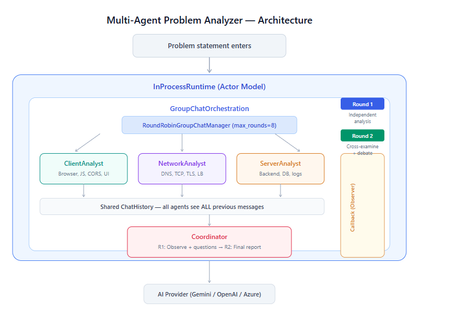
What You Will Build By the end of this guide, you will have a working multi-agent system where 4 specialist AI agents collaborate to diagnose production issues: ClientAnalyst — Analyzes browser, JavaScript, CORS, uploads, and UI symptoms NetworkAnalyst — Analyzes DNS, TCP/IP, TLS, load balancers, and firewalls ServerAnalyst — Analyzes backend logs, database, deployments, and resource limits Coordinator — Synthesizes all findings into a root cause report with a prioritized action plan These agents don't just run in sequence — they debate, cross-examine, and challenge each other's findings through a shared conversation, producing a diagnosis that's better than any single agent could achieve alone. Table of Contents Why Multi-Agent? The Problem with Single Agents Architecture Overview Understanding the Key SK Components The Actor Model — How InProcessRuntime Works Setting Up Your Development Environment Step-by-Step: Building the Multi-Agent Analyzer The Agent Interaction Flow — Round by Round Bugs I Found & Fixed — Lessons Learned Running with Different AI Providers What to Build Next 1. Why Multi-Agent? The Problem with Single Agents A single AI agent analyzing a production issue is like having one doctor diagnose everything — they'll catch issues in their specialty but miss cross-domain connections. Consider this problem: "Users report 504 Gateway Timeout errors when uploading files larger than 10MB. Started after Friday's deployment. Worse during peak hours." A single agent might say "it's a server timeout" and stop. But the real root cause often spans multiple layers: The client is sending chunked uploads with an incorrect Content-Length header (client-side bug) The load balancer has a 30-second timeout that's too short for large uploads (network config) The server recently deployed a new request body parser that's 3x slower (server-side regression) The combination only fails during peak hours because connection pool saturation amplifies the latency No single perspective catches this. You need specialists who analyze independently, then debate to find the cross-layer causal chain. That's what multi-agent orchestration gives you. The 5 Orchestration Patterns in SK Semantic Kernel provides 5 built-in patterns for agent collaboration: SEQUENTIAL: A → B → C → Done (pipeline — each builds on previous) CONCURRENT: ↗ A ↘ Task → B → Aggregate ↘ C ↗ (parallel — results merged) GROUP CHAT: A ↔ B ↔ C ↔ D ← We use this one (rounds, shared history, debate) HANDOFF: A → (stuck?) → B → (complex?) → Human (escalation with human-in-the-loop) MAGENTIC: LLM picks who speaks next dynamically (AI-driven speaker selection) We use GroupChatOrchestration with RoundRobinGroupChatManager because our problem requires agents to see each other's work, challenge assumptions, and build on each other's analysis across two rounds. 2. Architecture Overview Here's the complete architecture of what we're building: 3. Understanding the Key SK Components Before we write code, let's understand the 5 components we'll use and the design pattern each implements: ChatCompletionAgent — Strategy Pattern The agent definition. Each agent is a combination of: name — unique identifier (used in round-robin ordering) instructions — the persona and rules (this is the prompt engineering) service — which AI provider to call (Strategy Pattern — swap providers without changing agent logic) description — what other agents/tools understand about this agent agent = ChatCompletionAgent( name="ClientAnalyst", instructions="You are ONLY ClientAnalyst...", service=gemini_service, # ← Strategy: swap to OpenAI with zero changes description="Analyzes client-side issues", ) GroupChatOrchestration — Mediator Pattern The orchestration defines HOW agents interact. It's the Mediator — agents don't talk to each other directly. Instead, the orchestration manages a shared ChatHistory and routes messages through the Manager. RoundRobinGroupChatManager — Strategy Pattern The Manager decides WHO speaks next. RoundRobinGroupChatManager cycles through agents in a fixed order. SK also provides AutomaticGroupChatManager where the LLM decides who speaks next. max_rounds is the total number of messages per agent or cycle. With 4 agents and max_rounds=8, each agent speaks exactly twice. InProcessRuntime — Actor Model Abstraction The execution engine. Every agent becomes an "actor" with its own kind of mailbox (message queue). The runtime delivers messages between actors. Key properties: No shared state — agents communicate only through messages Sequential processing — each agent processes one message at a time Location transparency — same code works in-process today, distributed tomorrow agent_response_callback — Observer Pattern A function that fires after EVERY agent response. We use it to display each agent's output in real-time with emoji labels and round numbers. 4. The Actor Model — How InProcessRuntime Works The Actor Model is a concurrency pattern where each entity is an isolated "actor" with a private mailbox. Here's what happens inside InProcessRuntime when we run our demo: runtime.start() │ ├── Creates internal message loop (asyncio event loop) │ orchestration.invoke(task="504 timeout...", runtime=runtime) │ ├── Creates Actor[Orchestrator] → manages overall flow ├── Creates Actor[Manager] → RoundRobinGroupChatManager ├── Creates Actor[ClientAnalyst] → mailbox created, waiting ├── Creates Actor[NetworkAnalyst] → mailbox created, waiting ├── Creates Actor[ServerAnalyst] → mailbox created, waiting └── Creates Actor[Coordinator] → mailbox created, waiting Manager receives "start" message │ ├── Checks turn order: [Client, Network, Server, Coordinator] ├── Sends task to ClientAnalyst mailbox │ → ClientAnalyst processes: calls LLM → response │ → Response added to shared ChatHistory │ → callback fires (displayed in Notebook UI) │ → Sends "done" back to Manager │ ├── Manager updates: turn_index=1 ├── Sends to NetworkAnalyst mailbox │ → Same flow... │ ├── ... (ServerAnalyst, Coordinator for Round 1) │ ├── Manager checks: messages=4, max_rounds=8 → continue │ ├── Round 2: same cycle with cross-examination │ └── After message 8: Manager sends "complete" → OrchestrationResult resolves → result.get() returns final answer runtime.stop_when_idle() → All mailboxes empty → clean shutdown The Actor Model guarantees: No race conditions (each actor processes one message at a time) No deadlocks (no shared locks to contend for) No shared mutable state (agents communicate only via messages) 5. Setting Up Your Development Environment Prerequisites Python 3.11 or 3.12 (3.13+ may have compatibility issues with some SK connectors) Visual Studio Code with the Python and Jupyter extensions An API key from one of: Google AI Studio (free), OpenAI Step 1: Install Python Download from python.org. During installation, check "Add Python to PATH". Verify: python --version # Python 3.12.x Step 2: Install VS Code Extensions Open VS Code, go to Extensions (Ctrl+Shift+X), and install: Python (by Microsoft) — Python language support Jupyter (by Microsoft) — Notebook support Pylance (by Microsoft) — IntelliSense and type checking Step 3: Create Project Folder mkdir sk-multiagent-demo cd sk-multiagent-demo Open in VS Code: code . Step 4: Create Virtual Environment Open the VS Code terminal (Ctrl+`) and run: # Create virtual environment python -m venv sk-env # Activate it # Windows: sk-env\Scripts\activate # macOS/Linux: source sk-env/bin/activate You should see (sk-env) in your terminal prompt. Step 5: Install Semantic Kernel For Google Gemini (free tier — recommended for getting started): pip install semantic-kernel[google] python-dotenv ipykernel For OpenAI (paid API key): pip install semantic-kernel openai python-dotenv ipykernel For Azure AI Foundry (enterprise, Entra ID auth): pip install semantic-kernel azure-identity python-dotenv ipykernel Step 6: Register the Jupyter Kernel python -m ipykernel install --user --name=sk-env --display-name="Semantic Kernel (Python 3.12)" You can also select if this is already available from your environment from VSCode as below: Step 7: Get Your API Key Option A — Google Gemini (FREE, recommended for demo): Go to https://aistudio.google.com/apikey Click "Create API Key" Copy the key Free tier limits: 15 requests/minute, 1 million tokens/minute — more than enough for this demo. Option B — OpenAI: Go to https://platform.openai.com/api-keys Create a new key Copy the key Option C — Azure AI Foundry: Deploy a model in Azure AI Foundry portal Note the endpoint URL and deployment name If key-based auth is disabled, you'll need Entra ID with permissions Step 8: Create the .env File In your project root, create a file named .env: For Gemini: GOOGLE_AI_API_KEY=AIzaSy...your-key-here GOOGLE_AI_GEMINI_MODEL_ID=gemini-2.5-flash For OpenAI: OPENAI_API_KEY=sk-...your-key-here OPENAI_CHAT_MODEL_ID=gpt-4o For Azure AI Foundry: AZURE_OPENAI_ENDPOINT=https://your-resource.cognitiveservices.azure.com AZURE_OPENAI_CHAT_DEPLOYMENT_NAME=gpt-4o AZURE_OPENAI_API_KEY=your-key Step 9: Create the Notebook In VS Code: Click File > New File Save as multi_agent_analyzer.ipynb In the top-right of the notebook, click Select Kernel Choose Semantic Kernel (Python 3.12) (or your sk-env) Your environment is ready. Let's build. 6. Step-by-Step: Building the Multi-Agent Analyzer Cell 1: Verify Setup import semantic_kernel print(f"Semantic Kernel version: {semantic_kernel.__version__}") from semantic_kernel.agents import ( ChatCompletionAgent, GroupChatOrchestration, RoundRobinGroupChatManager, ) from semantic_kernel.agents.runtime import InProcessRuntime from semantic_kernel.contents import ChatMessageContent print("All imports successful") Cell 2: Load API Key and Create Service For Gemini: import os from dotenv import load_dotenv load_dotenv() from semantic_kernel.connectors.ai.google.google_ai import ( GoogleAIChatCompletion, GoogleAIChatPromptExecutionSettings, ) from semantic_kernel.contents import ChatHistory GEMINI_API_KEY = os.getenv("GOOGLE_AI_API_KEY") GEMINI_MODEL = os.getenv("GOOGLE_AI_GEMINI_MODEL_ID", "gemini-2.5-flash") service = GoogleAIChatCompletion( gemini_model_id=GEMINI_MODEL, api_key=GEMINI_API_KEY, ) print(f"Service created: Gemini {GEMINI_MODEL}") # Smoke test settings = GoogleAIChatPromptExecutionSettings() test_history = ChatHistory(system_message="You are a helpful assistant.") test_history.add_user_message("Say 'Connected!' and nothing else.") response = await service.get_chat_message_content( chat_history=test_history, settings=settings ) print(f"Model says: {response.content}") For OpenAI: import os from dotenv import load_dotenv load_dotenv() from semantic_kernel.connectors.ai.open_ai import ( OpenAIChatCompletion, OpenAIChatPromptExecutionSettings, ) from semantic_kernel.contents import ChatHistory service = OpenAIChatCompletion( ai_model_id=os.getenv("OPENAI_CHAT_MODEL_ID", "gpt-4o"), ) print(f"Service created: OpenAI {os.getenv('OPENAI_CHAT_MODEL_ID', 'gpt-4o')}") # Smoke test settings = OpenAIChatPromptExecutionSettings() test_history = ChatHistory(system_message="You are a helpful assistant.") test_history.add_user_message("Say 'Connected!' and nothing else.") response = await service.get_chat_message_content( chat_history=test_history, settings=settings ) print(f"Model says: {response.content}") Cell 3: Define All 4 Agents This is the most important cell — the prompt engineering that makes the demo work: from semantic_kernel.agents import ChatCompletionAgent # ═══════════════════════════════════════════════════ # AGENT 1: Client-Side Analyst # ═══════════════════════════════════════════════════ client_agent = ChatCompletionAgent( name="ClientAnalyst", description="Analyzes problems from the client-side: browser, JS, CORS, caching, UI symptoms", instructions="""You are ONLY **ClientAnalyst**. You must NEVER speak as NetworkAnalyst, ServerAnalyst, or Coordinator. Every word you write is from ClientAnalyst's perspective only. You are a senior front-end and client-side diagnostics expert. When given a problem statement, analyze it EXCLUSIVELY from the client side: 1. **Browser & Rendering**: DOM issues, JavaScript errors, CSS rendering, browser compatibility, memory leaks, console errors. 2. **Client-Side Caching**: Stale cache, service worker issues, local storage corruption. 3. **Network from Client View**: CORS errors, preflight failures, request timeouts, client-side retry storms, fetch/XHR configuration. 4. **Upload Handling**: File API usage, chunk upload implementation, progress tracking, FormData construction, content-type headers. 5. **UI/UX Symptoms**: What the user sees, error messages displayed, loading states. ROUND 1: Provide your independent analysis. Do NOT reference other agents. List your top 3 most likely causes with evidence. Every response MUST be at least 200 words. ROUND 2: You MUST: - Reference NetworkAnalyst and ServerAnalyst BY NAME - State specifically where you AGREE or DISAGREE with their findings - Answer the Coordinator's questions from your perspective - Add NEW cross-layer insights you see from the client perspective - Do NOT just say 'I agree' — provide substantive technical reasoning Be specific, evidence-based, and prioritize findings by likelihood.""", service=service, ) # ═══════════════════════════════════════════════════ # AGENT 2: Network Analyst # ═══════════════════════════════════════════════════ network_agent = ChatCompletionAgent( name="NetworkAnalyst", description="Analyzes problems from the network side: DNS, TCP, TLS, firewalls, load balancers, latency", instructions="""You are ONLY **NetworkAnalyst**. You must NEVER speak as ClientAnalyst, ServerAnalyst, or Coordinator. Every word you write is from NetworkAnalyst's perspective only. You are a senior network infrastructure diagnostics expert. When given a problem statement, analyze it EXCLUSIVELY from the network layer: 1. **DNS & Resolution**: DNS TTL, propagation delays, record misconfigurations. 2. **TCP/IP & Connections**: Connection pooling, keep-alive, TCP window scaling, connection resets, SYN floods. 3. **TLS/SSL**: Certificate issues, handshake failures, protocol version mismatches. 4. **Load Balancers & Proxies**: Sticky sessions, health checks, timeout configs, request body size limits, proxy buffering. 5. **Firewall & WAF**: Rule blocks, rate limiting, request inspection delays, geo-blocking, DDoS protection interference. ROUND 1: Provide your independent analysis. Do NOT reference other agents. List your top 3 most likely causes with evidence. Every response MUST be at least 200 words. ROUND 2: You MUST: - Reference ClientAnalyst and ServerAnalyst BY NAME - State specifically where you AGREE or DISAGREE with their findings - Answer the Coordinator's questions from your perspective - Add NEW cross-layer insights you see from the network perspective - Do NOT just say 'I am ready to proceed' — provide substantive technical analysis Be specific, evidence-based, and prioritize findings by likelihood.""", service=service, ) # ═══════════════════════════════════════════════════ # AGENT 3: Server-Side Analyst # ═══════════════════════════════════════════════════ server_agent = ChatCompletionAgent( name="ServerAnalyst", description="Analyzes problems from the server side: backend app, database, logs, resources, deployments", instructions="""You are ONLY **ServerAnalyst**. You must NEVER speak as ClientAnalyst, NetworkAnalyst, or Coordinator. Every word you write is from ServerAnalyst's perspective only. You are a senior backend and infrastructure diagnostics expert. When given a problem statement, analyze it EXCLUSIVELY from the server side: 1. **Application Server**: Error logs, exception traces, thread pool exhaustion, memory leaks, CPU spikes, garbage collection pauses. 2. **Database**: Slow queries, connection pool saturation, lock contention, deadlocks, replication lag, query plan changes. 3. **Deployment & Config**: Recent deployments, configuration changes, feature flags, environment variable mismatches, rollback candidates. 4. **Resource Limits**: File upload size limits, request body limits, disk space, temporary file cleanup, storage quotas. 5. **External Dependencies**: Upstream API timeouts, third-party service degradation, queue backlogs, cache (Redis/Memcached) issues. ROUND 1: Provide your independent analysis. Do NOT reference other agents. List your top 3 most likely causes with evidence. Every response MUST be at least 200 words. ROUND 2: You MUST: - Reference ClientAnalyst and NetworkAnalyst BY NAME - State specifically where you AGREE or DISAGREE with their findings - Answer the Coordinator's questions from your perspective - Add NEW cross-layer insights you see from the server perspective - Do NOT just say 'I agree' — provide substantive technical reasoning Be specific, evidence-based, and prioritize findings by likelihood.""", service=service, ) # ═══════════════════════════════════════════════════ # AGENT 4: Coordinator # ═══════════════════════════════════════════════════ coordinator_agent = ChatCompletionAgent( name="Coordinator", description="Synthesizes all specialist analyses into a final root cause report with prioritized action plan", instructions="""You are ONLY **Coordinator**. You must NEVER speak as ClientAnalyst, NetworkAnalyst, or ServerAnalyst. You synthesize — you do NOT do domain-specific analysis. You are the lead engineer who synthesizes the team's findings. ═══ ROUND 1 BEHAVIOR (your first turn, message 4) ═══ Keep this SHORT — maximum 300 words. - Note 2-3 KEY PATTERNS across the three analyses - Identify where specialists AGREE (high-confidence) - Identify where they CONTRADICT (needs resolution) - Ask 2-3 SPECIFIC QUESTIONS for Round 2 Round 1 MUST NOT: assign tasks, create action plans, write reports, or tell agents what to take lead on. Observation + questions ONLY. ═══ ROUND 2 BEHAVIOR (your final turn, message 8) ═══ Keep this FOCUSED — maximum 800 words. Produce a structured report: 1. **Root Cause** (1 paragraph): The #1 most likely cause with causal chain across layers. Reference specific findings from each specialist. 2. **Confidence** (short list): - HIGH: Areas where all 3 agreed - MEDIUM: Areas where 2 of 3 agreed - LOW: Disagreements needing investigation 3. **Action Plan** (numbered, max 6 items): For each: - What to do (specific) - Owner (Client/Network/Server team) - Time estimate 4. **Quick Wins vs Long-term** (2 short lists) Do NOT repeat what specialists already said verbatim. Synthesize, don't echo.""", service=service, ) # ═══════════════════════════════════════════════════ # All 4 agents — order = RoundRobin order # ═══════════════════════════════════════════════════ agents = [client_agent, network_agent, server_agent, coordinator_agent] print(f"{len(agents)} agents created:") for i, a in enumerate(agents, 1): print(f" {i}. {a.name}: {a.description[:60]}...") print(f"\nRoundRobin order: {' → '.join(a.name for a in agents)}") Cell 4: Run the Analysis from semantic_kernel.agents import GroupChatOrchestration, RoundRobinGroupChatManager from semantic_kernel.agents.runtime import InProcessRuntime from semantic_kernel.contents import ChatMessageContent from IPython.display import display, Markdown # ╔══════════════════════════════════════════════════════════╗ # ║ EDIT YOUR PROBLEM STATEMENT HERE ║ # ╚══════════════════════════════════════════════════════════╝ PROBLEM = """ Users are reporting intermittent 504 Gateway Timeout errors when trying to upload files larger than 10MB through our web application. The issue started after last Friday's deployment and seems worse during peak hours (2-5 PM EST). Some users also report that smaller file uploads work fine but the progress bar freezes at 85% for large files before timing out. """ # ════════════════════════════════════════════════════════════ agent_responses = [] def agent_response_callback(message: ChatMessageContent) -> None: name = message.name or "Unknown" content = message.content or "" agent_responses.append({"agent": name, "content": content}) emoji = { "ClientAnalyst": "🖥️", "NetworkAnalyst": "🌐", "ServerAnalyst": "⚙️", "Coordinator": "🎯" }.get(name, "🔹") round_num = (len(agent_responses) - 1) // len(agents) + 1 display(Markdown( f"---\n### {emoji} {name} (Message {len(agent_responses)}, Round {round_num})\n\n{content}" )) MAX_ROUNDS = 8 # 4 agents × 2 rounds = 8 messages exactly task = f"""## Problem Statement {PROBLEM.strip()} ## Discussion Rules You are in a GROUP DISCUSSION with 4 members. You can see ALL previous messages. There are exactly 2 rounds. ### ROUND 1 (Messages 1-4): Independent Analysis - ClientAnalyst, NetworkAnalyst, ServerAnalyst: Analyze from YOUR domain only. Give your top 3 most likely causes with evidence and reasoning. - Coordinator: Note patterns across the 3 analyses. Ask 2-3 specific questions. Do NOT assign tasks yet. ### ROUND 2 (Messages 5-8): Cross-Examination & Final Report - ClientAnalyst, NetworkAnalyst, ServerAnalyst: You MUST reference the OTHER specialists BY NAME. State where you agree, disagree, or have new insights. Answer the Coordinator's questions. Provide SUBSTANTIVE analysis. - Coordinator: Produce the FINAL structured report: root cause, confidence levels, prioritized action plan with owners and time estimates. IMPORTANT: Each agent speaks as THEMSELVES only. Never impersonate another agent.""" display(Markdown(f"## Problem Statement\n\n{PROBLEM.strip()}")) display(Markdown(f"---\n## Discussion Starting — {len(agents)} agents, {MAX_ROUNDS} rounds\n")) # Build and run orchestration = GroupChatOrchestration( members=agents, manager=RoundRobinGroupChatManager(max_rounds=MAX_ROUNDS), agent_response_callback=agent_response_callback, ) runtime = InProcessRuntime() runtime.start() result = await orchestration.invoke(task=task, runtime=runtime) final_result = await result.get(timeout=300) await runtime.stop_when_idle() display(Markdown(f"---\n## FINAL CONCLUSION\n\n{final_result}")) Cell 5: Statistics and Validation print("═" * 55) print(" ANALYSIS STATISTICS") print("═" * 55) emojis = {"ClientAnalyst": "🖥️", "NetworkAnalyst": "🌐", "ServerAnalyst": "⚙️", "Coordinator": "🎯"} agent_counts = {} agent_chars = {} for r in agent_responses: agent_counts[r["agent"]] = agent_counts.get(r["agent"], 0) + 1 agent_chars[r["agent"]] = agent_chars.get(r["agent"], 0) + len(r["content"]) for agent, count in agent_counts.items(): em = emojis.get(agent, "🔹") chars = agent_chars.get(agent, 0) avg = chars // count if count else 0 print(f" {em} {agent}: {count} msg(s), ~{chars:,} chars (avg {avg:,}/msg)") print(f"\n Total messages: {len(agent_responses)}") total_chars = sum(len(r['content']) for r in agent_responses) print(f" Total analysis: ~{total_chars:,} characters") # Validation print(f"\n Validation:") import re identity_issues = [] for r in agent_responses: other_agents = [a.name for a in agents if a.name != r["agent"]] for other in other_agents: pattern = rf'(?i)as {re.escape(other)}[,:]?\s+I\b' if re.search(pattern, r["content"][:300]): identity_issues.append(f"{r['agent']} impersonated {other}") if identity_issues: print(f" Identity confusion: {identity_issues}") else: print(f" No identity confusion detected") thin = [r for r in agent_responses if len(r["content"].strip()) < 100] if thin: for t in thin: print(f" Thin response from {t['agent']}") else: print(f" All responses are substantive") Cell 6: Save Report from datetime import datetime timestamp = datetime.now().strftime("%Y%m%d_%H%M%S") filename = f"analysis_report_{timestamp}.md" with open(filename, "w", encoding="utf-8") as f: f.write(f"# Problem Analysis Report\n\n") f.write(f"**Generated:** {datetime.now().strftime('%Y-%m-%d %H:%M:%S')}\n") f.write(f"**Agents:** {', '.join(a.name for a in agents)}\n") f.write(f"**Rounds:** {MAX_ROUNDS}\n\n---\n\n") f.write(f"## Problem Statement\n\n{PROBLEM.strip()}\n\n---\n\n") for i, r in enumerate(agent_responses, 1): em = emojis.get(r['agent'], '🔹') round_num = (i - 1) // len(agents) + 1 f.write(f"### {em} {r['agent']} (Message {i}, Round {round_num})\n\n") f.write(f"{r['content']}\n\n---\n\n") f.write(f"## Final Conclusion\n\n{final_result}\n") print(f"Report saved to: {filename}") 7. The Agent Interaction Flow — Round by Round Here's what actually happens during the 8-message orchestration: Round 1: Independent Analysis (Messages 1-4) Msg Agent What They See What They Do 1 ClientAnalyst Problem statement only Analyzes from client perspective: upload chunking, progress bar freezing at 85%, CORS, content-type headers 2 NetworkAnalyst Problem + ClientAnalyst's analysis Gives INDEPENDENT analysis despite seeing msg 1: load balancer timeouts, proxy body size limits, TCP window scaling 3 ServerAnalyst Problem + msgs 1-2 Gives INDEPENDENT analysis: recent deployment regression, request body parser, thread pool exhaustion, disk space 4 Coordinator Problem + msgs 1-3 Observes patterns: "All three mention timeout configuration. ClientAnalyst and NetworkAnalyst both point to body size. Question: Was the deployment a backend-only change or did it include infra?" Round 2: Cross-Examination (Messages 5-8) Msg Agent What They Do 5 ClientAnalyst "I agree with NetworkAnalyst that the load balancer timeout is likely a factor — the 85% freeze point matches the 30-second LB timeout for a 10MB upload on our average upload speed. However, I disagree with ServerAnalyst about thread pool exhaustion because the UI shows a clean 504, not a connection reset." 6 NetworkAnalyst "ServerAnalyst's point about the recent deployment is critical — if the new request parser is 3x slower, that would push uploads past the LB timeout. I can confirm the LB has a 30s idle timeout. The fix is both: increase LB timeout AND optimize the parser." 7 ServerAnalyst "Responding to Coordinator's question: The deployment was backend-only — a new multipart parser using streaming instead of buffered reads. ClientAnalyst is correct that the 504 is from the LB, not the app. The app itself returns 200 after 45 seconds, but the LB kills the connection at 30." 8 Coordinator Produces final structured report with root cause: "The backend deployment introduced a slower multipart parser (45s vs 15s for 10MB). The load balancer's 30s timeout kills the connection at ~85% progress. Fix: immediate — increase LB timeout to 120s. Short-term — optimize parser. Long-term — implement chunked uploads with progress resumption." Notice: The Round 2 analysis is dramatically better than Round 1. Agents reference each other by name, build on each other's findings, and the Coordinator can synthesize a cross-layer causal chain that no single agent could have produced. I made a small adjustment to the issue with Azure Web Apps. Please find the details below from testing carried out using Google Gemini: 8. Bugs I Found & Fixed — Lessons Learned Building this demo taught me several important lessons about multi-agent systems: Bug 1: Agents Speaking Only Once Symptom: Only 4 messages instead of 8. Root cause: The agents list was missing the Coordinator. It was defined in a separate cell and wasn't included in the members list. Fix: All 4 agents must be in the same list passed to GroupChatOrchestration. Bug 2: NetworkAnalyst Says "I'm Ready to Proceed" Symptom: NetworkAnalyst's Round 2 response was just "I'm ready to proceed with the analysis" — no actual content. Root cause: The Coordinator's Round 1 message was assigning tasks ("NetworkAnalyst, please check the load balancer config"), and the agent was acknowledging the assignment instead of analyzing. Fix: Added explicit constraint to Coordinator: "Round 1 MUST NOT assign tasks — observation + questions ONLY." Bug 3: ServerAnalyst Says "As NetworkAnalyst, I..." Symptom: ServerAnalyst's response started with "As NetworkAnalyst, I believe..." Root cause: LLM identity bleeding. When agents share ChatHistory, the LLM sometimes loses track of which agent it's currently playing. This is especially common with Gemini. Fix: Identity anchoring at the very top of every agent's instructions: "You are ONLY ServerAnalyst. You must NEVER speak as ClientAnalyst, NetworkAnalyst, or Coordinator." Bug 4: Gemini Gives Thin/Empty Responses Symptom: Some agents responded with just one sentence or "I concur." Root cause: Gemini 2.5 Flash is more concise than GPT-4o by default. Without explicit length requirements, it takes shortcuts. Fix: Added "Every response MUST be at least 200 words" and "Answer the Coordinator's questions" to every specialist's instructions. Bug 5: Coordinator's Report is 18K Characters Symptom: The Coordinator's Round 2 response was absurdly long — repeating everything every specialist said. Fix: Added word limits: "Round 1 max 300 words, Round 2 max 800 words" and "Synthesize, don't echo." Bug 6: MAX_ROUNDS Math Symptom: With MAX_ROUNDS=9, ClientAnalyst spoke a 3rd time after the Coordinator's final report — breaking the clean 2-round structure. Fix: MAX_ROUNDS must equal (number of agents × number of rounds). For 4 agents × 2 rounds = 8. 9. Running with Different AI Providers The beauty of SK's Strategy Pattern is that you change ONE LINE to switch providers. Everything else — agents, orchestration, callbacks, validation — stays identical. Gemini setup: from semantic_kernel.connectors.ai.google.google_ai import GoogleAIChatCompletion service = GoogleAIChatCompletion( gemini_model_id="gemini-2.5-flash", api_key=os.getenv("GOOGLE_AI_API_KEY"), ) OpenAI Setup from semantic_kernel.connectors.ai.open_ai import OpenAIChatCompletion service = OpenAIChatCompletion( ai_model_id="gpt-4o", api_key=os.getenv("OPEN_AI_API_KEY"), ) 10. What to Build Next Add Plugins to Agents Give agents real tools — not just LLM reasoning - looks exciting right ;) class NetworkDiagnosticPlugin: (description="Pings a host and returns latency") def ping(self, host: str) -> str: result = subprocess.run(["ping", "-c", "3", host], capture_output=True, text=True) return result.stdout class LogSearchPlugin: (description="Searches server logs for error patterns") def search_logs(self, pattern: str, hours: int = 1) -> str: # Query your log aggregator (Splunk, ELK, Azure Monitor) return query_logs(pattern, hours) Add Filters for Governance Intercept every agent call for PII redaction and audit logging: .filter(filter_type=FilterTypes.FUNCTION_INVOCATION) async def audit_filter(context, next): print(f"[AUDIT] {context.function.name} called by agent") await next(context) print(f"[AUDIT] {context.function.name} returned") Try Different Orchestration Patterns Replace GroupChat with Sequential for a pipeline approach: # Instead of debate, each agent builds on the previous orchestration = SequentialOrchestration( members=[client_agent, network_agent, server_agent, coordinator_agent] ) Or Concurrent for parallel analysis: # All specialists analyze simultaneously, Coordinator aggregates orchestration = ConcurrentOrchestration( members=[client_agent, network_agent, server_agent] ) Deploy to Azure Move from InProcessRuntime to Azure Container Apps for production scaling. The agent code doesn't change — only the runtime. Summary The key insight from building this demo: multi-agent systems produce better results than single agents not because each agent is smarter, but because the debate structure forces cross-domain thinking that a single prompt can never achieve. The Coordinator's final report consistently identifies causal chains that span client, network, and server layers — exactly the kind of insight that production incident response teams need. Semantic Kernel makes this possible with clean separation of concerns: agents define WHAT to analyze, orchestration defines HOW they interact, the manager defines WHO speaks when, the runtime handles WHERE it executes, and callbacks let you OBSERVE everything. Each piece is independently swappable — that's the power of SK from Microsoft. Resources: GitHub: github.com/microsoft/semantic-kernel Docs: learn.microsoft.com/semantic-kernel Orchestration Patterns: learn.microsoft.com/semantic-kernel/frameworks/agent/agent-orchestration Discord: aka.ms/sk/discord Disclaimer: The sample scripts provided in this article are provided AS IS without warranty of any kind. The author is not responsible for any issues, damages, or problems that may arise from using these scripts. Users should thoroughly test any implementation in their environment before deploying to production. Azure services and APIs may change over time, which could affect the functionality of the provided scripts. Always refer to the latest Azure documentation for the most up-to-date information. Thanks for reading this blog! I hope you found it helpful and informative for building AI agents with SK (Semantic Kernel) 😀942Views3likes1Comment
Azure ML Experimentation
Hi - I have created a Machine Learning Expirementation account on Azure, which I now wish to cancel. When I do so, it tells me that I cannot delete the resource until all nested resources are deleted. I have already deleted the storage account, all that is left is the workspace, which does not have an option to delete. Any Suggestions?4.1KViews3likes4CommentsAzure REST API - $filter param for time delta throws ProviderError
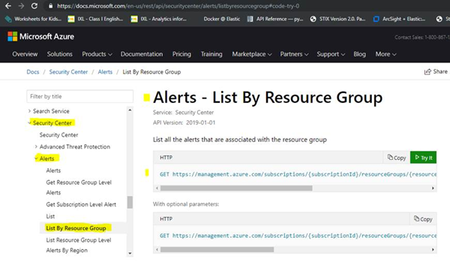
Hello All, We are facing issues with the Azure API endpoint for fetching security alerts based on given time filter. https://apc01.safelinks.protection.outlook.com/?url=https%3A%2F%2Fdocs.microsoft.com%2Fen-us%2Frest%2Fapi%2Fsecuritycenter%2Falerts%2Flistbyresourcegroup%23code-try-0&data=02%7C01%7Cannishprashan.stevi%40hcl.com%7Ce89ea1593b4247b8b13f08d70530766b%7C189de737c93a4f5a8b686f4ca9941912%7C0%7C0%7C636983578009379205&sdata=JavMX5P2vJPhQ5ERafc4kC5gxELv%2FEjtulWo%2B84xhIQ%3D&reserved=0 and screenshot for the API section, We encountered the following error while hitting the endpoint with the required params and Bearer access token. Error Details: { "error": { "code": "ProviderError", "message": "Resource provider 'Microsoft.Security' failed to return collection response for type 'alerts'." } } Endpoint URL: https://management.azure.com/subscriptions/{subscription-id}/resourceGroups/{ResourceGroup}/providers/Microsoft.Security/alerts?api-version={version}}&$filter=properties.reportedTimeUtc eq '2019-07-06T08:00:51.8801218Z' NOTE: The URL gives response without specifying the time “filter” , but when using filter as one of the params, we get the above mentioned error. The param value used: $filter = properties.reportedTimeUtc eq '2019-07-06T08:00:51.8801218Z' Could anyone help in the resolution of this issue? Let me know for any additional details/clarifications. Thank You.5.7KViews1like3CommentsNew 400GB and 200GB caches available on Azure Analysis Services
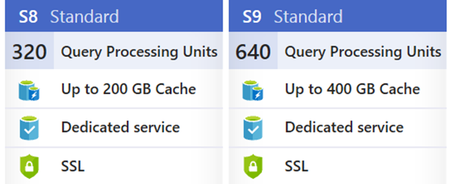
In April we announced the general availability of Azure Analysis Services, which evolved from the proven analytics engine in Microsoft SQL Server Analysis Services. The success of any modern data-driven organization requires that information is available at the fingertips of every business user, not just IT professionals and data scientists, to guide their day-to-day decisions. Self-service BI tools have made huge strides in making data accessible to business users. However, most business users don’t have the expertise or desire to do the heavy lifting that is typically required, including finding the right sources of data, importing the raw data, transforming it into the right shape, and adding business logic and metrics, before they can explore the data to derive insights. With Azure Analysis Services, a BI professional can create a semantic model over the raw data and share it with business users so that all they need to do is connect to the model from any BI tool and immediately explore the data and gain insights. Azure Analysis Services uses a highly optimized in-memory engine to provide responses to user queries at the speed of thought. Today we are introducing two new SKU sizes, the S8 and S9 allowing you to build data models up to 400 GB in size. Read about it on the Azure blog.3.6KViews1like0CommentsBackup and restore your Azure Analysis Services models
This month we announced the general availability of Azure Analysis Services, which evolved from the proven analytics engine in Microsoft SQL Server Analysis Services. The success of any modern data-driven organization requires that information is available at the fingertips of every business user, not just IT professionals and data scientists, to guide their day-to-day decisions. Self-service BI tools have made huge strides in making data accessible to business users. However, most business users don’t have the expertise or desire to do the heavy lifting that is typically required, including finding the right sources of data, importing the raw data, transforming it into the right shape, and adding business logic and metrics, before they can explore the data to derive insights. With Azure Analysis Services, a BI professional can create a semantic model over the raw data and share it with business users so that all they need to do is connect to the model from any BI tool and immediately explore the data and gain insights. Azure Analysis Services uses a highly optimized in-memory engine to provide responses to user queries at the speed of thought. One of the features that was added to Azure Analysis Services is the ability to backup your semantic models and all the data within them to a blob storage account. The backups can later be restored to same Azure Analysis Services server or to a different one. This method can also be used to backup models from SQL Server Analysis services and then restore them to Azure Analysis services. Please note that you can only restore models with a 1200 or higher compatibility level and that any active directory users or groups bust be removed from any role membership before restoring. After restoring, you can re-add those users and groups from Azure Active Directory. Read about it on the Azure blog.2KViews1like0CommentsThe Gap Between Applications and Analytics, and "How Lakebase Solves It"
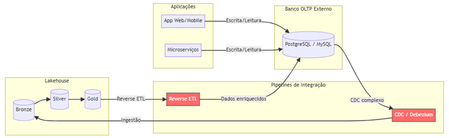
The Problem Nobody Likes to Admit. Imagine this scenario: your data team has built a flawless lakehouse. Ingest pipelines, bronze/silver/gold tiers, gleaming dashboards. Everything is working perfectly. Until someone asks: "And the production app? Where does it store the transactional data?" That's where the headache begins. You need a separate OLTP database (Postgres, MySQL, DynamoDB...), CDC pipelines to bring data into the lakehouse, reverse ETL to return enriched data to the app, and an infrastructure team to keep it all running. The result? Data silos, synchronization latency, operational complexity, and ever-increasing costs. Traditional Architecture (and Its Pain Points) Here's how most companies operate today: Pain points in this architecture: Multiple tools and suppliers for managing Significant latency between writing on OLTP and availability on Lakehouse. Fragmented governance — Unity Catalog doesn't see the external bank. High operational costs associated with synchronization pipelines. What is Lakebase? Lakebase is a fully managed Postgres database natively integrated with the Databricks Data Intelligence Platform. It is designed to bridge the gap between transactional (OLTP) and analytical (OLAP) workloads, unifying everything into a single ecosystem . In simple terms: it's like having a high-performance Postgres server living inside your lakehouse , with unified governance via Unity Catalog, native bidirectional synchronization, and modern capabilities such as autoscaling, scale-to-zero, and database branching. The New Architecture with Lakebase: What changes? Zero external database infrastructure Native bidirectional synchronization (no Debezium, no Airflow, no pain) Unified governance through the Unity Catalog A single control plane for OLTP + OLAP The Architectural Innovations of Lakebase Lakebase is not "just another managed Postgres." It brings modern data engineering concepts to the transactional world. 1. Separation of Compute and Storage Unlike traditional data banks where CPU and disk are coupled, Lakebase completely separates computing resources from storage. This means you scale each independently, paying only for what you use. 2. Copy-on-Write Storage The storage system uses a copy-on-write approach. In practice, when you create a branch of the database, there is no data duplication —only the changes are stored separately. This makes operations like branching and restoring virtually instantaneous. 3. Autoscaling and Scale-to-Zero The compute system automatically adjusts its capacity based on demand. During periods of inactivity, the database scales to zero , eliminating costs. When a request arrives, it "wakes up" in seconds. Database Branching: Git for Your Data This is probably the most innovative feature. Just as developers create branches in Git to work on isolated features, Lakebase allows you to create branches for the entire database . Powerful use cases: Development : each developer has their own branch of the database, without interfering with production. Migration testing : test schema changes in an isolated branch before applying them to production. Instant Restore : Restore the database to any point in time (configurable window from 0 to 30 days) by creating a branch from that point. Two-Way Synchronization: The End of Reverse ETL One of the biggest advantages is the native synchronization between Lakehouse and Lakebase: Synced Tables (Lakehouse → Lakebase) Unity Catalog tables are automatically synchronized to Lakebase, allowing applications to query rich analytical data with low latency. Supports Snapshot, Triggered, and Continuous modes. Lakehouse Sync (Lakebase → Lakehouse) Transactional data from Lakebase is continuously replicated to Delta tables in the Unity Catalog using Change Data Capture (CDC). The destination tables follow the SCD Type 2 standard , maintaining a complete history of changes. This completely eliminates the need for: External CDC tools (Debezium, Fivetran) Reverse ETL pipelines (Census, Hightouch) Custom synchronization jobs in Airflow/Prefect Three Strategic Use Cases Feature Serving for Real-Time ML Lakebase functions as an online store for Databricks' Feature Store. Features computed in the lakehouse are synchronized via Synced Tables to Lakebase, from where ML models query them with millisecond latency. State of AI Agents AI agents need to persist state between requests — conversation context, action history, workflow data. Lakebase provides a native transactional database to store this state with ACID consistency. Transactional Data for Applications Databricks Apps (or any external application) can use Lakebase as their primary database. The integration is native: simply add the Lakebase project as a resource in your app. Additionally, the Data API offers a PostgREST-compatible REST interface for direct HTTP access. Comparison: Before and After Availability Lakebase Autoscaling is available in the following AWS regions: us-east-1, us-east-2,us-west-2 ca-central-1, sa-east-1 eu-central-1, eu-west-1,eu-west-2 ap-south-1, ap-southeast-1,ap-southeast-2 The presence in sa-east-1 is particularly relevant for us in the Brazilian community, ensuring low latency for applications hosted in Brazil. Conclusion Lakebase represents a paradigm shift: instead of treating OLTP and OLAP as separate worlds that need complex "bridges," it unifies them into a single platform. For Brazilian data teams, this means: Fewer tools to manage and integrate. Fewer pipelines that silently break down at 3 a.m. More time focused on generating value with data. Real governance across the entire data lifecycle — from transactional writing to the executive dashboard. Lakehouse finally has its native transactional database. And it speaks Postgres. This post was inspired by concepts from the official Databricks documentation. For more technical details, please refer to the Lakebase documentation . Wiliam Rosa Data Engineer | Machine Learning Engineer linkedin.com/in/wiliamrosa Blog: https://wiliamrosa.github.io457Views1like3CommentsBYOPI - Design your own custom private AI Search indexer with no code ADF (SQLServer on private VM)
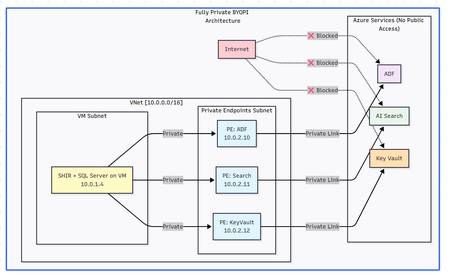
Executive Summary Building a fully private search indexing solution using Azure Data Factory (ADF) to sync SQL Server data from private VM to Azure AI Search is achievable but comes with notable complexities and limitations. This blog shares my journey, discoveries, and honest assessment of the BYOPI (Build Your Own Private Indexer) architecture. Architectural flow: Table of Contents Overall Setup How ADF works in this approach with Azure AI Search Challenges - discovered Pros and Cons: An Honest Assessment Conclusion and Recommendations 1. Overall Setup: Phase 1: Resource Group & Network Setup : create resource group and vNET (virtual network) in any region of your choice Phase 2: Deploy SQL Server VM: Phase 3: Create Azure Services - ADF (Azure Data Factory), Azure AI Search and AKV (Azure Key Vault) service from portal or from your choice of deployment. Phase 4: Create Private Endpoints for all the services in their dedicated subnets: Phase 5: Configure SQL Server on VM : connect to VM via bastion and setup database, tables & SP: Sample metadata used as below: CREATE DATABASE BYOPI_DB; GO USE BYOPI_DB; GO CREATE TABLE Products ( ProductId INT IDENTITY(1,1) PRIMARY KEY, ProductName NVARCHAR(200) NOT NULL, Description NVARCHAR(MAX), Category NVARCHAR(100), Price DECIMAL(10,2), InStock BIT DEFAULT 1, Tags NVARCHAR(500), IsDeleted BIT DEFAULT 0, CreatedDate DATETIME DEFAULT GETDATE(), ModifiedDate DATETIME DEFAULT GETDATE() ); CREATE TABLE WatermarkTable ( TableName NVARCHAR(100) PRIMARY KEY, WatermarkValue DATETIME ); INSERT INTO WatermarkTable VALUES ('Products', '2024-01-01'); CREATE PROCEDURE sp_update_watermark @TableName NVARCHAR(100), @NewWatermark DATETIME AS BEGIN UPDATE WatermarkTable SET WatermarkValue = @NewWatermark WHERE TableName = @TableName; END; INSERT INTO Products (ProductName, Description, Category, Price, Tags) VALUES ('Laptop Pro', 'High-end laptop', 'Electronics', 1299.99, 'laptop,computer'), ('Office Desk', 'Adjustable desk', 'Furniture', 599.99, 'desk,office'), ('Wireless Mouse', 'Bluetooth mouse', 'Electronics', 29.99, 'mouse,wireless'); Phase 6: Install Self-Hosted Integration Runtime Create SHIR in ADF: Go to ADF resource in Azure Portal Click "Open Azure Data Factory Studio" Note: You need to access from a VM in the same VNet or via VPN since ADF is private In ADF Studio, click Manage (toolbox icon) Select Integration runtimes → "+ New" Select "Azure, Self-Hosted" → "Self-Hosted" Name: SHIR-BYOPI or of your choice Click "Create" Copy Key1 (save it) Install SHIR on VM In the VM (via Bastion): Open browser, go to: https://www.microsoft.com/download/details.aspx?id=39717 Download and install Integration Runtime During setup: Launch Configuration Manager Paste the Key1 from Step 14 Click "Register" Wait for "Connected" status Phase 7: Create Search Index through below powershell script and saving it as search_index.ps1 $searchService = "search-byopi" $apiKey = "YOUR-ADMIN-KEY" $headers = @{ 'api-key' = $apiKey 'Content-Type' = 'application/json' } $index = @{ name = "products-index" fields = @( @{name="id"; type="Edm.String"; key=$true} @{name="productName"; type="Edm.String"; searchable=$true} @{name="description"; type="Edm.String"; searchable=$true} @{name="category"; type="Edm.String"; filterable=$true; facetable=$true} @{name="price"; type="Edm.Double"; filterable=$true} @{name="inStock"; type="Edm.Boolean"; filterable=$true} @{name="tags"; type="Collection(Edm.String)"; searchable=$true} ) } | ConvertTo-Json -Depth 10 Invoke-RestMethod ` -Uri "https://$searchService.search.windows.net/indexes/products-index?api-version=2020-06-30" ` -Method PUT ` -Headers $headers ` -Body $index Phase 8: Configure AKV & ADF Components - Link AKV and ADF for secrets Create Key Vault Secrets Navigate to kv-byopi (created AKV resource) in Portal Go to "Access policies" Click "+ Create" Select permissions: Get, List for secrets Select principal: adf-byopi-private Create Go to "Secrets" → "+ Generate/Import": Name: sql-password, Value: <> Name: search-api-key, Value: Your search key Create Linked Services in ADF Access ADF Studio from the VM (since it's private): Key Vault Linked Service: Manage → Linked services → "+ New" Search "Azure Key Vault" Configure: Name: LS_KeyVault Azure Key Vault: kv-byopi Integration runtime: AutoResolveIntegrationRuntime Test connection → Create SQL Server Linked Service: "+ New" → "SQL Server" Configure: Name: LS_SqlServer Connect via: SHIR-BYOPI Server name: localhost Database: BYOPI_DB Authentication: SQL Authentication User: sqladmin Password: Select from Key Vault → LS_KeyVault → sql-password Test → Create Azure Search Linked Service: "+ New" → "Azure Search" Configure: Name: LS_AzureSearch URL: https://search-byopi.search.windows.net Connect via: SHIR-BYOPI - Important - use SHIR API Key: From Key Vault → LS_KeyVault → search-api-key Test → Create Phase 9: Create ADF Datasets and PipelineCreate Datasets SQL Products Dataset: Author → Datasets → "+" → "New dataset" Select "SQL Server" → Continue Select "Table" → Continue Properties: Name: DS_SQL_Products Linked service: LS_SqlServer Table: Select Products click OK Watermark Dataset: Repeat with: Name: DS_SQL_Watermark Table: WatermarkTable Search Dataset: "+" → "Azure Search" Properties: Name: DS_Search_Index Linked service: LS_AzureSearch Index name: products-index Create Pipeline Author → Pipelines → "+" → "Pipeline" Name: PL_BYOPI_Private From Activities → General, drag "Lookup" activity Configure Lookup 1: Name: LookupOldWatermark Settings: Source dataset: DS_SQL_Watermark Query: below sql SELECT WatermarkValue FROM WatermarkTable WHERE TableName='Products' - **First row only**: ✓ Add another Lookup: Name: LookupNewWatermark Query: below sql SELECT MAX(ModifiedDate) as NewWatermark FROM Products Add Copy Data activity: Name: CopyToSearchIndex Source: Dataset: DS_SQL_Products Query: sql SELECT CAST(ProductId AS NVARCHAR(50)) as id, ProductName as productName, Description as description, Category as category, Price as price, InStock as inStock, Tags as tags, CASE WHEN IsDeleted = 1 THEN 'delete' ELSE 'upload' END as [@search.action] FROM Products WHERE ModifiedDate > '@{activity('LookupOldWatermark').output.firstRow.WatermarkValue}' AND ModifiedDate <= '@{activity('LookupNewWatermark').output.firstRow.NewWatermark}' Sink: Dataset: DS_Search_Index Write behavior: Merge Batch size: 1000 Add Stored Procedure activity: Name: UpdateWatermark SQL Account: LS_SqlServer Stored procedure: sp_update_watermark Parameters: TableName: Products NewWatermark: @{activity('LookupNewWatermark').output.firstRow.NewWatermark} Connect activities with success conditions Phase 10: Test and Schedule Test Pipeline Click "Debug" in pipeline Monitor in Output panel Check for green checkmarks Create Trigger In pipeline, click "Add trigger" → "New/Edit" Click "+ New" Configure: Name: TR_Hourly Type: Schedule Recurrence: Every 1 Hour OK → Publish All Monitor Go to Monitor tab View Pipeline runs Check Trigger runs Your pipeline should look like this: Phase 11: Validation & Testing Verify Private Connectivity From the VM, run PowerShell: # Test DNS resolution (should return private IPs) nslookup adf-byopi-private.datafactory.azure.net # Should show private IP like : 10.0.2.x nslookup search-byopi.search.windows.net # Should show private IP like : 10.0.2.x nslookup kv-byopi.vault.azure.net # Should show private IP like : 10.0.2.x # Test Search $headers = @{ 'api-key' = 'YOUR-KEY' } Invoke-RestMethod -Uri "https://search-byopi.search.windows.net/indexes/products-index/docs?`$count=true&api-version=2020-06-30" -Headers $headers Test Data Sync (adding few records) and verify in search index: -- Add test record INSERT INTO Products (ProductName, Description, Category, Price, Tags) VALUES ('Test Product Private', 'Testing private pipeline', 'Test', 199.99, 'test,private'); -- Trigger pipeline manually or wait for schedule -- Then verify in Search index 2. How ADF works in this approach with Azure AI search: Azure AI Search uses a REST API for indexing or called as uploading. When ADF sink uploads data to AI Search, it's actually making HTTP POST requests: for example - POST https://search-byopi.search.windows.net/indexes/products-index/docs/index?api-version=2020-06-30 Content-Type: application/json api-key: YOUR-ADMIN-KEY { "value": [ { "@search.action": "upload", "id": "1", "productName": "Laptop", "price": 999.99 }, { "@search.action": "delete", "id": "2" } ] } Delete action used here is soft delete and not hard delete. pipeline query: SELECT CAST(ProductId AS NVARCHAR(50)) as id, -- Renamed to match index field ProductName as productName, -- Renamed to match index field Description as description, Category as category, Price as price, InStock as inStock, Tags as tags, CASE WHEN IsDeleted = 1 THEN 'delete' ELSE 'upload' END as [@search.action] -- Special field with @ prefix FROM Products WHERE ModifiedDate > '2024-01-01' ``` Returns this resultset: ``` id | productName | description | category | price | inStock | tags | @search.action ----|----------------|------------------|-------------|--------|---------|----------------|--------------- 1 | Laptop Pro | High-end laptop | Electronics | 1299 | 1 | laptop,computer| upload 2 | Office Chair | Ergonomic chair | Furniture | 399 | 1 | chair,office | upload 3 | Deleted Item | Old product | Archive | 0 | 0 | old | delete The @search.action Field - The Magic Control This special field tells Azure AI Search what to do with each document: @search.action What It Does When to Use What Happens If Document... upload Insert OR Update Most common - upsert operation Exists: Updates it<br>Doesn't exist: Creates it merge Update only When you know it exists Exists: Updates specified fields<br>Doesn't exist: ERROR mergeOrUpload Update OR Insert Safe update Exists: Updates fields<br>Doesn't exist: Creates it delete Remove from index To remove documents Exists: Deletes it<br>Doesn't exist: Ignores (no error) ADF automatically converts SQL results to JSON format required by Azure Search: { "value": [ { "@search.action": "upload", "id": "1", "productName": "Laptop Pro", "description": "High-end laptop", "category": "Electronics", "price": 1299.00, "inStock": true, "tags": "laptop,computer" }, { "@search.action": "upload", "id": "2", "productName": "Office Chair", "description": "Ergonomic chair", "category": "Furniture", "price": 399.00, "inStock": true, "tags": "chair,office" }, { "@search.action": "delete", "id": "3" // For delete, only ID is needed } ] } ADF doesn't send all records at once. It batches them based on writeBatchSize and each batch is a separate HTTP POST to Azure Search How ADF will detect new changes and run batches: Watermark will be updated after each successful ADF run to detect new changes as below: Handling different scenarios: Scenario 1: No Changes Between Runs: Run at 10:00 AM: - Old Watermark: 09:45:00 - New Watermark: 10:00:00 - Query: WHERE ModifiedDate > '09:45' AND <= '10:00' - Result: 0 rows - Action: Still update watermark to 10:00 - Why: Prevents reprocessing if changes come later Scenario 2: Bulk Insert Happens: Someone inserts 5000 records at 10:05 AM Run at 10:15 AM: - Old Watermark: 10:00:00 - New Watermark: 10:15:00 - Query: WHERE ModifiedDate > '10:00' AND <= '10:15' - Result: 5000 rows - Action: Process all 5000, update watermark to 10:15 Scenario 3: Pipeline Fails Run at 10:30 AM: - Old Watermark: 10:15:00 (unchanged from last success) - Pipeline fails during Copy activity - Watermark NOT updated (still 10:15:00) Next Run at 10:45 AM: - Old Watermark: 10:15:00 (still the last successful) - New Watermark: 10:45:00 - Query: WHERE ModifiedDate > '10:15' AND <= '10:45' - Result: Gets ALL changes from 10:15 to 10:45 (30 minutes of data) - No data loss! Note: There is still room for improvement by refining this logic to handle more advanced scenarios. However, I have not examined the logic in depth, as the goal here is to review how the overall setup functions, identify its limitations, and compare it with the indexing solutions available in AI Search. 3. Challenges - disovered: When I tried to set out to build a private search indexer for SQL Server data residing on an Azure VM with no public IP, the solution seemed straightforward: use Azure Data Factory to orchestrate the data movement to Azure AI Search. The materials made it sound simple. The reality? It's possible, but the devil is in the details. What We Needed: ✅ SQL Server on private VM (no public IP) ✅ Azure AI Search with private endpoint ✅ No data over public internet ✅ Support for full CRUD operations ✅ Near real-time synchronization ✅ No-code/low-code solution Reality Check: ⚠️ DELETE operations not natively supported in ADF sink ⚠️ Complex networking requirements ⚠️ Higher costs than expected ⚠️ Significant setup complexity ✅ But it IS possible with workarounds Components Required Azure VM: ~$150/month (D4s_v3) Self-Hosted Integration Runtime: Free (runs on VM) Private Endpoints: ~$30/month (approx 3 endpoints) Azure Data Factory: ~$15-60/month (depends on frequency) Azure AI Search: ~$75/month (Basic tier) Total: ~$270-315/month** The DELETE Challenge: Despite Azure AI Search REST API fully supporting delete operations via @search.action, ADF's native Azure Search sink does NOT support delete operations. -- This SQL query with delete action SELECT ProductId as id, CASE WHEN IsDeleted = 1 THEN 'delete' ELSE 'upload' END as [@search.action] FROM Products -- Will NOT delete documents in Azure Search when using Copy activity -- The @search.action = 'delete' is ignored by ADF sink! Nevertheless, there is a workaround using the Web Activity approach or by calling the REST API from the ADF side to perform the delete operation. { "name": "DeleteViaREST", "type": "Web", "typeProperties": { "url": "https://search.windows.net/indexes/index/docs/index", "method": "POST", "body": { "value": [ {"@search.action": "delete", "id": "123"} ] } } } Development Challenges No Direct Portal Access: With ADF private, you need: Jump box in the same VNet VPN connection Bastion for access Testing Complexity: Can't use Postman from local machine Need to test from within VNet Debugging requires multiple tools 4. Pros and Cons: An Honest Assessment: Pros: Security: Complete network isolation Compliance: Meets strict requirements No-Code: Mostly configuration-based Scalability: Can handle large datasets Monitoring: Built-in ADF monitoring Managed Service: Microsoft handles updates Cons: DELETE Complexity: Not natively supported Cost: Higher than expected Setup Complexity: Many moving parts Debugging: Difficult with private endpoints Hidden Gotchas: - SHIR requires Windows VM (Linux in preview) - Private endpoint DNS propagation delays - ADF Studio timeout with private endpoints - SHIR auto-update can break pipelines 5. Conclusion and Recommendations: When to Use BYOPI: ✅ Good Fit: Strict security requirements Needs indexing from an un-supported scenarios for example SQL server residing on private VM Budget > $500/month Team familiar with Azure networking Read-heavy workloads ❌ Poor Fit: Simple search requirements Budget conscious Need real-time updates Heavy DELETE operations Small team without Azure expertise BYOPI works, but it's more complex and expensive than initially expected. The lack of native DELETE support in ADF sink is a significant limitation that requires workarounds. Key Takeaways It works but requires significant effort DELETE (hard) operations need workarounds Costs will be higher than expected Complexity is substantial for a "no-code" solution Alternative solutions might be better for many scenarios Disclaimer: The sample scripts provided in this article are provided AS IS without warranty of any kind. The author is not responsible for any issues, damages, or problems that may arise from using these scripts. Users should thoroughly test any implementation in their environment before deploying to production. Azure services and APIs may change over time, which could affect the functionality of the provided scripts. Always refer to the latest Azure documentation for the most up-to-date information. Thanks for reading this blog! I hope you've found this approach of creating own private indexing solution for Azure AI Search (BYOPI) useful 😀319Views1like0Comments
From Doubt to Victory: How I Passed Microsoft SC-200
Hey everyone! I wanted to share my journey of how I went from doubting my chances to successfully passing the Microsoft SC-200 exam. At first, the idea of taking the SC-200 seemed overwhelming. With so many topics to cover, especially with the integration of Microsoft security technologies, I wasn’t sure if I could pull it off. But after months of studying and staying consistent, I finally passed! 🎉 Here’s what worked for me: Study Plan: I created a structured study schedule and stuck to it. I broke down each section of the exam objectives and allocated time for each part. Authentic Exam Questions: I used it-examstest for practice exams. Their realistic test format helped me get a good grasp of the exam pattern. Plus, the explanations for the answers were super helpful in understanding the concepts. Practice Exams: I did multiple mock tests. Honestly, they helped me more than I expected! They boosted my confidence, and I could pinpoint areas where I needed to improve. SC-200 Study Materials: I relied on a combination of online courses, books, and video resources. Watching the study videos and taking notes helped me retain the information better. Don’t Cram: I didn’t leave things to the last minute. It took me about 2-3 months of consistent study to get comfortable with the material. I made sure to take breaks and not burn myself out. Passing this exam felt amazing! If you're in the same boat and feeling uncertain, just stick with it! It’s a challenging exam, but with the right tools and preparation, you can do it. Keep pushing forward, and good luck to everyone! 💪 Would be happy to answer any questions if anyone has them!3KViews1like8Comments