alwayson
26 TopicsMore Questions From Customers About SQL Server Transparent Data Encryption – TDE + Azure Key Vault
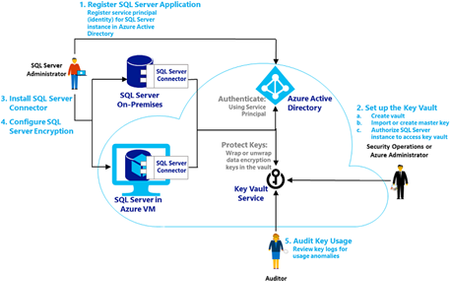
First published on MSDN on Apr 04, 2017 Recently many customers have been moving from AIX and HPUX to Windows 2016 & SQL Server 2016 running on Azure as these UNIX platforms are no longer mainstream, developed or invested by their vendorsMost of these customers are deploying TDE to protect the Database files and backups.Large Australian Energy Company Modernizes SAP Applications & Moves to Azure Public Cloud
First published on MSDN on Mar 27, 2017 This blog is a technical overview of a project recently completed by a large Australian Energy Company (the Company) over the past 12 months to transform the Company's SAP Solution from an End of Life HPUX/Oracle platform to a modern SQL Server 2016 solution running on the Azure Public Cloud.Lessons From a Recent Large Cloud Migration Project
First published on MSDN on Oct 27, 2016 IntroductionOver the last one year Microsoft has been working with various Global System Integrators to move larger global multi-national companies from an end of life proprietary UNIX platforms running Oracle or DB2 to Windows, SQL Server & Azure.Always On - Synchronize SAP login, jobs and objects
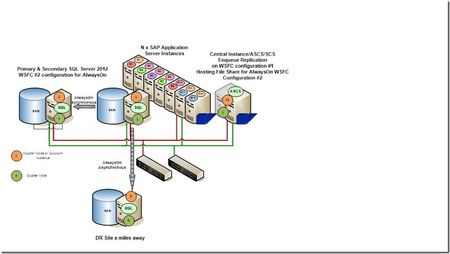
SQL Server AlwaysOn is one of the High Availability solutions available for an SAP system. It consists of two or more computers each hosting a SQL Server with a copy of the SAP database. A listener points to the actual primary copy and is used from the SAP system as the only connection point. For details how to setup and configure an SAP system together with SQL Server AlwaysOn see this blog post and its referenced blog posts. During the setup the SAP System is configured from the current primary node and all non-database related objects such as SQL Server Agent Jobs, logins etc. are created only on the current primary database. In a case of a (automatic) failover to one of the secondary nodes of AlwaysOn these objects are then missing. Jürgen has introduced a script (sap_helprevlogin) in his initial blog post about the database load after setting up AlwaysOn. This script will transfer only the logins, but will fall short on transferring jobs, server level permissions and other assignments. One of the SAP developers working in our team has built a comprehensive PowerShell script (sap_synchronize_always_on.ps1) to perform all these tasks and to transfer all the SAP objects from the initial installation to all the other nodes of the AlwaysOn system. The script connects to the primary instance, reads the configuration of the secondary nodes and then synchronizes the objects and jobs with these nodes. The script must be executed by a domain administrator which has SQL Server sysadmin privileges on all AlwaysOn instances. The script uses up to three input variables: The server name of the SQL Server instance or the listener name of the High-Availability group. The default is (local) The name of the SAP database, which must be in an High-Availability group on the given server Single login (optional): Only one login gets copied along with SAP CCMS jobs owned by the login. By default all logins mapped to the database are copied. The script will execute: Create a procedure CheckAccess in the master database (see this blog about the details about it) Discover which logins are mapped to the database Discover which SAP CCMS jobs belong to those logins If the job does not use CheckAccess then change the job step to use CheckAccess and run the job step in master Open a connection to each secondary and: Create procedure CheckAccess in the master database Create the logins if they don't exist already using the same sid. Create the jobs if they don't exist already. If a job exists and if the job does not CheckAccess then change the job step to use CheckAccess and run in master If new SAP CCMS jobs are added because of remote monitoring from a different SAP system using DBACOCKPIT, the script can be re-executed. It will then copy only new objects which have not been copied before. You can find this useful script attached, which makes the synchronization of the SAP Systems in an AlwaysOn environment so much easier. Please ensure that you test the execution in your test environment first, before you run it in production. Neither SAP nor Microsoft takes any responsibility from using this script, you run it on your own risk. Update January 2017: New script version that copies the sid<adm> and SAPService<SID> logins from the SAP System as well. Best regards | Bless! Clas & Guðmundur