aks
99 TopicsCreate an Azure OpenAI, LangChain, ChromaDB, and Chainlit chat app in AKS using Terraform
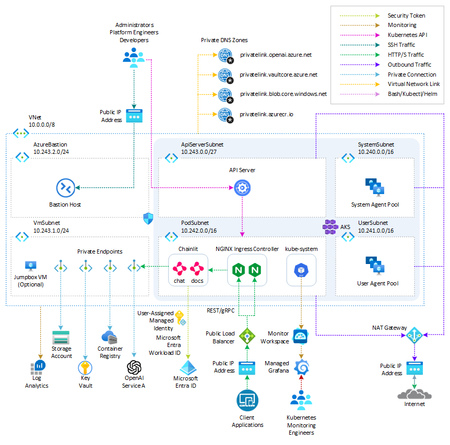
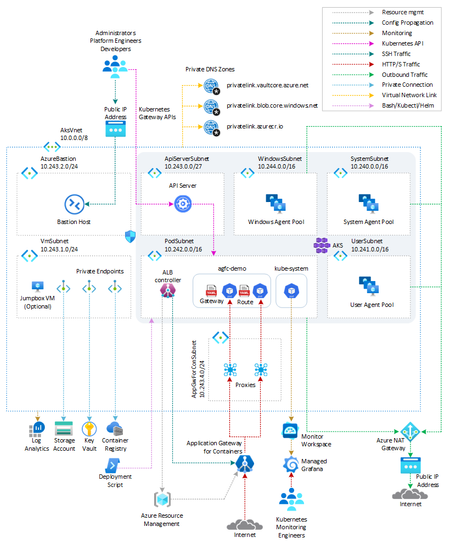
This sample shows how to create two AKS-hosted chat applications that use OpenAI, LangChain, ChromaDB, and Chainlit using Python and deploy them to an AKS environment built in Terraform.29KViews12likes4CommentsProvisioning Azure Database for MySQL - Single Server from AKS
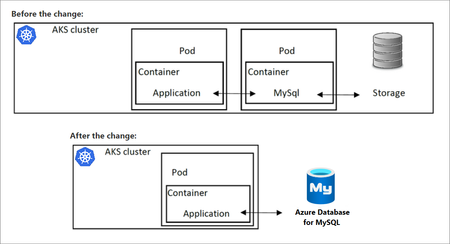
To gain the benefits of using a MySQL database in a Kubernetes application, a common strategy is to provision the database in a container running in a pod. In doing so, the database will use the cluster resources. Accessing the database from other pods in the same AKS cluster running client apps is possible via Kubernetes networking. However, if for some reason cluster resources become unavailable, both the application and the database will be unavailable, as both rely on cluster health. To address this issue, you can substitute the local database in AKS with Azure Database for MySQL, which will separate the database from the AKS cluster.14KViews9likes0CommentsAnnouncing: Microsoft moves $25 Billion in credit card transactions to Azure confidential computing
Microsoft is proud to showcase that customers in the financial sector can rely on public Azure to add confidentiality to provide secure and compliant payment solutions that meet or exceed industry standards. Microsoft is committed to hosting 100% of our payment services on Azure, just as we would expect our customers to do. Microsoft’s Commerce Financial Services (CFS) has completed a critical milestone by deploying a level 1 Payment Card Industry Data Security Standard (PCI-DSS) compliant credit card processing and vaulting solution, moving $25 Billion in annual credit card transactions to the public Azure cloud.Powering the next generation of Digital Transformation with Windows IoT and Azure Kubernetes Service
As edge computing becomes mainstream and a key strategy for enterprises to enhance their operations digitally, they require a reliable and comprehensive technology platform to fuel their ambitious goals. This platform needs to support a heterogenous device and cloud environment which enables running, deploying, and managing cloud-native applications. Microsoft is at the forefront of understanding evolving customer needs in this space and is providing solutions like Azure Kubernetes Service (AKS) Edge Essentials to run modern containerized applications on embedded devices running Windows operating systems. This blog explores the latest updates for these products and how they provide a rich platform for customers and partners to build intelligent, secure, cloud-native edge solutions with enterprise-grade security, reliability, and manageability.8KViews6likes1CommentCoreDNS in AKS: service discovery, upstream DNS, and failover
1. Where CoreDNS fits in AKS A pod can resolve another Kubernetes Service but fail to resolve a database name outside the cluster. CoreDNS can be running normally in both cases. That distinction matters because several problems can look like the same DNS outage: A cluster Service name fails. The namespace, Service record, or path from the pod to cluster DNS may be wrong. A name outside the cluster fails. CoreDNS may be reachable, but the upstream server or its network path may not be. A lookup eventually succeeds, but the application fails. The application may have stopped waiting before DNS returned an answer. CoreDNS is the default cluster DNS service in AKS. It runs as pods in kube-system, rather than as code inside your application or as a server hosted in the AKS control plane. It has two important jobs: Kubernetes service discovery: Answer names associated with Kubernetes resources, so workloads do not have to track changing addresses. Upstream forwarding: Send queries that require another DNS server to the configured upstream resolvers. Microsoft's AKS DNS concepts guide explains this architecture. The key operational lesson is simple: CoreDNS is part of the resolution path, but it is not the owner of every DNS answer. Who this is for: Platform engineers, application developers, and operations teams who want a practical understanding of CoreDNS in AKS. 2. How a pod gets a DNS answer For a typical pod using dnsPolicy: ClusterFirst, without a node-local DNS layer, the path looks like this: Application in a pod -> cluster DNS Service: kube-dns -> CoreDNS pod -> Kubernetes Service information: answer a cluster Service name -> upstream DNS server: forward a name handled outside the cluster -> DNS answer returns to the application The Service is still named kube-dns even when CoreDNS handles its traffic. That name does not mean the cluster is running the older kube-dns implementation. Kubernetes configures the pod's resolver settings, including its nameserver and search domains. For Linux containers, these are visible in /etc/resolv.conf. Cluster Service names Consider a regular ClusterIP Service named orders in the checkout namespace. With the cluster domain cluster.local, its full name is: orders.checkout.svc.cluster.local CoreDNS's kubernetes plugin uses Kubernetes resource information to answer that name with the Service's cluster IP. It does not need to ask a corporate or public DNS server for that Service record. The namespace matters. A pod in checkout may use the short name orders; a pod in another namespace normally needs orders.checkout or the full name. See Kubernetes DNS for Services and Pods for the naming rules. Names handled by another DNS server For a name outside its configured cluster zones, CoreDNS can use the forward plugin to contact another DNS server. That may be an Azure-provided resolver or a custom resolver, depending on the cluster's network and DNS configuration. Do not assume that every AKS cluster forwards to the same address or that two configured addresses always mean primary and backup. Inspect the effective CoreDNS configuration and the upstream resolver settings it references. Caching can also change the path. A valid cached answer may avoid an upstream query entirely. LocalDNS can change the first hop If AKS LocalDNS is enabled, the pod can contact a DNS proxy and cache on its node first. Cluster-domain queries are forwarded to CoreDNS, while other queries can go through CoreDNS or directly to an upstream, depending on the DNS policy and LocalDNS configuration. The diagram above is therefore a starting point, not a universal packet trace. Check whether LocalDNS is active before deciding which resolver to inspect. The AKS DNS concepts guide describes these alternate paths. 3. What AKS manages and what you can customize AKS manages the CoreDNS deployment and its main configuration. The Corefile, stored in the coredns ConfigMap, tells CoreDNS which plugins and forwarding rules to use. Three plugin responsibilities are useful to recognize: Plugin What it does kubernetes Answers DNS queries for configured Kubernetes zones using cluster resource information. forward Sends matching queries to upstream DNS servers. cache Reuses stored DNS responses when enabled and allowed by its configuration. An upstream failure affects queries that need that upstream. It does not automatically mean that normal Kubernetes Service records have become unavailable. For supported customization, AKS provides the coredns-custom ConfigMap. Microsoft documents custom entries with names ending in .server or .override, including domain-specific forwarding examples. Do not edit the managed main Corefile as a shortcut. A CoreDNS option being valid does not mean that every way of applying it is supported in AKS. For example, forwarding one private domain to designated resolvers is different from replacing the managed root forwarding behavior for the entire cluster. Follow the AKS CoreDNS customization guidance for the intended change. Also check the deployed image. The tests discussed here used CoreDNS 1.13.1. A setting shown in documentation for a newer CoreDNS release may not exist in that image. 4. How CoreDNS selects and checks upstream servers Once a query reaches the forward plugin, three separate decisions matter: which server to try, when to try another, and whether a server should be skipped on later queries. Selection policy chooses the starting server For CoreDNS 1.13.1: random chooses among eligible upstreams. It is the default when no policy is specified. round_robin rotates the initial choice. sequential tries upstreams in their configured order, preferring the first one not marked unhealthy. Here is an illustrative isolated-lab fragment, not a change to apply to AKS-managed CoreDNS. The addresses are placeholders: forward . <primary-dns-ip> <backup-dns-ip> { policy sequential failover SERVFAIL } policy sequential controls the order. failover SERVFAIL permits another upstream attempt when the response says the server could not complete the lookup. Those are different settings for different decisions. A missing reply and an error reply are different If packets are silently dropped, CoreDNS receives no answer and must wait for a timeout. If the server returns SERVFAIL, CoreDNS has received a DNS error response. By default, the forward plugin returns that SERVFAIL to the caller instead of trying another server. An explicit failover rule can change the handling of selected response codes. Protocol matters too. User Datagram Protocol (UDP) does not open a connection before sending the query. Transmission Control Protocol (TCP) does. In this release, the read timeout is two seconds. Opening a TCP connection has a separate timeout that starts at 30 seconds and can decrease toward one second based on recent connection times. There is no single timeout that describes every failure. These behaviors are documented in the CoreDNS 1.13.1 forward reference. Health checks change later selections The forward plugin starts upstream health checking after a network error. It does not continuously poll every untouched healthy upstream before any failure occurs. The documented default check interval is 0.5 seconds. That is not a promise that failover finishes in half a second: the triggering query may already be waiting for a timeout. max_fails controls how many failed health checks mark an upstream unhealthy. Its default is 2; the application-impact lab used 1 to make the change easier to observe. A DNS error response can still prove network reachability. Health checking therefore does not prove that an upstream can successfully resolve every name your application needs. Each CoreDNS process keeps its own upstream health state. Testing one replica does not establish the state of every replica, and restarting a resolver resets that state. The health-check guide and evidence distinguish source-backed behavior from measured, partial, and inconclusive cases. 5. What failure tests on AKS showed The run used Kubernetes v1.35.7 and image mcr.microsoft.com/oss/v2/kubernetes/coredns:v1.13.1-20. Tests ran against separate CoreDNS resolvers and controlled upstream servers in an isolated namespace. They did not inject faults into AKS-managed CoreDNS or validate every production DNS path, including LocalDNS. The test resolver used sequential selection and max_fails 1. Query times below are in milliseconds (ms). Test condition Recorded result First UDP query after silent primary packet loss Backup answer in 2,000 ms Independent one-second and two-second client timeouts Both clients received no response before timing out Five-second client timeout Backup answer in 2,000 ms Three later queries after the primary was marked unhealthy Backup answers, each displayed as 0 ms Primary returned SERVFAIL, with default handling SERVFAIL returned to the client Same error with failover SERVFAIL configured Successful answer from the backup First forced-TCP query with silent primary packet loss SERVFAIL, no address answer, after 30,000 ms Both test upstreams blocked No response before the five-second client timeout Five additional independent UDP failure cycles reached the backup in 2,000-2,004 ms on the first query. Their later queries took 0-4 ms. The result summary and raw query output retain the details. These are observations for one image and controlled failure conditions, not guaranteed AKS timings. A displayed 0 ms reflects the tool's timing precision, not zero latency. The practical lesson: an available CoreDNS pod, a reachable backup, and a successful application request are three different things. 6. Troubleshooting the right part of the DNS path Start by separating cluster Service resolution from upstream resolution. Then inspect the configuration before changing it. Prerequisites: PowerShell 7+, installed and authenticated kubectl, and permission to read CoreDNS Deployments, pods, Services, and ConfigMaps in the intended cluster. Check the context first and stop if it is not the correct cluster. The following commands are read-only. kubectl config current-context kubectl get deployment coredns -n kube-system ` -o jsonpath='{.spec.template.spec.containers[0].image}' kubectl get pods -n kube-system -l k8s-app=kube-dns kubectl get service kube-dns -n kube-system kubectl get configmap coredns -n kube-system -o yaml Use the findings to narrow the investigation: Only a cluster Service name fails: Check the Service name, namespace, and record type. Confirm that the Service exists and that the pod is using the expected cluster DNS path. Only names requiring an upstream fail: Check the matching forwarding rule, upstream reachability, and the upstream's ability to resolve that name. Only some pods fail: Compare their DNS policies, resolver settings, node-local DNS path, and network access. A successful query from another pod is useful, but not conclusive. The first query is slow and later queries are fast: Check upstream health state and caching. Do not assume the first result was an unrelated glitch. CoreDNS returns SERVFAIL: Identify whether it came from an upstream response or another failure. Do not assume it means packets were lost. Measure DNS latency with dig's Query time. The elapsed time of kubectl exec also includes Kubernetes API communication and process startup. Finally, look at the application. A reused connection may avoid DNS, a cached answer may hide an outage, and retries may increase load. A client can time out even if CoreDNS eventually finds an answer. The latest suite recorded 13 passing DNS and environment checks and five blocked application-specific cases. No representative application was supplied, so caching, connection reuse, retries, application telemetry, and service-level objective (SLO) impact were not established. A DNS test alone cannot prove the user's experience. 7. A repeatable way to validate CoreDNS behavior The CoreDNS repository folder organizes these questions into five detailed guides: Guide What to validate Selection policy Which upstream is tried first, and how the policy behaves during failure. Timeout behavior The difference between waiting for a reply, opening a connection, and the client's own timeout. Failover mechanism Network failures, DNS error responses, recovery, and all-upstream failure. Health checks How errors start checks and how health state affects later queries. Application and user impact Which DNS results are measured and which application effects still require a workload test. Each guide maps a question to named test cases, expected results, pass/fail criteria, and an Established evidence section. That section should tell you what happened, when it happened, and what the result does not prove. Prerequisites for fault testing: An authorized test cluster, PowerShell 7+, authenticated kubectl, permission to create and remove namespace-local test resources, and a network implementation that enforces the test NetworkPolicies. Review the selected guide's full setup and cleanup instructions before execution. Use an isolated test resolver. Do not change managed kube-system resources to reproduce an upstream failure. If another test namespace already exists and ownership is unclear, choose a unique namespace instead of deleting it. The published examples include the original lab context and paths beginning with 07-CoreDNS. A GitHub clone uses coredns. Adjust these values for your environment before running a suite. Cleanup is part of the test. In the current run, the unique test namespace was removed, all six base-lab Deployments remained Available, both managed CoreDNS replicas remained Available, and the managed Deployment resource version was unchanged. 8. Conclusion and next steps CoreDNS connects AKS workloads to both Kubernetes service discovery and the wider DNS environment. Understanding where a query is answered is the first step toward understanding why it failed. Start with the pod's DNS path. Inspect the CoreDNS version and configuration. Separate Service records from upstream queries. Then test selection, timeouts, health checks, and application behavior without changing managed cluster DNS. Understand the path before changing the policy. Validate the behavior before promising the outcome. Try it now Prerequisites: Git, PowerShell, network access to GitHub, and a working directory without an existing aks-stuff folder. No Azure permissions are needed to download the guides. These commands do not deploy resources or run failure tests. git clone https://github.com/jvargh/aks-stuff.git Set-Location .\aks-stuff Get-Content .\coredns\README.md Learn more CoreDNS guidance and test suites DNS concepts in AKS Supported CoreDNS customization in AKS Latest validation summary and recorded query output Connect and contribute Share a reproducible finding through the GitHub repository. Include the CoreDNS version, DNS path, test case, failure condition, client timeout, measured result, and cleanup outcome. Remove credentials, private addresses, and customer identifiers before sharing logs. Start here: github.com/jvargh/aks-stuff/tree/main/corednsSovereignty in Azure Belgium Central: A Three-Layer Technical Deep Dive
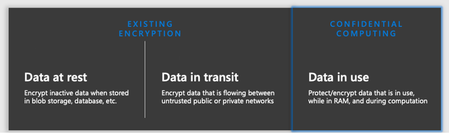
When Belgium Central went live in November 2025, it marked the launch of a new Azure region for Belgian organizations operating in the EU. For many scenarios, it enables customers to run workloads in-country and apply technical controls that can support sovereignty requirements. But "sovereignty" is one of those words that means different things to different people. So, let's break it down into something more tangible. In this post, we'll walk through sovereignty in Azure Belgium Central using three standardized technical layers. Think of them as concentric rings of protection around your data: Layer 1: Data Residency & Locality. Where your data physically lives and how it behaves during failure. Layer 2: Encryption at Rest & In Transit. How data is protected and who holds the keys. Layer 3: Confidential Computing. How data is protected while being processed in memory. Each layer builds on the previous one. Together, they form a comprehensive sovereignty posture. Let's find out what that looks like in practice. Layer 1: Data Residency & Locality This layer answers the most fundamental sovereignty question: where is my data, and does it stay there? In-Country Storage For regionally deployed Azure services, customer data at rest is stored in the selected Azure region. In Belgium Central, this means data at rest for supported services is stored in Belgium. Microsoft indicates the region’s datacenters are located in the Brussels area. When you deploy a resource with location = "belgiumcentral" in Terraform or location: 'belgiumcentral' in Bicep, you’re selecting that Azure region for the resource. This matters for organizations bound by Belgian or EU data residency requirements, and it matters for public sector customers who need assurance that sensitive data doesn't cross national borders without explicit action. Source: Microsoft Digital AmBEtion (microsoft.com/en-be) Three Availability Zones Belgium Central supports Availability Zones. Availability Zones are physically separate locations within an Azure region and are designed with independent power, cooling, and networking. This lets you deploy zone-redundant architectures (for example, spreading VMs, databases, and storage across zones) for high availability while keeping resources in the same Azure region. Availability Zones within a region are connected by high-bandwidth, low-latency networking designed to support zone-redundant services and architectures. Actual latency depends on workload placement and architecture and should be validated for your scenario. Source: The ABC of Azure Belgium Central (Microsoft Community Hub) Non-Paired Region: A Sovereignty Feature, Not a Limitation Azure Belgium Central is a non-paired region. For services that rely on region pairing for automatic geo-replication, behavior and options can differ from non-paired regions. Customers can configure cross-region disaster recovery explicitly and choose a target region based on their requirements. From a sovereignty perspective, some customers may prefer this model because cross-region replication and secondary data locations are customer-selected when configured. Replication and failover capabilities are service-specific, and customers should confirm the data residency and replication behavior for the services they use. Depending on the service and redundancy option, some geo-redundant features (for example, Geo-Redundant Storage (GRS) for Azure Storage) may not be available in non-paired regions. Many designs use Zone-Redundant Storage (ZRS) for in-region redundancy across Availability Zones. For cross-region replication, options such as object replication may be used where supported, with the destination region selected by the customer. Source: Azure region pairs and nonpaired regions (learn.microsoft.com) What This Means Architecturally When designing for Belgium Central, customers may consider: Intra-region redundancy via Availability Zones (for example, ZRS and zone-redundant deployments), where supported. Cross-region disaster recovery when explicitly configured, with a customer-chosen secondary region. Replication behavior that is service-dependent; customers should validate which services replicate within a region, across zones, or across regions, and what configuration is required. Layer 2: Encryption at Rest & In Transit Layer 1 keeps your data in Belgium. Layer 2 makes sure that even if someone gained physical access to the underlying infrastructure, they'd find nothing readable. Encryption at Rest: Platform-Managed by Default By default, all data stored at rest in Azure is encrypted to ensure security and compliance. Storage accounts, managed disks, databases: all use AES-256 encryption with Microsoft-managed keys out of the box. You don't have to configure anything to get this baseline protection. But for sovereignty scenarios, "Microsoft holds the keys" might not be enough. Data at rest is encrypted by default with platform managed keys but double encryption is possible with an extra layer of encryption with customer managed keys (CMK). Source: Double encryption in Azure (learn.microsoft.com) Customer-Managed Keys (CMK): You Hold the Keys Azure services in Belgium Central support Customer-Managed Keys (CMK) through Azure Key Vault. This shifts key ownership from Microsoft to you. You generate, rotate, and revoke keys on your own schedule. Azure services reference your key in Key Vault for encrypt/decrypt operations, but the key itself is under your control. This applies to a broad range of services: VM disk encryption, storage account encryption, Azure SQL Transparent Data Encryption, and more. But not all key storage is created equal. Azure offers three tiers of key management in Belgium Central, and the differences matter for sovereignty: Source: Azure encryption overview (learn.microsoft.com) Key Vault Standard: Software-Protected Keys The entry-level option. Keys are stored encrypted in software, protected by Microsoft's infrastructure, but not in dedicated HSM hardware. This is the entry-level option: software-protected keys stored in a vault, without dedicated HSM hardware. For many general-purpose workloads where regulatory demands don't mandate hardware key protection, Standard is cost-effective and fully functional for CMK scenarios. Key Vault Premium: HSM-Backed Keys (Multi-Tenant) Premium includes everything in Standard plus support for HSM-protected keys. When you create an HSM-backed key in a Premium vault, the key material lives inside Microsoft-managed Hardware Security Modules rather than in software. The HSM hardware is shared (multi-tenant, logically isolated per customer), but the key material is processed and stored within certified HSM devices. Microsoft documentation describes the compliance and validation posture of Key Vault and HSM-backed keys, including FIPS validation details that may vary by hardware generation, region, and service configuration. Customers should refer to the current product documentation and compliance listings for the specific SKU and region in scope. For many scenarios, Key Vault Premium provides HSM-backed key options in a multi-tenant service model and is priced differently than Key Vault Standard and Managed HSM. The right choice depends on regulatory requirements, operational model, and cost considerations. Managed HSM: Single-Tenant, Maximum Isolation For the highest level of key sovereignty, Azure Key Vault Managed HSM provides a single-tenant key management service backed by FIPS 140-3 Level 3 validated hardware. Unlike Key Vault Premium (where HSM-backed keys share a multi-tenant HSM infrastructure), a Managed HSM pool gives you a dedicated, cryptographically isolated HSM environment with your own security domain. Key facts about Managed HSM that matter for sovereignty: Compliance / validation: Managed HSM uses dedicated hardware security modules. Refer to current Microsoft documentation for FIPS validation level and applicability for your region and SKU. Regional deployment: Managed HSM is deployed to an Azure region. Customers should validate data residency and any service-specific data handling behavior for their workload and compliance needs. Security domain: Customers download and control the security domain (a cryptographic backup of HSM credentials), protected using customer-controlled keys. See product documentation for the shared responsibility model and operational details. Access control: Managed HSM provides role-based access controls for key operations. Customers should review the authorization model and administrative boundaries described in the documentation. Managed HSM has a different pricing and operational model than Key Vault (for example, pool-based billing and additional operational steps). It is typically considered when requirements call for dedicated HSM resources, security domain control, or specific compliance needs beyond a shared HSM service model. Choosing the Right Tier Managed HSM is typically considered when requirements call for dedicated HSM resources, security domain control, or administrative separation beyond a shared HSM service model. Key Vault Standard can be a fit for development/test or scenarios where software-protected keys meet your requirements. Key Vault and Managed HSM capabilities are available in Azure Belgium Central, but customers should verify current product, SKU, and service availability by region and validate service-specific data residency behavior for their workload. Source: Azure Key Vault Managed HSM overview (learn.microsoft.com), Managed HSM technical details (learn.microsoft.com), About keys (learn.microsoft.com) Encryption in Transit: MACsec + TLS On the wire, Azure provides two layers of transit encryption: IEEE 802.1AE MACsec. our documentation describes the use of MACsec on portions of the Azure backbone for in-network encryption on supported links. Availability and coverage can vary by scenario; customers should refer to current documentation for details. TLS. Azure services support TLS for client-to-service connections. Supported TLS versions and configuration requirements vary by service; customers should validate the specific service and endpoint configuration they use. Together, these mechanisms help protect data in transit at different layers, depending on the service and network path used. Layer 2 Summary Concern Mechanism Key Detail Data at rest (default) AES-256, platform-managed keys Automatic, no config needed CMK: software keys Key Vault Standard FIPS 140-2 L1, multi-tenant, lowest cost CMK: HSM-backed keys Key Vault Premium FIPS 140-3 L3 (new hardware), multi-tenant CMK: dedicated HSM Managed HSM FIPS 140-3 L3, single-tenant, security domain Data in transit (infra) MACsec (IEEE 802.1AE) Coverage varies by link/scenario; refer to current documentation Data in transit (client) TLS 1.2+ Supported versions vary by service and configuration Trusted Launch and protection of data at rest Trusted Launch is a security feature available for Azure Virtual Machines that helps protect against advanced threats such as rootkits and bootkits. It enables secure boot and virtual Trusted Platform Module (vTPM) on supported VM sizes, ensuring that only signed and verified operating system binaries are loaded during startup. This provides enhanced integrity for the boot process and helps organizations meet compliance requirements for workloads running in the cloud. By leveraging Trusted Launch, customers can monitor and attest to the health of their VMs at boot time, making it easier to detect and respond to potential tampering or compromise. The combination of secure boot and vTPM strengthens the security posture of Azure VMs, offering greater protection for sensitive workloads. Additionally, Trusted Launch strengthens data‑at‑rest protection by isolating encryption keys in a platform‑managed vTPM, binding key release to verified boot integrity, and preventing offline or unauthorized reuse of encrypted disks, even by privileged administrators. Source: Trusted Launch for Azure virtual machines Layer 3: Confidential Computing Layers 1 and 2 protect data where it lives and while it moves. Layer 3 closes the final gap: protecting data while it's being processed in memory. This is the domain of Azure Confidential Computing, and it's where things get genuinely interesting from a sovereignty perspective. Azure Confidential Computing is designed to help reduce certain operator-access risks by using hardware-backed isolation for data while it is being processed in memory. Confidential Virtual Machines Azure Confidential VMs use specialized hardware to create a Trusted Execution Environment (TEE) at the VM level. Two technology families are available: AMD SEV-SNP (DCasv6 / DCadsv6 / ECasv6 / ECadsv6 series) These VMs use AMD's Secure Encrypted Virtualization with Secure Nested Paging. The key properties: The VM's memory is encrypted with keys generated by the AMD processor. These keys are designed to remain within the CPU boundary. The platform is designed to help protect VM memory and state from access by the hypervisor and host management code. Supports Confidential OS disk encryption with either platform-managed keys (PMK) or customer-managed keys (CMK), binding encryption to the VM's virtual TPM on supported configurations. Each VM uses a virtual TPM (vTPM) for key sealing and integrity measurement. Intel TDX (DCesv6 / DCedsv6 series) These VMs use Intel Trust Domain Extensions, which provides full VM memory encryption and integrity protection: The entire VM runs inside a hardware-isolated Trust Domain (TD), designed to help protect data in memory from the hypervisor and host management code. Memory encryption and integrity are enforced by the Intel CPU using dedicated encryption keys per TD. Supports Confidential OS disk encryption (PMK/CMK) and vTPM integration on supported configurations. Additional performance characteristics and hardware details vary by VM size and generation; refer to the current VM size documentation for specifics. The AMD SEV-SNP VM families are currently available in Preview in Azure Belgium Central, with GA planned. The Intel SKU is not currently available in Azure Belgium Central. Source: About Azure confidential VMs (learn.microsoft.com), DC family VM sizes (learn.microsoft.com), Intel TDX confidential VMs GA announcement (techcommunity.microsoft.com) Azure Attestation: Trust, but Verify Confidential computing isn't just about encryption. It's about verifiable trust. Azure Attestation is a free service that validates the integrity of the hardware and firmware environment before your workload runs. Here's how platform attestation works for AMD SEV-SNP and Intel TDX Confidential VMs: When a confidential VM boots, the hardware generates an attestation report containing firmware and platform measurements (an SNP report for AMD, a TDX quote for Intel). Azure Attestation evaluates this report against expected values. Only if the platform passes attestation are decryption keys released from your Key Vault or Managed HSM. These keys unlock the vTPM state and the encrypted OS disk, and the VM starts. If the platform does not meet the attestation policy, key release can be blocked and the VM may not start, depending on configuration. In addition to platform attestation, customers can perform guest-initiated attestation from within the CVM to independently verify the VM's measured hardware and runtime state. This allows applications running inside a confidential VM to obtain an attestation token at runtime, which they can present to relying parties (like a key vault or external service) to prove they are executing in a genuine TEE. This can help reduce reliance on implicit trust by providing cryptographic evidence about the environment at boot and, where implemented, at runtime. Azure Attestation availability is region-dependent; customers should verify current availability in Belgium Central and select the appropriate provider configuration for their scenario. Source: Azure Attestation overview (learn.microsoft.com), Attestation types and scenarios (learn.microsoft.com) Confidential Computing on AKS For containerized workloads, Azure Kubernetes Service supports confidential computing through confidential node pools. You can add node pools backed by confidential VMs alongside regular node pools in the same cluster. You can add AKS node pools using supported confidential VM sizes. In this model, the worker node runs as a confidential VM, so the node’s memory is hardware-protected from the host and hypervisor. Containers scheduled onto that node can run without application refactoring, but the added protection is at the VM/node level. Exact region and SKU availability should be validated for the sizes you plan to deploy. AKS support for confidential VM sizes today includes AMD SEV-SNP with Intel TDX on the roadmap; customers should validate region and SKU availability for the exact AKS node pool sizes they intend to use. Azure Attestation can be integrated into confidential computing architectures on AKS to verify the trust state of nodes or workloads before secrets are released. This is typically implemented at the workload or confidential container level and is not enforced automatically for all AKS pods. Source: Confidential VM node pools on AKS (learn.microsoft.com), Use CVM in AKS (learn.microsoft.com) The Full Data Protection Chain When you combine all three layers, the protection chain when using confidential VMs in Belgium Central looks like this: [Confidential VM boots] → Hardware TEE encrypts VM memory (SEV-SNP or TDX, CPU-generated keys) → Azure Attestation validates platform report (SNP report or TDX quote) → Key Vault (Premium) or Managed HSM conditionally releases disk decryption keys → vTPM state unlocked → OS disk decrypted → VM starts → Data in memory: encrypted and isolated by hardware TEE (Layer 3 – Confidential Compute) → Data at rest: encrypted by CMK from Key Vault / Managed HSM (Layer 2 – Encryption) → Data in transit: protected using TLS (and MACsec on selected Azure backbone links) (Layer 2 – Encryption) → Data stored and processed in Belgium Central where supported and as configured (Layer 1 – Data Residency) These controls are designed to reduce operator-access risk through hardware-backed isolation, attestation, and customer-controlled key options. The exact protection level depends on the selected service, SKU, region, and configuration Bringing It All Together Here's the sovereignty stack for Azure Belgium Central in one view: Layer What It Protects Key Technologies Availability in Belgium Central 1: Data Residency Where data lives 3 AZs, non-paired region, ZRS GA. No cross-border replication by default. 2: Encryption Data at rest + in transit CMK, Key Vault (Std/Premium), Managed HSM, MACsec, TLS GA. All three Key Vault tiers available in-region. 3: Confidential Computing Data in use (memory) SEV-SNP / TDX VMs, Attestation, AKS Availability varies by SKU and region. Confirm confidential VM options (AMD/Intel), attestation, and AKS confidential node support for Belgium Central for the exact sizes you plan to use. Each layer is independently valuable, but the combination can help customers implement stronger technical controls for data residency, encryption, and in-use protection—subject to the specific services, SKUs, regions, and configurations selected. A Few Honest Caveats Because I want to keep this honest and useful: Check regional availability for specific SKUs. Availability can vary by region and can change over time. Before finalizing an architecture, confirm that the exact services and SKUs you plan to use are available in Azure Belgium Central (for example, specific confidential VM sizes, Azure Attestation, Managed HSM, and AKS node pool sizes) using the Azure products-by-region information. Sovereignty is not just technical. The layers above cover technical sovereignty, where data is, who encrypts it, and who can access it in memory. Legal sovereignty (jurisdiction, government access requests, contractual commitments) is a separate conversation. Managed HSM has different pricing and operational characteristics. Managed HSM uses pool-based billing and may require additional operational steps compared to Key Vault. Key Vault Premium supports HSM-backed keys in a multi-tenant model, which may be sufficient for many CMK scenarios. Select the option that meets your compliance and operational requirements. Confidential VM capabilities and integrations vary by VM size, generation, and feature. Some scenarios and integrations (for example, certain backup/DR options, live migration behaviors, accelerated networking, or resize paths) may be limited for specific confidential VM offerings. Validate the current limitations and supported features for the exact confidential VM series and region you plan to use, and plan DR based on the services and mechanisms supported for your scenario. These limitations are being actively worked on. Disclosure: Disaster recovery (DR) design and configuration remain a customer responsibility, including selecting a secondary region and implementing replication, failover, testing, and operational runbooks. Azure service availability and specific features can vary by region, SKU, and deployment model, and may change over time. Replication scope and behavior (in-zone, zone-redundant, regional, or cross-region) are service-specific and depend on the redundancy option selected; validate the data residency and replication details for each service in your architecture. References Microsoft Digital AmBEtion (microsoft.com/en-be) The ABC of Azure Belgium Central (Microsoft Community Hub) Azure region pairs and nonpaired regions (learn.microsoft.com) Azure encryption overview (learn.microsoft.com) Double encryption in Azure (learn.microsoft.com) Azure Key Vault Managed HSM overview (learn.microsoft.com) Managed HSM technical details (learn.microsoft.com) About keys (learn.microsoft.com) About Azure confidential VMs (learn.microsoft.com) DC family VM sizes (learn.microsoft.com) Confidential VM FAQ (learn.microsoft.com) Intel TDX confidential VMs GA announcement (techcommunity.microsoft.com) Confidential VM node pools on AKS (learn.microsoft.com) Use CVM in AKS (learn.microsoft.com) Azure Attestation overview (learn.microsoft.com) Attestation types and scenarios (learn.microsoft.com) Azure products by region (azure.microsoft.com) Trusted Launch for Azure virtual machines (learn.microsoft.com)1.1KViews4likes0Comments