aks arc
3 TopicsRegional Endpoints for Azure Container Registry Geo-Replication — Now in Public Preview
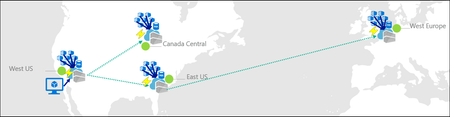
By Johnson Shi, Zoey (Zhuyu) Li, Huangli Wu What's new Regional endpoints for geo-replicated Azure Container Registries are now in public preview. See the feature's official MS Learn documentation. If you've been following since the private preview announcement, here's what changed: No feature flag registration. No subscription enrollment so all Azure subscriptions and customers can now use this feature. No CLI extension. Regional endpoints commands are built into Azure CLI 2.86.0+ natively. If you installed the private preview acrregionalendpoint extension, uninstall it to avoid conflicts. Native CLI and portal support. With Azure CLI 2.86.0+, enable regional endpoints for all geo-replicas of a registry with az acr create --regional-endpoints enabled or az acr update --regional-endpoints enabled . The Azure portal also supports configuring regional endpoints natively. CLI flag rename for configuring a geo-replica's global endpoint routing (an existing separate feature). The existing flag --region-endpoint-enabled (on az acr replication create/update ) has been renamed to --global-endpoint-routing . Key clarifications: "--global-endpoint-routing" (formerly "--region-endpoint-enabled" on "az acr replication create / az acr replication update") — controls whether a specific geo-replica participates in global endpoint routing. This is an existing feature that is different from the new registry-level "--regional-endpoints" feature being discussed in this post. "--regional-endpoints" (on az "acr create / az acr update") — enables or disables the regional endpoints feature at the registry level for all geo-replicas. This is the feature discussed in this post. See the endpoint reference for the full breakdown of the various registry endpoints (global endpoints, regional endpoints, and data endpoints). Regional endpoints are available on Premium SKU registries in all Azure public cloud regions. What are regional endpoints? Regional endpoints give you dedicated, per-region login server URLs for each geo-replica with the following URL pattern: myregistry.eastus.geo.azurecr.io myregistry.westeurope.geo.azurecr.io Regional endpoints coexist with the registry's global endpoint ( myregistry.azurecr.io ) — enabling regional endpoints doesn't disable a registry's global endpoint that is backed by Azure-managed routing. You can choose per workload: You can use the global endpoint with automatic Azure-managed routing with health-aware failover, where Azure will route your requests to the geo-replica with the best network performance profile to the client. You can use a regional endpoint when you need explicit control or routing to a specific geo-replica. Other resources: For the full background on why regional endpoints exist and the problems they solve, see the private preview blog post. For the complete operational deep dive — health-aware failover, throttling considerations, storage quota and pricing, eventual consistency, home region outage behavior, DNS propagation, private endpoint interaction, capacity planning, and monitoring guidance — see How ACR geo-replication handles failover, failback, and traffic redirection. For the behind-the-scenes engineering implementation — architectural overview and the engineering system design of the feature — see Determinism over magic: the engineering design behind Azure Container Registry Regional Endpoints. Getting started Enable regional endpoints on an existing registry: az acr update -n myregistry -g myrg --regional-endpoints enabled View all registry endpoint URLs, including the registry global endpoint, geo-replica regional endpoints, and data endpoints: az acr show-endpoints --name myregistry --resource-group myrg Using regional endpoints Authenticate to a specific regional endpoint: az acr login --name myregistry --endpoint eastus Push to a specific geo-replica. Images and tags pushed to a geo-replica via regional endpoints still propagate to all other geo-replicas under eventual consistency. docker tag myapp:v1 myregistry.eastus.geo.azurecr.io/myapp:v1 docker push myregistry.eastus.geo.azurecr.io/myapp:v1 Pull an image: docker pull myregistry.eastus.geo.azurecr.io/myapp:v1 You can specify regional endpoints directly in Kubernetes deployment manifests if you need to pin workloads to specific regions. This ensures clusters in specific regions always pull from their colocated replica, providing predictable routing and reduced latency. By using different regional endpoints in each cluster's manifests, you can choose to guarantee that each cluster pulls from its local replica instead of relying on Azure-managed routing. East US cluster deployment: apiVersion: apps/v1 kind: Deployment metadata: name: myapp-eastus spec: template: spec: containers: - name: myapp image: myregistry.eastus.geo.azurecr.io/myapp:v1 West Europe cluster deployment: apiVersion: apps/v1 kind: Deployment metadata: name: myapp-westeurope spec: template: spec: containers: - name: myapp image: myregistry.westeurope.geo.azurecr.io/myapp:v1 When to use regional endpoints Scenario What to do Most workloads Keep using the global endpoint ( myregistry.azurecr.io ). Health-aware failover handles routing automatically. Pin AKS clusters to co-located replicas Use regional endpoint URLs in deployment manifests. CI/CD push-then-pull consistency Pin pushes to a regional endpoint to avoid eventual-consistency races. Client-side failover Switch between regional endpoints based on your own health checks. Capacity planning Spread workloads across multiple regional endpoints to avoid per-replica throttling. Troubleshooting Target a specific geo-replica to reproduce or isolate an issue. What changed from private preview Private preview Public preview Feature flag registration required ( az feature register ) No registration needed Subscription private preview enrollment and propagation wait Immediately available to all Azure subscriptions for all Premium SKU registries in all Azure public cloud regions. Separate CLI extension ( acrregionalendpoint ) Built into Azure CLI 2.86.0+ natively No registry-level CLI flag az acr update --regional-endpoints enabled enables regional endpoints for all geo-replicas --region-endpoint-enabled flag for controlling a geo-replica's global endpoint routing via az acr replication update Flag for controlling a geo-replica's global endpoint routing renamed to --global-endpoint-routing No portal support Native Azure portal support for enabling regional endpoints for new registries (during creation) and for existing registries Private preview docs in Azure/acr Full documentation on MS Learn Enabling regional endpoints in the Azure portal You can enable regional endpoints directly from the Azure portal for both new registries (during creation), as well as existing registries: If you were in the private preview 1. Uninstall the CLI extension. The private preview CLI extension conflicts with the built-in commands in Azure CLI 2.86.0+. Remove it: az extension remove --name acrregionalendpoint Verify it's gone: az extension list --query "[?name=='acrregionalendpoint']" -o table 2. Ensure you're running Azure CLI 2.86.0 or later. Regional endpoints commands are available natively starting in Azure CLI 2.86.0. Check your version: az version 3. Update scripts that use --region-endpoint-enabled for controlling global endpoint routing for a geo-replica. The old flag name for controlling a geo-replica's global endpoint routing configuration is deprecated and will be removed in Azure CLI 2.87.0 (June 2026). Update to --global-endpoint-routing : # Old (deprecated) az acr replication update --registry myregistry --name westus \ --region-endpoint-enabled false # New az acr replication update --registry myregistry --name westus \ --global-endpoint-routing false Why the rename? The old flag name --region-endpoint-enabled was confusing — it sounded like it controlled the regional endpoints feature, but it actually controlled whether a geo-replica participates in global endpoint routing. The new name --global-endpoint-routing says exactly what it does. For a full breakdown of all three CLI flags and how they relate, see the endpoint reference. Learn more Full documentation: Geo-replication in Azure Container Registry — Regional endpoints — prerequisites, CLI commands, network considerations, private endpoint integration, and troubleshooting. Operational deep dive: How ACR geo-replication handles failover, failback, and traffic redirection — health-aware failover, throttling, eventual consistency, DNS considerations, monitoring, pricing, and a full walkthrough. Behind-the-scenes engineering implementation: Determinism over magic: the engineering design behind Azure Container Registry Regional Endpoints — architectural details and the engineering system design behind the feature. Endpoint reference: Azure Container Registry endpoint reference — all endpoint types, URL formats, and CLI flags in one place. Private endpoints: Connect privately to a registry using private endpoints — IP allocation math, subnet sizing, and NIC queries for registries with regional endpoints. Firewall rules: Configure firewall access rules — which FQDNs to allow for regional endpoints. Feedback We'd love to hear how you're using regional endpoints and what we can improve. Reach out via: Azure Container Registry GitHub repository — issues, feature requests, and discussion Azure portal feedback — use the feedback button in the Azure portal on your registry's page Regional endpoints are on the path to GA. Your feedback directly shapes the feature's direction.100Views1like1Comment
Windows Server 2019 Retirement on AKS enabled by Azure Arc
Action Required: Migrate to Windows Server 2022 by April 2026 As previously announced, Microsoft is retiring Windows Server 2019 support on Azure Kubernetes Service (AKS) enabled by Azure Arc (formerly AKS Hybrid on Azure Local releases after April 1, 2026. If you're running Windows Server 2019 workloads, you must migrate to Windows Server 2022 to maintain support, security updates, and the ability to upgrade Kubernetes versions. Migration Approach You cannot upgrade Windows node pools in place. The migration process requires: Creating new Windows Server 2022 node pools Updating and rebuilding container images with WS2022 base images Migrating workloads to the new pools Decommissioning old Windows Server 2019 pools Make sure to allocate 2-4 weeks for testing, and plan to complete production migration by March 2026. Key Milestones Milestone Date Details Windows Server 2019 Support Ends Post April 1, 2026 No support or security updates after this date Windows Server 2019 Retirement Post April 1, 2026 In new releases cannot create new node pools with WS2019 Default Image Changes to WS2022 Early 2026 New deployments default to Windows Server 2022 Why Is This Happening? End of Mainstream Support: Windows Server 2019 mainstream support ended on January 9, 2024. Simplified Experience: Starting early 2026, Windows Server 2022 will be the default OS SKU, providing a seamless experience for new deployments. What Happens After Retirement? Immediate Impact on Your Clusters Starting April 1, 2026, clusters still running Windows Server 2019 node pools will face the following restrictions: Kubernetes Upgrade Blocking: Attempting to upgrade to Kubernetes versions (with Windows Server 2019 node pools) will be blocked Error message: "Windows Server 2019 images not available for the selected Kubernetes version. Please re-create your Windows node pool with a supported OS SKU" Node Pool Creation Restrictions: Cannot create new Windows node pools with Windows Server 2019 OS SKU Loss of Support: Support cases opened for clusters with Windows Server 2019 will require upgrade before assistance No security patches or updates will be available Clusters will be considered out of compliance Default Image Transition (Early 2026) Starting in early 2026, Windows Server 2022 will become the default OS SKU for all new Windows node pool deployments created on the clusters on the latest Azure Local releases. This change ensures new deployments automatically use the supported OS version, reducing the risk of accidentally deploying deprecated images. Getting Started For detailed step-by-step instructions, see our Migration How-to Guide, which includes: Commands to identify affected clusters Container image update procedures Node pool creation and workload migration steps Validation and troubleshooting guidance Frequently Asked Questions General Questions Q: What happens if I don't upgrade before the retirement date? A: After April 2026, your clusters running Windows Server 2019 will lose support. You will be required to upgrade before receiving any assistance from Microsoft support. Your clusters will also be unable to upgrade to Kubernetes versions, potentially leaving them on unsupported Kubernetes releases. Q: Can I upgrade my Windows node pools in place? A: No. Windows node pools cannot be upgraded in place. You must create new node pools with Windows Server 2022, migrate your workloads, and then decommission the old node pools. Q: Will my existing container images work on Windows Server 2022? A: Most Windows Server 2019 container images will work on Windows Server 2022 hosts. However, we recommend rebuilding your images on the Windows Server 2022 base for optimal performance, security, and compatibility. Q: Can I upgrade my Kubernetes version with Windows Server 2019 node pools still running? A: No. Upgrades to Kubernetes versions will be blocked if you have any Windows Server 2019 node pools in your cluster. You must migrate to Windows Server 2022 first. Migration Questions Q: How long does a typical migration take? A: Migration time varies based on the number of applications, complexity, and data volume. Simple applications may migrate in hours, while complex environments may take days or weeks. Plan for adequate testing time. Q: Can I run Windows Server 2019 and Windows Server 2022 node pools in the same cluster? A: Yes, during the migration period you can have node pools with different OS SKUs in the same cluster. This enables gradual migration and testing. Q: Will there be any downtime during migration? A: Downtime depends on your migration strategy. For stateless applications using rolling updates, downtime can be minimal or zero. Stateful applications may require planned maintenance windows. Additional Resources: AKS enabled by Azure Arc Overview Windows Container Upgrade Guide Original Retirement Announcement603Views1like0Comments