aifoundtry
3 TopicsToken Limit Exceeded? What's Actually Going On and What to Do About It ?
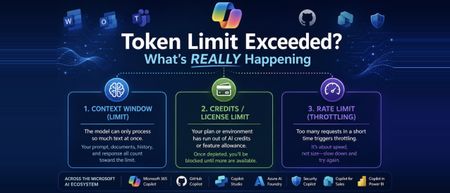
Hi All, Based on some recent experience across the organisation with token limit issues, I wanted to put my thoughts down and actually dig into what's happening under the hood, rather than just chalking it up to "we need a bigger plan." If you work anywhere near the Microsoft ecosystem these days, you're probably touching more AI tools than you realize. Copilot in Word and Excel, GitHub Copilot while you code, Copilot Studio if you're building agents, maybe Security Copilot or Copilot for Sales depending on your role, and increasingly Azure AI Foundry if your team is building anything custom. I work across a good chunk of this stack day to day, and at some point, almost everyone runs into the same wall: "Token limit exceeded." "You've reached your usage limit." "Upgrade to continue." The first instinct is usually to assume you did something wrong wrote too much, uploaded too big a file, or just need a fatter subscription. Sometimes that's the actual story. But honestly, often, that error message is standing in for three completely different problems that all happen to look identical from the outside. One is about how much text a model can physically process at once. One is about your license or credits running dry. And one has nothing to do with size at all it's just about how fast you're sending requests. Once you know which of these three, you're dealing with, the fix becomes obvious. Until then, "upgrade your plan" feels like the only lever you've got even when it isn't. This post walks through what a token is, why Microsoft's various Copilots each handle this differently, and what habits genuinely cut down on these interruptions instead of just throwing money at the problem. Part 1: So What Is a Token, Really? A token isn't a word, and it isn't a character it's somewhere in between. It's the small chunk of text a model's tokenizer breaks your input into before it can do anything with it. Take a word like "unbelievable." A tokenizer might split it into three pieces something like "un," "believ," and "able." Short, everyday words usually come out as a single token. But code, technical jargon, acronyms, and non-English text tend to fragment into a lot more tokens than you'd guess just by looking at the word count. This is why every AI tool has a ceiling on how much it can handle in one go, and that ceiling isn't measured in words or characters it's measured in tokens. Your prompt, any documents or emails it pulls in as context, the back-and-forth history of your conversation, and the response itself all draw from the same pool. Once that pool runs dry, something has to give: the tool truncates, rejects the request outright, or quietly summarizes older context to make room. The part that trips people up: token count doesn't map cleanly to word count. A short, dense paragraph full of code or acronyms can eat up more tokens than a much longer plain-English message. Part 2: Three Different Limits, One Confusing Error Message This isn't always obvious upfront, even to a lot of admins managing these tools: "token limit exceeded" is really a stand-in phrase for three separate limits, and they don't behave the same way. This isn't unique to Microsoft either every major AI platform bundles these same three things behind similarly vague error messages. Microsoft's stack just makes a good case study because so many of us touch multiple pieces of it in the same week. The context window is the ceiling on how much text a specific model can process in a single request everything from your prompt to retrieved documents to chat history. This is tied to the model itself, not your subscription. Swap from one model to another inside the same tool, and this ceiling can move without you doing anything differently. Your license, credits, or feature allowance is a completely separate thing. This is what Microsoft 365 Copilot plans track through AI credits and feature limits, and it's what Copilot Studio measures through Copilot credits at the environment level. A single action summarizing an inbox, generating an agent response, running an analysis deducts from this pool regardless of how small your actual prompt felt. Run out, and you get blocked, even if you're nowhere near any context window limit. The rate limit is about speed, not size. Copilot Studio, for instance, enforces quotas measured in requests per minute or per hour to keep the system stable under load. Send messages too quickly, which happens easily with automations, flows, or bots, and you can get throttled even with a tiny prompt and plenty of credits left. The reason this matters: a plan upgrade only ever fixes the second one. If you're actually running into the model's context window or getting rate-limited, paying for a bigger license won't change anything, and that mismatch is exactly where most of the frustration comes from. Part 3: How This Plays Out Across the Microsoft AI Stack The Microsoft ecosystem isn't one AI tool wearing different outfits it's genuinely several different systems, each handling tokens and limits in its own way. Here's a tour of the ones people run into most. Microsoft 365 Copilot (the one living inside Word, Excel, Outlook, Teams) doesn't work off a single published token number the way a developer tool would. Instead, it dynamically pulls together your prompt, recent chat history, and relevant snippets retrieved from Microsoft Graph your files, emails, and messages and quietly summarizes or drops older material to stay within bounds. Where this usually breaks isn't the context window at all; it's the AI credit and feature-limit system running out, often without much warning until you're mid-task. GitHub Copilot Chat is more like a traditional developer tool. It has a fixed, published token window tied to whichever model you've selected, and that limit applies consistently whether you're in the browser, VS Code, or the CLI. The failure mode here is usually a long conversation or a big multi-file context quietly creeping past that ceiling. Copilot Studio, where a lot of custom agent-building happens, runs on Copilot credits per interaction, plus its own requests-per-minute and requests-per-hour quotas at the environment level. If you're grounding an agent in SharePoint content, there's also a separate file-size ceiling to watch content over a certain size can get silently excluded from generative answers depending on your tenant's licensing. Azure AI Foundry (recently renamed to Microsoft Foundry, in case you've seen both names floating around) is where this gets more directly in your control. If your team is building custom applications on top of Azure OpenAI or other models in the Foundry catalog, which now includes everything from GPT to Phi to Claude to Llama, you're working with explicit, published context windows per model, and you're billed per token rather than per credit. It's a different mental model entirely: less "you hit a wall," more "you're paying by the word, so design accordingly." Security Copilot, if your org uses it for threat analysis and incident response, runs on its own capacity model pooled compute units at the tenant level rather than a simple per-user cap. It's easy to assume this behaves like M365 Copilot license limits; it doesn't. Copilot for Sales, embedded in Outlook and Teams for CRM-connected work, and Copilot in Power BI, which now goes beyond generating summaries to actually helping build and refine semantic models, both draw from their own feature-specific allowances layered on top of whatever base Microsoft 365 or Power Platform license you're on. And then there's the multi-model wrinkle that trips up teams the most: because tools like Copilot Studio and GitHub Copilot let you choose between GPT-based models, Claude, and others, the exact same prompt can have a different effective context window and a different token cost purely based on which model handled it that day. This is a big, underrated reason behind the "it worked fine yesterday, why not now" complaint. Part 4: What Actually Helps ? Some of this is genuinely outside your control, but a fair amount isn't. If you're just using these tools day to day, the single biggest habit shift is not letting conversations run forever. Long threads in Copilot Chat or Copilot Studio keep accumulating history, and that history eats into the same budget as whatever you're asking right now. Starting fresh periodically costs you nothing and buys back a lot of headroom. Large documents are worth splitting up before you feed them in, especially for SharePoint-grounded agents, where oversized files can get quietly excluded rather than cleanly rejected you won't necessarily know it happened unless you're looking for it. And it's worth resisting the urge to default to the heaviest, most capable model for every single task. Lighter models are usually faster, cheaper, and often sit under a more generous limit than the flagship ones, and most everyday tasks genuinely don't need the biggest model available. Before you go asking IT for a license upgrade, it's worth a quick sanity check on which limit you actually hit. If it's a rate limit, waiting a minute and retrying usually solves it outright. If it's a context window problem, trimming your prompt or starting a new session fixes it. An upgrade only helps if you've genuinely run out of credits or feature allowance, and that's worth confirming before you file the request. If you're on the building side Copilot Studio agents, Foundry applications, anything with RAG-style grounding a couple of things pay off quickly. Keep an eye on credit or token consumption proactively rather than discovering it's gone when the agent goes down mid-conversation. Be deliberate about what goes into system prompts and orchestration instructions, since those draw from the same budget as the end user's actual message, often invisibly to whoever's chatting with the agent. And spend real time getting chunk size right for knowledge sources too large and you're burning budget on irrelevant context, too small and the agent loses the thread. Part 5: Quick Checklist Before You Escalate Is this actually a context window problem -prompt, history, and attachments too big for the model in use? Have you genuinely run out of credits or feature allowance on your plan? Could this be a rate limit -too many requests too fast, especially from a flow or automation? Did the underlying model change since last time, quietly shifting the effective window? For Studio or Foundry work, is this a tenant or environment-level limit rather than something tied to you personally? Closing Thoughts Tokenization is one of those things that stays completely invisible right up until it isn't. Across a stack as sprawling as Microsoft's M365 Copilot, GitHub Copilot, Copilot Studio, Foundry, Security Copilot, and everything layered on top "token limit exceeded" almost never means one single thing. It means you've hit one of three very different walls, and each one needs a different response. If your team builds or maintains any of these tools, this is genuinely worth putting in front of people early. Most of the "why did this break" tickets in this space aren't about tokens at all. They're about nobody knowing which limit actually got hit, or where in this increasingly large ecosystem it happened. I'm curious how this shows up for others has your team standardized on one model across these tools, or are you juggling several depending on the task? I'd love to hear what patterns you've run into. Cheers, and happy reading. - By Surya Vennapusa, MCT799Views2likes2CommentsHow can you stay competitive and relevant in an AI-Driven World?
In a world where AI tools evolve weekly and yesterday's skills can feel obsolete overnight, this blog offers a grounded, human-first guide for cloud and technology professionals who want to stay ahead not by chasing every trend, but by building the right foundations. Across six core themes, the post walks readers through understanding what AI truly changes in the workplace, committing to deliberate and structured learning through platforms like Microsoft Learn, getting hands-on with real Azure AI projects beyond just certifications, and doubling down on the human skills critical thinking, communication, and ethical judgment that AI simply cannot replicate. The blog also makes the case for community and network as a long-term career asset, and closes with a call to develop an AI mindset rooted in curiosity, adaptability, and a willingness to experiment and share openly. Whether you're a cloud architect, a security professional preparing for AZ-500 or SC-200, or simply someone navigating what this AI shift means for your career this post is written for you. Key Takeaways for Readers: Understand AI's real impact · Build a deliberate learning habit · Go hands-on with Azure AI tools · Strengthen human skills · Invest in community · Cultivate an AI-first mindset400Views2likes2CommentsGovernance Is the New Bottleneck: What Agent 365 Means for Admins ?
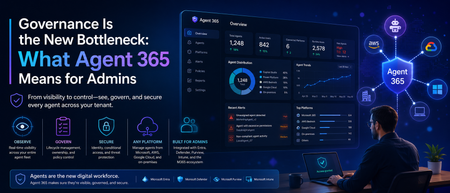
Hi all , following up on my last post about token limits, I wanted to write about something that's been on my mind a lot lately: the sheer number of agents quietly showing up across our tenant. Not just the ones we built deliberately in Copilot Studio, but ones people spun up in Power Platform, ones connected through Teams, and a few I genuinely couldn't trace back to an owner when I went looking. That's the moment this topic stopped being theoretical for me. For the last couple of years, the Microsoft AI conversation was mostly about capability -what can Copilot do, which model is better, how do I write a good prompt. That conversation hasn't gone away, but a second one has caught up to it fast: who's actually watching all of this. Microsoft's own 2026 Work Trend Index makes the shift explicit this isn't about saving a few minutes in Outlook anymore, it's about organizations redesigning how work gets divided between people and agents. And the moment agents start acting semi-independently across your tenant, "how many do we have, and what are they allowed to touch" becomes a real operational question, not a hypothetical one. That's exactly the gap Microsoft Agent 365 is built to close. It went generally available on May 1, 2026, alongside Microsoft 365 E7, and I think it's worth understanding properly especially if you're the one who ends up fielding the "wait, there's an agent doing what?" conversation. What Agent 365 Actually Is (and Isn't) The first thing worth clearing up: Agent 365 doesn't build agents. That's still Copilot Studio's job, or Foundry, or whatever platform your team is using. Agent 365 is the layer that sits on top of all of that it's a control plane, not a construction tool. Think of it less like "another AI product" and more like the admin and security backbone that was honestly missing from the picture until now. Microsoft frames it around three pillars: observe, govern, and secure. In practice, that means every agent in your tenant whether it was built in Copilot Studio, imported from AWS or Google Cloud, or even running locally on someone's Windows machine gets registered, gets its own identity through Microsoft Entra, and becomes something you can actually see and act on instead of just hoping it's behaving. That identity piece is the part I think gets underrated. Each agent gets its own Entra Agent ID, the same way a human user would. That's a meaningful shift it means conditional access policies, auditing, and compliance tooling that already exist for people can now extend to agents instead of treating them as some invisible background process. Why This Matters Right Now Here's the honest version of what's been happening across a lot of organizations, including bits of what I've seen firsthand: agent creation has gotten easy. Almost too easy. Between Copilot Studio, Power Platform, and now agentic mode built directly into Word, Excel, and PowerPoint, it doesn't take much for someone in a business unit to spin up something that's technically an AI agent with access to real data without IT or security ever being looped in. Microsoft has been fairly direct about this risk themselves, which I appreciated seeing in writing rather than just implied: the speed of agent development shows real value, but without guardrails, that pace turns into blind spots, lower ROI, and genuine security exposure. That's not vendor fear-mongering, that's just what happens when adoption outpaces oversight in any technology, and agents are no exception. What makes this particular moment different from past "shadow IT" waves is that agents don't just store or move data they can act on it. An agent with the wrong scope isn't just a compliance footnote, it's something that could send an email, modify a file, or trigger a workflow on its own. That's a different risk category than an unsanctioned spreadsheet sitting in someone's OneDrive. What You Actually Get With Agent 365 A few capabilities stood out to me as genuinely useful rather than just checkbox governance: The overview dashboard gives you a real-time view of your entire agent fleet total registered agents, active users, connected platforms, runtime hours, and risk signals, all in one place. Before this, getting even a rough headcount of "how many agents exist in our tenant" was a manual, frustrating exercise. Registry sync extends that visibility beyond Microsoft's own tools. It can pull in agents built on AWS Bedrock and Google Cloud, so you're not stuck with three different governance stories depending on where an agent happens to live. For organizations that are realistically never going to be 100% single-vendor, that matters. Lifecycle actions install, publish, block, unblock, delete, reassign ownership are now available directly from the registry. That's a big deal operationally. Before, tracking down who owned a rogue or abandoned agent could turn into an actual investigation. Now it's a few clicks. Local agent controls through Defender and Intune are rolling in too, extending management down to agents running on individual Windows endpoints, not just cloud-hosted ones. Given how much agent activity is starting to happen at the device level, this closes a gap that would've otherwise been a blind spot. Conditional access for agents, through Entra, means you can apply the same kind of dynamic, granular access policies to agents that you'd apply to a human user which is really the whole philosophical shift Agent 365 represents: agents aren't a separate, ungoverned category anymore, they're first-class identities in your tenant. What This Means for Admins, Practically If you're managing a tenant with any real Copilot or agent activity, here's where I'd actually start: Don't wait for "full autonomy" to engage. It's tempting to think governance can wait until agents are doing something more dramatic than they are today. Microsoft's own guidance pushes against that the advice is to establish visibility and guardrails early, while adoption is still accelerating, not after. Get a real inventory first. Before writing new policies, it's worth just knowing what already exists. I'd genuinely bet most tenants have more agents running than the admin team could name off the top of their head. The overview dashboard is the fastest way to close that gap. Loop in more than just IT. Agent 365 licensing and controls touch the M365 admin center, Entra, Defender, Purview, and Intune which means this isn't a single-team rollout. Security, compliance, and helpdesk all need to understand what's changing, especially the distinction between Frontier (preview, no production SLA) and GA (production-ready, supported). Understand the licensing model before you scope a rollout. Agent 365 is licensed per human user — the person who manages, sponsors, or is served by an agent rather than per agent. It's available standalone at $15 per user per month, or bundled into Microsoft 365 E7. Worth mapping that against your actual agent-using population rather than assuming it's a flat cost per bot. Treat this as incremental, not a one-time setup. Microsoft has said plainly that Agent 365's capabilities will keep evolving as adoption patterns and governance models mature. This isn't a project you finish and close out it's closer to how you'd think about identity and access management generally: ongoing, not a one-time rollout. The Bigger Shift Underneath All This What I find genuinely interesting about Agent 365 is what it signals about where Microsoft thinks this is all heading. They're not just selling a better Copilot anymore they're positioning Microsoft 365 as the place where AI-driven work gets governed, regardless of which vendor's model or platform an agent actually runs on. Whether that's the right long-term answer for every organization is a fair thing to debate. But the underlying problem it's solving that agents were multiplying faster than anyone's ability to see or control them is real, and I don't think it's specific to Microsoft shops. If your organization is building agents in Copilot Studio, experimenting with Foundry, or even just watching Copilot's agentic mode quietly take on more autonomous work in Word and Excel, this is worth getting ahead of. The teams that treat agent governance as a foundational layer now are going to have a much easier time scaling adoption later than the ones who bolt it on after something goes wrong. Curious whether others are already rolling out Agent 365, or still in the "let's figure out how many agents we actually have" phase I suspect a lot of us are somewhere in between. Would love to hear how your organization is approaching this. Cheers, and happy reading. Surya Vennapusa-MCT86Views0likes0Comments