ai
1082 TopicsSecurity in the agentic era: What it means for the Marketplace
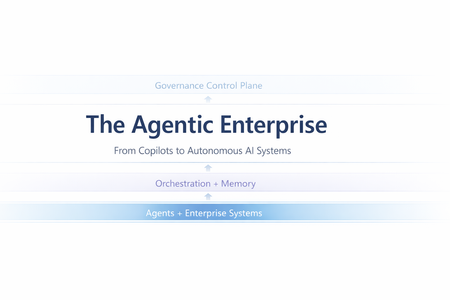
As AI agents become integral to marketplace solutions, security expectations are evolving for both publishers and customers. This article examines how the agentic era introduces new requirements around trust, identity, permissions, and governance—particularly in multi-tenant, partner-driven ecosystems. It outlines how marketplaces can enable innovation while ensuring secure, compliant, and scalable adoption of agent-powered applications, helping partners build with confidence and customers buy with trust. Read the full article here: Security in the agentic era: A new paradigm | Microsoft Community Hub The article is based on a presentation covering the security, governance, and compliance dimensions of AI in the agentic era. To view the full session recording, visit Security for SDC Series: Securing the Agentic Era Episode 1New Certification for machine learning operations (MLOps) engineers
Do your co-workers rely on you to deploy, operationalize, and maintain machine learning and generative AI solutions in production? Are you working at the intersection of data science, DevOps, and generative AI? If so, the Microsoft Certified: Machine Learning Operations (MLOps) Engineer Associate Certification is designed for you. This Certification validates your ability to operationalize not only traditional machine learning but also generative AI solutions on Azure, reflecting how AI roles have evolved from model experimentation to enterprise-scale AI operations. To earn this Certification, you need to pass Exam AI-300: Operationalizing Machine Learning and Generative AI solutions, currently in beta. Key skills validated by this Certification To earn the MLOps engineer Certification, you must demonstrate your ability to: Design and implement secure, scalable MLOps infrastructure. Automate resource provisioning and deployments by using GitHub Actions, Bicep, and Azure CLI. Orchestrate training, manage model registration and versioning, and monitor production models. Deploy and operationalize generative AI solutions by using Microsoft Foundry. Implement quality assurance, observability, and safety evaluations for generative AI systems. Optimize retrieval-augmented generation (RAG) pipelines and fine-tuned models for performance, accuracy, and cost efficiency. This Certification replaces the Microsoft Certified: Azure Data Scientist Associate Certification (Exam DP-100), which is retiring on June 1, 2026, and reflects the evolution of AI in the enterprise. Exam DP-100 focused on validating your ability to design and implement data science solutions, including data exploration, model training, evaluation, and deployment. Exam AI-300 expands the scope significantly. It retains training and evaluation but places much stronger emphasis on validating your knowledge and experience in automation, infrastructure as code (IaC), continuous integration and continuous deployment (CI/CD), lifecycle governance, observability, drift detection, cost control, and the operationalization of generative AI systems. For more details on the retirement of Exam DP-100, and the latest cloud and AI Certification updates, read our recent blog post, The AI job boom is here. Are you ready to showcase your skills? Skill area Exam AI-300 (new) Exam DP-100 (old) MLOps infrastructure Full CI/CD, IaC (Bicep, Azure CLI), GitHub Actions Basic workspace and compute setup Model lifecycle management Core focus, including registration, versioning, rollout/rollback, monitoring Full lifecycle from training to deployment GenAIOps infrastructure End-to-end lifecycle, including security, automation, and model management with Foundry Basic generative AI setup and experimentation QA and observability Generative AI evaluation, tracing, safety metrics, drift detection, cost monitoring Model evaluation and responsible AI principles Generative AI performance optimization RAG optimization, embedding model selection and tuning, advanced fine-tuning, synthetic data management Basic prompt engineering and fine-tuning Ready to prove your skills? Take advantage of the discounted beta exam offer. The first 300 people who take Exam AI-300 (beta) on or before April 2, 2026, can get 80% off market price. To receive the discount, when you register for the exam and are prompted for payment, use code AI300Meridian. This is not a private access code. The seats are offered on a first-come, first-served basis. As noted, you must take the exam on or before April 2, 2026. Please note that this discount is not available in Turkey, Pakistan, India, or China. Get ready to take Exam AI-300 (beta): Review the Exam AI-300 (beta) exam page for details. The Exam AI-300 study guide explores key topics covered in the exam. Want even more in-depth instructor-led training? We’re creating new instructor-led training that will be released in late March 2026. Connect with Microsoft Training Services Partners in your area for in-person offerings. Need other preparation ideas? Check out Just How Does One Prepare for Beta Exams? You can take certification exams online, from home or the office. Learn what to expect in Online proctored exams: What to expect and how to prepare. The rescore process starts on the day an exam goes live, and final scores for beta exams are released approximately 10 days after that. For details on the timing of beta exam rescoring and results, check out Creating high-quality exams: The path from beta to live. Ready to get started? Remember, only the first 300 candidates can get 80% off Exam AI-300 (beta) with code AI300Meridian on or before April 2, 2026. Stay tuned for general availability of this Certification in May 2026. Learn more about Microsoft Credentials. Related announcements We recently migrated our subject matter expert (SME) database to LinkedIn. To be notified of beta exam availability or opportunities to help with the development of exam, assessment, or learning content, sign up today for the Microsoft Worldwide Learning SME Group for Credentials.992Views1like4CommentsMCP vs mcp-cli: Dynamic Tool Discovery for Token-Efficient AI Agents
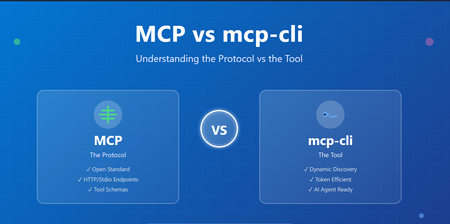
Introduction The AI agent ecosystem is evolving rapidly, and with it comes a scaling challenge that many developers are hitting context window bloat. When building systems that integrate with multiple MCP (Model Context Protocol) servers, you're forced to load all tool definitions upfront—consuming thousands of tokens just to describe what tools could be available. mcp-cli: a lightweight tool that changes how we interact with MCP servers. But before diving into mcp-cli, it's essential to understand the foundational protocol itself, the design trade-offs between static and dynamic approaches, and how they differ fundamentally. Part 1: Understanding MCP (Model Context Protocol) What is MCP? The Model Context Protocol (MCP) is an open standard for connecting AI agents and applications to external tools, APIs, and data sources. Think of it as a universal interface that allows: AI Agents (Claude, Gemini, etc.) to discover and call tools Tool Providers to expose capabilities in a standardized way Seamless Integration between diverse systems without custom adapters New to MCP see https://aka.ms/mcp-for-beginners How MCP Works MCP operates on a simple premise: define tools with clear schemas and let clients discover and invoke them. Basic MCP Flow: Tool Provider (MCP Server) ↓ [Tool Definitions + Schemas] ↓ AI Agent / Client ↓ [Discover Tools] → [Invoke Tools] → [Get Results] Example: A GitHub MCP server exposes tools like: search_repositories - Search GitHub repos create_issue - Create a GitHub issue list_pull_requests - List open PRs Each tool comes with a JSON schema describing its parameters, types, and requirements. The Static Integration Problem Traditionally, MCP integration works like this: Startup: Load ALL tool definitions from all servers Context Window: Send every tool schema to the AI model Invocation: Model chooses which tool to call Execution: Tool is invoked and result returned The Problem: When you have multiple MCP servers, the token cost becomes substantial: Scenario Token Count 6 MCP Servers, 60 tools (static loading) ~47,000 tokens After dynamic discovery ~400 tokens Token Reduction 99% 🚀 For a production system with 10+ servers exposing 100+ tools, you're burning through thousands of tokens just describing capabilities, leaving less context for actual reasoning and problem-solving. Key Issues: ❌ Reduced effective context length for actual work ❌ More frequent context compactions ❌ Hard limits on simultaneous MCP servers ❌ Higher API costs Part 2: Enter mcp-cli – Dynamic Context Discovery What is mcp-cli? mcp-cli is a lightweight CLI tool (written in Bun, compiled to a single binary) that implements dynamic context discovery for MCP servers. Instead of loading everything upfront, it pulls in information only when needed. Static vs. Dynamic: The Paradigm Shift Traditional MCP (Static Context): AI Agent Says: "Load all tool definitions from all servers" ↓ Context Window Bloat ❌ ↓ Limited space for reasoning mcp-cli (Dynamic Discovery): AI Agent Says: "What servers exist?" ↓ mcp-cli responds AI Agent Says: "What are the params for tool X?" ↓ mcp-cli responds AI Agent Says: "Execute tool X" mcp-cli executes and responds Result: You only pay for information you actually use. ✅ Core Capabilities mcp-cli provides three primary commands: 1. Discover - What servers and tools exist? mcp-cli Lists all configured MCP servers and their tools. 2. Inspect - What does a specific tool do? mcp-cli info <server> <tool> Returns the full JSON schema for a tool (parameters, descriptions, types). 3. Execute - Run a tool mcp-cli call <server> <tool> '{"arg": "value"}' Executes the tool and returns results. Key Features of mcp-cli Feature Benefit Stdio & HTTP Support Works with both local and remote MCP servers Connection Pooling Lazy-spawn daemon avoids repeated startup overhead Tool Filtering Control which tools are available via allowedTools/disabledTools Glob Searching Find tools matching patterns: mcp-cli grep "*mail*" AI Agent Ready Designed for use in system instructions and agent skills Lightweight Single binary, minimal dependencies Part 3: Detailed Comparison Table Aspect Traditional MCP mcp-cli Protocol HTTP/REST or Stdio Stdio/HTTP (via CLI) Context Loading Static (upfront) Dynamic (on-demand) Tool Discovery All at once Lazy enumeration Schema Inspection Pre-loaded On-request Token Usage High (~47k for 60 tools) Low (~400 for 60 tools) Best For Direct server integration AI agent tool use Implementation Server-side focus CLI-side focus Complexity Medium Low (CLI handles it) Startup Time One call Multiple calls (optimized) Scaling Limited by context Unlimited (pay per use) Integration Custom implementation Pre-built mcp-cli Part 4: When to Use Each Approach Use Traditional MCP (HTTP Endpoints) when: ✅ Building a direct server integration ✅ You have few tools (< 10) and don't care about context waste ✅ You need full control over HTTP requests/responses ✅ You're building a specialized integration (not AI agents) ✅ Real-time synchronous calls are required Use mcp-cli when: ✅ Integrating with AI agents (Claude, Gemini, etc.) ✅ You have multiple MCP servers (> 2-3) ✅ Token efficiency is critical ✅ You want a standardized, battle-tested tool ✅ You prefer CLI-based automation ✅ Connection pooling and lazy loading are beneficial ✅ You're building agent skills or system instructions Conclusion MCP (Model Context Protocol) defines the standard for tool sharing and discovery. mcp-cli is the practical tool that makes MCP efficient for AI agents by implementing dynamic context discovery. The fundamental difference: MCP mcp-cli What The protocol standard The CLI tool Where Both server and client Client-side CLI Problem Solved Tool standardization Context bloat Architecture Protocol Implementation Think of it this way: MCP is the language, mcp-cli is the interpreter that speaks fluently. For AI agent systems, dynamic discovery via mcp-cli is becoming the standard. For direct integrations, traditional MCP HTTP endpoints work fine. The choice depends on your use case, but increasingly, the industry is trending toward mcp-cli for its efficiency and scalability. Resources MCP Specification mcp-cli GitHub New to MCP see https://aka.ms/mcp-for-beginners Practical demo: AnveshMS/mcp-cli-exampleUnified AI Weather Forecasting Pipeline thru Aurora, Foundry, and Microsoft Planetary Computer Pro
Weather shapes some of the most critical decisions we make, from protecting our critical infrastructure and global supply chains, to keeping communities safe during extreme events. As climate variability becomes more volatile, an organization’s ability to predict, assess, and plan their response to extreme weather is a defining capability for modern infrastructure owners & operators. This is especially true for the energy and utility sector — even small delays in preparations and response can cascade into massive operational risk and financial impacts, including widespread outages and millions in recovery costs. Operators of critical power infrastructure are increasingly turning to AI-powered solutions to reduce their operational and service delivery risk. “As the physical risks to our grid systems grow, so too does our technological capacity to anticipate them. Artificial intelligence has quietly reached a maturity point in utility operations-not just as a tool for optimization, about as a strategic foresight engine. The opportunity is clear: with the right data, infrastructure, and operational alignment, AI outage prediction utility grid strategies can now forecast vulnerabilities with precision and help utilities transition from reactive to preventive risk models.” – Article by Think Power Solutions Providing direct control of their data and AI analytics allows providers to make better, more actionable insights for their operations. Today, we’ll demonstrate and explore how organizations can use the state-of-the-art Aurora weather model in Microsoft Foundry with weather data provided by Microsoft Planetary Computer (MPC), an Azure based geospatial data management platform, to develop a utility industry-specific impact prediction capability. Taking Control of your Weather Prediction Microsoft Research first announced Aurora in June 2024, a cutting-edge AI foundation model enabling locally executed, on-demand, global weather forecasting, and storm-trajectory prediction generated from publicly available weather data. Two months later, Aurora became available on Microsoft Foundry elevating on-demand weather forecasting from a self-hosted experience to managed deployments, readying Aurora for broader enterprise and public adoption. Aurora’s scientific foundations and forecasting performance were peer‑reviewed and published in Nature, providing independent validation across global benchmarks. Its evolution continues with a strong commitment to openness and interoperability: In November 2025, Microsoft announced plans to open-source Aurora to accelerate innovation across the global research and developer community. Building upon the innovation and continued development of Aurora, today we are showcasing how organizations can operationalize this state-of-the-art capability with Microsoft Planetary Computer and Microsoft Planetary Computer Pro. By bringing together the vast public geospatial data stores in Planetary Computer, with the private data managed by Planetary Computer Pro, organizations can unify their weather prediction and geospatial data in a single platform, simplifying data processing pipelines and data management. This advancement allows enterprise customers to take control of their own weather forecasting on their own timeline. A Unified Weather Prediction Data Pipeline In addition, a key pain-point for energy and utility companies is the inability to reliably ingest, store, and operationalize high-volume weather data. Model inputs and outputs often sit scattered across fragmented pipelines and platforms, making decisions difficult to trace, reproduce, and reference over time. For example, referenced in articles, many utility companies have to pull public data from various silos, maintain GIS layers in another, and run operational planning in a separate environment—forcing teams to manually stitch together forecasts, assets, and risk assessments, introducing delays exactly when rapid decisions matter most. With the MPC Pro + Microsoft Foundry pipeline, utility companies transition from fragmented, manual workflows to a single operating platform – where the value lies in a seamless end-to-end data-to-model pipeline. Users can leverage Aurora on Microsoft Foundry alongside Microsoft Planetary Computer Pro’s geospatial data platform to unlock the following unified workflow: Source near real time weather data from Planetary Computer Run Aurora in Microsoft Foundry Fuse weather prediction results with geospatial data in Planetary Computer Pro for rapid assessment and post processing A Ready-to-use reference architecture This reference architecture provides a reusable pattern for operationalizing frontier weather models with Microsoft Planetary Computer Pro and Microsoft Foundry. Our architecture feeds updated global weather data, hosted by Microsoft Planetary Computer, to the Microsoft Foundry hosted model, then fuses those prediction results with enterprise geospatial context for analysis, decision-making, and action. Each component plays a distinct role in ensuring forecasts are timely, scalable, and directly usable within operational workflows. Near Real-Time Weather Data Microsoft Planetary Computer automatically ingests, indexes, and distributes up-to-date global weather data from the European Centre for Medium-Range Weather Forecasts (ECMWF) four times per day. This fully managed data pipeline ensures that the latest atmospheric datasets are continuously refreshed, standardized, and readily accessible, eliminating the need for manual data acquisition or preprocessing. Storing and Centralizing Public and Private Geospatial Data on Microsoft Planetary Computer Pro Microsoft Planetary Computer Pro enables utility operators to store, manage, and access both public and private geospatial datasets within a single Azure platform. With a Microsoft Planetary Computer Pro GeoCatalog, organizations can centralize ECMWF weather data alongside infrastructure and location data to support downstream analyses. Microsoft Foundry Hosts and Runs Weather Prediction Model on Demand Microsoft Foundry provides model access and the infrastructure required to support execution of Aurora and other weather forecasting models. Users can provision Aurora inference endpoints on their own dedicated compute. After provisioned, the user would be able to open the python notebook and run the model to execute weather forecasts on demand. Weather Forecast Outputs are Fused with Existing Data Sources on Microsoft Planetary Computer Pro Aurora’s weather prediction outputs are seamlessly integrated back into Microsoft Planetary Computer Pro, where they are fused with existing public or private geospatial datasets. This makes forecast results immediately accessible for visualization, post-processing, and analysis—such as identifying assets at risk, estimating localized impact, informing operational response plans, or pre-positioning needed assets for quick recovery. By combining AI-driven forecasts with geospatial context, organizations can move from raw predictions to actionable insights in a single workflow. This solution also provides organizations with a centralized platform to store and catalog geospatial data for future traceability. Unified Weather Prediction Demonstration This demonstration visualizes the forecast storm track (Figure 2), along with projected damage impact along the storm path and associated coastal surge areas (Figure 3 & 4). This enables users to assess asset exposure, anticipate damage due to winds, pre-position crews, and proactively protect critical infrastructure—helping reduce outage duration, lower operational costs, and improve grid resilience. & Powerplants) Getting Started The python notebook supports tracking of historical storm events, forecasting real-time storm trajectories, and overlaying critical power infrastructure structure data from OpenStreetMap to visualize overlap. To get started, deploy this solution in your Azure environment to begin generating weather forecasts and storm-track predictions. The code and documentation for running this notebook are available in the linked GitHub Repo. Sample output for you to explore are linked within this HTML. For additional resources, visit the following MS Learn pages: Microsoft Planetary Computer Pro Microsoft Foundry The interoperability between ‘GeoAI models + data platform’ extends far beyond weather prediction. It empowers organizations to take control of their geospatial data; to generate actionable insights on their own timeline, and to meet their own specific needs. With Microsoft Planetary Computer and Microsoft Foundry together, organizations will unify their enterprise geospatial data, and unlock its value with powerful, and state of the art AI solutions.443Views2likes0Comments
GenRec Direct Learning: Moving Ranking from Feature Pipelines to Token-Native Sequence Modeling
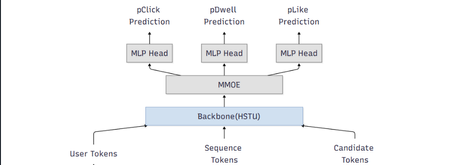
Authors: Chunlong Yu, Han Zheng, Jie Zhu, I-Hong Jhuo, Neal Zhang, Li Xia, Lin Zhu, Sawyer Shen, Yulan Yan TL;DR Most modern ranking stacks rely on large generative models as feature extractors, flattening their outputs into vectors that are then fed into downstream rankers. While effective, this pattern introduces additional pipeline complexity and often dilutes token‑level semantics. GenRec Direct Learning (DirL) explores a different direction: using a generative, token‑native sequential model as the ranking engine itself. In this formulation, ranking becomes an end‑to‑end sequence modeling problem over user behavior, context, and candidate items—without an explicit feature‑extraction stage. Why revisit the classic L2 ranker design? Large‑scale recommender systems have historically evolved as layered pipelines: more signals lead to more feature plumbing, which in turn introduces more special cases. In our previous L2 ranking architecture, signals were split into dense and sparse branches and merged late in the stack (Fig. 1). As the system matured, three recurring issues became increasingly apparent. Figure 1: traditional ranking DNN 1) Growing pipeline surface area Each new signal expands the surrounding ecosystem—feature definitions, joins, normalization logic, validation, and offline/online parity checks. Over time, this ballooning surface area slows iteration, raises operational overhead, and increases the risk of subtle production inconsistencies. 2) Semantics diluted by flattening Generative models naturally capture rich structure: token‑level interactions, compositional meaning, and contextual dependencies. However, when these representations are flattened into sparse or dense feature vectors, much of that structure is lost—undermining the very semantics that make generative representations powerful. 3) Sequence modeling is treated as an add-on While traditional rankers can ingest history features, modeling long behavioral sequences and fine‑grained temporal interactions typically requires extensive manual feature engineering. As a result, sequence modeling is often bolted on rather than treated as a first‑class concern. DirL goal: treat ranking as native sequence learning, not as “MLP over engineered features.” What “Direct Learning” means in DirL The core shift behind Direct Learning (DirL) is simple but fundamental. Instead of the conventional pipeline: generative model → embeddings → downstream ranker, DirL adopts an end‑to‑end formulation: tokenized sequence → generative sequential model → ranking score(s). In DirL, user context, long‑term behavioral history, and candidate item information are all represented within a single, unified token sequence. Ranking is then performed directly by a generative, token‑native sequential model. This design enables several key capabilities: Long‑term behavior modeling beyond short summary windows The model operates over extended user histories, allowing it to capture long‑range dependencies and evolving interests that are difficult to represent with fixed‑size aggregates. Fine‑grained user–content interaction learning By modeling interactions at the token level, DirL learns detailed behavioral and content patterns rather than relying on coarse, pre‑engineered features. Preserved cross‑token semantics within the ranking model Semantic structure is maintained throughout the ranking process, instead of being collapsed into handcrafted dense or sparse vectors before scoring. Architecture overview (from signals to ranking) 1) Unified Tokenization All inputs in DirL are converted into a shared token embedding space, allowing heterogeneous signals to be modeled within a single sequential backbone. Conceptually, each input sequence consists of three token types: User / context tokens These tokens encode user or request‑level information, such as age or cohort‑like attributes, request or canvas context, temporal signals (e.g., day or time), and user‑level statistics like historical CTR. History tokens These represent prior user interactions over time, including signals such as engaged document IDs, semantic or embedding IDs, and topic‑like attributes. Each interaction is mapped to a token, preserving temporal order and enabling long‑range behavior modeling. Candidate tokens Each candidate item to be scored is represented as a token constructed from document features and user–item interaction features. These features are concatenated and projected into a fixed‑dimensional vector via an MLP, yielding a token compatible with the shared embedding space. Categorical features are embedded directly, while dense numerical signals are passed through MLP layers before being fused into their corresponding tokens. As a result, the model backbone consumes a sequence of the form: [1 user/context token] + [N history tokens] + [1 candidate token] 2) Long-sequence modeling backbone (HSTU) To model long input sequence, DirL adopts a sequential backbone designed to scale beyond naïve full attention. In the current setup, the backbone consists of stacked HSTU layers with multi‑head attention and dropout for regularization. The hidden state of the candidate token from the final HSTU layer is then fed into an MMoE module for scoring. 3) Multi-task prediction head (MMoE) Ranking typically optimizes multiple objectives (e.g., engagement‑related proxies). DirL employs a multi‑gate mixture‑of‑experts (MMoE) layer to support multi‑task prediction while sharing representation learning. The MMoE layer consists of N shared experts and one task‑specific expert per task. For each task, a gating network produces a weighted combination of the shared experts and the task‑specific expert. The aggregated representation is then fed into a task‑specific MLP head to produce the final prediction. Figure 2: DirL structure Early experiments: what worked and what didn’t What looked promising Early results indicate that a token‑native setup improves both inhouse evaluation metrics and online engagement (time spent per UU), suggesting that modeling long behavior sequences in a unified token space is directionally beneficial. The hard part: efficiency and scale The same design choices that improve expressiveness also raise practical hurdles: Training velocity slows down: long-sequence modeling and larger components can turn iteration cycles from hours into days, making ablations expensive. Serving and training costs increase: large sparse embedding tables + deep sequence stacks can dominate memory and compute. Capacity constraints limit rollout speed: Hardware availability and cost ceilings become a gating factor for expanding traffic and experimentation. In short: DirL’s main challenge isn’t “can it learn the right dependencies?”—it’s “can we make it cheap and fast enough to be a production workhorse?” Path to production viability: exploratory directions Our current work focuses on understanding how to keep the semantic benefits of token‑native modeling while exploring options that could help reduce overall cost. 1) Embedding tables consolidate and prune oversized sparse tables rely more on shared token representations where possible 2) Right-size the sequence model reduce backbone depth where marginal gains flatten evaluate minimal effective token sets—identify which tokens actually move metrics. explore sequence length vs. performance curves to find the “knee” 3) Inference and systems optimization dynamic batching tuned for token-native inference kernel fusion and graph optimizations quantization strategies that preserve ranking model behavior Why this direction matters DirL explores a broader shift in recommender systems—from feature‑heavy pipelines with shallow rankers toward foundation‑style sequential models that learn directly from user trajectories. If token‑native ranking can be made efficient, it unlocks several advantages: Simpler modeling interfaces, with fewer feature‑plumbing layers. Stronger semantic utilization, reducing information loss from aggressive flattening. A more natural path to long‑term behavior and intent modeling. Early signals are encouraging. The next phase is about translating this promise into practice—making the approach scalable, cost‑efficient, and fast enough to iterate as a production system. Using Microsoft Services to Enable Token‑Native Ranking Research This work was developed and validated within Microsoft’s internal machine learning and experimentation ecosystem. Training data was derived from seven days of MSN production logs and user behavior labels, encompassing thousands of features, including numerical, ID‑based, cross, and sequential features. Model training was performed using a PyTorch‑based deep learning framework built by the MSN infrastructure team and executed on Azure Machine Learning with a single A100 GPU. For online serving, the trained model was deployed on DLIS, Microsoft’s internal inference platform. Evaluation was conducted through controlled online experiments on the Azure Exp platform, enabling validation of user engagement signals under real production traffic. Although the implementation leverages Microsoft’s internal platforms, the core ideas behind DirL are broadly applicable. Practitioners interested in exploring similar approaches may consider the following high‑level steps: Construct a unified token space that captures user context, long‑term behavior sequences, and candidate items. Apply a long‑sequence modeling backbone to learn directly from extended user trajectories. Formulate ranking as a native sequence modeling problem, scoring candidates from token‑level representations. Evaluate both model effectiveness and system efficiency, balancing gains in expressiveness against training and serving cost. Call to action We encourage practitioners and researchers working on large‑scale recommender systems to experiment with token‑native ranking architectures alongside traditional feature‑heavy pipelines, compare trade‑offs in modeling power and system efficiency, and share insights on when direct sequence learning provides practical advantages in production environments. Acknowledgement: We would like to acknowledge the support and contributions from several colleagues who helped make this work possible. We thank Gaoyuan Jiang and Lightning Huang for their assistance with model deployment, Jianfei Wang for support with the training platform, Gong Cheng for ranker monitoring, Peiyuan Xu for sequential feature logging, and Chunhui Han and Peng Hu for valuable discussions on model design.Complete Guide to Deploying OpenClaw on Azure Windows 11 Virtual Machine
1. Introduction to OpenClaw OpenClaw is an open-source AI personal assistant platform that runs on your own devices and executes real-world tasks. Unlike traditional cloud-based AI assistants, OpenClaw emphasizes local deployment and privacy protection, giving you complete control over your data. Key Features of OpenClaw Cross-Platform Support: Runs on Windows, macOS, Linux, and other operating systems Multi-Channel Integration: Interact with AI through messaging platforms like WhatsApp, Telegram, and Discord Task Automation: Execute file operations, browser control, system commands, and more Persistent Memory: AI remembers your preferences and contextual information Flexible AI Backends: Supports multiple large language models including Anthropic Claude and OpenAI GPT OpenClaw is built on Node.js and can be quickly installed and deployed via npm. 2. Security Advantages of Running OpenClaw on Azure VM Deploying OpenClaw on an Azure virtual machine instead of your personal computer offers significant security benefits: 1. Environment Isolation Azure VMs provide a completely isolated runtime environment. Even if the AI agent exhibits abnormal behavior or is maliciously exploited, it won't affect your personal computer or local data. This isolation mechanism forms the foundation of a zero-trust security architecture. 2. Network Security Controls Through Azure Network Security Groups (NSGs), you can precisely control which IP addresses can access your virtual machine. The RDP rules configured in the deployment script allow you to securely connect to your Windows 11 VM via Remote Desktop while enabling further restrictions on access sources. 3. Data Persistence and Backup Azure VM managed disks support automatic snapshots and backups. Even if the virtual machine encounters issues, your OpenClaw configuration and data remain safe. 4. Elastic Resource Management You can adjust VM specifications (memory, CPU) at any time based on actual needs, or stop the VM when not in use to save costs, maintaining maximum flexibility. 5. Enterprise-Grade Authentication Azure supports integration with Azure Active Directory (Entra ID) for identity verification, allowing you to assign different access permissions to team members for granular access control. 6. Audit and Compliance Azure provides detailed activity logs and audit trails, making it easy to trace any suspicious activity and meet enterprise compliance requirements. 3. Deployment Steps Explained This deployment script uses Azure CLI to automate the installation of OpenClaw and its dependencies on a Windows 11 virtual machine. Here are the detailed execution steps: Prerequisites Before running the script, ensure you have: Install Azure CLI # Windows users can download the MSI installer https://aka.ms/installazurecliwindows # macOS users brew install azure-cli # Linux users curl -sL https://aka.ms/InstallAzureCLIDeb | sudo bash 2. Log in to Azure Account az login 3. Prepare Deployment Script Save the provided deploy-windows11-vm.sh script locally and grant execute permissions: chmod +x deploy-windows11-vm.sh Step 1: Configure Deployment Parameters The script begins by defining key configuration variables that you can modify as needed: RESOURCE_GROUP="Your Azure Resource Group Name" # Resource group name VM_NAME="win11-openclaw-vm" # Virtual machine name LOCATION="Your Azure Regison Name" # Azure region ADMIN_USERNAME="Your Azure VM Administrator Name" # Administrator username ADMIN_PASSWORD="our Azure VM Administrator Password" # Administrator password (change to a strong password) VM_SIZE="Your Azure VM Size" # VM size (4GB memory) Security Recommendations: Always change ADMIN_PASSWORD to your own strong password Passwords should contain uppercase and lowercase letters, numbers, and special characters Never commit scripts containing real passwords to code repositories Step 2: Check and Create Resource Group The script first checks if the specified resource group exists, and creates it automatically if it doesn't: echo "Checking resource group $RESOURCE_GROUP..." az group show --name $RESOURCE_GROUP &> /dev/null if [ $? -ne 0 ]; then echo "Creating resource group $RESOURCE_GROUP..." az group create --name $RESOURCE_GROUP --location $LOCATION fi A resource group is a logical container in Azure used to organize and manage related resources. All associated resources (VMs, networks, storage, etc.) will be created within this resource group. Step 3: Create Windows 11 Virtual Machine This is the core step, using the az vm create command to create a Windows 11 Pro virtual machine: az vm create \ --resource-group $RESOURCE_GROUP \ --name $VM_NAME \ --image MicrosoftWindowsDesktop:windows-11:win11-24h2-pro:latest \ --size $VM_SIZE \ --admin-username $ADMIN_USERNAME \ --admin-password $ADMIN_PASSWORD \ --public-ip-sku Standard \ --nsg-rule RDP Parameter Explanations: --image: Uses the latest Windows 11 24H2 Professional edition image --size: Standard_B2s provides 2 vCPUs and 4GB memory, suitable for running OpenClaw --public-ip-sku Standard: Assigns a standard public IP --nsg-rule RDP: Automatically creates network security group rules allowing RDP (port 3389) inbound traffic Step 4: Retrieve Virtual Machine Public IP After VM creation completes, the script retrieves its public IP address: PUBLIC_IP=$(az vm show -d -g $RESOURCE_GROUP -n $VM_NAME --query publicIps -o tsv) echo "VM Public IP: $PUBLIC_IP" This IP address will be used for subsequent RDP remote connections. Step 5: Install Chocolatey Package Manager Using az vm run-command to execute PowerShell scripts inside the VM, first installing Chocolatey: az vm run-command invoke -g $RESOURCE_GROUP -n $VM_NAME --command-id RunPowerShellScript \ --scripts "Set-ExecutionPolicy Bypass -Scope Process -Force; [System.Net.ServicePointManager]::SecurityProtocol = [System.Net.ServicePointManager]::SecurityProtocol -bor 3072; iex ((New-Object System.Net.WebClient).DownloadString( 'https://community.chocolatey.org/install.ps1'))" Chocolatey is a package manager for Windows, similar to apt or yum on Linux, simplifying subsequent software installations. Step 6: Install Git Git is a dependency for many npm packages, especially those that need to download source code from GitHub for compilation: az vm run-command invoke -g $RESOURCE_GROUP -n $VM_NAME --command-id RunPowerShellScript \ --scripts "C:\ProgramData\chocolatey\bin\choco.exe install git -y" Step 7: Install CMake and Visual Studio Build Tools Some of OpenClaw's native modules require compilation, necessitating the installation of C++ build toolchain: az vm run-command invoke -g $RESOURCE_GROUP -n $VM_NAME --command-id RunPowerShellScript \ --scripts "C:\ProgramData\chocolatey\bin\choco.exe install cmake visualstudio2022buildtools visualstudio2022-workload-vctools -y" Component Descriptions: cmake: Cross-platform build system visualstudio2022buildtools: VS 2022 Build Tools visualstudio2022-workload-vctools: C++ development toolchain Step 8: Install Node.js LTS Install the Node.js Long Term Support version, which is the core runtime environment for OpenClaw: az vm run-command invoke -g $RESOURCE_GROUP -n $VM_NAME --command-id RunPowerShellScript \ --scripts "$env:Path = [System.Environment]::GetEnvironmentVariable('Path','Machine') + ';' + [System.Environment]::GetEnvironmentVariable('Path','User'); C:\ProgramData\chocolatey\bin\choco.exe install nodejs-lts -y" The script refreshes environment variables first to ensure Chocolatey is in the PATH, then installs Node.js LTS. Step 9: Globally Install OpenClaw Use npm to globally install OpenClaw: az vm run-command invoke -g $RESOURCE_GROUP -n $VM_NAME --command-id RunPowerShellScript \ --scripts "$env:Path = [System.Environment]::GetEnvironmentVariable('Path','Machine') + ';' + [System.Environment]::GetEnvironmentVariable('Path','User'); npm install -g openclaw" Global installation makes the openclaw command available from anywhere in the system. Step 10: Configure Environment Variables Add Node.js and npm global paths to the system PATH environment variable: az vm run-command invoke -g $RESOURCE_GROUP -n $VM_NAME --command-id RunPowerShellScript \ --scripts " $npmGlobalPath = 'C:\Program Files\nodejs'; $npmUserPath = [System.Environment]::GetFolderPath('ApplicationData') + '\npm'; $currentPath = [System.Environment]::GetEnvironmentVariable('Path', 'Machine'); if ($currentPath -notlike \"*$npmGlobalPath*\") { $newPath = $currentPath + ';' + $npmGlobalPath; [System.Environment]::SetEnvironmentVariable('Path', $newPath, 'Machine'); Write-Host 'Added Node.js path to system PATH'; } if ($currentPath -notlike \"*$npmUserPath*\") { $newPath = [System.Environment]::GetEnvironmentVariable('Path', 'Machine') + ';' + $npmUserPath; [System.Environment]::SetEnvironmentVariable('Path', $newPath, 'Machine'); Write-Host 'Added npm global path to system PATH'; } Write-Host 'Environment variables updated successfully!'; " This ensures that node, npm, and openclaw commands can be used directly even in new terminal sessions. Step 11: Verify Installation The script finally verifies that all software is correctly installed: az vm run-command invoke -g $RESOURCE_GROUP -n $VM_NAME --command-id RunPowerShellScript \ --scripts "$env:Path = [System.Environment]::GetEnvironmentVariable('Path','Machine') + ';' + [System.Environment]::GetEnvironmentVariable('Path','User'); Write-Host 'Node.js version:'; node --version; Write-Host 'npm version:'; npm --version; Write-Host 'openclaw:'; npm list -g openclaw" Successful output should look similar to: Node.js version: v20.x.x npm version: 10.x.x openclaw: openclaw@x.x.x Step 12: Connect to Virtual Machine After deployment completes, the script outputs connection information: ============================================ Deployment completed! ============================================ Resource Group: Your Azure Resource Group Name VM Name: win11-openclaw-vm Public IP: xx.xx.xx.xx Admin Username: Your Administrator UserName VM Size: Your VM Size Connect via RDP: mstsc /v:xx.xx.xx.xx ============================================ Connection Methods: Windows Users: Press Win + R to open Run dialog Enter mstsc /v:public_ip and press Enter Log in using the username and password set in the script macOS Users: Download "Windows App" from the App Store Add PC connection with the public IP Log in using the username and password set in the script Linux Users: # Use Remmina or xfreerdp xfreerdp /u:username /v:public_ip Step 13: Initialize OpenClaw After connecting to the VM, run the following in PowerShell or Command Prompt # Initialize OpenClaw openclaw onboard # Configure AI model API key # Edit configuration file: C:\Users\username\.openclaw\openclaw.json notepad $env:USERPROFILE\.openclaw\openclaw.json Add your AI API key in the configuration file: { "agents": { "defaults": { "model": "Your Model Name", "apiKey": "your-api-key-here" } } } Step 14: Start OpenClaw # Start Gateway service openclaw gateway # In another terminal, connect messaging channels (e.g., WhatsApp) openclaw channels login Follow the prompts to scan the QR code and connect OpenClaw to your messaging app. 4. Summary Through this guide, we've successfully implemented the complete process of automatically deploying OpenClaw on an Azure Windows 11 virtual machine. The entire deployment process is highly automated, completing everything from VM creation to installing all dependencies and OpenClaw itself through a single script. Key Takeaways Automation Benefits: Using az vm run-command allows executing configuration scripts immediately after VM creation without manual RDP login Dependency Management: Chocolatey simplifies the Windows package installation workflow Environment Isolation: Running AI agents on cloud VMs protects local computers and data Scalability: Scripted deployment facilitates replication and team collaboration, easily deploying multiple instances Cost Optimization Tips Standard_B2s VMs cost approximately $0.05/hour (~$37/month) on pay-as-you-go pricing When not in use, stop the VM to only pay for storage costs Consider Azure Reserved Instances to save up to 72% Security Hardening Recommendations Change Default Port: Modify RDP port from 3389 to a custom port Enable JIT Access: Use Azure Security Center's just-in-time access feature Configure Firewall Rules: Only allow specific IP addresses to access Regular System Updates: Enable automatic Windows Updates Use Azure Key Vault: Store API keys in Key Vault instead of configuration files 5. Additional Resources Official Documentation OpenClaw Website: https://openclaw.ai OpenClaw GitHub: https://github.com/openclaw/openclaw OpenClaw Documentation: https://docs.openclaw.ai Azure CLI Documentation: https://docs.microsoft.com/cli/azure/ Azure Resources Azure VM Pricing Calculator: https://azure.microsoft.com/pricing/calculator/ Azure Free Account: https://azure.microsoft.com/free/ (new users receive $200 credit) Azure Security Center: https://azure.microsoft.com/services/security-center/ Azure Key Vault: https://azure.microsoft.com/services/key-vault/7.8KViews3likes3Comments
Building High-Performance Agentic Systems
Most enterprise chatbots fail in the same quiet way. They answer questions. They impress in demos. And then they stall in production. Knowledge goes stale. Answers cannot be audited. The system cannot act beyond generating text. When workflows require coordination, execution, or accountability, the chatbot stops being useful. Agentic systems exist because that model is insufficient. Instead of treating the LLM as the product, agentic architecture embeds it inside a bounded control loop: plan → act (tools) → observe → refine The model becomes one component in a runtime system with explicit state management, safety policies, identity enforcement, and operational telemetry. This shift is not speculative. A late-2025 MIT Sloan Management Review / BCG study reports that 35% of organizations have already adopted AI agents, with another 44% planning deployment. Microsoft is advancing open protocols for what it calls the “agentic web,” including Agent-to-Agent (A2A) interoperability and Model Context Protocol (MCP), with integration paths emerging across Copilot Studio and Azure AI Foundry. The real question is no longer whether agents are coming. It is whether enterprise architecture is ready for them. This article translates “agentic” into engineering reality: the runtime layers, latency and cost levers, orchestration patterns, and governance controls required for production deployment. The Core Capabilities of Agentic AI What makes an AI “agentic” is not a single feature—it’s the interaction of different capabilities. Together, they form the minimum set needed to move from “answering” to “operating”. Autonomy – Goal-Driven Task Completion Traditional bots are reactive: they wait for a prompt and produce output. Autonomy introduces a goal state and a control loop. The agent is given an objective (or a trigger) and it can decide the next step without being micromanaged. The critical engineering distinction is that autonomy must be bounded: in production, you implement it with explicit budgets and stop conditions—maximum tool calls, maximum retries, timeouts, and confidence thresholds. The typical execution shape is a loop: plan → act → observe → refine. A project-management agent, for example, doesn’t just answer “what’s the status?” It monitors signals (work items, commits, build health), detects a risk pattern (slippage, dependency blockage), and then either surfaces an alert or prepares a remediation action (re-plan milestones, notify owners). In high-stakes environments, autonomy is usually human-in-the-loop by design: the agent can draft changes, propose next actions, and only execute after approval. Over time, teams expand the autonomy envelope for low-risk actions while keeping approvals for irreversible or financially sensitive operations. Tool Integration – Taking Action and Staying Current A standalone LLM cannot fetch live enterprise state and cannot change it. Tool integration is how an agent becomes operational: it can query systems of record, call APIs, trigger workflows, and produce outputs that reflect the current world rather than the model’s pretraining snapshot. There are two classes of tools that matter in enterprise agents: Retrieval tools (grounding / RAG)When the agent needs facts, it retrieves them. This is the backbone of reducing hallucination: instead of guessing, the agent pulls authoritative content (SharePoint, Confluence, policy repositories, CRM records, Fabric datasets) and uses it as evidence. In practice, retrieval works best when it is engineered as a pipeline: query rewrite (optional) → hybrid search (keyword + vector) → filtering (metadata/ACL) → reranking → compact context injection. The point is not “stuff the prompt with documents,” but “inject only the minimum evidence required to answer accurately.” Action tools (function calling / connectors) These are the hands of the agent: update a CRM record, create a ticket, send an email, schedule a meeting, generate a report, run a pipeline. Tool integration shifts value from “advice” to “execution,” but also introduces risk—so action tools need guardrails: least-privilege permissions, input validation, idempotency keys, and post-condition checks (confirm the update actually happened). In Microsoft ecosystems, this tool plane often maps to Graph actions + business connectors (via Logic Apps/Power Automate) + custom APIs, with Copilot Studio (low code) or Foundry-style runtimes (pro code) orchestrating the calls. Memory (Context & Learning) – Context Awareness and Adaptation “Memory” is not just a long prompt. In agentic systems, memory is an explicit state strategy: Working memory: what the agent has learned during the current run (intermediate tool results, constraints, partial plans). Session memory: what should persist across turns (user preferences, ongoing tasks, summarized history). Long-term memory: enterprise knowledge the agent can retrieve (indexed documents, structured facts, embeddings + metadata). Short-term memory enables multi-step workflows without repeating questions. An HR onboarding agent can carry a new hire’s details from intake through provisioning without re-asking, because the workflow state is persisted and referenced. Long-term “learning” is typically implemented through feedback loops rather than real-time model weight updates: capturing corrections, storing validated outcomes, and periodically improving prompts, routing logic, retrieval configuration, or (where appropriate) fine-tuning. The key design rule is that memory must be policy-aware: retention rules, PII handling, and permission trimming apply to stored state as much as they apply to retrieved documents. Orchestration – Coordinating Multi-Agent Teams Complex enterprise work is rarely single-skill. Orchestration is how agentic systems scale capability without turning one agent into an unmaintainable monolith. The pattern is “manager + specialists”: an orchestrator decomposes the goal into subtasks, routes each to the best tool or sub-agent, and then composes a final response. This can be done sequentially or in parallel. Employee onboarding is a classic: HR intake, IT account creation, equipment provisioning, and training scheduling can run in parallel where dependencies allow. The engineering challenge is making orchestration reliable: defining strict input/output contracts between agents (often structured JSON), handling failures (timeouts, partial completion), and ensuring only one component has authority to send the final user-facing message to avoid conflicting outputs. In Microsoft terms, orchestration can be implemented as agentic flows in Copilot Studio, connected-agent patterns in Foundry, or explicit orchestrators in code using structured tool schemas and shared state. Strategic Impact – How Agentic AI Changes Knowledge Work Agentic AI is no longer an experimental overlay to enterprise systems. It is becoming an embedded operational layer inside core workflows. Unlike earlier chatbot deployments that answered isolated questions, modern enterprise agents execute end-to-end processes, interact with structured systems, maintain context, and operate within governed boundaries. The shift is not about conversational intelligence alone; it is about workflow execution at scale. The transformation becomes clearer when examining real implementations across industries. In legal services, agentic systems have moved beyond document summarization into operational case automation. Assembly Software’s NeosAI, built on Azure AI infrastructure, integrates directly into legal case management systems and automates document analysis, structured data extraction, and first-draft generation of legal correspondence. What makes this deployment impactful is not merely the generative drafting capability, but the integration architecture. NeosAI is not an isolated chatbot; it operates within the same document management systems, billing systems, and communication platforms lawyers already use. Firms report time savings of up to 25 hours per case, with document drafting cycles reduced from days to minutes for first-pass outputs. Importantly, the system runs within secure Azure environments with zero data retention policies, addressing one of the most sensitive concerns in legal AI adoption: client confidentiality. JPMorgan’s COiN platform represents another dimension of legal and financial automation. Instead of conversational assistance, COiN performs structured contract intelligence at production scale. It analyzes more than 12,000 commercial loan agreements annually, extracting over 150 clause attributes per document. Work that previously required approximately 360,000 human hours now executes in seconds. The architecture emphasizes structured NLP pipelines, taxonomy-based clause classification, and private cloud deployment for regulatory compliance. Rather than replacing legal professionals, the system flags unusual clauses for human review, maintaining oversight while dramatically accelerating analysis. Over time, COiN has also served as a knowledge retention mechanism, preserving institutional contract intelligence that would otherwise be lost with employee turnover. In financial services, the impact is similarly structural. Morgan Stanley’s internal AI Assistant allows wealth advisors to query over 100,000 proprietary research documents using natural language. Adoption has reached nearly universal usage across advisor teams, not because it replaces expertise, but because it compresses research time and surfaces insights instantly. Building on this foundation, the firm introduced an AI meeting debrief agent that transcribes client conversations using speech-to-text models and generates CRM notes and follow-up drafts through GPT-based reasoning. Advisors review outputs before finalization, preserving human judgment. The result is faster client engagement and measurable productivity improvements. What differentiates Morgan Stanley’s approach is not only deployment scale, but disciplined evaluation before release. The firm established rigorous benchmarking frameworks to test model outputs against expert standards for accuracy, compliance, and clarity. Only after meeting defined thresholds were systems expanded firmwide. This pattern—evaluation before scale—is becoming a defining trait of successful enterprise agent deployment. Human Resources provides a different perspective on agentic AI. Johnson Controls deployed an AI HR assistant inside Slack to manage policy questions, payroll inquiries, and onboarding support across a global workforce exceeding 100,000 employees. By embedding the agent in a channel employees already use, adoption barriers were reduced significantly. The result was a 30–40% reduction in live HR call volume, allowing HR teams to redirect focus toward strategic workforce initiatives. Similarly, Ciena integrated an AI assistant directly into Microsoft Teams, unifying HR and IT support through a single conversational interface. Employees no longer navigate separate portals; the agent orchestrates requests across backend systems such as Workday and ServiceNow. The technical lesson here is clear: integration breadth drives usability, and usability drives adoption. Engineering and IT operations reveal perhaps the most technically sophisticated application of agentic AI: multi-agent orchestration. In a proof-of-concept developed through collaboration between Microsoft and ServiceNow, an AI-driven incident response system coordinates multiple agents during high-priority outages. Microsoft 365 Copilot transcribes live war-room discussions and extracts action items, while ServiceNow’s Now Assist executes operational updates within IT service management systems. A Semantic Kernel–based manager agent maintains shared context and synchronizes activity across platforms. This eliminates the longstanding gap between real-time discussion and structured documentation, automatically generating incident reports while freeing engineers to focus on remediation rather than clerical tasks. The system demonstrates that orchestration is not conceptual—it is operational. Across these examples, the pattern is consistent. Agentic AI changes knowledge work by absorbing structured cognitive labor: document parsing, compliance classification, research synthesis, workflow routing, transcription, and task coordination. Humans remain essential for judgment, ethics, and accountability, but the operational layer increasingly runs through AI-mediated execution. The result is not incremental productivity improvement; it is structural acceleration of knowledge processes. Design and Governance Challenges – Managing the Risks As agentic AI shifts from answering questions to executing workflows, governance must mature accordingly. These systems retrieve enterprise data, invoke APIs, update records, and coordinate across platforms. That makes them operational actors inside your architecture—not just assistants. The primary shift is this: autonomy increases responsibility. Agents must be observable. Every retrieval, reasoning step, and tool invocation should be traceable. Without structured telemetry and audit trails, enterprises lose visibility into why an agent acted the way it did. Agents must also operate within scoped authority. Least-privilege access, role-based identity, and bounded credentials are essential. An HR agent should not access finance systems. A finance agent should not modify compliance data without policy constraints. Autonomy only works when it is deliberately constrained. Execution boundaries are equally critical. High-risk actions—financial approvals, legal submissions, production changes—should include embedded thresholds or human approval gates. Autonomy should be progressive, not absolute. Cost and performance must be governed just like cloud infrastructure. Agentic systems can trigger recursive calls and model loops. Without usage monitoring, rate limits, and model-tier routing, compute consumption can escalate unpredictably. Finally, agentic systems require continuous evaluation. Real-world testing, live monitoring, and drift detection ensure the system remains aligned with business rules and compliance requirements. These are not “set and forget” deployments. In short, agentic AI becomes sustainable only when autonomy is paired with observability, scoped authority, embedded guardrails, cost control, and structured oversight. Conclusion – Towards the Agentic Enterprise The organizations achieving meaningful returns from agentic AI share a common pattern. They do not treat AI agents as experimental tools. They design them as production systems with defined roles, scoped authority, measurable KPIs, embedded observability, and formal governance layers. When autonomy is paired with integration, memory, orchestration, and governance discipline, agentic AI becomes more than automation—it becomes an operational architecture. Enterprises that master this architecture are not merely reducing costs; they are redefining how knowledge work is executed. In this emerging model, human professionals focus on strategic judgment and innovation, while AI agents manage structured cognitive execution at scale. The competitive advantage will not belong to those who deploy the most AI, but to those who deploy it with architectural rigor and governance maturity. Before we rush to deploy more agents, a few questions are worth asking: If an AI agent executes a workflow in your enterprise today, can you trace every reasoning step and tool invocation behind that decision? Does your architecture treat AI as a conversational layer - or as an operational actor with scoped identity, cost controls, and policy enforcement? Where should autonomy stop in your organization - and who defines that boundary? Agentic AI is not just a capability shift. It is an architectural decision. Curious to hear how others are designing their control planes and orchestration layers. References MIT Sloan – “Agentic AI, Explained” by Beth Stackpole: A foundational overview of agentic AI, its distinction from traditional generative AI, and its implications for enterprise workflows, governance, and strategy. Microsoft TechCommunity – “Introducing Multi-Agent Orchestration in Foundry Agent Service”: Details Microsoft’s multi-agent orchestration capabilities, including Connected Agents, Multi-Agent Workflows, and integration with A2A and MCP protocols. Microsoft Learn – “Extend the Capabilities of Your Agent – Copilot Studio”: Explains how to build and extend custom agents in Microsoft Copilot Studio using tools, connectors, and enterprise data sources. Assembly Software’s NeosAI case – Microsoft Customer Stories JPMorgan COiN platform – GreenData Case Study HR support AI (Johnson Controls, Ciena, Databricks) – Moveworks case studies ServiceNow & Semantic Kernel multi-agent P1 Incident – Microsoft Semantic Kernel Blog
Introducing Phi-4-Reasoning-Vision to Microsoft Foundry
Vision reasoning models unlock a critical capability for developers: the ability to move beyond passive perception toward systems that can understand, reason over, and act on visual information. Instead of treating images, diagrams, documents, or UI screens as unstructured inputs, vision reasoning models enable developers to build applications that can interpret visual structure, connect it with textual context, and perform multi-step reasoning to reach actionable conclusions. Today, we are excited to announce Phi-4-Reasoning-Vision-15B is available in Microsoft Foundry and Hugging Face. This model brings high‑fidelity vision to the reasoning‑focused Phi‑4 family, extending small language models (SLMs) beyond perception into structured, multi‑step visual reasoning for agents, analytical tools, and scientific workflows. What’s new? The Phi model family has advanced toward combining efficient visual understanding with strong reasoning in small language models. Earlier Phi‑4 models demonstrated reliable perception and grounding across images and text, while later iterations introduced structured reasoning to improve performance on complex tasks. Phi‑4‑reasoning-vision-15B brings these threads together, pairing high‑resolution visual perception with selective, task‑aware reasoning. As a result, the model can reason deeply when needed while remaining fast and efficient for perception‑focused scenarios—making it well suited for interactive, real‑world applications. Key capabilities Reasoning behavior is explicitly enabled via prompting: Developers can explicitly enable or disable reasoning to balance latency and accuracy at runtime. Optimized for vision reasoning and can be used for: diagram-based math, document, chart, and table understanding, GUI interpretations and grounding for agent scenarios to interpret screens and actions, Computer-use agent scenarios, and General image chat and answering questions Benchmarks The following results summarize Phi-4-reasoning-vision-15B performance across a set of established multimodal reasoning, mathematics, and computer use benchmarks. The following benchmarks are the result of internal evaluations. Benchmark Phi-4-reasoning-vision-15B Phi-4-reasoning-vision-15B – force no think Phi-4-mm-instruct Kimi-VL-A3B-Instruct gemma-3-12b-it Qwen3-VL-8B-Instruct-4K Qwen3-VL-8B-Instruct-32K Qwen3-VL-32B-Instruct-4K Qwen3-VL-32B-Instruct-32K AI2D _TEST 84.8 84.7 68.6 84.6 80.4 82.7 83 84.8 85 ChartQA _TEST 83.3 76.5 23.5 87 39 83.1 83.2 84.3 84 HallusionBench 64.4 63.1 56 65.2 65.3 73.5 74.1 74.4 74.9 MathVerse _MINI 44.9 43.8 32.4 41.7 29.8 54.5 57.4 64.2 64.2 MathVision _MINI 36.2 34.2 20 28.3 31.9 45.7 50 54.3 60.5 MathVista _MINI 75.2 68.7 50.5 67.1 57.4 77.1 76.4 82.5 81.8 MMMU _VAL 54.3 52 42.3 52 50 60.7 64.6 68.6 70.6 MMStar 64.5 63.3 45.9 60 59.4 68.9 69.9 73.7 74.3 OCRBench 76 75.6 62.6 86.5 75.3 89.2 90 88.5 88.5 ScreenSpot _v2 88.2 88.3 28.5 89.8 3.5 91.5 91.5 93.7 93.9 Table 1: Accuracy comparisons relative to popular open-weight, non-thinking models Benchmark Phi-4-reasoning-vision-15B Phi-4-reasoning-vision-15B - force thinking Kimi-VL-A3B-Thinking gemma-3-12b-it Qwen3-VL-8B-Thinking-4K Qwen3-VL-8B-Thinking-40K Qwen3-VL-32B-Thiking-4K Qwen3-VL-32B-Thinking-40K AI2D_TEST 84.8 79.7 81.2 80.4 83.5 83.9 86.9 87.2 ChartQA _TEST 83.3 82.9 73.3 39 78 78.6 78.5 79.1 HallusionBench 64.4 63.9 70.6 65.3 71.6 73 76.4 76.6 MathVerse _MINI 44.9 53.1 61 29.8 67.3 73.3 78.3 78.2 MathVision _MINI 36.2 36.2 50.3 31.9 43.1 50.7 60.9 58.6 MathVista _MINI 75.2 74.1 78.6 57.4 77.7 79.5 83.9 83.8 MMMU _VAL 54.3 55 60.2 50 59.3 65.3 72 72.2 MMStar 64.5 63.9 69.6 59.4 69.3 72.3 75.5 75.7 OCRBench 76 73.7 79.9 75.3 81.2 82 83.7 85 ScreenSpot _v2 88.2 88.1 81.8 3.5 93.3 92.7 83.1 83.1 Table 2: Accuracy comparisons relative to popular open-weight, thinking models All results were obtained using a consistent evaluation setup and prompts across models; numbers are provided for comparison and analysis rather than as leaderboard claims. For more information regarding benchmarks and evaluations, please read the technical paper on the Microsoft Research hub. Suggested use cases and applications Phi‑4‑Reasoning-Vision-15B supports applications that require both high‑fidelity visual perception and structured inference. Two representative scenarios include scientific and mathematical reasoning over visual inputs, and computer‑using agents (CUAs) that operate directly on graphical user interfaces. In both cases, the model provides grounded visual understanding paired with controllable, low‑latency reasoning suitable for interactive systems. Computer use agents in retail scenarios For computer use agents, Phi‑4‑Reasoning-Vision-15B provides the perception and grounding layer required to understand and act within live ecommerce interfaces. For example, in an online shopping experience, the model interprets screen content—products, prices, filters, promotions, buttons, and cart state—and produces grounded observations that agentic models like Fara-7B can use to select actions. Its compact size and low latency inference make it well suited for CUA workflows and agentic applications. Visual reasoning for education Another practical use of visual reasoning models is education. A developer could build a K‑12 tutoring app with Phi‑4‑Reasoning‑Vision‑15B where students upload photos of worksheets, charts, or diagrams to get guided help—not answers. The model can understand the visual content, identify where the student went wrong, and explain the correct steps clearly. Over time, the app can adapt by serving new examples matched to the student’s learning level, turning visual problem‑solving into a personalized learning experience. Microsoft Responsible AI principles At Microsoft, our mission to empower people and organizations remains constant—especially in the age of AI, where the potential for human achievement is greater than ever. We recognize that trust is foundational to AI adoption, and earning that trust requires a commitment to transparency, safety, and accountability. As with other Phi models, Phi-4-Reasoning-Vision-15B was developed with safety as a core consideration throughout training and evaluation. The model was trained on a mixture of public safety datasets and internally generated examples designed to elicit behaviors the model should appropriately refuse, in alignment with Microsoft’s Responsible AI Principles. These safety focused training signals help the model recognize and decline requests that fall outside intended or acceptable use. Additional details on the model’s safety considerations, evaluation approach, and known limitations are provided in the accompanying technical blog and model card. Getting started Start using Phi‑4‑Reasoning-Vision-15B in Microsoft Foundry today. Microsoft Foundry provides a unified environment for model discovery, evaluation, and deployment, making it straightforward to move from initial experimentation to production use while applying appropriate safety and governance practices. Deploy the new model on Microsoft Foundry. Learn more about the Phi family on Foundry Labs and in the Phi Cookbook Connect to the Microsoft Developer Community on Discord Read the technical paper on Microsoft Research Read more use cases on the Educators Developer blog602Views0likes0CommentsStreamline your Marketplace deals with AI-powered automation
Navigating the operational complexity of Microsoft Marketplace private offers and IP co-sell workflows can slow deal velocity and add friction between your CRM and Partner Center. In the latest blog post, How to streamline Microsoft Marketplace private offers and IP co-sell with AI powered automation, Kyle Heisner from Suger, shares practical insights on automating these processes, reducing manual work, and boosting accuracy with AI-driven integrations. Whether you’re managing plan configuration, validating co-sell referrals, or closing the loop from quote to cash, this article highlights where AI can serve as a co-pilot — helping your team operate more efficiently and accelerate Marketplace success. Want to learn more: Join the live session on March 11 to learn directly from the experts and get your questions answered. AI-powered automation for Marketplace private offers and IP co-sell - Microsoft Marketplace Community