ai
981 TopicsNew Azure blog on charting AI & agent strategy with Marketplace
In a new Azure blog, Cyril Belikoff, Vice President, Commercial Cloud and AI Marketing, talks about how organizations are using Microsoft Marketplace as a central hub for discovering, buying, and deploying AI models, applications, and agents to support their AI strategy. He emphasizes that there isn’t a one-size-fits-all approach—companies can build custom solutions, buy ready-made ones, or blend both depending on their needs. Marketplace offers thousands of pre-vetted models and AI tools that integrate with existing Microsoft products (like Microsoft Foundry and Copilot), helping teams accelerate time-to-value, maintain governance, and balance agility with oversight as they adopt AI more broadly. Read the full blog and share it with your customers: Design your AI strategy with Microsoft Marketplace SolutionsWhat’s New in Microsoft EDU, Bett Edition January 2026
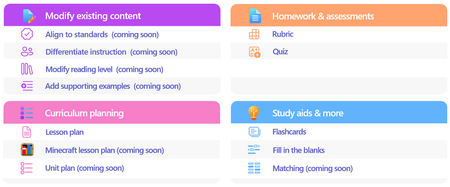
Welcome to our update for Microsoft Education and our special Bett 2026 edition! The Bett conference takes place in London during the week of January 21st - January 23rd, and Microsoft Education has 18 exciting updates to share! Check out the official Bett News blog here, and for our full Bett schedule and session times, be sure to check out our Microsoft EDU Bett 2026 guide. January 2026 topics: Microsoft 365 Updates for Educators Microsoft Learning Zone Microsoft 365 Updates for Students Teams EDU and OneNote EDU Updates Microsoft 365 LTI Updates Minecraft EDU 1. New Educator tools coming to the Teach Module in Microsoft 365 Unit Plans Soon educators will be able to create unit plans in Teach. Using a familiar interface, educators will be able to describe their unit, ground in existing content and educational standards, and attach any existing lesson plans. Unit plans will be created as Microsoft Word documents to facilitate easy edits and sharing. When: Preview in Spring 2026 Minecraft Lesson Plans Minecraft Education prepares students for the future workplace by helping build skills like collaboration, creative problem-solving, communication, and computational thinking. Coming soon, you will be able to create lesson plans in Teach that are fully teachable in Minecraft Education. And if you’re new to Minecraft Education, the lesson plan includes step-by-step instructions to get started. Just like the existing lesson plan tool in Teach, Minecraft Lessons can be grounded on your class details, existing content, and educational standards from 35+ countries. When: Preview in February 2026 Modify Content When: In Preview now Teach supports educators in modifying their existing teaching materials using AI-powered tools that save time and help meet the diverse needs of learners. With Modify existing content, educators can quickly adapt lessons they already use—without starting from scratch—by aligning materials to standards, differentiating instructions, adjusting reading levels, and enhancing text with supporting examples. Each modification tool accepts direct text input or file uploads from cloud storage, making it easy to transform current curriculum resources. These tools help educators maintain instructional intent while ensuring content is accessible, standards aligned, and effective for all learners. Align materials to standards Aligning instructional content to educational standards helps ensure lessons clearly support required learning goals and set the right expectations for learners. The Align to Standards tool rewrites existing lesson instructions so they reflect the intent of the selected standard—focusing on what learners should understand or be able to do—without copying the standard’s wording. Scenario: An educator has a lesson instruction for a reading activity on ecosystems. After selecting a state science standard, the educator uses Align to Standards to produce a revised instruction that emphasizes system interactions and evidence-based explanations while preserving the lesson’s original purpose. This allows the educator to strengthen alignment quickly without rewriting the lesson from scratch. Differentiate instructions Differentiation helps ensure every learner—regardless of readiness, background knowledge, or support needs—can access and engage with instructional tasks. The Differentiate Instructions tool adapts existing instructions based on specific supports an educator selects, such as adjusting reading level, including a single type of scaffold, or targeting a desired length. Because this tool is designed for single shot use, it produces a clear, accurate adaptation that adheres directly to the selected inputs. Scenario: A secondary biology educator has lab instructions written for general education learners but needs versions for learners requiring additional scaffolding. Using Differentiate Instructions, the educator quickly generates modified instructions that include step-by-step breakdowns, sentence starters, or graphic organizers—making the lab more accessible without changing the learning goal. Modify reading level Adjusting the reading level helps ensure instructional content remains accessible while preserving essential vocabulary and core concepts. The Modify reading level tool rewrites text to match a specified grade level, simplifying or increasing complexity as needed while maintaining meaning. Educators can also choose to generate a glossary with clear, age-appropriate definitions of key terms. Scenario: A social studies educator wants students to work with a primary source written at a university reading level. Using Modify reading level, the educator creates a version that maintains the document’s key ideas and important historical terms while simplifying sentence structure for lower secondary learners. By adding a glossary, students can access learner friendly definitions alongside the adapted text. Add supporting examples Concrete examples strengthen understanding by connecting abstract ideas to real world applications. The Add Supporting Examples tool enhances existing instructional content by appending relevant, accurate, and age-appropriate examples—without altering the original paragraph. Scenario: An educator teaching thermal energy transfer has a paragraph explaining that heat moves from warmer objects to cooler ones, but the concept feels abstract. Using Add Supporting Examples, the educator adds real world examples—such as a metal spoon warming in hot soup or an ice cube melting on a countertop—to help learners visualize how heat transfer works. These examples reinforce understanding and make the concept more accessible for secondary learners. Fill in the Blanks, Matching and Quizzing New Learning Activities are coming soon! We’re excited to introduce three new Learning Activities designed to make classroom experiences more dynamic and personalized: Fill in the Blanks, Matching, and Quizzes. Whether it’s completing paragraphs to strengthen comprehension, pairing terms with definitions in a timed matching game, or testing knowledge through quick self-assessments, these activities bring variety and fun to learning. Fill in the blanks creates paragraphs where learners can check their understanding by filling in missing terms. Matching is a game where learners can match terms and definitions while racing against the clock, aiming for fast completion and accuracy. And Quizzes allows students to quiz themselves and assess their comprehension. Learning Activities are available across our education products, in a standalone web app, in the Teach Module, in Teams for Education, in the Study and Learn agent and Study Guides. When: Spring 2026 Teach Module updates in Teams Classwork In Teams Classwork, you can already use Copilot to create Lesson Plans, Flashcards, and Fill in the Blank Activities. Coming this Spring, you will see the ability to create and modify more content, better matching the capabilities of Teach in the Microsoft 365 Copilot App. This includes modifying content with AI, Minecraft Lessons, and more! When: Coming soon Teach Module and Class Notebook integration We're bringing Copilot-powered creation tools directly into OneNote Class Notebook. Teachers will be able to generate Learning Activities and quizzes or modify existing content (like adjusting reading level or adding supporting examples) without leaving the page where they're already planning. When: Coming soon 2. Spark classroom engagement with Microsoft Learning Zone Educators worldwide are always looking for innovative ways to engage students, personalize learning, and support individual growth, yet limited time and resources often stand in their way. Microsoft Learning Zone, a new Windows app, empowers educators to transform any idea or resource into an interactive, personalized lesson using AI on Copilot+ PCs. The app also provides actionable insights to guide instruction and support every student’s progress. Learning Zone is now available to download from the Windows app store and included at no additional cost with all Microsoft Education licenses. Just in time for Bett 2026, Learning Zone has earned the prestigious ISTE Seal of Alignment - a recognized mark of quality, accessibility, and inclusive design. This recognition reflects our commitment to delivering meaningful, inclusive, and research-backed digital learning experiences for every learner. As noted by ISTE reviewers: "Microsoft Learning Zone saves educators valuable time while delivering personalized instruction that addresses individual learning needs." Getting started with Microsoft Learning Zone is simple. Educators begin by defining their lesson goals and preferences and can also choose to reference their teaching materials or trusted in-app resources by OpenStax. From there, AI does the heavy-lifting, generating a complete, interactive lesson with engaging content slides and a variety of practice activities. Educators can also quickly create Kahoot! quizzes using AI, bringing live classroom gamification into their lessons with just a few clicks. Learning Zone is more than content creation; it provides a full classroom-ready solution: from assignment to actionable insights. Once a lesson is created and reviewed, educators can assign it to students. Students complete lessons at their own pace, on any device, while the lesson flow adapts to their responses, helping reinforce understanding, revisit missed concepts, and build confidence over time. Educators, in turn, gain clear, actionable insights into student progress and mastery, enabling them to personalize instruction and better support every learner’s growth. Learning Zone is a classroom ready solution including management and actionable insights Learning Zone also includes an extensive library of ready-to-learn lessons developed in collaboration with leading global organizations, including the Nobel Peace Center, PBS NewsHour, the World Wildlife Fund (WWF), NASA, OpenStax, Figma, and Minecraft Education. Ready-to-learn lessons are available to educators and students on any Windows device and are a great way to inspire curiosity and bring meaningful learning of different subjects into the classroom. Ready-to-learn library in partnership with trusted global organizations Learning Zone is available today: Visit https://learningzone.microsoft.com to learn more and download the app. 3. New AI-powered tools for student learning in Microsoft 365 Study and Learn Agent Bring the interactive, conversational Study and Learn Agent in the Microsoft 365 Copilot App to your students. Available to all Microsoft EDU customers, the agent does not require an additional Copilot license. It is going into preview now, in January 2026. Join the Microsoft Education Insiders community at https://aka.ms/joinEIP and get information about getting access to the Preview. Study and Learn helps learners understand concepts, practice skills with activities like flashcards, and prepare for tests with study guides and quizzes. Additional activities including fill-in-the-blanks, matching, and others that will continue to be added. Purpose-built for learning in collaboration with learning science experts, Study and Learn aims to help foster reflective and critical thinking. Over time, it will provide a more personalized, adaptive, inclusive experience to make learning relevant and bolster motivation. When: January 2026 Preview Learning Activities app The Learning Activities Web App is now here! This web-based experience brings all your favorite activities together in one place, making it easier than ever to create, customize, and share engaging content. Whether you’re an educator designing lessons or a student building study sets, the web app offers a streamlined interface for finding or creating Flashcards and Fill in the Blanks with Matching, and Quizzes coming soon. You can easily access all your activities that you have created in other products from the web app, too. When: Available now! 4. Updates for your favorite teaching tools - Teams EDU and OneNote EDU Set AI Guidelines in Teams To help bring clarity to AI use in the classroom, AI Guidelines in Assignments allow educators to set clear expectations for when and how students can use AI—directly within the assignment experience. Educators start with a set of default, standardized AI use levels, and can apply them at the class or assignment level, with the ability to customize descriptions to reflect their school or district guidelines. These guidelines are clearly visible to students, reducing confusion and supporting responsible, transparent AI use, while also encouraging learners to use secure, education-ready Copilot. When: In Preview Q1 Add Learning Activities to Teams Assignments Learning Activities are coming to Teams Assignments and supported LMS platforms in preview, helping educators integrate interactive practice into the assignment workflows they already use. Educators can add activities such as Flashcards, Fill in the blanks, and Matching, and share resource documents that enable students to create their own learning activities within an assignment or the Classwork module. Students complete activities seamlessly within Assignments or their LMS, with progress captured as part of the assignment experience—supporting active, student driven learning while keeping setup, instruction and review in one familiar place. Students can create their own learning activities from educator-shared resources within an assignment or Classwork. When: In Preview Q1 New information literacy features in Search Progress in Teams Assignments Now students don't just gather sources—they investigate them. Four new research prompts (Source Reputation, Factual Importance, Cross-check, Source Purpose) make their thinking visible as they research. Read more about these new features in the preview blog here, and stay tuned for Microsoft Learn course updates to come. When: Available now Add Learning Zone lessons to Teams Assignments and LMS Learning Zone lessons are coming to Teams Assignments and Microsoft 365 LTI for LMS platforms in preview, allowing educators to bring interactive lessons directly into the assignments and grading workflows they already use. Educators can attach Learning Zone lessons during assignment creation, while students complete them fully embedded within Assignments or their LMS, with progress and scores automatically synchronized for review. This preview helps educators save time, reduce manual setup and grading steps, and confidently deliver interactive learning experiences—while keeping assignment creation, student work, and review all in one place. When: Preview in February Embed Learning Activities in OneNote You asked, we're building it. Soon, learners and educators alike will be able to copy a Learning Activity link, paste it into any OneNote classic page, and have it render inline – all to help folks engage without leaving the page. When: NH Spring 2026 5. Create with Copilot in your LMS In addition to supporting the new Learning Zone lessons in assignments, we are adding exciting new Create with Copilot options in Microsoft 365 LTI which bring the AI-powered capabilities of the Teach Module directly into LMS content creation workflows. From within their course, educators can use Copilot to draft lesson materials and other instructional content which is seamlessly published to the course using familiar Microsoft 365 tools. Create with Copilot is also available in LMS content editors to help educators compose content, discussion posts, and more. This includes the ability to modify existing content, if supported by the LMS platform. By embedding the creation experience where courses are designed and managed, Microsoft 365 LTI helps educators preserve instructional intent, reduce context switching, and move more quickly from planning to teaching. Microsoft 365 LTI is available to any Microsoft Education customer without additional licensing. LMS administrators can deploy the integration to an LTI 1.3 compatible LMS like Canvas, Blackboard, PowerSchool Schoology Learning, D2L/Brightspace and Moodle to get started! When: Preview in February 6. Dedicated servers coming to Minecraft Education Minecraft Education is launching a new feature that enables IT administrators and educators to run dedicated servers to host persistent worlds for use in classrooms and after-school programs, similar to Minecraft Bedrock’s dedicated servers (for the consumer version of the game). Dedicated servers enable cross-tenant gameplay, which is a gamechanger for expanding multiplayer experiences in the classroom or running Minecraft esports programs with other schools. This feature is currently in Beta to release in February for general availability for all Minecraft Education users. (Minecraft Education is available in Microsoft A3 and A5 software subscriptions for schools.) ___________________________________________________________________________________ And finally, just to recap all the news we have for you this month, here’s a quick review of all the features that are generally available or are rolling out soon: Teach Module Microsoft 365 Updates for Educators • Unit Plans – available in spring • Minecraft Lesson plans – preview in February • Modify content – align to standards. Private preview now • Modify content – modify reading level. Private preview now • Modify content – add supporting examples Private preview now • Modify content – differentiate instructions. Private preview now • Teach Module integration into OneNote Class Notebooks – preview in spring Microsoft Learning Zone • Available to download from the Windows store, at no additional cost • Provide full classroom ready solution including lesson management and insights • Teach Module, Teams Assignments and LMS integration in March Microsoft 365 Updates for Students • Study and Learn Agent – preview in late January • Learning Activities – Fill in the Blanks generally available • Learning Activities – Matching Activities in private preview now • Learning Activities – Self-quizzing available in private preview in February Teams and OneNote EDU Updates • Set expected AI use in Assignments – private preview end of January • Add Flashcards to Assignments – private preview in February • New information literacy features in Search Progress • Embed Learning Activities in OneNote – private preview in spring Copilot in your Learning Management System Dedicated Minecraft EDU servers Have any feedback to share with us? As always, we'd love to hear it! Mike Tholfsen Group Product Manager Microsoft Education499Views1like0Comments
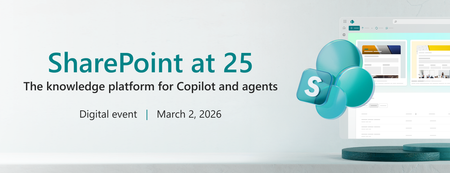
SharePoint at 25: The knowledge platform for Copilot and agents
Join us for a global digital event to celebrate the 25th birthday of SharePoint! Gear up for an exciting look at SharePoint’s historic moments along with an exclusive look ahead to the next chapter of SharePoint’s AI future! You will discover how SharePoint’s new content AI capabilities and intelligent experiences will transform the way people create, manage, and collaborate. Be sure to stick around after for our live Ask Microsoft Anything (AMA), where you can ask your questions about the exciting new SharePoint features directly to the product team! 🛠️ Don’t miss the SharePoint Hackathon in March 2026 Design, create, share! We are excited to invite you to a hackathon dedicated to crafting exceptional employee experiences using AI and the latest SharePoint features. More details coming soon.1.1KViews9likes3CommentsAdvanced Function Calling and Multi-Agent Systems with Small Language Models in Foundry Local
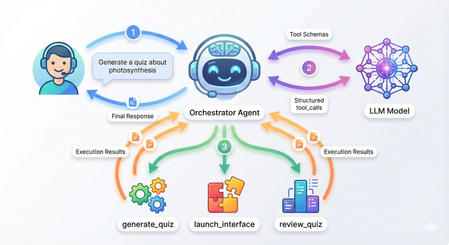
Advanced Function Calling and Multi-Agent Systems with Small Language Models in Foundry Local In our previous exploration of function calling with Small Language Models, we demonstrated how to enable local SLMs to interact with external tools using a text-parsing approach with regex patterns. While that method worked, it required manual extraction of function calls from the model's output; functional but fragile. Today, I'm excited to show you something far more powerful: Foundry Local now supports native OpenAI-compatible function calling with select models. This update transforms how we build agentic AI systems locally, making it remarkably straightforward to create sophisticated multi-agent architectures that rival cloud-based solutions. What once required careful prompt engineering and brittle parsing now works seamlessly through standardized API calls. We'll build a complete multi-agent quiz application that demonstrates both the elegance of modern function calling and the power of coordinated agent systems. The full source code is available in this GitHub repository, but rather than walking through every line of code, we'll focus on how the pieces work together and what you'll see when you run it. What's New: Native Function Calling in Foundry Local As we explored in our guide to running Phi-4 locally with Foundry Local, we ran powerful language models on our local machine. The latest version now support native function calling for models specifically trained with this capability. The key difference is architectural. In our weather assistant example, we manually parsed JSON strings from the model's text output using regex patterns and frankly speaking, meticulously testing and tweaking the system prompt for the umpteenth time 🙄. Now, when you provide tool definitions to supported models, they return structured tool_calls objects that you can directly execute. Currently, this native function calling capability is available for the Qwen 2.5 family of models in Foundry Local. For this tutorial, we're using the 7B variant, which strikes a great balance between capability and resource requirements. Quick Setup Getting started requires just a few steps. First, ensure you have Foundry Local installed. On Windows, use winget install Microsoft.FoundryLocal , and on macOS, use bash brew install microsoft/foundrylocal/foundrylocal You'll need version 0.8.117 or later. Install the Python dependencies in the requirements file, then start your model. The first run will download approximately 4GB: foundry model run qwen2.5-7b-instruct-cuda-gpu If you don't have a compatible GPU, use the CPU version instead, or you can specify any other Qwen 2.5 variant that suits your hardware. I have set a DEFAULT_MODEL_ALIAS variable you can modify to use different models in utils/foundry_client.py file. Keep this terminal window open. The model needs to stay running while you develop and test your application. Understanding the Architecture Before we dive into running the application, let's understand what we're building. Our quiz system follows a multi-agent architecture where specialized agents handle distinct responsibilities, coordinated by a central orchestrator. The flow works like this: when you ask the system to generate a quiz about photosynthesis, the orchestrator agent receives your message, understands your intent, and decides which tool to invoke. It doesn't try to generate the quiz itself, instead, it calls a tool that creates a specialist QuizGeneratorAgent focused solely on producing well-structured quiz questions. Then there's another agent, reviewAgent, that reviews the quiz with you. The project structure reflects this architecture: quiz_app/ ├── agents/ # Base agent + specialist agents ├── tools/ # Tool functions the orchestrator can call ├── utils/ # Foundry client connection ├── data/ ├── quizzes/ # Generated quiz JSON files │── responses/ # User response JSON files └── main.py # Application entry point The orchestrator coordinates three main tools: generate_new_quiz, launch_quiz_interface, and review_quiz_interface. Each tool either creates a specialist agent or launches an interactive interface (Gradio), handling the complexity so the orchestrator can focus on routing and coordination. How Native Function Calling Works When you initialize the orchestrator agent in main.py, you provide two things: tool schemas that describe your functions to the model, and a mapping of function names to actual Python functions. The schemas follow the OpenAI function calling specification, describing each tool's purpose, parameters, and when it should be used. Here's what happens when you send a message to the orchestrator: The agent calls the model with your message and the tool schemas. If the model determines a tool is needed, it returns a structured tool_calls attribute containing the function name and arguments as a proper object—not as text to be parsed. Your code executes the tool, creates a message with "role": "tool" containing the result, and sends everything back to the model. The model can then either call another tool or provide its final response. The critical insight is that the model itself controls this flow through a while loop in the base agent. Each iteration represents the model examining the current state, deciding whether it needs more information, and either proceeding with another tool call or providing its final answer. You're not manually orchestrating when tools get called; the model makes those decisions based on the conversation context. Seeing It In Action Let's walk through a complete session to see how these pieces work together. When you run python main.py, you'll see the application connect to Foundry Local and display a welcome banner: Now type a request like "Generate a 5 question quiz about photosynthesis." Watch what happens in your console: The orchestrator recognized your intent, selected the generate_new_quiz tool, and extracted the topic and number of questions from your natural language request. Behind the scenes, this tool instantiated a QuizGeneratorAgent with a focused system prompt designed specifically for creating quiz JSON. The agent used a low temperature setting to ensure consistent formatting and generated questions that were saved to the data/quizzes folder. This demonstrates the first layer of the multi-agent architecture: the orchestrator doesn't generate quizzes itself. It recognizes that this task requires specialized knowledge about quiz structure and delegates to an agent built specifically for that purpose. Now request to take the quiz by typing "Take the quiz." The orchestrator calls a different tool and Gradio server is launched. Click the link to open in a browser window displaying your quiz questions. This tool demonstrates how function calling can trigger complex interactions—it reads the quiz JSON, dynamically builds a user interface with radio buttons for each question, and handles the submission flow. After you answer the questions and click submit, the interface saves your responses to the data/responses folder and closes the Gradio server. The orchestrator reports completion: The system now has two JSON files: one containing the quiz questions with correct answers, and another containing your responses. This separation of concerns is important—the quiz generation phase doesn't need to know about response collection, and the response collection doesn't need to know how quizzes are created. Each component has a single, well-defined responsibility. Now request a review. The orchestrator calls the third tool: A new chat interface opens, and here's where the multi-agent architecture really shines. The ReviewAgent is instantiated with full context about both the quiz questions and your answers. Its system prompt includes a formatted view of each question, the correct answer, your answer, and whether you got it right. This means when the interface opens, you immediately see personalized feedback: The Multi-Agent Pattern Multi-agent architectures solve complex problems by coordinating specialized agents rather than building monolithic systems. This pattern is particularly powerful for local SLMs. A coordinator agent routes tasks to specialists, each optimized for narrow domains with focused system prompts and specific temperature settings. You can use a 1.7B model for structured data generation, a 7B model for conversations, and a 4B model for reasoning, all orchestrated by a lightweight coordinator. This is more efficient than requiring one massive model for everything. Foundry Local's native function calling makes this straightforward. The coordinator reliably invokes tools that instantiate specialists, with structured responses flowing back through proper tool messages. The model manages the coordination loop—deciding when it needs another specialist, when it has enough information, and when to provide a final answer. In our quiz application, the orchestrator routes user requests but never tries to be an expert in quiz generation, interface design, or tutoring. The QuizGeneratorAgent focuses solely on creating well-structured quiz JSON using constrained prompts and low temperature. The ReviewAgent handles open-ended educational dialogue with embedded quiz context and higher temperature for natural conversation. The tools abstract away file management, interface launching, and agent instantiation, the orchestrator just knows "this tool launches quizzes" without needing implementation details. This pattern scales effortlessly. If you wanted to add a new capability like study guides or flashcards, you could just easily create a new tool or specialists. The orchestrator gains these capabilities automatically by having the tool schemas you have defined without modifying core logic. This same pattern powers production systems with dozens of specialists handling retrieval, reasoning, execution, and monitoring, each excelling in its domain while the coordinator ensures seamless collaboration. Why This Matters The transition from text-parsing to native function calling enables a fundamentally different approach to building AI applications. With text parsing, you're constantly fighting against the unpredictability of natural language output. A model might decide to explain why it's calling a function before outputting the JSON, or it might format the JSON slightly differently than your regex expects, or it might wrap it in markdown code fences. Native function calling eliminates this entire class of problems. The model is trained to output tool calls as structured data, separate from its conversational responses. The multi-agent aspect builds on this foundation. Because function calling is reliable, you can confidently delegate to specialist agents knowing they'll integrate smoothly with the orchestrator. You can chain tool calls—the orchestrator might generate a quiz, then immediately launch the interface to take it, based on a single user request like "Create and give me a quiz about machine learning." The model handles this orchestration intelligently because the tool results flow back as structured data it can reason about. Running everything locally through Foundry Local adds another dimension of value and I am genuinely excited about this (hopefully, the phi models get this functionality soon). You can experiment freely, iterate quickly, and deploy solutions that run entirely on your infrastructure. For educational applications like our quiz system, this means students can interact with the AI tutor as much as they need without cost concerns. Getting Started With Your Own Multi-Agent System The complete code for this quiz application is available in the GitHub repository, and I encourage you to clone it and experiment. Try modifying the tool schemas to see how the orchestrator's behavior changes. Add a new specialist agent for a different task. Adjust the system prompts to see how agent personalities and capabilities shift. Think about the problems you're trying to solve. Could they benefit from having different specialists handling different aspects? A customer service system might have agents for order lookup, refund processing, and product recommendations. A research assistant might have agents for web search, document summarization, and citation formatting. A coding assistant might have agents for code generation, testing, and documentation. Start small, perhaps with two or three specialist agents for a specific domain. Watch how the orchestrator learns to route between them based on the tool descriptions you provide. You'll quickly see opportunities to add more specialists, refine the existing ones, and build increasingly sophisticated systems that leverage the unique strengths of each agent while presenting a unified, intelligent interface to your users. In the next entry, we will be deploying our quizz app which will mark the end of our journey in Foundry and SLMs these past few weeks. I hope you are as excited as I am! Thanks for reading.131Views0likes0CommentsUnlock key strategies for Marketplace growth
Looking to strengthen your go‑to‑market strategy in the year ahead? Don’t miss Microsoft’s latest guidance on how partners can accelerate success in the commercial marketplace. At Microsoft Ignite 2025, Microsoft Marketplace emerged as a central platform for cloud and AI innovation, with major enhancements such as expanded resale-enabled offers, deeper integration across Microsoft’s cloud ecosystem, and new tools designed to streamline procurement and accelerate value delivery for customers. This valuable resource distills 10 essential tips to help organizations optimize listings, leverage private offers, improve discoverability, and scale more effectively in the evolving AI-first landscape. It’s a valuable guide for any partner aiming to elevate their marketplace performance and align with Microsoft’s modern go-to-market approach. Read more: 10 Essential tips for Marketplace success: Insights from Microsoft Ignite 2025 | Microsoft Community Hub🚀 AI Toolkit for VS Code: January 2026 Update
Happy New Year! 🎆 We are kicking off 2026 with a major set of updates designed to streamline how you build, test, and deploy AI agents. This month, we’ve focused on aligning with the latest GitHub Copilot standards, introducing powerful new debugging tools, and enhancing our support for enterprise-grade models via Microsoft Foundry. 💡 From Copilot Instructions to Agent Skills The biggest architectural shift following the latest VS Code Copilot standards, in v0.28.1 is the transition from Copilot Instructions to Copilot Skills. This transition has equipped GitHub Copilot specialized skills on developing AI agents using Microsoft Foundry and Agent Framework in a cost-efficient way. In AI Toolkit, we have migrated our Copilot Tools from the Custom Instructions to Agent Skills. This change allows for a more capable integration within GitHub Copilot Chat. 🔄 Enhanced AIAgentExpert: Our custom agent now has a deeper understanding of workflow code generation and evaluation planning/execution. 🧹Automatic Migration: When you upgrade to v0.28.1, the toolkit will automatically clean up your old instructions to ensure a seamless transition to the new skills-based framework. 🏗️ Major Enhancements to Agent Development Our v0.28.0 milestone release brought significant improvements to how agents are authored and authenticated. 🔒 Anthropic & Entra Auth Support We’ve expanded the Agent Builder and Playground to support Anthropic models using Entra Auth types. This provides enterprise developers with a more secure way to leverage Claude models within the Agent Framework while maintaining strict authentication standards. 🏢 Foundry-First Development We are prioritizing the Microsoft Foundry ecosystem to provide a more robust development experience: Foundry v2: Code generation for agents now defaults to Foundry v2. ⚡ Eval Tool: You can now generate evaluation code directly within the toolkit to create and run evaluations in Microsoft Foundry. 📊 Model Catalog: We’ve optimized the Model Catalog to prioritize Foundry models and improved general loading performance. 🏎️ 💻 Performance and Local Models For developers building on Windows, we continue to optimize the local model experience: Profiling for Windows ML: Version 0.28.0 introduces profiling features for Windows ML-based local models, allowing you to monitor performance and resource utilization directly within VS Code. Platform Optimization: To keep the interface clean, we’ve removed the Windows AI API tab from the Model Catalog when running on Linux and macOS platforms. 🐛 Squashing Bugs & Polishing the Experience Codespaces Fix: Resolved a crash occurring when selecting images in the Playground while using GitHub Codespaces. Resource Management: Fixed a delay where newly added models wouldn't immediately appear in the "My Resources" view. Claude Compatibility: Fixed an issue where non-empty content was required for Claude models when used via the AI Toolkit in GitHub Copilot. 🚀 Getting Started Ready to experience the future of AI development? Here's how to get started: 📥 Download: Install the AI Toolkit from the Visual Studio Code Marketplace 📖 Learn: Explore our comprehensive AI Toolkit Documentation 🔍 Discover: Check out the complete changelog for v0.24.0 We'd love to hear from you! Whether it's a feature request, bug report, or feedback on your experience, join the conversation and contribute directly on our GitHub repository. Happy Coding! 💻✨Optimizing maintenance workflows with AI and Azure
In our Partner Spotlight series, we highlight organizations driving innovation across the Microsoft Marketplace. In each feature, we share the distinct journey of a partner leveraging the Microsoft ecosystem to deliver AI‑enabled solutions and transactable offers that streamline enterprise adoption and accelerate digital transformation. In this installment, we spoke with Benjamin Schwärzler of Workheld, a Vienna‑based SaaS company transforming maintenance management for asset‑intensive industries. We dive into their early beginnings, their growth as a Microsoft partner, and the ways they’re helping organizations close the gap between shopfloor execution and strategic decision‑making—powered by a secure, Azure‑based architecture. Read more to learn how Azure is shaping the future of intelligent maintenance management: AI-powered maintenance management with Microsoft Azure | Microsoft Community HubAPAC Fabric Engineering Connection
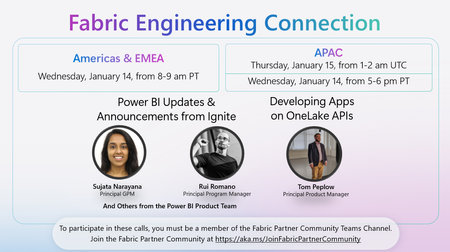
🚀 Upcoming Fabric Engineering Connection Call – Americas & EMEA & APAC! Join us on Wednesday, January 14, 8–9 am PT (Americas & EMEA) and Thursday, January 15, 1–2 am UTC (APAC) for a special session featuring the latest Power BI Updates & Announcements from Ignite with Sujata Narayana, Rui Romano, and other members of the Power BI Product Team. Plus, hear from Tom Peplow on Developing Apps on OneLake APIs. 🔗 To participate, make sure you’re a member of the Fabric Partner Community Teams Channel. If you haven’t joined yet, sign up here: https://lnkd.in/g_PRdfjt Don’t miss this opportunity to learn, connect, and stay up to date with the latest in Microsoft Fabric and Power BI!60Views0likes0CommentsAmericas & EMEA Fabric Engineering Connection
🚀 Upcoming Fabric Engineering Connection Call – Americas & EMEA & APAC! Join us on Wednesday, January 14, 8–9 am PT (Americas & EMEA) and Thursday, January 15, 1–2 am UTC (APAC) for a special session featuring the latest Power BI Updates & Announcements from Ignite with Sujata Narayana, Rui Romano, and other members of the Power BI Product Team. Plus, hear from Tom Peplow on Developing Apps on OneLake APIs. 🔗 To participate, make sure you’re a member of the Fabric Partner Community Teams Channel. If you haven’t joined yet, sign up here: https://lnkd.in/g_PRdfjt Don’t miss this opportunity to learn, connect, and stay up to date with the latest in Microsoft Fabric and Power BI!206Views0likes0CommentsAI Didn’t Break Your Production — Your Architecture Did
Most AI systems don’t fail in the lab. They fail the moment production touches them. I’m Hazem Ali — Microsoft AI MVP, Principal AI & ML Engineer / Architect, and Founder & CEO of Skytells. With a strong foundation in AI and deep learning from low-level fundamentals to production-scale, backed by rigorous cybersecurity and software engineering expertise, I design and deliver enterprise AI systems end-to-end. I often speak about what happens after the pilot goes live: real users arrive, data drifts, security constraints tighten, and incidents force your architecture to prove it can survive. My focus is building production AI with a security-first mindset: identity boundaries, enforceable governance, incident-ready operations, and reliability at scale. My mission is simple: Architect and engineer secure AI systems that operate safely, predictably, and at scale in production. And here’s the hard truth: AI initiatives rarely fail because the model is weak. They fail because the surrounding architecture was never engineered for production reality. - Hazem Ali You see this clearly when teams bolt AI onto an existing platform. In Azure-based environments, the foundation can be solid—identity, networking, governance, logging, policy enforcement, and scale primitives. But that doesn’t make the AI layer production-grade by default. It becomes production-grade only when the AI runtime is engineered like a first-class subsystem with explicit boundaries, control points, and designed failure behavior. A quick moment from the field I still remember one rollout that looked perfect on paper. Latency was fine. Error rate was low. Dashboards were green. Everyone was relaxed. Then a single workflow started creating the wrong tickets, not failing or crashing. It was confidently doing the wrong thing at scale. It took hours before anyone noticed, because nothing was broken in the traditional sense. When we finally traced it, the model was not the root cause. The system had no real gates, no replayable trail, and tool execution was too permissive. The architecture made it easy for a small mistake to become a widespread mess. That is the gap I’m talking about in this article. Production Failure Taxonomy This is the part most teams skip because it is not exciting, and it is not easy to measure in a demo. When AI fails in production, the postmortem rarely says the model was bad. It almost always points to missing boundaries, over-privileged execution, or decisions nobody can trace. So if your AI can take actions, you are no longer shipping a chat feature. You are operating a runtime that can change state across real systems, that means reliability is not just uptime. It is the ability to limit blast radius, reproduce decisions, and stop or degrade safely when uncertainty or risk spikes. You can usually tell early whether an AI initiative will survive production. Not because the model is weak, but because the failure mode is already baked into the architecture. Here are the ones I see most often. 1. Healthy systems that are confidently wrong Uptime looks perfect. Latency is fine. And the output is wrong. This is dangerous because nothing alerts until real damage shows up. 2. The agent ends up with more authority than the user The user asks a question. The agent has tools and credentials. Now it can do things the user never should have been able to do in that moment. 3. Each action is allowed, but the chain is not Read data, create ticket, send message. All approved individually. Put together, it becomes a capability nobody reviewed. 4. Retrieval becomes the attack path Most teams worry about prompt injection. Fair. But a poisoned or stale retrieval layer can be worse, because it feeds the model the wrong truth. 5. Tool calls turn mistakes into incidents The moment AI can change state—config, permissions, emails, payments, or data—a mistake is no longer a bad answer. It is an incident. 6. Retries duplicate side effects Timeouts happen. Retries happen. If your tool calls are not safe to repeat, you will create duplicate tickets, refunds, emails, or deletes. Next, let’s talk about what changes when you inject probabilistic behavior into a deterministic platform. In the Field: Building and Sharing Real-World AI In December 2025, I had the chance to speak and engage with builders across multiple AI and technology events, sharing what I consider the most valuable part of the journey: the engineering details that show up when AI meets production reality. This photo captures one of those moments: real conversations with engineers, architects, and decision-makers about what it truly takes to ship production-grade AI. During my session, Designing Scalable and Secure Architecture at the Enterprise Scale I walked through the ideas in this article live on stage then went deeper into the engineering reality behind them: from zero-trust boundaries and runtime policy enforcement to observability, traceability, and safe failure design, The goal wasn’t to talk about “AI capability,” but to show how to build AI systems that operate safely and predictably at scale in production. Deterministic platforms, probabilistic behavior Most production platforms are built for deterministic behavior: defined contracts, predictable services, stable outputs. AI changes the physics. You introduce probabilistic behavior into deterministic pipelines and your failure modes multiply. An AI system can be confidently wrong while still looking “healthy” through basic uptime dashboards. That’s why reliability in production AI is rarely about “better prompts” or “higher model accuracy.” It’s about engineering the right control points: identity boundaries, governance enforcement, behavioral observability, and safe degradation. In other words: the model is only one component. The system is the product. Production AI Control Plane Here’s the thing. Once you inject probabilistic behavior into a deterministic platform, you need more than prompts and endpoints. You need a control plane. Not a fancy framework. Just a clear place in the runtime where decisions get bounded, actions get authorized, and behavior becomes explainable when something goes wrong. This is the simplest shape I have seen work in real enterprise systems. The control plane components Orchestrator Owns the workflow. Decides what happens next, and when the system should stop. Retrieval Brings in context, but only from sources you trust and can explain later. Prompt assembly Builds the final input to the model, including constraints, policy signals, and tool schemas. Model call Generates the plan or the response. It should never be trusted to execute directly. Policy Enforcement Point The gate before any high impact step. It answers: is this allowed, under these conditions, with these constraints. Tool Gateway The firewall for actions. Scopes every operation, validates inputs, rate-limits, and blocks unsafe calls. Audit log and trace store A replayable chain for every request. If you cannot replay it, you cannot debug it. Risk engine Detects prompt injection signals, anomalous sessions, uncertainty spikes, and switches the runtime into safer modes. Approval flow For the few actions that should never be automatic. It is the line between assistance and damage. If you take one idea from this section, let it be this. The model is not where you enforce safety. Safety lives in the control plane. Next, let’s talk about the most common mistake teams make right after they build the happy-path pipeline. Treating AI like a feature. The common architectural trap: treating AI like a feature Many teams ship AI like a feature: prompt → model → response. That structure demos well. In production, it collapses the moment AI output influences anything stateful tickets, approvals, customer messaging, remediation actions, or security decisions. At that point, you’re not “adding AI.” You’re operating a semi-autonomous runtime. The engineering questions become non-negotiable: Can we explain why the system responded this way? Can we bound what it’s allowed to do? Can we contain impact when it’s wrong? Can we recover without human panic? If those answers aren’t designed into the architecture, production becomes a roulette wheel. Governance is not a document It’s a runtime enforcement capability Most governance programs fail because they’re implemented as late-stage checklists. In production, governance must live inside the execution path as an enforceable mechanism, A Policy Enforcement Point (PEP) that evaluates every high-impact step before it happens. At the moment of execution, your runtime must answer a strict chain of authorization questions: 1. What tools is this agent attempting to call? Every tool invocation is a privilege boundary. Your runtime must identify the tool, the operation, and the intended side effect (read vs write, safe vs state-changing). 2. Does the tool have the right permissions to run for this agent? Even before user context, the tool itself must be runnable by the agent’s workload identity (service principal / managed identity / workload credentials). If the agent identity can’t execute the tool, the call is denied period. 3. If the tool can run, is the agent permitted to use it for this user? This is the missing piece in most systems: delegation. The agent might be able to run the tool in general, but not on behalf of this user, in this tenant, in this environment, for this task category. This is where you enforce: user role / entitlement tenant boundaries environment (prod vs staging) session risk level (normal vs suspicious) 4. If yes, which tasks/operations are permitted? Tools are too broad. Permissions must be operation-scoped. Not “Jira tool allowed.” But “Jira: create ticket only, no delete, no project-admin actions.” Not “Database tool allowed.” But “DB: read-only, specific schema, specific columns, row-level filters.” This is ABAC/RBAC + capability-based execution. 5. What data scope is allowed? Even a permitted tool operation must be constrained by data classification and scope: public vs internal vs confidential vs PII row/column filters time-bounded access purpose limitation (“only for incident triage”) If the system can’t express data scope at runtime, it can’t claim governance. 6. What operations require human approval? Some actions are inherently high risk: payments/refunds changing production configs emailing customers deleting data executing scripts The policy should return “REQUIRE_APPROVAL” with clear obligations (what must be reviewed, what evidence is required, who can approve). 7. What actions are forbidden under certain risk conditions? Risk-aware policy is the difference between governance and theater. Examples: If prompt injection signals are high → disable tool execution If session is anomalous → downgrade to read-only mode If data is PII + user not entitled → deny and redact If environment is prod + request is destructive → block regardless of model confidence The key engineering takeaway Governance works only when it’s enforceable, runtime-evaluated, and capability-scoped: Agent identity answers: “Can it run at all?” Delegation answers: “Can it run for this user?” Capabilities answer: “Which operations exactly?” Data scope answers: “How much and what kind of data?” Risk gates + approvals answer: “When must it stop or escalate?” If policy can’t be enforced at runtime, it isn’t governance. It’s optimism. Safe Execution Patterns Policy answers whether something is allowed. Safe execution answers what happens when things get messy. Because they will, Models time out, Retries happen, Inputs are adversarial. People ask for the wrong thing. Agents misunderstand. And when tools can change state, small mistakes turn into real incidents. These patterns are what keep the system stable when the world is not. 👈 Two-phase execution Do not execute directly from a model output. First phase: propose a plan and a dry-run summary of what will change. Second phase: execute only after policy gates pass, and approval is collected if required. Idempotency for every write If a tool call can create, refund, email, delete, or deploy, it must be safe to retry. Every write gets an idempotency key, and the gateway rejects duplicates. This one change prevents a huge class of production pain. Default to read-only when risk rises When injection signals spike, when the session looks anomalous, when retrieval looks suspicious, the system should not keep acting. It should downgrade. Retrieve, explain, and ask. No tool execution. Scope permissions to operations, not tools Tools are too broad. Do not allow Jira. Allow create ticket in these projects, with these fields. Do not allow database access. Allow read-only on this schema, with row and column filters. Rate limits and blast radius caps Agents should have a hard ceiling. Max tool calls per request. Max writes per session. Max affected entities. If the cap is hit, stop and escalate. A kill switch that actually works You need a way to disable tool execution across the fleet in one move. When an incident happens, you do not want to redeploy code. You want to stop the bleeding. If you build these in early, you stop relying on luck. You make failure boring, contained, and recoverable. Think for scale, in the Era of AI for AI I want to zoom out for a second, because this is the shift most teams still design around. We are not just adding AI to a product. We are entering a phase where parts of the system can maintain and improve themselves. Not in a magical way. In a practical, engineering way. A self-improving system is one that can watch what is happening in production, spot a class of problems, propose changes, test them, and ship them safely, while leaving a clear trail behind it. It can improve code paths, adjust prompts, refine retrieval rules, update tests, and tighten policies. Over time, the system becomes less dependent on hero debugging at 2 a.m. What makes this real is the loop, not the model. Signals come in from logs, traces, incidents, drift metrics, and quality checks. The system turns those signals into a scoped plan. Then it passes through gates: policy and permissions, safe scope, testing, and controlled rollout. If something looks wrong, it stops, downgrades to read-only, or asks for approval. This is why scale changes. In the old world, scale meant more users and more traffic. In the AI for AI world, scale also means more autonomy. One request can trigger many tool calls. One workflow can spawn sub-agents. One bad signal can cause retries and cascades. So the question is not only can your system handle load. The question is can your system handle multiplication without losing control. If you want self-improving behavior, you need three things to be true: The system is allowed to change only what it can prove is safe to change. Every change is testable and reversible. Every action is traceable, so you can replay why it happened. When those conditions exist, self-improvement becomes an advantage. When they do not, self-improvement becomes automated risk. And this leads straight into governance, because in this era governance is not a document. It is the gate that decides what the system is allowed to improve, and under which conditions. Observability: uptime isn’t enough — you need traceability and causality Traditional observability answers: Is the service up. Is it fast. Is it erroring. That is table stakes. Production AI needs a deeper truth: why did it do that. Because the system can look perfectly healthy while still making the wrong decision. Latency is fine. Error rate is fine. Dashboards are green. And the output is still harmful. To debug that kind of failure, you need causality you can replay and audit: Input → context retrieval → prompt assembly → model response → tool invocation → final outcome Without this chain, incident response becomes guesswork. People argue about prompts, blame the model, and ship small patches that do not address the real cause. Then the same issue comes back under a different prompt, a different document, or a slightly different user context. The practical goal is simple. Every high-impact action should have a story you can reconstruct later. What did the system see. What did it pull. What did it decide. What did it touch. And which policy allowed it. When you have that, you stop chasing symptoms. You can fix the actual failure point, and you can detect drift before users do. RAG Governance and Data Provenance Most teams treat retrieval as a quality feature. In production, retrieval is a security boundary. Because the moment a document enters the context window, it becomes part of the system’s brain for that request. If retrieval pulls the wrong thing, the model can behave perfectly and still lead you to a bad outcome. I learned this the hard way, I have seen systems where the model was not the problem at all. The problem was a single stale runbook that looked official, ranked high, and quietly took over the decision. Everything downstream was clean. The agent followed instructions, called the right tools, and still caused damage because the truth it was given was wrong. I keep repeating one line in reviews, and I mean it every time: Retrieval is where truth enters the system. If you do not control that, you are not governing anything. - Hazem Ali So what makes retrieval safe enough for enterprise use? Provenance on every chunk Every retrieved snippet needs a label you can defend later: source, owner, timestamp, and classification. If you cannot answer where it came from, you cannot trust it for actions. Staleness budgets Old truth is a real risk. A runbook from last quarter can be more dangerous than no runbook at all. If content is older than a threshold, the system should say it is old, and either confirm or downgrade to read-only. No silent reliance. Allowlisted sources per task Not all sources are valid for all jobs. Incident response might allow internal runbooks. Customer messaging might require approved templates only. Make this explicit. Retrieval should not behave like a free-for-all search engine. Scope and redaction before the model sees it Row and column limits, PII filtering, secret stripping, tenant boundaries. Do it before prompt assembly, not after the model has already seen the data. Citation requirement for high-impact steps If the system is about to take a high-impact action, it should be able to point to the sources that justified it. If it cannot, it should stop and ask. That one rule prevents a lot of confident nonsense. Monitor retrieval like a production dependency Track which sources are being used, which ones cause incidents, and where drift is coming from. Retrieval quality is not static. Content changes. Permissions change. Rankings shift. Behavior follows. When you treat retrieval as governance, the system stops absorbing random truth. It consumes controlled truth, with ownership, freshness, and scope. That is what production needs. Security: API keys aren’t a strategy when agents can act The highest-impact AI incidents are usually not model hacks. They are architectural failures: over-privileged identities, blurred trust boundaries, unbounded tool access, and unsafe retrieval paths. Once an agent can call tools that mutate state, treat it like a privileged service, not a chatbot. Least privilege by default Explicit authorization boundaries Auditable actions Containment-first design Clear separation between user intent and system authority This is how you prevent a prompt injection from turning into a system-level breach. If you want the deeper blueprint and the concrete patterns for securing agents in practice, I wrote a full breakdown here: Zero-Trust Agent Architecture: How to Actually Secure Your Agents What “production-ready AI” actually means Production-ready AI is not defined by a benchmark score. It’s defined by survivability under uncertainty. A production-grade AI system can: Explain itself with traceability. Enforce policy at runtime. Contain blast radius when wrong. Degrade safely under uncertainty. Recover with clear operational playbooks. If your system can’t answer “how does it fail?” you don’t have production AI yet.. You have a prototype with unmanaged risk. How Azure helps you engineer production-grade AI Azure doesn’t “solve” production-ready AI by itself, it gives you the primitives to engineer it correctly. The difference between a prototype and a survivable system is whether you translate those primitives into runtime control points: identity, policy enforcement, telemetry, and containment. 1. Identity-first execution (kill credential sprawl, shrink blast radius) A production AI runtime should not run on shared API keys or long-lived secrets. In Azure environments, the most important mindset shift is: every agent/workflow must have an identity and that identity must be scoped. Guidance Give each agent/orchestrator a dedicated identity (least privilege by default). Separate identities by environment (prod vs staging) and by capability (read vs write). Treat tool invocation as a privileged service call, never “just a function.” Why this matters If an agent is compromised (or tricked via prompt injection), identity boundaries decide whether it can read one table or take down a whole environment. 2. Policy as enforcement (move governance into the execution path) Your article’s core idea governance is runtime enforcement maps perfectly to Azure’s broader governance philosophy: policies must be enforceable, not advisory. Guidance Create an explicit Policy Enforcement Point (PEP) in your agent runtime. Make the PEP decision mandatory before executing any tool call or data access. Use “allow + obligations” patterns: allow only with constraints (redaction, read-only mode, rate limits, approval gates, extra logging). Why this matters Governance fails when it’s a document. It works when it’s compiled into runtime decisions. 3. Observability that explains behavior Azure’s telemetry stack is valuable because it’s designed for distributed systems: correlation, tracing, and unified logs. Production AI needs the same plus decision traceability. Guidance Emit a trace for every request across: retrieval → prompt assembly → model call → tool calls → outcome. Log policy decisions (allow/deny/require approval) with policy version + obligations applied. Capture “why” signals: risk score, classifier outputs, injection signals, uncertainty indicators. Why this matters When incidents happen, you don’t just debug latency — you debug behavior. Without causality, you can’t root-cause drift or containment failures. 4. Zero-trust boundaries for tools and data Azure environments tend to be strong at network segmentation and access control. That foundation is exactly what AI systems need because AI introduces adversarial inputs by default. Guidance Put a Tool Gateway in front of tools (Jira, email, payments, infra) and enforce scopes there. Restrict data access by classification (PII/secret zones) and enforce row/column constraints. Degrade safely: if risk is high, drop to read-only, disable tools, or require approval. Why this matters Prompt injection doesn’t become catastrophic when your system has hard boundaries and graceful failure modes. 5. Practical “production-ready” checklist (Azure-aligned, engineering-first) If you want a concrete way to apply this: Identity: every runtime has a scoped identity; no shared secrets PEP: every tool/data action is gated by policy, with obligations Traceability: full chain captured and correlated end-to-end Containment: safe degradation + approval gates for high-risk actions Auditability: policy versions and decision logs are immutable and replayable Environment separation: prod ≠ staging identities, tools, and permissions Outcome This is how you turn “we integrated AI” into “we operate AI safely at scale.” Operating Production AI A lot of teams build the architecture and still struggle, because production is not a diagram. It is a living system. So here is the operating model I look for when I want to trust an AI runtime in production. The few SLOs that actually matter Trace completeness For high-impact requests, can we reconstruct the full chain every time, without missing steps. Policy coverage What percentage of tool calls and sensitive reads pass through the policy gate, with a recorded decision. Action correctness Not model accuracy. Real-world correctness. Did the system take the right action, on the right target, with the right scope. Time to contain When something goes wrong, how fast can we stop tool execution, downgrade to read-only, or isolate a capability. Drift detection time How quickly do we notice behavioral drift before users do. The runbooks you must have If you operate agents, you need simple playbooks for predictable bad days: Injection spike → safe mode, block tool execution, force approvals Retrieval poisoning suspicion → restrict sources, raise freshness requirements, require citations Retry storm → enforce idempotency, rate limits, and circuit breakers Tool gateway instability → fail closed for writes, degrade safely for reads Model outage → fall back to deterministic paths, templates, or human escalation Clear ownership Someone has to own the runtime, not just the prompts. Platform owns the gates, tool gateway, audit, and tracing Product owns workflows and user-facing behavior Security owns policy rules, high-risk approvals, and incident procedures When these pieces are real, production becomes manageable. When they are not, you rely on luck and hero debugging. The 60-second production readiness checklist If you want a fast sanity check, here it is. Every agent has an identity, scoped per environment No shared API keys for privileged actions Every tool call goes through a policy gate with a logged decision Permissions are scoped to operations, not whole tools Writes are idempotent, retries cannot duplicate side effects Tool gateway validates inputs, scopes data, and rate-limits actions There is a safe mode that disables tools under risk There is a kill switch that stops tool execution across the fleet Retrieval is allowlisted, provenance-tagged, and freshness-aware High-impact actions require citations or they stop and ask Audit logs are immutable enough to trust later Traces are replayable end-to-end for any incident If most of these are missing, you do not have production AI yet. You have a prototype with unmanaged risk. A quick note In Azure-based enterprises, you already have strong primitives that mirror the mindset production AI requires: identity-first access control (Microsoft Entra ID), secure workload authentication patterns (managed identities), and deep telemetry foundations (Azure Monitor / Application Insights). The key is translating that discipline into the AI runtime so governance, identity, and observability aren’t external add-ons, but part of how AI executes and acts. Closing Models will keep evolving. Tooling will keep improving. But enterprise AI success still comes down to systems engineering. If you’re building production AI today, what has been the hardest part in your environment: governance, observability, security boundaries, or operational reliability? If you’re dealing with deep technical challenges around production AI, agent security, RAG governance, or operational reliability, feel free to connect with me on LinkedIn. I’m open to technical discussions and architecture reviews. Thanks for reading. — Hazem Ali525Views0likes0Comments