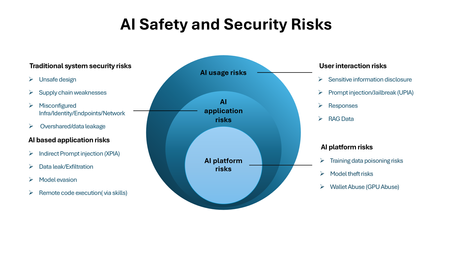
ai security
7 Topics
Securing Enterprise AI Agents with Microsoft Sentinel
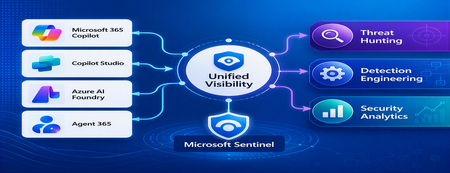
1. Introduction Enterprise adoption of Generative AI is accelerating rapidly through Microsoft 365 Copilot, Copilot Studio, Azure AI Foundry Agents, Security Copilot, and custom AI agents integrated with business applications. Unlike traditional SaaS applications, AI agents can: Access enterprise data Query internal knowledge repositories Invoke APIs and MCP tools Execute workflows Interact with business applications Make decisions on behalf of users While these capabilities improve productivity, they introduce a new attack surface that security teams must monitor and secure. Common AI threats include: Prompt Injection Cross Prompt Injection Attacks (XPIA) Jailbreak Attempts Unauthorized Tool Invocation Data Exfiltration through AI Agents Agent Identity Abuse Excessive Data Access Malicious MCP Tool Execution Traditional SOC monitoring platforms were designed for users, devices, applications and infrastructure—not autonomous AI systems. To address this challenge, Microsoft provides a comprehensive AI security monitoring framework built around: Agent 365 Observability Microsoft Agent Identities Microsoft Copilot Logs Defender XDR Defender for AI Microsoft Sentinel Together these components provide end-to-end observability of: User prompts Agent execution paths Tool invocations Safety signal detections Agent identities Security alerts 2. Reference Architecture AI Security Monitoring Architecture 3. Integration Architecture Microsoft provides multiple telemetry sources that complement one another. 3.1 Agent Runtime Telemetry Sentinel Data Connector Agent 365 Data Connector Table UnifiedAgentObservability Captures runtime behavior of AI agents including: User prompts Session IDs Conversation IDs Agent identities MCP tool invocations Connector invocations Tool arguments Tool responses Request payloads Response payloads Execution errors This dataset provides the forensic trail of everything an AI agent performed. 3.2 Agent Governance and Asset Inventory Sentinel Data Connector Microsoft Agent Identities Provides visibility into: Agent inventory Agent blueprint inventory Ownership Relationships Governance metadata Risk context This allows SOC teams to answer: Who owns this agent? What permissions does it have? Which business unit deployed it? Which related agents exist? 3.3 Copilot Audit and Usage Monitoring Sentinel Data Connector Microsoft Copilot Logs Connector Table CopilotActivity Provides: Copilot usage auditing Operational visibility User interaction tracking Useful for governance, compliance and adoption reporting. 3.4 AI Safety Telemetry Sentinel Data Connector Microsoft Defender XDR Connector Table CloudAppEvents CloudAppEvents provides AI safety signals such as: Prompt Shield detections Prompt Injection attempts Cross Prompt Injection Attacks (XPIA) Jailbreak-related verdicts Unsafe prompt classifications Think of CloudAppEvents as answering: "Was the prompt malicious?" 3.5 AI Security Alerts Sentinel Data Connectors Microsoft Defender XDR Microsoft Defender for Cloud Tables SecurityAlert SecurityIncident Used for: AI attack detections Security incidents Correlated investigation workflows 4. Understanding the Two Most Important AI Tables CloudAppEvents Focuses on AI Safety Questions answered: Was Prompt Shield triggered? Was this a jailbreak attempt? Was XPIA detected? Was the prompt suspicious? UnifiedAgentObservability Focuses on Agent Runtime Behavior Questions answered: What tool was invoked? Which connector executed? What arguments were passed? What data was returned? What actions did the agent perform? 5. Advanced Threat Hunting Scenarios The Agent365 Observability hunting guide contains several investigation scenarios that can be used directly in Microsoft Sentinel. Reference: Agent 365 Observability — AI Agent Telemetry Hunting https://github.com/SCStelz/security-investigator/blob/main/queries/cloud/agent365_observability.md 5.1 Prompt Injection Detection Detect prompts containing indicators such as: Ignore previous instructions Reveal system prompt Developer mode Disregard safety controls Investigation workflow: Review Tool Activity This allows analysts to determine whether a suspicious prompt resulted in downstream actions. 5.2 Session Reconstruction One of the most powerful capabilities of UnifiedAgentObservability is session reconstruction. Analysts can correlate: This creates complete forensic timelines. 5.3 MCP Tool Auditing Monitor all MCP activity including: query_lake Graph API tools ServiceNow connectors SharePoint connectors Custom enterprise tools Questions answered: Which tool was used? Who triggered it? What parameters were supplied? What data was returned? 5.4 Sensitive Data Access Monitoring Monitor AI agent interaction with: Employee records Customer data Financial information SharePoint repositories HR databases Useful for identifying: Data exfiltration attempts Excessive access patterns Sensitive data exposure 5.5 Query Lake Monitoring The GitHub hunting guide introduces monitoring of: query_lake RunAdvancedHuntingQuery Analysts can inspect: Actual KQL submitted Target workspaces Data sources queried Scope of access This provides visibility into AI-driven security investigations. 5.6 New Tool Detection Identify newly observed tool usage. Examples: Unauthorized MCP servers Newly registered connectors Unapproved tools Unexpected integrations This use case is particularly useful for governance programs. 5.7 Tool Failure Monitoring Monitor: Permission failures Connector failures Application errors Access-denied responses A sudden increase in failures may indicate: Reconnaissance activity Misconfiguration Privilege abuse attempts 6. Detection Engineering Opportunities Organizations can create Sentinel Analytics Rules for: 6.1 Prompt Injection Detection Developer Mode prompts Prompt Override attempts System Prompt disclosure requests 6.2 Jailbreak Attempt Detection Safety bypass attempts Role manipulation prompts Instruction override patterns 6.3 Unauthorized Tool Usage New MCP tools High-risk connectors Rare tool executions 6.4 Sensitive Data Access HR data queries Identity information retrieval Large-volume exports 6.5 Agent Identity Abuse Ownership changes Unexpected agent activity Agent-to-agent anomalies 7. Data Lake Exploration and Long-Term Analytics Because agent telemetry resides within Sentinel Data Lake, organizations can perform: Long-term AI investigations Historical AI attack analysis Agent baselining Governance reporting Trend analysis Tool inventory reporting Example dashboards include: Top Prompt Injection Attempts Most Active Agents High-Risk MCP Tools Agent Ownership Analysis AI Security Incidents Sensitive Data Access Trends 8. Summary AI agents represent the next major computing platform, but they also introduce a completely new attack surface. To effectively secure enterprise AI solutions, organizations require visibility across: User interactions Agent execution paths MCP tool usage Prompt safety signals Agent identities Security detections Microsoft Sentinel provides this unified view by integrating: Agent 365 Observability UnifiedAgentObservability Microsoft Agent Identities Microsoft Copilot Logs CloudAppEvents Defender XDR Defender for AI By combining AI runtime telemetry with AI safety signals and Defender detections, security teams can move beyond traditional monitoring and build a modern SOC capability for threat hunting, incident response, governance and forensic investigations across Microsoft 365 Copilot, Copilot Studio, Azure AI Foundry and future AI agent ecosystems. Reference: https://github.com/SCStelz/security-investigator/blob/main/queries/cloud/agent365_observability.mdMicrosoft Security Copilot: AI-Driven Security Operations at Greater Scale
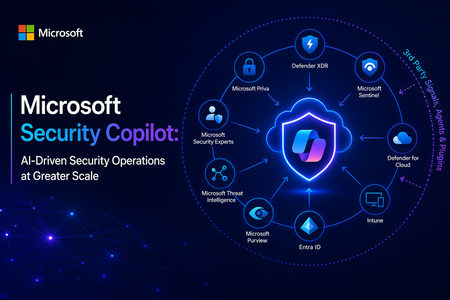
At its core, Security Copilot is built to enhance every facet of security operations at machine speed. It translates a vast array of inputs (Microsoft’s cloud-scale telemetry, threat intelligence feeds, security best practices, and enterprise-specific data) into tailored recommendations and summaries, helping security teams “catch what others miss,” respond faster, and strengthen their expertise. In the sections below, I explore the key security benefits of Security Copilot, its extensibility via third-party plugins and skills, and the value of its deep integration with Microsoft’s security ecosystem. Key Benefits for Security Operations Security Copilot meaningfully improves threat detection, investigation, response, correlation of signals, and analyst productivity. The table below summarizes these core security benefits and capabilities: Security Operations Aspect Benefit with Security Copilot Threat Detection Augmented detection of elusive threats: Security Copilot leverages broad threat intelligence and comprehensive signals to identify subtle threats, anomalies, and attack patterns that might be missed through manual analysis. By reasoning over Microsoft’s vast security graph and global threat telemetry, it helps analysts “catch what others miss,” ensuring unique or stealthy threats are surfaced. Incident Investigation Faster, context-rich investigations: Security Copilot can swiftly summarize and analyze incident data from multiple sources, enhancing incident details with additional context from logs, alerts, and threat intel. It correlates related events and highlights root causes, giving analysts a consolidated understanding of complex incidents in minutes. This enables quicker triage and deeper insights, so investigators know what happened and where to focus next. Response & Remediation Guided response and remediation: Security Copilot not only identifies issues but also provides prescriptive guidance on how to respond. It can suggest remediation steps and mitigation strategies in plain language, helping analysts act decisively. For example, it may outline containment steps or orchestrate automated actions through integrated tools, significantly reducing response time to incidents. Signal Correlation Holistic cross-domain correlation: Because it taps into signals across identities, endpoints, email, cloud workloads, and more, Security Copilot automatically connects the dots among disparate alerts and data streams. It presents unified incident narratives by linking related indicators (e.g., matching an endpoint malware alert with identity login anomalies and cloud logs), eliminating manual cross-tool correlation and uncovering hidden attack paths. Analysts get a single cohesive view of an incident across the kill chain. Analyst Productivity Boosted efficiency & skill elevation: By automating repetitive tasks (like scanning logs, writing KQL queries, or summarizing reports) and supporting natural language interaction, Security Copilot reduces manual workload and accelerates everyday tasks. This lets analysts focus on higher-value activities. In practice, teams using Security Copilot have seen significant productivity gains – a recent study found 23–47% improvement in SecOps task efficiency after adoption. Junior analysts ramp up faster (learning from Copilot’s guidance), while senior analysts can handle more incidents with less fatigue. These improvements translate into measurable security outcomes. Incident response becomes faster and more consistent, with mean time to resolution reduced by 30% on average within a few months of use according to early research. Security Copilot’s ability to accelerate investigations and streamline tasks drives down risk exposure and helps organizations make the most of their security investments. Ultimately, it strengthens an organization’s security posture by augmenting human analysts with AI-driven speed, scale, and intelligence. Seamless Integration with the Microsoft Security Ecosystem Another key strength of Security Copilot is its deep native integration with Microsoft’s security portfolio. From day one, Security Copilot was “designed with integration in mind.” It plugs directly into a broad range of Microsoft security products — including Microsoft 365 Defender (XDR), Microsoft Sentinel (SIEM), Microsoft Entra (ID and access management), Microsoft Intune (endpoint management), Microsoft Purview (compliance), and more. In practice, Security Copilot is available as both a standalone portal and as an embedded side-by-side experience within these Microsoft security tools. This means a security analyst working in Microsoft Sentinel or Defender can access Copilot’s capabilities without switching context: Copilot is right there in the workflow, ready to answer questions or assist with tasks in real time. Because of this close integration, Security Copilot can access data and signals from across all Microsoft security solutions that an organization uses. It operates over a unified security data estate encompassing endpoints, identities, emails, applications, cloud workloads, data repositories, and beyond. The result is truly end-to-end visibility and protection: Copilot can reason across diverse telemetry (e.g., correlating a device malware alert from Defender with cloud logs from Azure, or identity risk signals from Entra) to provide comprehensive insight. This unified approach eliminates silos and tool fragmentation — analysts spend less time pivoting between separate consoles or manually stitching together information because Copilot synthesizes it automatically. Moreover, leveraging the Microsoft ecosystem means Security Copilot can immediately add value without requiring a rip-and-replace of existing tools. It acts as a “force multiplier” across the installed Microsoft Security stack, maximizing the return on those investments by making them more effective and easier to use. For example, Copilot can turn a collection of raw alerts from different Microsoft products into a single, coherent incident storyline with actionable next steps. This synergy leads to significant operational efficiency gains and a more streamlined SOC workflow, as analysts have a central AI assistant coordinating across all defenses on their behalf. By providing unified insights, reducing tool sprawl, and bringing together Microsoft’s best-in-class security technologies, Security Copilot emerges as a valuable asset for modern security teams. It empowers organizations to practice “AI-first” security operations – enabling defenders to work faster and smarter, while fully utilizing an integrated security ecosystem to protect the enterprise from evolving threats. In summary, Microsoft Security Copilot offers a compelling combination of advanced AI capabilities, extensibility, and seamless integration that helps security teams achieve unprecedented speed, breadth, and efficiency in defending their organizations. It enhances human expertise with machine-scale intelligence, improving threat detection and response outcomes and transforming the way security operations centers operate for the better. Open Extensibility with Third-Party Plugins and Skills A standout capability of Security Copilot is its extensible plugin architecture, which allows it to incorporate external data sources and integrate with third-party security tools. Plugins in Security Copilot are modular connectors that bring in specific data or perform defined actions (each plugin encapsulates certain “skills,” such as running a KQL query, calling an API, or searching threat intel). Microsoft provides numerous pre-installed plugins out-of-the-box for common Microsoft security services and workflows, and administrators can easily add or develop custom plugins to connect 3rd-party systems or bespoke data sources. This design ensures that Security Copilot’s capabilities can expand and adapt to different environments. Through both Microsoft-built and third-party plugins, Security Copilot can tap into a wide variety of security data beyond the Microsoft stack. For example, supported third-party plugins let Copilot pull context from external solutions such as IT service management tools (e.g., ServiceNow), vulnerability management platforms, identity providers, network security appliances, and others. Plugins feed additional logs, alerts, and intelligence into Copilot’s analysis, thereby enriching its understanding of incidents with non-Microsoft data and events. This means a SOC can leverage existing investments in third-party security products by having Security Copilot analyze and correlate those systems’ outputs alongside Microsoft’s telemetry. Microsoft and its partners have already created an ecosystem of Security Copilot plugins. For instance, Microsoft announced 15+ new third-party plugins at Ignite 2024, spanning categories like threat intelligence (e.g., integrating feeds from providers like CrowdSec, Cybersixgill, GreyNoise) and device/network/identity management tools (e.g., Red Canary, Netskope, Tanium, CyberArk, etc.). These plugins bring rich external data on threat actors, indicators of compromise, vulnerabilities, device health, user activity, and more, allowing Copilot to provide even more comprehensive analyses and recommendations. Crucially, customers can build their own plugins and skills if needed, using Security Copilot’s developer tools and APIs. This means an enterprise could integrate a proprietary threat feed, custom data store, or even trigger custom response workflows via Copilot, tailoring the AI assistant to their unique security environment. Thanks to secure design and admin controls, organizations maintain full governance over which plugins are enabled and how they consume resources. In summary, Security Copilot’s open, plugin-based extensibility ensures that it can grow with an organization’s needs, incorporating any relevant third-party data or workflow to further enhance threat analysis and incident response. Technical Resources: Security Copilot Main documentation site Security Copilot agents Security Copilot plugins What’s new for Security Copilot Responsible AI in Security Copilot Official Security Copilot GitHub How to operationalize Security Copilot and increase SOC productivityEmbracing Responsible AI: A Comprehensive Guide and Call to Action
In an age where artificial intelligence (AI) is becoming increasingly integrated into our daily lives, the need for responsible AI practices has never been more critical. From healthcare to finance, AI systems influence decisions affecting millions of people. As developers, organizations, and users, we are responsible for ensuring that these technologies are designed, deployed, and evaluated ethically. This blog will delve into the principles of responsible AI, the importance of assessing generative AI applications, and provide a call to action to engage with the Microsoft Learn Module on responsible AI evaluations. What is Responsible AI? Responsible AI encompasses a set of principles and practices aimed at ensuring that AI technologies are developed and used in ways that are ethical, fair, and accountable. Here are the core principles that define responsible AI: Fairness AI systems must be designed to avoid bias and discrimination. This means ensuring that the data used to train these systems is representative and that the algorithms do not favor one group over another. Fairness is crucial in applications like hiring, lending, and law enforcement, where biased AI can lead to significant societal harm. Transparency Transparency involves making AI systems understandable to users and stakeholders. This includes providing clear explanations of how AI models make decisions and what data they use. Transparency builds trust and allows users to challenge or question AI decisions when necessary. Accountability Developers and organizations must be held accountable for the outcomes of their AI systems. This includes establishing clear lines of responsibility for AI decisions and ensuring that there are mechanisms in place to address any negative consequences that arise from AI use. Privacy AI systems often rely on vast amounts of data, raising concerns about user privacy. Responsible AI practices involve implementing robust data protection measures, ensuring compliance with regulations like GDPR, and being transparent about how user data is collected, stored, and used. The Importance of Evaluating Generative AI Applications Generative AI, which includes technologies that can create text, images, music, and more, presents unique challenges and opportunities. Evaluating these applications is essential for several reasons: Quality Assessment Evaluating the output quality of generative AI applications is crucial to ensure that they meet user expectations and ethical standards. Poor-quality outputs can lead to misinformation, misrepresentation, and a loss of trust in AI technologies. Custom Evaluators Learning to create and use custom evaluators allows developers to tailor assessments to specific applications and contexts. This flexibility is vital in ensuring that the evaluation process aligns with the intended use of the AI system. Synthetic Datasets Generative AI can be used to create synthetic datasets, which can help in training AI models while addressing privacy concerns and data scarcity. Evaluating these synthetic datasets is essential to ensure they are representative and do not introduce bias. Call to Action: Engage with the Microsoft Learn Module To deepen your understanding of responsible AI and enhance your skills in evaluating generative AI applications, I encourage you to explore the Microsoft Learn Module available at this link. What You Will Learn: Concepts and Methodologies: The module covers essential frameworks for evaluating generative AI, including best practices and methodologies that can be applied across various domains. Hands-On Exercises: Engage in practical, code-first exercises that simulate real-world scenarios. These exercises will help you apply the concepts learned tangibly, reinforcing your understanding. Prerequisites: An Azure subscription (you can create one for free). Basic familiarity with Azure and Python programming. Tools like Docker and Visual Studio Code for local development. Why This Matters By participating in this module, you are not just enhancing your skills; you are contributing to a broader movement towards responsible AI. As AI technologies continue to evolve, the demand for professionals who understand and prioritize ethical considerations will only grow. Your engagement in this learning journey can help shape the future of AI, ensuring it serves humanity positively and equitably. Conclusion As we navigate the complexities of AI technology, we must prioritize responsible AI practices. By engaging with educational resources like the Microsoft Learn Module on responsible AI evaluations, we can equip ourselves with the knowledge and skills necessary to create AI systems that are not only innovative but also ethical and responsible. Join the movement towards responsible AI today! Take the first step by exploring the Microsoft Learn Module and become an advocate for ethical AI practices in your community and beyond. Together, we can ensure that AI serves as a force for good in our society. References Evaluate generative AI applications https://learn.microsoft.com/en-us/training/paths/evaluate-generative-ai-apps/?wt.mc_id=studentamb_263805 Azure Subscription for Students https://azure.microsoft.com/en-us/free/students/?wt.mc_id=studentamb_263805 Visual Studio Code https://code.visualstudio.com/?wt.mc_id=studentamb_2638051KViews0likes0CommentsRedefining Security for an AI Driven World
Vendors are being challenged to help customers address these challenges not as a point-solution vendor but as an end-to-end security and AI platform partner. By integrating identity, data governance, threat protection, and AI services into a unified ecosystem, Microsoft can deliver coordinated defenses, continuous compliance monitoring, and operational efficiency gains that fragmented toolsets cannot match. The sections that follow examine each challenge in depth — why it persists, what makes it hard, and specifically how Microsoft helps organizations bridge the gap. Challenge 1: Safeguarding Data Privacy in the AI Era AI systems are voracious consumers of data, and their adoption is outpacing the governance structures meant to protect it. More than 80% of business leaders cite leakage of sensitive data as their primary concern with generative AI, and nearly 48% have responded by banning all use of GenAI in the workplace entirely. Meanwhile, AI is raising the value of human-generated data as a critical training input while introducing entirely new avenues for potential data leakage through models and AI-powered applications. Why This Challenge Persists Fragmented tooling is the most immediate obstacle. Organizations are managing security, compliance, and data governance through disconnected platforms, creating siloed visibility that undermines cohesive protection. Only 31% of organizations have established a global data architecture, and just 25% maintain a global data quality program — two foundations essential for trustworthy AI innovation. Without enterprise-wide data classification and access controls, AI systems cannot distinguish what is too sensitive to surface. At the same time, shadow AI compounds the risk. When employees turn to unapproved AI tools to boost productivity, sensitive data can flow to services outside IT's purview. According to Microsoft's guide on securing the AI-powered enterprise, 80% of business leaders worry that sensitive data could slip through the cracks due to unchecked AI use. AI models also inherit the permissions of their users, meaning an over-permissioned employee can unknowingly expose critical data to an AI system. Gartner has estimated that by 2025, generative AI will account for 10% of all data produced, further blurring the boundary between what is corporate-controlled and what is AI-generated. Regulatory stakes add urgency: Gartner projects that by 2027, at least one global company will see its AI deployment banned by a regulator for non-compliance with data protection or AI governance legislation. How can organizations bridge the gap? Microsoft Purview provides a unified platform that combines data classification, data loss prevention (DLP), and AI-specific posture management to address fragmentation head-on. Its Data Security Posture Management (DSPM) for AI centralizes visibility into how AI applications interact with sensitive data across the organization — including Microsoft 365 Copilot, enterprise AI apps, and third-party AI tools. Security teams can see, for example, how many unlabeled files were referenced by Copilot and where the greatest concentrations of unprotected data reside. Sensitivity labels created in Purview travel with documents and are enforced at inference time: when an AI app retrieves a file labeled "Highly Confidential," the system ensures the requesting user holds the required EXTRACT and VIEW usage rights before returning data. In practice, an executive running a Copilot query on a labeled strategy document would see the sensitivity label clearly marked alongside the response. Purview's DLP policies now extend to AI scenarios directly, including inline browser protection that can block or warn users attempting to paste sensitive data into third-party generative AI sites such as ChatGPT in Microsoft Edge, Chrome, or Firefox. For organizations handling the most sensitive workloads, Azure Confidential Computing protects data even while it is being processed, using hardware-based Trusted Execution Environments (TEEs) that keep information encrypted in memory — invisible even to cloud operators. This capability is especially relevant for AI training and inference on regulated data, where customers need verifiable proof that their information was never exposed in plaintext during processing. The net result is defense-in-depth for data: discover where sensitive information lives, classify it so AI systems respect boundaries, enforce policies at the point of AI interaction, and encrypt data in use for the highest-risk scenarios — all governed through a single compliance surface. Challenge 2: The AI-Weaponized Threat Landscape Adversaries are using AI to accelerate, scale, and personalize attacks faster than traditional defenses can respond. In the past year, 67% of all phishing attacks employed some form of AI, and organizations now face an average of 66 data security alerts per day — up from 52 in 2023. Under this pressure, 73% of cybersecurity experts admit they have missed, ignored, or failed to respond to high-priority security alerts. Why This Challenge Persists The speed differential is the core problem. AI-enabled threat actors can now use models to autonomously discover, chain, and exploit vulnerabilities, compressing the window from discovery to exploitation from months to hours. Attackers leverage generative AI for malware generation, automated vulnerability scanning, customized exploits, password cracking, sophisticated phishing and social engineering, and deepfake-based impersonation of data, email, and voice. At the same time, AI systems themselves introduce novel attack surfaces. A staggering 88% of organizations, according to a Gartner Peer Community survey of 332 participants, are concerned about indirect prompt injection attacks — where malicious instructions embedded in data manipulate an AI's behavior to reveal confidential information or bypass controls. AI models are also susceptible to fabrications, initially known as hallucinations, in essence biased outputs, and data poisoning — risks that traditional vulnerability management frameworks were never designed to address. From an operational standpoint, SOC analysts already spend nearly three hours per day on incidents, accumulating costs that reach billions in aggregate. Layering AI-driven attacks on top of this existing overload threatens to break conventional security operations entirely. How can organizations bridge the gap? Microsoft counters the asymmetry with AI-powered defense at cloud scale, grounded in threat intelligence no single organization could replicate alone. Microsoft processes more than 100 trillion security signals per day from endpoints, cloud services, identity systems, and the edge, and tracks 1,500 unique threat actor groups — including 600 nation-state actors, 300 cybercrime groups, and 200 influence operations groups. This intelligence feeds directly into detection models and product updates, ensuring customers benefit from patterns observed across billions of users and devices worldwide. Microsoft Security Copilot is the most visible expression of this strategy. A generative AI security assistant combining advanced OpenAI models with a Microsoft-developed security-specific model, it helps analysts investigate and remediate incidents in natural language — from triaging complex alerts into actionable summaries, to reverse-engineering malicious scripts, to generating KQL queries for threat hunting. Early deployment data shows that Defender XDR customers using Security Copilot experienced a 30% reduction in incident resolution time in just three months. For securing AI models themselves, Microsoft Defender for Cloud now offers AI model security (in public preview since March 2026), which scans custom AI models in Azure Machine Learning registries and workspaces for embedded malware, unsafe operators, and exposed secrets — integrated directly into CI/CD pipelines so risky models are stopped before reaching production. The Microsoft Digital Defense Report 2025 reinforced this posture with seven top recommendations, led by managing cyber risk at the boardroom level, prioritizing identity protection, and investing in people alongside tools. Microsoft's approach treats AI threats not as a separate domain but as an intensification of the broader threat landscape that demands coordinated, platform-level defense. Challenge 3: Identity and Access Governance for AI Agents AI is creating an entirely new class of digital actors that most identity systems were never designed to manage. According to IDC, there will be approximately 1.3 billion AI agents operating across enterprises by 2028. These agents — which range from simple automation bots to fully autonomous decision-making systems — require resource access, generate data, and interact with users and services in ways that fundamentally differ from traditional applications or human users. Why This Challenge Persists Most organizations lack lifecycle management, ownership models, and policy controls for non-human identities, and AI agents amplify these gaps significantly. Industry analysts argue that AI agents should not be treated as just another non-human identity; they introduce complex delegation chains between humans, agents, and services that require distinct identity, accountability, and audit models. Traditional human-in-the-loop controls may not scale for agentic systems, yet new identity-centric governance mechanisms are only beginning to emerge. Compounding the issue, the indeterministic nature of large language models means that an AI agent with broad access privileges may behave unpredictably — potentially taking actions its developers did not anticipate. Without proper controls, forgotten or orphaned agent identities can become easy targets for attackers, and the resulting security incidents may be difficult to attribute or contain. How can organizations bridge the gap? Microsoft extends its identity-first Zero Trust architecture to AI through Microsoft Entra Agent ID (in public preview). The core idea: every AI agent receives a unique, first-class identity — discoverable, manageable, and securable alongside human users, applications, and devices. Once registered, an agent's access can be scoped using the same enterprise-grade controls as any other identity: conditional access policies, role-based access control, lifecycle governance, and risk-based protection. Conditional Access for Agents allows organizations to evaluate an agent's context and risk level before granting a token. Policies can enforce controls such as restricting agents to specific network locations or blocking access when risk signals are elevated. Microsoft is also developing RBAC guardrails specifically tailored to AI agent behaviors, acknowledging that LLM-based agents present heightened risk when granted broad role assignments. For lifecycle management, Microsoft provides mechanisms for IT administrators to create automated lifecycle policies for agent identities — including periodic attestation by designated sponsors, automated cleanup of unmonitored agents, and notifications when agent identities approach expiration. This directly addresses the "agent sprawl" problem identified by CISOs and security architects. At a broader level, Microsoft Agent 365 delivers a unified control plane for agents, aggregating posture, and real-time risk signals from Defender, Entra, and Purview into a single dashboard — providing discovery of both Microsoft and third-party agents, AI posture tracking, and governance controls to delegate remediation tasks to the appropriate teams. The Security Dashboard for AI (in GA now) answers the executive-level questions: Which AI assets exist in our environment? What is their current security posture? Where must we take action? — covering Microsoft 365 Copilot, Copilot Studio agents, Foundry apps, and third-party AI including Google Gemini, OpenAI ChatGPT, and MCP servers Challenge 4: Regulatory Compliance and Ethical AI Governance The regulatory landscape for AI is evolving faster than most organizations can track, and the stakes — legal, financial, and reputational — are escalating. More than 52% of business leaders admit they are unsure how to navigate rapidly evolving AI regulations. Frameworks like the EU AI Act (whose first obligations took effect on February 2, 2025), GDPR, and sector-specific rules such as DORA are converging to create a compliance environment that demands continuous adaptation. Why This Challenge Persists The EU AI Act alone adopts a risk-based approach to AI regulation, classifying systems by their potential impact on health, safety, and fundamental rights and imposing corresponding obligations for documentation, transparency, human oversight, and testing. Organizations must map every AI deployment to the correct risk category — and misclassification can lead to regulatory violations. Simultaneously, the responsibilities of security leaders are expanding to include governance and regulatory compliance oversight that traditionally belonged to legal or compliance teams. The NC State University Executive Perspectives on Top Risks survey of 1,540 board members and C-suite executives ranked regulatory uncertainty and fragmentation as the eighth-highest near-term risk (2026–2028), and AI implementation risks as sixth. Among AI-specific concerns, 24% of respondents identified lack of governance and accountability for AI deployments as a top three worry. Culturally, building internal consensus around what constitutes "responsible" AI use — across diverse business units with different risk appetites — remains a persistent organizational challenge. How can organizations bridge the gap? Microsoft's Responsible AI program, anchored by six durable principles established in 2018 — Fairness, Reliability & Safety, Privacy & Security, Inclusiveness, Transparency, and Accountability — provides a governance blueprint that has proven stable even as AI technology evolves rapidly. These principles shape design, deployment, and oversight choices across Microsoft's products, and the company shares the lessons openly through its 2025 Responsible AI Transparency Report and customer guidance. In preparing for the EU AI Act specifically, Microsoft has taken a proactive, layered approach to compliance, conducting impact assessments and adversarial red teaming on high-risk models and systems, and extending its Sensitive Uses governance program to ensure additional oversight for the most consequential AI deployments. Microsoft has also documented its approach to EU AI Act implementation to help customers understand how its products and services are being built to comply. Operationally, the Security Dashboard for AI provides board-ready analytics and compliance insights, aggregating risk signals across Entra, Defender, and Purview into a single executive view with recommendations and direct remediation paths. This makes AI governance visible and actionable within the same tools security leaders already use for broader risk management. Microsoft also fosters community-driven governance through initiatives like the Security for AI Accelerated Collaboration Forum (ACF), which brings together CISOs, security architects, SOC leaders, identity and data owners, and platform engineers to share challenges, shape roadmap priorities, and develop reusable governance frameworks. Challenge 5: Integration Complexity and Workforce Readiness Even when the right AI security tools exist, most organizations struggle to integrate them into existing technology stacks and to equip their people to use them effectively. Among executives surveyed by NC State University, 31% identified integrating AI with existing technologies, business processes, and workforce as a top-three AI concern, 29% pointed to equipping the workforce to realize AI's value proposition, and 28% flagged the inability to deploy AI at a competitive pace. Why This Challenge Persists Years of tool proliferation have left enterprises with fragmented security architectures. Organizations rely on disconnected platforms for endpoint protection, cloud workload security, identity management, and data governance — and AI capabilities are now being added to each domain independently. Microsoft's own research notes that organizations using fragmented platforms across security, compliance, and data teams see exacerbated security outcomes. When a data loss prevention alert in one system cannot be correlated with an identity anomaly in another, threats slip through. At the same time, AI security as a discipline lacks comprehensive resources and seasoned experts. Because major cloud AI platforms only became generally available in 2021–2023, organizations must often develop protective measures without much external guidance or established precedent. The cybersecurity workforce shortage is well documented; the additional demand for professionals who understand both machine learning and security compounds it further. The broader threat environment amplifies the urgency: cyberthreats have grown 5X in scale, Microsoft now tracks over 1,500 threat actor groups (up from roughly 300 just a few years ago), and the median time for an attacker to access confidential data after a successful phishing attack is just 1 hour 12 minutes. Teams that cannot integrate and respond quickly are structurally disadvantaged. How can organizations bridge the gap? Microsoft's primary answer to integration complexity is a unified, cloud-native security platform in which AI, identity, data governance, and threat protection work as a coordinated system. Security Copilot, for instance, is embedded within and integrates across Microsoft Defender XDR, Microsoft Sentinel, Microsoft Intune, Microsoft Entra, and Microsoft Purview. An analyst can use a single natural language interface to investigate incidents drawing on data from any of these products, generate remediation steps, build reports for stakeholders, and automate routine tasks with autonomous Security Copilot agents — all without switching consoles. The inclusion of Security Copilot in Microsoft 365 E5 and E7 licensing simplifies adoption further. Customers receive a monthly allocation of SCUs or Secure Computing Units to empower Security Copilot, eliminating the need for separate AI security procurement. This positions integrated, agentic AI-powered security as a default capability rather than an add-on. For endpoint-level visibility into AI agent sprawl, Microsoft Defender for Endpoint now automatically discovers supported AI coding agents on onboarded Windows 11 devices — including OpenClaw, Claude Code, Codex, Cursor, GitHub Copilot CLI, ChatGPT Desktop, Gemini CLI, and others — and surfaces them in the Defender portal inventory for investigation and correlation with existing device telemetry. On workforce enablement, Microsoft operates the Security Copilot Adoption Hub, which provides role-specific guidance for CISOs, threat intelligence analysts, IT admins, and data security administrators on how to embed AI into their daily workflows. The broader Microsoft Learn platform now offers modules on securing AI applications and responsible AI governance. Microsoft's role here is as a force multiplier: by consolidating tools, reducing integration burden, and actively investing in customer readiness, Microsoft enables organizations to convert AI from a source of complexity into an operational advantage — without leaving security behind. Conclusion: Turning AI Security into Competitive Advantage The five challenges examined here — data exposure, adversarial threats, identity sprawl, regulatory uncertainty, and integration complexity — will only intensify as AI adoption accelerates. Yet for organizations that address them proactively, the payoff extends well beyond risk mitigation. Robust AI security has become a source of trust with customers and regulators, a prerequisite for bold innovation, and a differentiator in markets where competitors may still be scrambling to catch up. Microsoft's contribution is structural: an integrated platform where identity, data governance, threat intelligence, and compliance converge — backed by principles of Responsible AI that have remained durable since 2018 and by threat visibility at a scale (more than 100 trillion signals per day, 1,500+ tracked threat actor groups) that no single enterprise can replicate. For executive leadership, the actionable imperative is to treat AI security not as a technical footnote but as a boardroom priority — one that spans the CIO, CISO, Chief Data Officer, and business-unit leaders working together. As Microsoft's own AI security guidance articulates, cross-team collaboration, employee training, and transparent governance are just as essential as firewalls and encryption in building a secure AI future. The organizations that internalize this lesson will be those best positioned to harness AI's full potential — securely, responsibly, and at scale. Tech Resources: Defense at AI speed: Microsoft’s new multi-model agentic security system tops leading industry benchmark Securing AI and Navigating risks and compliance for the future Entra agent Identities for AI agents Secure Dashboard for AI Microsoft Security Copilot Microsoft Security Copilot FAQBuilding an Auditable Security Layer for Agentic AI
Most agent failures do not look like breaches. They look like a normal chat, a normal answer, and a normal tool call. Until the next morning, when a single question collapses the whole story: who authorized that action. You think you deployed an agent. In reality, you deployed an unbounded automation pipeline that happens to speak English. I’m Hazem Ali — Microsoft AI MVP, Distinguished AI & ML Architect, Founder & CEO at Skytells. For over 20 years, I’ve built secure, scalable enterprise AI across cloud and edge, with a focus on agent security and sovereign, governed AI architectures. My work on these systems is widely referenced by practitioners across multiple regions. Hazem Ali honored to receive an official speaker invitation under the patronage of H.H. Sheikh Dr. Sultan bin Muhammad Al Qasimi, Member of the UAE Supreme Council and Ruler of Sharjah, to speak at the Sharjah International Conference on Linguistic Intelligence (SICLI), organized by the American University of Sharjah (AUS) and the Emirates Scholar Center for Research and Studies. This piece is a collaboration with Hammad Atta a Practice Lead – AI Security & Cloud Strategy and Dr. Yasir Mehmood , Dr Muhammad Zeeshan Baig, Dr. Muhammad Aatif, Dr. MUHAMMAD AZIZ UL HAQ. We align on one core idea: agent security is not about making the model behave. It is about building enforceable boundaries around the model and proving every privileged step. This article is meant to sit next to my earlier Tech Community piece, Zero-Trust Agent Architecture: How To Actually Secure Your Agents, and go one level deeper into the mechanics you can implement on Azure today. Let me break it down. The Principle: The model is not your boundary Let me break it down in the way I’d explain it in a design review. A boundary is something that still holds when the component on the other side is adversarial, confused, or simply wrong. An LLM is none of those reliably. In an agent, the model is not just a generator. It becomes a planner and scheduler. It decides when to retrieve, which tool to call, how to shape arguments, and when to loop. That means your real attack surface is not “bad output.” It is the control-flow graph the model is allowed to traverse. So if your “security” lives inside the prompt, you are putting policy in the same token stream the attacker can influence. That is not a boundary. That is a suggestion. The only stable design is to treat the model like an untrusted proposer and the runtime like the verifier. Here is the chain I use. Each gate is external to the model and survives manipulation. Context Gate: Everything that enters the model is treated as executable influence, not “text.” Capability Gate: Tools are invoked as constrained capabilities, not free-form function calls. Evidence Gate: Every privileged step produces a verifiable artifact, not a story. Retrieval Control Plane: What the agent can see is governed by labels and identity, not prompt etiquette. Detection Layer: Drift and probing become alerts, not surprises. Now the rare part, the part most people miss: the boundary is not “block or allow.” The boundary is stateful. Once the runtime sees a suspicious signal, the entire session must transition into a degraded capability state, and every downstream gate must enforce that state. 1. Treat context as executable influence, and preserve provenance If you do RAG, your documents are not “supporting info.” They are an input channel. That makes the biggest prompt-injection risk not the user. It is your documents. Microsoft’s Prompt Shields covers user prompt attacks (scanned at the user input intervention point) and document attacks (scanned at the user input and tool response intervention points). When enabled, each request returns annotation results with detected and filtered values that your runtime can translate into a policy decision: block, degrade, or allow. Provenance Collapse. Most teams concatenate prompt + policy + retrieved chunks into one blob. The moment you do that, you lose the one thing you need for a defensible boundary: you can no longer reliably tell which tokens came from where. That is how “context” becomes “authority.” For indirect/document attacks, Microsoft guidance recommends delimiting context documents inside the prompt using """<documents> ... </documents>""" to improve indirect attack detection. That delimiter is not formatting. It is a provenance marker that improves indirect attack detection through Prompt Shields. Minimal, practical pattern: // Provenance-preserving prompt construction for indirect/document attack detection function buildPrompt(system: string, user: string, retrievedDocs: string[]): string { const docs = retrievedDocs.map((d) => `- ${d}`).join("\n"); return [ system, "", `User: ${user}`, "", `""" <documents>\n${docs}\n</documents> """`, ].join("\n"); } Then treat Prompt Shields output as a session security event, not a banner: type RiskState = "NORMAL" | "SUSPECT" | "BLOCK"; type FilterPolicy = "BLOCK_ON_FILTERED" | "DEGRADE_ON_FILTERED"; function computeRiskState( shields: { detected: boolean; filtered?: boolean }, labels: string[], policy: FilterPolicy = "DEGRADE_ON_FILTERED", ): RiskState { // detected => hard stop if (shields.detected) return "BLOCK"; // filtered is an annotation signal: block or degrade by policy if (shields.filtered) { return policy === "BLOCK_ON_FILTERED" ? "BLOCK" : "SUSPECT"; } // example: sensitivity-based degradation independent of shield hits const sensitive = labels.some((l) => ["Confidential", "HighlyConfidential", "Regulated"].includes(l), ); return sensitive ? "SUSPECT" : "NORMAL"; } When the signal is clear, you block and log. When it is suspicious, you do not warn. You downgrade authority. QSAF Alignment: Prompt Injection Protection (Domain 1): QSAF-PI-001 (static pattern blacklist), QSAF-PI-002 (dynamic LLM analysis), QSAF-PI-003 (semantic embedding comparison) All addressed by Prompt Shields and provenance marking. Context Manipulation (Domain 2): QSAF-RC-004 (context drift), QSAF-RC-007 (nested prompt injection) – mitigated by stateful risk calculation. 2. Tools are capabilities with constraints, not functions When the model proposes a tool call, your runtime should re-derive what is allowed from identity plus risk state, then enforce it at the gateway. type ToolRequest = { tool: string; args: unknown; }; type Capabilities = { allowWrite: boolean; allowedTools: Set<string>; }; function deriveCapabilities(risk: RiskState, roles: string[]): Capabilities { const baseAllowed = new Set(["search_kb", "get_profile", "summarize"]); const isAdmin = roles.includes("Admin"); if (risk === "SUSPECT") { return { allowWrite: false, allowedTools: baseAllowed }; } if (risk === "BLOCK") { return { allowWrite: false, allowedTools: new Set() }; } // NORMAL const tools = new Set([ ...baseAllowed, ...(isAdmin ? ["update_record", "issue_refund"] : []), ]); return { allowWrite: isAdmin, allowedTools: tools }; } function authorizeTool(req: ToolRequest, caps: Capabilities): void { if (!caps.allowedTools.has(req.tool)) throw new Error("ToolNotAllowed"); if (!caps.allowWrite && req.tool.startsWith("update_")) { throw new Error("WriteDenied"); } } The model can ask. It cannot grant itself permission. QSAF Alignment: Plugin Abuse Monitoring (Domain 3): QSAF-PL-001 (whitelist enforcement), QSAF-PL-003 (restrict sensitive plugins), QSAF-PL-006 (rate‑limiting) – implemented via capability derivation and gateway policies. Behavioral Anomaly Detection (Domain 5): QSAF-BA-006 (plugin execution pattern deviance) – detected by comparing actual calls against derived capabilities. The Integrity Gate: Hash-chain the authority, not the output Let me add the part that makes investigations clean. Most teams treat integrity like an audit log problem. That is not enough. Logs explain. Integrity proves. The hard truth is that agent authority is assembled out of pieces: the system instruction, the user prompt, retrieved chunks, risk annotations, and finally the tool intent. If you do not bind those pieces together cryptographically, an incident review becomes a story-telling session. This is why QSAF has an entire domain for payload integrity and signing, including prompt hash signing, nonce or replay protection, and a hash chain lineage that tracks how a session evolved. Here is how you can map that into the runtime verifies. You build a canonical “authority envelope” for every privileged hop, compute a digest, and then: link it to the previous hop (hash chain) include a nonce (replay control) sign the digest with Azure Key Vault (Key Vault signs digests, it does not hash your content for you) import crypto from "crypto"; type AuthorityEnvelope = { sessionId: string; turnId: number; policyVersion: string; // provenance-preserved components systemHash: string; userHash: string; documentsHash: string; // hash of structured retrieved chunks (not just rendered text) shields: { detected: boolean; filtered: boolean; }; riskState: "NORMAL" | "SUSPECT" | "BLOCK"; // proposed action (if any) tool?: { name: string; argsHash: string; }; // anti-replay + lineage nonce: string; prevDigest?: string; ts: string; }; function sha256(bytes: string): string { return crypto.createHash("sha256").update(bytes).digest("hex"); } // Canonicalization matters. JSON.stringify is OK if you control key order. // For cross-language, use RFC 8785 (JCS) canonical JSON. function canonicalJson(x: unknown): string { return JSON.stringify(x); } function buildEnvelope( input: Omit<AuthorityEnvelope, "nonce" | "ts">, ): AuthorityEnvelope { return { ...input, nonce: crypto.randomUUID(), ts: new Date().toISOString(), }; } function digestEnvelope(env: AuthorityEnvelope): string { return sha256(canonicalJson(env)); } Then you call Key Vault to sign that digest (REST sign), and optionally verify later (REST verify). The rare failure mode this blocks is subtle: authority splicing. Without a hash chain, it is possible for the runtime to correctly validate a tool call, but later be unable to prove which retrieved chunk, which Prompt Shields result, and which policy version were in force when that call was authorized. With the chain, every privileged hop becomes tamper-evident. This is the point: Prompt Shields tells you “this looks dangerous.” Document delimiters preserve provenance. The integrity gate makes the runtime able to say, later, with evidence: “This is exactly what I accepted as authority.” QSAF Alignment: Payload Integrity & Signing (Domain 6): QSAF-PY-001 (prompt hash signing), QSAF-PY-005 (nonce/replay control), QSAF-PY-006 (hash chain lineage) – directly implemented via the envelope and chaining. Tools must sit behind a wall that can say “no” Tool calls are where language becomes authority. If an agent can call APIs that mutate state, your security story is not about the response text. It is about whether the tool call is allowed under explicit policy. This is exactly where Azure API Management belongs: as the tool gateway that enforces authentication and authorization before any tool request reaches your backend. The validate-jwt policy is the canonical enforcement mechanism for validating JWTs at the gateway. The design goal is simple: The model can request a tool call. The gateway decides if it is permitted. A capability token approach keeps it clean: <!-- APIM inbound policy sketch --> <validate-jwt header-name="Authorization" failed-validation-httpcode="401"> <required-claims> <claim name="scp"> <value>tools.read</value> </claim> </required-claims> </validate-jwt> The claim name (scp, roles, or custom claims) depends on your token issuer; the point is enforcing authorization at the gateway, not inside model text. Now you can enforce “read-only mode” by issuing tokens that simply do not carry write scopes. The model can try to call a write tool. It still gets denied by policy. Evidence is not logs. Evidence is a signed chain. Logs help you debug. Evidence helps you prove. So you hash the session envelope and the tool intent, then sign the digest using Azure Key Vault Keys. Key Vault sign creates a signature from a digest, and verify verifies a signature against a digest. Key Vault does not hash your content for you. Hash locally, then sign the digest.), and Key Vault documentation is explicit that signing is sign-hash, not “sign arbitrary content.” You hash locally, then ask Key Vault to sign the hash. import crypto from "crypto"; const sha256 = (x: unknown): string => crypto.createHash("sha256").update(JSON.stringify(x)).digest("hex"); type IntentEnvelope = { sessionId: string; userId: string; promptHash: string; documentsHash: string; tool: string; argsHash: string; nonce: string; ts: string; policyVersion: string; }; function buildIntent( sessionId: string, userId: string, prompt: string, docs: unknown, tool: string, args: unknown, policyVersion: string, ): IntentEnvelope { return { sessionId, userId, promptHash: sha256(prompt), documentsHash: sha256(docs), tool, argsHash: sha256(args), nonce: crypto.randomUUID(), ts: new Date().toISOString(), policyVersion, }; } Once you do this, your system stops “explaining.” It starts proving. Govern what the agent can see, not only what it can say RAG without governance eventually becomes a data exposure feature. This is why I treat retrieval as a governed operation. Microsoft Purview sensitivity labels give you a practical way to classify content and build retrieval rules on top of that classification. Microsoft documents creating and configuring sensitivity labels in Purview. The pattern is simple: Label the corpus. Filter retrieval by label and identity policy. Log label distribution per completion. Alert when a low-privilege identity retrieves high-sensitivity labels. This is how you keep sovereignty real. Not in a slide deck. In the retrieval path. Operate it like a security system: posture and detection Inline gates reduce risk. They do not eliminate it. Systems drift. People add tools. Policies get loosened. Attacks evolve. Microsoft Defender for Cloud’s Defender CSPM plan includes AI security posture management for generative AI apps and AI agents (Preview), including discovery/inventory of AI agents deployed with Azure AI Foundry. Then you use Microsoft Sentinel to turn your telemetry into incidents, with scheduled analytics rules. Your detections should match the gates you built: Repeated Prompt Shields detections from the same identity or session. Tool-call spikes after a suspicious document signal. APIM denials for write endpoints from sessions in read-only mode. High-sensitivity label retrieval by identities that should never touch that tier. QSAF Alignment: Behavioral Anomaly Detection (Domain 5): QSAF-BA-001 (session entropy), QSAF-BA-004 (repeated intent mutation), QSAF-BA-007 (unified risk score) – detected via Sentinel rules. Cross‑Environment Defense (Domain 9): QSAF-CE-006 (coordinated alert response) – using Sentinel incidents and playbooks. Where the reference checklist fits, quietly Behind the scenes, we use a control checklist lens to ensure we cover prompt/context attacks, tool misuse, integrity, governance, and operational monitoring. The point is not to rename Microsoft features into framework terms. The point is to make the system enforceable and auditable using Azure-native gates. Closing Zero trust for agents is not a slogan. It is a build. Prompt Shields gives you a front gate for both user prompt attacks and document attacks, with clear annotations like detected and filtered. API Management gives you a tool boundary that can say “no” regardless of what the model tries, using validate-jwt. Signed intent gives you evidence, using Key Vault’s sign-hash semantics. Purview labels give you governed retrieval. Sentinel and Defender give you an operating model, not wishful thinking. If you want the conceptual spine and the architectural principles that frame this pipeline, start with my earlier Tech Community pieces, then come back here and implement the gates. Thanks for reading — Hazem Ali621Views1like0CommentsOn-device AI and security: What really matters for the enterprise
AI is evolving, and so is the way businesses run it. Traditionally, most AI workloads have been processed in the cloud. When a user gives an AI tool a prompt, that input is sent over the internet to remote servers, where the model processes it and sends back a result. This model supports large-scale services like Microsoft 365 Copilot, which integrates AI into apps like Word, Excel, and Teams. Now, a new capability is emerging alongside cloud-based AI. AI can also run directly on a PC—no internet connection or remote server required. This is known as on-device processing. It means the data and the model stay on the device itself, and the work is done locally. Modern CPUs and GPUs are beginning to support this kind of processing. But neural processing units (NPUs), now included in enterprise-grade PCs such as Microsoft Surface Copilot+ PCs, are specifically designed to run AI workloads efficiently. NPUs are designed to perform the types of operations AI needs at high speed while using less power. That makes them ideal for features that need to work instantly, in a sustained fashion in the background, or without an internet connection. A flexible approach to AI deployment NPUs can enable power-efficient on-device processing, fast response times with small models, consistent functionality in offline scenarios, and more control over how data is processed and stored. For organizations, it adds flexibility in choosing how and where to run AI—whether to support real-time interactions at the edge or meet specific data governance requirements. At the same time, cloud-based AI remains essential to how organizations deliver intelligent services across teams and workflows. Microsoft 365 Copilot, for example, is powered by cloud infrastructure and integrates deeply across productivity applications using enterprise-grade identity, access, and content protections. Both models serve different but complementary needs. On-device AI adds new options for responsiveness and control. Cloud-based AI enables broad integration and centralized scale. Together, they give businesses flexibility to align AI processing with the demands of the use case, whether for fast local inference or connected collaboration. For business and IT leaders, the question is not which model is better but how to use each effectively within a secure architecture. That starts with understanding where data flows, how it is protected, and what matters most at the endpoint. Understanding AI data flow and its security impact AI systems rely on several types of input such as user prompts, system context, and business content. When AI runs in the cloud, data is transmitted to remote servers for processing. When it runs on the device, processing happens locally. Both approaches have implications for security. With cloud AI, protection depends on the strength of the vendor’s infrastructure, encryption standards, and access controls. Security follows a shared responsibility model where the cloud provider secures the platform while the enterprise defines its policies for data access, classification, and compliance. Microsoft’s approach to data security and privacy in cloud AI services Although the purpose of this blog post is to talk about on-device AI and security, it’s worth a detour to briefly touch on how Microsoft approaches data governance across its cloud-based AI services. Ultimately, the goal is for employees to be able to use whatever tools work best for what they want to get done, and they may not differentiate between local and cloud AI services. That means having a trusted provider for both is important for long-term AI value and security in the organization. Microsoft’s generative AI solutions, including Azure OpenAI Service and Copilot services and capabilities, do not use your organization’s data to train foundation models without your permission. The Azure OpenAI Service is operated by Microsoft as an Azure service; Microsoft hosts the OpenAI models in Microsoft's Azure environment and the Service does not interact with any services operated by OpenAI (e.g. ChatGPT, or the OpenAI API). Microsoft 365 Copilot and other AI tools operate within a secured boundary, pulling from organization-specific content sources like OneDrive and Microsoft Graph while respecting existing access permissions. For more resources on data privacy and security in Microsoft cloud AI services, check out Microsoft Learn. Local AI security depends on a trusted endpoint When AI runs on the device, the data stays closer to its source. This reduces reliance on network connectivity and can help limit exposure in scenarios where data residency or confidentiality is a concern. But it also means the device must be secured at every level. Running AI on the device does not inherently make it more or less secure. It shifts the security perimeter. Now the integrity of the endpoint matters even more. Surface Copilot+ PCs are built with this in mind. As secured-core PCs, they integrate hardware-based protections that help guard against firmware, OS-level, and identity-based threats. TPM 2.0 and Microsoft Pluton security processors provide hardware-based protection for sensitive data Hardware-based root of trust verifies system integrity from boot-up Microsoft-developed firmware can reduce exposure to third-party supply chain risks and helps address emerging threats rapidly via Windows Update Windows Hello and Enhanced Sign-in Security (ESS) offer strong authentication at the hardware level These protections and others work together to create a dependable foundation for local AI workloads. When AI runs on a device like this, the same enterprise-grade security stack that protects the OS and applications also applies to AI processing. Why application design is part of the security equation Protecting the device is foundational—but it’s not the whole story. As organizations begin to adopt generative AI tools that run locally, the security conversation must also expand to include how those tools are designed, governed, and managed. The value of AI increases dramatically when it can work with rich, contextual data. But that same access introduces new risks if not handled properly. Local AI tools must be built with clear boundaries around what data they can access, how that access is granted, and how users and IT teams can control it. This includes opt-in mechanisms, permission models, and visibility into what’s being stored and why. Microsoft Recall (preview) on Copilot+ PCs is a case study in how thoughtful application design can make local AI both powerful and privacy conscious. It captures snapshots of the desktop embedded with contextual information, enabling employees to find almost anything that has appeared on their screen by describing it in their own words. This functionality is only possible because Recall has access to a wide range of on-device data—but that access is carefully managed. Recall runs entirely on the device. It is turned off by default—even when enabled by IT—and requires biometric sign-in with Windows Hello Enhanced Sign-in Security to activate. Snapshots are encrypted and stored locally, protected by Secured-core PC features and the Microsoft Pluton security processor. These safeguards ensure that sensitive data stays protected, even as AI becomes more deeply embedded in everyday workflows. IT admins can manage Recall through Microsoft Intune, with policies to enable or disable the feature, control snapshot retention, and apply content filters. Even when Recall is enabled, it remains optional for employees, who can pause snapshot saving, filter specific apps or websites, and delete snapshots at any time. This layered approach—secure hardware, secure OS, and secure app design—reflects Microsoft’s broader strategy for responsible local AI and aligns to the overall Surface security approach. It helps organizations maintain governance and compliance while giving users confidence that they are in control of their data and that the tools are designed to support them, not surveil them. This balance is essential to building trust in AI-powered workflows and ensuring that innovation doesn’t come at the expense of privacy or transparency. For more information, check out the related blog post. Choosing the right AI model for the use case Local AI processing complements cloud AI, offering additional options for how and where workloads run. Each approach supports different needs and use cases. What matters is selecting the right model for the task while maintaining consistent security and governance across the entire environment. On-device AI is especially useful in scenarios where organizations need to reduce data movement or ensure AI works reliably in disconnected environments In regulated industries such as finance, legal, or government, local processing can help support compliance with strict data-handling requirements In the field, mobile workers can use AI features such as document analysis or image recognition without relying on a stable connection For custom enterprise models, on-device execution through the Windows AI Foundry Local lets developers embed AI in apps while maintaining control over how data is used and stored These use cases reflect a broader trend. Businesses want more flexibility in how they deploy and manage AI. On-device processing makes that possible without requiring a tradeoff in security or integration. Security fundamentals matter most Microsoft takes a holistic view of AI security across cloud services, on-device platforms, and everything in between. Whether your AI runs in Azure or on a Surface device, the same principles apply. Protect identity, encrypt data, enforce access controls, and ensure transparency. This approach builds on the enterprise-grade protections already established across Microsoft’s technology stack. From the Secure Development Lifecycle to Zero Trust access policies, Microsoft applies rigorous standards to every layer of AI deployment. For business leaders, AI security extends familiar principles—identity, access, data protection—into new AI-powered workflows, with clear visibility and control over how data is handled across cloud and device environments. Securing AI starts with the right foundations AI is expanding from cloud-only services to include new capable endpoints. This shift gives businesses more ways to match the processing model to the use case without compromising security. Surface Copilot+ PCs support this flexibility by delivering local AI performance on a security-forward enterprise-ready platform. When paired with Microsoft 365 and Azure services, they offer a cohesive ecosystem that respects data boundaries and aligns with organizational policies. AI security is not about choosing between cloud or device. It is about enabling a flexible, secure ecosystem where AI can run where it delivers the most value—on the endpoint, in the cloud, or across both. This adaptability unlocks new ways to work, automate, and innovate, without increasing risk. Surface Copilot+ PCs are part of that broader strategy, helping organizations deploy AI with confidence and control—at scale, at speed, and at the edge of what’s next.1.8KViews1like0Comments