ai foundry
3 TopicsCan you use AI to implement an Enterprise Master Patient Index (EMPI)?
The Short Answer: Yes. And It's Better Than You Think. If you've worked in healthcare IT for any length of time, you've dealt with this problem. Patient A shows up at Hospital 1 as "Jonathan Smith, DOB 03/15/1985." Patient B shows up at Hospital 2 as "Jon Smith, DOB 03/15/1985." Patient C shows up at a clinic as "John Smythe, DOB 03/15/1985." Same person? Probably. But how do you prove it at scale — across millions of records, dozens of source systems, and data quality that ranges from pristine to "someone fat-fingered a birth year"? That's the problem an Enterprise Master Patient Index (EMPI) solves. And traditionally, it's been solved with expensive commercial products, rigid rule engines, and a lot of manual review. We built one with AI. On Azure. With open-source tooling. And the results are genuinely impressive. This post walks through how it works, what the architecture looks like, and why the combination of deterministic matching, probabilistic algorithms, and AI-enhanced scoring produces better results than any single approach alone. 1. Why EMPI Still Matters (More Than Ever) Healthcare organizations don't have a "patient data problem." They have a patient identity problem. Every EHR, lab system, pharmacy platform, and claims processor creates its own patient record. When those systems exchange data via FHIR, HL7, or flat files, there's no universal patient identifier in the U.S. — Congress has blocked funding for one since 1998. The result: Duplicate records inflate costs and fragment care history Missed matches mean clinicians don't see a patient's full medical picture False positives can merge two different patients into one record — a patient safety risk Traditional EMPI solutions use deterministic matching (exact field comparisons) and sometimes probabilistic scoring (fuzzy string matching). They work. But they leave a significant gray zone of records that require human review — and that queue grows faster than teams can process it. What if AI could shrink that gray zone? 2. The Architecture: Three Layers of Matching Here's the core insight: no single matching technique is sufficient. Exact matches miss typos. Fuzzy matches produce false positives. AI alone hallucinates. But layer them together with calibrated weights, and you get something remarkably accurate. Let's break each layer down. 3. Layer 1: Deterministic Matching — The Foundation Deterministic matching is the bedrock. If two records share an Enterprise ID, they're the same person. Full stop. The system assigns trust levels to each identifier type: Identifier Weight Why Enterprise ID 1.0 Explicitly assigned by an authority SSN 0.9 Highly reliable when present and accurate MRN 0.8 System-dependent — only valid within the same healthcare system Date of Birth 0.35 Common but not unique — 0.3% of the population shares any given birthday Phone 0.3 Useful signal but changes frequently Email 0.3 Same — supportive evidence, not proof The key implementation detail here is MRN system validation. An MRN of "12345" at Hospital A is completely unrelated to MRN "12345" at Hospital B. The system checks the identifier's source system URI before considering it a match. Without this, you'd get a flood of false positives from coincidental MRN collisions. If an Enterprise ID match is found, the system short-circuits — no need for probabilistic or AI scoring. It's a guaranteed match. 4. Layer 2: Probabilistic Matching — Where It Gets Interesting This is where the system earns its keep. Probabilistic matching handles the messy reality of healthcare data: typos, nicknames, transposed digits, abbreviations, and inconsistent formatting. Name Similarity The system uses a multi-algorithm ensemble for name matching: Jaro-Winkler (60% weight): Optimized for short strings like names. Gives extra credit when strings share a common prefix — so "Jonathan" vs "Jon" scores higher than you'd expect. Soundex / Metaphone (phonetic boost): Catches "Smith" vs "Smythe," "Jon" vs "John," and other sound-alike variations that string distance alone would miss. Levenshtein distance (typo detection): Handles single-character errors — "Johanson" vs "Johansn." These scores are blended, and first name and last name are scored independently before combining. This prevents a matching last name from compensating for a wildly different first name. Date of Birth — Smarter Than You'd Think DOB matching goes beyond exact comparison. The system detects month/day transposition — one of the most common data entry errors in healthcare: Scenario Score Exact match 1.0 Month and day swapped (e.g., 03/15 vs 15/03) 0.8 Off by 1 day 0.9 Off by 2–30 days 0.5–0.8 (scaled) Different year 0.0 This alone catches a category of mismatches that pure deterministic systems miss entirely. Address Similarity Address matching uses a hybrid approach: Jaro-Winkler on the normalized full address (70% weight) Token-based Jaccard similarity (30% weight) to handle word reordering Bonus scoring for matching postal codes, city, and state Abbreviation expansion — "St" becomes "Street," "Ave" becomes "Avenue" 5. Layer 3: AI-Enhanced Matching — The Game Changer This is where the architecture diverges from traditional EMPI solutions. OpenAI Embeddings (Semantic Similarity) The system generates a text embedding for each patient's complete demographic profile using OpenAI's text-embedding-3-small model. Then it computes cosine similarity between patient pairs. Why does this work? Because embeddings capture semantic relationships that string-matching can't. "123 Main Street, Apt 4B, Springfield, IL" and "123 Main St #4B, Springfield, Illinois" are semantically identical even though they differ character-by-character. The embedding score carries only 10% of the total weight — it's a signal, not a verdict. But in ambiguous cases, it's the signal that tips the scale. GPT-5.2 LLM Analysis (Intelligent Reasoning) For matches that land in the human review zone (0.65–0.85), the system optionally invokes GPT-5.2 to analyze the patient pair and provide structured reasoning: { "match_score": 0.92, "confidence": "high", "reasoning": "Multiple strong signals: identical last name, DOB matches exactly, same city. First name 'Jon' is a common nickname for 'Jonathan'.", "name_analysis": "First name variation is a known nickname pattern.", "potential_issues": [], "recommendation": "merge" } The LLM doesn't just produce a number — it explains why it thinks two records match. This is enormously valuable for the human reviewers who make final decisions on ambiguous cases. Instead of staring at two records and guessing, they get AI-generated reasoning they can evaluate. When LLM analysis is enabled, the final score blends traditional and LLM scores: Final Score = (Traditional Score × 0.8) + (LLM Score × 0.2) The LLM temperature is set to 0.1 for consistency — you want deterministic outputs from your matching engine, not creative ones. 6. The Graph Database: Modeling Patient Relationships Records and scores are only half the story. The real power comes from how the system stores and traverses relationships. We use Azure Cosmos DB with the Gremlin API — a graph database that models patients, identifiers, addresses, and clinical data as vertices connected by typed edges. (:Patient)──[:HAS_IDENTIFIER]──▶(:Identifier) │ ├──[:HAS_ADDRESS]──▶(:Address) │ ├──[:HAS_CONTACT]──▶(:ContactPoint) │ ├──[:LINKED_TO]──▶(:EmpiRecord) ← Golden Record │ ├──[:POTENTIAL_MATCH {score, confidence}]──▶(:Patient) │ └──[:HAS_ENCOUNTER]──▶(:Encounter) └──[:HAS_OBSERVATION]──▶(:Observation) Why a Graph? Three reasons: Candidate retrieval is a graph traversal problem. "Find all patients who share an identifier with Patient X" is a natural graph query — traverse from the patient to their identifiers, then back to other patients who share those same identifiers. In Gremlin, this is a few lines. In SQL, it's a multi-table join with performance that degrades as data grows. Relationships are first-class citizens. A POTENTIAL_MATCH edge stores the match score, confidence level, and detailed breakdown directly on the relationship. You can query "show me all high-confidence matches" without any joins. EMPI records are naturally hierarchical. A golden record (EmpiRecord) links to multiple source patients via LINKED_TO edges. When you merge two patients, you're adding an edge — not rewriting rows in a relational table. Performance at Scale Cosmos DB's partition strategy uses source_system as the partition key, providing logical isolation between healthcare systems. The system handles Azure's 429 rate-limiting with automatic retry and exponential backoff, and uses batch operations for bulk loads to avoid RU exhaustion. 7. FHIR-Native Data Ingestion The system ingests HL7 FHIR R4 Bundles — the emerging interoperability standard for healthcare data exchange. Each FHIR Bundle is a JSON file containing a complete patient record: demographics, encounters, observations, conditions, procedures, immunizations, medication requests, and diagnostic reports. The FHIR loader: Maps FHIR identifier systems to internal types (SSN, MRN, Enterprise ID) Handles all three FHIR date formats (YYYY, YYYY-MM, YYYY-MM-DD) Extracts clinical data for comprehensive patient profiles Uses an iterator pattern for memory-efficient processing of thousands of patients Tracks source system provenance for audit compliance This means the service can ingest data directly from any FHIR-compliant EHR — Epic, Cerner, MEDITECH, or Synthea-generated test data — without custom integration work. 8. The Conversational Agent: Matching via Natural Language Here's where it gets fun. The system includes a conversational AI agent built on the Azure AI Foundry Agent Service. It's deployed as a GPT-5.2-powered agent with OpenAPI tools that call the matching service's REST API. Instead of navigating a complex UI to find matches, a data steward can simply ask: "Search patients named Aaron" "Compare patient abc-123 with patient xyz-456" "What matches are pending review?" "Approve the match between patient A and patient B" The agent is integrated directly into the Streamlit dashboard's Agent Chat tab, so users never leave their workflow. Under the hood, when the agent decides to call a tool (like "search patients"), Azure AI Foundry makes an HTTP request directly to the Container App API — no local function execution required. Available Agent Tools Tool What It Does searchPatients Search patients by name, DOB, or identifier getPatientDetails Get detailed patient demographics and history findPatientMatches Find potential duplicates for a patient compareTwoPatients Side-by-side comparison with detailed scoring getPendingReviews List matches awaiting human decision submitReviewDecision Approve or reject a match getServiceStatistics MPI dashboard metrics This same tool set is also exposed via a Model Context Protocol (MCP) server, making the matching engine accessible from AI-powered IDEs and coding assistants. 9. The Dashboard: Putting It All Together The Patient Matching Service includes a full-featured Streamlit dashboard for operational management. Page What You See Dashboard Key metrics, score distribution charts, recent match activity Match Results Filterable list with score breakdowns — deterministic, probabilistic, AI, and LLM tabs Patients Browse and search all loaded patients with clinical data Patient Graph Interactive graph visualization of patient relationships using streamlit-agraph Review Queue Pending matches with approve/reject actions Agent Chat Conversational AI for natural language queries Settings Configure match weights, thresholds, and display preferences The match detail view provides six tabs that walk reviewers through every scoring component: Summary, Deterministic, Probabilistic, AI/Embeddings, LLM Analysis, and Raw Data. Reviewers don't just see a number — they see exactly why the system scored a match the way it did. 10. Azure Architecture The full solution runs on Azure: Service Role Azure Cosmos DB (Gremlin + NoSQL) Patient graph storage and match result persistence Azure OpenAI (GPT-5.2 + text-embedding-3-small) LLM analysis and semantic embeddings Azure Container Apps Hosts the FastAPI REST API Azure AI Foundry Agent Service Conversational agent with OpenAPI tools Azure Log Analytics Centralized logging and monitoring The separation between Cosmos DB's Gremlin API (graph traversal) and NoSQL API (match result documents) is intentional. Graph queries excel at relationship traversal — "find all patients connected to this identifier." Document queries excel at filtering and aggregation — "show me all auto-merge matches from the last 24 hours." 11. What We Learned AI doesn't replace deterministic matching. It augments it. The three-layer approach works because each layer compensates for the others' weaknesses: Deterministic handles the easy cases quickly and with certainty Probabilistic catches the typos, nicknames, and formatting differences that exact matching misses AI provides semantic understanding and human-readable reasoning for the ambiguous middle ground The LLM is most valuable as a reviewer's assistant, not a decision-maker. We deliberately keep the LLM weight at 20% of the final score. Its real value is the structured reasoning it produces — the "why" behind a match score. Human reviewers process cases faster when they have AI-generated analysis explaining the matching signals. Graph databases are naturally suited for patient identity. Patient matching is fundamentally a relationship problem. "Who shares identifiers with whom?" "Which patients are linked to this golden record?" "Show me the cluster of records that might all be the same person." These are graph traversal queries. Trying to model this in relational tables works, but you're fighting the data model instead of leveraging it. FHIR interoperability reduces integration friction to near zero. By accepting FHIR R4 Bundles as the input format, the service can ingest data from any modern EHR without custom connectors. This is a massive practical advantage — the hardest part of any EMPI project is usually getting the data in, not matching it. 12. Try It Yourself The Patient Matching Service is built entirely on Azure services and open-source tooling https://github.com/dondinulos/patient-matching-service : Python with FastAPI, Streamlit, and the Azure AI SDKs Azure Cosmos DB (Gremlin API) for graph storage Azure OpenAI for embeddings and LLM analysis Azure AI Foundry for the conversational agent Azure Container Apps for deployment Synthea for FHIR test data generation The matching algorithms (Jaro-Winkler, Soundex, Metaphone, Levenshtein) use pure Python implementations — no proprietary matching engines required. Whether you're building a new EMPI from scratch or augmenting an existing one with AI capabilities, the three-layer approach gives you the best of all worlds: the certainty of deterministic matching, the flexibility of probabilistic scoring, and the intelligence of AI-enhanced analysis. Final Thoughts Can you use AI to implement an EMPI? Yes. And the answer isn't "replace everything with an LLM." It's "use AI where it adds the most value — semantic understanding, natural language reasoning, and augmenting human reviewers — while keeping deterministic and probabilistic matching as the foundation." The combination is more accurate than any single approach. The graph database makes relationships queryable. The conversational agent makes the system accessible. And the whole thing runs on Azure with FHIR-native data ingestion. Patient matching isn't a solved problem. But with AI in the stack, it's a much more manageable one. Tags: Healthcare, Azure, AI, EMPI, FHIR, Patient Matching, Azure Cosmos DB, Azure OpenAI, Graph Database, Interoperability
Monitoring and Evaluating LLMs in Clinical Contexts with Azure AI Foundry
👀 Missed Session 02? Don’t worry—you can still catch up. But first, here’s what AI HLS Ignited is all about: What is AI HLS Ignited? AI HLS Ignited is a Microsoft-led technical series for healthcare innovators, solution architects, and AI engineers. Each session brings to life real-world AI solutions that are reshaping the Healthcare and Life Sciences (HLS) industry. Through live demos, architectural deep dives, and GitHub-hosted code, we equip you with the tools and knowledge to build with confidence. Session 02 Recap: In this session, we introduced MedEvals, an end-to-end evaluation framework for medical AI applications built on Azure AI Foundry. Inspired by Stanford’s MedHELM benchmark, MedEvals enables providers and payers to systematically validate performance, safety, and compliance of AI solutions across clinical decision support, documentation, patient communication, and more. 🧠 Why Scalable Evaluation Is Critical for Medical AI "Large language models (LLMs) hold promise for tasks ranging from clinical decision support to patient education. However, evaluating the performance of LLMs in medical contexts presents unique challenges due to the complex and critical nature of medical information." — Evaluating large language models in medical applications: a survey As AI systems become deeply embedded in healthcare workflows, the need for rigorous evaluation frameworks intensifies. Although large language models (LLMs) can augment tasks ranging from clinical documentation to decision support, their deployment in patient-facing settings demands systematic validation to guarantee safety, fidelity, and robustness. Benchmarks such as MedHELM address this requirement by subjecting models to a comprehensive battery of clinically derived tasks built on dataset (ground truth), enabling fine-grained, multi-metric performance assessment across the full spectrum of clinical use cases. However, shipping a medical LLM is only step one. Without a repeatable, metrics-driven evaluation loop, quality erodes, regulatory gaps widen, and patient safety is put at risk. This project accelerates your ability to operationalize trustworthy LLMs by delivering plug-and-play medical benchmarks, configurable evaluators, and CI/CD templates—so every model update triggers an automated, domain-specific “health check” that flags drift, surfaces bias, and validates clinical accuracy before it ever reaches production. 🚀 How to Get Started with MedEvals Kick off your MedEvals journey by following our curated labs. Newcomers to Azure AI Foundry can start with the foundational workflow; seasoned practitioners can dive into advanced evaluation pipelines and CI/CD integration. 🧪 Labs 🧪 Foundry Basics & Custom Evaluations: 🧾 Notebook Authenticate, initialize a Foundry project, run built-in metrics, and build custom evaluators with EvalAI and PromptEval. 🧪 Search & Retrieval Evaluations: 🧾 Notebook Prepare datasets, execute search metrics (precision, recall, NDCG), visualize results, and register evaluators in Foundry. 🧪 Repeatable Evaluations & CI/CD: 🧾 Notebook Define evaluation schemas, build deterministic pipelines with PyTest, and automate drift detection using GitHub Actions. 🏥 Use Cases 📝 Creating Your Clinical Evaluation with RevCycle Determinations Select a model and metric that best supports the determination behind the rationale made on AI-assisted prior authorizations based on real payor policy. This notebook use case includes: Selecting multiple candidate LLMs (e.g., gpt-4o, o1) Breaking down determinations both in deterministic results (approved vs rejected) and the supporting rationale and logic. Running evaluations across multiple dimensions Combining deterministic evaluators and LLM-as-a-Judge methods Evaluating the differential impacts of evaluators on the rationale across scenarios 🧾Get Started with the Notebook Why it matters: Enables data-driven metric selection for clinical workflows, ensures transparent benchmarking, and accelerates safe AI adoption in healthcare. 📝 Evaluating AI Medical Notes Summarization Applications Systematically assess how different foundation models and prompting strategies perform on clinical summarization tasks, following the MedHELM framework. This notebook use case includes: Preparing real-world datasets of clinical notes and summaries Benchmarking summarization quality using relevance, coherence, factuality, and harmfulness metrics Testing prompting techniques (zero-shot, few-shot, chain-of-thought prompting) Evaluating outputs using both automated metrics and human-in-the-loop scoring 🧾Get Started with the Notebook Why it matters: Ensures responsible deployment of AI applications for clinical summarization, guaranteeing high standards of quality, trustworthiness, and usability. 📣 Join Us for the Next Session Help shape the future of healthcare by sharing AI HLS Ignited with your network—and don’t miss what’s coming next! 📅 Register for the upcoming session → AI HLS Ignited Event Page 💻 Explore the code, demos, and architecture → AI HLS Ignited GitHub Repository1.3KViews0likes0Comments
Orchestrate multimodal AI insights within your healthcare data estate (Public Preview)
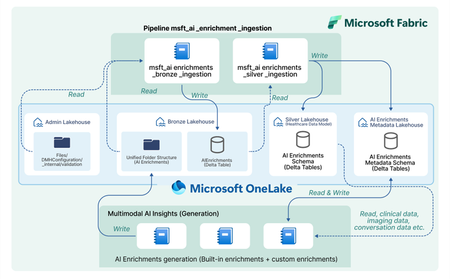
In today’s healthcare landscape, there is an increasing emphasis on leveraging artificial intelligence (AI) to extract meaningful insights from diverse datasets to improve patient care and drive clinical research. However, incorporating AI into your healthcare data estate often brings significant costs and challenges, especially when dealing with siloed and unstructured data. Healthcare organizations produce and consume data that is not only vast but also varied in format—ranging from structured EHR entries to unstructured clinical notes and imaging data. Traditional methods require manual effort to prepare and harmonize this data for AI, specify the AI output format, set up API calls, store the AI outputs, integrate the AI outputs, and analyze the AI outputs for each AI model or service you decide to use. Orchestrate multimodal AI insights is designed to streamline and scale healthcare AI within your data estate by building off of the data transformations in healthcare data solutions in Microsoft Fabric. This capability provides a framework to generate AI insights by connecting your multimodal healthcare data to an ecosystem of AI services and models and integrating structured AI-generated insights back into your data estate. When you combine these AI-generated insights with the existing healthcare data in your data estate, you can power advanced analytics scenarios for your organization and patient population. Key features: Metadata store lakehouse acts as a central repository for the metadata for AI orchestration to effectively capture and manage enrichment definitions, view definitions, and contextual information for traceability purposes. Execution notebooks define the enrichment view and enrichment definition based on the model configuration and input mappings. They also specify the model processor and transformer. The model processor calls the model API, and the transformer produces the standardized output while saving the output in the bronze lakehouse in the Ingest folder. Transformation pipeline to ingest AI-generated insights through the healthcare data solutions medallion lakehouse layers and persist the insights in an enrichment store within the silver layer. Conceptual architecture: The data transformations in healthcare data solutions in Microsoft Fabric allow you ingest, store, and analyze multimodal data. With the orchestrate multimodal AI insights capability, this standardized data serves as the input for healthcare AI models. The model results are stored in a standardized format and provide new insights from your data. The diagram below shows the flow of integrating AI generated insights into the data estate, starting as raw data in the bronze lakehouse and being transformed to delta tables in the silver lakehouse. This capability simplifies AI integration across modalities for data-driven research and care, currently supporting: Text Analytics for health in Azure AI Language to extract medical entities such as conditions and medications from unstructured clinical notes. This utilizes the data in the DocumentReference FHIR resource. MedImageInsight healthcare AI model in Azure AI Foundry to generate medical image embeddings from imaging data. This model leverages the data in the ImagingStudy FHIR resource. MedImageParse healthcare AI model in Azure AI Foundry to enable segmentation, detection, and recognition from imaging data across numerous object types and imaging modalities. This model uses the data in the ImagingStudy FHIR resource. By using orchestrate multimodal AI insights to leverage the data in healthcare data solutions for these models and integrate the results into the data estate, you can analyze your existing data alongside AI enrichments. This allows you to explore use cases such as creating image segmentations and combining with your existing imaging metadata and clinical data to enable quick insights and disease progression trends for clinical research at the patient level. Get started today! This capability is now available in public preview, and you can use the in-product sample data to test this feature with any of the three models listed above. For more information and to learn how to deploy the capability, please refer to the product documentation. We will dive deeper into more detailed aspects of the capability, such as the enrichment store and custom AI use cases, in upcoming blogs. Medical device disclaimer: Microsoft products and services (1) are not designed, intended or made available as a medical device, and (2) are not designed or intended to be a substitute for professional medical advice, diagnosis, treatment, or judgment and should not be used to replace or as a substitute for professional medical advice, diagnosis, treatment, or judgment. Customers/partners are responsible for ensuring solutions comply with applicable laws and regulations. FHIR® is the registered trademark of HL7 and is used with permission of HL7.1.3KViews2likes0Comments