ai for security
18 Topics
Evolving identity security: How the Conditional Access Optimization Agent helps you adapt
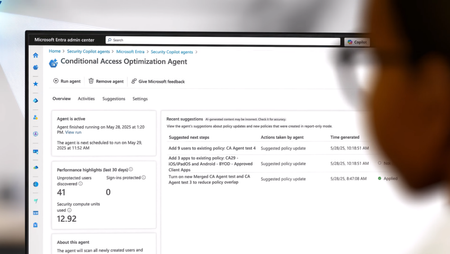
Organizations are expanding Zero Trust across more users, applications, and now a growing population of AI agent identities, making it even more challenging to maintain visibility and control at scale. As environments grow more complex and change daily, static best-practice approaches can’t keep up. Security teams are left trying to reason across dozens of access policies, shifting conditions, and evolving risks, often without clear visibility into where gaps exist. That’s exactly what we’re hearing from customers. “The recommendations are great, but they don’t always match how our organization works.” With this latest set of enhancements, the Conditional Access Optimization Agent moves beyond static guidance to continuous, context-aware identity posture optimization. The agent now understands your organization’s business context, surfaces gaps that manual reviews miss, helps you act on insights safely, and proves the impact of your improvements—all as part of a new operating model for identity security. Here’s a quick look at what’s new in the Conditional Access Optimization Agent, now in public preview: Context-aware recommendations tailored to your environment. Continuous deep gap analysis to identify persistent or emerging policy gaps. Automated least-privilege enforcement to reduce unnecessary permissions. Enhanced phased rollout for gradual, controlled deployment. Passkey deployment campaigns that streamline phishing-resistant authentication rollout. Zero Trust posture reporting that helps demonstrate measurable improvements. These new capabilities are designed to work together as part of a continuous operating model for identity security. To make this concrete, let’s walk through how the agent works in practice across four key steps – from tailoring recommendations to your environment, to identifying gaps, safely deploying changes, and measurable impact. This is a view of the agent overview dashboard, showing analyzed coverage, identified gaps, and recommended actions to strengthen your access policies. Step 1: Make recommendations match your reality Every organization runs Conditional Access a little differently. Naming conventions, policy design patterns, and exception processes – these all vary across environments. Until now, the agent's recommendations were based on industry and Microsoft best practices, sign-in data, and your Conditional Access policies. However, guidance needs to reflect how your organizations actually operate. Context-aware policy recommendations – teach the agent your standards With context-aware policy recommendations, you can upload internal documentation directly to the agent. Think about the guidance your team already relies on, such as documents that outline authentication strength requirements, device compliance baselines, and internal or external policy standards. These often live as PDFs, wiki pages, or long policy docs that admins manually cross-reference during periodic reviews. The agent securely uses that context to tailor recommendations for your organization, so they align with how your team designs and manages Conditional Access. For example, the Australian government publishes Conditional Access guidance for organizations operating in regulated environments. The agent is able to reason over this guidance and produce recommendations aligned to Australian compliance standards. In the agent’s settings page, you can upload organization-specific policies and guidance so the agent can tailor recommendations to your environment Step 2: Surface gaps humans can’t easily see As environments grow more complex, Conditional Access policies become increasingly difficult to reason over. Organizations often manage dozens, or even hundreds, of policies across user groups, applications, authentication strengths, and device requirements, making it hard to fully understand how they interact. Continuous deep gap analysis Enterprise customers average 83 Conditional Access policies. The number of possible interactions between those policies – layers, overlaps, and coverage gaps – is challenging to reason over. Manual review typically focuses on recently changed policies. But some of the most critical gaps have been there all along. They are persistent configuration issues that have existed for years. The agent evaluates how policies interact with one another, understands how authentication requirements are enforced across the policies, and identifies gaps where coverage falls short. This means it can detect: newly introduced gaps caused by policy changes or configuration drift persistent structural gaps cause by policy overlap, constantly evolving exceptions, and more Instead of reviewing policies one by one, the agent evaluates the entire access control system as a whole. The agent identifies uncovered users and policy gaps by analyzing how Conditional Access policies interact across your environment. Zero Trust least-privileged enforcement for agent identities Nowadays, access is no longer just about people. Gartner stated that by 2029, most secure access requests will come from non-human identities—up from less than 5% today. As AI agents become a rapidly growing part of the workforce, they also introduce new risks. Many of these identities can be over-privileged, making them attractive targets for attackers! The Conditional Access Optimization Agent identifies agent identities with excessive or unused permissions and recommends least-privilege adjustments. This extends continuous Zero Trust enforcement beyond workforce identities to the fastest-growing population in your environment. Step 3: Turn insight into action without breaking things Finding gaps is important. Fixing them safely is where the real operational challenge begins. We all know the risk of making access policy changes without understanding their real-world impact. A single misconfigured policy can lock out users or disrupt critical applications. These enhancements help your teams move from insight to execution with confidence. Phased rollout for any Conditional Access policy With our updated Phased Rollout capability, you can now deploy any Conditional Access policy gradually, not only agent-recommended ones like in our previous release. For each rollout, the agent proposes low-impact phases, monitors real user impact at every stage, and intelligently suggests progression or roll back so you can easily deploy policies while minimizing end-user impact. This means your team no longer needs to manually move policies from report only to enabled. The agent handles that progression for you. This allows your team to strengthen access protections in a way that works for your business, without widespread lockouts, helpdesk spikes, or disruption to critical workflows. The agent creates a phased rollout plan, allowing policies to be deployed gradually while monitoring user impact and minimizing disruption. Passkey deployment campaigns – structured adoption of phishing-resistant authentication Phishing-resistant authentication is one of the most important steps organizations can take to strengthen identity security – and passkeys deliver both security and usability. The challenge isn't whether to adopt passkeys, but how to roll them out without creating operational friction. Microsoft data shows consumer users are 3× more successful signing in with passkeys compared to legacy authentication methods. That's where the agent's passkey campaign experience comes in, helping you run structured adoption campaigns across your organization. Start with your highest-impact users such as administrators, executives, or employees most targeted by phishing. The agent tracks registration progress, identifies users that haven’t enrolled yet, communicates with them via teams, and helps you expand adoption wave by wave. No more ad hoc enforcement or spreadsheet-driven tracking across teams. The agent guides passkey adoption with structured campaigns, targeting users, tracking progress, and expanding rollout in stages. Step 4: Prove progress and communicate impact Closing gaps is only just a piece of the whole story. Security leaders increasingly need to demonstrate measurable progress, to both internal stakeholders and your executive leadership. The built-in reporting dashboard provides a clear summary of posture improvements driven by you and the agent. You can track: Exactly how many Conditional Access policy gaps the agent has discovered Users, Apps, and Agent IDs you have improved policy coverage for Remaining users, apps, and agent IDs requiring additional coverage This makes it easier to demonstrate the value of your Zero Trust investments and communicate progress to your leadership. The reporting dashboard tracks Conditional Access posture improvements, showing gaps closed, coverage gained, and remaining areas to address. The new operating model for identity security These enhancements aren't incremental improvements to a recommendation engine. They represent a shift in how identity security operations work. Moving from static rule management to continuous, context-aware optimization leveraging the power of AI. Identity security is no longer a periodic audit exercise. It becomes a continuous operational capability - helping you secure both human and non-human identities across authentication, access, and risk. Get started today If you have Microsoft 365 E5, the Conditional Access Optimization Agent will become available through a phased rollout. Once available in your tenant, you can enable it directly in the Microsoft Entra admin center and start using it right away. We are continuing to expand these capabilities and will evolve the agent based on your feedback. Enable the Conditional Access Optimization Agent → Security Copilot agents - Microsoft Entra admin center Swaroop Krishnamurthy Principal Product Manager, Microsoft Entra Swaroop Krishnamurthy | LinkedIn Additional resources Microsoft Entra Conditional Access optimization agent | Microsoft Learn Conditional Access Optimization Agent knowledge base (Preview) | Microsoft Learn Conditional Access Optimization Agent phased rollout | Microsoft Learn Learn more about Microsoft Entra Prevent identity attacks, ensure least privilege access, unify access controls, and improve the experience for users with comprehensive identity and network access solutions across on-premises and clouds. Microsoft Entra News and Insights | Microsoft Security Blog Microsoft Entra blog | Tech Community Microsoft Entra documentation | Microsoft Learn Microsoft Entra discussions | Microsoft Community5KViews0likes0CommentsIntroducing developer solutions for Microsoft Sentinel platform
Security is being reengineered for the AI era, moving beyond static, rule-bound controls and toward after-the-fact response toward platform-led, machine-speed defense. The challenge is clear: fragmented tools, sprawling signals, and legacy architectures that can’t match the velocity and scale of modern attacks. What’s needed is an AI-ready, data-first foundation - one that turns telemetry into a security graph, standardizes access for agents, and coordinates autonomous actions while keeping humans in command of strategy and high-impact investigations. Security teams already center operations on their SIEM for end-to-end visibility, and we’re advancing that foundation by evolving Microsoft Sentinel into both the SIEM and the platform for agentic defense—connecting analytics and context across ecosystems. And today, we’re introducing new platform capabilities that build on Sentinel data lake: Sentinel graph for deeper insight and context; Sentinel MCP server and tools to make data agent ready; new developer capabilities; and Security Store for effortless discovery and deployment—so protection accelerates to machine speed while analysts do their best work. Today, customers use a breadth of solutions to keep themselves secure. Each solution typically ingests, processes, and stores the security data it needs which means applications maintain identical copies of the same underlying data. This is painful for both customers and partners, who don’t want to build and maintain duplicate infrastructure and create data silos that make it difficult to counter sophisticated attacks. With today’s announcement, we’re directly addressing those challenges by giving partners the ability to create solutions that can reason over the single copy of the security data that each customer has in their Sentinel data lake instance. Partners can create AI solutions that use Sentinel and Security Copilot and distribute them in Microsoft Security Store to reach audiences, grow their revenue, and keep their customers safe. Sentinel already has a rich partner ecosystem with hundreds of SIEM solutions that include connectors, playbooks, and other content types. These new platform capabilities extend those solutions, creating opportunities for partners to address new scenarios and bring those solutions to market quickly since they don’t need to build complex data pipelines or store and process new data sets in their own infrastructure. For example, partners can use Sentinel connectors to bring their own data into the Sentinel data lake. They can create Jupyter notebook jobs in the updated Sentinel Visual Studio Code extension to analyze that data or take advantage of the new Model Context Protocol (MCP) server which makes the data understandable and accessible to AI agents in Security Copilot. With Security Copilot’s new vibe-coding capabilities, partners can create their agent in the same Sentinel Visual Studio Code extension or the environment of their choice. The solution can then be packaged and published to the new Microsoft Security Store, which gives partners an opportunity to expand their audience and grow their revenue while protecting more customers across the ecosystem. These capabilities are being embraced across our ecosystem by mature and emerging partners alike. Services partners such as Accenture and ISVs such as Zscaler and ServiceNow are already creating solutions that leverage the capabilities of the Sentinel platform. Partners have already brought several solutions to market using the integrated capabilities of the Sentinel platform: Illumio. Illumio for Microsoft Sentinel combines Illumio Insights with Microsoft Sentinel data lake and Security Copilot to revolutionize detection and response to cyber threats. It fuses data from Illumio and all the other sources feeding into Sentinel to deliver a unified view of threats, giving SOC analysts, incident responders, and threat hunters visibility and AI-driven breach containment capabilities for lateral traffic threats and attack paths across hybrid and multi-cloud environments. To learn more, visit Illumio for Microsoft Sentinel. OneTrust. OneTrust’s AI-ready governance platform enables 14,000 customers globally – including over half of the Fortune 500 – to accelerate innovation while ensuring responsible data use. Privacy and risk teams know that undiscovered personal data in their digital estate puts their business and customers at risk. OneTrust’s Privacy Risk Agent uses Security Copilot, Purview scan logs, Entra ID data, and Jupyter notebook jobs in the Sentinel data lake to automatically discover personal data, assess risk, and take mitigating actions. To learn more, visit here. Tanium. The Tanium Security Triage Agent accelerates alert triage using real-time endpoint intelligence from Tanium. Tanium intends to expand its agent to ingest contextual identity data from Microsoft Entra using Sentinel data lake. Discover how Tanium’s integrations empower IT and security teams to make faster, more informed decisions. Simbian. Simbian’s Threat Hunt Agent makes hunters more effective by automating the process of validating threat hunt hypotheses with AI. Threat hunters provide a hypothesis in natural language, and the Agent queries and analyzes the full breadth of data available in Sentinel data lake to validate the hypothesis and do deep investigation. Simbian's AI SOC Agent investigates and responds to security alerts from Sentinel, Defender, and other alert sources and also uses Sentinel data lake to enhance the depth of investigations. Learn more here. Lumen. Lumen’s Defender℠ Threat Feed for Microsoft Sentinel helps customers correlate known-bad artifacts with activity in their environment. Lumen’s Black Lotus Labs® harnesses unmatched network visibility and machine intelligence to produce high-confidence indicators that can be operationalized at scale for detection and investigation. Currently Lumen’s Defender℠ Threat Feed for Microsoft Sentinel is available as an invite only preview. To request an invite, reach out to the Lumen Defender Threat Feed Sales team. The updated Sentinel Visual Studio Code extension for Microsoft Sentinel The Sentinel Extension for Visual Studio code brings new AI and packaging capabilities on top of existing Jupyter notebook jobs to help developers efficiently create new solutions. Building with AI Impactful AI security solutions need access and understanding of relevant security data to address a scenario. The new Microsoft Sentinel Model Context Protocol (MCP) server makes data in Sentinel data lake AI-discoverable and understandable to agents so they can reason over it to generate powerful new insights. It integrates with the Sentinel VS Code extension so developers can use those tools to explore the data in the lake and have agents use those tools as they do their work. To learn more, read the Microsoft Sentinel MCP server announcement. Microsoft is also releasing MCP tools to make creating AI agents more straightforward. Developers can use Security Copilot’s MCP tools to create agents within either the Sentinel VS Code extension or the environment of their choice. They can also take advantage of the low code agent authoring experience right in the Security Copilot portal. To learn more about the Security Copilot pro code and low code agent authoring experiences visit the Security Copilot blog post on Building your own Security Copilot agents. Jupyter Notebook Jobs Jupyter notebooks jobs are an important part of the Sentinel data lake and were launched at our public preview a couple of months ago. See the documentation here for more details on Jupyter notebooks jobs and how they can be used in a solution. Note that when jobs write to the data lake, agents can use the Sentinel MCP tools to read and act on those results in the same way they’re able to read any data in the data lake. Packaging and Publishing Developers can now package solutions containing notebook jobs and Copilot agents so they can be distributed through the new Microsoft Security Store. With just a few clicks in the Sentinel VS Code extension, a developer can create a package which they can then upload to Security Store. Distribution and revenue opportunities with Security Store Sentinel platform solutions can be packaged and offered through the new Microsoft Security Store, which gives partners new ways to grow revenue and reach customers. Learn more about the ways Microsoft Security Store can help developers reach customers and grow revenue by visiting securitystore.microsoft.com. Getting started Developers can get started building powerful applications that bring together Sentinel data, Jupyter notebook jobs, and Security Copilot today: Become a partner to publish solutions to Microsoft Security Store Onboarding to Sentinel data lake Downloading the Sentinel Visual Studio Code extension Learn about Security Copilot news Learn about Microsoft Security Store