ai agent
4 TopicsAgent vs. Workflow in Copilot Studio - Which One Do I Actually Need?
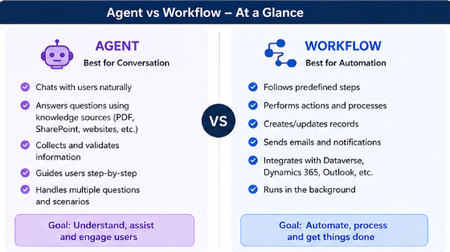
Hey everyone! 👋 Raise your hand if this has happened to you... You open Copilot Studio for the first time, you're excited, you're ready to build and then the very first screen asks you: "What would you like to build?" [ Agent ] [ Workflow ] And your brain just goes blank. 😅 Which one? What's the difference? Does it even matter which I pick? I've been there. I picked randomly, built halfway through, and then realized I probably chose the wrong one. So I put together this quick breakdown to save you that frustration! The One-Line Answer Agent = Conversation. Workflow = Automation. That's the core of it. But let me unpack what that actually means in practice. Here's a Visual That Makes It Click Let's Break It Down Simply 🤖 Choose an Agent when... Your tool needs to talk to people and actually understand what they're saying. An Agent is like a smart assistant that: Chats with users in a natural, back-and-forth way Pulls answers from your knowledge sources like PDFs, SharePoint, or websites Asks follow-up questions to collect and validate information Guides users through a process step by step Handles all kinds of different questions without breaking Its whole goal? Understand, assist, and engage the person in front of it. Real example: A customer types "I need help with my invoice" - the Agent reads that, asks the right follow-up questions, and helps them resolve it without any human stepping in. ⚙️ Choose a Workflow when... You need something to run in the background and get things done - no conversation needed. A Workflow is like a reliable robot that: Follows a fixed set of predefined steps every single time Performs actions and processes automatically Creates or updates records in your systems Sends emails and notifications at the right moment Connects with Dataverse, Dynamics 365, Outlook, and more Just runs — quietly, consistently, without anyone needing to interact with it Its whole goal? Automate, process, and get things done. Real example: When a new employee is added to the system → automatically create their accounts, send a welcome email, and notify their manager. No one has to lift a finger. The Simplest Way to Decide Ask yourself just one question: Does someone need to have a conversation with it? Yes → Build an Agent No → Build a Workflow That single question will get you to the right answer 90% of the time. The Mistake Most Beginners Make A lot of us (myself included!) jump straight to building an Agent because it sounds more exciting and powerful. But if your process is just a series of fixed steps with no real conversation involved, a Workflow will do the job faster, cleaner, and more reliably. You don't have to choose just one forever. A really powerful pattern is having your Agent handle the conversation and then trigger a Workflow to do the heavy lifting in the background. Best of both worlds! 🙌 Quick Recap Agent Workflow Best for Conversation Automation Talks to users? Yes No Follows fixed steps? Not always Always Runs in background? No Yes Connects to systems? Can Yes, natively Hope this clears things up! Drop your questions below especially if you have a specific use case you're trying to figure out. Happy to help you work out which one fits. 😊762Views2likes1CommentStop Writing Promotional Emails. Build an AI Agent That Does It For You.
Hi everyone 👋 A few weeks ago, I started thinking about how much time businesses still spend writing repetitive promotional emails manually every month. The process is usually the same: review customer purchase history check active discounts write personalized emails send them one by one So I decided to build a simple AI-powered workflow that could automate the entire process. For Edition #003 of my newsletter, I created an AI agent that: ✅ reads customer purchase data ✅ matches category-based discounts ✅ generates personalized promotional emails using AI ✅ sends emails automatically What I enjoyed most while building this project was seeing how even small personalization details can completely change the customer experience. Instead of sending generic promotions, the workflow creates emails tailored to each customer’s purchases and interests. In this edition, I shared: the real-world use case the complete workflow approach implementation screenshots sample datasets GitHub project files practical automation tips 📌 View the newsletter If you enjoy building practical AI automations or exploring real-world AI agent ideas, I think you’ll enjoy this edition. I’d genuinely love to hear your thoughts and learn how others are approaching AI-driven automation in their own projects 🙌127Views0likes0CommentsWhy Collecting User Feedback on Your AI Agent Actually Matters
Hi everyone, I see many of us experimenting with AI agents in Copilot Studio and other platforms. Spinning up an agent is now the easy part but making sure it actually helps users is much harder. In a short blog, I shared why listening to users should be part of your AI design, not an afterthought. I talk about: Using thumbs up/down, comments, and simple surveys Turning feedback into a backlog of improvements Why this feedback loop is essential for making AI agents truly useful If you’re building or maintaining AI agents, I’d love your thoughts and experiences. 🔗 Read the blog: Why Collecting User Feedback on Your AI Agent Actually Matters https://medium.com/@sajeda27/why-collecting-user-feedback-on-your-ai-agent-actually-matters-54deea4fee7b177Views1like0CommentsFrom AI‑Curious to Agent‑Builder in Microsoft 365 (No Code)
Hi everyone, I keep getting the same questions in my inbox: “How do I start learning AI?” “Can I build an AI Agent without knowing how to code?” So I put together a simple, beginner-friendly blog focused on Microsoft tools like Copilot and Copilot Studio - perfect for anyone starting from zero. 👉 Check it out here: https://medium.com/@sajeda27/from-ai-curious-to-agent-builder-no-code-required-46f845458a97 If you find it useful, feel free to share it with someone who’s been asking the same questions 🙌136Views0likes0Comments