agents
7 Topics
Amplify Healthcare Intelligence: Data, AI, and Agent-Powered Transformation
Join Microsoft for Amplify Healthcare Intelligence, a webinar and in-person workshop series designed for healthcare and life sciences organizations building the foundation for trusted AI. Every session starts from the same premise: you cannot deliver trusted AI without a trusted data foundation. Across the series you will see how leading organizations unify their data estate, ground AI agents in real business context, and turn that foundation into results they can measure. What You Will Learn How to build a unified, AI-ready data foundation across a fragmented healthcare data estate How to ground AI agents in trusted healthcare data and real business context How to modernize analytics while reducing complexity and cost How to accelerate innovation with Microsoft Fabric, Azure AI Foundry, Microsoft IQ, and Copilot technologies How to deliver measurable impact across clinical, operational, research, and business scenarios Whether you are defining your AI strategy, modernizing your analytics platform, or scaling AI across your organization, these sessions offer practical guidance, real-world customer examples, and hands-on learning to help you move from AI ambition to business impact. Webinars & In-Person Workshops 🎥 Webinars One-hour virtual sessions with actionable guidance, live demonstrations, customer stories, and best practices from Microsoft experts. Each webinar shows how leading healthcare organizations are turning data, AI, and enterprise intelligence into measurable business outcomes. All sessions are from 3-4 ET (12-1 PT) and are free to attend. Date Topic Register Sep 30 3-4 ET (12-1 PT) Driving AI-Powered Healthcare: Transforming Clinical, Operational, and Research Outcomes with AI Register Oct 7 3-4 ET (12-1 PT) Building an AI-Ready Healthcare Data Foundation Register Oct 14 3-4 ET (12-1 PT) Building Trusted Healthcare AI: Grounding Agents with Enterprise Data and Context Register Oct 21 3-4 ET (12-1 PT) Finance in the Agent Era: AI-Powered Planning, Forecasting, and Insights Register Oct 28 3-4 ET (12-1 PT) Reduce BI Sprawl, Cut Cost and Build an AI-Ready Analytics Foundation Register Cannot join live? Register anyway. We will send you the recording and session materials after the event. Additional sessions will be added through the end of the year, so check back or register for one session to be notified as new dates are announced. 🏢 In-Person Workshops Our two-day workshops combine executive strategy, healthcare-specific use cases, architecture guidance, and hands-on labs designed to help teams identify and accelerate high-value AI opportunities. Attendance is free. Participants are responsible for their own travel and accommodation, and space at each location is limited. Workshops run 9am to 4pm local time on both days. Day 1: From Healthcare Data to Healthcare Intelligence Day 1 focuses on healthcare transformation strategy, customer examples, and the architectural patterns that make trusted AI possible at scale. The day closes with a networking reception and peer exchange. The Frontier Transformation imperative: from AI ambition to measurable impact Microsoft IQ: turning data into enterprise intelligence Building the unified data foundation Building trusted AI: security, governance, privacy, and compliance Healthcare transformation in action: clinical, operational, research, and finance scenarios Activating data with AI data agents and Copilot experiences Day 2: Hands-On Healthcare AI and Analytics Lab Day 2 is a guided, end-to-end lab. Participants build a working healthcare intelligence solution from raw data through to a grounded AI agent, using Microsoft Fabric, Azure AI Foundry, Copilot technologies, and modern data architectures. Build the foundation: data ingestion, lakehouse architecture, and data engineering Create actionable insights: semantic models and dashboards Prepare data for AI: AI-ready data assets and data governance Build and ground AI agents in trusted enterprise data From insight to intelligent action: planning your organization's next steps What to bring: a laptop with a current browser. Lab environments and credentials are provided on site, and no prior Fabric or Foundry experience is assumed. Date City Venue Register September 29-30, 2026 9am - 4pm Minneapolis Microsoft Edina 3601 West 76th Street, Suite 600 Edina, MN 55435 Register October 13-14, 2026 9am - 4pm Boston Microsoft New England One Memorial Drive Cambridge, MA 02142 Register October 27-28, 2026 9am - 4pm Silicon Valley Microsoft Silicon Valley 1045 La Avenida Street Mountain View, CA 94043 Register November 10-11, 2026 9am - 4pm Chicago Microsoft Chicago (AON Center) 200 East Randolph Drive, Suite 200 Chicago, IL 60601 Register December 8-9, 2026 9am - 4pm New York Microsoft Garage 300 Lafayette Street New York, NY 10012 Register Who Should Attend This series is built for the people who own the data estate and the people who depend on it. Sessions are technical enough for practitioners and strategic enough for the leaders who fund the work. Chief data officers and data and analytics leaders Data platform, data engineering, and business intelligence teams Data architects, engineers, and data scientists AI and innovation leaders Healthcare and life sciences executives Clinical, operational, research, and finance transformation leaders No prior Microsoft Fabric experience is required for any session in this series. Questions Wondering whether a session is the right fit, or whether to bring a team rather than an individual? Contact Camille Whicker and we will help you choose the right sessions for your organization.Extend clinical workflows with Dragon Copilot AI Apps and Agents in Microsoft Marketplace
GA ANNOUNCEMENT Today, we're excited to announce the General Availability (GA) of Dragon Copilot AI Apps and Agents for physician workflows, a major milestone in building an open and trusted healthcare AI ecosystem. Healthcare organizations can now discover, build, deploy, and manage trusted AI-powered applications and agents that support specialized clinical and operational capabilities through Dragon Copilot. At the same time, partners can use self-service experiences to build, validate, certify, publish, and manage solutions that integrate directly into clinician workflows. Together, these capabilities bring healthcare organizations, clinicians, and partners onto a common platform designed to accelerate innovation while maintaining the trust, transparency, and governance required in healthcare. Why it matters to clinicians Clinicians need relevant insights delivered in the flow of care—not in another disconnected tool. Dragon Copilot AI Apps and Agents can surface specialized intelligence within existing workflows to support coding and documentation, medical decision-making, risk adjustment, prior authorization, diagnostic support, behavioral health screening, and preventive care. Dragon Copilot AI Apps and Agents for physicians provide capabilities for use cases such as: Coding and documentation optimization (Regard, RhythmX AI) Risk adjustment (RAAPID Inc) Prior authorization (Humata Health, Genzeon) Evidence-Based Hyper-Personalized Care Guidance (Atropos Health) Diagnostic support (Coming soon!) Cognitive & behavioral health screening (Canary Speech) Care Gaps & Preventive Health Reminders (Coming soon!) Clinician coaching (Whetstone Health) By bringing the right information into the physician’s existing workflow and using patient data from the EHR and the Dragon ambient context (audio, transcript and clinical note) to make insights more relevant, these capabilities can reduce context switching, streamline administrative work, and help physicians stay focused on patient care while maintaining clinical judgment and control workflows. Why it matters to healthcare organizations Healthcare organizations need a scalable way to expand the value of Dragon Copilot while maintaining enterprise governance. AI Apps and Agents provide access to a growing portfolio of specialized capabilities through a common platform, helping organizations increase return on their Dragon Copilot investment without adding fragmented solutions. Dragon Copilot AI Apps and Agents Helps increase ROI by extending Dragon Copilot across more clinical and operational use cases, seamlessly integrated into workflow Simplify solution discovery and purchase through Microsoft Marketplace Centralize deployment, policy, and lifecycle governance through the Dragon Admin Center Maintain clinician oversight and organizational standards for security, privacy, compliance, and responsible AI Reduce implementation burden with streamlined experiences that require minimal IT lift Build and deploy custom built apps/agents integrated with Dragon Copilot This creates a governed, scalable path to adopt new capabilities faster, making it easier to evaluate solutions, deploy them across teams, manage them consistently, and measure value without unnecessary operational complexity. Why it matters to partners Healthcare AI companies often have valuable, specialized capabilities but face significant complexity bringing them into clinical workflows and deploying them consistently across healthcare organizations. Dragon Copilot AI Apps and Agents give partners a standardized extensibility model for embedding their innovations where clinicians already work. Access ambient, patient and encounter context to deliver more relevant, timely experiences Integrate into the Dragon Copilot experience without building and maintaining bespoke workflow integrations for every customer Use self-service onboarding, technical validation, and applicable compliance certification to accelerate readiness Reach healthcare customers through Microsoft Marketplace and scale deployment through a trusted enterprise platform Build customer confidence with transparent solution information and consistent governance expectations By reducing the friction of workflow integration, distribution, and enterprise deployment, the platform helps partners focus on differentiated clinical value while expanding their reach at scale. Creating a trusted healthcare AI ecosystem Dragon Copilot connects specialized partner capabilities with clinical workflows through a trusted & scalable ecosystem. Streamlined self-service onboarding, package validation, compliance certification, and help partner innovations reach the market faster while giving healthcare organizations confidence to adopt and manage these AI solutions responsibly. “Healthcare moves at the speed of trust. You look at Microsoft and Dragon Copilot, we absolutely trust the combination of Microsoft and Dragon Copilot for industry leading innovation, highly trusted, responsible AI, and delivery at scale, and also the reach with the number of clinicians that Dragon Copilot has. And if you combine all these elements of innovation, your reach, track record, and the trust, that's a perfect recipe for partnership.” — Deepthi Bathina, CEO and Founder, GW RhythmX "I use Dragon Copilot in clinic every day. The extension program let me design, build, and implement the tool I wanted to make me a better clinician. It's never been this easy to be both the user and the builder." — Aaron Reinke, MD, Family Physician and Founder, Whetstone Health Explore the ecosystem For healthcare organizations – discover and deploy Explore how Dragon Copilot AI Apps and Agents on Microsoft Marketplace can deliver specialized AI solutions tailored to your clinical and operational needs through Dragon Copilot. Discover new capabilities, purchaseand deploytrusted solutions, and deliver more value to clinicians without disrupting existing workflows in Dragon Copilot, learn more here. For partners – build and publish Bring your differentiated expertise directly into Physician workflows by creating and publishing AI Apps and Agents that help healthcare organizations address high-value clinical and operational needs. Learn how to build and publish applications and agents Review our open-source code samples and start building today with Dragon Copilot’s extensibility framework and reach healthcare customers through Microsoft Marketplace. Publishyour Dragon offer on Microsoft on Marketplace Looking ahead Dragon Copilot is becoming a trusted destination for specialized healthcare AI—bringing partner innovation directly into familiar clinician workflows. As the ecosystem grows, we will expand support for Radiology and Nursing Apps and Agents, addressing the distinct role-based needs of multiple clinical personas. We will also evolve the end-user experience to be more adaptable, enabling chat-based experiences, richer interactivity, and new ways for clinicians to engage with partner capabilities in the flow of work. Streamlined self-service, transparent governance, and Marketplace distribution will help partners scale secure solutions while giving healthcare organizations confidence to adopt them. Together, we’re helping clinicians spend less time on administration and access the right intelligence at the right moment in care.
Amplify Healthcare Intelligence In-Person Workshop Series
What You'll Learn How leading organizations are navigating the Frontier Transformation journey Strategies for turning healthcare data, workflows, and expertise into organizational intelligence Best practices for building a unified, AI-ready data foundation Approaches for implementing trusted AI with strong governance and security Real-world healthcare scenarios across clinical, operational, financial, and research domains How AI agents can transform the way people interact with data and make decisions Practical skills for deploying analytics, AI, and agent-powered solutions Day 1: From Healthcare Data to Healthcare Intelligence Explore how leading healthcare organizations are creating a trusted foundation for AI and transforming data into meaningful business outcomes. The Frontier Transformation Imperative The future of healthcare in the age of AI and agents Industry trends, opportunities, and challenges Moving from AI ambition to measurable impact Microsoft IQ: Turning Data into Enterprise Intelligence Connecting data, workflows, and organizational knowledge Building organizational intelligence for AI Establishing the foundation for trusted decision-making Building the Unified Data Foundation Modernizing the healthcare data estate Creating a single source of truth for analytics and AI Leveraging Microsoft Fabric and OneLake as a unified platform Building Trusted AI Security, governance, privacy, and compliance Responsible AI considerations for healthcare and life sciences Preparing data and processes for enterprise AI adoption Healthcare Transformation in Action Clinical transformation scenarios Operational transformation scenarios Research and innovation use cases Finance and performance management opportunities Activating Data with AI Agents AI Data Agents and Copilot experiences From data to decision-making Real-world examples of agent-powered healthcare innovation Networking Reception & Peer Exchange Day 2: Hands-On Healthcare AI & Analytics Lab Gain practical experience building an end-to-end healthcare intelligence solution using Microsoft technologies. Build the Foundation Data ingestion and modernization patterns Lakehouse architecture and data engineering Establishing a scalable healthcare data platform Create Actionable Insights Semantic models and business intelligence Power BI dashboards and reporting Real-time healthcare intelligence Prepare Data for AI Building AI-ready data assets Data governance and trust Optimizing data for intelligent applications Build and Ground AI Agents Creating AI Data Agents Leveraging business context and trusted enterprise data Connecting agents to analytics and operational workflows From Insight to Intelligent Action End-to-end healthcare AI scenario Data → Insights → Agents → Outcomes Planning your organization's next steps Upcoming Workshop Locations Date City Venue Register September 9-10, 2026 9am - 4pm Dallas Microsoft Las Colinas 1 7000 N State Hwy 161 Irving, TX 75039 Register September 29-30, 2026 9am - 4pm Minneapolis Microsoft Edina 3601 West 76th Street, Suite 600 Edina, MN 55435 Register October 13-14, 2026 9am - 4pm Boston Microsoft New England One Memorial Drive Cambridge, MA 02142 Register October 27-28, 2026 9am - 4pm Silicon Valley Microsoft Silicon Valley 1045 La Avenida Street Mountain View, CA 94043 Register November 10-11, 2026 9am - 4pm Chicago Microsoft Chicago (AON Center) 200 East Randolph Drive, Suite 200 Chicago, IL 60601 Register December 8-9, 2026 9am - 4pm New York Microsoft Garage 300 Lafayette Street New York, NY 10012 Register Who Should Attend? Healthcare and Life Sciences Executives CIOs, CTOs, and Chief Data Officers Clinical and Operational Leaders Analytics and Data Platform Teams AI and Innovation Leaders Finance Transformation Teams Architects, Engineers, and Data Professionals What You'll Walk Away With By the end of the workshop, you'll have a clear understanding of how to build a unified data and AI foundation, enable trusted AI and intelligent agents, and create a roadmap for accelerating healthcare transformation within your organization.Fabric Data Agents can choose Query Language based on Context
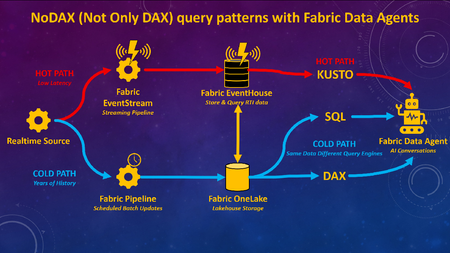
What if you could combine decades of historical analysis with live, real-time data in one seamless AI chat experience? Traditionally, analyzing large volumes of past data (Analytics / Business Intelligence) has been a separate architecture, or has at least required separate toolsets, from monitoring what’s happening right now (real-time, IoT, etc). With Fabric Data Agents, analytics for large volumes of historical data can be accessible with real-time data via a single AI query endpoint. Analytics can be used to gain understanding from historical data, and findings can be put into action for real-time scenarios, all through a single interface for the end users. Figure 1.0 – Fabric Data Agent can use different query languages for optimal performance with a lambda-style RTI architecture on Fabric Many of the demos I’ve seen for Fabric Data Agents will highlight the capability to connect to different types of queries and sources via a single endpoint such as Lakehouses (SQL), Warehouses (SQL), Semantic Models (DAX), Eventhouses (Kusto), and Ontologies. What I have not seen frequently discussed is adding different query engines on the same data for the purpose of optimizing query performance based upon the context of the query and the latency of the data, as per Figure 1.0 above. To be clear, I am not advocating duplication of data for the purpose of query performance. Rather, this architecture would enable Fabric Data Agents to choose the best query language for the context of the query. Hence the acronym I created for this blog article “NoDAX” which stands for “Not Only DAX.” NoSQL “Not Only SQL” is a real term referring to non-relational database systems designed for flexible schemas, horizontal scaling, and high-performance access to large, distributed datasets. NoDAX exists only within this blog post, and represents the availability of multiple query languages within a single Fabric Data Agent. The best query language can be used based on the context of the question and query. Not only DAX but also SQL, Kusto, and Ontologies can be queried to generate the most efficient contextual query. Figure 1.1 – Explaining the NoDAX acronym created for this article Why does this use case matter? The ability to query both the past and the present in one interface isn’t just a novel technical capability. Many analytic solutions can benefit from a pattern of [analysis + action]. Analytics by itself is great at understanding the past. We can look at years of historical data to figure out patterns, drivers of performance, and what went right or wrong. Historical context is incredibly valuable, but understanding the past doesn’t improve outcomes in the future. The real value comes when we connect findings from the past to decisions we make right now and in the future. If you discover historical data patterns that lead to an inventory shortage, a fraud event, or a patient risk score increasing, you can apply that insight to the latest operational data and act on ongoing workflows. Analytics and action have to reinforce each other. Analytics without action doesn’t create value. But action without understanding can easily make things worse. I once had a veteran analytics manager say to me “Without carefully considered and vetted KPIs you are flying blind. But be careful, because a KPI without proper context and understanding will quickly become a blunt object that an empty suit uses to whack somebody over the head.” Figure 1.2 – The purpose of this architecture is to learn from the past to improve the present and future Different Query Languages without data duplication A Fabric real-time architecture can be part of a design pattern that is similar to if not a version of a Lambda architecture. With a Lambda architecture, hot path data is available for real-time alerting and analytics while cold path data is stored for deep and complete historical analytics and data science. Figure 1.3 – NoDAX architecture can query a lambda-style architecture via multiple query endpoints Per the diagram above, real-time data is available in Fabric ASAP and cycled through an Eventhouse. Historical data can either be batched into a Fabric Lakehouse / Warehouse or copied over from the Eventhouse. A Fabric Data Agent can then generate Kusto queries against the Eventhouse, SQL queries against the Lakehouse / Warehouse, or DAX queries against the Warehouse / Lakehouse via the Direct Lake Semantic Model. DAX is often the best query language for data having deep history with complext analytic logic. SQL can be the best query language for retrieving historical row-level information from a robust relational database. Kusto can be used to query what’s happening right now via a real-time Eventhouse. Lambda architectures have been around for years, so why is this architecture a new option? Past lambda architectures would have hot path data available in a streaming toolset such as Azure Eventhub, and then store historical cold path data in a tool such as Azure Data Lake. Hot path alerting and reporting was usually disparate from historical cold path analytics. Per the diagram 3.4 below, with Microsoft Fabric, you can now: implement both the hot and cold path in a single Fabric environment (Eventstream, Eventhouse, Lakehouse / Warehouse). Ontologies are also an option. query the hot and cold path data via a single agentic endpoint using a Fabric Data agent Query either the hot or cold path using the optimal query language for the context of the question (DAX, SQL, Kusto, Ontologies) Figure 1.4 – Fabric not only unifies components of lambda-style architecture, but Data Agent also unites the query endpoints for AI unification Example use case for Healthcare Here’s an example of a Healthcare use case: A user might ask a question “Show me the percentage of patients who had their pain scores checked every hour for gall bladder removals on floor 5 over the last 3 years.” This will ideally filter three years worth of data for patients with specific procedure codes, filtered for specific rooms, and calculate the pain score check compliance for those visits. This query is ideal for the DAX language with a Semantic Model. The user might then want to see details for a specific time period, and ask “Show me the pain score results for patients who had their gall bladder removed on July 3 2024 on floor 5.” A SQL query might be the best option here against the Fabric Warehouse or Lakehouse, since SQL is better than DAX at retrieving row-level information. Then the user might want to know what is happening today. “Show me the pain score checks for inpatients right now who had their gall bladder removed on floor 5.” The Kusto language can retrieve the information that streams into a Fabric Eventhouse via an Eventstream. Based on the findings, the user may take an action. With the example above, a user was able to query deep history with analytic logic, retrieve historical row-level information from a robust relational database, and then view what’s happening right now for those patients. Action can then be taken in the here and now. Here are some additional use cases for Finance, Supply Chain, and Manufacturing in addition to Healthcare: Figure 1.5 – Industry use cases for Fabric Data Agent with multiple endpoints Video Summary Below is my video summary and demo of the Fabric Data Agent NoDAX architecture: Configure Fabric Data Agent for NoDAX query patterns When more than one source is added to a Fabric Data Agent, by default the source used for a specific query will be chosen based on interpreting available metadata. The Data Agents have a field called "Agent instructions" which can be used to provide detailed instructions about choosing the right source for the right question. Here’s a screenshot of the Agent instructions: Figure 1.6 – Agent instructions will guide the Fabric Data Agent to the best query endpoint I would recommend extensive unit testing and iterative improvements to the Agent instructions based upon your own data and use cases. Here’s a few examples that worked for my initial testing. I would recommend much more robust and carefully designed prompts for a production solution, but this is a baseline of an approach I found to work based on the demo in the video above: The KQL database named SeattleFireEventHouse is a live stream of 911 calls to the fire department in the city of Seattle. Whenever someone asks for “most recent” or “newest” or “latest” use SeattleFireEventHouse The lakehouse SeattleFireLakehouse should be queried with a SQL statement when someone asks for a list of incidents before the year 2026. Use SQL to retrieve row level requests for historical data. The semantic model SeattleFireSemantic Model should be queried when questions ask about historical analytic trends such as call volume averages, Year over year changes, and queries that aggregate data for analytic queries.The Agentic Workday: A Technical Deep Dive into Microsoft Scout for Healthcare and Life Sciences
The Agentic Workday: A Technical Deep Dive into Microsoft Scout for Healthcare and Life Sciences Healthcare and life sciences teams do not have a motivation problem. They have a time problem. The people closest to patients, studies, and customers spend a striking share of their week assembling information — pulling records, reconciling notes, cross-checking criteria, and stitching together the context a single decision requires. The work is essential, but most of it is assembly, not judgment. And assembly is exactly what a well-governed agent can take off their plate. That is the promise of agentic AI, and it is why Microsoft Scout — an agentic AI desktop assistant — belongs at the center of the modern HLS workday. This is a technical deep dive, not a teaser. We will walk two concrete workflows end to end: how the work happens today, how Scout would actually do it step by step, where a human stays in control, and how the whole thing stays inside your existing security and compliance boundaries. The product claims are kept functional and defensible, and the guardrails are made explicit — because in this industry the guardrails are the point. From assistant to agent: why the shift matters in HLS First-generation generative AI was reactive. You asked a question; it produced text. Helpful, but the human still did all the connecting — opening the file, navigating the portal, copying the answer into the next system. Agentic AI changes the unit of work. Instead of a single response, an agent can plan a sequence of steps, operate the tools already on your machine, draw on the sources you permit, and pause for your approval before anything consequential happens. In most industries that is a convenience. In healthcare and life sciences it is the difference between a demo and a deployable workflow, because the steps between "knowing" and "doing" are wrapped in regulated systems, sensitivity labels, and review obligations. An agent that respects those boundaries does not just save time; it makes the time savings auditable. How Microsoft Scout is grounded in your work Microsoft Scout is designed to act, not just chat. It can read and organize files, run routine multi-step tasks across your everyday applications, browse the public web for current information, and reach into your Microsoft 365 work — Outlook email and calendar, Teams messages, and documents in OneDrive and SharePoint — to assemble the context a task genuinely needs. Where clinical or proprietary systems are involved, the practical and defensible pattern is to ground Scout in permitted exports and connectors and your existing permissions, rather than assuming a built-in line into any system of record. Microsoft Scout draws on permitted sources and returns review-ready drafts — within your existing identity, permissions, and sensitivity labels. The experience HLS leaders notice is momentum. Rather than narrating every click, you describe an outcome — "prepare the prior-authorization packet for today's queue" — and Scout drafts the path, does the assembly, and brings the result back for review with its work shown. Two design choices make that adoptable in a regulated setting: a human stays in the loop on anything consequential, and every step is visible, so reviewers can trust what they sign. Deep dive 1: Prior-authorization preparation The business problem, and what it costs today Prior authorization is one of the most friction-heavy workflows in provider operations. Before a procedure or therapy can proceed, someone has to demonstrate it meets the payer's medical-necessity criteria — and that proof lives in fragments scattered across clinical notes, prior results, correspondence, and policy documents. The cost is rarely a single dramatic number; it is the steady drag of skilled coordinators and clinicians spending hours on document hunting and formatting, delays that push back care, and the rework that follows when a submission comes back incomplete. Every hour spent assembling is an hour not spent on patients or on the genuinely hard calls. The manual process today Walk the current path and the pattern is familiar: a coordinator identifies the cases in the queue, then opens system after system to locate the supporting documentation. They copy relevant notes into a working document, compare what they have against the payer's criteria for that specific service, and — often late — discover a missing result or an unanswered question. They chase it down, assemble the submission, give it a final review, and key it into the payer portal. The judgment at the end is real and valuable. Almost everything before it is assembly. The agentic how-to: how Microsoft Scout would do it Scout automates gathering, drafting, and gap-flagging; the coordinator reviews, approves, and submits. Trigger — a scheduled run. Scout starts on a schedule (for example, early each morning) against the day's work queue, so a first-pass packet is waiting before the team sits down. It can also be launched on demand for a single case. Gather from permitted sources. Operating under the coordinator's existing permissions, Scout pulls the relevant context: documentation provided through permitted exports or connectors, related Outlook email threads, and supporting files in OneDrive or SharePoint. It only ever sees what that user is already allowed to see. Draft the packet against criteria. Scout assembles a structured summary, organized to mirror the payer's medical-necessity criteria for the specific service, and lines up the supporting evidence next to each requirement. Flag gaps and questions. Crucially, it surfaces what is missing up front — an absent result, an unsigned note, an unanswered clinical question. The expensive "discovered late" moment moves to the very beginning, where it is cheap to fix. Human review and edit (checkpoint). The coordinator or clinician opens a ready draft rather than a blank page. They verify every linked source, correct anything off, and resolve the flagged gaps. This is the human-in-the-loop checkpoint, and it is non-negotiable. Approve and submit. The person — not the agent — makes the final call and submits in the payer portal. Scout prepared; the human decided. The same standards are met, but the assembly that used to consume the morning is done before review begins. The shape of the win is visible in the comparison: the standards do not move, but the order changes. Gaps are caught first, the human starts from a review-ready draft, and the rote assembly happens off the critical path. Governance and compliance None of this is adoptable unless it is safe, so the controls are the feature. Scout operates within your existing identity and permissions — it acts as the signed-in user and inherits exactly their access, no more. Microsoft Purview sensitivity labels travel with content, so classified material keeps its protections as it moves through the workflow and is not written out to unprotected destinations. Consequential actions — submitting, sending, finalizing — wait for explicit human approval. And because Scout shows its steps and the sources it touched, you get an audit-friendly trail of what was assembled, from where, and who approved it. In a setting where "show your work" is a compliance requirement, that visibility is as valuable as the speed. How to start this week You do not need a transformation program to begin. Pick one payer and one common service line with well-understood criteria. Confirm which sources are already permitted and which exports or connectors are available. Have Scout assemble draft packets for a handful of cases, and ask your coordinators to do what they always do — review and decide — while noting where the draft saved time and where it needed correction. Keep the human checkpoint firmly in place, and let the evidence from one narrow workflow make the case for the next. Deep dive 2: Field medical pre-engagement briefs The business problem, and what it costs today In medical affairs, the quality of a field medical engagement often comes down to preparation. Before a meeting with a healthcare professional, a medical science liaison needs a clear, accurate picture: relevant background, the latest approved internal materials, prior interactions, and the open scientific questions worth exploring. Pulling that together is time-consuming, and when calendars are full it is the part that gets compressed — which means well-qualified experts sometimes walk in less prepared than they would like. The cost is a softer one: engagements that are good when they could be excellent, and institutional knowledge that lives in individual inboxes rather than in a repeatable process. The manual process today Today an MSL typically prepares by hand: scanning email and notes from previous interactions, hunting for the most current approved materials, checking the calendar for context, and drafting their own talking points. Done well it is excellent; done under time pressure it is uneven. And because it is manual, the standard varies from person to person and week to week. The agentic how-to: how Microsoft Scout would do it From a scheduled trigger through source-checked drafting to a required field-medical review before the brief is final. Trigger ahead of the engagement. Scout runs on a schedule tied to upcoming engagements — for instance, the day before each scheduled meeting — so a draft brief is ready in advance. Gather context from permitted sources. Under the MSL's own permissions, it draws on approved internal materials, prior interaction notes, related Outlook threads, and calendar context. Summarize into a usable brief. Scout drafts a structured read-ahead — concise background, suggested talking points, and a short list of open scientific questions — shaped for the person to refine, not to send as-is. Check sources. It grounds the brief in approved, permitted content and shows where each element came from, so nothing rests on an unverifiable claim. Field medical review (checkpoint). The MSL edits and confirms accuracy. In medical affairs this review is essential — the human owns scientific accuracy and compliance, every time. Brief ready. The reviewed read-ahead is in hand before the meeting, and the same high standard applies to every engagement, not just the ones with time to spare. The benefit is consistency as much as speed: the floor rises, because every brief starts from a thorough, source-checked draft, and the expert's time goes to sharpening the science rather than gathering the inputs. Governance and compliance The same guardrails apply. Scout works within the MSL's identity and permissions; sensitivity labels stay attached to the materials it touches; the field medical review is a hard checkpoint before anything is finalized; and the trail of sources keeps the brief defensible. For regulated medical affairs work, an agent that drafts transparently and then steps back for human sign-off is precisely the right division of labor. How to start this week Choose one engagement type and one well-curated set of approved materials. Have Scout produce draft briefs for the next few meetings, and ask your MSLs to review and refine as they normally would. Compare the agent-drafted starting point with a blank page, and watch what happens to both preparation time and consistency across the team. Where Cowork and Microsoft 365 Copilot fit Scout is the star at the individual desktop, but it is part of a broader fabric. Microsoft Cowork extends agentic collaboration into the flow of teamwork, so momentum is shared rather than personal. Microsoft 365 Copilot keeps AI close to the documents, meetings, and messages where so much HLS work already lives. The practical sequence for most organizations is to start where the friction is sharpest — a recurring prep workflow like the two above — prove the model with the human firmly in control, and then extend across the team. The throughline: do more with less, without doing less Across both deep dives the pattern is identical. The agent does the assembling; the human does the deciding. Speed to market improves because the busywork shrinks, not because the standards do. Compliance gets easier because the agent operates inside your existing identity, permissions, and labels, and because every consequential action waits for a person. That is what makes agentic AI a fit for healthcare and life sciences specifically: it is fast and it is accountable, and in this industry you are not allowed to choose only one. Subscribe to the Microsoft Healthcare and Life Sciences blog for weekly, practical deep dives on putting Microsoft AI to work — safely — across care, research, and commercial teams. If you mapped your own highest-friction prep workflow onto the six steps above, which step would you let an agent own first — and what evidence would you need before you trusted it with the rest?How Microsoft Scout Brings Agentic AI to Everyday Healthcare and Life Sciences Work
Healthcare and life sciences teams are asked to do the impossible every day: deliver better outcomes, move faster, and stretch every dollar — all while navigating some of the most regulated, documentation-heavy workflows in any industry. The promise of AI has never been about replacing the experts who do this work. It’s about giving them their time back. That promise is entering a new phase. We’re moving from AI that answers to AI that acts — agentic AI that can carry out multi-step work across your applications, your documents, and the web, with you in control. Nowhere is the opportunity more concrete than in the daily operational grind of healthcare and life sciences. From answering to doing Most knowledge work in HLS isn’t blocked by a lack of information — it’s blocked by the effort of pulling that information together and turning it into action. Gathering the right documents. Summarizing a thread. Drafting the first version. Updating five systems with the same three facts. Microsoft Scout is designed for exactly this layer of work. Think of it as an agentic AI teammate on your desktop — one that can read and organize files, search across your email, calendar, and Teams, browse the web, and complete genuinely multi-step tasks on your behalf. Crucially, it can run on a schedule, so routine work happens before you sit down, and it keeps a human in the loop for anything that matters. Real-world ways HLS teams can do more with less Provider operations: Assemble the documentation needed for a referral or prior-authorization request, summarize the relevant history, and draft the submission — turning a 30-minute scramble into a two-minute review. Clinical research coordination: Pull together study start-up documents, track outstanding site communications, and draft consistent follow-ups, so coordinators spend their time on sites and patients rather than inboxes. Medical affairs and field medical: Prepare for an engagement by gathering the latest publications and prior interactions into a single brief, then capture a structured summary afterward — every meeting, consistently. Commercial and market access: Stand up an account briefing or a competitive news roundup on a recurring schedule, so the team starts every week informed instead of researching from scratch. The thread running through all of these is the same: reclaim capacity, increase consistency, and accelerate speed to market — doing more with the people and budget you already have. Built for the trust HLS demands In this industry, “helpful” is not enough; it has to be trustworthy. Agentic AI for healthcare and life sciences has to respect enterprise security and data boundaries, keep sensitive information under your control, and keep a person in command of consequential decisions. The goal is to automate the busywork around expert judgment — never to automate the judgment itself. A family of AI that works the way you do Scout is part of a broader shift in how Microsoft is bringing AI to work. Where Microsoft 365 Copilot brings AI into the flow of the apps you already use, and Microsoft Cowork reimagines how teams collaborate with AI, Scout focuses on agentic action at the desktop — automating end-to-end tasks and recurring workflows. Together they point to the same future: more of your day spent on the work only you can do. Start small, compound the gains You don’t need a transformation program to begin. Pick one repetitive, high-friction workflow — the weekly roundup, the recurring briefing, the documentation prep that nobody enjoys — and let agentic AI take the first pass. The time you reclaim funds the next idea. We’ll be sharing practical, healthcare- and life-sciences-specific playbooks here every week. Subscribe to the blog, and tell us in the comments: what’s the one recurring task you’d hand to an AI teammate first? Learn more about Microsoft Scout: Introducing Microsoft Scout: Your always-on personal agent | Microsoft 365 Blog Microsoft Scout (Frontier) overview | Microsoft LearnWebinar Series for Microsoft AI Agents
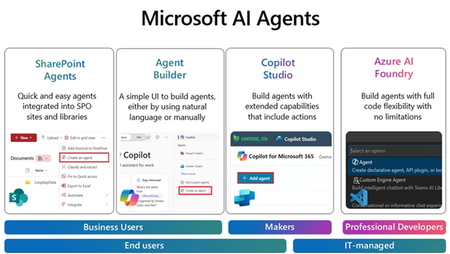
Join us for an exciting and insightful webinar series where we delve into the revolutionary world of Microsoft Copilot Agents in SharePoint, Agent builder, Copilot Studio and Azure AI Foundry! Discover how the integration of AI and intelligent agents is set to transform the future of business processes, making them more efficient, intelligent, and adaptive. In this webinar series, we will explore: The Power of Microsoft Copilot Agents: Learn how these advanced AI-driven agents can assist you in automating routine tasks, providing intelligent insights, and enhancing collaboration within your organization. Seamless Integration with Microsoft Graph: See how Copilot Agents work seamlessly with Microsoft Graph data to improve information retrieval, boost productivity, and automate mundane tasks. Real-World Applications: See real-world examples of how businesses are leveraging Copilot Agents to drive innovation and achieve their goals. Future Trends and Innovations: Get a glimpse into the future of AI in business processes and how it will continue to evolve and shape the way we work. Join us for the Webinars every week, at 11:30am PST/1:30pm CST/2:30 EST: (Click on the webinar name to join the live meeting on the actual date/time or use the .ics file at the bottom of the page to save the date on your calendar) April 2nd: Agents with SharePoint - Watch this Webinar recording for an overview of SharePoint Agents and its key capabilities to enable your organization with powerful Agents helping you search for information within seconds in large SharePoint libraries with 100's of documents. April 9th: Agents with Agent Builder - Watch this Webinar recording for an overview of Agent Builder and its key capabilities to enable organization with "No code" Agents that can be created by any business user within minutes. April 16th: Agents with Copilot Studio- Join us for an overview of Copilot Studio and its key capabilities to enable organization with "Low code" Agents that can help create efficiency with existing business processes. We will feature a few real-life demo examples and answer any questions. April 24th: Agents with Azure AI Foundry - Join us for an overview of Azure AI Foundry and its key capabilities to enable your organization with AI Agents. We will feature a demo of AI agents for prior authorization and provide resources to accelerate your next project. Don't miss this opportunity to stay ahead of the curve and unlock the full potential of AI and Copilot Agents in your organization. Register now and be part of the future of business transformation! Speakers: Jaspreet Dhamija, Sr. MW Copilot Specialist - Linkedin Michael Gannotti, Principal MW Copilot Specialist - LinkedIn Melissa Nelli, Sr. Biz Apps Technical Specialist - LinkedIn Matthew Anderson, Director Azure Apps - LinkedIn Marcin Jimenez, Sr. Cloud Solution Architect - LinkedIn Thank you!