agents
20 TopicsIntegrating Microsoft Foundry with OpenClaw: Step by Step Model Configuration
Step 1: Deploying Models on Microsoft Foundry Let us kick things off in the Azure portal. To get our OpenClaw agent thinking like a genius, we need to deploy our models in Microsoft Foundry. For this guide, we are going to focus on deploying gpt-5.2-codex on Microsoft Foundry with OpenClaw. Navigate to your AI Hub, head over to the model catalog, choose the model you wish to use with OpenClaw and hit deploy. Once your deployment is successful, head to the endpoints section. Important: Grab your Endpoint URL and your API Keys right now and save them in a secure note. We will need these exact values to connect OpenClaw in a few minutes. Step 2: Installing and Initializing OpenClaw Next up, we need to get OpenClaw running on your machine. Open up your terminal and run the official installation script: curl -fsSL https://openclaw.ai/install.sh | bash The wizard will walk you through a few prompts. Here is exactly how to answer them to link up with our Azure setup: First Page (Model Selection): Choose "Skip for now". Second Page (Provider): Select azure-openai-responses. Model Selection: Select gpt-5.2-codex , For now only the models listed (hosted on Microsoft Foundry) in the picture below are available to be used with OpenClaw. Follow the rest of the standard prompts to finish the initial setup. Step 3: Editing the OpenClaw Configuration File Now for the fun part. We need to manually configure OpenClaw to talk to Microsoft Foundry. Open your configuration file located at ~/.openclaw/openclaw.json in your favorite text editor. Replace the contents of the models and agents sections with the following code block: { "models": { "providers": { "azure-openai-responses": { "baseUrl": "https://<YOUR_RESOURCE_NAME>.openai.azure.com/openai/v1", "apiKey": "<YOUR_AZURE_OPENAI_API_KEY>", "api": "openai-responses", "authHeader": false, "headers": { "api-key": "<YOUR_AZURE_OPENAI_API_KEY>" }, "models": [ { "id": "gpt-5.2-codex", "name": "GPT-5.2-Codex (Azure)", "reasoning": true, "input": ["text", "image"], "cost": { "input": 0, "output": 0, "cacheRead": 0, "cacheWrite": 0 }, "contextWindow": 400000, "maxTokens": 16384, "compat": { "supportsStore": false } }, { "id": "gpt-5.2", "name": "GPT-5.2 (Azure)", "reasoning": false, "input": ["text", "image"], "cost": { "input": 0, "output": 0, "cacheRead": 0, "cacheWrite": 0 }, "contextWindow": 272000, "maxTokens": 16384, "compat": { "supportsStore": false } } ] } } }, "agents": { "defaults": { "model": { "primary": "azure-openai-responses/gpt-5.2-codex" }, "models": { "azure-openai-responses/gpt-5.2-codex": {} }, "workspace": "/home/<USERNAME>/.openclaw/workspace", "compaction": { "mode": "safeguard" }, "maxConcurrent": 4, "subagents": { "maxConcurrent": 8 } } } } You will notice a few placeholders in that JSON. Here is exactly what you need to swap out: Placeholder Variable What It Is Where to Find It <YOUR_RESOURCE_NAME> The unique name of your Azure OpenAI resource. Found in your Azure Portal under the Azure OpenAI resource overview. <YOUR_AZURE_OPENAI_API_KEY> The secret key required to authenticate your requests. Found in Microsoft Foundry under your project endpoints or Azure Portal keys section. <USERNAME> Your local computer's user profile name. Open your terminal and type whoami to find this. Step 4: Restart the Gateway After saving the configuration file, you must restart the OpenClaw gateway for the new Foundry settings to take effect. Run this simple command: openclaw gateway restart Configuration Notes & Deep Dive If you are curious about why we configured the JSON that way, here is a quick breakdown of the technical details. Authentication Differences Azure OpenAI uses the api-key HTTP header for authentication. This is entirely different from the standard OpenAI Authorization: Bearer header. Our configuration file addresses this in two ways: Setting "authHeader": false completely disables the default Bearer header. Adding "headers": { "api-key": "<key>" } forces OpenClaw to send the API key via Azure's native header format. Important Note: Your API key must appear in both the apiKey field AND the headers.api-key field within the JSON for this to work correctly. The Base URL Azure OpenAI's v1-compatible endpoint follows this specific format: https://<your_resource_name>.openai.azure.com/openai/v1 The beautiful thing about this v1 endpoint is that it is largely compatible with the standard OpenAI API and does not require you to manually pass an api-version query parameter. Model Compatibility Settings "compat": { "supportsStore": false } disables the store parameter since Azure OpenAI does not currently support it. "reasoning": true enables the thinking mode for GPT-5.2-Codex. This supports low, medium, high, and xhigh levels. "reasoning": false is set for GPT-5.2 because it is a standard, non-reasoning model. Model Specifications & Cost Tracking If you want OpenClaw to accurately track your token usage costs, you can update the cost fields from 0 to the current Azure pricing. Here are the specs and costs for the models we just deployed: Model Specifications Model Context Window Max Output Tokens Image Input Reasoning gpt-5.2-codex 400,000 tokens 16,384 tokens Yes Yes gpt-5.2 272,000 tokens 16,384 tokens Yes No Current Cost (Adjust in JSON) Model Input (per 1M tokens) Output (per 1M tokens) Cached Input (per 1M tokens) gpt-5.2-codex $1.75 $14.00 $0.175 gpt-5.2 $2.00 $8.00 $0.50 Conclusion: And there you have it! You have successfully bridged the gap between the enterprise-grade infrastructure of Microsoft Foundry and the local autonomy of OpenClaw. By following these steps, you are not just running a chatbot; you are running a sophisticated agent capable of reasoning, coding, and executing tasks with the full power of GPT-5.2-codex behind it. The combination of Azure's reliability and OpenClaw's flexibility opens up a world of possibilities. Whether you are building an automated devops assistant, a research agent, or just exploring the bleeding edge of AI, you now have a robust foundation to build upon. Now it is time to let your agent loose on some real tasks. Go forth, experiment with different system prompts, and see what you can build. If you run into any interesting edge cases or come up with a unique configuration, let me know in the comments below. Happy coding!12KViews2likes2CommentsLevel up your Python + AI skills with our complete series
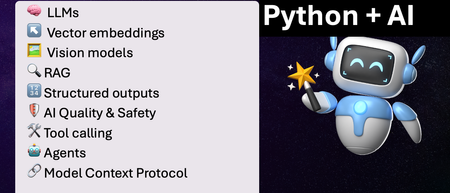
We've just wrapped up our live series on Python + AI, a comprehensive nine-part journey diving deep into how to use generative AI models from Python. The series introduced multiple types of models, including LLMs, embedding models, and vision models. We dug into popular techniques like RAG, tool calling, and structured outputs. We assessed AI quality and safety using automated evaluations and red-teaming. Finally, we developed AI agents using popular Python agents frameworks and explored the new Model Context Protocol (MCP). To help you apply what you've learned, all of our code examples work with GitHub Models, a service that provides free models to every GitHub account holder for experimentation and education. Even if you missed the live series, you can still access all the material using the links below! If you're an instructor, feel free to use the slides and code examples in your own classes. If you're a Spanish speaker, check out the Spanish version of the series. Python + AI: Large Language Models 📺 Watch recording In this session, we explore Large Language Models (LLMs), the models that power ChatGPT and GitHub Copilot. We use Python to interact with LLMs using popular packages like the OpenAI SDK and LangChain. We experiment with prompt engineering and few-shot examples to improve outputs. We also demonstrate how to build a full-stack app powered by LLMs and explain the importance of concurrency and streaming for user-facing AI apps. Slides for this session Code repository with examples: python-openai-demos Python + AI: Vector embeddings 📺 Watch recording In our second session, we dive into a different type of model: the vector embedding model. A vector embedding is a way to encode text or images as an array of floating-point numbers. Vector embeddings enable similarity search across many types of content. In this session, we explore different vector embedding models, such as the OpenAI text-embedding-3 series, through both visualizations and Python code. We compare distance metrics, use quantization to reduce vector size, and experiment with multimodal embedding models. Slides for this session Code repository with examples: vector-embedding-demos Python + AI: Retrieval Augmented Generation 📺 Watch recording In our third session, we explore one of the most popular techniques used with LLMs: Retrieval Augmented Generation. RAG is an approach that provides context to the LLM, enabling it to deliver well-grounded answers for a particular domain. The RAG approach works with many types of data sources, including CSVs, webpages, documents, and databases. In this session, we walk through RAG flows in Python, starting with a simple flow and culminating in a full-stack RAG application based on Azure AI Search. Slides for this session Code repository with examples: python-openai-demos Python + AI: Vision models 📺 Watch recording Our fourth session is all about vision models! Vision models are LLMs that can accept both text and images, such as GPT-4o and GPT-4o mini. You can use these models for image captioning, data extraction, question answering, classification, and more! We use Python to send images to vision models, build a basic chat-with-images app, and create a multimodal search engine. Slides for this session Code repository with examples: openai-chat-vision-quickstart Python + AI: Structured outputs 📺 Watch recording In our fifth session, we discover how to get LLMs to output structured responses that adhere to a schema. In Python, all you need to do is define a Pydantic BaseModel to get validated output that perfectly meets your needs. We focus on the structured outputs mode available in OpenAI models, but you can use similar techniques with other model providers. Our examples demonstrate the many ways you can use structured responses, such as entity extraction, classification, and agentic workflows. Slides for this session Code repository with examples: python-openai-demos Python + AI: Quality and safety 📺 Watch recording This session covers a crucial topic: how to use AI safely and how to evaluate the quality of AI outputs. There are multiple mitigation layers when working with LLMs: the model itself, a safety system on top, the prompting and context, and the application user experience. We focus on Azure tools that make it easier to deploy safe AI systems into production. We demonstrate how to configure the Azure AI Content Safety system when working with Azure AI models and how to handle errors in Python code. Then we use the Azure AI Evaluation SDK to evaluate the safety and quality of output from your LLM. Slides for this session Code repository with examples: ai-quality-safety-demos Python + AI: Tool calling 📺 Watch recording In the final part of the series, we focus on the technologies needed to build AI agents, starting with the foundation: tool calling (also known as function calling). We define tool call specifications using both JSON schema and Python function definitions, then send these definitions to the LLM. We demonstrate how to properly handle tool call responses from LLMs, enable parallel tool calling, and iterate over multiple tool calls. Understanding tool calling is absolutely essential before diving into agents, so don't skip over this foundational session. Slides for this session Code repository with examples: python-openai-demos Python + AI: Agents 📺 Watch recording In the penultimate session, we build AI agents! We use Python AI agent frameworks such as the new agent-framework from Microsoft and the popular LangGraph framework. Our agents start simple and then increase in complexity, demonstrating different architectures such as multiple tools, supervisor patterns, graphs, and human-in-the-loop workflows. Slides for this session Code repository with examples: python-ai-agent-frameworks-demos Python + AI: Model Context Protocol 📺 Watch recording In the final session, we dive into the hottest technology of 2025: MCP (Model Context Protocol). This open protocol makes it easy to extend AI agents and chatbots with custom functionality, making them more powerful and flexible. We demonstrate how to use the Python FastMCP SDK to build an MCP server running locally and consume that server from chatbots like GitHub Copilot. Then we build our own MCP client to consume the server. Finally, we discover how easy it is to connect AI agent frameworks like LangGraph and Microsoft agent-framework to MCP servers. With great power comes great responsibility, so we briefly discuss the security risks that come with MCP, both as a user and as a developer. Slides for this session Code repository with examples: python-mcp-demo11KViews6likes0CommentsAI Agents: Key Principles and Guidelines - Part 3
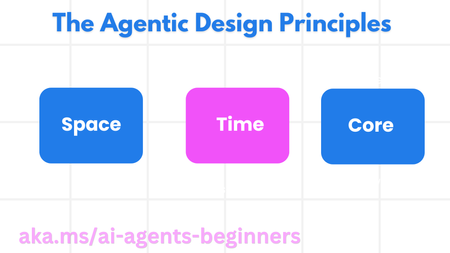
This blog post, the third in a series on AI agents, focuses on user-centric design principles for building effective and trustworthy agentic systems. Drawing from the "Agentic Design Patterns" section of Microsoft's "AI Agents for Beginners" GitHub repository, the post outlines key principles categorized by Agent (Space), Agent (Time), and Agent (Core). These principles emphasize connection, accessibility, leveraging historical context, adapting to future needs, and establishing trust through transparency and control. Practical implementation guidelines are provided, along with a travel agent example to illustrate how these principles can be applied in real-world scenarios. The post also links to additional resources and previous installments in the series for a comprehensive learning experience.3.4KViews1like0CommentsMulti-Agent Systems and MCP Tools Integration with Azure AI Foundry
The Power of Connected Agents: Building Multi-Agent Systems Imagine trying to build an AI system that can handle complex workflows like managing support tickets, analyzing data from multiple sources, or providing comprehensive recommendations. Sounds challenging, right? That's where multi-agent systems come in! The Develop a multi-agent solution with Azure AI Foundry Agent Services module introduces you to the concept of connected agents a game changing approach that allows you to break down complex tasks into specialized roles handled by different AI agents. Why Connected Agents Matter As a student developer, you might wonder why you'd need multiple agents when a single agent can handle many tasks. Here's why this approach is transformative: 1. Simplified Complexity: Instead of building one massive agent that does everything (and becomes difficult to maintain), you can create smaller, specialized agents with clearly defined responsibilities. 2. No Custom Orchestration Required: The main agent naturally delegates tasks using natural language - no need to write complex routing logic or orchestration code. 3. Better Reliability and Debugging: When something goes wrong, it's much easier to identify which specific agent is causing issues rather than debugging a monolithic system. 4. Flexibility and Extensibility: Need to add a new capability? Just create a new connected agent without modifying your main agent or other parts of the system. How Multi-Agent Systems Work The architecture is surprisingly straightforward: 1. A main agent acts as the orchestrator, interpreting user requests and delegating tasks 2. Connected sub-agents perform specialized functions like data retrieval, analysis, or summarization 3. Results flow back to the main agent, which compiles the final response For example, imagine building a ticket triage system. When a new support ticket arrives, your main agent might: - Delegate to a classifier agent to determine the ticket type - Send the ticket to a priority-setting agent to determine urgency - Use a team-assignment agent to route it to the right department All this happens seamlessly without you having to write custom routing logic! Setting Up a Multi-Agent Solution The module walks you through the entire process: 1. Initializing the agents client 2. Creating connected agents with specialized roles 3. Registering them as tools for the main agent 4. Building the main agent that orchestrates the workflow 5. Running the complete system Taking It Further: Integrating MCP Tools with Azure AI Agents Once you've mastered multi-agent systems, the next level is connecting your agents to external tools and services. The Integrate MCP Tools with Azure AI Agents module teaches you how to use the Model Context Protocol (MCP) to give your agents access to a dynamic catalog of tools. What is Dynamic Tool Discovery? Traditionally, adding new tools to an AI agent meant hardcoding each one directly into your agent's code. But what if tools change frequently, or if different teams manage different tools? This approach quickly becomes unmanageable. Dynamic tool discovery through MCP solves this problem by: 1. Centralizing Tool Management: Tools are defined and managed in a central MCP server 2. Enabling Runtime Discovery: Agents discover available tools during runtime through the MCP client 3. Supporting Automatic Updates: When tools are updated on the server, agents automatically get the latest versions The MCP Server-Client Architecture The architecture involves two key components: 1. MCP Server: Acts as a registry for tools, hosting tool definitions decorated with `@mcp.tool`. Tools are exposed over HTTP when requested. 2. MCP Client: Acts as a bridge between your MCP server and Azure AI Agent. It discovers available tools, generates Python function stubs to wrap them, and registers those functions with your agent. This separation of concerns makes your AI solution more maintainable and adaptable to change. Setting Up MCP Integration The module guides you through the complete process: 1. Setting up an MCP server with tool definitions 2. Creating an MCP client to connect to the server 3. Dynamically discovering available tools 4. Wrapping tools in async functions for agent use 5. Registering the tools with your Azure AI agent Once set up, your agent can use any tool in the MCP catalog as if it were a native function, without any hardcoding required! Practical Applications for Student Developers As a student developer, how might you apply these concepts in real projects? Classroom Projects: - Build a research assistant that delegates to specialized agents for different academic subjects - Create a coding tutor that uses different agents for explaining concepts, debugging code, and suggesting improvements Hackathons: - Develop a sustainability app that uses connected agents to analyze environmental data from different sources - Create a personal finance advisor with specialized agents for budgeting, investment analysis, and financial planning Personal Portfolio Projects: - Build a content creation assistant with specialized agents for brainstorming, drafting, editing, and SEO optimization - Develop a health and wellness app that uses MCP tools to connect to fitness APIs, nutrition databases, and sleep tracking services Getting Started Ready to dive in? Both modules include hands-on exercises where you'll build real working examples: - A ticket triage system using connected agents - An inventory management assistant that integrates with MCP tools The prerequisites are straightforward: - Experience with deploying generative AI models in Azure AI Foundry - Programming experience with Python or C# Conclusion Multi-agent systems and MCP tools integration represent the next evolution in AI application development. By mastering these concepts, you'll be able to build more sophisticated, maintainable, and extensible AI solutions - skills that will make you stand out in internship applications and job interviews. The best part? These modules are designed with practical, hands-on learning in mind - perfect for student developers who learn by doing. So why not give them a try? Your future AI applications (and your resume) will thank you for it! Want to learn more about Model Context Protocol 'MCP' see MCP for Beginners Happy coding!2.4KViews2likes0CommentsAI Agents: Mastering the Tool Use Design Pattern - Part 4
This blog post, Part 4 of a series on AI agents, delves into the Tool Use Design Pattern, a key concept in enabling agents to interact with external systems and perform a wider range of tasks. The post explains how tools, ranging from simple functions to complex API calls, are invoked by AI agents through model-generated function calls. Several use cases are presented, highlighting the versatility of this pattern, from dynamic information retrieval and code execution to workflow automation and customer support. The post further details the implementation of function/tool calling, including choosing a suitable LLM, defining a function schema, and writing the function code. Examples using Semantic Kernel and Azure AI Agent Service illustrate how agentic frameworks simplify tool integration. Finally, the post addresses security considerations and provides links to valuable resources, including the "AI Agents for Beginners" GitHub repository and related workshops, for further learning.2.4KViews1like0CommentsBuild your code-first agent with Azure AI Foundry: Self-Guided Workshop
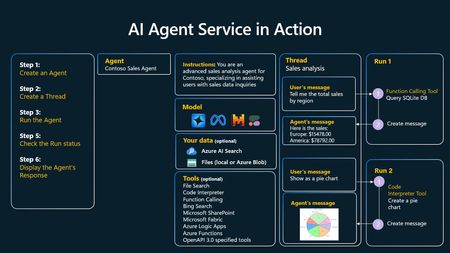
Build your first Agent App Agentic AI is changing how we build intelligent apps - enabling software to reason, plan, and act for us. Learning to build AI agents is quickly becoming a must-have skill for anyone working with AI. Self-Guided Workshop Try our self-guided “Build your code-first agent with Azure AI Foundry” workshop to get hands-on with Azure AI Agent Service. You’ll learn to build, deploy, and interact with agents using Azure’s powerful tools. What is Azure AI Agent Service? Azure AI Agent Service lets you create, orchestrate, and manage AI-powered agents that can handle complex tasks, integrate with tools, and deploy securely. What Will You Learn? The basics of agentic AI apps and how they differ from traditional apps How to set up your Azure environment How to build your first agent How to test and interact with your agent Advanced features like tool integration and memory management Who Is This For? Anyone interested in building intelligent, goal-oriented agents — developers, data scientists, students, and AI enthusiasts. No prior experience with Azure AI Agent Service required. How Does the Workshop Work? Tip: Select the self-guided tab in Getting Started for the right instructions. Step-by-step guides at your own pace Code samples and templates Real-world scenarios Get Started See what agentic AI can do for you with the self-guided “Build your code-first agent with Azure AI Foundry” workshop. Build practical skills in one of AI’s most exciting areas. Try the workshop and start building agents that make a difference! Additional Resources Azure AI Foundry Documentation Azure AI Agent Service Overview Questions or feedback Questions or feedback? Visit the issues page. Happy learning and building with Azure AI Agent Service!1.9KViews0likes0CommentsLangchain Multi-Agent Systems with Microsoft Agent Framework and Hosted Agents
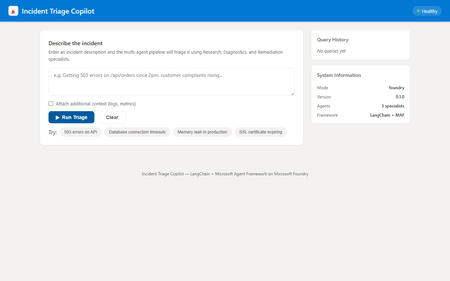
If you have been building AI agents with LangChain, you already know how powerful its tool and chain abstractions are. But when it comes to deploying those agents to production — with real infrastructure, managed identity, live web search, and container orchestration — you need something more. This post walks through how to combine LangChain with the Microsoft Agent Framework ( azure-ai-agents ) and deploy the result as a Microsoft Foundry Hosted Agent. We will build a multi-agent incident triage copilot that uses LangChain locally and seamlessly upgrades to cloud-hosted capabilities on Microsoft Foundry. Why combine LangChain with Microsoft Agent Framework? As a LangChain developer, you get excellent abstractions for building agents: the @tool decorator, RunnableLambda chains, and composable pipelines. But production deployment raises questions that LangChain alone does not answer: Where do your agents run? Containers, serverless, or managed infrastructure? How do you add live web search or code execution? Bing Grounding and Code Interpreter are not LangChain built-ins. How do you handle authentication? Managed identity, API keys, or tokens? How do you observe agents in production? Distributed tracing across multiple agents? The Microsoft Agent Framework fills these gaps. It provides AgentsClient for creating and managing agents on Microsoft Foundry, built-in tools like BingGroundingTool and CodeInterpreterTool , and a thread-based conversation model. Combined with Hosted Agents, you get a fully managed container runtime with health probes, auto-scaling, and the OpenAI Responses API protocol. The key insight: LangChain handles local logic and chain composition; the Microsoft Agent Framework handles cloud-hosted orchestration and tooling. Architecture overview The incident triage copilot uses a coordinator pattern with three specialist agents: User Query | v Coordinator Agent | +--> LangChain Triage Chain (routing decision) +--> LangChain Synthesis Chain (combine results) | +---+---+---+ | | | v v v Research Diagnostics Remediation Agent Agent Agent Each specialist agent has two execution modes: Mode LangChain Role Microsoft Agent Framework Role Local @tool functions provide heuristic analysis Not used Foundry Chains handle routing and synthesis AgentsClient with BingGroundingTool , CodeInterpreterTool This dual-mode design means you can develop and test locally with zero cloud dependencies, then deploy to Foundry for production capabilities. Step 1: Define your LangChain tools Start with what you know. Define typed, documented tools using LangChain’s @tool decorator: from langchain_core.tools import tool @tool def classify_incident_severity(query: str) -> str: """Classify the severity and priority of an incident based on keywords. Args: query: The incident description text. Returns: Severity classification with priority level. """ query_lower = query.lower() critical_keywords = [ "production down", "all users", "outage", "breach", ] high_keywords = [ "503", "500", "timeout", "latency", "slow", ] if any(kw in query_lower for kw in critical_keywords): return "severity=critical, priority=P1" if any(kw in query_lower for kw in high_keywords): return "severity=high, priority=P2" return "severity=low, priority=P4" These tools work identically in local mode and serve as fallbacks when Foundry is unavailable. Step 2: Build routing with LangChain chains Use RunnableLambda to create a routing chain that classifies the incident and selects which specialists to invoke: from langchain_core.runnables import RunnableLambda from enum import Enum class AgentRole(str, Enum): RESEARCH = "research" DIAGNOSTICS = "diagnostics" REMEDIATION = "remediation" DIAGNOSTICS_KEYWORDS = { "log", "error", "exception", "timeout", "500", "503", "crash", "oom", "root cause", } REMEDIATION_KEYWORDS = { "fix", "remediate", "runbook", "rollback", "hotfix", "patch", "resolve", "action plan", } def _route(inputs: dict) -> dict: query = inputs["query"].lower() specialists = [AgentRole.RESEARCH] # always included if any(kw in query for kw in DIAGNOSTICS_KEYWORDS): specialists.append(AgentRole.DIAGNOSTICS) if any(kw in query for kw in REMEDIATION_KEYWORDS): specialists.append(AgentRole.REMEDIATION) return {**inputs, "specialists": specialists} triage_routing_chain = RunnableLambda(_route) This is pure LangChain — no cloud dependency. The chain analyses the query and returns which specialists should handle it. Step 3: Create specialist agents with dual-mode execution Each specialist agent extends a base class. In local mode, it uses LangChain tools. In Foundry mode, it delegates to the Microsoft Agent Framework: from abc import ABC, abstractmethod from pathlib import Path class BaseSpecialistAgent(ABC): role: AgentRole prompt_file: str def __init__(self): prompt_path = Path(__file__).parent.parent / "prompts" / self.prompt_file self.system_prompt = prompt_path.read_text(encoding="utf-8") async def run(self, query, shared_context, correlation_id, client=None): if client is not None: return await self._run_on_foundry(query, shared_context, correlation_id, client) return await self._run_locally(query, shared_context, correlation_id) async def _run_on_foundry(self, query, shared_context, correlation_id, client): """Use Microsoft Agent Framework for cloud-hosted execution.""" from azure.ai.agents.models import BingGroundingTool agent = await client.agents.create_agent( model=shared_context.get("model_deployment", "gpt-4o"), name=f"{self.role.value}-{correlation_id}", instructions=self.system_prompt, tools=self._get_foundry_tools(shared_context), ) thread = await client.agents.threads.create() await client.agents.messages.create( thread_id=thread.id, role="user", content=self._build_prompt(query, shared_context), ) run = await client.agents.runs.create_and_process( thread_id=thread.id, agent_id=agent.id, ) # Extract and return the agent’s response... async def _run_locally(self, query, shared_context, correlation_id): """Use LangChain tools for local heuristic analysis.""" # Each subclass implements this with its specific tools ... The key pattern here: same interface, different backends. Your coordinator does not care whether a specialist ran locally or on Foundry. Step 4: Wire it up with FastAPI Expose the multi-agent pipeline through a FastAPI endpoint. The /triage endpoint accepts incident descriptions and returns structured reports: from fastapi import FastAPI from agents.coordinator import Coordinator from models import TriageRequest app = FastAPI(title="Incident Triage Copilot") coordinator = Coordinator() @app.post("/triage") async def triage(request: TriageRequest): return await coordinator.triage( request=request, client=app.state.foundry_client, max_turns=10, ) The application also implements the /responses endpoint, which follows the OpenAI Responses API protocol. This is what Microsoft Foundry Hosted Agents expects when routing traffic to your container. Step 5: Deploy as a Hosted Agent This is where Microsoft Foundry Hosted Agents shines. Your multi-agent system becomes a managed, auto-scaling service with a single command: # Install the azd AI agent extension azd extension install azure.ai.agents # Provision infrastructure and deploy azd up The Azure Developer CLI ( azd ) provisions everything: Azure Container Registry for your Docker image Container App with health probes and auto-scaling User-Assigned Managed Identity for secure authentication Microsoft Foundry Hub and Project with model deployments Application Insights for distributed tracing Your agent.yaml defines what tools the hosted agent has access to: name: incident-triage-copilot-langchain kind: hosted model: deployment: gpt-4o identity: type: managed tools: - type: bing_grounding enabled: true - type: code_interpreter enabled: true What you gain over pure LangChain Capability LangChain Only LangChain + Microsoft Agent Framework Local development Yes Yes (identical experience) Live web search Requires custom integration Built-in BingGroundingTool Code execution Requires sandboxing Built-in CodeInterpreterTool Managed hosting DIY containers Foundry Hosted Agents Authentication DIY Managed Identity (zero secrets) Observability DIY OpenTelemetry + Application Insights One-command deploy No azd up Testing locally The dual-mode architecture means you can test the full pipeline without any cloud resources: # Create virtual environment and install dependencies python -m venv .venv source .venv/bin/activate pip install -r requirements.txt # Run locally (agents use LangChain tools) python -m src Then open http://localhost:8080 in your browser to use the built-in web UI, or call the API directly: curl -X POST http://localhost:8080/triage \ -H "Content-Type: application/json" \ -d '{"message": "Getting 503 errors on /api/orders since 2pm"}' The response includes a coordinator summary, specialist results with confidence scores, and the tools each agent used. Running the tests The project includes a comprehensive test suite covering routing logic, tool behaviour, agent execution, and HTTP endpoints: curl -X POST http://localhost:8080/triage \ -H "Content-Type: application/json" \ -d '{"message": "Getting 503 errors on /api/orders since 2pm"}' Tests run entirely in local mode, so no cloud credentials are needed. Key takeaways for LangChain developers Keep your LangChain abstractions. The @tool decorator, RunnableLambda chains, and composable pipelines all work exactly as you expect. Add cloud capabilities incrementally. Start local, then enable Bing Grounding, Code Interpreter, and managed hosting when you are ready. Use the dual-mode pattern. Every agent should work locally with LangChain tools and on Foundry with the Microsoft Agent Framework. This makes development fast and deployment seamless. Let azd handle infrastructure. One command provisions everything: containers, identity, monitoring, and model deployments. Security comes free. Managed Identity means no API keys in your code. Non-root containers, RBAC, and disabled ACR admin are all configured by default. Get started Clone the sample repository and try it yourself: git clone https://github.com/leestott/hosted-agents-langchain-samples cd hosted-agents-langchain-samples python -m venv .venv && source .venv/bin/activate pip install -r requirements.txt python -m src Open http://localhost:8080 to interact with the copilot through the web UI. When you are ready for production, run azd up and your multi-agent system is live on Microsoft Foundry. Resources Microsoft Agent Framework for Python documentation Microsoft Foundry Hosted Agents Azure Developer CLI (azd) LangChain documentation Microsoft Foundry documentation1.8KViews0likes0CommentsMicrosoft AI Agents Learn Live Starting 15th April
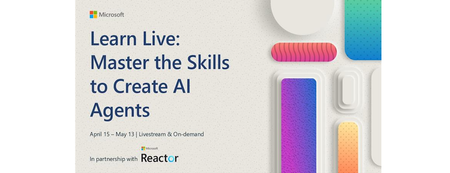
Join us for an exciting Learn Live webinar where we dive into the fundamentals of using Azure AI Foundry and AI Agents. The series is to help you build powerful Agent applications. This learn live series will help you understand the AI agents, including when to use them and how to build them, using Azure AI Agent Service and Semantic Kernel Agent Framework. By the end of this learning series, you will have the skills needed to develop AI agents on Azure. This sessions will introduce you to AI agents, the next frontier in intelligent applications and explore how they can be developed and deployed on Microsoft Azure. Through this webinar, you'll gain essential skills to begin creating agents with the Azure AI Agent Service. We'll also discuss how to take your agents to the next level by integrating custom tools, allowing you to extend their capabilities beyond built-in functionalities to better meet your specific needs. Don't miss this opportunity to gain hands-on knowledge and insights from experts in the field. Register now and start your journey into building intelligent agents on Azure Register NOW Learn Live: Master the Skills to Create AI Agents | Microsoft Reactor Plan and Prepare to Develop AI Solution on Azure Microsoft Azure offers multiple services that enable developers to build amazing AI-powered solutions. Proper planning and preparation involves identifying the services you'll use and creating an optimal working environment for your development team. Learning objectives By the end of this module, you'll be able to: Identify common AI capabilities that you can implement in applications Describe Azure AI Services and considerations for using them Describe Azure AI Foundry and considerations for using it Identify appropriate developer tools and SDKs for an AI project Describe considerations for responsible AI Format: Livestream Topic: Core AI Language: English Details Fundamentals of AI agents on Azure AI agents represent the next generation of intelligent applications. Learn how they can be developed and used on Microsoft Azure. Learning objectives By the end of this module, you'll be able to: Describe core concepts related to AI agents Describe options for agent development Create and test an agent in the Azure AI Foundry portal Format: Livestream Topic: Core AI Language: English Details Develop an AI agent with Azure AI Agent Service This module provides engineers with the skills to begin building agents with Azure AI Agent Service. Learning objectives By the end of this module, you'll be able to: Describe the purpose of AI agents Explain the key features of Azure AI Agent Service Build an agent using the Azure AI Agent Service Integrate an agent in the Azure AI Agent Service into your own application Format: Livestream Topic: Core AI Language: English Details Integrate custom tools into your agent Built-in tools are useful, but they may not meet all your needs. In this module, learn how to extend the capabilities of your agent by integrating custom tools for your agent to use. Learning objectives By the end of this module, you'll be able to: Describe the benefits of using custom tools with your agent. Explore the different options for custom tools. Build an agent that integrates custom tools using the Azure AI Agent Service. Format: Livestream Topic: Core AI Language: English Details Develop an AI agent with Semantic Kernel - Training | Microsoft Learn By the end of this module, you'll be able to: Use Semantic Kernel to connect to an Azure AI Foundry project Create Azure AI Agent Service agents using the Semantic Kernel SDK Integrate plugin functions with your AI agent Develop an AI agent with Semantic Kernel Format: Livestream Topic: Core AI Language: English Details Details Orchestrate a multi-agent solution using Semantic Kernel Learn how to use the Semantic Kernel SDK to develop your own AI agents that can collaborate for a multi-agent solution. Learning objectives By the end of this module, you'll be able to: Build AI agents using the Semantic Kernel SDK Develop multi-agent solutions Create custom selection and termination strategies for agent collaboration Format: Livestream Topic: Core AI Language: English Details1.5KViews3likes0CommentsStudent Devs: Build AI Agents, Compete for $55K in Prizes
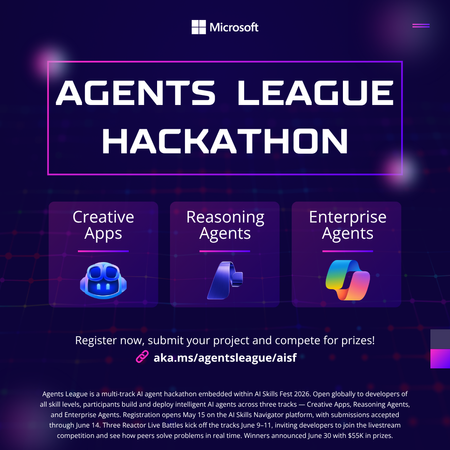
Student Devs: Build AI Agents, Compete for $55K in Prizes 🎮 AI Skills Fest • June 4–14, 2026 • Free to Enter $55K Prize Pool 3 Challenge Tracks 10 Days of Hacking Free To Enter Whether you're a first-year CS student or a final-year senior with a portfolio full of projects, Agents League is the best way to gain hands-on experience with agentic AI this summer and walk away with real skills employers are hiring for right now. What You'll Actually Learn Forget passive tutorials. Agents League is project-based learning at full speed. By the end of the hackathon, you'll have built a working AI agent and gained practical experience with the tools shaping the future of software development. 🤖 AI-Assisted Development Use GitHub Copilot to accelerate your coding workflow — from scaffolding to debugging — the way professional developers do today. 🧩 Multi-Step Reasoning Build agents with Microsoft Foundry that can plan, reason, and execute complex tasks — the core of agentic AI. 🏢 Enterprise AI Patterns Learn to build production-ready agents that integrate with Microsoft 365 and Copilot Studio — skills that translate directly to industry jobs. 🔧 Prompt Engineering Design effective prompts and orchestration flows that make AI agents reliable and useful in the real world. 📦 GitHub Workflows Submit your project through GitHub — practising version control, README writing, and open-source collaboration. 🎯 Competitive Problem-Solving Work under real constraints with deadlines, judging criteria, and peer competition — just like industry hackathons and sprints. Pick Your Track (or Try All Three) Agents League has three challenge tracks, each using different Microsoft AI tools. Choose based on your interests or stretch yourself by competing in multiple tracks. Track 01. Creative Apps Build an innovative application with AI-assisted development. This track rewards creativity, dream big and let GitHub Copilot help you bring ideas to life faster than ever. Tool: GitHub Copilot Track 02. Reasoning Agents Create intelligent agents that solve complex problems through multi-step reasoning. Think: agents that can research, plan, and act. This is the cutting edge of AI. Tool: Microsoft Foundry Track 03. Enterprise Agents Build knowledge agents that integrate with Microsoft 365 Copilot. Learn how businesses are deploying AI today and add enterprise AI to your skillset. Tool: Copilot Studio • M365 Opportunities You Won't Want to Miss Agents League isn't just a competition, it's a launchpad. Here's what's in it for you beyond the code: 💰 Win from a $55,000 USD Prize Pool Prizes are awarded across all three tracks smaller teams and solo hackers have a real shot. 📺 Watch Live Coding Battles at Microsoft Reactor See industry experts go head-to-head building AI agents live. Learn advanced techniques you can apply immediately to your own project. 🎓 Free Learning Resources on Microsoft Learn Access curated learning paths and the AI Skills Navigator, structured content designed to get you from zero to submission-ready. 🌍 Join a Global Developer Community Connect with thousands of developers on the Agents League Discord. Find teammates, ask questions, and build your professional network. 📂 Build Your Portfolio with a Real Project Every submission lives on GitHub. Walk away with a polished, public project that demonstrates your AI skills to future employers and grad schools. 🏆 Gain Recognition from Microsoft and the Community Top projects get visibility across the Microsoft developer ecosystem. Stand out from the crowd in internship and job applications. Key Dates to Remember Event Date Hacking Period Opens June 4, 2026 Registration Deadline June 12, 2026 — 12:00 PM PT Submission Deadline June 14, 2026 — 11:59 PM PT How to Get Started (Right Now) You don't have to wait until June 4th to start preparing. Here's your pre-hackathon game plan: Register for the hackathon it's free and open to everyone. Pick a track that matches your interests or curiosity. Explore the learning resources on Microsoft Learn and the AI Skills Navigator. Join the Discord community to find teammates and get early tips. Watch the Reactor event series for live coding battles and expert walkthroughs. Set up your GitHub repo and start experimenting before the hacking window opens. Helpful Links Register for Agents League Free entry, sign up now Microsoft Reactor Events Live coding battles & workshops AI Skills Fest The broader event Microsoft Learn Free learning paths The Arena Awaits 🏆 Ten days. Three tracks. $55K in prizes. Whether you go solo or squad up, this is your chance to build something real with AI and have a blast doing it. Register Now It's Free | Watch Reactor Events Agents League is part of AI Skills Fest and is open to the public at no cost. Review the Hackathon Rules and Regulations and the Microsoft Event Code of Conduct before participating.1KViews0likes0CommentsBuilding Reliable AI Coding Workflows Using Modular AI Agent Optimization
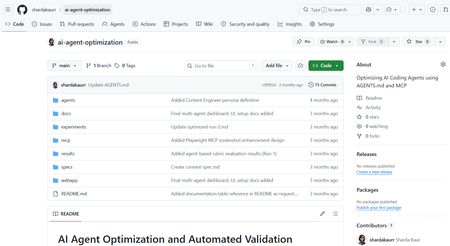
Artificial Intelligence is rapidly transforming the modern software development industry. AI-powered coding assistants such as GitHub Copilot, Claude Code, and other Large Language Model (LLM)-based systems are helping developers automate repetitive coding tasks, improve productivity, and accelerate software development processes. These tools can generate code, assist with debugging, provide recommendations, and support developers during implementation. However, despite their growing capabilities, many AI coding assistants still face challenges related to reliability, maintainability, project-specific conventions, and structured software engineering workflows. Most coding assistants perform well for generic programming tasks but often struggle when working with domain-specific development requirements, API integrations, project architectures, validation workflows, and coding standards. In real-world software engineering environments, developers require systems that not only generate code but also follow project conventions, maintain readability, support modular development, and improve long-term maintainability. The project “AI Agents Optimization” focuses on improving the reliability and effectiveness of AI coding agents by designing structured workflows, modular configurations, validation mechanisms, and optimized task execution strategies. The objective of the project is to investigate how AI agents can become dependable collaborators in practical software engineering tasks instead of functioning only as autocomplete systems. The project explores different approaches for organizing AI agent workflows using structured instruction handling, modular task division, context management, validation systems, and integration of external tools and documentation sources. Different agent configurations are analyzed and evaluated to understand how workflow optimization affects software development quality and performance. Why Existing AI Coding Workflows Often Fail Most AI coding assistants perform well for isolated coding tasks but struggle in real-world engineering environments where projects involve multiple files, coding standards, APIs, validation requirements, and contextual dependencies. For example, a generic prompt such as: “Build authentication middleware” may generate functional code, but the output often lacks: Project-specific architecture Error handling consistency Validation logic Security best practices Dependency awareness This project approaches the problem differently by introducing a structured workflow pipeline where AI agents operate in defined stages rather than generating outputs in a single step. The workflow separates planning, generation, validation, and refinement into independent modules. This improves maintainability, reduces inconsistent outputs, and supports iterative refinement similar to real software engineering workflows. Project Objectives The primary objective of this project is to optimize AI coding agents for real-world software engineering workflows. The project aims to improve how AI systems handle development tasks such as code generation, debugging, testing, validation, feature implementation, and workflow management. Another major objective is to design modular AI workflows where different stages of software development are managed systematically. The workflow focuses on task planning, instruction processing, validation, refinement, and output evaluation. This structured approach improves transparency, maintainability, and consistency in AI-generated outputs. The project also aims to evaluate how AI coding agents perform under different configurations and development scenarios. By testing multiple workflows and structured instruction methods, the project analyzes how optimization techniques improve development reliability and coding quality. Technologies and Tools Used The project utilizes multiple modern technologies and development tools for experimentation and workflow optimization. Technology / Tool Purpose Python Automation and scripting GitHub Copilot AI-assisted coding Claude / LLM APIs AI workflow experimentation Visual Studio Code Development environment Git & GitHub Version control and repository management Structured Prompting Workflow optimization MCP Concepts Tool and context integration These tools collectively support the implementation and testing of optimized AI coding workflows. Implementation Workflow The system was implemented using a modular AI workflow pipeline where each stage performs a dedicated engineering task. Step 1 — Task Parsing The user submits a development task or coding requirement. The Instruction Processing Module extracts: Objective Constraints Project context Expected output format Example structured prompt: Task: Create JWT authentication middleware Language: Node.js Constraints: - Use Express.js - Add token validation - Follow modular architecture - Include error handling Step 2 — Planning & Reasoning The Planning Module divides the task into subtasks such as: Route handling Token verification Error management Security validation This improves reasoning consistency before generation begins. Step 3 — Code Generation The Code Generation Module produces outputs using structured prompts and contextual references instead of generic instructions. Step 4 — Validation Generated outputs are validated using: Syntax checks Logical consistency checks Formatting standards Dependency validation Step 5 — Refinement If validation fails, the workflow loops back into refinement where issues are corrected before final delivery. System Workflow The workflow of the AI Agents Optimization system is based on modular task execution and structured development processes. The workflow begins with task planning and requirement analysis. The AI agent receives structured instructions along with coding constraints, project context, and validation requirements. The system processes the provided instructions and generates outputs according to defined workflows and development standards. Different configurations are tested to evaluate how instruction structures and modular task handling influence the quality of generated code The workflow also includes validation and refinement stages where generated outputs are analyzed for correctness, maintainability, and consistency. The project focuses not only on code generation but also on improving readability, workflow transparency, debugging support, and adherence to project conventions. Key Features of the Project Structured AI workflow design Modular task execution AI-assisted software development Workflow optimization strategies Validation and refinement mechanisms Integration of development tools and documentation Improved maintainability and readability Support for practical software engineering workflows Challenges Faced During Development One of the major challenges encountered during the project was maintaining consistency and reliability in AI-generated outputs. Different AI models often produce different responses depending on prompts, context, and task structure. Designing workflows that improve output stability and maintain coding standards required careful experimentation and optimization. Another challenge involved integrating structured workflows while ensuring flexibility in task execution. AI systems often require clear instructions and contextual information to produce accurate outputs. Balancing automation with maintainability and project-specific requirements was an important aspect of the project. Managing validation and refinement processes was also challenging because generated outputs needed to be evaluated not only for correctness but also for readability, maintainability, and software engineering best practices. Observations and Outcomes During experimentation, structured workflows produced more reliable and maintainable outputs compared to single-prompt generation approaches. Some important observations included: Reduced repetitive corrections during code refinement Improved consistency in generated outputs Better adherence to coding structure and formatting More stable workflow behavior for multi-step tasks Improved readability and maintainability of generated code The validation and refinement stages were particularly effective in reducing incomplete outputs and improving response quality. Although the project focuses primarily on workflow architecture and qualitative analysis rather than benchmark testing, the results demonstrate that modular AI pipelines can significantly improve practical software engineering workflows. Future Enhancements The project can be further enhanced by implementing advanced multi-agent collaboration systems where multiple AI agents work together on complex software development tasks. Future versions may also include real-time documentation integration, automated testing frameworks, cloud-based workflow management, and improved reasoning models. Additional enhancements may include IDE extensions, intelligent debugging systems, automated code review mechanisms, and adaptive workflow optimization based on project requirements. Conclusion The AI Agents Optimization project demonstrates how structured workflows and modular configurations can improve the effectiveness of AI-powered coding assistants in modern software engineering environments. By focusing on workflow optimization, validation mechanisms, modular task execution, and structured instruction handling, the project highlights the future potential of AI agents as reliable development collaborators capable of supporting real-world software engineering processes. The project represents an important step toward building dependable AI-assisted development systems that improve productivity, maintainability, and software quality while supporting modern engineering practices. How to Try This Workflow Define a structured development task Provide project constraints and context Break the task into subtasks Generate output using structured prompts Validate output quality Refine based on validation feedback900Views0likes0Comments