agents
20 Topics
Agentic Mentor: A Specification-Driven, Multi-Agent Learning Tool
Project Overview Rather than relying on the model to know when the student understands, we built a pipeline where progress itself is gated: a student cannot move forward until they can demonstrate they understood what was just built. And rather than depending on commercial, token-billed APIs to make this teaching possible, the system is designed to run on locally hosted or free-tier models, keeping it accessible to students and institutions alike. As our contribution to Microsoft, we've handed over the full public repository behind Agentic Mentor. Given how central token-based services have become to software development, we see real potential for this approach in initiatives like GitHub Education, where affordable, agentic tools for students matter. In this post, we'll walk through what motivated the project, how Agentic Mentor works under the hood, and what we learned putting it to the test on a real piece of university coursework. The Project Journey This project was completed over three months. The first few weeks were spent on background research and requirements elicitation. We reviewed the literature on AI-assisted learning, specification-driven development and prompt ambiguity, elicited functional and non-functional requirements from our client supervisor at Microsoft, Lee Stott, and our academic supervisors, and broke the work into components we could build and test independently. This told us what was realistically achievable in the time we had, and which features were core to the tool rather than desirable extras. Implementation was coordinated through GitHub, with the team meeting daily to keep parallel work in sync and weekly meetings with both our supervisors and our client to report progress and check we were still building the right thing. We worked this way because the shape of the tool was still settling once implementation began, and that frequency of contact meant a wrong assumption surfaced in days rather than weeks. The most consequential decision of the project came out of those conversations. Agentic Mentor had been proposed as an assessment tool, but the AI does not write the assessment brief, so it cannot be relied on to read it as the academic intended, and grading on top of that reading would carry the model's misunderstanding into a student's mark. We pivoted to a learning tool, and the design of the pipeline followed from there. The final month went on completing both interfaces and evaluating the system, first against SpecBench as a correctness check, then against a real master's-level coursework. Two problems surfaced. Our GPU infrastructure went offline, so we moved to free-tier cloud models and scheduled runs around quota resets. And one of the questions the system generated turned out to be subtly wrong, and we had read it and accepted it without question, which is the automation bias we had spent the project writing about. Technical Details Agentic Mentor is built as a multi-agent, specification-driven pipeline. It has four agents; Research, Ingestion, Mentoring, and Viva. Each agent was implemented using the Microsoft Agent Framework. We chose to give each phase its own dedicated agent so that every stage could be equipped with the specific tools its task required, rather than relying on one general-purpose agent to handle the whole assignment. The agents run linearly, with each one writing its output to disk and the orchestrator passing the resulting file paths to the next stage. This design lets a session pause and resume. An overview of Agentic Mentor's architecture is seen in the figure below. Research Agent. This stage grounds the pipeline in external context. It uses GitHub and arXiv MCP servers to gather relevant literature and existing implementations. MCP gave the agent a uniform interface to both sources, meaning further ones could be added later simply by connecting another server, without reworking the agent itself. Ingestion Agent. Built around GitHub SpecKit, an open-source toolkit for spec-driven development, this agent converts the assignment brief and research context into structured specification files. Rather than letting the model resolve ambiguities in the brief on its own, SpecKit's clarification step surfaces unclear points directly to the student, who must answer before the pipeline continues. This choice keeps the student engaged in design decisions rather than letting the model make them silently. Mentoring Agent. This is where the student and the model actually build the project together, phase by phase, with the agent writing code and explaining its reasoning as it goes. Progress is gated: the student cannot move to the next phase until every task is complete, and a short multiple-choice checkpoint has been passed. The checkpoint tests understanding of what was just built rather than simply advancing on request. Viva Agent. Once implementation is complete, this agent interviews the student. Answers are checked against key points prepared in advance, with feedback given after each response and a full transcript saved for later review. How Microsoft's tools shaped the project. The Microsoft Agent Framework was the backbone that made the multi-agent design practical: it let us build four functionally distinct agents that could each carry their own tools and responsibilities while still communicating cleanly through a shared orchestration layer. Together with GitHub SpecKit's structured approach to specification-driven development, these tools gave Agentic Mentor a technical foundation that would have been considerably harder to assemble from scratch, and were central to making the pipeline's phase-gated, specification-first design actually work in practice rather than remaining a concept on paper. Demo This demo video shows an end-to-end demonstration of the VS Code extension of Agentic Mentor. Results and outcomes We evaluated Agentic Mentor in two phases: a benchmark check for basic correctness, followed by a real master's-level coursework that better matched the system's intended use. Phase 1: Code Correctness We used SpecBench to evaluate Agentic Mentor’s code correctness. SpecBench is a benchmark of 30 systems-level programming tasks with pre-existing test suites. We ran six of them using a locally served Qwen3.6-27B model. Our results show that tasks with common structural logic scored well, such as json_parser achieving a 97.7% pass rate. However, more complex tasks performed worse. On crypto_primitives, hallucinations prevented a testable solution being produced at all. This result reflects the limits of a small local model such as Qwen3.6-27B. However, the success of some tasks show that smaller local models have promise. Phase 2: Student Understanding The second phase evaluated the system against a real academic assignment on Test-Driven Development, which the team had previously completed without Agentic Mentor. Claude Sonnet 5 was used to reduce hallucinations and improve reasoning. We combined our own assessment as students with an interview with Jens Krinke, the module leader who set and assessed the coursework. From our perspective, we found that Agentic Mentor made a large, loosely specified project easier to approach, and the questions at each stage required active recall which helped us understand the assignment better. It improved on our original attempt by constructing a synthetic repository with known test–production pairs as concrete acceptance criteria, linking test and production files by co-occurrence in commit history rather than naming conventions, and producing unit test coverage within a properly separated project structure. The assessment of its understanding was less favourable. Jens rated its comprehension as comparable to a typical student's, but no better: it treated commit history as capable of confirming the presence of TDD, when it can only reveal the degree of its absence, and it missed an implicit hint regarding commit size. Lessons Learned Building Agentic Mentor taught our team a great deal about coding agents, local models, and the practical challenges of applying AI in education. These lessons shaped both the tool itself and how we think about deploying AI in learning contexts. Knowing where the tool fits. One of our clearest takeaways was that Agentic Mentor works best on well-specified, undergraduate-level assignments rather than open-ended, research-style coursework. Our evaluation on SpecBench's json_parser task, where the tool achieved a 97.7% pass rate, showed just how effective it can be on concrete, well-bounded problems. Our Test-Driven Development case study showed the same tool struggling once the task demanded interpreting ambiguous or partially hidden objectives. Even so, our own experience using the tool showed genuine improvements in our learning outcomes and even surfaced implementation ideas we hadn't considered ourselves, which reinforced our belief in the promise of agentic learning tools when applied to the right kind of problem. Navigating the local model trade-off. Our extensive experimentation with locally hosted models taught us that there is a trade-off between accessibility and quality. Local models performed well on smaller, simpler tasks, but as task complexity grew, code correctness declined and hallucinations became more frequent. This was a valuable lesson in engineering trade-offs: a fully local, cost-free deployment is achievable in principle, but a genuinely effective one currently depends on access to larger, cloud-hosted models. Rethinking what the tool should be for. Perhaps our biggest shift in thinking came from an idea we abandoned. We originally envisioned Agentic Mentor as an assessment tool, capable of evaluating a student's understanding for official grading. Working through the implementation made clear why that vision doesn't hold up: an AI system that didn't generate the assessment brief itself cannot be guaranteed to interpret an educator's intent correctly. This is a limitation of natural language interpretation that is well documented in the literature we reviewed. Recognizing this early enough to change course was itself a valuable exercise in engineering judgment, and it led us to reposition Agentic Mentor as a learning tool focused on helping students engage with agentic AI, rather than an assessment tool that asks AI to make judgments it isn't equipped to make reliably. Implications for Educators Our experience building and evaluating Agentic Mentor highlighted three critical takeaways for educators looking to integrate AI into their classrooms. Watch out for automation bias. Our academic evaluation revealed that the AI agents occasionally held technical misconceptions, which raised up the risk of automation bias; one of the biggest risks in AI-assisted education. When an AI speaks with absolute confidence, it’s incredibly easy to believe it. If students trust the model's outputs without sufficient questioning, they bypass the critical thinking the coursework was meant to provoke. Educational AI needs built-in friction to force the AI to highlight its own uncertainties and encourage students to question the output. Be careful using AI as an Assessment tool. The discovery of the AI’s technical misconceptions also suggests caution using AI for grading or formal assessment. Because the model can misunderstand core concepts the exact same way a student might, it cannot reliably evaluate student comprehension. This also led us to pivot Agentic Mentor strictly to a learning tool. AI is an excellent tool for supporting student learning through phased tasks, but it is not currently reliable enough to act as an autonomous judge of a student's underlying understanding. Agentic Development is reshaping software engineering. As agentic development reshapes software engineering, educators must shift their focus from teaching students how to write code manually, to teaching them how to prompt coding agents. This includes using practices such as specification-driven development, which reduces AI errors in code by preventing ambiguities in natural language prompts. Future Development The limitations we encountered while building Agentic Mentor point to two clear directions for further development. Both would make the system a more reliable learning tool for students. Validation agent Agentic Mentor currently interprets a project with the same gaps and misconceptions a typical student might bring to it. Because the system presents its output with confidence, those gaps can be passed on unchallenged. We propose extending the pipeline with a validation agent. This component would be dedicated to interrogating the questions and conclusions the system produces. Its purpose would be to introduce a deliberate layer of hesitation, surfacing assumptions explicitly rather than allowing them to reach the student as established fact. The intended outcome is a reduction in automation bias, encouraging students to engage critically with the system's output rather than accepting it uncritically. Integration with academic platforms As long as the system's understanding of an assignment is constrained in the same ways a student's is, it cannot be relied upon to identify a task's critical elements. A future version could accept explicit input from educators, specifying those critical elements in advance along with guidance on how students should be directed through them. This would require Agentic Mentor to move beyond a standalone local tool and integrate with the institution's existing education platform. Such integration would give educators direct control over the system's behaviour, making it both more trustworthy and more productive as a learning aid. Conclusion Agentic Mentor was built to help students learn from their coding coursework rather than simply complete it, embedding the learning process into the structure of the system instead of relying on vibe coding. We found that a model cannot be trusted to be consistently correct. Running on smaller local models trades capability for accessibility. And measuring student understanding is difficult without a large user study. Agentic Mentor nonetheless represents a step towards integrating AI-assisted development into education while preserving student understanding. With adequate guardrails against automation bias, it can serve as an accessible tool that adapts the learning process to the changes AI has brought to software development. Call to Action The challenge of "one-click" AI code generation in education is here to stay, but with Agentic Mentor, we aim to keep students actively engaged in problem-solving rather than bypassing it. We invite you to explore our work and help us build the future of AI in education. Explore the Code: Visit the Agentic Mentor GitHub Repository Run It Your Way: Execute the orchestrator via the CLI (see the main README), or use our custom GUI by running the VS Code Extension (located in the agentic-mentor-extension folder). Tools: Our pipeline is built on the Microsoft Agent Framework for multi-agent routing and GitHub SpecKit to enforce strict Specification-Driven Development. Team Our team involved in developing this project included 6 members. All of us are Masters students at UCL, studying either Software Systems Engineering or Artificial Intelligence and Data Engineering. Mark Connor – Team Leader – Software Engineer GitHub URL: https://github.com/markjconnor LinkedIn URL: http://www.linkedin.com/in/mark-connor2003 Alexander Filippov – Software Engineer GitHub URL: https://github.com/ucabavf LinkedIn URL: https://www.linkedin.com/in/alexander-f-003a5721b Weeraya Hew – Software Engineer GitHub URL: https://github.com/tingwry LinkedIn URL: https://www.linkedin.com/in/weeraya-hew-924a19261 Tanishka Jaikrishnia – Software Engineer GitHub URL: https://github.com/tanishkajaikrishnia LinkedIn URL: https://www.linkedin.com/in/tanishka-jaikrishnia-96b652274/ Pranav Kannan – Software Engineer GitHub URL: https://github.com/pranavk295 LinkedIn URL: https://www.linkedin.com/in/pranav-kannan-0b2a11221 Gabriel Mardakhaev – Software Engineer GitHub URL: https://github.com/gabmardakhaev LinkedIn URL: https://www.linkedin.com/in/gabriel-mardakhaev Special Thanks to Contributors We want to express our deepest gratitude to the following contributors, whose ongoing support and dedication led to the success of this project. Lee Stott, Principal Cloud Advocate Microsoft He Ye, Academic Supervisor, UCL Jens Krinke, Senior Lecturer and Academic Supervisor, UCL 2.1KViews1like1Comment
Building ShadowQuest: A Multi-Agent RPG
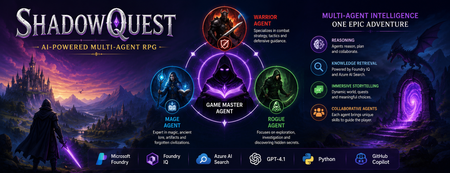
Artificial Intelligence is rapidly evolving beyond traditional chatbots. Today, developers are building intelligent systems where multiple AI agents collaborate, retrieve knowledge, and solve problems together. Microsoft's Agents League Hackathon provided the perfect opportunity to explore this new approach through the Reasoning Agents challenge. For this challenge, I built ShadowQuest, a fantasy role-playing game (RPG) powered by Microsoft Foundry, Foundry IQ, Azure AI Search, GPT-4.1, and GitHub Copilot. The project demonstrates how specialized AI agents can work together while using Retrieval-Augmented Generation (RAG) to deliver accurate and context-aware responses. About the Challenge Microsoft Agents League is a global developer challenge designed to encourage developers to build intelligent AI applications using Microsoft's latest AI technologies. Participants could choose from three tracks: Creative Apps, Reasoning Agents, and Enterprise Agents. I selected the Reasoning Agents track because I wanted to explore how multiple AI agents could collaborate instead of relying on a single large language model. Another important requirement for this year's challenge was integrating at least one Microsoft Intelligence Layer. For ShadowQuest, I chose Foundry IQ as the project's intelligence layer. The Idea Behind ShadowQuest Fantasy RPGs are built around storytelling, exploration, and collaboration between different characters. Every character usually has a unique role, whether it's a warrior protecting the team, a mage interpreting magical knowledge, or a rogue discovering hidden paths. I wanted to recreate this experience using AI. Instead of building one AI assistant responsible for everything, I designed a system where multiple specialized agents collaborate to create a richer and more immersive adventure. ShadowQuest is set in a fantasy world filled with magical artifacts, forgotten kingdoms, mysterious locations, and story-driven quests. Players can ask questions about the world, explore different locations, and learn about the game's lore through conversations with AI agents. Building the Multi-Agent Architecture The architecture follows a simple but scalable design. At the center of the system is the Game Master Agent, which acts as the orchestrator. Every player interaction starts with the Game Master. It receives the player's request, determines what information is needed, retrieves additional knowledge when required, and generates the final response. Supporting the Game Master are three specialized agents: Warrior Agent – Focuses on combat strategy and tactical decisions. Mage Agent – Provides magical knowledge, world lore, and information about ancient artifacts. Rogue Agent – Specializes in exploration, investigation, and discovering hidden information. Each agent has a clearly defined responsibility, making the system easier to understand, maintain, and extend in the future. Using Foundry IQ as the Knowledge Layer One of the most important parts of the project was integrating Foundry IQ. Instead of storing every piece of game information inside prompts, I created a dedicated knowledge base containing information about characters, magical artifacts, locations, quests, and the history of the ShadowQuest world. This approach separates knowledge from reasoning. Whenever a player asks a question, the Game Master Agent first retrieves relevant information from the knowledge base before generating a response. This ensures that answers remain consistent with the game's world while reducing hallucinations. Foundry IQ became the central source of truth for the entire project, making it easy to manage and expand the game world without constantly modifying prompts. Azure AI Search and Retrieval-Augmented Generation To enable intelligent retrieval, I connected Foundry IQ with Azure AI Search. The RPG documents were indexed, and vector embeddings were generated using Microsoft's embedding models. This enables semantic search, allowing the system to understand the meaning behind a player's question instead of relying only on keyword matching. For example, if a player asks about a magical relic without mentioning its exact name, Azure AI Search can still retrieve the correct information based on semantic similarity. The complete workflow looks like this: The player submits a question. The Game Master Agent receives the request. Foundry IQ queries Azure AI Search. Relevant documents are retrieved. GPT-4.1 generates a grounded response using the retrieved context. This Retrieval-Augmented Generation (RAG) approach significantly improves the quality and reliability of responses. Accelerating Development with GitHub Copilot GitHub Copilot played an important role throughout the development process. It helped generate Python classes, improve documentation, create helper functions, and speed up repetitive coding tasks. During the live demonstration, I also showed how Copilot could quickly generate a new Healer Agent, demonstrating how AI-assisted development makes it easier to extend a multi-agent application while maintaining a consistent architecture. Rather than replacing the developer, Copilot acted as an intelligent coding assistant, allowing me to focus more on architecture and design decisions. Demonstrating ShadowQuest During the Microsoft Agents League Reasoning Agents Battle, I demonstrated the Game Master Agent by asking questions about the ShadowQuest world, magical artifacts, and game lore. One of the most interesting parts of the demonstration was observing the retrieval process. Before generating a response, the Game Master Agent called the knowledge retrieval function through Foundry IQ. This confirmed that the system was retrieving relevant information from the indexed knowledge base rather than relying only on GPT-4.1's internal knowledge. This demonstrated how RAG can create more grounded, reliable, and context-aware AI experiences. Lessons Learned Building ShadowQuest taught me that designing multi-agent systems is as much about architecture as it is about AI models. Clearly defining responsibilities for each agent made the application easier to maintain and opened the door for future expansion. I also learned how valuable Retrieval-Augmented Generation can be for applications that depend on structured knowledge. Separating reasoning from knowledge allows AI systems to remain accurate while making it easier to update information over time. Finally, participating in the Microsoft Agents League was an incredible opportunity to experiment with Microsoft's latest AI technologies, learn from other developers, and share ideas with a global community passionate about agentic AI. Looking Ahead ShadowQuest is only the beginning. In future iterations, I plan to expand the project by introducing additional agents such as a Merchant Agent and Healer Agent, implementing persistent player memory, adding dynamic quest generation, improving combat mechanics, and enabling deeper collaboration between agents. These improvements will make the game world more immersive while continuing to explore the possibilities of agent-based AI systems. Conclusion ShadowQuest demonstrates how Microsoft Foundry, Foundry IQ, Azure AI Search, GPT-4.1, and GitHub Copilot can be combined to build intelligent multi-agent applications. More importantly, the project reinforced an important idea: the future of AI is not a single assistant performing every task, but a team of specialized agents collaborating with shared knowledge to solve increasingly complex problems. Participating in the Microsoft Agents League was an inspiring experience that allowed me to explore the next generation of AI development while building a project that combines storytelling, reasoning, and knowledge retrieval. I look forward to continuing this journey and discovering new ways to build intelligent applications using Microsoft's growing AI ecosystem.546Views1like0CommentsBuilding a hands-free voice concierge with Microsoft Foundry Voice Live and a Hosted Agent
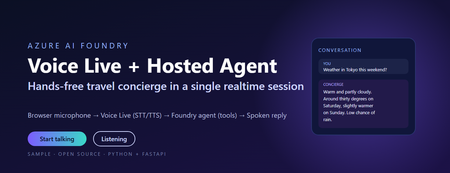
This post walks through a small, working sample that wires the browser microphone to Azure AI Speech Voice Live, binds the realtime session to a Foundry hosted agent, and lets the agent answer travel questions using tool calls. The full source, infrastructure, and labs live in the repository linked at the end. Why this combination matters Voice user interfaces have historically been hard to build well. Streaming audio, partial transcripts, barge-in, voice activity detection, tool dispatch, and audio playback have traditionally meant stitching together five or six services. The combination of Voice Live and a Foundry hosted agent collapses that into one realtime WebSocket session with a single binding field. Voice Live owns the audio loop: speech to text, neural text to speech, semantic turn detection, noise suppression, and echo cancellation. The Foundry hosted agent owns the brain: instructions, memory, model selection, evaluators, and tool calling. The link between them is one query parameter on the WebSocket URL. What this means in practice: the browser never sees a model API key, never instantiates a tool, and never owns the agent prompt. The browser does microphone capture and audio playback. Everything else lives server-side. The scenario The sample is called Contoso Travel Concierge. The user is mid-journey, hands and eyes busy, and wants to ask things like: What is the weather in Tokyo this weekend? Is BA005 from Heathrow on time? What time is check-in at the Marriott Marquis? Each question triggers a tool call on the hosted agent. The reply is short, speakable, and synthesised back to the user in under a second on a warm connection. Architecture There are four moving parts. Three of them are managed Azure services. Only the broker is your code. Browser client – captures PCM16 audio at 24 kHz and streams it over a WebSocket to the broker. Plays back audio chunks the broker forwards from Voice Live. Session broker (FastAPI) – authenticates to Azure with DefaultAzureCredential , builds the Voice Live WebSocket URL with a short-lived bearer token, and relays frames in both directions. Voice Live – the Azure AI Speech realtime endpoint. Transcribes the user, hands the text to the bound agent, and synthesises the agent’s reply. Foundry hosted agent – a prompt-kind agent in Azure AI Foundry with instructions, tool definitions, and the microsoft.voice-live.enabled metadata flag set to true . Two design choices are worth calling out. The broker is small on purpose. It does authentication, URL construction, and WebSocket relay. It does not transcode audio, run business logic, or hold conversation state. Voice Live and the agent already do those things well. The agent binding is a URL query parameter, not an SDK call. There is no per-turn HTTP request to the agent runtime. Voice Live opens a session against the agent once and streams turns through it for the lifetime of the WebSocket. That is what keeps latency low. The Voice Live URL contract This is the single most important thing to get right. The public Microsoft sample that ships under liupeirong/ai-foundry-voice-agent targets a different URL shape ( services.ai.azure.com host, agent-id + agent-access-token parameters, an Authorization header). That shape is rejected by Foundry resources that expose voice-live-enabled agents. The shape below is the one the portal itself uses, and the one this sample dials. Three details cause most failures: The host must be <resource>.cognitiveservices.azure.com , not services.ai.azure.com . The broker rewrites this automatically from VOICE_LIVE_ENDPOINT . The bearer token travels in the authorization query parameter, URL-encoded, with a literal Bearer prefix and a + (or %20 ) before the token. No Authorization header is sent. agent-name and model are both the agent’s display name. agent-version is empty when you want the latest published version. Walkthrough: from clone to spoken reply Prerequisites Python 3.11 or later (the sample is developed on 3.13). The Azure CLI, signed in with az login --tenant <your-tenant-id> . An Azure AI Foundry project in a Voice Live region ( eastus2 , swedencentral , or westus2 ). A deployed prompt-kind agent in that project with Enable Voice Live turned on. The Cognitive Services User role on the Foundry resource for the identity the broker will use. Configure the broker Copy .env.sample to .env and fill in four values: AZURE_AI_PROJECT_ENDPOINT=https://<your-resource>.services.ai.azure.com AZURE_AI_PROJECT_NAME=<your-foundry-project-name> VOICE_LIVE_ENDPOINT=wss://<your-resource>.services.ai.azure.com/voice-live/realtime VOICE_LIVE_API_VERSION=2025-10-01 FOUNDRY_AGENT_ID=<your-agent-name> The agent name is what the Foundry portal shows on the agent card. The broker uses it for both the agent-name and model query parameters. Install and run python -m venv .venv .\.venv\Scripts\Activate.ps1 pip install -r requirements.txt .\scripts\start-local.ps1 The broker exposes three endpoints: GET /healthz – liveness probe. GET /config – returns the session.update the browser sends as its first frame. WS /ws – the bi-directional relay to Voice Live. Smoke test .\scripts\test-session.ps1 A successful run prints: [OK] /ws upgraded -> sent session.update <- {"type":"session.created",…} <- {"type":"session.updated",…} [OK] session.updated received -- E2E works This confirms the entire chain: local broker, DefaultAzureCredential token, Foundry Portal URL shape, Voice Live handshake, and the bound agent acknowledging the session. Open the browser UI Browse to http://localhost:8000/ , click Start talking, and ask one of the sample questions. Transcripts appear in real time and the spoken reply plays back through the audio context. Inside the broker The relay logic is tiny – the heavy lifting is the URL construction. The function below is the canonical reference; copy it if you are porting the pattern to another language. def build_voice_live_ws_url(agent_access_token: str) -> str: """ Build the Foundry Portal style Voice Live WebSocket URL. Auth lives in the query string only. No Authorization header is sent. """ host = _ws_host_from_endpoint(VOICE_LIVE_ENDPOINT) qs = urlencode( { "trafficType": "FoundryPortal", "agent-name": FOUNDRY_AGENT_ID, "agent-version": "", "agent-project-name": AZURE_AI_PROJECT_NAME, "api-version": VOICE_LIVE_API_VERSION, "model": FOUNDRY_AGENT_ID, "client-request-id": str(uuid.uuid4()), "authorization": f"Bearer {agent_access_token}", }, quote_via=quote, ) return f"wss://{host}/voice-live/realtime?{qs}" The relay itself is a pair of asyncio tasks: one forwarding browser frames upstream, one forwarding Voice Live frames back. Audio bytes are passed straight through – the broker never decodes them. Deploying the hosted agent The most reliable way to create a voice-live-enabled agent is the Foundry portal. Agents created via the Assistants v2 SDK do not carry the required metadata by default and will be rejected by the Voice Live URL shape above. The portal steps are: Open the Foundry project, go to Agents, and click New agent. Choose Prompt agent as the kind, name it (for example travel-concierge ), and pick a model deployment. Paste the contents of agent/src/prompts/system.txt into the instructions box. On the Voice tab, switch Enable Voice Live on. This is what sets the microsoft.voice-live.enabled = true metadata. Add the three tools ( get_weather , get_flight_status , get_hotel_info ) from agent/agent.yaml on the Tools tab. Publish the version and write the agent name back to .env as FOUNDRY_AGENT_ID . The full deployment guide, including how to host the broker on Azure Container Apps with a managed identity, is in docs/deployment.md in the repository. Three lessons from getting this to production 1. Voice output must be written for speech, not for screens Foundry agents tend to format answers in markdown with citations like ([data.jma.go.jp](https://…)) . When Voice Live synthesises that text, the user hears the URL read aloud, character by character. The fix is to write the agent instructions so the spoken text never contains URLs, markdown, or symbols. A short block at the end of the agent instructions does the job: Voice output rules - This output is read aloud by TTS. Never include URLs, domain names, or citation markers like "(source.com)" in your reply. Cite by speakable source name only. - Never use markdown for formatting. No asterisks, brackets, backticks, bullets, or hashes. Write in plain spoken sentences. - Keep numbers speakable: say "thirty degrees Celsius", not "30C / 86F". - Keep replies under about 40 words unless the user asks for detail. The browser transcript can still render markdown for the eyes. The sample does so with a small, escaping markdown renderer that whitelists bold, italic, code, and http(s) links only, so the same agent reply looks polished on screen even though the spoken version contains none of it. 2. Identity is simpler than it looks The broker uses DefaultAzureCredential and requests the https://ai.azure.com/.default scope. Locally that resolves to your az login credentials. In Azure Container Apps it resolves to the user-assigned managed identity. In both cases the only role assignment you need on the Foundry account is Cognitive Services User. There is no API key path on the working URL shape – it is bearer tokens all the way down. 3. The wrong sample wastes a day If you start from the public liupeirong/ai-foundry-voice-agent repository against a portal-provisioned voice-live agent, the WebSocket either returns HTTP 400 or closes silently with code 1006. The cause is the URL shape, not your code. The reference probe in scripts/probe_portal_shape.py is the single source of truth for the working contract – keep it as a regression test. Responsible AI and security notes Credentials never reach the browser. Tokens are minted server-side and travel only on the upstream Voice Live URL. No secrets in source. The .env file is gitignored. The .env.sample contains only placeholders. Markdown rendering is escape-first. The browser HTML-escapes the agent reply before applying its small markdown whitelist, and links are restricted to http(s) URLs so the rule cannot emit javascript: hrefs. Tool calls are auditable. Every turn shows up as a run in the Foundry portal under the agent, with the prompt, model output, and tool inputs and outputs visible for review. Voice biometric considerations. If you plan to handle account verification by voice, plug in dedicated speaker recognition rather than relying on the conversational model. Key takeaways Voice Live plus a Foundry hosted agent is a session-level integration, not an API integration. One URL, one binding field, one WebSocket. The browser is a thin client. Authentication, URL construction, and relay all live in a small FastAPI broker. Get the URL shape right ( cognitiveservices.azure.com , token in the query string, agent-name equals model equals the agent display name) and the rest is plumbing. Use the Foundry portal to create the agent so the voice-live metadata is set correctly. Write agent instructions for the ear, not the eye, then layer screen formatting on top in the browser. Get the code and try it Repository: github.com/microsoft/foundry-agent-voice-mode-sample Deployment guide: docs/deployment.md in the repository. Labs: three progressive workshops under labs/ – basic voice, adding tools, and binding a hosted agent. Reference docs: Voice Live in Azure AI Speech and Agents in Microsoft Foundry. If you build something on top of this pattern, open an issue or pull request on the repository. The sample is intentionally small so it stays easy to fork.530Views0likes0CommentsBuilding Reliable AI Coding Workflows Using Modular AI Agent Optimization
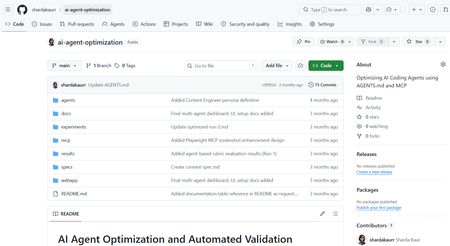
Artificial Intelligence is rapidly transforming the modern software development industry. AI-powered coding assistants such as GitHub Copilot, Claude Code, and other Large Language Model (LLM)-based systems are helping developers automate repetitive coding tasks, improve productivity, and accelerate software development processes. These tools can generate code, assist with debugging, provide recommendations, and support developers during implementation. However, despite their growing capabilities, many AI coding assistants still face challenges related to reliability, maintainability, project-specific conventions, and structured software engineering workflows. Most coding assistants perform well for generic programming tasks but often struggle when working with domain-specific development requirements, API integrations, project architectures, validation workflows, and coding standards. In real-world software engineering environments, developers require systems that not only generate code but also follow project conventions, maintain readability, support modular development, and improve long-term maintainability. The project “AI Agents Optimization” focuses on improving the reliability and effectiveness of AI coding agents by designing structured workflows, modular configurations, validation mechanisms, and optimized task execution strategies. The objective of the project is to investigate how AI agents can become dependable collaborators in practical software engineering tasks instead of functioning only as autocomplete systems. The project explores different approaches for organizing AI agent workflows using structured instruction handling, modular task division, context management, validation systems, and integration of external tools and documentation sources. Different agent configurations are analyzed and evaluated to understand how workflow optimization affects software development quality and performance. Why Existing AI Coding Workflows Often Fail Most AI coding assistants perform well for isolated coding tasks but struggle in real-world engineering environments where projects involve multiple files, coding standards, APIs, validation requirements, and contextual dependencies. For example, a generic prompt such as: “Build authentication middleware” may generate functional code, but the output often lacks: Project-specific architecture Error handling consistency Validation logic Security best practices Dependency awareness This project approaches the problem differently by introducing a structured workflow pipeline where AI agents operate in defined stages rather than generating outputs in a single step. The workflow separates planning, generation, validation, and refinement into independent modules. This improves maintainability, reduces inconsistent outputs, and supports iterative refinement similar to real software engineering workflows. Project Objectives The primary objective of this project is to optimize AI coding agents for real-world software engineering workflows. The project aims to improve how AI systems handle development tasks such as code generation, debugging, testing, validation, feature implementation, and workflow management. Another major objective is to design modular AI workflows where different stages of software development are managed systematically. The workflow focuses on task planning, instruction processing, validation, refinement, and output evaluation. This structured approach improves transparency, maintainability, and consistency in AI-generated outputs. The project also aims to evaluate how AI coding agents perform under different configurations and development scenarios. By testing multiple workflows and structured instruction methods, the project analyzes how optimization techniques improve development reliability and coding quality. Technologies and Tools Used The project utilizes multiple modern technologies and development tools for experimentation and workflow optimization. Technology / Tool Purpose Python Automation and scripting GitHub Copilot AI-assisted coding Claude / LLM APIs AI workflow experimentation Visual Studio Code Development environment Git & GitHub Version control and repository management Structured Prompting Workflow optimization MCP Concepts Tool and context integration These tools collectively support the implementation and testing of optimized AI coding workflows. Implementation Workflow The system was implemented using a modular AI workflow pipeline where each stage performs a dedicated engineering task. Step 1 — Task Parsing The user submits a development task or coding requirement. The Instruction Processing Module extracts: Objective Constraints Project context Expected output format Example structured prompt: Task: Create JWT authentication middleware Language: Node.js Constraints: - Use Express.js - Add token validation - Follow modular architecture - Include error handling Step 2 — Planning & Reasoning The Planning Module divides the task into subtasks such as: Route handling Token verification Error management Security validation This improves reasoning consistency before generation begins. Step 3 — Code Generation The Code Generation Module produces outputs using structured prompts and contextual references instead of generic instructions. Step 4 — Validation Generated outputs are validated using: Syntax checks Logical consistency checks Formatting standards Dependency validation Step 5 — Refinement If validation fails, the workflow loops back into refinement where issues are corrected before final delivery. System Workflow The workflow of the AI Agents Optimization system is based on modular task execution and structured development processes. The workflow begins with task planning and requirement analysis. The AI agent receives structured instructions along with coding constraints, project context, and validation requirements. The system processes the provided instructions and generates outputs according to defined workflows and development standards. Different configurations are tested to evaluate how instruction structures and modular task handling influence the quality of generated code The workflow also includes validation and refinement stages where generated outputs are analyzed for correctness, maintainability, and consistency. The project focuses not only on code generation but also on improving readability, workflow transparency, debugging support, and adherence to project conventions. Key Features of the Project Structured AI workflow design Modular task execution AI-assisted software development Workflow optimization strategies Validation and refinement mechanisms Integration of development tools and documentation Improved maintainability and readability Support for practical software engineering workflows Challenges Faced During Development One of the major challenges encountered during the project was maintaining consistency and reliability in AI-generated outputs. Different AI models often produce different responses depending on prompts, context, and task structure. Designing workflows that improve output stability and maintain coding standards required careful experimentation and optimization. Another challenge involved integrating structured workflows while ensuring flexibility in task execution. AI systems often require clear instructions and contextual information to produce accurate outputs. Balancing automation with maintainability and project-specific requirements was an important aspect of the project. Managing validation and refinement processes was also challenging because generated outputs needed to be evaluated not only for correctness but also for readability, maintainability, and software engineering best practices. Observations and Outcomes During experimentation, structured workflows produced more reliable and maintainable outputs compared to single-prompt generation approaches. Some important observations included: Reduced repetitive corrections during code refinement Improved consistency in generated outputs Better adherence to coding structure and formatting More stable workflow behavior for multi-step tasks Improved readability and maintainability of generated code The validation and refinement stages were particularly effective in reducing incomplete outputs and improving response quality. Although the project focuses primarily on workflow architecture and qualitative analysis rather than benchmark testing, the results demonstrate that modular AI pipelines can significantly improve practical software engineering workflows. Future Enhancements The project can be further enhanced by implementing advanced multi-agent collaboration systems where multiple AI agents work together on complex software development tasks. Future versions may also include real-time documentation integration, automated testing frameworks, cloud-based workflow management, and improved reasoning models. Additional enhancements may include IDE extensions, intelligent debugging systems, automated code review mechanisms, and adaptive workflow optimization based on project requirements. Conclusion The AI Agents Optimization project demonstrates how structured workflows and modular configurations can improve the effectiveness of AI-powered coding assistants in modern software engineering environments. By focusing on workflow optimization, validation mechanisms, modular task execution, and structured instruction handling, the project highlights the future potential of AI agents as reliable development collaborators capable of supporting real-world software engineering processes. The project represents an important step toward building dependable AI-assisted development systems that improve productivity, maintainability, and software quality while supporting modern engineering practices. How to Try This Workflow Define a structured development task Provide project constraints and context Break the task into subtasks Generate output using structured prompts Validate output quality Refine based on validation feedback1.3KViews0likes0CommentsModel Mondays S2E12: Models & Observability
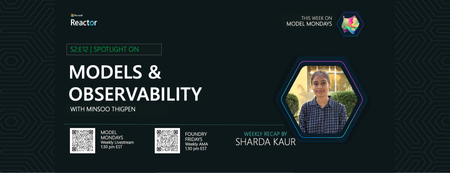
1. Weekly Highlights This week’s top news in the Azure AI ecosystem included: GPT Real Time (GA): Azure AI Foundry now offers GPT Real Time (GA)—lifelike voices, improved instruction following, audio fidelity, and function calling, with support for image context and lower pricing. Read the announcement and check out the model card for more details. Azure AI Translator API (Public Preview): Choose between fast Neural Machine Translation (NMT) or nuanced LLM-powered translations, with real-time flexibility for multilingual workflows. Read the announcement then check out the Azure AI Translator documentation for more details. Azure AI Foundry Agents Learning Plan: Build agents with autonomous goal pursuit, memory, collaboration, and deep fine-tuning (SFT, RFT, DPO) - on Azure AI Foundry. Read the announcement what Agentic AI involves - then follow this comprehensive learning plan with step-by-step guidance. CalcLM Agent Grid (Azure AI Foundry Labs): Project CalcLM: Agent Grid is a prototype and open-source experiment that illustrates how agents might live in a grid-like surface (like Excel). It's formula-first and lightweight - defining agentic workflows like calculations. Try the prototype and visit Foundry Labs to learn more. Agent Factory Blog: Observability in Agentic AI: Agentic AI tools and workflows are gaining rapid adoption in the enterprise. But delivering safe, reliable and performant agents requires foundation support for Observability. Read the 6-part Agent Factory series and check out the Top 5 agent observability best practices for reliable AI blog post for more details. 2. Spotlight On: Observability in Azure AI Foundry This week’s spotlight featured a deep dive and demo by Han Che (Senior PM, Core AI/ Microsoft ), showing observability end-to-end for agent workflows. Why Observability? Ensures AI quality, performance, and safety throughout the development lifecycle. Enables monitoring, root cause analysis, optimization, and governance for agents and models. Key Features & Demos: Development Lifecycle: Leaderboard: Pick the best model for your agent with real-time evaluation. Playground: Chat and prototype agents, view instant quality and safety metrics. Evaluators: Assess quality, risk, safety, intent resolution, tool accuracy, code vulnerability, and custom metrics. Governance: Integrate with partners like Cradle AI and SideDot for policy mapping and evidence archiving. Red Teaming Agent: Automatically test for vulnerabilities and unsafe behavior. CI/CD Integration: Automate evaluation in GitHub Actions and Azure DevOps pipelines. Azure DevOps GitHub Actions Monitoring Dashboard: Resource usage, application analytics, input/output tokens, request latency, cost breakdown, and evaluation scores. Azure Cost Management SDKs & Local Evaluation: Run evaluations locally or in the cloud with the Azure AI Evaluation SDK. Demo Highlights: Chat with a travel planning agent, view run metrics and tool usage. Drill into run details, debugging, and real-time safety/quality scores. Configure and run large-scale agent evaluations in CI/CD pipelines. Compare agents, review statistical analysis, and monitor in production dashboards 3. Customer Story: Saifr Saifr is a RegTech company that uses artificial intelligence to streamline compliance for marketing, communications, and creative teams in regulated industries. Incubated at Fidelity Labs (Fidelity Investments’ innovation arm), Saifr helps enterprises create, review, and approve content that meets regulatory standards—faster and with less manual effort. What Saifr Offers AI-Powered Compliance: Saifr’s platform leverages proprietary AI models trained on decades of regulatory expertise to automatically detect potential compliance risks in text, images, audio, and video. Automated Guardrails: The solution flags risky or non-compliant language, suggests compliant alternatives, and provides explanations—all in real time. Workflow Integration: Saifr seamlessly integrates with enterprise content creation and approval workflows, including cloud platforms and agentic AI systems like Azure AI Foundry. Multimodal Support: Goes beyond text to check images, videos, and audio for compliance risks, supporting modern marketing and communications teams. 4. Key Takeaways Observability is Essential: Azure AI Foundry offers complete monitoring, evaluation, tracing, and governance for agentic AI—making production safe, reliable, and compliant. Built-In Evaluation and Red Teaming: Use leaderboards, evaluators, and red teaming agents to assess and continuously improve model safety and quality. CI/CD and Dashboard Integration: Automate evaluations in GitHub Actions or Azure DevOps, then monitor and optimize agents in production with detailed dashboards. Compliance Made Easy: Safer’s agents and models help financial services and regulated industries proactively meet compliance standards for content and communications. Sharda's Tips: How I Wrote This Blog I focus on organizing highlights, summarizing customer stories, and linking to official Microsoft docs and real working resources. For this recap, I explored the Azure AI Foundry Observability docs, tested CI/CD pipeline integration, and watched the customer demo to share best practices for regulated industries. Here’s my Copilot prompt for this episode: "Generate a technical blog post for Model Mondays S2E12 based on the transcript and episode details. Focus on observability, agent dashboards, CI/CD, compliance, and customer stories. Add correct, working Microsoft links!" Coming Up Next Week Next week: Open Source Models! Join us for the final episode with Hugging Face VP of Product, live demos, and open model workflows. Register For The Livestream – Sep 15, 2025 About Model Mondays Model Mondays is your weekly Azure AI learning series: 5-Minute Highlights: Latest AI news and product updates 15-Minute Spotlight: Demos and deep dives with product teams 30-Minute AMA Fridays: Ask anything in Discord or the forum Start building: Watch Past Replays Register For AMA Recap Past AMAs Join The Community Don’t build alone! The Azure AI Developer Community is here for real-time chats, events, and support: Join the Discord Explore the Forum About Me I'm Sharda, a Gold Microsoft Learn Student Ambassador focused on cloud and AI. Find me on GitHub, Dev.to, Tech Community, and LinkedIn. In this blog series, I share takeaways from each week’s Model Mondays livestream.394Views0likes0CommentsModel Mondays S2E10: Automating Document Processing with AI
1. Weekly Highlights We kicked off with the top news and updates in the Azure AI ecosystem: Agent Factory Blog Series: A new 6-part blog series on designing reliable, agentic AI—exploring multi-step, collaborative agents that reflect, plan, and adapt using tool integrations and design patterns. Text PII Preview in Azure AI Language: Now redacts PII (like date of birth, license plates) in major European languages, with better accuracy for UK bank entities. Claude Opus 4.1 in Copilot Pro & Enterprise: Public preview brings smarter summaries, tool assistant thinking, and "Ask Mode" in VS Code.Now leverages stronger computer vision algorithms for table parsing—achieving 94-97% accuracy across Latin, Chinese, Japanese, and Korean—with sub-10ms latency. Mistral Document AI in Azure Foundry: Instantly turn PDFs, contracts, and scanned docs into structured JSON with tables, headings, and LaTeX support. Serverless, multilingual, secure, and perfect for regulated industries. 2. Spotlight On: Document Intelligence with Azure & Mistral This week’s spotlight was a hands-on exploration of document processing, featuring both Microsoft and Mistral AI experts. Why Document Processing? Unstructured data—receipts, forms, handwritten notes—are everywhere. Modern document AI can extract, structure, and even annotate this data, fueling everything from search to RAG pipelines. Azure Document Intelligence: State-of-the-art OCR and table extraction with super-high accuracy and speed. Handles multi-language, complex layouts, and returns structured outputs ready for programmatic use. Mistral Document AI: Transforms PDFs and scanned docs into JSON, retaining complex formatting, tables, images, and even LaTeX. Supports custom schema extraction, image/document annotations, and returns everything in one API call. Integrates seamlessly with Azure AI Foundry and developer workflows. Demo Highlights: Extracting Receipts: OCR accurately pulls out store, date, and transaction details from photos. Handwriting Recognition: Even historical documents (like Thomas Jefferson’s letters) are parsed with surprising accuracy. Tables & Structured Data: Financial statements and reports converted into structured markdown and JSON—ready for downstream apps. Advanced Annotations: Define your own schema (via JSON Schema or Pydantic), extract custom fields, classify images, summarize documents, and even translate summaries—all in a single call. 3. Customer Story: Oracle Health Oracle Health shared how agentic AI and fine-tuned models are revolutionizing clinical workflows: Problem: Clinicians spend hours on documentation, searching records, and manual data entry—reducing time for patient care. Solution: Oracle’s clinical AI agents automate chart reviews, data extraction, and even conversational Q&A—while keeping humans in the loop for safety. Technical Highlights: Multi-agent architecture understands provider specialty and context. Orchestrator model "routes" requests to the right agent or plugin, extracting needed arguments from context. Fine-tuning was key: For low latency, Oracle used lightweight models (like GPT-4 Mini) and fine-tuned on their data—achieving sub-800ms responses, with accuracy matching larger models. Fine-tuning also allowed for nuanced tool selection, argument extraction, and rule-based orchestration—better than prompt engineering alone. Used LoRA for efficient, targeted fine-tuning without erasing base model knowledge. Live Demo: Agent summarizes patient history, retrieves lab results, filters for abnormals, and answers follow-up questions—all conversationally. Fine-tuned orchestrator chooses the right tool and context for each doctor’s workflow. Result: 1-2 hours saved per day, more time for patients, and happier doctors! 4. Key Takeaways Here are the key learnings from this episode: Document AI is Production-Ready: Azure Document Intelligence and Mistral Document AI offer fast, accurate, and customizable document parsing for real enterprise needs. Schema-Driven Extraction & Annotation: Define your own schemas and extract exactly what you want—no more one-size-fits-all. Fine-Tuning Unlocks Performance: For low latency and high accuracy, fine-tuning lightweight models beats prompt engineering in complex, rule-based agent workflows. Agentic Workflows in Action: Multi-agent systems can automate complex tasks, route requests, and keep humans in control, especially in regulated domains like healthcare. Community & Support: Join the Discord and Forum to ask questions, share use cases, and connect with the team. Sharda's Tips: How I Wrote This Blog Writing this recap is all about sharing what I learned and making it practical for the community! I start by organizing the key highlights, then walk through customer stories and demos, using simple language and real-world examples. Copilot helps me structure and clarify my notes, especially when summarizing technical sections. Here’s the prompt I used for Copilot this week: "Generate a technical blog post for Model Mondays S2E10 based on the transcript and episode details. Focus on document processing with Azure AI and Mistral, include customer demos, and highlight practical workflows and fine-tuning. Make it clear and approachable for developers and students." Every episode inspires me to try these tools myself, and I hope this blog makes it easy for you to start, too. If you have questions or want to share your own experience, I’d love to hear from you! Coming Up Next Week Next week: Text & Speech AI Playgrounds! Learn how to build and test language and speech models, with live demos and expert guests. | Register For The Livestream – Aug 25, 2025 | Register For The AMA – Aug 29, 2025 | Ask Questions & View Recaps – Discussion Forum About Model Mondays Model Mondays is a weekly series to build your Azure AI IQ with: 5-Minute Highlights: News & updates on Mondays 15-Minute Spotlight: Deep dives into new features, models, and protocols 30-Minute AMA Fridays: Live Q&A with product teams and experts Get started: Register For Livestreams Watch Past Replays Register For AMA Recap Past AMAs Join The Community Don’t build alone! Join the Azure AI Developer Community for real-time chats, events, support, and more: Join the Discord Explore the Forum About Me I'm Sharda, a Gold Microsoft Learn Student Ambassador focused on cloud and AI. Find me on GitHub, Dev.to, Tech Community, and LinkedIn. In this blog series, I share takeaways from each week’s Model Mondays livestream.470Views0likes0CommentsStudent Devs: Build AI Agents, Compete for $55K in Prizes
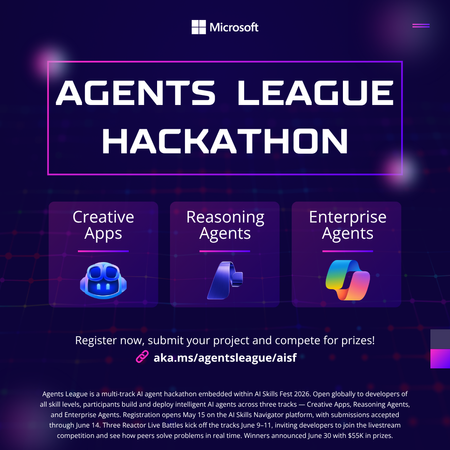
Student Devs: Build AI Agents, Compete for $55K in Prizes 🎮 AI Skills Fest • June 4–14, 2026 • Free to Enter $55K Prize Pool 3 Challenge Tracks 10 Days of Hacking Free To Enter Whether you're a first-year CS student or a final-year senior with a portfolio full of projects, Agents League is the best way to gain hands-on experience with agentic AI this summer and walk away with real skills employers are hiring for right now. What You'll Actually Learn Forget passive tutorials. Agents League is project-based learning at full speed. By the end of the hackathon, you'll have built a working AI agent and gained practical experience with the tools shaping the future of software development. 🤖 AI-Assisted Development Use GitHub Copilot to accelerate your coding workflow — from scaffolding to debugging — the way professional developers do today. 🧩 Multi-Step Reasoning Build agents with Microsoft Foundry that can plan, reason, and execute complex tasks — the core of agentic AI. 🏢 Enterprise AI Patterns Learn to build production-ready agents that integrate with Microsoft 365 and Copilot Studio — skills that translate directly to industry jobs. 🔧 Prompt Engineering Design effective prompts and orchestration flows that make AI agents reliable and useful in the real world. 📦 GitHub Workflows Submit your project through GitHub — practising version control, README writing, and open-source collaboration. 🎯 Competitive Problem-Solving Work under real constraints with deadlines, judging criteria, and peer competition — just like industry hackathons and sprints. Pick Your Track (or Try All Three) Agents League has three challenge tracks, each using different Microsoft AI tools. Choose based on your interests or stretch yourself by competing in multiple tracks. Track 01. Creative Apps Build an innovative application with AI-assisted development. This track rewards creativity, dream big and let GitHub Copilot help you bring ideas to life faster than ever. Tool: GitHub Copilot Track 02. Reasoning Agents Create intelligent agents that solve complex problems through multi-step reasoning. Think: agents that can research, plan, and act. This is the cutting edge of AI. Tool: Microsoft Foundry Track 03. Enterprise Agents Build knowledge agents that integrate with Microsoft 365 Copilot. Learn how businesses are deploying AI today and add enterprise AI to your skillset. Tool: Copilot Studio • M365 Opportunities You Won't Want to Miss Agents League isn't just a competition, it's a launchpad. Here's what's in it for you beyond the code: 💰 Win from a $55,000 USD Prize Pool Prizes are awarded across all three tracks smaller teams and solo hackers have a real shot. 📺 Watch Live Coding Battles at Microsoft Reactor See industry experts go head-to-head building AI agents live. Learn advanced techniques you can apply immediately to your own project. 🎓 Free Learning Resources on Microsoft Learn Access curated learning paths and the AI Skills Navigator, structured content designed to get you from zero to submission-ready. 🌍 Join a Global Developer Community Connect with thousands of developers on the Agents League Discord. Find teammates, ask questions, and build your professional network. 📂 Build Your Portfolio with a Real Project Every submission lives on GitHub. Walk away with a polished, public project that demonstrates your AI skills to future employers and grad schools. 🏆 Gain Recognition from Microsoft and the Community Top projects get visibility across the Microsoft developer ecosystem. Stand out from the crowd in internship and job applications. Key Dates to Remember Event Date Hacking Period Opens June 4, 2026 Registration Deadline June 12, 2026 — 12:00 PM PT Submission Deadline June 14, 2026 — 11:59 PM PT How to Get Started (Right Now) You don't have to wait until June 4th to start preparing. Here's your pre-hackathon game plan: Register for the hackathon it's free and open to everyone. Pick a track that matches your interests or curiosity. Explore the learning resources on Microsoft Learn and the AI Skills Navigator. Join the Discord community to find teammates and get early tips. Watch the Reactor event series for live coding battles and expert walkthroughs. Set up your GitHub repo and start experimenting before the hacking window opens. Helpful Links Register for Agents League Free entry, sign up now Microsoft Reactor Events Live coding battles & workshops AI Skills Fest The broader event Microsoft Learn Free learning paths The Arena Awaits 🏆 Ten days. Three tracks. $55K in prizes. Whether you go solo or squad up, this is your chance to build something real with AI and have a blast doing it. Register Now It's Free | Watch Reactor Events Agents League is part of AI Skills Fest and is open to the public at no cost. Review the Hackathon Rules and Regulations and the Microsoft Event Code of Conduct before participating.1.2KViews0likes0CommentsFrom Demo to Production: Building Microsoft Foundry Hosted Agents with .NET
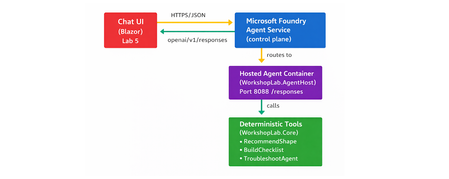
The Gap Between a Demo and a Production Agent Let's be honest. Getting an AI agent to work in a demo takes an afternoon. Getting it to work reliably in production, tested, containerised, deployed, observable, and maintainable by a team. is a different problem entirely. Most tutorials stop at the point where the agent prints a response in a terminal. They don't show you how to structure your code, cover your tools with tests, wire up CI, or deploy to a managed runtime with a proper lifecycle. That gap between prototype and production is where developer teams lose weeks. Microsoft Foundry Hosted Agents close that gap with a managed container runtime for your own custom agent code. And the Hosted Agents Workshop for .NET gives you a complete, copy-paste-friendly path through the entire journey. from local run to deployed agent to chat UI, in six structured labs using .NET 10. This post walks you through what the workshop delivers, what you will build, and why the patterns it teaches matter far beyond the workshop itself. What Is a Microsoft Foundry Hosted Agent? Microsoft Foundry supports two distinct agent types, and understanding the difference is the first decision you will make as an agent developer. Prompt agents are lightweight agents backed by a model deployment and a system prompt. No custom code required. Ideal for simple Q&A, summarisation, or chat scenarios where the model's built-in reasoning is sufficient. Hosted agents are container-based agents that run your own code .NET, Python, or any framework you choose inside Foundry's managed runtime. You control the logic, the tools, the data access, and the orchestration. When your scenario requires custom tool integrations, deterministic business logic, multi-step workflow orchestration, or private API access, a hosted agent is the right choice. The Foundry runtime handles the managed infrastructure; you own the code. For the official deployment reference, see Deploy a hosted agent to Foundry Agent Service on Microsoft Learn. What the Workshop Delivers The Hosted Agents Workshop for .NET is a beginner-friendly, hands-on workshop that takes you through the full development and deployment path for a real hosted agent. It is structured around a concrete scenario: a Hosted Agent Readiness Coach that helps delivery teams answer questions like: Should this use case start as a prompt agent or a hosted agent? What should a pilot launch checklist include? How should a team troubleshoot common early setup problems? The scenario is purposefully practical. It is not a toy chatbot. It is the kind of tool a real team would build and hand to other engineers, which means it needs to be testable, deployable, and extensible. The workshop covers: Local development and validation with .NET 10 Copilot-assisted coding with repo-specific instructions Deterministic tool implementation with xUnit test coverage CI pipeline validation with GitHub Actions Secure deployment to Azure Container Registry and Microsoft Foundry Chat UI integration using Blazor What You Will Build By the end of the workshop, you will have a code-based hosted agent that exposes an OpenAI Responses-compatible /responses endpoint on port 8088 . The agent is backed by three deterministic local tools, implemented in WorkshopLab.Core : RecommendImplementationShape — analyses a scenario and recommends hosted or prompt agent based on its requirements BuildLaunchChecklist — generates a pilot launch checklist for a given use case TroubleshootHostedAgent — returns structured troubleshooting guidance for common setup problems These tools are deterministic by design, no LLM call required to return a result. That choice makes them fast, predictable, and fully testable, which is the right architecture for business logic in a production agent. The end-to-end architecture looks like this: The Hands-On Journey: Lab by Lab The workshop follows a deliberate build → validate → ship progression. Each lab has a clear outcome. You do not move forward until the previous checkpoint passes. Lab 0 — Setup and Local Run Open the repo in VS Code or a GitHub Codespace, configure your Microsoft Foundry project endpoint and model deployment name, then run the agent locally. By the end of Lab 0, your agent is listening on http://localhost:8088/responses and responding to test requests. dotnet restore dotnet build dotnet run --project src/WorkshopLab.AgentHost Test it with a single PowerShell call: Invoke-RestMethod -Method Post ` -Uri "http://localhost:8088/responses" ` -ContentType "application/json" ` -Body '{"input":"Should we start with a hosted agent or a prompt agent?"}' Lab 0 instructions → Lab 1 — Copilot Customisation Configure repo-specific GitHub Copilot instructions so that Copilot understands the hosted-agent patterns used in this project. You will also add a Copilot review skill tailored to hosted agent code reviews. This step means every code suggestion you receive from Copilot is contextualised to the workshop scenario rather than giving generic .NET advice. Lab 1 instructions → Lab 2 — Tool Implementation Extend one of the deterministic tools in WorkshopLab.Core with a real feature change. The suggested change adds a stronger recommendation path to RecommendImplementationShape for scenarios that require all three hosted-agent strengths simultaneously. // In RecommendImplementationShape — add before the final return: if (requiresCode && requiresTools && requiresWorkflow) { return string.Join(Environment.NewLine, [ $"Recommended implementation: Hosted agent (full-stack)", $"Scenario goal: {goal}", "Why: the scenario requires custom code, external tool access, and " + "multi-step orchestration — all three hosted-agent strengths.", "Suggested next step: start with a code-based hosted agent, register " + "local tools for each integration, and add a workflow layer." ]); } You then write an xUnit test to cover it, run dotnet test , and validate the change against a live /responses call. This is the workshop's most important teaching moment: every tool change is covered by a test before it ships. Lab 2 instructions → Lab 3 — CI Validation Wire up a GitHub Actions workflow that builds the solution, runs the test suite, and validates that the agent container builds cleanly. No manual steps — if a change breaks the build or a test, CI catches it before any deployment happens. Lab 3 instructions → Lab 4 — Deployment to Microsoft Foundry Use the Azure Developer CLI ( azd ) to provision an Azure Container Registry, publish the agent image, and deploy the hosted agent to Microsoft Foundry. The workshop separates provisioning from deployment deliberately: azd owns the Azure resources; the Foundry control plane deployment is an explicit, intentional final step that depends on your real project endpoint and agent.yaml manifest values. Lab 4 instructions → Lab 5 — Chat UI Integration Connect a Blazor chat UI to the deployed hosted agent and validate end-to-end responses. By the end of Lab 5, you have a fully functioning agent accessible through a real UI, calling your deterministic tools via the Foundry control plane. Lab 5 instructions → Key Concepts to Take Away The workshop teaches concrete patterns that apply well beyond this specific scenario. Code-first agent design Prompt-only agents are fast to build but hard to test and reason about at scale. A hosted agent with code-backed tools gives you something you can unit test, refactor, and version-control like any other software. Deterministic tools and testability The workshop explicitly avoids LLM calls inside tool implementations. Deterministic tools return predictable outputs for a given input, which means you can write fast, reliable unit tests for them. This is the right pattern for business logic. Reserve LLM calls for the reasoning layer, not the execution layer. CI/CD for agent systems AI agents are software. They deserve the same build-test-deploy discipline as any other service. Lab 3 makes this concrete: you cannot ship without passing CI, and CI validates the container as well as the unit tests. Deployment separation The workshop's split between azd provisioning and Foundry control-plane deployment is not arbitrary. It reflects the real operational boundary: your Azure resources are long-lived infrastructure; your agent deployment is a lifecycle event tied to your project's specific endpoint and manifest. Keeping them separate reduces accidents and makes rollbacks easier. Observability and the validation mindset Every lab ends with an explicit checkpoint. The culture the workshop builds is: prove it works before moving on. That mindset is more valuable than any specific tool or command in the labs. Why Hosted Agents Are Worth the Investment The managed runtime in Microsoft Foundry removes the infrastructure overhead that makes custom agent deployment painful. You do not manage Kubernetes clusters, configure ingress rules, or handle TLS termination. Foundry handles the hosting; you handle the code. This matters most for teams making the transition from demo to production. A prompt agent is an afternoon's work. A hosted agent with proper CI, tested tools, and a deployment pipeline is a week's work done properly once, instead of several weeks of firefighting done poorly repeatedly. The Foundry agent lifecycle —> create, update, version, deploy —>also gives you the controls you need to manage agents in a real environment: staged rollouts, rollback capability, and clear separation between agent versions. For the full deployment guide, see Deploy a hosted agent to Foundry Agent Service. From Workshop to Real Project This workshop is not just a learning exercise. The repository structure, the tooling choices, and the CI/CD patterns are a reference implementation. The patterns you can lift directly into a production project include: The WorkshopLab.Core / WorkshopLab.AgentHost separation between business logic and agent hosting The agent.yaml manifest pattern for declarative Foundry deployment The GitHub Actions workflow structure for build, test, and container validation The azd + ACR pattern for image publishing without requiring Docker Desktop locally The Blazor chat UI as a starting point for internal tooling or developer-facing applications The scenario, a readiness coach for hosted agents. This is also something teams evaluating Microsoft Foundry will find genuinely useful. It answers exactly the questions that come up when onboarding a new team to the platform. Common Mistakes When Building Hosted Agents Having run workshops and spoken with developer teams building on Foundry, a few patterns come up repeatedly: Skipping local validation before containerising. Always validate the /responses endpoint locally first. Debugging inside a container is slower and harder than debugging locally. Putting business logic inside the LLM call. If the answer to a user query can be determined by code, use code. Reserve the model for reasoning, synthesis, and natural language output. Treating CI as optional. Agent code changes break things just like any other code change. If you do not have CI catching regressions, you will ship them. Conflating provisioning and deployment. Recreating Azure resources on every deploy is slow and error-prone. Provision once with azd ; deploy agent versions as needed through the Foundry control plane. Not having a rollback plan. The Foundry agent lifecycle supports versioning. Use it. Know how to roll back to a previous version before you deploy to production. Get Started The workshop is open source, beginner-friendly, and designed to be completed in a single day. You need a .NET 10 SDK, an Azure subscription, access to a Microsoft Foundry project, and a GitHub account. Clone the repository, follow the labs in order, and by the end you will have a production-ready reference implementation that your team can extend and adapt for real scenarios. Clone the workshop repository → Here is the quick start to prove the solution works locally before you begin the full lab sequence: git clone https://github.com/microsoft/Hosted_Agents_Workshop_dotNET.git cd Hosted_Agents_Workshop_dotNET # Set your Foundry project endpoint and model deployment $env:AZURE_AI_PROJECT_ENDPOINT = "https://<resource>.services.ai.azure.com/api/projects/<project>" $env:MODEL_DEPLOYMENT_NAME = "gpt-4.1-mini" # Build and run dotnet restore dotnet build dotnet run --project src/WorkshopLab.AgentHost Then send your first request: Invoke-RestMethod -Method Post ` -Uri "http://localhost:8088/responses" ` -ContentType "application/json" ` -Body '{"input":"Should we start with a hosted agent or a prompt agent?"}' When the agent answers as a Hosted Agent Readiness Coach, you are ready to begin the labs. Key Takeaways Hosted agents in Microsoft Foundry let you run custom .NET code in a managed container runtime — you own the logic, Foundry owns the infrastructure. Deterministic tools are the right pattern for business logic in production agents: fast, testable, and predictable. CI/CD is not optional for agent systems. Build it in from the start, not as an afterthought. Separate your provisioning ( azd ) from your deployment (Foundry control plane) — it reduces accidents and simplifies rollbacks. The workshop is a reference implementation, not just a tutorial. The patterns are production-grade and ready to adapt. References Hosted Agents Workshop for .NET — GitHub Repository Workshop Lab Guide Deploy a Hosted Agent to Foundry Agent Service — Microsoft Learn Microsoft Foundry Portal Azure Developer CLI (azd) — Microsoft Learn .NET 10 SDK Download681Views0likes0CommentsGetting Started with Foundry Local: A Student Guide to the Microsoft Foundry Local Lab
If you want to start building AI applications on your own machine, the Microsoft Foundry Local Lab is one of the most useful places to begin. It is a practical workshop that takes you from first-time setup through to agents, retrieval, evaluation, speech transcription, tool calling, and a browser-based interface. The material is hands-on, cross-language, and designed to show how modern AI apps can run locally rather than depending on a cloud service for every step. This blog post is aimed at students, self-taught developers, and anyone learning how AI applications are put together in practice. Instead of treating large language models as a black box, the lab shows you how to install and manage local models, connect to them with code, structure tasks into workflows, and test whether the results are actually good enough. If you have been looking for a learning path that feels more like building real software and less like copying isolated snippets, this workshop is a strong starting point. What Is Foundry Local? Foundry Local is a local runtime for downloading, managing, and serving AI models on your own hardware. It exposes an OpenAI-compatible interface, which means you can work with familiar SDK patterns while keeping execution on your device. For learners, that matters for three reasons. First, it lowers the barrier to experimentation because you can run projects without setting up a cloud account for every test. Second, it helps you understand the moving parts behind AI applications, including model lifecycle, local inference, and application architecture. Third, it encourages privacy-aware development because the examples are designed to keep data on the machine wherever possible. The Foundry Local Lab uses that local-first approach to teach the full journey from simple prompts to multi-agent systems. It includes examples in Python, JavaScript, and C#, so you can follow the language that fits your course, your existing skills, or the platform you want to build on. Why This Lab Works Well for Learners A lot of AI tutorials stop at the moment a model replies to a prompt. That is useful for a first demo, but it does not teach you how to build a proper application. The Foundry Local Lab goes further. It is organised as a sequence of parts, each one adding a new idea and giving you working code to explore. You do not just ask a model to respond. You learn how to manage the service, choose a language SDK, construct retrieval pipelines, build agents, evaluate outputs, and expose the result through a usable interface. That sequence is especially helpful for students because the parts build on each other. Early labs focus on confidence and setup. Middle labs focus on architecture and patterns. Later labs move into more advanced ideas that are common in real projects, such as tool calling, evaluation, and custom model packaging. By the end, you have seen not just what a local AI app looks like, but how its different layers fit together. Before You Start The workshop expects a reasonably modern machine and at least one programming language environment. The core prerequisites are straightforward: install Foundry Local, clone the repository, and choose whether you want to work in Python, JavaScript, or C#. You do not need to master all three. In fact, most learners will get more value by picking one language first, completing the full path in that language, and only then comparing how the same patterns look elsewhere. If you are new to AI development, do not be put off by the number of parts. The early sections are accessible, and the later ones become much easier once you have completed the foundations. Think of the lab as a structured course rather than a single tutorial. What You Learn in Each Lab https://github.com/microsoft-foundry/foundry-local-lab Part 1: Getting Started with Foundry Local The first part introduces the basics of Foundry Local and gets you up and running. You learn how to install the CLI, inspect the model catalogue, download a model, and run it locally. This part also introduces practical details such as model aliases and dynamic service ports, which are small but important pieces of real development work. For students, the value of this part is confidence. You prove that local inference works on your machine, you see how the service behaves, and you learn the operational basics before writing any application code. By the end of Part 1, you should understand what Foundry Local does, how to start it, and how local model serving fits into an application workflow. Part 2: Foundry Local SDK Deep Dive Once the CLI makes sense, the workshop moves into the SDK. This part explains why application developers often use the SDK instead of relying only on terminal commands. You learn how to manage the service programmatically, browse available models, control model download and loading, and understand model metadata such as aliases and hardware-aware selection. This is where learners start to move from using a tool to building with a platform. You begin to see the difference between running a model manually and integrating it into software. By the end of this section, you should understand the API surface you will use in your own projects and know how to bootstrap the SDK in Python, JavaScript, or C#. Part 3: SDKs and APIs Part 3 turns the SDK concepts into a working chat application. You connect code to the local inference server and use the OpenAI-compatible API for streaming chat completions. The lab includes examples in all three supported languages, which makes it especially useful if you are comparing ecosystems or learning how the same idea is expressed through different syntax and libraries. The key learning outcome here is not just that you can get a response from a model. It is that you understand the boundary between your application and the local model service. You learn how messages are structured, how streaming works, and how to write the sort of integration code that becomes the foundation for every later lab. Part 4: Retrieval-Augmented Generation This is where the workshop starts to feel like modern AI engineering rather than basic prompting. In the retrieval-augmented generation lab, you build a simple RAG pipeline that grounds answers in supplied data. You work with an in-memory knowledge base, apply retrieval logic, score matches, and compose prompts that include grounded context. For learners, this part is important because it demonstrates a core truth of AI app development: a model on its own is often not enough. Useful applications usually need access to documents, notes, or structured information. By the end of Part 4, you understand why retrieval matters, how to pass retrieved context into a prompt, and how a pipeline can make answers more relevant and reliable. Part 5: Building AI Agents Part 5 introduces the concept of an agent. Instead of a one-off prompt and response, you begin to define behaviour through system instructions, roles, and conversation state. The lab uses the ChatAgent pattern and the Microsoft Agent Framework to show how an agent can maintain a purpose, respond with a persona, and return structured output such as JSON. This part helps learners understand the difference between a raw model call and a reusable application component. You learn how to design instructions that shape behaviour, how multi-turn interaction differs from single prompts, and why structured output matters when an AI component has to work inside a broader system. Part 6: Multi-Agent Workflows Once a single agent makes sense, the workshop expands the idea into a multi-agent workflow. The example pipeline uses roles such as researcher, writer, and editor, with outputs passed from one stage to the next. You explore sequential orchestration, shared configuration, and feedback loops between specialised components. For students, this lab is a very clear introduction to decomposition. Instead of asking one model to do everything at once, you break a task into smaller responsibilities. That pattern is useful well beyond AI. By the end of Part 6, you should understand why teams build multi-agent systems, how hand-offs are structured, and what trade-offs appear when more components are added to a workflow. Part 7: Zava Creative Writer Capstone Application The Zava Creative Writer is the capstone project that brings the earlier ideas together into a more production-style application. It uses multiple specialised agents, structured JSON hand-offs, product catalogue search, streaming output, and evaluation-style feedback loops. Rather than showing an isolated feature, this part shows how separate patterns combine into a complete system. This is one of the most valuable parts of the workshop for learner developers because it narrows the gap between tutorial code and real application design. You can see how orchestration, agent roles, and practical interfaces fit together. By the end of Part 7, you should be able to recognise the architecture of a serious local AI app and understand how the earlier labs support it. Part 8: Evaluation-Led Development Many beginner AI projects stop once the output looks good once or twice. This lab teaches a much stronger habit: evaluation-led development. You work with golden datasets, rule-based checks, and LLM-as-judge scoring to compare prompt or agent variants systematically. The goal is to move from anecdotal testing to repeatable assessment. This matters enormously for students because evaluation is one of the clearest differences between a classroom demo and dependable software. By the end of Part 8, you should understand how to define success criteria, compare outputs at scale, and use evidence rather than intuition when improving an AI component. Part 9: Voice Transcription with Whisper Part 9 broadens the workshop beyond text generation by introducing speech-to-text with Whisper running locally. You use the Foundry Local SDK to download and load the model, then transcribe local audio files through the compatible API surface. The emphasis is on privacy-first processing, with audio kept on-device. This section is a useful reminder that local AI development is not limited to chatbots. Learners see how a different modality fits into the same ecosystem and how local execution supports sensitive workloads. By the end of this lab, you should understand the transcription flow, the relevant client methods, and how speech features can be integrated into broader applications. Part 10: Using Custom or Hugging Face Models After learning the standard path, the workshop shows how to work with custom or Hugging Face models. This includes compiling models into optimised ONNX format with ONNX Runtime GenAI, choosing hardware-specific options, applying quantisation strategies, creating configuration files, and adding compiled models to the Foundry Local cache. For learner developers, this part opens the door to model engineering rather than simple model consumption. You begin to understand that model choice, optimisation, and packaging affect performance and usability. By the end of Part 10, you should have a clearer picture of how models move from an external source into a runnable local setup and why deployment format matters. Part 11: Tool Calling with Local Models Tool calling is one of the most practical patterns in current AI development, and this lab covers it directly. You define tool schemas, allow the model to request function calls, handle the multi-turn interaction loop, execute the tools locally, and return results back to the model. The examples include practical scenarios such as weather and population tools. This lab teaches learners how to move beyond generation into action. A model is no longer limited to producing text. It can decide when external data or a function is needed and incorporate that result into a useful answer. By the end of Part 11, you should understand the tool-calling flow and how AI systems connect reasoning with deterministic software behaviour. Part 12: Building a Web UI for the Zava Creative Writer Part 12 adds a browser-based front end to the capstone application. You learn how to serve a shared interface from Python, JavaScript, or C#, stream updates to the browser, consume NDJSON with the Fetch API and ReadableStream, and show live agent status as content is produced in real time. This part is especially good for students who want to build portfolio projects. It turns backend orchestration into something visible and interactive. By the end of Part 12, you should understand how to connect a local AI backend to a web interface and how streaming changes the user experience compared with waiting for one final response. Part 13: Workshop Complete The final part is a summary and extension point. It reviews what you have built across the previous sections and suggests ways to continue. Although it is not a new technical lab in the same way as the earlier parts, it plays an important role in learning. It helps you consolidate the architecture, the terminology, and the development patterns you have encountered. For learners, reflection matters. By the end of Part 13, you should be able to describe the full stack of a local AI application, from model management to user interface, and identify which area you want to deepen next. What Students Gain from the Full Workshop Taken together, these labs do more than teach Foundry Local itself. They teach how AI applications are built. You learn operational basics such as model setup and service management. You learn application integration through SDKs and APIs. You learn system design through RAG, agents, multi-agent orchestration, and web interfaces. You learn engineering discipline through evaluation. You also see how text, speech, custom models, and tool calling all fit into one local-first development workflow. That breadth makes the workshop useful in several settings. A student can use it as a self-study path. A lecturer can use it as source material for practical sessions. A learner developer can use it to build portfolio pieces and to understand which AI patterns are worth learning next. Because the repository includes Python, JavaScript, and C#, it also works well for comparing how architectural ideas transfer across languages. How to Approach the Lab as a Beginner If you are starting from scratch, the best route is simple. Complete Parts 1 to 3 in your preferred language first. That gives you the essential setup and integration skills. Then move into Parts 4 to 6 to understand how AI application patterns are composed. After that, use Parts 7 and 8 to learn how larger systems and evaluation fit together. Finally, explore Parts 9 to 12 based on your interests, whether that is speech, tooling, model customisation, or front-end work. It is also worth keeping notes as you go. Record what each part adds to your understanding, what code files matter, and what assumptions each example makes. That habit will help you move from following the labs to adapting the patterns in your own projects. Final Thoughts The Microsoft Foundry Local Lab is a strong introduction to local AI development because it treats learners like developers rather than spectators. You install, run, connect, orchestrate, evaluate, and present working systems. That makes it far more valuable than a short demo that only proves a model can answer a question. If you are a student or learner developer who wants to understand how AI applications are really built, this lab gives you a clear path. Start with the basics, pick one language, and work through the parts in order. By the time you finish, you will not just have used Foundry Local. You will have a practical foundation for building local AI applications with far more confidence and much better judgement.903Views0likes0CommentsLangchain Multi-Agent Systems with Microsoft Agent Framework and Hosted Agents
If you have been building AI agents with LangChain, you already know how powerful its tool and chain abstractions are. But when it comes to deploying those agents to production — with real infrastructure, managed identity, live web search, and container orchestration — you need something more. This post walks through how to combine LangChain with the Microsoft Agent Framework ( azure-ai-agents ) and deploy the result as a Microsoft Foundry Hosted Agent. We will build a multi-agent incident triage copilot that uses LangChain locally and seamlessly upgrades to cloud-hosted capabilities on Microsoft Foundry. Why combine LangChain with Microsoft Agent Framework? As a LangChain developer, you get excellent abstractions for building agents: the @tool decorator, RunnableLambda chains, and composable pipelines. But production deployment raises questions that LangChain alone does not answer: Where do your agents run? Containers, serverless, or managed infrastructure? How do you add live web search or code execution? Bing Grounding and Code Interpreter are not LangChain built-ins. How do you handle authentication? Managed identity, API keys, or tokens? How do you observe agents in production? Distributed tracing across multiple agents? The Microsoft Agent Framework fills these gaps. It provides AgentsClient for creating and managing agents on Microsoft Foundry, built-in tools like BingGroundingTool and CodeInterpreterTool , and a thread-based conversation model. Combined with Hosted Agents, you get a fully managed container runtime with health probes, auto-scaling, and the OpenAI Responses API protocol. The key insight: LangChain handles local logic and chain composition; the Microsoft Agent Framework handles cloud-hosted orchestration and tooling. Architecture overview The incident triage copilot uses a coordinator pattern with three specialist agents: User Query | v Coordinator Agent | +--> LangChain Triage Chain (routing decision) +--> LangChain Synthesis Chain (combine results) | +---+---+---+ | | | v v v Research Diagnostics Remediation Agent Agent Agent Each specialist agent has two execution modes: Mode LangChain Role Microsoft Agent Framework Role Local @tool functions provide heuristic analysis Not used Foundry Chains handle routing and synthesis AgentsClient with BingGroundingTool , CodeInterpreterTool This dual-mode design means you can develop and test locally with zero cloud dependencies, then deploy to Foundry for production capabilities. Step 1: Define your LangChain tools Start with what you know. Define typed, documented tools using LangChain’s @tool decorator: from langchain_core.tools import tool @tool def classify_incident_severity(query: str) -> str: """Classify the severity and priority of an incident based on keywords. Args: query: The incident description text. Returns: Severity classification with priority level. """ query_lower = query.lower() critical_keywords = [ "production down", "all users", "outage", "breach", ] high_keywords = [ "503", "500", "timeout", "latency", "slow", ] if any(kw in query_lower for kw in critical_keywords): return "severity=critical, priority=P1" if any(kw in query_lower for kw in high_keywords): return "severity=high, priority=P2" return "severity=low, priority=P4" These tools work identically in local mode and serve as fallbacks when Foundry is unavailable. Step 2: Build routing with LangChain chains Use RunnableLambda to create a routing chain that classifies the incident and selects which specialists to invoke: from langchain_core.runnables import RunnableLambda from enum import Enum class AgentRole(str, Enum): RESEARCH = "research" DIAGNOSTICS = "diagnostics" REMEDIATION = "remediation" DIAGNOSTICS_KEYWORDS = { "log", "error", "exception", "timeout", "500", "503", "crash", "oom", "root cause", } REMEDIATION_KEYWORDS = { "fix", "remediate", "runbook", "rollback", "hotfix", "patch", "resolve", "action plan", } def _route(inputs: dict) -> dict: query = inputs["query"].lower() specialists = [AgentRole.RESEARCH] # always included if any(kw in query for kw in DIAGNOSTICS_KEYWORDS): specialists.append(AgentRole.DIAGNOSTICS) if any(kw in query for kw in REMEDIATION_KEYWORDS): specialists.append(AgentRole.REMEDIATION) return {**inputs, "specialists": specialists} triage_routing_chain = RunnableLambda(_route) This is pure LangChain — no cloud dependency. The chain analyses the query and returns which specialists should handle it. Step 3: Create specialist agents with dual-mode execution Each specialist agent extends a base class. In local mode, it uses LangChain tools. In Foundry mode, it delegates to the Microsoft Agent Framework: from abc import ABC, abstractmethod from pathlib import Path class BaseSpecialistAgent(ABC): role: AgentRole prompt_file: str def __init__(self): prompt_path = Path(__file__).parent.parent / "prompts" / self.prompt_file self.system_prompt = prompt_path.read_text(encoding="utf-8") async def run(self, query, shared_context, correlation_id, client=None): if client is not None: return await self._run_on_foundry(query, shared_context, correlation_id, client) return await self._run_locally(query, shared_context, correlation_id) async def _run_on_foundry(self, query, shared_context, correlation_id, client): """Use Microsoft Agent Framework for cloud-hosted execution.""" from azure.ai.agents.models import BingGroundingTool agent = await client.agents.create_agent( model=shared_context.get("model_deployment", "gpt-4o"), name=f"{self.role.value}-{correlation_id}", instructions=self.system_prompt, tools=self._get_foundry_tools(shared_context), ) thread = await client.agents.threads.create() await client.agents.messages.create( thread_id=thread.id, role="user", content=self._build_prompt(query, shared_context), ) run = await client.agents.runs.create_and_process( thread_id=thread.id, agent_id=agent.id, ) # Extract and return the agent’s response... async def _run_locally(self, query, shared_context, correlation_id): """Use LangChain tools for local heuristic analysis.""" # Each subclass implements this with its specific tools ... The key pattern here: same interface, different backends. Your coordinator does not care whether a specialist ran locally or on Foundry. Step 4: Wire it up with FastAPI Expose the multi-agent pipeline through a FastAPI endpoint. The /triage endpoint accepts incident descriptions and returns structured reports: from fastapi import FastAPI from agents.coordinator import Coordinator from models import TriageRequest app = FastAPI(title="Incident Triage Copilot") coordinator = Coordinator() @app.post("/triage") async def triage(request: TriageRequest): return await coordinator.triage( request=request, client=app.state.foundry_client, max_turns=10, ) The application also implements the /responses endpoint, which follows the OpenAI Responses API protocol. This is what Microsoft Foundry Hosted Agents expects when routing traffic to your container. Step 5: Deploy as a Hosted Agent This is where Microsoft Foundry Hosted Agents shines. Your multi-agent system becomes a managed, auto-scaling service with a single command: # Install the azd AI agent extension azd extension install azure.ai.agents # Provision infrastructure and deploy azd up The Azure Developer CLI ( azd ) provisions everything: Azure Container Registry for your Docker image Container App with health probes and auto-scaling User-Assigned Managed Identity for secure authentication Microsoft Foundry Hub and Project with model deployments Application Insights for distributed tracing Your agent.yaml defines what tools the hosted agent has access to: name: incident-triage-copilot-langchain kind: hosted model: deployment: gpt-4o identity: type: managed tools: - type: bing_grounding enabled: true - type: code_interpreter enabled: true What you gain over pure LangChain Capability LangChain Only LangChain + Microsoft Agent Framework Local development Yes Yes (identical experience) Live web search Requires custom integration Built-in BingGroundingTool Code execution Requires sandboxing Built-in CodeInterpreterTool Managed hosting DIY containers Foundry Hosted Agents Authentication DIY Managed Identity (zero secrets) Observability DIY OpenTelemetry + Application Insights One-command deploy No azd up Testing locally The dual-mode architecture means you can test the full pipeline without any cloud resources: # Create virtual environment and install dependencies python -m venv .venv source .venv/bin/activate pip install -r requirements.txt # Run locally (agents use LangChain tools) python -m src Then open http://localhost:8080 in your browser to use the built-in web UI, or call the API directly: curl -X POST http://localhost:8080/triage \ -H "Content-Type: application/json" \ -d '{"message": "Getting 503 errors on /api/orders since 2pm"}' The response includes a coordinator summary, specialist results with confidence scores, and the tools each agent used. Running the tests The project includes a comprehensive test suite covering routing logic, tool behaviour, agent execution, and HTTP endpoints: curl -X POST http://localhost:8080/triage \ -H "Content-Type: application/json" \ -d '{"message": "Getting 503 errors on /api/orders since 2pm"}' Tests run entirely in local mode, so no cloud credentials are needed. Key takeaways for LangChain developers Keep your LangChain abstractions. The @tool decorator, RunnableLambda chains, and composable pipelines all work exactly as you expect. Add cloud capabilities incrementally. Start local, then enable Bing Grounding, Code Interpreter, and managed hosting when you are ready. Use the dual-mode pattern. Every agent should work locally with LangChain tools and on Foundry with the Microsoft Agent Framework. This makes development fast and deployment seamless. Let azd handle infrastructure. One command provisions everything: containers, identity, monitoring, and model deployments. Security comes free. Managed Identity means no API keys in your code. Non-root containers, RBAC, and disabled ACR admin are all configured by default. Get started Clone the sample repository and try it yourself: git clone https://github.com/leestott/hosted-agents-langchain-samples cd hosted-agents-langchain-samples python -m venv .venv && source .venv/bin/activate pip install -r requirements.txt python -m src Open http://localhost:8080 to interact with the copilot through the web UI. When you are ready for production, run azd up and your multi-agent system is live on Microsoft Foundry. Resources Microsoft Agent Framework for Python documentation Microsoft Foundry Hosted Agents Azure Developer CLI (azd) LangChain documentation Microsoft Foundry documentation2KViews0likes0Comments