agents
340 Topics
Amplify Healthcare Intelligence: Data, AI, and Agent-Powered Transformation
Join Microsoft for Amplify Healthcare Intelligence, a webinar and in-person workshop series designed for healthcare and life sciences organizations building the foundation for trusted AI. Every session starts from the same premise: you cannot deliver trusted AI without a trusted data foundation. Across the series you will see how leading organizations unify their data estate, ground AI agents in real business context, and turn that foundation into results they can measure. What You Will Learn How to build a unified, AI-ready data foundation across a fragmented healthcare data estate How to ground AI agents in trusted healthcare data and real business context How to modernize analytics while reducing complexity and cost How to accelerate innovation with Microsoft Fabric, Azure AI Foundry, Microsoft IQ, and Copilot technologies How to deliver measurable impact across clinical, operational, research, and business scenarios Whether you are defining your AI strategy, modernizing your analytics platform, or scaling AI across your organization, these sessions offer practical guidance, real-world customer examples, and hands-on learning to help you move from AI ambition to business impact. Webinars & In-Person Workshops 🎥 Webinars One-hour virtual sessions with actionable guidance, live demonstrations, customer stories, and best practices from Microsoft experts. Each webinar shows how leading healthcare organizations are turning data, AI, and enterprise intelligence into measurable business outcomes. All sessions are from 3-4 ET (12-1 PT) and are free to attend. Date Topic Register Oct 21 3-4 ET (12-1 PT) Finance in the Agent Era: AI-Powered Planning, Forecasting, and Insights Register Oct 28 3-4 ET (12-1 PT) Reduce BI Sprawl, Cut Cost and Build an AI-Ready Analytics Foundation Register Cannot join live? Register anyway. We will send you the recording and session materials after the event. Additional sessions will be added through the end of the year, so check back or register for one session to be notified as new dates are announced. 🏢 In-Person Workshops Our two-day workshops combine executive strategy, healthcare-specific use cases, architecture guidance, and hands-on labs designed to help teams identify and accelerate high-value AI opportunities. Attendance is free. Participants are responsible for their own travel and accommodation, and space at each location is limited. Workshops run 9am to 4pm local time on both days. Day 1: From Healthcare Data to Healthcare Intelligence Day 1 focuses on healthcare transformation strategy, customer examples, and the architectural patterns that make trusted AI possible at scale. The day closes with a networking reception and peer exchange. The Frontier Transformation imperative: from AI ambition to measurable impact Microsoft IQ: turning data into enterprise intelligence Building the unified data foundation Building trusted AI: security, governance, privacy, and compliance Healthcare transformation in action: clinical, operational, research, and finance scenarios Activating data with AI data agents and Copilot experiences Day 2: Hands-On Healthcare AI and Analytics Lab Day 2 is a guided, end-to-end lab. Participants build a working healthcare intelligence solution from raw data through to a grounded AI agent, using Microsoft Fabric, Azure AI Foundry, Copilot technologies, and modern data architectures. Build the foundation: data ingestion, lakehouse architecture, and data engineering Create actionable insights: semantic models and dashboards Prepare data for AI: AI-ready data assets and data governance Build and ground AI agents in trusted enterprise data From insight to intelligent action: planning your organization's next steps What to bring: a laptop with a current browser. Lab environments and credentials are provided on site, and no prior Fabric or Foundry experience is assumed. Date City Venue Register November 10-11, 2026 9am - 4pm Chicago Microsoft Chicago (AON Center) 200 East Randolph Drive, Suite 200 Chicago, IL 60601 Register December 8-9, 2026 9am - 4pm New York Microsoft Garage 300 Lafayette Street New York, NY 10012 Register Who Should Attend This series is built for the people who own the data estate and the people who depend on it. Sessions are technical enough for practitioners and strategic enough for the leaders who prioritize the work. Data & analytics leaders Data platform, data engineering, and business intelligence teams Data architects, engineers, and data scientists AI and innovation leaders Healthcare and life sciences executives Clinical, operational, research, and finance transformation leaders No prior Microsoft Fabric or AI experience is required for any session in this series. Questions Contact Camille Whicker if you have any questions about our upcoming events.🆕Orchestrate Foundry Prompt and Hosted Agents with Logic Apps Automation
Microsoft Foundry is retiring workflows on December 1, 2026. After that date, the visual workflow designer and running workflows in the Foundry portal won’t be supported. For business process automation that combines deterministic steps with AI reasoning, the Foundry migration guide recommends Azure Logic Apps. Logic Apps is especially well suited to building these processes visually: Foundry agents become steps in a workflow, running alongside built-in actions, APIs, and MCP servers in the same run. Beyond the migration, there’s a broader question many teams face once an agent is working. Most agents start out as interactive, chat-based experiences: a person asks, and the agent responds. Putting that same agent to work in a business process means it has to run autonomously, started by an API call or an event instead of a person, running in the background and at scale. It also has to fit alongside the deterministic steps the process already depends on, such as gathering data before the agent runs and validating and acting on its output afterward. With support for Foundry Prompt Agents and Foundry Hosted Agents, Azure Logic Apps Automation gives you a direct way to do this. Any agent you’ve built in Foundry can become a step in a workflow. It can be started by an API call, a schedule, or an event from one of 1,400+ connectors, run in the background at scale, and sit between the deterministic steps that come before and after it. Before we get to the workflow side, here’s a quick look at the two agent types. If you want the full picture, the Foundry Agent Service overview compares them in detail. What are Foundry Prompt Agents A Prompt Agent is an agent you configure rather than code. You write instructions, pick a model, attach tools, and Foundry runs it. There’s nothing to deploy and no scaling to think about. It can use the Foundry model and tool catalogs, including knowledge sources like Azure AI Search and Foundry IQ. You pay for the tokens and tool calls it uses, with no separate platform charge. If you can write down what the agent should do and which tools it needs, a Prompt Agent will usually do the job, and it’s the quickest way to get something working. The prompt agent quickstart walks through building one. What are Foundry Hosted Agents A Hosted Agent is your own agent code, packaged as a container and run on Microsoft Foundry Agent Service. You can build it with Microsoft Agent Framework, LangGraph, the OpenAI Agents SDK, or your own code. Foundry handles the hosting and scaling. Since it’s your code, you decide how the agent loop works. Each session gets its own isolated sandbox with the CPU and memory you choose, and files and state persist between turns. Each Hosted Agent also gets its own Microsoft Entra agent identity, so you can see and audit what it does like any other identity in your tenant. Hosted Agents use the same models and tools as Prompt Agents. On top of tokens and tool calls, you pay for the compute they use (vCPU and memory hours). You can read more about how Hosted Agents work. A simple way to choose: start with a Prompt Agent. Move to a Hosted Agent when you need custom code or custom orchestration or want to bring your own code and framework. Orchestrate Foundry agents with Logic Apps workflows An agent in Foundry runs when someone or something calls it. Most business processes start somewhere else: an email comes in, a ticket is opened, a file lands in SharePoint, or a schedule fires. They usually end somewhere else too, with a record updated or someone getting a message. Logic Apps covers both ends and everything in between: a trigger to start the agent, deterministic steps around it, and branching, retries, timeouts, and parallel branches for the agent call. The next two sections show what that looks like. Every run shows up in run history, with the inputs, what the agent returned, and what happened next. When something goes wrong, you can see exactly where. The Learn article on automating Foundry agents with workflows covers the setup step by step. Run agents autonomously from any trigger The simplest setup is a trigger, an agent, and an action. Say a support email arrives in Outlook. The workflow sends it to a Prompt Agent that classifies it and drafts a reply, then creates a ticket with the result. This runs every time an email arrives, with no one starting it. Schedules work the same way. A recurrence trigger could call a Hosted Agent every Monday to go through last week’s data and post a summary in Teams. Mix agentic reasoning with deterministic steps Most processes are largely rule-based, with a step or two that needs adaptive reasoning or a decision. In Logic Apps you use an agent for those steps and keep everything else as deterministic steps. Before the agent runs, collect what it needs. Look up the customer in your CRM, pull the contract from SharePoint, or query a database, and pass all of it in. After it runs, check what came back. Validate it against a schema, apply your business rules, and send anything uncertain to a person for approval. Then write the result to the right system with a connector. Use both agent types in one workflow You don’t have to pick one type of agent per process. A workflow can call a Prompt Agent for a quick classification and send only the harder cases to a Hosted Agent for a longer analysis. The workflow passes output from one agent to the next, runs agents in parallel when they don’t depend on each other, and brings the results back together. Each agent stays small, and the end-to-end logic lives in the workflow, where you can see it and change it. How to use Foundry Agents from Workflows Hosted Agent You can create Foundry Hosted Agents directly from your Logic Apps Automation application. Pick your Foundry project and model deployment, and the app takes care of identity, permissions, and readiness checks for you. In a workflow, the Foundry Hosted agent action sends the agent its instructions, task, files, and any workflow actions you’ve added as tools. It returns the agent’s final response and generated files for the next steps to use. For details, see Foundry Hosted Agents for an overview and Create and use a Foundry Hosted Agent for step-by-step setup. https://youtu.be/foN9oPu5lRE Prompt Agent You can call an existing Foundry Prompt Agent from a workflow or create a new one right from the designer . Connect to your Foundry project, then either pick an agent from the list or select Create new agent and give it a name, a model, and instructions. The agent is created and hosted in Foundry. You can also give the agent tools from Logic Apps: actions from 1,400+ connectors, built-in actions, APIs, MCP servers, and other workflows. https://youtu.be/YkM7dHzHjdM Roadmap Today, workflows can invoke Hosted Agents that you create from your Logic Apps Automation app. We’re adding support for selecting an existing Hosted Agent from your Foundry project and invoking it from a workflow. Get Started Read to automate! Start building at auto.azure.com Automation QuickStart Automation Documentation - https://auto.azure.com/docs/285Views0likes0Comments
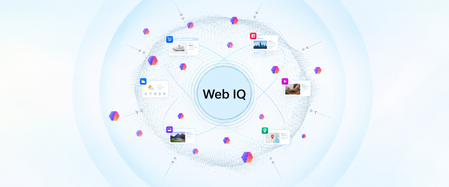
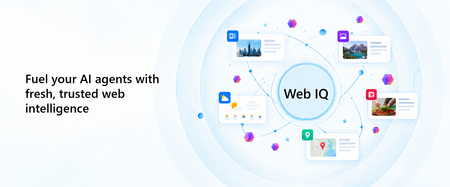
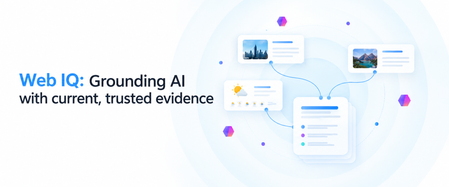
Web IQ: Web Search and Grounding APIs for AI Agents
Web IQ gives AI agents current, citable evidence from across the web. We explain what it is, how its four layers (Bing's web substrate, Harrier embeddings, DiskANN, and structured evidence) work together, and how it pairs with Microsoft IQ to ground agents in web and enterprise context.When Intent Becomes the Interface: Why Applications Are No Longer the Starting Point
For decades, enterprise software has asked people to learn how applications work. Which screen to open. Which fields to complete. Which workflow to trigger. Which report to generate. And which application to visit next. Here is a situation I keep meeting. A sales executive is preparing a renewal proposal. Customer relationships live in CRM. Contract terms sit in SharePoint. Support issues are tracked elsewhere. Revenue data comes from finance. Relevant conversations are scattered across Outlook and Teams. The executive knows what needs to be accomplished. The software requires them to figure out how. But something interesting is happening. We are beginning to separate the intent to accomplish work from the applications traditionally required to perform it. Microsoft's developments across Copilot, Cowork, Code, Copilot Studio and Microsoft IQ suggest that this could become a defining shift in enterprise software. The question is no longer simply how to make applications more intelligent. What if enterprise software started with the work, rather than the application? Enterprise Software Was Built Around Navigation Traditional enterprise applications organize business capabilities into reliable systems. ERP manages transactions. CRM manages customer relationships. HR platforms manage employee processes. These systems aren't going away. Their data models, transaction controls and business rules remain essential. But their user experiences were designed for a world where software needed explicit instructions at almost every step. People became the integration layer. We retrieved information from one system, interpreted it, entered it into another, initiated approvals and followed up when something stalled. APIs and automation improved individual steps. Generative AI introduced conversational interfaces. But the underlying model often remained unchanged. People still needed to know which application to use and how to move the result into the next step. Now the architecture itself is beginning to change. Microsoft Is Bringing Three Capabilities Together One of Microsoft's more consequential recent developments is the convergence of applications, workflows and agents in Copilot Studio. These are fundamentally different capabilities. Applications provide structured experiences for people to view information, make decisions and act. Workflows provide predictable execution for repeatable processes, business rules and integrations. Agents bring reasoning and adaptation when the next step cannot always be predetermined. Not every business process needs an agent. Not every decision should be probabilistic. And not every interaction belongs in a chat window. A purchase approval may require deterministic policy enforcement. Evaluating an unusual supplier proposal may benefit from AI reasoning. A material exception may require human judgment through a purpose-built application. Microsoft Copilot Studio is bringing these capabilities into a more unified development experience, supported by agent orchestration, workflow execution, reusable skills and connected tools. And the audience for this convergence is already enormous: Microsoft noted on a recent earnings call that more than 80% of the Fortune 500 already have active agents built with its low-code tools. This suggests a useful architectural principle: Use reasoning where the path is uncertain. Use workflows where the rules are known. Use applications where human interaction adds value. I have started calling this the Composition Rule. The breakthrough isn't replacing one with another. It is combining them deliberately. From Application-Led to Intent-Led Work Return to our sales executive preparing a renewal proposal. Instead of visiting multiple systems, the executive could begin with a request: Prepare the renewal proposal. Incorporate the latest commercial terms, outstanding support issues and account commitments. Flag anything requiring approval. The system must interpret the request, retrieve authoritative information, apply business rules, assemble the deliverable and recognize where human judgment is necessary. Different Microsoft capabilities can contribute to that experience. Microsoft 365 Copilot Cowork enables delegation of complex, multi-step work across connected productivity experiences. Work IQ provides context from Microsoft 365 collaboration. Fabric IQ contributes business semantics and relationships across enterprise data. Foundry IQ supports reusable enterprise knowledge and retrieval. Together, they form the context layer I explored in The Context Advantage and intent-led work is where that investment begins to pay out. Dynamics 365 and Power Platform connect intelligence to operational records, business processes and actions. Copilot Studio enables agents to use tools and workflows, while applications can provide structured experiences for human review. These are complementary building blocks, not necessarily one automatically integrated execution path. Bringing them together requires deliberate solution architecture, connectors, permissions and orchestration. The executive receives a proposal, supporting evidence and decisions requiring attention. The underlying systems remain important. But navigating them is no longer necessarily the executive's responsibility. In traditional enterprise architecture, applications organize capabilities and users navigate between them. In an intent-led architecture, the desired outcome becomes the organizing principle. Applications, workflows, agents and enterprise services are composed around that intent. The application remains important. But it is no longer necessarily the primary unit of the user experience. When Software Can Be Assembled Another development deserves attention. Microsoft's Copilot Code and Copilot Studio capabilities are making it easier to create software experiences from natural-language requirements. Copilot Managed Runtime provides Microsoft-hosted infrastructure for running and governing supported applications. These capabilities are at different stages of availability, but their direction is significant. Traditionally, an enterprise application begins with a development project: requirements, design, engineering, testing, deployment and maintenance. That remains essential for complex, mission-critical systems. But not every business need justifies a conventional development cycle. A procurement manager may need a focused interface for comparing supplier proposals. A finance team may need a temporary application for reviewing reconciliation exceptions. Increasingly, some experiences can be generated, connected to governed data and shared with colleagues. The distance between recognizing a business need and creating a useful software experience may shrink dramatically. But faster creation also raises important questions. Who owns the generated application? How is it tested? Which identities and permissions does it use? How is it maintained or retired? Microsoft Copilot Managed Runtime, currently in preview, addresses part of this challenge through managed hosting, Microsoft Entra authentication and application governance capabilities. The ability to generate software is becoming easier. The ability to operate that software responsibly remains an engineering discipline. Software creation may become democratized. Software accountability cannot become optional. Reasoning Is Not Execution There is one distinction I find myself drawing on whiteboards more often than any other as AI moves deeper into enterprise processes. Large language models are useful when tasks require interpretation, synthesis and adaptation. But enterprises also depend on predictability. An invoice approval threshold shouldn't change because a model reasons differently. A financial transaction must preserve the integrity of the system recording it. Consider an insurance claim. An agent interprets submitted documentation and identifies missing information. A workflow applies established eligibility rules and routes the claim. A human reviewer examines complex exceptions through an application presenting the relevant evidence. The model contributes interpretation. The workflow contributes repeatability. The application supports human judgment. And the system of record preserves the authoritative transaction. This requires business capabilities to be accessible beyond application screens. APIs, Model Context Protocol (MCP) tools, Power Platform connectors and reusable services become building blocks through which intelligent workflows can operate across systems. Microsoft Copilot Studio supports this direction through workflow triggers, agent handoffs, connected tools and evaluation capabilities. Microsoft Foundry provides complementary capabilities for agent development, evaluation, tracing and operational monitoring. The quality of the experience increasingly depends on how well these capabilities can be composed - not simply on how intelligent the underlying model is. For enterprise architects, this introduces a more useful question than where to deploy another agent: Which parts of this process should be intelligent, which must be deterministic and which require human judgment? That is the Composition Rule at work. A New Architecture, Not Another Generation of Sprawl The counterargument comes up in almost every architecture conversation I am part of. If every employee can generate applications and every department can assemble workflows, enterprises could recreate decades of software fragmentation at unprecedented speed. A hundred individually useful applications don't necessarily create a coherent enterprise architecture. The answer isn't to prevent experimentation. It is to establish reusable foundations. Common identity through Microsoft Entra. Trusted business semantics through Fabric IQ. Approved connectors and MCP tools. Shared engineering standards. Managed execution environments. Clear ownership and lifecycle controls. Microsoft Agent 365 adds an enterprise control plane for discovering, securing and governing agents across supported environments. These capabilities address different parts of the challenge. They do not eliminate the need for enterprise architecture. The more accessible software creation becomes, the more important shared foundations become. Otherwise, we risk making software easier to build while making the enterprise harder to operate. When the Business Need Comes First I don't expect enterprise applications to disappear. Organizations will continue to need ERP, CRM, finance, HR and industry-specific platforms. Systems of record remain indispensable. But the relationship between people and applications is beginning to evolve. Today, enterprise users learn which application performs which function. Tomorrow, more experiences may begin with a desired result, with intelligence coordinating underlying capabilities and presenting the appropriate interface when needed. Sometimes that interface will be a conversation. Sometimes a generated application. Sometimes a familiar enterprise screen. And sometimes a workflow will complete a defined step without another interaction. Microsoft's convergence of Copilot, Copilot Studio, Microsoft IQ, Power Platform and managed execution infrastructure makes this architectural possibility increasingly tangible. We may be moving from a world where people navigate software to accomplish work toward one where software is assembled around the work people need to accomplish. That won't happen overnight. It requires strong architecture, trusted data, explicit execution boundaries and deliberate engineering choices. But it raises a question worth asking before the next enterprise software investment: Are we designing another application people must learn to operate or a capability that understands the work they are trying to accomplish? References Microsoft Copilot Studio Blog: “Build apps, workflows, and agents together” The Official Microsoft Blog: “Introducing the new Copilot with Home, Code and Autopilot” (September 25, 2026) Microsoft Copilot Studio Blog: “Microsoft Copilot Managed Runtime: Enterprise code execution for Microsoft 365” Microsoft 365 Blog: “Powering Frontier Transformation with Copilot and agents” (Copilot Cowork) Microsoft IQ Microsoft Agent 365 Microsoft FY26 Q2 earnings conference call — more than 80% of the Fortune 500 with active agents built using Microsoft's low-code tools Ashok Karania Articles on Microsoft Tech Community — “The Context Advantage”; “When AI Stops Waiting for Instructions”; “Beyond Tokens: Rethinking AI Economics with Microsoft Foundry” Image Credit: OpenAI149Views0likes0CommentsLand Your Offer - Anatomy of Revenue Generating Partner Offer - Part 3 - Copilot Deployment
In Part 1 we looked at Copilot in 30, a $0 trial for SMB customers. In Part 2 we looked at Envisioning & POC, a funded pre-sales engagement. Part 3 moves to post-sales. The customer has bought Copilot seats. The job now is to get people using them. That job has a new reward. From 1 October 2026, the Frontier Accelerate for Copilot: M365 Copilot Deployment Accelerator pays in two milestones: one when you deliver the deployment, and one when the customer's active users grow. It also lands just after Microsoft introduced the new Copilot with Home, Code and Autopilot, usage-based billing and FinOps for AI. Deployment now covers more ground, and customers need a partner to cover it. Package this engagement as a Microsoft Marketplace offer and you have a repeatable way to turn paid seats into active users across your whole customer base. Start Here: Why Publishing on Microsoft Marketplace Matters Microsoft Marketplace is Microsoft's partner-focused business platform. It helps you reach more customers and makes buying from you simpler. A published offer gives your practice a permanent storefront where customers and Microsoft sellers already look for Copilot help. An offer also makes your work repeatable. You define the phases, activities, deliverables and sizes once. Then you run the same engagement for every qualified customer instead of scoping each one from scratch. Partner Center supports both professional service and managed service offers, so one listing can carry the deployment and the ongoing services that follow. The Opportunity: Seats Bought, Value Waiting Many organisations have bought Copilot ahead of their people adopting it. The gap between paid seats and monthly active users is value still waiting to be realised. Take a customer with 3,000 paid Copilot seats and 1,000 monthly active users. That leaves 2,000 seats, about $720K a year of Copilot investment at $30 per user per month, not yet part of anyone's working day. Closing that gap is what this engagement is designed to do. Customer eligibility for each size is set by two numbers: purchased Copilot seats, and unused seats (purchased seats minus active users). Both are in Partner Center's growth insights reporting in the AI Business Solutions & Security Insights (ASPX) dashboard. Use the dashboard's filters to find customers to land this offer with, and you will know which size each one qualifies for before the first conversation. Why Deployment Is Where Copilot Value Is Won Copilot delivers its value through daily use. The more people build it into how they work, the more value the business sees, and the stronger the case to extend it to more teams. The new Copilot widens what a good deployment covers. Home is the new starting point, with the full power of Word, Excel and PowerPoint built in through Office in Copilot. Code lets people build apps, dashboards and automations in plain language. Autopilot is a persistent agent that keeps work moving without a prompt. Advanced capabilities run on usage-based billing, governed through FinOps for AI. So deployment now goes beyond assigning licences. It means securing data, governing Code apps and Autopilot agents, training people on Chat, Office in Copilot and Code, and putting spend controls in place before usage scales. Each of these takes skills many customers do not yet have in-house. Each one is a service you can deliver. Meet the Offer: M365 Copilot Deployment Accelerator, Paid in Two Milestones The M365 Copilot Deployment Accelerator is a post-sales, partner-led engagement. It covers technical deployment of Microsoft 365 Copilot and Microsoft 365 Copilot Business, security and governance controls, user training, and adoption and change management. The essentials: Who qualifies: Customers with a minimum number of purchased Copilot seats and unused seats for each size: XXS 50+ and 25+, XS 300+ and 250+, S 500+ and 500+, M 1,500+ and 1,500+, L 3,000+ and 3,000+. Strategic 500 customers are not eligible. EDU and non-profit customers are not eligible for XXS and XS. How it is sized: Five sizes: XXS (10 hours), XS (20 hours), S (40 hours), M (100 hours) and L (200 hours). How it pays: Milestone 1 (Solution Deployment) is paid once your proof of execution (POE) is approved. It is guaranteed and does not depend on any outcome. Milestone 2 (Consumption Growth) is paid if the customer's incremental paid Copilot monthly active users reach the nominated band within a six-month window. Going above the band does not increase the payment. Falling below it means no Milestone 2 payment. How it runs: Nominate the customer into a size band (the band is locked once submitted). Get customer consent within 30 days. Deliver the work and submit POE (partner survey, customer attestation and invoice) within 90 days of consent. Each customer tenant can have up to two approved claims, one at a time. Who can deliver: Partners at Copilot JumpStart Ready or higher until 31 December 2026. From 1 January 2027, the Microsoft 365 Copilot specialization is required. Term: 1 October 2026 to 30 June 2027, or until the program cap is reached. Microsoft funds the deployment and rewards the growth. You own the delivery, the relationship and everything that follows. Your Role: From Deployer to Adoption Partner A deployment is not finished when licences are assigned. It is finished when people use Copilot every week and the sponsor can see the value. Your job is to get the customer there, phase by phase. Plan: Confirm the first business functions to adopt. Validate priority scenarios across Chat, Office in Copilot and the Microsoft 365 apps. Set KPIs and Responsible AI guardrails. Build a measurable business case that includes usage-based billing. Assess the environment and sequence remediation before deployment. Implement: Prepare the environment and assign licences. Configure data controls, fix oversharing, and govern Code apps and Autopilot agents. Enable admin tools. Set up the Copilot Dashboard, reporting and FinOps for AI spend controls. Launch a champions programme and community. Train users on Chat, Office in Copilot and Code. Adopt: Run prompt-a-thons on real scenarios. Survey users on their experience. Track incremental paid active users every month against the Milestone 2 band. Review audit logs and Copilot reports. Monitor service health, demand, cost and AI spend. Manage and Improve: Extend analytics with custom impact reports. Refine the business case with real data. Align policies to Home, Code and Autopilot on a set schedule. Optimise operations and AI spend. Mine help desk tickets for new agentic use cases. Keep training going as adoption spreads. Close out: Deliver an executive summary with recommendations, risks, owners and dates. Submit POE. Agree the plan to reach the nominated active user band within the six-month Milestone 2 window. Every phase moves one number: active users. It is the number the customer's sponsor watches most closely, and the one both milestones are built around. Inside the Offer: Activities and Hours by Engagement Size Below is the full activity plan behind the offer, with hours for each of the five sizes. Use it to size your own offer plans and statements of work. ID Phase Activity XXS XS S M L Pre-req Eligibility Minimum Copilot seats / unused seats (unused = seats minus active users) 50+ / 25+ 300+ / 250+ 500+ / 500+ 1,500+ / 1,500+ 3,000+ / 3,000+ P1 Plan Identify priority business functions 0.25 0.5 1 2.25 4.5 P2 Plan Determine high-value scenarios 0.5 1.25 2.25 5.75 11.5 P3 Plan Define success metrics and guardrails 0.5 0.75 1.5 3.75 7.5 P4 Plan Develop the business case, incl. usage-based billing (UBB) 0.5 1.25 2.25 5.75 11.5 P5 Plan Plan readiness and remediation 0.5 1 1.75 4.5 9 I1 Implement Prepare environment and assign licenses 0.75 1.5 3 7.75 15.25 I2 Implement Configure security and data controls 0.75 1.5 3 7.75 15.25 I3 Implement Enable administrative tools 0.5 0.75 1.5 3.75 7.5 I4 Implement Deploy analytics and reporting, incl. FinOps for AI 0.5 0.75 1.5 3.75 7.5 I5 Implement Activate champions and communities 0.25 0.75 1.25 3 6 I6 Implement Conduct training and communications 0.75 1.5 2.75 6.75 13.75 A1 Adopt Drive cross-organizational adoption 0.5 1.25 2.5 6 12.25 A2 Adopt Gather user feedback and sentiment 0.25 0.5 1.25 3 6 A3 Adopt Measure business impact and usage 0.5 1 2 5.25 10.75 A4 Adopt Monitor security and audit reports 0.25 0.5 1 2.75 5.25 A5 Adopt Monitor and evaluate operations, cost and AI spend 0.25 0.5 1.25 3 6 M1 Manage and Improve Extend analytics 0.25 0.5 1.25 3 6 M2 Manage and Improve Evolve the business case, incl. UBB 0.25 0.5 1.25 3 6 M3 Manage and Improve Policy review and refinement 0.25 0.5 1.25 3 6 M4 Manage and Improve Optimize operations and AI spend 0.5 0.75 1.5 3.75 7.5 M5 Manage and Improve Continuous process improvement 0.25 0.5 1.25 3 6 M6 Manage and Improve Continuous training and adoption 0.5 0.75 1.5 3.75 7.5 C1 Close-out Executive summary, POE and Milestone 2 growth plan 0.5 1.25 2.25 5.75 11.5 TOTAL Hours 10 20 40 100 200 Land Your Offer: What One Customer Is Worth The table below is the revenue anatomy of one Deployment Accelerator engagement at each of the five sizes. Four revenue streams stack on top of each other: Milestone 1, Solution Deployment: Microsoft funds the deployment work, from $1,625 for an XXS engagement to $32,500 for an L engagement. It is paid once POE is approved and is guaranteed. Milestone 2, Consumption Growth: a further $875 to $17,500, paid when the customer's incremental paid active users reach the nominated band within six months. This is where adoption work earns its own reward. CSP incentive on Copilot revenue: earned on the Copilot seats you transact. Customers who see their people using Copilot every day tend to renew and extend, so adoption work supports this stream too. Managed services: the recurring engagement described in After Close-out, which is where the largest and most durable share of revenue lives. Item XXS XS S M L Minimum Copilot seats / unused seats 50+ / 25+ 300+ / 250+ 500+ / 500+ 1,500+ / 1,500+ 3,000+ / 3,000+ Engagement hours 10 20 40 100 200 Milestone 2 target: incremental paid Copilot active users in six months 25+ 250+ 500+ 1,500+ 3,000+ Milestone 1, Solution Deployment (K) $1.63K $3.25K $6.5K $16.25K $32.5K Milestone 2, Consumption Growth (K) $0.88K $1.75K $3.5K $8.75K $17.5K Frontier Accelerate total (K) $2.5K $5K $10K $25K $50K CSP incentive on Copilot revenue (K)† $3.51K $21.06K $35.1K $105.3K $210.6K † Milestone payments shown at Market A rates for claims nominated from 1 October 2026. CSP incentive shown at a blended 19.5% (direct bill 2.5 + 7 + 10; indirect reseller 7 + 12.5) on the minimum Copilot seats for each size at $30 per user per month for 12 months. Illustrative estimates from the offer plan. Confirm current rates, market rates, eligibility and geographic restrictions (which apply to the L size) in the latest Microsoft Commercial Partner Incentives Guide. Now multiply. Everything above is the anatomy of a single customer. Landing the offer means running it across every qualifying customer in your base. The same ASPX view you use to check eligibility is your target list: sort the customers you manage by the gap between paid Copilot seats and active users, and check MCI eligibility and potential earnings for each. Do not forget your Part 2 customers: every Envisioning & POC engagement that converted to paid seats is a natural next candidate. How the Offer Fits Together: From Sizing to Proof of Execution The offer runs left to right in three layers: Sizing and value: five sizes from XXS (10 hours) to L (200 hours). Milestone 1 is paid on POE approval. Milestone 2 is paid when the active user band is met. Bands are locked at nomination. Five phases: Plan (P1 to P5), Implement (I1 to I6), Adopt (A1 to A5), Manage and Improve (M1 to M6) and Close-out (C1, T1, T2, X1). Each phase produces something the sponsor can see. Proof of execution: prioritised scenarios and a business case that includes usage-based billing; a secure, licensed Copilot environment; analytics, reporting and admin controls; active champions and trained users; incremental paid active users, impact and ROI measured; an executive summary, roadmap and POE. Plus a named wave 2 expansion beyond the first teams. The highlighted activities are champions and communities (I5), training and communications (I6), cross-organizational adoption (A1), business impact and usage (A3), extended analytics (M1), policy review (M3), operations and AI spend (M4), continuous training (M6), trial to paid licence conversion (T1), commercial proposal and signature (T2) and the wave 2 expansion plan (X1). These are where the engagement stops being a project and becomes an ongoing relationship: managed services, ongoing optimisation and follow-on professional services after the engagement closes. The managed services below are built from exactly these activities. After Close-out: Managed Services That Keep Delivering Close-out is the start of the real engagement. Package these six recurring services in your offer. Each one carries forward a highlighted activity from the deployment, is sized in partner days so you can price it, and drives a business outcome the sponsor can put a number on. Managed service Partner activity: what you deliver and measure Customer business outcome: what it drives (illustrative targets, M-size customer) Champions and community management • Effort: 1 to 2 days a month • Activity: Run the champions network and a Viva Engage or Teams community, host monthly prompt-a-thons on real work, and carry adoption into every business function (I5, A1) • Reported as: Active champions per function; community questions answered; functions above the utilisation target • One active champion for every 50 users (60 champions across 3,000 seats) • Adoption spreads from the first 2 business functions to 6+ within six months • Copilot how-to tickets to the help desk down 30 to 50% as peers answer questions first Continuous learning and enablement • Effort: 2 days a month • Activity: Deliver role-based training and launch communications for each new group, onboard new joiners within their first 30 days, and refresh training as new Copilot capabilities arrive (I6, M6) • Reported as: People trained by role; new joiners onboarded within 30 days; trained users active within 30 days • 2 to 4 hours saved per active user a week (≈5,000 to 10,000 hours across 2,500 active users) • 90%+ of trained users active within 30 days of training • New joiners productive with Copilot in their first month, not their first quarter Usage and impact analytics • Effort: 1 to 2 days a month • Activity: Track incremental paid active users against the Milestone 2 band every month, extend the Copilot Dashboard with third-party data, and build custom impact reports by function (A3, M1) • Reported as: Incremental active users against the band; utilisation (active users ÷ paid seats); impact by function • Utilisation lifted from 33% to 83% (1,000 to 2,500 active users) within six months, meeting the M band floor • ≈$540K a year of Copilot investment moved from unused to in use • Return shown in the customer's own numbers: ≈$1.08M a year of seats against $9.6M+ of staff time released at $40 per hour Policy lifecycle management • Effort: 1 day a month • Activity: Review and refine security and governance policies on a set schedule, and align them to Home, Code and Autopilot before each capability reaches users (M3) • Reported as: Policy reviews completed on schedule; new capabilities assessed before rollout; open policy exceptions • New Copilot capabilities switched on in weeks, not quarters, because policies are ready • Zero Copilot-related oversharing incidents as usage grows • Audit evidence for every policy decision available on request Service and AI spend optimisation • Effort: 1 to 2 days a month • Activity: Review KPIs, user feedback and AI spend each month, update the service management plan, and focus usage-based capabilities on the users and scenarios that justify them (M4) • Reported as: KPI trend; AI spend against budget; feedback themes closed • AI spend held within ±10% of budget, with no unplanned overage • Cost per active user down 10 to 20% a year as usage matures • Top user feedback themes acted on within 30 days Licence growth and wave planning • Effort: 1 day a month, plus 2 to 3 days per expansion wave • Activity: Convert trial licences to paid, prepare commercial proposals for named teams, and plan and date the next expansion wave (T1, T2, X1) • Reported as: Trials converted; proposals signed; next wave dated with named teams • New seats added only where a named team and use case are ready • Each new wave at 80%+ utilisation within 60 days • Wave 2 adds 250 to 500 seats, each backed by usage data from wave 1 Outcomes are illustrative targets for an M-size customer with 3,000 paid Copilot seats and 1,000 active users at nomination, at $30 per user per month, a blended $40 per hour staff cost and 48 working weeks a year. Validate them with each customer when you define success metrics (P3) and build the business case (P4), then report against them from A3 onwards. Effort scales with seats in scope, as the engagement hours do. Add the recurring rows together and one M-size customer sustains roughly 8 to 9 partner days a month after close-out, before expansion waves are counted. Every row pairs a number you can invoice against with a number the sponsor can take to the board. That is what turns a recurring service into a renewable one. Ready to Build Your Copilot Deployment Accelerator Offer? Read the engagement terms and mechanics in the Microsoft Commercial Partner Incentives Guide, and download the delivery guide and pre-engagement planning resources. Check your eligibility: Copilot JumpStart Ready or higher until 31 December 2026, then the Microsoft 365 Copilot specialization from 1 January 2027. Publish your offer in Partner Center as a professional service (the deployment accelerator) with a managed service follow-on (community, learning, analytics, policy, spend optimisation and licence growth). Build your first cohort: in ASPX, filter the customers you manage for paid Copilot seats with low Copilot utilisation and an adoption status of starting or struggling, then check MCI eligibility and potential earnings for each. Start with customers from your Envisioning & POC engagements that converted to paid. Nominate the right band: the band is locked at nomination and Milestone 2 pays only if incremental paid active users reach its floor. Use ASPX to set it: take today's Copilot MAU as your baseline, look at the recent trend and adoption status, and pick the band whose floor you can realistically add in six months. A customer with 3,000 paid seats and 1,000 active users qualifies for M, and reaching the M floor means adding 1,500 active users. If your plan adds 600, S is the safer choice. Book the close-out before Plan begins, so the Milestone 2 plan and the wave 2 conversation are already on the calendar. Your customers have already chosen Copilot. Help every one of their people make it part of how they work. Resources Engagement mechanics for Copilot Deployment Accelerators | Microsoft Commercial Partner Incentives Guide Microsoft Commercial Partner Incentives Guide M365 Copilot Deployment Accelerator: Delivery Guide M365 Copilot Deployment Accelerator: Pre-Engagement Planning Partner investments: October 2026 updates Archived incentive terms for claims nominated before 1 October 2026 The new Copilot is here: the opportunity for Microsoft partners Introducing the new Copilot with Home, Code and Autopilot297Views1like0CommentsThe Context Advantage
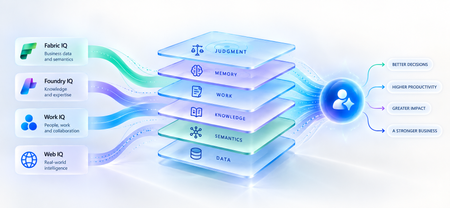
A strange thing happens when enterprises upgrade their AI models. The model gets smarter. The benchmarks improve. The demos become more impressive. And sometimes, the business outcome barely moves. The agent still asks questions the organization answered months ago. It recommends something policy doesn't allow. It treats a strategic customer like any other customer. It proposes an architecture your engineering team rejected six months ago. The problem isn't necessarily intelligence. It is ignorance of the business. That distinction matters because the world's most capable models are becoming available to almost everyone. Your competitors can increasingly access the same frontier intelligence you can. What they cannot access is your customer history, operating knowledge, organizational memory or understanding of how decisions actually get made. Models are becoming shared. Context remains proprietary. And that may be where the next enterprise AI advantage is built. Intelligence Without Context is Surprisingly Ordinary Consider a simple enterprise question: Can we offer this customer a larger discount? A powerful model can reason about discounts. But answering that question properly may require the customer's lifetime value, current contract, payment history, margins and approval thresholds and perhaps a conversation yesterday in which the account executive learned that a competitor had entered the deal. The model isn't missing intelligence. It is missing context. Humans rarely make important decisions from one piece of information. We combine data, experience, relationships, history and situational awareness almost unconsciously. Agents need a version of the same capability. That is why enterprise AI is moving from an era dominated by prompt engineering toward one increasingly shaped by context engineering. Satya Nadella recently described the emerging market simply as “a world of context engineering.” Prompt engineering asks: What should I tell the model? Context engineering asks the larger question: What does the model need to understand before it can act well? That difference becomes critical as AI moves from answering questions to performing work. The Enterprise Context Stack In discussions about enterprise agents, “context” can easily become shorthand for giving a model access to more data. That definition is too narrow. I think about enterprise context as a stack: DATA → SEMANTICS → KNOWLEDGE → WORK → MEMORY → JUDGMENT Data tells the agent what happened: orders, transactions, inventory, claims and customer records. Semantics tells it what that data means to the business: what constitutes a strategic customer, how margin is calculated, which assets belong to which production line. Knowledge tells it what the organization knows: policies, contracts, procedures, research and accumulated expertise. Work tells it what is happening now: who is involved, what has been discussed and which commitments already exist. Memory tells it what happened before: previous interactions, decisions, exceptions and outcomes. And judgment helps determine what should happen next. Memory deserves particular attention because it is context agents can accumulate through experience. Microsoft Foundry now distinguishes between session, user and procedural memory - moving agents beyond remembering a conversation toward remembering preferences and learning how work gets done across repeated interactions. Sometimes the cheapest way to make an agent meaningfully better may not be a bigger model. It may be a better memory. Not every agent needs every layer. But the more consequential its responsibility, the richer, and more carefully governed, its context usually needs to become. This is where context stops being a retrieval problem and starts becoming an enterprise architecture problem. Context Is Becoming Infrastructure This shift is now visible well beyond any one technology platform. Gartner increasingly describes a context layer as an architectural foundation for agentic AI - bringing together semantics, operational state, provenance and other enterprise signals so agents can act reliably. Anthropic, approaching the problem from AI engineering, argues that context should be treated as a finite resource that must be carefully curated rather than simply expanded. Microsoft's recent direction is particularly interesting through this lens. Work IQ, Fabric IQ, Foundry IQ and Web IQ increasingly form a shared intelligence layer across Microsoft's stack. Work IQ provides context about how work happens. Fabric IQ brings business semantics and relationships. Foundry IQ provides reusable enterprise knowledge and agentic retrieval. Web IQ extends that understanding with fresh external intelligence. The architectural implication matters more than the product names. Instead of every new agent rebuilding connectors, retrieval logic, semantic definitions and permissions, context becomes reusable infrastructure from which many agents can reason. Microsoft captured the shift particularly well: As agents become the new application model, context becomes critical infrastructure. Your Data Estate Is Not Automatically Your AI Moat For years, organizations have been told their data is a competitive advantage. Sometimes it is. But possessing data and making that data useful to an agent are very different things. Most enterprises don't suffer from a shortage of information. They suffer from an abundance of it -scattered across databases, documents, emails, meetings, applications and people's heads. The advantage doesn't come from connecting an agent to all of it. It comes from turning information into usable context: preserving business meaning, understanding relationships, distinguishing authoritative knowledge from convenient information, respecting permissions and retrieving what matters when a decision is being made. The enterprise with the most data may not build the best AI. The enterprise that makes its context most usable might. The Context Budget There is a trap on the other side too. If context improves AI, the natural instinct is to give the agent as much as possible. That is the wrong objective. Context consumes attention and compute. Irrelevant information creates noise. Stale information can mislead. Conflicting context can degrade reasoning rather than improve it. The objective should therefore not be maximum context. It should be minimum sufficient context the smallest trusted, relevant and permission-aware set of information required to produce the right outcome. In Beyond Tokens, I introduced the idea of an Intelligence Budget: How much intelligence does this outcome deserve? Enterprise agents increasingly need a companion concept. The Context Budget. How much context does this decision deserve? A scheduling agent may need calendars and preferences. A pricing agent may need customer economics, margins, commitments and approval policies. A clinical agent requires an entirely different level of completeness, provenance and governance. Every unnecessary token of context is cost. Every missing piece of necessary context is risk. Which gives us a useful way to think about enterprise agents: Right Intelligence × Right Context → Right Outcome Spend more intelligence where the outcome warrants it. Provide more context where the decision requires it. Do neither indiscriminately. What An Agent May Know Matters Too! There is another dimension to the Context Budget: permissions. Enterprise context belongs to someone. A system that retrieves the right answer but ignores whether the agent is entitled to see it isn't intelligent. It is a security problem. Enterprise context must therefore remain identity-aware and permission-aware as it moves from source systems into agent reasoning. This becomes especially important as agents gain persistent identities and greater autonomy. What an agent may know is as much a part of its job description as what it may do. Autonomy defines the boundary of action. Context defines the boundary of understanding. From RAG Projects To Context Architecture The first generation of enterprise GenAI often started with RAG: connect documents to a model and retrieve relevant passages. That was an important step. But an agentic enterprise cannot become a collection of hundreds of independent RAG pipelines, each separately rediscovering the organization's customers, products, policies, terminology and permissions. That risks creating another generation of technology fragmentation. The opportunity is to move from agent-specific retrieval toward reusable enterprise context. What knowledge should agents inherit? Which business entities should have common definitions? Which sources are authoritative? Which memories should persist—and which should be forgotten? And perhaps the hardest question: Who owns enterprise context? Today, responsibility is scattered across data teams, application teams, knowledge management, security, business functions and increasingly AI teams. In an agentic enterprise, context may need to be managed as a product, not everyone's side project. The Moat Is Not The Model Imagine two competing organizations using exactly the same frontier model. One connects it to fragmented documents and a handful of applications. The other has strong data foundations, shared business semantics, governed knowledge, connected workflows and organizational memory. They have access to the same AI. They do not have the same intelligence system. The second organization's agents understand customers more deeply, interpret signals more accurately and act with greater awareness of how the organization actually works. And that advantage compounds. Every workflow creates more context. Every interaction adds organizational memory. Every decision creates another signal from which future agents can reason. Models depreciate the moment a better one ships. Context appreciates every day you operate. That may be the most important strategic shift of all. Anyone can rent intelligence. No one can rent your context. Intelligence Is Becoming Abundant. Understanding Isn't. The first wave of enterprise AI taught us how powerful models could be. The next may teach us that models were only one part of the equation. An agent needs intelligence to reason. But it needs context to understand your business. As frontier intelligence becomes more accessible, enterprises may discover that their most defensible AI asset was never the model. It was everything the organization had learned before the model arrived: its data, semantics, knowledge, relationships, history, workflows and judgment. The organizations that turn those assets into trusted, reusable context will give every agent they build an advantage from day one. So perhaps the strategic question is no longer simply: Which model should we use? It is: What does our organization know that our competitors don't and can our AI actually use it? Because in a world where everyone can access intelligence, context may be what makes that intelligence uniquely yours. References Microsoft — FY2026 Q2 Earnings Conference Call Microsoft — FY2026 Q4 Earnings Conference Call Microsoft Learn — What is Foundry IQ? Microsoft Foundry — Foundry IQ: Build Smarter Agents Faster with Unified Knowledge and Serverless Retrieval Microsoft Foundry — What's New in Microsoft Foundry | Build 2026 Gartner — Context Engineering Is the New Prompt Engineering Gartner — Market Overview for AI Context Platforms Gartner — The 3 Core Components of the Context Layer for AI Agents243Views0likes1Comment