agentic
10 TopicsAI Agents in Production: From Prototype to Reality - Part 10
This blog post, the tenth and final installment in a series on AI agents, focuses on deploying AI agents to production. It covers evaluating agent performance, addressing common issues, and managing costs. The post emphasizes the importance of a robust evaluation system, providing potential solutions for performance issues, and outlining cost management strategies such as response caching, using smaller models, and implementing router models.1.6KViews3likes1CommentAI Agents: Building Trustworthy Agents- Part 6
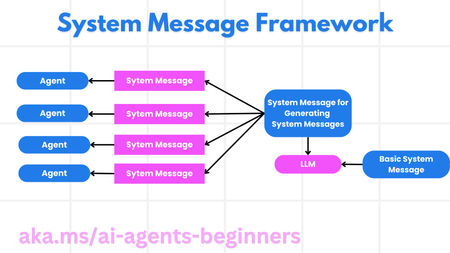
This blog post, Part 6 in a series on AI agents, focuses on building trustworthy AI agents. It emphasizes the importance of safety and security in agent design and deployment. The post details a system message framework for creating robust and scalable prompts, outlining a four-step process from meta prompt to iterative refinement. It then explores various threats to AI agents, including task manipulation, unauthorized access, resource overloading, knowledge base poisoning, and cascading errors, providing mitigation strategies for each. The post also highlights the human-in-the-loop approach for enhanced trust and control, providing a code example using AutoGen. Finally, it links to further resources on responsible AI, model evaluation, and risk assessment, along with the previous posts in the series.945Views3likes0CommentsIntegrating Microsoft Foundry with OpenClaw: Step by Step Model Configuration
Step 1: Deploying Models on Microsoft Foundry Let us kick things off in the Azure portal. To get our OpenClaw agent thinking like a genius, we need to deploy our models in Microsoft Foundry. For this guide, we are going to focus on deploying gpt-5.2-codex on Microsoft Foundry with OpenClaw. Navigate to your AI Hub, head over to the model catalog, choose the model you wish to use with OpenClaw and hit deploy. Once your deployment is successful, head to the endpoints section. Important: Grab your Endpoint URL and your API Keys right now and save them in a secure note. We will need these exact values to connect OpenClaw in a few minutes. Step 2: Installing and Initializing OpenClaw Next up, we need to get OpenClaw running on your machine. Open up your terminal and run the official installation script: curl -fsSL https://openclaw.ai/install.sh | bash The wizard will walk you through a few prompts. Here is exactly how to answer them to link up with our Azure setup: First Page (Model Selection): Choose "Skip for now". Second Page (Provider): Select azure-openai-responses. Model Selection: Select gpt-5.2-codex , For now only the models listed (hosted on Microsoft Foundry) in the picture below are available to be used with OpenClaw. Follow the rest of the standard prompts to finish the initial setup. Step 3: Editing the OpenClaw Configuration File Now for the fun part. We need to manually configure OpenClaw to talk to Microsoft Foundry. Open your configuration file located at ~/.openclaw/openclaw.json in your favorite text editor. Replace the contents of the models and agents sections with the following code block: { "models": { "providers": { "azure-openai-responses": { "baseUrl": "https://<YOUR_RESOURCE_NAME>.openai.azure.com/openai/v1", "apiKey": "<YOUR_AZURE_OPENAI_API_KEY>", "api": "openai-responses", "authHeader": false, "headers": { "api-key": "<YOUR_AZURE_OPENAI_API_KEY>" }, "models": [ { "id": "gpt-5.2-codex", "name": "GPT-5.2-Codex (Azure)", "reasoning": true, "input": ["text", "image"], "cost": { "input": 0, "output": 0, "cacheRead": 0, "cacheWrite": 0 }, "contextWindow": 400000, "maxTokens": 16384, "compat": { "supportsStore": false } }, { "id": "gpt-5.2", "name": "GPT-5.2 (Azure)", "reasoning": false, "input": ["text", "image"], "cost": { "input": 0, "output": 0, "cacheRead": 0, "cacheWrite": 0 }, "contextWindow": 272000, "maxTokens": 16384, "compat": { "supportsStore": false } } ] } } }, "agents": { "defaults": { "model": { "primary": "azure-openai-responses/gpt-5.2-codex" }, "models": { "azure-openai-responses/gpt-5.2-codex": {} }, "workspace": "/home/<USERNAME>/.openclaw/workspace", "compaction": { "mode": "safeguard" }, "maxConcurrent": 4, "subagents": { "maxConcurrent": 8 } } } } You will notice a few placeholders in that JSON. Here is exactly what you need to swap out: Placeholder Variable What It Is Where to Find It <YOUR_RESOURCE_NAME> The unique name of your Azure OpenAI resource. Found in your Azure Portal under the Azure OpenAI resource overview. <YOUR_AZURE_OPENAI_API_KEY> The secret key required to authenticate your requests. Found in Microsoft Foundry under your project endpoints or Azure Portal keys section. <USERNAME> Your local computer's user profile name. Open your terminal and type whoami to find this. Step 4: Restart the Gateway After saving the configuration file, you must restart the OpenClaw gateway for the new Foundry settings to take effect. Run this simple command: openclaw gateway restart Configuration Notes & Deep Dive If you are curious about why we configured the JSON that way, here is a quick breakdown of the technical details. Authentication Differences Azure OpenAI uses the api-key HTTP header for authentication. This is entirely different from the standard OpenAI Authorization: Bearer header. Our configuration file addresses this in two ways: Setting "authHeader": false completely disables the default Bearer header. Adding "headers": { "api-key": "<key>" } forces OpenClaw to send the API key via Azure's native header format. Important Note: Your API key must appear in both the apiKey field AND the headers.api-key field within the JSON for this to work correctly. The Base URL Azure OpenAI's v1-compatible endpoint follows this specific format: https://<your_resource_name>.openai.azure.com/openai/v1 The beautiful thing about this v1 endpoint is that it is largely compatible with the standard OpenAI API and does not require you to manually pass an api-version query parameter. Model Compatibility Settings "compat": { "supportsStore": false } disables the store parameter since Azure OpenAI does not currently support it. "reasoning": true enables the thinking mode for GPT-5.2-Codex. This supports low, medium, high, and xhigh levels. "reasoning": false is set for GPT-5.2 because it is a standard, non-reasoning model. Model Specifications & Cost Tracking If you want OpenClaw to accurately track your token usage costs, you can update the cost fields from 0 to the current Azure pricing. Here are the specs and costs for the models we just deployed: Model Specifications Model Context Window Max Output Tokens Image Input Reasoning gpt-5.2-codex 400,000 tokens 16,384 tokens Yes Yes gpt-5.2 272,000 tokens 16,384 tokens Yes No Current Cost (Adjust in JSON) Model Input (per 1M tokens) Output (per 1M tokens) Cached Input (per 1M tokens) gpt-5.2-codex $1.75 $14.00 $0.175 gpt-5.2 $2.00 $8.00 $0.50 Conclusion: And there you have it! You have successfully bridged the gap between the enterprise-grade infrastructure of Microsoft Foundry and the local autonomy of OpenClaw. By following these steps, you are not just running a chatbot; you are running a sophisticated agent capable of reasoning, coding, and executing tasks with the full power of GPT-5.2-codex behind it. The combination of Azure's reliability and OpenClaw's flexibility opens up a world of possibilities. Whether you are building an automated devops assistant, a research agent, or just exploring the bleeding edge of AI, you now have a robust foundation to build upon. Now it is time to let your agent loose on some real tasks. Go forth, experiment with different system prompts, and see what you can build. If you run into any interesting edge cases or come up with a unique configuration, let me know in the comments below. Happy coding!12KViews2likes2CommentsBuilding a Local Research Desk: Multi-Agent Orchestration
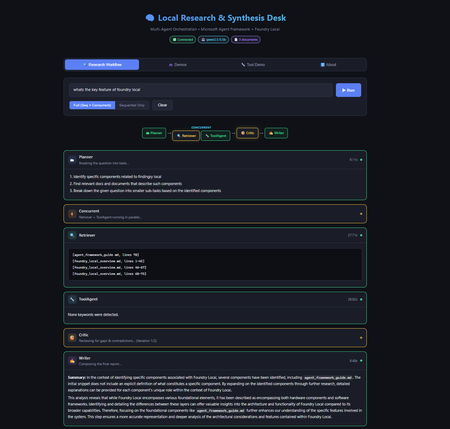
Introduction Multi-agent systems represent the next evolution of AI applications. Instead of a single model handling everything, specialised agents collaborate—each with defined responsibilities, passing context to one another, and producing results that no single agent could achieve alone. But building these systems typically requires cloud infrastructure, API keys, usage tracking, and the constant concern about what data leaves your machine. What if you could build sophisticated multi-agent workflows entirely on your local machine, with no cloud dependencies? The Local Research & Synthesis Desk demonstrates exactly this. Using Microsoft Agent Framework (MAF) for orchestration and Foundry Local for on-device inference, this demo shows how to create a four-agent research pipeline that runs entirely on your hardware—no API keys, no data leaving your network, and complete control over every step. This article walks through the architecture, implementation patterns, and practical code that makes multi-agent local AI possible. You'll learn how to bootstrap Foundry Local from Python, create specialised agents with distinct roles, wire them into sequential, concurrent, and feedback loop orchestration patterns, and implement tool calling for extended functionality. Whether you're building research tools, internal analysis systems, or simply exploring what's possible with local AI, this architecture provides a production-ready foundation. Why Multi-Agent Architecture Matters Single-agent AI systems hit limitations quickly. Ask one model to research a topic, analyse findings, identify gaps, and write a comprehensive report—and you'll get mediocre results. The model tries to do everything at once, with no opportunity for specialisation, review, or iterative refinement. Multi-agent systems solve this by decomposing complex tasks into specialised roles. Each agent focuses on what it does best: Planners break ambiguous questions into concrete sub-tasks Retrievers focus exclusively on finding and extracting relevant information Critics review work for gaps, contradictions, and quality issues Writers synthesise everything into coherent, well-structured output This separation of concerns mirrors how human teams work effectively. A research team doesn't have one person doing everything—they have researchers, fact-checkers, editors, and writers. Multi-agent AI systems apply the same principle to AI workflows, with each agent receiving the output of previous agents as context for their own specialised task. The Local Research & Synthesis Desk implements this pattern with four primary agents, plus an optional ToolAgent for utility functions. Here's how user questions flow through the system: This architecture demonstrates three essential orchestration patterns: sequential pipelines where each agent builds on the previous output, concurrent fan-out where independent tasks run in parallel to save time, and feedback loops where the Critic can send work back to the Retriever for iterative refinement. The Technology Stack: MAF + Foundry Local Before diving into implementation, let's understand the two core technologies that make this architecture possible and why they work so well together. Microsoft Agent Framework (MAF) The Microsoft Agent Framework provides building blocks for creating AI agents in Python and .NET. Unlike frameworks that require specific cloud providers, MAF works with any OpenAI-compatible API—which is exactly what Foundry Local provides. The key abstraction in MAF is the ChatAgent . Each agent has: Instructions: A system prompt that defines the agent's role and behaviour Chat client: An OpenAI-compatible client for making inference calls Tools: Optional functions the agent can invoke during execution Name: An identifier for logging and observability MAF handles message threading, tool execution, and response parsing automatically. You focus on designing agent behaviour rather than managing low-level API interactions. Foundry Local Foundry Local brings Azure AI Foundry's model catalog to your local machine. It automatically selects the best hardware acceleration available (GPU, NPU, or CPU) and exposes models through an OpenAI-compatible API. Models run entirely on-device with no data leaving your machine. The foundry-local-sdk Python package provides programmatic control over the Foundry Local service. You can start the service, download models, and retrieve connection information—all from your Python code. This is the "control plane" that manages the local AI infrastructure. The combination is powerful: MAF handles agent logic and orchestration, while Foundry Local provides the underlying inference. No cloud dependencies, no API keys, complete data privacy: Bootstrapping Foundry Local from Python The first practical challenge is starting Foundry Local programmatically. The FoundryLocalBootstrapper class handles this, encapsulating all the setup logic so the rest of the application can focus on agent behaviour. The bootstrap process follows three steps: start the Foundry Local service if it's not running, download the requested model if it's not cached, and return connection information that MAF agents can use. Here's the core implementation: from dataclasses import dataclass from foundry_local import FoundryLocalManager @dataclass class FoundryConnection: """Holds endpoint, API key, and model ID after bootstrap.""" endpoint: str api_key: str model_id: str model_alias: str This dataclass carries everything needed to connect MAF agents to Foundry Local. The endpoint is typically http://localhost:<port>/v1 (the port is assigned dynamically), and the API key is managed internally by Foundry Local. class FoundryLocalBootstrapper: def __init__(self, alias: str | None = None) -> None: self.alias = alias or os.getenv("MODEL_ALIAS", "qwen2.5-0.5b") def bootstrap(self) -> FoundryConnection: """Start service, download & load model, return connection info.""" from foundry_local import FoundryLocalManager manager = FoundryLocalManager() model_info = manager.download_and_load_model(self.alias) return FoundryConnection( endpoint=manager.endpoint, api_key=manager.api_key, model_id=model_info.id, model_alias=self.alias, ) Key design decisions in this implementation: Lazy import: The foundry_local import happens inside bootstrap() so the application can provide helpful error messages if the SDK isn't installed Environment configuration: Model alias comes from MODEL_ALIAS environment variable or defaults to qwen2.5-0.5b Automatic hardware selection: Foundry Local picks GPU, NPU, or CPU automatically—no configuration needed The qwen2.5 model family is recommended because it supports function/tool calling, which the ToolAgent requires. For higher quality outputs, larger variants like qwen2.5-7b or qwen2.5-14b are available via the --model flag. Creating Specialised Agents With Foundry Local bootstrapped, the next step is creating agents with distinct roles. Each agent is a ChatAgent instance with carefully crafted instructions that focus it on a specific task. The Planner Agent The Planner receives a user question and available documents, then breaks the research task into concrete sub-tasks. Its instructions emphasise structured output—a numbered list of specific tasks rather than prose: from agent_framework import ChatAgent from agent_framework.openai import OpenAIChatClient def _make_client(conn: FoundryConnection) -> OpenAIChatClient: """Create an MAF OpenAIChatClient pointing at Foundry Local.""" return OpenAIChatClient( api_key=conn.api_key, base_url=conn.endpoint, model_id=conn.model_id, ) def create_planner(conn: FoundryConnection) -> ChatAgent: return ChatAgent( chat_client=_make_client(conn), name="Planner", instructions=( "You are a planning agent. Given a user's research question and a list " "of document snippets (if any), break the question into 2-4 concrete " "sub-tasks. Output ONLY a numbered list of tasks. Each task should state:\n" " • What information is needed\n" " • Which source documents might help (if known)\n" "Keep it concise — no more than 6 lines total." ), ) Notice how the instructions are explicit about output format. Multi-agent systems work best when each agent produces structured, predictable output that downstream agents can parse reliably. The Retriever Agent The Retriever receives the Planner's task list plus raw document content, then extracts and cites relevant passages. Its instructions emphasise citation format—a specific pattern that the Writer can reference later: def create_retriever(conn: FoundryConnection) -> ChatAgent: return ChatAgent( chat_client=_make_client(conn), name="Retriever", instructions=( "You are a retrieval agent. You receive a research plan AND raw document " "text from local files. Your job:\n" " 1. Identify the most relevant passages for each task in the plan.\n" " 2. Output extracted snippets with citations in the format:\n" " [filename.ext, lines X-Y]: \"quoted text…\"\n" " 3. If no relevant content exists, say so explicitly.\n" "Be precise — quote only what is relevant, keep each snippet under 100 words." ), ) The citation format [filename.ext, lines X-Y] creates a consistent contract. The Writer knows exactly how to reference source material, and human reviewers can verify claims against original documents. The Critic Agent The Critic reviews the Retriever's work, identifying gaps and contradictions. This agent serves as a quality gate before the final report and can trigger feedback loops for iterative improvement: def create_critic(conn: FoundryConnection) -> ChatAgent: return ChatAgent( chat_client=_make_client(conn), name="Critic", instructions=( "You are a critical review agent. You receive a plan and extracted snippets. " "Your job:\n" " 1. Check for gaps — are any plan tasks unanswered?\n" " 2. Check for contradictions between snippets.\n" " 3. Suggest 1-2 specific improvements or missing details.\n" "Start your response with 'GAPS FOUND' if issues exist, or 'NO GAPS' if satisfied.\n" "Then output a short numbered list of issues (or say 'No issues found')." ), ) The Critic is instructed to output GAPS FOUND or NO GAPS at the start of its response. This structured output enables the orchestrator to detect when gaps exist and trigger the feedback loop—sending the gaps back to the Retriever for additional retrieval before re-running the Critic. This iterates up to 2 times before the Writer takes over, ensuring higher quality reports. Critics are essential for production systems. Without this review step, the Writer might produce confident-sounding reports with missing information or internal contradictions. The Writer Agent The Writer receives everything—original question, plan, extracted snippets, and critic review—then produces the final report: def create_writer(conn: FoundryConnection) -> ChatAgent: return ChatAgent( chat_client=_make_client(conn), name="Writer", instructions=( "You are the final report writer. You receive:\n" " • The original question\n" " • A plan, extracted snippets with citations, and a critic review\n\n" "Produce a clear, well-structured answer (3-5 paragraphs). " "Requirements:\n" " • Cite sources using [filename.ext, lines X-Y] notation\n" " • Address any gaps the critic raised (note if unresolvable)\n" " • End with a one-sentence summary\n" "Do NOT fabricate citations — only use citations provided by the Retriever." ), ) The final instruction—"Do NOT fabricate citations"—is crucial for responsible AI. The Writer has access only to citations the Retriever provided, preventing hallucinated references that plague single-agent research systems. Implementing Sequential Orchestration With agents defined, the orchestrator connects them into a workflow. Sequential orchestration is the simpler pattern: each agent runs after the previous one completes, passing its output as input to the next agent. The implementation uses Python's async/await for clean asynchronous execution: import asyncio import time from dataclasses import dataclass, field @dataclass class StepResult: """Captures one agent step for observability.""" agent_name: str input_text: str output_text: str elapsed_sec: float @dataclass class WorkflowResult: """Final result of the entire orchestration run.""" question: str steps: list[StepResult] = field(default_factory=list) final_report: str = "" async def _run_agent(agent: ChatAgent, prompt: str) -> tuple[str, float]: """Execute a single agent and measure elapsed time.""" start = time.perf_counter() response = await agent.run(prompt) elapsed = time.perf_counter() - start return response.content, elapsed The StepResult dataclass captures everything needed for observability: what went in, what came out, and how long it took. This information is invaluable for debugging and optimisation. The sequential pipeline chains agents together, building context progressively: async def run_sequential_workflow( question: str, docs: LoadedDocuments, conn: FoundryConnection, ) -> WorkflowResult: wf = WorkflowResult(question=question) doc_block = docs.combined_text if docs.chunks else "(no documents provided)" # Step 1 — Plan planner = create_planner(conn) planner_prompt = f"User question: {question}\n\nAvailable documents:\n{doc_block}" plan_text, elapsed = await _run_agent(planner, planner_prompt) wf.steps.append(StepResult("Planner", planner_prompt, plan_text, elapsed)) # Step 2 — Retrieve retriever = create_retriever(conn) retriever_prompt = f"Plan:\n{plan_text}\n\nDocuments:\n{doc_block}" snippets_text, elapsed = await _run_agent(retriever, retriever_prompt) wf.steps.append(StepResult("Retriever", retriever_prompt, snippets_text, elapsed)) # Step 3 — Critique critic = create_critic(conn) critic_prompt = f"Plan:\n{plan_text}\n\nExtracted snippets:\n{snippets_text}" critique_text, elapsed = await _run_agent(critic, critic_prompt) wf.steps.append(StepResult("Critic", critic_prompt, critique_text, elapsed)) # Step 4 — Write writer = create_writer(conn) writer_prompt = ( f"Original question: {question}\n\n" f"Plan:\n{plan_text}\n\n" f"Extracted snippets:\n{snippets_text}\n\n" f"Critic review:\n{critique_text}" ) report_text, elapsed = await _run_agent(writer, writer_prompt) wf.steps.append(StepResult("Writer", writer_prompt, report_text, elapsed)) wf.final_report = report_text return wf Each step receives all relevant context from previous steps. The Writer gets the most comprehensive prompt—original question, plan, snippets, and critique—enabling it to produce a well-informed final report. Adding Concurrent Fan-Out and Feedback Loops Sequential orchestration works well but can be slow. When tasks are independent—neither needs the other's output—running them in parallel saves time. The demo implements this with asyncio.gather . Consider the Retriever and ToolAgent: both need the Planner's output, but neither depends on the other. Running them concurrently cuts the wait time roughly in half: async def run_concurrent_retrieval( plan_text: str, docs: LoadedDocuments, conn: FoundryConnection, ) -> tuple[str, str]: """Run Retriever and ToolAgent in parallel.""" retriever = create_retriever(conn) tool_agent = create_tool_agent(conn) doc_block = docs.combined_text if docs.chunks else "(no documents)" retriever_prompt = f"Plan:\n{plan_text}\n\nDocuments:\n{doc_block}" tool_prompt = f"Analyse the following documents for word count and keywords:\n{doc_block}" # Execute both agents concurrently (snippets_text, r_elapsed), (tool_text, t_elapsed) = await asyncio.gather( _run_agent(retriever, retriever_prompt), _run_agent(tool_agent, tool_prompt), ) return snippets_text, tool_text The asyncio.gather function runs both coroutines concurrently and returns when both complete. If the Retriever takes 3 seconds and the ToolAgent takes 1.5 seconds, the total wait is approximately 3 seconds rather than 4.5 seconds. Implementing the Feedback Loop The most sophisticated orchestration pattern is the Critic–Retriever feedback loop. When the Critic identifies gaps in the retrieved information, the orchestrator sends them back to the Retriever for additional retrieval, then re-evaluates: async def run_critic_with_feedback( plan_text: str, snippets_text: str, docs: LoadedDocuments, conn: FoundryConnection, max_iterations: int = 2, ) -> tuple[str, str]: """ Run Critic with feedback loop to Retriever. Returns (final_snippets, final_critique). """ critic = create_critic(conn) retriever = create_retriever(conn) current_snippets = snippets_text for iteration in range(max_iterations): # Run Critic critic_prompt = f"Plan:\n{plan_text}\n\nExtracted snippets:\n{current_snippets}" critique_text, _ = await _run_agent(critic, critic_prompt) # Check if gaps were found if not critique_text.upper().startswith("GAPS FOUND"): return current_snippets, critique_text # Gaps found — send back to Retriever for more extraction gap_fill_prompt = ( f"Previous snippets:\n{current_snippets}\n\n" f"Gaps identified:\n{critique_text}\n\n" f"Documents:\n{docs.combined_text}\n\n" "Extract additional relevant passages to fill these gaps." ) additional_snippets, _ = await _run_agent(retriever, gap_fill_prompt) current_snippets = f"{current_snippets}\n\n--- Gap-fill iteration {iteration + 1} ---\n{additional_snippets}" # Max iterations reached — run final critique final_critique, _ = await _run_agent(critic, f"Plan:\n{plan_text}\n\nExtracted snippets:\n{current_snippets}") return current_snippets, final_critique This feedback loop pattern significantly improves output quality. The Critic acts as a quality gate, and when standards aren't met, the system iteratively improves rather than producing incomplete results. The full workflow combines all three patterns—sequential where dependencies require it, concurrent where independence allows it, and feedback loops for quality assurance: async def run_full_workflow( question: str, docs: LoadedDocuments, conn: FoundryConnection, ) -> WorkflowResult: """ End-to-end workflow showcasing THREE orchestration patterns: 1. Planner runs first (sequential — must happen before anything else). 2. Retriever + ToolAgent run concurrently (fan-out on independent tasks). 3. Critic reviews with feedback loop (iterates with Retriever if gaps found). 4. Writer produces final report (sequential — needs everything above). """ wf = WorkflowResult(question=question) # Step 1: Planner (sequential) plan_text, elapsed = await _run_agent(create_planner(conn), planner_prompt) wf.steps.append(StepResult("Planner", planner_prompt, plan_text, elapsed)) # Step 2: Concurrent fan-out (Retriever + ToolAgent) snippets_text, tool_text = await run_concurrent_retrieval(plan_text, docs, conn) # Step 3: Critic with feedback loop final_snippets, critique_text = await run_critic_with_feedback( plan_text, snippets_text, docs, conn ) # Step 4: Writer (sequential — needs everything) writer_prompt = ( f"Original question: {question}\n\n" f"Plan:\n{plan_text}\n\n" f"Snippets:\n{final_snippets}\n\n" f"Stats:\n{tool_text}\n\n" f"Critique:\n{critique_text}" ) report_text, elapsed = await _run_agent(create_writer(conn), writer_prompt) wf.final_report = report_text return wf This hybrid approach maximises both correctness and performance. Dependencies are respected, independent work happens in parallel, and quality is ensured through iterative feedback. Implementing Tool Calling Some agents benefit from deterministic tools rather than relying entirely on LLM generation. The ToolAgent demonstrates this pattern with two utility functions: word counting and keyword extraction. MAF supports tool calling through function declarations with Pydantic type annotations: from typing import Annotated from pydantic import Field def word_count( text: Annotated[str, Field(description="The text to count words in")] ) -> int: """Count words in a text string.""" return len(text.split()) def extract_keywords( text: Annotated[str, Field(description="The text to extract keywords from")], top_n: Annotated[int, Field(description="Number of keywords to return", default=5)] ) -> list[str]: """Extract most frequent words (simple implementation).""" words = text.lower().split() # Filter common words, count frequencies, return top N word_counts = {} for word in words: if len(word) > 3: # Skip short words word_counts[word] = word_counts.get(word, 0) + 1 sorted_words = sorted(word_counts.items(), key=lambda x: x[1], reverse=True) return [word for word, count in sorted_words[:top_n]] The Annotated type with Field descriptions provides metadata that MAF uses to generate function schemas for the LLM. When the model needs to count words, it invokes the word_count tool rather than attempting to count in its response (which LLMs notoriously struggle with). The ToolAgent receives these functions in its constructor: def create_tool_agent(conn: FoundryConnection) -> ChatAgent: return ChatAgent( chat_client=_make_client(conn), name="ToolHelper", instructions=( "You are a utility agent. Use the provided tools to compute " "word counts or extract keywords when asked. Return the tool " "output directly — do not embellish." ), tools=[word_count, extract_keywords], ) This pattern—combining LLM reasoning with deterministic tools—produces more reliable results. The LLM decides when to use tools and how to interpret results, but the actual computation happens in Python where precision is guaranteed. Running the Demo With the architecture explained, here's how to run the demo yourself. Setup takes about five minutes. Prerequisites You'll need Python 3.10 or higher and Foundry Local installed on your machine. Install Foundry Local by following the instructions at github.com/microsoft/Foundry-Local, then verify it works: foundry --help Installation Clone the repository and set up a virtual environment: git clone https://github.com/leestott/agentframework--foundrylocal.git cd agentframework--foundrylocal python -m venv .venv # Windows .venv\Scripts\activate # macOS / Linux source .venv/bin/activate pip install -r requirements.txt copy .env.example .env CLI Usage Run the research workflow from the command line: python -m src.app "What are the key features of Foundry Local and how does it compare to cloud inference?" --docs ./data You'll see agent-by-agent progress with timing information: Web Interface For a visual experience, launch the Flask-based web UI: python -m src.app.web Open http://localhost:5000 in your browser. The web UI provides real-time streaming of agent progress, a visual pipeline showing both orchestration patterns, and an interactive demos tab showcasing tool calling capabilities. CLI Options The CLI supports several options for customisation: --docs: Folder of local documents to search (default: ./data) --model: Foundry Local model alias (default: qwen2.5-0.5b) --mode: full for sequential + concurrent, or sequential for simpler pipeline --log-level: DEBUG, INFO, WARNING, or ERROR For higher quality output, try larger models: python -m src.app "Explain multi-agent benefits" --docs ./data --model qwen2.5-7b Validate Tool/Function Calling Run the dedicated tool calling demo to verify function calling works: python -m src.app.tool_demo This tests direct tool function calls ( word_count , extract_keywords ), LLM-driven tool calling via the ToolAgent, and multi-tool requests in a single prompt. Run Tests Run the smoke tests to verify your setup: pip install pytest pytest-asyncio pytest tests/ -v The smoke tests check document loading, tool functions, and configuration—they do not require a running Foundry Local service. Interactive Demos: Exploring MAF Capabilities Beyond the research workflow, the web UI includes five interactive demos showcasing different MAF capabilities. Each demonstrates a specific pattern with suggested prompts and real-time results. Weather Tools demonstrates multi-tool calling with an agent that provides weather information, forecasts, city comparisons, and activity recommendations. The agent uses four different tools to construct comprehensive responses. Math Calculator shows precise calculation through tool calling. The agent uses arithmetic, percentage, unit conversion, compound interest, and statistics tools instead of attempting mental math—eliminating the calculation errors that plague LLM-only approaches. Sentiment Analyser performs structured text analysis, detecting sentiment, emotions, key phrases, and word frequency through lexicon-based tools. The results are deterministic and verifiable. Code Reviewer analyses code for style issues, complexity problems, potential bugs, and improvement opportunities. This demonstrates how tool calling can extend AI capabilities into domain-specific analysis. Multi-Agent Debate showcases sequential orchestration with interdependent outputs. Three agents—one arguing for a position, one against, and a moderator—debate a topic. Each agent receives the previous agent's output, demonstrating how multi-agent systems can explore topics from multiple perspectives. Troubleshooting Common issues and their solutions: foundry: command not found : Install Foundry Local from github.com/microsoft/Foundry-Local foundry-local-sdk is not installed : Run pip install foundry-local-sdk Model download is slow: First download can be large. It's cached for future runs. No documents found warning: Add .txt or .md files to the --docs folder Agent output is low quality: Try a larger model alias, e.g. --model phi-3.5-mini Web UI won't start: Ensure Flask is installed: pip install flask Port 5000 in use: The web UI uses port 5000. Stop other services or set PORT=8080 environment variable Key Takeaways Multi-agent systems decompose complex tasks: Specialised agents (Planner, Retriever, Critic, Writer) produce better results than single-agent approaches by focusing each agent on what it does best Local AI eliminates cloud dependencies: Foundry Local provides on-device inference with automatic hardware acceleration, keeping all data on your machine MAF simplifies agent development: The ChatAgent abstraction handles message threading, tool execution, and response parsing, letting you focus on agent behaviour Three orchestration patterns serve different needs: Sequential pipelines maintain dependencies; concurrent fan-out parallelises independent work; feedback loops enable iterative quality improvement Feedback loops improve quality: The Critic–Retriever feedback loop catches gaps and contradictions, iterating until quality standards are met rather than producing incomplete results Tool calling adds precision: Deterministic functions for counting, calculation, and analysis complement LLM reasoning for more reliable results The same patterns scale to production: This demo architecture—bootstrapping, agent creation, orchestration—applies directly to real-world research and analysis systems Conclusion and Next Steps The Local Research & Synthesis Desk demonstrates that sophisticated multi-agent AI systems don't require cloud infrastructure. With Microsoft Agent Framework for orchestration and Foundry Local for inference, you can build production-quality workflows that run entirely on your hardware. The architecture patterns shown here—specialised agents with clear roles, sequential pipelines for dependent tasks, concurrent fan-out for independent work, feedback loops for quality assurance, and tool calling for precision—form a foundation for building more sophisticated systems. Consider extending this demo with: Additional agents for fact-checking, summarisation, or domain-specific analysis Richer tool integrations connecting to databases, APIs, or local services Human-in-the-loop approval gates before producing final reports Different model sizes for different agents based on task complexity Start with the demo, understand the patterns, then apply them to your own research and analysis challenges. The future of AI isn't just cloud models—it's intelligent systems that run wherever your data lives. Resources Local Research & Synthesis Desk Repository – Full source code with documentation and examples Foundry Local – Official site for on-device AI inference Foundry Local GitHub Repository – Installation instructions and CLI reference Foundry Local SDK Documentation – Python SDK reference on Microsoft Learn Microsoft Agent Framework Documentation – Official MAF tutorials and user guides MAF Orchestrations Overview – Deep dive into workflow patterns agent-framework-core on PyPI – Python package for MAF Agent Framework Samples – Additional MAF examples and patterns2.1KViews2likes2CommentsSpec-Driven Development for AI-Enabled Enterprise Systems
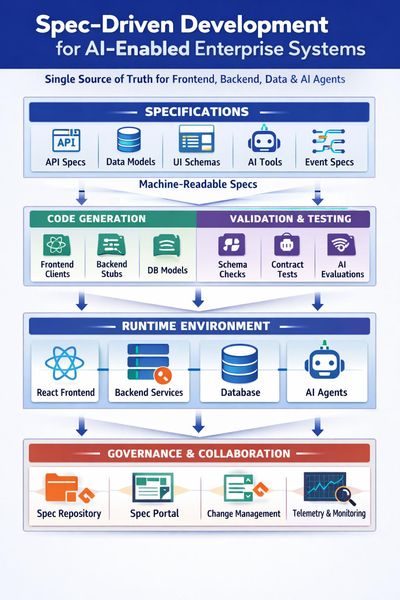
Spec-Driven Development for AI-Enabled Enterprise Systems How to make specs the single source of truth for your React frontends, backend services, data, and AI agents. If you are building an enterprise system with a React frontend, backend APIs and services, a database layer, and shared libraries, moving to Spec-Driven Development (SDD) can feel like a big cultural shift. For AI developers and engineers, though, it is a gift: structured, machine-readable specifications are exactly what both humans and AI coding agents need to stay aligned and productive. This post walks through how to structure specs, version contracts, design workflows, and integrate AI agents in a way that scales. Along the way, it references Microsoft’s public guidance on microservices, APIs, DevOps, and architecture so you can go deeper where needed. 1. Structuring specifications for an enterprise system For a serious enterprise system, treat specs as layered and modular rather than a single monolithic document. A good mental model is Domain-Driven Design (DDD) and bounded contexts (see https://learn.microsoft.com/azure/architecture/microservices/model/domain-analysis Business and domain layer This layer is technology-agnostic and captures: Business capabilities and problem statements Domain language and key entities Business rules and workflows Non-functional requirements (performance, security, compliance, SLAs) Solution and architecture layer Here you define how the system is shaped: System context and C4-style diagrams Service boundaries and ownership Integration patterns and event flows Data ownership and high-level models Microsoft’s microservices guidance is a solid reference: https://learn.microsoft.com/azure/architecture/microservices/. Implementation-oriented specs per component For each concrete component, keep a focused spec: Frontend / UI (React): screen catalogue, UX flows, state contracts, API dependencies, validation rules, accessibility and performance requirements. APIs / services: OpenAPI or AsyncAPI contracts, error models, authentication and authorisation, rate limits, SLAs, observability requirements. Database / schema: logical data model, ownership per service, migration strategy, retention, indexing, partitioning. Shared libraries: responsibilities, versioning policy, supported runtimes, compatibility matrix. Integrations: protocols, payloads, sequencing, idempotency, retry and backoff, SLAs, failure modes. In practice, this usually means: One “master” business and architecture spec per domain or product Separate specs per service or module (frontend app, each backend service, shared library, integration) Everything linked via IDs (for example REQ-123, SVC-ORDER-001) so you can trace from requirement to spec, implementation, and tests 2. Templates and standards that scale To keep things consistent across teams, use a base template that all components share, then extend it with technology-specific sections. This works well for both human readers and AI agents consuming the specs. Base specification template Every spec, regardless of component type, should include: Purpose and scope Stakeholders and dependencies Requirements mapping (list of requirement IDs covered) Architecture and interaction overview Contracts (APIs, events, data) Non-functional requirements Risks and open questions Test and acceptance criteria Extended templates per component Frontend: UX flows, wireframes or Figma links, accessibility, performance budgets, offline behaviour, error states. API / service: OpenAPI or AsyncAPI link, auth and authorisation, throttling, logging and metrics, health endpoints. See logging and monitoring guidance at https://learn.microsoft.com/azure/architecture/microservices/logging-monitoring Database: schema definition, migration plan, backup and restore, data lifecycle, multi-tenant strategy. Integration: sequence diagrams, error handling, retry and idempotency, message contracts, security. 3. Contracts, versioning, and change management API contracts For SDD, API contracts are first-class citizens. Define them via OpenAPI or AsyncAPI and treat the spec as the source of truth. Use contract testing to keep providers and consumers aligned, and version APIs explicitly (for example v1, v2) rather than breaking changes in place. Microsoft’s API design guidance is a good starting point: https://learn.microsoft.com/azure/architecture/best-practices/api-design and Azure API Management at https://learn.microsoft.com/azure/api-management/. Database migrations Any spec change that affects data should include a migration plan. Use migration tooling such as EF Core migrations, Flyway, or Liquibase, and treat migration scripts as code. Document backward-compatibility windows so APIs can support both old and new fields for a defined period. Shared DTOs and models Prefer sharing contracts (OpenAPI, JSON Schema) over large shared code libraries. If you must share code, version the shared library independently and document compatibility (for example, “Service A supports SharedLib 2.x”). Keep DTOs at the edges and map to internal domain models inside each service. Cross-service dependencies Capture dependencies explicitly in specs, such as “Order Service depends on Customer v1.3+ for endpoint /customers/{id}”. Use consumer-driven contracts and CI checks to prevent breaking changes. For event-driven systems, document event contracts and evolution rules. See event-driven architecture guidance at https://learn.microsoft.com/azure/architecture/reference-architectures/event-driven/event-driven-architecture-overview. Spec versioning and change management Version specs semantically (for example OrderServiceSpec v1.2.0) and record what changed, why, impact, and migration steps. Link spec versions to releases or tags in Git and to work items in Azure DevOps or GitHub Issues. Azure Boards is useful here: https://learn.microsoft.com/azure/devops/boards/?view=azure-devops. 4. A mature Spec-Driven Development workflow A realistic SDD workflow for AI-enabled teams might look like this: Discovery and domain analysis: capture business capabilities, domain language, and high-level workflows. Business and architecture specs: define bounded contexts, service boundaries, integration patterns, and NFRs. Contract design: design API specs (OpenAPI or AsyncAPI), event schemas, data models, and validation rules. Task generation: derive work items from specs, such as “Implement endpoint X”, “Add migration Y”, “Add UI flow Z”. This is a great place to use AI agents to read specs and generate tasks. Implementation: code is generated or written to satisfy the spec; the spec remains the reference, not the code. Validation and testing: contract tests, unit tests, integration tests, and end-to-end tests all trace back to spec IDs. Use quality gates in CI and CD, as described in Https://learn.microsoft.com/azure/architecture/framework/devops/devops-quality Review and sign-off: architecture and product review against the spec; update the spec if reality diverges. Release and observability: dashboards and alerts tied to specified SLIs and SLOs. 5. Governance, traceability, and avoiding drift Traceability across the lifecycle Use IDs everywhere: requirements, spec sections, tasks, tests, and deployment artefacts. In Azure DevOps or GitHub, link: Requirement (for example Azure DevOps Feature) Spec (stored in the repo) User stories and tasks Pull requests Tests Releases For key decisions, adopt Architecture Decision Records (ADRs). Microsoft’s guidance on ADRs is here: Https://learn.microsoft.com/azure/architecture/framework/devops/adrs Keeping humans and AI agents aligned To avoid implementation drift: Make specs as machine-readable as possible (OpenAPI, JSON Schema, YAML, BPMN). Enforce spec checks in CI: API implementation must match OpenAPI, DB schema must match migration plan, generated clients must be up to date. For AI coding agents, always provide the relevant spec files as context and constrain them to files linked to specific spec IDs. Add automated checks that compare generated code to contracts and fail builds when they diverge. 6. Enterprise best practices for repos and governance Example repository structure /docs /business /architecture /decisions (ADRs) /specs /frontend /services /orders /customers /integrations /data /src /frontend /services /shared /tests /ops /pipelines /infra-as-code Governance practices An architecture review group that reviews spec changes, not just code changes. Definition of Done includes: spec updated, tests linked, contracts validated. Regular “spec health” reviews to identify what is out of date or drifting. For broader architectural guidance, see: Azure microservices and DDD: https://learn.microsoft.com/azure/architecture/microservices/ Cloud design patterns: https://learn.microsoft.com/azure/architecture/patterns/ Azure Well-Architected Framework: https://learn.microsoft.com/azure/well-architected/ 7. Integrating AI and agentic workflows into SDD Spec-Driven Development is a natural fit for AI and multi-agent systems because specs provide structured, reliable context. Here are some practical patterns. LangGraph and multi-agent orchestration using Microsoft Agent Framework You can design a graph where: A “spec agent” reads and validates specs. An “implementation agent” writes or updates code based on those specs. A “test agent” generates tests from contracts and acceptance criteria. The graph flow can mirror your SDD workflow: Spec → Contract → Code → Tests → Review, with each agent responsible for a stage. MCP (Model Context Protocol) Expose your spec repository, OpenAPI definitions, and ADRs as MCP tools so agents can query the true source of truth instead of hallucinating. For example, provide a tool that returns the OpenAPI for a given service and version, or a tool that returns the ADRs relevant to a particular domain. Learn more about MCP at https://aka.ms/mcp-for-beginners BPMN and process flows Store BPMN diagrams as part of the spec. Agents can read them to generate workflow code, state machines, or tests. For process-oriented integrations, see Azure Logic Apps guidance at https://learn.microsoft.com/azure/logic-apps/. CI/CD pipelines on Azure In your pipelines, validate that implementation matches the spec: Contract tests for APIs and events Schema checks for databases Linting and static analysis for spec conformance Use pipeline gates to block deployments if contracts or migrations are out of sync. Azure Pipelines https://learn.microsoft.com/azure/devops/pipelines/?view=azure-devops GitHub Agentic Workflow Patterns https://github.github.com/gh-aw/ Where to start The key is not to boil the ocean. Pick one domain, such as “Orders”, and design a thin but end-to-end SDD flow: spec → contract → tasks → code → tests. Run it with your AI agents in the loop, learn where the friction is, and iterate. Once that feels natural, you can roll the patterns out across the rest of your system. For AI developers and engineers, SDD is more than process hygiene. It is how you give your agents high-quality, unambiguous context so they can generate code, tests, and documentation that actually match what the business needs. `1.5KViews1like0CommentsAI Agents: Mastering Agentic RAG - Part 5
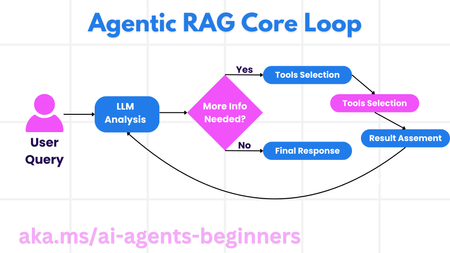
This blog post, Part 5 of a series on AI agents, explores Agentic RAG (Retrieval-Augmented Generation), a paradigm shift in how LLMs interact with external data. Unlike traditional RAG, Agentic RAG allows LLMs to autonomously plan their information retrieval process through an iterative loop of actions and evaluations. The post highlights the importance of the LLM "owning" the reasoning process, dynamically selecting tools and refining queries. It covers key implementation details, including iterative loops, tool integration, memory management, and handling failure modes. Practical use cases, governance considerations, and code examples demonstrating Agentic RAG with AutoGen, Semantic Kernel, and Azure AI Agent Service are provided. The post concludes by emphasizing the transformative potential of Agentic RAG and encourages further exploration through linked resources and previous blog posts in the series.4KViews1like0Comments