agentic workflows
14 TopicsUnlocking the Power of AI Agents: An Introductory Guide - Part 1
This blog post introduces Microsoft's "AI Agents for Beginners" course and its accompanying GitHub repository, offering a valuable resource for anyone interested in learning about agentic AI. The course covers fundamental concepts, different types of agents, design patterns, and practical frameworks for building intelligent agents. Whether you're a beginner, intermediate learner, or advanced developer, this free resource provides a comprehensive learning experience, empowering you to create AI systems that can reason, plan, and act autonomously. The post also highlights additional resources, including links to Azure AI Agent Service, Semantic Kernel, AutoGen, and the Azure AI Discord community. Embark on your agentic AI journey today and discover the future of intelligent applications.5.2KViews5likes0CommentsAI Agents in Production: From Prototype to Reality - Part 10
This blog post, the tenth and final installment in a series on AI agents, focuses on deploying AI agents to production. It covers evaluating agent performance, addressing common issues, and managing costs. The post emphasizes the importance of a robust evaluation system, providing potential solutions for performance issues, and outlining cost management strategies such as response caching, using smaller models, and implementing router models.1.7KViews3likes1CommentAI Agents: Building Trustworthy Agents- Part 6
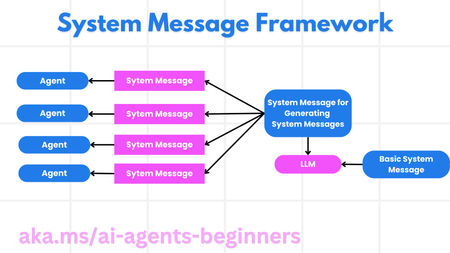
This blog post, Part 6 in a series on AI agents, focuses on building trustworthy AI agents. It emphasizes the importance of safety and security in agent design and deployment. The post details a system message framework for creating robust and scalable prompts, outlining a four-step process from meta prompt to iterative refinement. It then explores various threats to AI agents, including task manipulation, unauthorized access, resource overloading, knowledge base poisoning, and cascading errors, providing mitigation strategies for each. The post also highlights the human-in-the-loop approach for enhanced trust and control, providing a code example using AutoGen. Finally, it links to further resources on responsible AI, model evaluation, and risk assessment, along with the previous posts in the series.1KViews3likes0Comments
Building Agentic Solutions with Autogen 0.4
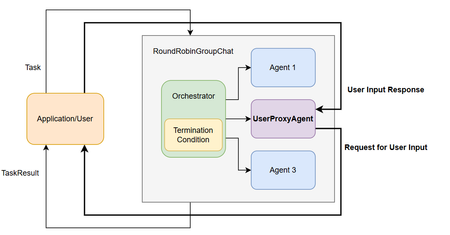
Multi Agent Systems are a consequence of an organized interaction between diverse agents to achieve a goal. Similar to human collaborations, Agentic solutions are expected to collaborate effectively in accordance with the goal to be accomplished. A crucial aspect is adopting the appropriate design pattern depending on the task on hand. Let us look at the design of Agentic Solutions is stages. Stage 1: Determine all the required Agents and define the required tools which can be leveraged by the Agents. The tools may have access requirements which has to be handled with appropriate security constraints. In Autogen, this is supported through multiple patterns which address different requirements. At its core, Autogen provides the ability to leverage LLMs, human inputs, tools or a combination. Autogen 0.4 in particular has provided an high-level API through AgentChat with preset Agents allowing for variations in agent responses. Some of the preset Agents include 1) AssistantAgent is a built-in agent which can use a language model and tools. It can also handle multimodal messages and instructions of the Agents function. 2) UserProxyAgent: An agent that takes user input returns it as responses. 3) CodeExecutorAgent: An agent that can execute code. 4) OpenAIAssistantAgent: An agent that is backed by an OpenAI Assistant, with ability to use custom tools. 5) MultimodalWebSurfer: A multi-modal agent that can search the web and visit web pages for information. 6) FileSurfer: An agent that can search and browse local files for information. 7) VideoSurfer: An agent that can watch videos for information. A Custom Agents can be used when the preset Agents do not address the need. Stage 2: Identify the optimal interaction between the team of agents. This can include a human in the loop proxy agent which serves as an interface for human inputs. Autogen supports multiple interaction patterns 1) GroupChat is a high-level design pattern for interleaved interactions. In Auotgen 0.4, GroupChat got further abstracted with RoundRobinGroupChat or SelectorGroupChat . This means you can choose to go with abstracted options of RoundRobinGroupChat, SelectorGroupChat or customize it to your need with the base GroupChat in the core. RoundRobinGroupChat team configuration where all agents share the same context respond in a round-robin fashion. Broadcasts response to all agents, provides a consistent context. Human In the Loop - UserProxyAgent SelectorGroupChat team where participants take turns broadcasting messages to all other members. A generative model selects the next speaker based on the shared context, enabling dynamic, context-aware collaboration. selector_func argument with a custom selector function to override the default model-based selection. GroupChat in core 2) Sequential Agents Stage 3: Determine the memory and message passing between the Agents Memory can be the context for the Agent which could be the conversation history, RAG which is pulled from a ListMemory or a Custom Memory Store like a Vector DB. Messaging between Agents uses ChatMessage. This message type allows both text and multimodal communication and includes specific types such as TextMessage or MultiModalMessage. Stage 4: Articulate the Termination condition The following Termination options are available in Autogen 0.4 MaxMessageTermination: Stops after a specified number of messages have been produced, including both agent and task messages. TextMentionTermination: Stops when specific text or string is mentioned in a message (e.g., “TERMINATE”). TokenUsageTermination: Stops when a certain number of prompt or completion tokens are used. This requires the agents to report token usage in their messages. TimeoutTermination: Stops after a specified duration in seconds. HandoffTermination: Stops when a handoff to a specific target is requested. Handoff messages can be used to build patterns such as Swarm. This is useful when you want to pause the run and allow application or user to provide input when an agent hands off to them. SourceMatchTermination: Stops after a specific agent responds. ExternalTermination: Enables programmatic control of termination from outside the run. This is useful for UI integration (e.g., “Stop” buttons in chat interfaces). StopMessageTermination: Stops when a StopMessage is produced by an agent. TextMessageTermination: Stops when a TextMessage is produced by an agent. FunctionCallTermination: Stops when a ToolCallExecutionEvent containing a FunctionExecutionResult with a matching name is produced by an agent. Stage 5: Optionally manage the state This is useful in web application where stateless endpoints respond to requests and need to load the state of the application from persistent storage. The state can be saved by using the save_state() call in the AssistantAgent. assistant_agent.save_state() Finally, Logging and Serializing is also available for debugging and sharing. A well-designed Agentic Solution is crucial to be both optimal and effective in accomplishing the assigned goal. References Autogen - https://microsoft.github.io/autogen/stable/index.html1.7KViews3likes2CommentsIntegrating Microsoft Foundry with OpenClaw: Step by Step Model Configuration
Step 1: Deploying Models on Microsoft Foundry Let us kick things off in the Azure portal. To get our OpenClaw agent thinking like a genius, we need to deploy our models in Microsoft Foundry. For this guide, we are going to focus on deploying gpt-5.2-codex on Microsoft Foundry with OpenClaw. Navigate to your AI Hub, head over to the model catalog, choose the model you wish to use with OpenClaw and hit deploy. Once your deployment is successful, head to the endpoints section. Important: Grab your Endpoint URL and your API Keys right now and save them in a secure note. We will need these exact values to connect OpenClaw in a few minutes. Step 2: Installing and Initializing OpenClaw Next up, we need to get OpenClaw running on your machine. Open up your terminal and run the official installation script: curl -fsSL https://openclaw.ai/install.sh | bash The wizard will walk you through a few prompts. Here is exactly how to answer them to link up with our Azure setup: First Page (Model Selection): Choose "Skip for now". Second Page (Provider): Select azure-openai-responses. Model Selection: Select gpt-5.2-codex , For now only the models listed (hosted on Microsoft Foundry) in the picture below are available to be used with OpenClaw. Follow the rest of the standard prompts to finish the initial setup. Step 3: Editing the OpenClaw Configuration File Now for the fun part. We need to manually configure OpenClaw to talk to Microsoft Foundry. Open your configuration file located at ~/.openclaw/openclaw.json in your favorite text editor. Replace the contents of the models and agents sections with the following code block: { "models": { "providers": { "azure-openai-responses": { "baseUrl": "https://<YOUR_RESOURCE_NAME>.openai.azure.com/openai/v1", "apiKey": "<YOUR_AZURE_OPENAI_API_KEY>", "api": "openai-responses", "authHeader": false, "headers": { "api-key": "<YOUR_AZURE_OPENAI_API_KEY>" }, "models": [ { "id": "gpt-5.2-codex", "name": "GPT-5.2-Codex (Azure)", "reasoning": true, "input": ["text", "image"], "cost": { "input": 0, "output": 0, "cacheRead": 0, "cacheWrite": 0 }, "contextWindow": 400000, "maxTokens": 16384, "compat": { "supportsStore": false } }, { "id": "gpt-5.2", "name": "GPT-5.2 (Azure)", "reasoning": false, "input": ["text", "image"], "cost": { "input": 0, "output": 0, "cacheRead": 0, "cacheWrite": 0 }, "contextWindow": 272000, "maxTokens": 16384, "compat": { "supportsStore": false } } ] } } }, "agents": { "defaults": { "model": { "primary": "azure-openai-responses/gpt-5.2-codex" }, "models": { "azure-openai-responses/gpt-5.2-codex": {} }, "workspace": "/home/<USERNAME>/.openclaw/workspace", "compaction": { "mode": "safeguard" }, "maxConcurrent": 4, "subagents": { "maxConcurrent": 8 } } } } You will notice a few placeholders in that JSON. Here is exactly what you need to swap out: Placeholder Variable What It Is Where to Find It <YOUR_RESOURCE_NAME> The unique name of your Azure OpenAI resource. Found in your Azure Portal under the Azure OpenAI resource overview. <YOUR_AZURE_OPENAI_API_KEY> The secret key required to authenticate your requests. Found in Microsoft Foundry under your project endpoints or Azure Portal keys section. <USERNAME> Your local computer's user profile name. Open your terminal and type whoami to find this. Step 4: Restart the Gateway After saving the configuration file, you must restart the OpenClaw gateway for the new Foundry settings to take effect. Run this simple command: openclaw gateway restart Configuration Notes & Deep Dive If you are curious about why we configured the JSON that way, here is a quick breakdown of the technical details. Authentication Differences Azure OpenAI uses the api-key HTTP header for authentication. This is entirely different from the standard OpenAI Authorization: Bearer header. Our configuration file addresses this in two ways: Setting "authHeader": false completely disables the default Bearer header. Adding "headers": { "api-key": "<key>" } forces OpenClaw to send the API key via Azure's native header format. Important Note: Your API key must appear in both the apiKey field AND the headers.api-key field within the JSON for this to work correctly. The Base URL Azure OpenAI's v1-compatible endpoint follows this specific format: https://<your_resource_name>.openai.azure.com/openai/v1 The beautiful thing about this v1 endpoint is that it is largely compatible with the standard OpenAI API and does not require you to manually pass an api-version query parameter. Model Compatibility Settings "compat": { "supportsStore": false } disables the store parameter since Azure OpenAI does not currently support it. "reasoning": true enables the thinking mode for GPT-5.2-Codex. This supports low, medium, high, and xhigh levels. "reasoning": false is set for GPT-5.2 because it is a standard, non-reasoning model. Model Specifications & Cost Tracking If you want OpenClaw to accurately track your token usage costs, you can update the cost fields from 0 to the current Azure pricing. Here are the specs and costs for the models we just deployed: Model Specifications Model Context Window Max Output Tokens Image Input Reasoning gpt-5.2-codex 400,000 tokens 16,384 tokens Yes Yes gpt-5.2 272,000 tokens 16,384 tokens Yes No Current Cost (Adjust in JSON) Model Input (per 1M tokens) Output (per 1M tokens) Cached Input (per 1M tokens) gpt-5.2-codex $1.75 $14.00 $0.175 gpt-5.2 $2.00 $8.00 $0.50 Conclusion: And there you have it! You have successfully bridged the gap between the enterprise-grade infrastructure of Microsoft Foundry and the local autonomy of OpenClaw. By following these steps, you are not just running a chatbot; you are running a sophisticated agent capable of reasoning, coding, and executing tasks with the full power of GPT-5.2-codex behind it. The combination of Azure's reliability and OpenClaw's flexibility opens up a world of possibilities. Whether you are building an automated devops assistant, a research agent, or just exploring the bleeding edge of AI, you now have a robust foundation to build upon. Now it is time to let your agent loose on some real tasks. Go forth, experiment with different system prompts, and see what you can build. If you run into any interesting edge cases or come up with a unique configuration, let me know in the comments below. Happy coding!12KViews2likes2CommentsJuly 2025 Recap: Azure Database for PostgreSQL
Hello Azure Community, July delivered a wave of exciting updates to Azure Database for PostgreSQL! From Fabric mirroring support for private networking to cascading read replicas, these new features are all about scaling smarter, performing faster, and building better. This blog covers what’s new, why it matters, and how to get started. Catch Up on POSETTE 2025 In case you missed POSETTE: An Event for Postgres 2025 or couldn't watch all of the sessions live, here's a playlist with the 11 talks all about Azure Database for PostgreSQL. And, if you'd like to dive even deeper, the Ultimate Guide will help you navigate the full catalog of 42 recorded talks published on YouTube. Feature Highlights Upsert and Script activity in ADF and Azure Synapse – Generally Available Power BI Entra authentication support – Generally Available New Regions: Malaysia West & Chile Central Latest Postgres minor versions: 17.5, 16.9, 15.13, 14.18 and 13.21 Cascading Read Replica – Public Preview Private Endpoint and VNet support for Fabric Mirroring - Public Preview Agentic Web with NLWeb and PostgreSQL PostgreSQL for VS Code extension enhancements Improved Maintenance Workflow for Stopped Instances Upsert and Script activity in ADF and Azure Synapse – Generally Available We’re excited to announce the general availability of Upsert method and Script activity in Azure Data Factory and Azure Synapse Analytics for Azure Database for PostgreSQL. These new capabilities bring greater flexibility and performance to your data pipelines: Upsert Method: Easily merge incoming data into existing PostgreSQL tables without writing complex logic reducing overhead and improving efficiency. Script Activity: Run custom SQL scripts as part of your workflows, enabling advanced transformations, procedural logic, and fine-grained control over data operations. Together, these features streamline ETL and ELT processes, making it easier to build scalable, declarative, and robust data integration solutions using PostgreSQL as either a source or sink. Visit our documentation guide for Upsert Method and script activity to know more. Power BI Entra authentication support – Generally Available You can now use Microsoft Entra ID authentication to connect to Azure Database for PostgreSQL from Power BI Desktop. This update simplifies access management, enhances security, and helps you support your organization’s broader Entra-based authentication strategy. To learn more, please refer to our documentation. New Regions: Malaysia West & Chile Central Azure Database for PostgreSQL has now launched in Malaysia West and Chile Central. This expanded regional presence brings lower latency, enhanced performance, and data residency support, making it easier to build fast, reliable, and compliant applications, right where your users are. This continues to be our mission to bring Azure Database for PostgreSQL closer to where you build and run your apps. For the full list of regions visit: Azure Database for PostgreSQL Regions. Latest Postgres minor versions: 17.5, 16.9, 15.13, 14.18 and 13.21 PostgreSQL latest minor versions 17.5, 16.9, 15.13, 14.18 and 13.21 are now supported by Azure Database for PostgreSQL flexible server. These minor version upgrades are automatically performed as part of the monthly planned maintenance in Azure Database for PostgreSQL. This upgrade automation ensures that your databases are always running on the most secure and optimized versions without requiring manual intervention. This release fixes two security vulnerabilities and over 40 bug fixes and improvements. To learn more, please refer PostgreSQL community announcement for more details about the release. Cascading Read Replica – Public Preview Azure Database for PostgreSQL supports cascading read replica in public preview capacity. This feature allows you to scale read-intensive workloads more effectively by creating replicas not only from the primary database but also from existing read replicas, enabling two-level replication chains. With cascading read replicas, you can: Improve performance for read-heavy applications. Distribute read traffic more efficiently. Support complex deployment topologies. Data replication is asynchronous, and each replica can serve as a source for additional replicas. This setup enhances scalability and flexibility for your PostgreSQL deployments. For more details read the cascading read replicas documentation. Private Endpoint and VNET Support for Fabric Mirroring - Public Preview Microsoft Fabric now supports mirroring for Azure Database for PostgreSQL flexible server instances deployed with Virtual Network (VNET) integration or Private Endpoints. This enhancement broadens the scope of Fabric’s real-time data replication capabilities, enabling secure and seamless analytics on transactional data, even within network-isolated environments. Previously, mirroring was only available for flexible server instances with public endpoint access. With this update, organizations can now replicate data from Azure Database for PostgreSQL hosted in secure, private networks, without compromising on data security, compliance, or performance. This is particularly valuable for enterprise customers who rely on VNETs and Private Endpoints for database connectivity from isolated networks. For more details visit fabric mirroring with private networking support blog. Agentic Web with NLWeb and PostgreSQL We’re excited to announce that NLWeb (Natural Language Web), Microsoft’s open project for natural language interfaces on websites now supports PostgreSQL. With this enhancement, developers can leverage PostgreSQL and NLWeb to transform any website into an AI-powered application or Model Context Protocol (MCP) server. This integration allows organizations to utilize a familiar, robust database as the foundation for conversational AI experiences, streamlining deployment and maximizing data security and scalability. For more details, read Agentic web with NLWeb and PostgreSQL blog. PostgreSQL for VS Code extension enhancements PostgreSQL for VS Code extension is rolling out new updates to improve your experience with this extension. We are introducing key connections, authentication, and usability improvements. Here’s what we improved: SSH connections - You can now set up SSH tunneling directly in the Advanced Connection options, making it easier to securely connect to private networks without leaving VS Code. Clearer authentication setup - A new “No Password” option eliminates guesswork when setting up connections that don’t require credentials. Entra ID fixes - Improved default username handling, token refresh, and clearer error feedback for failed connections. Array and character rendering - Unicode and PostgreSQL arrays now display more reliably and consistently. Azure Portal flow - Reuses existing connection profiles to avoid duplicates when launching from the portal. Don’t forget to update to the latest version in the Marketplace to take advantage of these enhancements and visit our GitHub to learn more about this month’s release. Improved Maintenance Workflow for Stopped Instances We’ve improved how scheduled maintenance is handled for stopped or disabled PostgreSQL servers. Maintenance is now applied only when the server is restarted - either manually or through the 7-day auto-restart rather than forcing a restart during the scheduled maintenance window. This change reduces unnecessary disruptions and gives you more control over when updates are applied. You may notice a slightly longer restart time (5–8 minutes) if maintenance is pending. For more information, refer Applying Maintenance on Stopped/Disabled Instances. Azure Postgres Learning Bytes 🎓 Set Up HA Health Status Monitoring Alerts This section will talk about setting up HA health status monitoring alerts using Azure Portal. These alerts can be used to effectively monitor the HA health states for your server. To monitor the health of your High Availability (HA) setup: Navigate to Azure portal and select your Azure Database for PostgreSQL flexible server instance. Create an Alert Rule Go to Monitoring > Alerts > Create Alert Rule Scope: Select your PostgreSQL Flexible Server Condition: Choose the signal from the drop down (CPU percentage, storage percentage etc.) Logic: Define when the alert should trigger Action Group: Specify where the alert should be sent (email, webhook, etc.) Add tags Click on “Review + Create” Verify the Alert Check the Alerts tab in Azure Monitor to confirm the alert has been triggered. For deeper insight into resource health: Go to Azure Portal > Search for Service Health > Select Resource Health. Choose Azure Database for PostgreSQL Flexible Server from the dropdown. Review the health status of your server. For more information, check out the HA Health status monitoring documentation guide. Conclusion That’s a wrap for our July 2025 feature updates! Thanks for being part of our journey to make Azure Database for PostgreSQL better with every release. We’re always working to improve, and your feedback helps us do that. 💬 Got ideas, questions, or suggestions? We’d love to hear from you: https://aka.ms/pgfeedback 📢 Want to stay on top of Azure Database for PostgreSQL updates? Follow us here for the latest announcements, feature releases, and best practices: Azure Database for PostgreSQL Blog Stay tuned for more updates in our next blog!749Views2likes0CommentsStep-by-Step Tutorial: Building an AI Agent Using Azure AI Foundry
This blog post provides a comprehensive tutorial on building an AI agent using Azure AI Agent service and the Azure AI Foundry portal. AI agents represent a powerful new paradigm in application development, offering a more intuitive and dynamic way to interact with software. They can understand natural language, reason about user requests, and take actions to fulfill those requests. This tutorial will guide you through the process of creating and deploying an intelligent agent on Azure. We'll cover setting up an Azure AI Foundry hub, crafting effective instructions to define the agent's behavior, including recognizing user intent, processing requests, and generating helpful responses. We'll also discuss testing the agent's conversational abilities and provide additional resources for expanding your knowledge of AI agents and the Azure AI ecosystem. This hands-on guide is perfect for anyone looking to explore the practical application of Azure's conversational AI capabilities and build intelligent virtual assistants. Join us as we dive into the exciting world of AI agents.18KViews2likes2CommentsAI Agents: The Multi-Agent Design Pattern - Part 8
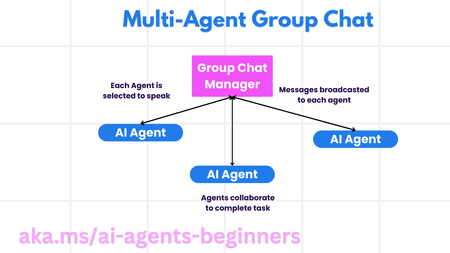
This blog post, Part 8 in a series on AI agents, explores the Multi-Agent Design Pattern, outlining the benefits and key components of building systems with multiple interacting agents. It details the scenarios where multi-agent systems excel (large workloads, complex tasks, diverse expertise), highlights their advantages over single-agent approaches (specialization, scalability, fault tolerance), and discusses the fundamental building blocks for implementation, including agent communication, coordination mechanisms, and architectural considerations. The post introduces common multi-agent patterns (group chat, hand-off, collaborative filtering) and illustrates these concepts with a refund process example. Finally, it includes a practical assignment and provides links to further resources and previous posts in the series.5.9KViews1like0CommentsAI Agents: Planning and Orchestration with the Planning Design Pattern - Part 7
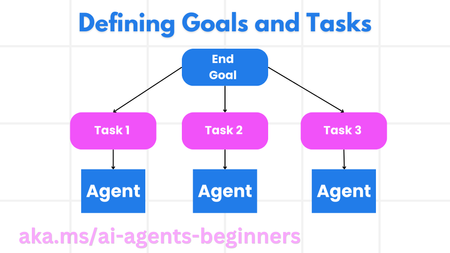
This blog post, Part 7 in a series on AI agents, focuses on the Planning Design Pattern for effective task orchestration. It explains how to define clear goals, decompose complex tasks into manageable subtasks, and leverage structured output (e.g., JSON) for seamless communication between agents. The post includes code snippets demonstrating how to create a planning agent, orchestrate multi-agent workflows, and implement iterative planning for dynamic adaptation. It also links to a practical example notebook (07-autogen.ipynb) and further resources like AutoGen Magnetic One, encouraging readers to explore advanced planning concepts. Links to the previous posts in the series are provided for easy access to foundational AI agent concepts.3KViews1like0Comments