agent
18 Topics
Building a Multi-Agent System with Azure AI Agent Service: Campus Event Management
Personal Background My name is Peace Silly. I studied French and Spanish at the University of Oxford, where I developed a strong interest in how language is structured and interpreted. That curiosity about syntax and meaning eventually led me to computer science, which I came to see as another language built on logic and structure. In the academic year 2024–2025, I completed the MSc Computer Science at University College London, where I developed this project as part of my Master’s thesis. Project Introduction Can large-scale event management be handled through a simple chat interface? This was the question that guided my Master’s thesis project at UCL. As part of the Industry Exchange Network (IXN) and in collaboration with Microsoft, I set out to explore how conversational interfaces and autonomous AI agents could simplify one of the most underestimated coordination challenges in campus life: managing events across multiple departments, societies, and facilities. At large universities, event management is rarely straightforward. Rooms are shared between academic timetables, student societies, and one-off events. A single lecture theatre might host a departmental seminar in the morning, a society meeting in the afternoon, and a careers talk in the evening, each relying on different systems, staff, and communication chains. Double bookings, last-minute cancellations, and maintenance issues are common, and coordinating changes often means long email threads, manual spreadsheets, and frustrated users. These inefficiencies do more than waste time; they directly affect how a campus functions day to day. When venues are unavailable or notifications fail to reach the right people, even small scheduling errors can ripple across entire departments. A smarter, more adaptive approach was needed, one that could manage complex workflows autonomously while remaining intuitive and human for end users. The result was the Event Management Multi-Agent System, a cloud-based platform where staff and students can query events, book rooms, and reschedule activities simply by chatting. Behind the scenes, a network of Azure-powered AI agents collaborates to handle scheduling, communication, and maintenance in real time, working together to keep the campus running smoothly. The user scenario shown in the figure below exemplifies the vision that guided the development of this multi-agent system. Starting with Microsoft Learning Resources I began my journey with Microsoft’s tutorial Build Your First Agent with Azure AI Foundry which introduced the fundamentals of the Azure AI Agent Service and provided an ideal foundation for experimentation. Within a few weeks, using the Azure Foundry environment, I extended those foundations into a fully functional multi-agent system. Azure Foundry’s visual interface was an invaluable learning space. It allowed me to deploy, test, and adjust model parameters such as temperature, system prompts, and function calling while observing how each change influenced the agents’ reasoning and collaboration. Through these experiments, I developed a strong conceptual understanding of orchestration and coordination before moving to the command line for more complex development later. When development issues inevitably arose, I relied on the Discord support community and the GitHub forum for troubleshooting. These communities were instrumental in addressing configuration issues and providing practical examples, ensuring that each agent performed reliably within the shared-thread framework. This early engagement with Microsoft’s learning materials not only accelerated my technical progress but also shaped how I approached experimentation, debugging, and iteration. It transformed a steep learning curve into a structured, hands-on process that mirrored professional software development practice. A Decentralised Team of AI Agents The system’s intelligence is distributed across three specialised agents, powered by OpenAI’s GPT-4.1 models through Azure OpenAI Service. They each perform a distinct role within the event management workflow: Scheduling Agent – interprets natural language requests, checks room availability, and allocates suitable venues. Communications Agent – notifies stakeholders when events are booked, modified, or cancelled. Maintenance Agent – monitors room readiness, posts fault reports when venues become unavailable, and triggers rescheduling when needed. Each agent operates independently but communicates through a shared thread, a transparent message log that serves as the coordination backbone. This thread acts as a persistent state space where agents post updates, react to changes, and maintain a record of every decision. For example, when a maintenance fault is detected, the Maintenance Agent logs the issue, the Scheduling Agent identifies an alternative venue, and the Communications Agent automatically notifies attendees. These interactions happen autonomously, with each agent responding to the evolving context recorded in the shared thread. Interfaces and Backend The system was designed with both developer-focused and user-facing interfaces, supporting rapid iteration and intuitive interaction. The Terminal Interface Initially, the agents were deployed and tested through a terminal interface, which provided a controlled environment for debugging and verifying logic step by step. This setup allowed quick testing of individual agents and observation of their interactions within the shared thread. The Chat Interface As the project evolved, I introduced a lightweight chat interface to make the system accessible to staff and students. This interface allows users to book rooms, query events, and reschedule activities using plain language. Recognising that some users might still want to see what happens behind the scenes, I added an optional toggle that reveals the intermediate steps of agent reasoning. This transparency feature proved valuable for debugging and for more technical users who wanted to understand how the agents collaborated. When a user interacts with the chat interface, they are effectively communicating with the Scheduling Agent, which acts as the primary entry point. The Scheduling Agent interprets natural-language commands such as “Book the Engineering Auditorium for Friday at 2 PM” or “Reschedule the robotics demo to another room.” It then coordinates with the Maintenance and Communications Agents to complete the process. Behind the scenes, the chat interface connects to a FastAPI backend responsible for core logic and data access. A Flask + HTMX layer handles lightweight rendering and interactivity, while the Azure AI Agent Service manages orchestration and shared-thread coordination. This combination enables seamless agent communication and reliable task execution without exposing any of the underlying complexity to the end user. Automated Notifications and Fault Detection Once an event is scheduled, the Scheduling Agent posts the confirmation to the shared thread. The Communications Agent, which subscribes to thread updates, automatically sends notifications to all relevant stakeholders by email. This ensures that every participant stays informed without any manual follow-up. The Maintenance Agent runs routine availability checks. If a fault is detected, it logs the issue to the shared thread, prompting the Scheduling Agent to find an alternative room. The Communications Agent then notifies attendees of the change, ensuring minimal disruption to ongoing events. Testing and Evaluation The system underwent several layers of testing to validate both functional and non-functional requirements. Unit and Integration Tests Backend reliability was evaluated through unit and integration tests to ensure that room allocation, conflict detection, and database operations behaved as intended. Automated test scripts verified end-to-end workflows for event creation, modification, and cancellation across all agents. Integration results confirmed that the shared-thread orchestration functioned correctly, with all test cases passing consistently. However, coverage analysis revealed that approximately 60% of the codebase was tested, leaving some areas such as Azure service integration and error-handling paths outside automated validation. These trade-offs were deliberate, balancing test depth with project scope and the constraints of mocking live dependencies. Azure AI Evaluation While functional testing confirmed correctness, it did not capture the agents’ reasoning or language quality. To assess this, I used Azure AI Evaluation, which measures conversational performance across metrics such as relevance, coherence, fluency, and groundedness. The results showed high scores in relevance (4.33) and groundedness (4.67), confirming the agents’ ability to generate accurate and context-aware responses. However, slightly lower fluency scores and weaker performance in multi-turn tasks revealed a retrieval–execution gap typical in task-oriented dialogue systems. Limitations and Insights The evaluation also surfaced several key limitations: Synthetic data: All tests were conducted with simulated datasets rather than live campus systems, limiting generalisability. Scalability: A non-functional requirement in the form of horizontal scalability was not tested. The architecture supports scaling conceptually but requires validation under heavier load. Despite these constraints, the testing process confirmed that the system was both technically reliable and linguistically robust, capable of autonomous coordination under normal conditions. The results provided a realistic picture of what worked well and what future iterations should focus on improving. Impact and Future Work This project demonstrates how conversational AI and multi-agent orchestration can streamline real operational processes. By combining Azure AI Agent Services with modular design principles, the system automates scheduling, communication, and maintenance while keeping the user experience simple and intuitive. The architecture also establishes a foundation for future extensions: Predictive maintenance to anticipate venue faults before they occur. Microsoft Teams integration for seamless in-chat scheduling. Scalability testing and real-user trials to validate performance at institutional scale. Beyond its technical results, the project underscores the potential of multi-agent systems in real-world coordination tasks. It illustrates how modularity, transparency, and intelligent orchestration can make everyday workflows more efficient and human-centred. Acknowledgements What began with a simple Microsoft tutorial evolved into a working prototype that reimagines how campuses could manage their daily operations through conversation and collaboration. This was both a challenging and rewarding journey, and I am deeply grateful to Professor Graham Roberts (UCL) and Professor Lee Stott (Microsoft) for their guidance, feedback, and support throughout the project.1KViews4likes1CommentIntegrating Microsoft Foundry with OpenClaw: Step by Step Model Configuration
Step 1: Deploying Models on Microsoft Foundry Let us kick things off in the Azure portal. To get our OpenClaw agent thinking like a genius, we need to deploy our models in Microsoft Foundry. For this guide, we are going to focus on deploying gpt-5.2-codex on Microsoft Foundry with OpenClaw. Navigate to your AI Hub, head over to the model catalog, choose the model you wish to use with OpenClaw and hit deploy. Once your deployment is successful, head to the endpoints section. Important: Grab your Endpoint URL and your API Keys right now and save them in a secure note. We will need these exact values to connect OpenClaw in a few minutes. Step 2: Installing and Initializing OpenClaw Next up, we need to get OpenClaw running on your machine. Open up your terminal and run the official installation script: curl -fsSL https://openclaw.ai/install.sh | bash The wizard will walk you through a few prompts. Here is exactly how to answer them to link up with our Azure setup: First Page (Model Selection): Choose "Skip for now". Second Page (Provider): Select azure-openai-responses. Model Selection: Select gpt-5.2-codex , For now only the models listed (hosted on Microsoft Foundry) in the picture below are available to be used with OpenClaw. Follow the rest of the standard prompts to finish the initial setup. Step 3: Editing the OpenClaw Configuration File Now for the fun part. We need to manually configure OpenClaw to talk to Microsoft Foundry. Open your configuration file located at ~/.openclaw/openclaw.json in your favorite text editor. Replace the contents of the models and agents sections with the following code block: { "models": { "providers": { "azure-openai-responses": { "baseUrl": "https://<YOUR_RESOURCE_NAME>.openai.azure.com/openai/v1", "apiKey": "<YOUR_AZURE_OPENAI_API_KEY>", "api": "openai-responses", "authHeader": false, "headers": { "api-key": "<YOUR_AZURE_OPENAI_API_KEY>" }, "models": [ { "id": "gpt-5.2-codex", "name": "GPT-5.2-Codex (Azure)", "reasoning": true, "input": ["text", "image"], "cost": { "input": 0, "output": 0, "cacheRead": 0, "cacheWrite": 0 }, "contextWindow": 400000, "maxTokens": 16384, "compat": { "supportsStore": false } }, { "id": "gpt-5.2", "name": "GPT-5.2 (Azure)", "reasoning": false, "input": ["text", "image"], "cost": { "input": 0, "output": 0, "cacheRead": 0, "cacheWrite": 0 }, "contextWindow": 272000, "maxTokens": 16384, "compat": { "supportsStore": false } } ] } } }, "agents": { "defaults": { "model": { "primary": "azure-openai-responses/gpt-5.2-codex" }, "models": { "azure-openai-responses/gpt-5.2-codex": {} }, "workspace": "/home/<USERNAME>/.openclaw/workspace", "compaction": { "mode": "safeguard" }, "maxConcurrent": 4, "subagents": { "maxConcurrent": 8 } } } } You will notice a few placeholders in that JSON. Here is exactly what you need to swap out: Placeholder Variable What It Is Where to Find It <YOUR_RESOURCE_NAME> The unique name of your Azure OpenAI resource. Found in your Azure Portal under the Azure OpenAI resource overview. <YOUR_AZURE_OPENAI_API_KEY> The secret key required to authenticate your requests. Found in Microsoft Foundry under your project endpoints or Azure Portal keys section. <USERNAME> Your local computer's user profile name. Open your terminal and type whoami to find this. Step 4: Restart the Gateway After saving the configuration file, you must restart the OpenClaw gateway for the new Foundry settings to take effect. Run this simple command: openclaw gateway restart Configuration Notes & Deep Dive If you are curious about why we configured the JSON that way, here is a quick breakdown of the technical details. Authentication Differences Azure OpenAI uses the api-key HTTP header for authentication. This is entirely different from the standard OpenAI Authorization: Bearer header. Our configuration file addresses this in two ways: Setting "authHeader": false completely disables the default Bearer header. Adding "headers": { "api-key": "<key>" } forces OpenClaw to send the API key via Azure's native header format. Important Note: Your API key must appear in both the apiKey field AND the headers.api-key field within the JSON for this to work correctly. The Base URL Azure OpenAI's v1-compatible endpoint follows this specific format: https://<your_resource_name>.openai.azure.com/openai/v1 The beautiful thing about this v1 endpoint is that it is largely compatible with the standard OpenAI API and does not require you to manually pass an api-version query parameter. Model Compatibility Settings "compat": { "supportsStore": false } disables the store parameter since Azure OpenAI does not currently support it. "reasoning": true enables the thinking mode for GPT-5.2-Codex. This supports low, medium, high, and xhigh levels. "reasoning": false is set for GPT-5.2 because it is a standard, non-reasoning model. Model Specifications & Cost Tracking If you want OpenClaw to accurately track your token usage costs, you can update the cost fields from 0 to the current Azure pricing. Here are the specs and costs for the models we just deployed: Model Specifications Model Context Window Max Output Tokens Image Input Reasoning gpt-5.2-codex 400,000 tokens 16,384 tokens Yes Yes gpt-5.2 272,000 tokens 16,384 tokens Yes No Current Cost (Adjust in JSON) Model Input (per 1M tokens) Output (per 1M tokens) Cached Input (per 1M tokens) gpt-5.2-codex $1.75 $14.00 $0.175 gpt-5.2 $2.00 $8.00 $0.50 Conclusion: And there you have it! You have successfully bridged the gap between the enterprise-grade infrastructure of Microsoft Foundry and the local autonomy of OpenClaw. By following these steps, you are not just running a chatbot; you are running a sophisticated agent capable of reasoning, coding, and executing tasks with the full power of GPT-5.2-codex behind it. The combination of Azure's reliability and OpenClaw's flexibility opens up a world of possibilities. Whether you are building an automated devops assistant, a research agent, or just exploring the bleeding edge of AI, you now have a robust foundation to build upon. Now it is time to let your agent loose on some real tasks. Go forth, experiment with different system prompts, and see what you can build. If you run into any interesting edge cases or come up with a unique configuration, let me know in the comments below. Happy coding!12KViews2likes2CommentsAugust 2025 Recap: Azure Database for PostgreSQL
Hello Azure Community, August was an exciting month for Azure Database for PostgreSQL! We have introduced updates that make your experience smarter and more secure. From simplified Entra ID group login to integrations with LangChain and LangGraph, these updates help with improving access control and seamless integration for your AI agents and applications. Stay tuned as we dive deeper into each of these feature updates. Feature Highlights Enhanced Performance recommendations for Azure Advisor - Generally Available Entra-ID group login using user credentials - Public Preview New Region Buildout: Austria East LangChain and LangGraph connector Active-Active Replication Guide Enhanced Performance recommendations for Azure Advisor - Generally Available Azure Advisor now offers enhanced recommendations to further optimize PostgreSQL server performance, security, and resource management. These key updates are as follows: Index Scan Insights: Detection and recommendations for disabled index and index-only scans to improve query efficiency. Audit Logging Review: Identification of excessive logging via the pgaudit.log parameter, with guidance to reduce overhead. Statistics Monitoring: Alerts on server statistics resets and suggestions to restore accurate performance tracking. Storage Optimization: Analysis of storage usage with recommendations to enable the Storage Autogrow feature for seamless scaling. Connection Management: Evaluation of workloads for short-lived connections and frequent connectivity errors, with recommendations to implement PgBouncer for efficient connection pooling. These enhancements aim to provide deeper operational insights and support proactive performance tuning for PostgreSQL workloads. For more details read the Performance recommendations documentation. Entra-ID group login using user credentials - Public Preview The public preview for Entra-ID group login using user credentials is now available. This feature simplifies user management and improves security within the Azure Database for PostgreSQL. This allows administrators and users to benefit from a more streamlined process like: Changes in Entra-ID group memberships are synchronized on a periodic 30min basis. This scheduled syncing ensures that access controls are kept up to date, simplifying user management and maintaining current permissions. Users can log in with their own credentials, streamlining authentication, and improving auditing and access management for PostgreSQL environments. As organizations continue to adopt cloud-native identity solutions, this update represents a major improvement in operational efficiency and security for PostgreSQL database environments. For more details read the documentation on Entra-ID group login. New Region Buildout: Austria East New region rollout! Azure Database for PostgreSQL flexible server is now available in Austria East, giving customers in and around the region lower latency and data residency options. This continues our mission to bring Azure PostgreSQL closer to where you build and run your apps. For the full list of regions visit: Azure Database for PostgreSQL Regions. LangChain and LangGraph connector We are excited to announce that native LangChain & LangGraph support is now available for Azure Database for PostgreSQL! This integration brings native support for Azure Database for PostgreSQL into LangChain or LangGraph workflows, enabling developers to use Azure PostgreSQL as a secure and high-performance vector store and memory store for their AI agents and applications. Specifically, this package adds support for: Microsoft Entra ID (formerly Azure AD) authentication when connecting to your Azure Database for PostgreSQL instances, and, DiskANN indexing algorithm when indexing your (semantic) vectors. This package makes it easy to connect LangChain to your Azure-hosted PostgreSQL instances whether you're building intelligent agents, semantic search, or retrieval-augmented generation (RAG) systems. Read more at https://aka.ms/azpg-agent-frameworks Active-Active Replication Guide We have published a new blog article that guides you through setting up active-active replication in Azure Database for PostgreSQL using the pglogical extension. This walkthrough covers the fundamentals of active-active replication, key prerequisites for enabling bi-directional replication, and step-by-step demo scripts for the setup. It also compares native and pglogical approaches helping you choose the right strategy for high availability, and multi-region resilience in production environments. Read more about the active-active replication guide on this blog. Azure Postgres Learning Bytes 🎓 Enabling Zone-Redundant High Availability for Azure Database for PostgreSQL Flexible Server Using APIs. High availability (HA) is essential for ensuring business continuity and minimizing downtime in production workloads. With Zone-Redundant HA, Azure Database for PostgreSQL Flexible Server automatically provisions a standby replica in a different availability zone, providing stronger fault tolerance against zone-level failures. This section will guide you on how to enable Zone-Redundant HA using REST APIs. Using REST APIs gives you clear visibility into the exact requests and responses, making it easier to debug issues and validate configurations as you go. You can use any REST API client tool of your choice to perform these operations including Postman, Thunder Client (VS Code extension), curl, etc. to send requests and inspect the results directly. Before enabling Zone-Redundant HA, make sure your server is on the General Purpose or Memory Optimized tier and deployed in a region that supports it. If your server is currently using Same-Zone HA, you must first disable it before switching to Zone-Redundant. Steps to Enable Zone-Redundant HA: Get an ARM Bearer token: Run this in a terminal where Azure CLI is signed in (or use Azure Cloud Shell) az account get-access-token --resource https://management.azure.com --query accessToken -o tsv Paste token in your API client tool Authorization: `Bearer <token>` </token> Inspect the server (GET) using the following URL: https://management.azure.com/subscriptions/{{subscriptionId}}/resourceGroups/{{resourceGroup}}/providers/Microsoft.DBforPostgreSQL/flexibleServers/{{serverName}}?api-version={{apiVersion}} In the JSON response, note: sku.tier → must be 'GeneralPurpose' or 'MemoryOptimized' properties.availabilityZone → '1' or '2' or '3' (depends which availability zone that was specified while creating the primary server, it will be selected by system if the availability zone is not specified) properties.highAvailability.mode → 'Disabled', 'SameZone', or 'ZoneRedundant' properties.highAvailability.state → e.g. 'NotEnabled','CreatingStandby', 'Healthy' If HA is currently SameZone, disable it first (PATCH) using API. Use the same URL in Step 3, in the Body header insert: { "properties": { "highAvailability": { "mode": "Disabled" } } } Enable Zone Redundant HA (PATCH) using API: Use the same URL in Step 3, in the Body header insert: { "properties": { "highAvailability": { "mode": "ZoneRedundant" } } } Monitor until HA is Healthy: Re-run the GET from Step 3 every 30-60 seconds until you see: "highAvailability": { "mode": "ZoneRedundant", "state": "Healthy" } Conclusion That’s all for our August 2025 feature updates! We’re committed to making Azure Database for PostgreSQL better with every release, and your feedback plays a key role in shaping what’s next. 💬 Have ideas, questions, or suggestions? Share them with us: https://aka.ms/pgfeedback 📢 Want to stay informed about the latest features and best practices? Follow us here for the latest announcements, feature releases, and best practices: Azure Database for PostgreSQL Blog More exciting improvements are on the way—stay tuned for what’s coming next!1.3KViews2likes0CommentsJuly 2025 Recap: Azure Database for PostgreSQL
Hello Azure Community, July delivered a wave of exciting updates to Azure Database for PostgreSQL! From Fabric mirroring support for private networking to cascading read replicas, these new features are all about scaling smarter, performing faster, and building better. This blog covers what’s new, why it matters, and how to get started. Catch Up on POSETTE 2025 In case you missed POSETTE: An Event for Postgres 2025 or couldn't watch all of the sessions live, here's a playlist with the 11 talks all about Azure Database for PostgreSQL. And, if you'd like to dive even deeper, the Ultimate Guide will help you navigate the full catalog of 42 recorded talks published on YouTube. Feature Highlights Upsert and Script activity in ADF and Azure Synapse – Generally Available Power BI Entra authentication support – Generally Available New Regions: Malaysia West & Chile Central Latest Postgres minor versions: 17.5, 16.9, 15.13, 14.18 and 13.21 Cascading Read Replica – Public Preview Private Endpoint and VNet support for Fabric Mirroring - Public Preview Agentic Web with NLWeb and PostgreSQL PostgreSQL for VS Code extension enhancements Improved Maintenance Workflow for Stopped Instances Upsert and Script activity in ADF and Azure Synapse – Generally Available We’re excited to announce the general availability of Upsert method and Script activity in Azure Data Factory and Azure Synapse Analytics for Azure Database for PostgreSQL. These new capabilities bring greater flexibility and performance to your data pipelines: Upsert Method: Easily merge incoming data into existing PostgreSQL tables without writing complex logic reducing overhead and improving efficiency. Script Activity: Run custom SQL scripts as part of your workflows, enabling advanced transformations, procedural logic, and fine-grained control over data operations. Together, these features streamline ETL and ELT processes, making it easier to build scalable, declarative, and robust data integration solutions using PostgreSQL as either a source or sink. Visit our documentation guide for Upsert Method and script activity to know more. Power BI Entra authentication support – Generally Available You can now use Microsoft Entra ID authentication to connect to Azure Database for PostgreSQL from Power BI Desktop. This update simplifies access management, enhances security, and helps you support your organization’s broader Entra-based authentication strategy. To learn more, please refer to our documentation. New Regions: Malaysia West & Chile Central Azure Database for PostgreSQL has now launched in Malaysia West and Chile Central. This expanded regional presence brings lower latency, enhanced performance, and data residency support, making it easier to build fast, reliable, and compliant applications, right where your users are. This continues to be our mission to bring Azure Database for PostgreSQL closer to where you build and run your apps. For the full list of regions visit: Azure Database for PostgreSQL Regions. Latest Postgres minor versions: 17.5, 16.9, 15.13, 14.18 and 13.21 PostgreSQL latest minor versions 17.5, 16.9, 15.13, 14.18 and 13.21 are now supported by Azure Database for PostgreSQL flexible server. These minor version upgrades are automatically performed as part of the monthly planned maintenance in Azure Database for PostgreSQL. This upgrade automation ensures that your databases are always running on the most secure and optimized versions without requiring manual intervention. This release fixes two security vulnerabilities and over 40 bug fixes and improvements. To learn more, please refer PostgreSQL community announcement for more details about the release. Cascading Read Replica – Public Preview Azure Database for PostgreSQL supports cascading read replica in public preview capacity. This feature allows you to scale read-intensive workloads more effectively by creating replicas not only from the primary database but also from existing read replicas, enabling two-level replication chains. With cascading read replicas, you can: Improve performance for read-heavy applications. Distribute read traffic more efficiently. Support complex deployment topologies. Data replication is asynchronous, and each replica can serve as a source for additional replicas. This setup enhances scalability and flexibility for your PostgreSQL deployments. For more details read the cascading read replicas documentation. Private Endpoint and VNET Support for Fabric Mirroring - Public Preview Microsoft Fabric now supports mirroring for Azure Database for PostgreSQL flexible server instances deployed with Virtual Network (VNET) integration or Private Endpoints. This enhancement broadens the scope of Fabric’s real-time data replication capabilities, enabling secure and seamless analytics on transactional data, even within network-isolated environments. Previously, mirroring was only available for flexible server instances with public endpoint access. With this update, organizations can now replicate data from Azure Database for PostgreSQL hosted in secure, private networks, without compromising on data security, compliance, or performance. This is particularly valuable for enterprise customers who rely on VNETs and Private Endpoints for database connectivity from isolated networks. For more details visit fabric mirroring with private networking support blog. Agentic Web with NLWeb and PostgreSQL We’re excited to announce that NLWeb (Natural Language Web), Microsoft’s open project for natural language interfaces on websites now supports PostgreSQL. With this enhancement, developers can leverage PostgreSQL and NLWeb to transform any website into an AI-powered application or Model Context Protocol (MCP) server. This integration allows organizations to utilize a familiar, robust database as the foundation for conversational AI experiences, streamlining deployment and maximizing data security and scalability. For more details, read Agentic web with NLWeb and PostgreSQL blog. PostgreSQL for VS Code extension enhancements PostgreSQL for VS Code extension is rolling out new updates to improve your experience with this extension. We are introducing key connections, authentication, and usability improvements. Here’s what we improved: SSH connections - You can now set up SSH tunneling directly in the Advanced Connection options, making it easier to securely connect to private networks without leaving VS Code. Clearer authentication setup - A new “No Password” option eliminates guesswork when setting up connections that don’t require credentials. Entra ID fixes - Improved default username handling, token refresh, and clearer error feedback for failed connections. Array and character rendering - Unicode and PostgreSQL arrays now display more reliably and consistently. Azure Portal flow - Reuses existing connection profiles to avoid duplicates when launching from the portal. Don’t forget to update to the latest version in the Marketplace to take advantage of these enhancements and visit our GitHub to learn more about this month’s release. Improved Maintenance Workflow for Stopped Instances We’ve improved how scheduled maintenance is handled for stopped or disabled PostgreSQL servers. Maintenance is now applied only when the server is restarted - either manually or through the 7-day auto-restart rather than forcing a restart during the scheduled maintenance window. This change reduces unnecessary disruptions and gives you more control over when updates are applied. You may notice a slightly longer restart time (5–8 minutes) if maintenance is pending. For more information, refer Applying Maintenance on Stopped/Disabled Instances. Azure Postgres Learning Bytes 🎓 Set Up HA Health Status Monitoring Alerts This section will talk about setting up HA health status monitoring alerts using Azure Portal. These alerts can be used to effectively monitor the HA health states for your server. To monitor the health of your High Availability (HA) setup: Navigate to Azure portal and select your Azure Database for PostgreSQL flexible server instance. Create an Alert Rule Go to Monitoring > Alerts > Create Alert Rule Scope: Select your PostgreSQL Flexible Server Condition: Choose the signal from the drop down (CPU percentage, storage percentage etc.) Logic: Define when the alert should trigger Action Group: Specify where the alert should be sent (email, webhook, etc.) Add tags Click on “Review + Create” Verify the Alert Check the Alerts tab in Azure Monitor to confirm the alert has been triggered. For deeper insight into resource health: Go to Azure Portal > Search for Service Health > Select Resource Health. Choose Azure Database for PostgreSQL Flexible Server from the dropdown. Review the health status of your server. For more information, check out the HA Health status monitoring documentation guide. Conclusion That’s a wrap for our July 2025 feature updates! Thanks for being part of our journey to make Azure Database for PostgreSQL better with every release. We’re always working to improve, and your feedback helps us do that. 💬 Got ideas, questions, or suggestions? We’d love to hear from you: https://aka.ms/pgfeedback 📢 Want to stay on top of Azure Database for PostgreSQL updates? Follow us here for the latest announcements, feature releases, and best practices: Azure Database for PostgreSQL Blog Stay tuned for more updates in our next blog!778Views2likes0CommentsGraphRAG and PostgreSQL integration in docker with Cypher query and AI agents (Version 2*)
This is update from previous blog (version 1): GraphRAG and PostgreSQL integration in docker with Cypher query and AI agents | Microsoft Community Hub Review the business needs of this solution from version 1 What's new in version 2? MCP tools for GraphRAG and PostgreSQL with Apache AGE This solution now includes MCP tools for GraphRAG and PostgreSQL. There are five MCP tools exposed: [graphrag_search] Used to run query (local or global) with runtime-tunable API parameters. One important aspect is that query behavior can be tuned at runtime, without changing the underlying index. [age_get_schema_cached] Used for schema inspection and diagnostics. It returns the graph schema (node labels and relationship types) from cache by default; and can optionally refresh the cache by re‑querying the database. This tool is typically used for introspection or debugging, not for answering user questions about data. [age_entity_lookup] Used for quick entity discovery and disambiguation. It performs a simple substring match on entity names or titles and is especially useful for questions like “Who is X?” or as a preliminary step before issuing more complex graph queries. [age_cypher_query] Executes a user‑provided Cypher query directly against the AGE graph. This is intended for advanced users who already know the graph structure and want full control over traversal logic and filters. [age_nl2cypher_query] Bridges natural language and Cypher. This tool converts a natural‑language question into a Cypher query (using only Entity nodes and RELATED_TO edges), executes it, and returns the results. It is most effective for multi‑hop or structurally complex questions where semantic interpretation is needed first, but execution must remain deterministic. Besides that, This solution now uses Microsoft agent framework. It enables clean orchestration over MCP tools, allowing the agent to dynamically select between GraphRAG and graph query capabilities at runtime, with a looser coupling and clearer execution model than traditional Semantic Kernel function plugins. The new Docker image includes graphRAG3.0.5. This version stabilizes the 3.x configuration‑driven, API‑based architecture and improves indexing reliability, making graph construction more predictable and easier to integrate into real workflows. New architecture Updated Step 7 - run query in Jupyter notebook This step runs Jupyter notebook in docker, which is the same as stated in previous blog. > docker compose up query-notebook After clicking the link highlighted in the above screen shot, you can explore all files within the project in the docker, then find the query-notebook.ipynb. https://github.com/Azure-Samples/postgreSQL-graphRAG-docker/blob/main/project_folder/query-notebook.ipynb But in this new version of notebook, the graphRAG3.0.5 uses different library for local Search and global Search. New Step 8 - run agent and MCP tools in Jupyter notebook This step runs Jupyter notebook in docker. > docker compose up mcp-agent Click on the highlighted URL, you can start working on agent-notebook.ipynb. https://github.com/Azure-Samples/postgreSQL-graphRAG-docker/blob/main/project_folder/agent-notebook.... Multiple scenarios of agents with MCP tools are included in the notebook: GraphRAG search: local search and global search examples with direct mcp call. GraphRAG search: local search and global search examples with agent and include mcp tools. Cypher query in direct mcp call. Agent to query in natural language, and mcp tool included to convert NL2Cypher. Agent with unified mcp (all five mcp tools), and based on the question route to the corresponding tool. ['graphrag_search', 'age_get_schema_cached', 'age_cypher_query', 'age_entity_lookup', 'age_nl2cypher_query'] Router agent: selecting the right MCP tool The notebook also includes a router agent that has access to all five MCP tools and decides which one to invoke based on the user’s question. Rather than hard‑coding execution paths, the agent reasons about intent and selects the most appropriate capability at runtime. General routing guidance used in this solution Use [graphrag_search] when the question requires: full dataset understanding, themes, patterns, or trends across documents, exploratory or open‑ended analysis, global understanding or evaluation where we have a corpus of many tokens. In these cases, GraphRAG’s semantic retrieval and aggregation are a better fit than explicit graph traversal. Use AGE‑based tools [age_get_schema_cached, age_entity_lookup, age_cypher_query, age_nl2cypher_query] when the question involves: specific entities or explicit relationships, deterministic graph traversal or filtering, questions that depend on graph structure rather than document semantics, complex graph queries involving multiple entities or multi‑hop paths. Within the AGE toolset: [age_entity_lookup] is typically used for quick entity discovery or disambiguation. [age_cypher_query] is used when a precise Cypher query is already known. [age_nl2cypher_query] is used when the question is expressed in natural language but requires a non‑trivial Cypher query to answer. [age_get_schema_cached] is reserved for schema inspection and diagnostics. The router agent dynamically selects between semantic search and deterministic graph tools based on question intent, keeping retrieval, graph execution, and orchestration clearly separated and extensible. Note: The repository also includes [age_get_schema] and [age_get_schema_details] MCP tools for debugging and development purposes. These are not exposed to agents by default and are superseded by [age_get_schema_cached] for normal use. Key takeaways GraphRAG and postgreSQL AGE querying serve different purposes and each has its advantages. MCP tools provide a uniform interface to both semantic search and deterministic graph operations. Microsoft Agent Framework enables tool‑centric orchestration, where agents select the right capability at runtime instead of hard‑coding logic in prompts. The Jupyter‑based agent workflow makes it easy to experiment with different interaction patterns, from direct tool calls to fully routed agent execution. What's next In this solution, the MCP server and agent runtime are architecturally separated but deployed together in a single Docker container to demonstrate how MCP tools work and to keep local experimentation simple. There are other deployment options, such as running MCP servers remotely, where tools can be hosted and operated independently of the agent runtime. Contributions and enhancements are welcome.720Views1like0CommentsBuild a Fully Offline RAG App with Foundry Local: No Cloud Required
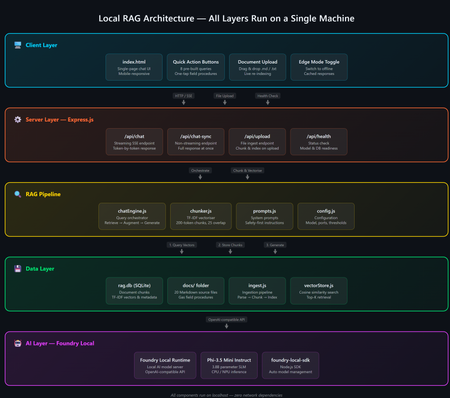
A practical guide to building an on-device AI support agent using Retrieval-Augmented Generation, JavaScript, and Microsoft Foundry Local. The Problem: AI That Can't Go Offline Most AI-powered applications today are firmly tethered to the cloud. They assume stable internet, low-latency API calls, and the comfort of a managed endpoint. But what happens when your users are in an environment with zero connectivity a gas pipeline in a remote field, a factory floor, an underground facility? That's exactly the scenario that motivated this project: a fully offline RAG-powered support agent that runs entirely on a laptop. No cloud. No API keys. No outbound network calls. Just a local model, a local vector store, and domain-specific documents all accessible from a browser on any device. The Gas Field Support Agent - running entirely on-device What is RAG and Why Should You Care? Retrieval-Augmented Generation (RAG) is a pattern that makes language models genuinely useful for domain-specific tasks. Instead of hoping the model "knows" the answer from pre-training, you: Retrieve relevant chunks from your own documents Augment the model's prompt with those chunks as context Generate a response grounded in your actual data The result: fewer hallucinations, traceable answers, and an AI that works with your content. If you're building internal tools, customer support bots, field manuals, or knowledge bases, RAG is the pattern you want. Why fully offline? Data sovereignty, air-gapped environments, field operations, latency-sensitive workflows, and regulatory constraints all demand AI that doesn't phone home. Running everything locally gives you complete control over your data and eliminates any external dependency. The Tech Stack This project is deliberately simple — no frameworks, no build steps, no Docker: Layer Technology Why AI Model Foundry Local + Phi-3.5 Mini Runs locally, OpenAI-compatible API, no GPU needed Backend Node.js + Express Lightweight, fast, universally known Vector Store SQLite via better-sqlite3 Zero infrastructure, single file on disk Retrieval TF-IDF + cosine similarity No embedding model required, fully offline Frontend Single HTML file with inline CSS No build step, mobile-responsive, field-ready The total dependency footprint is just four npm packages: express , openai , foundry-local-sdk , and better-sqlite3 . Architecture Overview The system has five layers — all running on a single machine: Five-layer architecture: Client → Server → RAG Pipeline → Data → AI Model Client Layer — A single HTML file served by Express, with quick-action buttons and responsive chat Server Layer — Express.js handles API routes for chat (streaming + non-streaming), document upload, and health checks RAG Pipeline — The chat engine orchestrates retrieval and generation; the chunker handles TF-IDF vectorization Data Layer — SQLite stores document chunks and their TF-IDF vectors; source docs live as .md files AI Layer — Foundry Local runs Phi-3.5 Mini Instruct on CPU/NPU, exposing an OpenAI-compatible API Getting Started in 5 Minutes You need two prerequisites: Node.js 20+ — nodejs.org Foundry Local — Microsoft's on-device AI runtime: Terminal winget install Microsoft.FoundryLocal Then clone, install, ingest, and run: git clone https://github.com/leestott/local-rag.git cd local-rag npm install npm run ingest # Index the 20 gas engineering documents npm start # Start the server + Foundry Local Open http://127.0.0.1:3000 and start chatting. Foundry Local auto-downloads Phi-3.5 Mini (~2 GB) on first run. How the RAG Pipeline Works Let's trace what happens when a user asks: "How do I detect a gas leak?" RAG query flow: Browser → Server → Vector Store → Model → Streaming response Step 1: Document Ingestion Before any queries happen, npm run ingest reads every .md file from the docs/ folder, splits each into overlapping chunks (~200 tokens, 25-token overlap), computes a TF-IDF vector for each chunk, and stores everything in SQLite. Chunking example docs/01-gas-leak-detection.md → Chunk 1: "Gas Leak Detection – Safety Warnings: Ensure all ignition..." → Chunk 2: "...sources are eliminated. Step-by-step: 1. Perform visual..." → Chunk 3: "...inspection of all joints. 2. Check calibration date..." The overlap ensures no information falls between chunk boundaries — a critical detail in any RAG system. Step 2: Query → Retrieval When the user sends a question, the server converts it into a TF-IDF vector, compares it against every stored chunk using cosine similarity, and returns the top-K most relevant results. For 20 documents (~200 chunks), this executes in under 10ms. src/vectorStore.js /** Retrieve top-K most relevant chunks for a query. */ search(query, topK = 5) { const queryTf = termFrequency(query); const rows = this.db.prepare("SELECT * FROM chunks").all(); const scored = rows.map((row) => { const chunkTf = new Map(JSON.parse(row.tf_json)); const score = cosineSimilarity(queryTf, chunkTf); return { ...row, score }; }); scored.sort((a, b) => b.score - a.score); return scored.slice(0, topK).filter((r) => r.score > 0); } Step 3: Prompt Construction The retrieved chunks are injected into the prompt alongside system instructions: Prompt structure System: You are an offline gas field support agent. Safety-first... Context: [Chunk 1: Gas Leak Detection – Safety Warnings...] [Chunk 2: Gas Leak Detection – Step-by-step...] [Chunk 3: Purging Procedures – Related safety...] User: How do I detect a gas leak? Step 4: Generation + Streaming The prompt is sent to Foundry Local via the OpenAI-compatible API. The response streams back token-by-token through Server-Sent Events (SSE) to the browser: Safety-first response with structured guidance Expandable sources with relevance scores Foundry Local: Your Local AI Runtime Foundry Local is what makes the "offline" part possible. It's a runtime from Microsoft that runs small language models (SLMs) on CPU or NPU — no GPU required. It exposes an OpenAI-compatible API and manages model downloads, caching, and lifecycle automatically. The integration code is minimal if you've used the OpenAI SDK before, this will feel instantly familiar: src/chatEngine.js import { FoundryLocalManager } from "foundry-local-sdk"; import { OpenAI } from "openai"; // Start Foundry Local and load the model const manager = new FoundryLocalManager(); const modelInfo = await manager.init("phi-3.5-mini"); // Use the standard OpenAI client — pointed at the local endpoint const client = new OpenAI({ baseURL: manager.endpoint, apiKey: manager.apiKey, }); // Chat completions work exactly like the cloud API const stream = await client.chat.completions.create({ model: modelInfo.id, messages: [ { role: "system", content: "You are a helpful assistant." }, { role: "user", content: "How do I detect a gas leak?" } ], stream: true, }); Portability matters Because Foundry Local uses the OpenAI API format, any code you write here can be ported to Azure OpenAI or OpenAI's cloud API with a single config change. You're not locked in. Why TF-IDF Instead of Embeddings? Most RAG tutorials use embedding models for retrieval. We chose TF-IDF for this project because: Fully offline — no embedding model to download or run Zero latency — vectorization is instantaneous (just math on word frequencies) Good enough — for a curated collection of 20 domain-specific documents, TF-IDF retrieves the right chunks reliably Transparent — you can inspect the vocabulary and weights, unlike neural embeddings For larger collections (thousands of documents) or when semantic similarity matters more than keyword overlap, you'd swap in an embedding model. But for this use case, TF-IDF keeps the stack simple and dependency-free. Mobile-Responsive Field UI Field engineers use this app on phones and tablets often wearing gloves. The UI is designed for harsh conditions with a dark, high-contrast theme, large touch targets (minimum 48px), and horizontally scrollable quick-action buttons. Desktop view Mobile view The entire frontend is a single index.html file — no React, no build step, no bundler. This keeps the project accessible and easy to deploy anywhere. Runtime Document Upload Users can upload new documents without restarting the server. The upload endpoint receives markdown content, chunks it, computes TF-IDF vectors, and inserts the chunks into SQLite — all in memory, immediately available for retrieval. Drag-and-drop document upload with instant indexing Adapt This for Your Own Domain This project is a scenario sample designed to be forked and customized. Here's the three-step process: 1. Replace the Documents Delete the gas engineering docs in docs/ and add your own .md files with optional YAML front-matter: docs/my-procedure.md --- title: Troubleshooting Widget Errors category: Support id: KB-001 --- # Troubleshooting Widget Errors ...your content here... 2. Edit the System Prompt Open src/prompts.js and rewrite the instructions for your domain: src/prompts.js export const SYSTEM_PROMPT = `You are an offline support agent for [YOUR DOMAIN]. Rules: - Only answer using the retrieved context - If the answer isn't in the context, say so - Use structured responses: Summary → Details → Reference `; 3. Tune the Retrieval Adjust chunking and retrieval parameters in src/config.js : src/config.js export const config = { model: "phi-3.5-mini", chunkSize: 200, // smaller = more precise, less context per chunk chunkOverlap: 25, // prevents info from falling between chunks topK: 3, // chunks per query (more = richer context, slower) }; Extending to Multi-Agent Architectures Once you have a working RAG agent, the natural next step is multi-agent orchestration where specialized agents collaborate to handle complex workflows. With Foundry Local's OpenAI-compatible API, you can compose multiple agent roles on the same machine: Multi-agent concept // Each agent is just a different system prompt + RAG scope const agents = { safety: { prompt: safetyPrompt, docs: "safety/*.md" }, diagnosis: { prompt: diagnosisPrompt, docs: "faults/*.md" }, procedure: { prompt: procedurePrompt, docs: "procedures/*.md" }, }; // Router determines which agent handles the query function route(query) { if (query.match(/safety|warning|hazard/i)) return agents.safety; if (query.match(/fault|error|code/i)) return agents.diagnosis; return agents.procedure; } // Each agent uses the same Foundry Local model endpoint const response = await client.chat.completions.create({ model: modelInfo.id, messages: [ { role: "system", content: selectedAgent.prompt }, { role: "system", content: `Context:\n${retrievedChunks}` }, { role: "user", content: userQuery } ], stream: true, }); This pattern lets you build specialized agent pipelines a triage agent routes to the right specialist, each with its own document scope and system prompt, all running on the same local Foundry instance. For production multi-agent systems, explore Microsoft Foundry for cloud-scale orchestration when connectivity is available. Local-first, cloud-ready Start with Foundry Local for development and offline scenarios. When your agents need cloud scale, swap to Azure AI Foundry with the same OpenAI-compatible API your agent code stays the same. Key Takeaways 1 RAG = Retrieve + Augment + Generate Ground your AI in real documents — dramatically reducing hallucination and making answers traceable. 2 Foundry Local makes local AI accessible OpenAI-compatible API running on CPU/NPU. No GPU required. No cloud dependency. 3 TF-IDF + SQLite is viable For small-to-medium document collections, you don't need a dedicated vector database. 4 Same API, local or cloud Build locally with Foundry Local, deploy with Azure OpenAI — zero code changes. What's Next? Embedding-based retrieval — swap TF-IDF for a local embedding model for better semantic matching Conversation memory — persist chat history across sessions Multi-agent routing — specialized agents for safety, diagnostics, and procedures PWA packaging — make it installable as a standalone app on mobile devices Hybrid retrieval — combine keyword search with semantic embeddings for best results Get the code Clone the repo, swap in your own documents, and start building: git clone https://github.com/leestott/local-rag.git github.com/leestott/local-rag — MIT licensed, contributions welcome. Open source under the MIT License. Built with Foundry Local and Node.js.1.8KViews1like0CommentsBuilding an Auditable Security Layer for Agentic AI
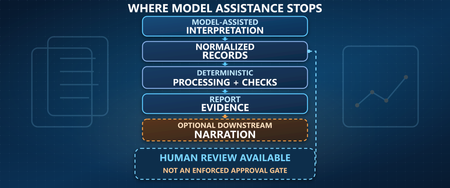
Most agent failures do not look like breaches. They look like a normal chat, a normal answer, and a normal tool call. Until the next morning, when a single question collapses the whole story: who authorized that action. You think you deployed an agent. In reality, you deployed an unbounded automation pipeline that happens to speak English. I’m Hazem Ali — Microsoft AI MVP, Distinguished AI & ML Architect, Founder & CEO at Skytells. For over 20 years, I’ve built secure, scalable enterprise AI across cloud and edge, with a focus on agent security and sovereign, governed AI architectures. My work on these systems is widely referenced by practitioners across multiple regions. Hazem Ali honored to receive an official speaker invitation under the patronage of H.H. Sheikh Dr. Sultan bin Muhammad Al Qasimi, Member of the UAE Supreme Council and Ruler of Sharjah, to speak at the Sharjah International Conference on Linguistic Intelligence (SICLI), organized by the American University of Sharjah (AUS) and the Emirates Scholar Center for Research and Studies. This piece is a collaboration with Hammad Atta a Practice Lead – AI Security & Cloud Strategy and Dr. Yasir Mehmood , Dr Muhammad Zeeshan Baig, Dr. Muhammad Aatif, Dr. MUHAMMAD AZIZ UL HAQ. We align on one core idea: agent security is not about making the model behave. It is about building enforceable boundaries around the model and proving every privileged step. This article is meant to sit next to my earlier Tech Community piece, Zero-Trust Agent Architecture: How To Actually Secure Your Agents, and go one level deeper into the mechanics you can implement on Azure today. Let me break it down. The Principle: The model is not your boundary Let me break it down in the way I’d explain it in a design review. A boundary is something that still holds when the component on the other side is adversarial, confused, or simply wrong. An LLM is none of those reliably. In an agent, the model is not just a generator. It becomes a planner and scheduler. It decides when to retrieve, which tool to call, how to shape arguments, and when to loop. That means your real attack surface is not “bad output.” It is the control-flow graph the model is allowed to traverse. So if your “security” lives inside the prompt, you are putting policy in the same token stream the attacker can influence. That is not a boundary. That is a suggestion. The only stable design is to treat the model like an untrusted proposer and the runtime like the verifier. Here is the chain I use. Each gate is external to the model and survives manipulation. Context Gate: Everything that enters the model is treated as executable influence, not “text.” Capability Gate: Tools are invoked as constrained capabilities, not free-form function calls. Evidence Gate: Every privileged step produces a verifiable artifact, not a story. Retrieval Control Plane: What the agent can see is governed by labels and identity, not prompt etiquette. Detection Layer: Drift and probing become alerts, not surprises. Now the rare part, the part most people miss: the boundary is not “block or allow.” The boundary is stateful. Once the runtime sees a suspicious signal, the entire session must transition into a degraded capability state, and every downstream gate must enforce that state. 1. Treat context as executable influence, and preserve provenance If you do RAG, your documents are not “supporting info.” They are an input channel. That makes the biggest prompt-injection risk not the user. It is your documents. Microsoft’s Prompt Shields covers user prompt attacks (scanned at the user input intervention point) and document attacks (scanned at the user input and tool response intervention points). When enabled, each request returns annotation results with detected and filtered values that your runtime can translate into a policy decision: block, degrade, or allow. Provenance Collapse. Most teams concatenate prompt + policy + retrieved chunks into one blob. The moment you do that, you lose the one thing you need for a defensible boundary: you can no longer reliably tell which tokens came from where. That is how “context” becomes “authority.” For indirect/document attacks, Microsoft guidance recommends delimiting context documents inside the prompt using """<documents> ... </documents>""" to improve indirect attack detection. That delimiter is not formatting. It is a provenance marker that improves indirect attack detection through Prompt Shields. Minimal, practical pattern: // Provenance-preserving prompt construction for indirect/document attack detection function buildPrompt(system: string, user: string, retrievedDocs: string[]): string { const docs = retrievedDocs.map((d) => `- ${d}`).join("\n"); return [ system, "", `User: ${user}`, "", `""" <documents>\n${docs}\n</documents> """`, ].join("\n"); } Then treat Prompt Shields output as a session security event, not a banner: type RiskState = "NORMAL" | "SUSPECT" | "BLOCK"; type FilterPolicy = "BLOCK_ON_FILTERED" | "DEGRADE_ON_FILTERED"; function computeRiskState( shields: { detected: boolean; filtered?: boolean }, labels: string[], policy: FilterPolicy = "DEGRADE_ON_FILTERED", ): RiskState { // detected => hard stop if (shields.detected) return "BLOCK"; // filtered is an annotation signal: block or degrade by policy if (shields.filtered) { return policy === "BLOCK_ON_FILTERED" ? "BLOCK" : "SUSPECT"; } // example: sensitivity-based degradation independent of shield hits const sensitive = labels.some((l) => ["Confidential", "HighlyConfidential", "Regulated"].includes(l), ); return sensitive ? "SUSPECT" : "NORMAL"; } When the signal is clear, you block and log. When it is suspicious, you do not warn. You downgrade authority. QSAF Alignment: Prompt Injection Protection (Domain 1): QSAF-PI-001 (static pattern blacklist), QSAF-PI-002 (dynamic LLM analysis), QSAF-PI-003 (semantic embedding comparison) All addressed by Prompt Shields and provenance marking. Context Manipulation (Domain 2): QSAF-RC-004 (context drift), QSAF-RC-007 (nested prompt injection) – mitigated by stateful risk calculation. 2. Tools are capabilities with constraints, not functions When the model proposes a tool call, your runtime should re-derive what is allowed from identity plus risk state, then enforce it at the gateway. type ToolRequest = { tool: string; args: unknown; }; type Capabilities = { allowWrite: boolean; allowedTools: Set<string>; }; function deriveCapabilities(risk: RiskState, roles: string[]): Capabilities { const baseAllowed = new Set(["search_kb", "get_profile", "summarize"]); const isAdmin = roles.includes("Admin"); if (risk === "SUSPECT") { return { allowWrite: false, allowedTools: baseAllowed }; } if (risk === "BLOCK") { return { allowWrite: false, allowedTools: new Set() }; } // NORMAL const tools = new Set([ ...baseAllowed, ...(isAdmin ? ["update_record", "issue_refund"] : []), ]); return { allowWrite: isAdmin, allowedTools: tools }; } function authorizeTool(req: ToolRequest, caps: Capabilities): void { if (!caps.allowedTools.has(req.tool)) throw new Error("ToolNotAllowed"); if (!caps.allowWrite && req.tool.startsWith("update_")) { throw new Error("WriteDenied"); } } The model can ask. It cannot grant itself permission. QSAF Alignment: Plugin Abuse Monitoring (Domain 3): QSAF-PL-001 (whitelist enforcement), QSAF-PL-003 (restrict sensitive plugins), QSAF-PL-006 (rate‑limiting) – implemented via capability derivation and gateway policies. Behavioral Anomaly Detection (Domain 5): QSAF-BA-006 (plugin execution pattern deviance) – detected by comparing actual calls against derived capabilities. The Integrity Gate: Hash-chain the authority, not the output Let me add the part that makes investigations clean. Most teams treat integrity like an audit log problem. That is not enough. Logs explain. Integrity proves. The hard truth is that agent authority is assembled out of pieces: the system instruction, the user prompt, retrieved chunks, risk annotations, and finally the tool intent. If you do not bind those pieces together cryptographically, an incident review becomes a story-telling session. This is why QSAF has an entire domain for payload integrity and signing, including prompt hash signing, nonce or replay protection, and a hash chain lineage that tracks how a session evolved. Here is how you can map that into the runtime verifies. You build a canonical “authority envelope” for every privileged hop, compute a digest, and then: link it to the previous hop (hash chain) include a nonce (replay control) sign the digest with Azure Key Vault (Key Vault signs digests, it does not hash your content for you) import crypto from "crypto"; type AuthorityEnvelope = { sessionId: string; turnId: number; policyVersion: string; // provenance-preserved components systemHash: string; userHash: string; documentsHash: string; // hash of structured retrieved chunks (not just rendered text) shields: { detected: boolean; filtered: boolean; }; riskState: "NORMAL" | "SUSPECT" | "BLOCK"; // proposed action (if any) tool?: { name: string; argsHash: string; }; // anti-replay + lineage nonce: string; prevDigest?: string; ts: string; }; function sha256(bytes: string): string { return crypto.createHash("sha256").update(bytes).digest("hex"); } // Canonicalization matters. JSON.stringify is OK if you control key order. // For cross-language, use RFC 8785 (JCS) canonical JSON. function canonicalJson(x: unknown): string { return JSON.stringify(x); } function buildEnvelope( input: Omit<AuthorityEnvelope, "nonce" | "ts">, ): AuthorityEnvelope { return { ...input, nonce: crypto.randomUUID(), ts: new Date().toISOString(), }; } function digestEnvelope(env: AuthorityEnvelope): string { return sha256(canonicalJson(env)); } Then you call Key Vault to sign that digest (REST sign), and optionally verify later (REST verify). The rare failure mode this blocks is subtle: authority splicing. Without a hash chain, it is possible for the runtime to correctly validate a tool call, but later be unable to prove which retrieved chunk, which Prompt Shields result, and which policy version were in force when that call was authorized. With the chain, every privileged hop becomes tamper-evident. This is the point: Prompt Shields tells you “this looks dangerous.” Document delimiters preserve provenance. The integrity gate makes the runtime able to say, later, with evidence: “This is exactly what I accepted as authority.” QSAF Alignment: Payload Integrity & Signing (Domain 6): QSAF-PY-001 (prompt hash signing), QSAF-PY-005 (nonce/replay control), QSAF-PY-006 (hash chain lineage) – directly implemented via the envelope and chaining. Tools must sit behind a wall that can say “no” Tool calls are where language becomes authority. If an agent can call APIs that mutate state, your security story is not about the response text. It is about whether the tool call is allowed under explicit policy. This is exactly where Azure API Management belongs: as the tool gateway that enforces authentication and authorization before any tool request reaches your backend. The validate-jwt policy is the canonical enforcement mechanism for validating JWTs at the gateway. The design goal is simple: The model can request a tool call. The gateway decides if it is permitted. A capability token approach keeps it clean: <!-- APIM inbound policy sketch --> <validate-jwt header-name="Authorization" failed-validation-httpcode="401"> <required-claims> <claim name="scp"> <value>tools.read</value> </claim> </required-claims> </validate-jwt> The claim name (scp, roles, or custom claims) depends on your token issuer; the point is enforcing authorization at the gateway, not inside model text. Now you can enforce “read-only mode” by issuing tokens that simply do not carry write scopes. The model can try to call a write tool. It still gets denied by policy. Evidence is not logs. Evidence is a signed chain. Logs help you debug. Evidence helps you prove. So you hash the session envelope and the tool intent, then sign the digest using Azure Key Vault Keys. Key Vault sign creates a signature from a digest, and verify verifies a signature against a digest. Key Vault does not hash your content for you. Hash locally, then sign the digest.), and Key Vault documentation is explicit that signing is sign-hash, not “sign arbitrary content.” You hash locally, then ask Key Vault to sign the hash. import crypto from "crypto"; const sha256 = (x: unknown): string => crypto.createHash("sha256").update(JSON.stringify(x)).digest("hex"); type IntentEnvelope = { sessionId: string; userId: string; promptHash: string; documentsHash: string; tool: string; argsHash: string; nonce: string; ts: string; policyVersion: string; }; function buildIntent( sessionId: string, userId: string, prompt: string, docs: unknown, tool: string, args: unknown, policyVersion: string, ): IntentEnvelope { return { sessionId, userId, promptHash: sha256(prompt), documentsHash: sha256(docs), tool, argsHash: sha256(args), nonce: crypto.randomUUID(), ts: new Date().toISOString(), policyVersion, }; } Once you do this, your system stops “explaining.” It starts proving. Govern what the agent can see, not only what it can say RAG without governance eventually becomes a data exposure feature. This is why I treat retrieval as a governed operation. Microsoft Purview sensitivity labels give you a practical way to classify content and build retrieval rules on top of that classification. Microsoft documents creating and configuring sensitivity labels in Purview. The pattern is simple: Label the corpus. Filter retrieval by label and identity policy. Log label distribution per completion. Alert when a low-privilege identity retrieves high-sensitivity labels. This is how you keep sovereignty real. Not in a slide deck. In the retrieval path. Operate it like a security system: posture and detection Inline gates reduce risk. They do not eliminate it. Systems drift. People add tools. Policies get loosened. Attacks evolve. Microsoft Defender for Cloud’s Defender CSPM plan includes AI security posture management for generative AI apps and AI agents (Preview), including discovery/inventory of AI agents deployed with Azure AI Foundry. Then you use Microsoft Sentinel to turn your telemetry into incidents, with scheduled analytics rules. Your detections should match the gates you built: Repeated Prompt Shields detections from the same identity or session. Tool-call spikes after a suspicious document signal. APIM denials for write endpoints from sessions in read-only mode. High-sensitivity label retrieval by identities that should never touch that tier. QSAF Alignment: Behavioral Anomaly Detection (Domain 5): QSAF-BA-001 (session entropy), QSAF-BA-004 (repeated intent mutation), QSAF-BA-007 (unified risk score) – detected via Sentinel rules. Cross‑Environment Defense (Domain 9): QSAF-CE-006 (coordinated alert response) – using Sentinel incidents and playbooks. Where the reference checklist fits, quietly Behind the scenes, we use a control checklist lens to ensure we cover prompt/context attacks, tool misuse, integrity, governance, and operational monitoring. The point is not to rename Microsoft features into framework terms. The point is to make the system enforceable and auditable using Azure-native gates. Closing Zero trust for agents is not a slogan. It is a build. Prompt Shields gives you a front gate for both user prompt attacks and document attacks, with clear annotations like detected and filtered. API Management gives you a tool boundary that can say “no” regardless of what the model tries, using validate-jwt. Signed intent gives you evidence, using Key Vault’s sign-hash semantics. Purview labels give you governed retrieval. Sentinel and Defender give you an operating model, not wishful thinking. If you want the conceptual spine and the architectural principles that frame this pipeline, start with my earlier Tech Community pieces, then come back here and implement the gates. Thanks for reading — Hazem Ali605Views1like0CommentsConditional Access for Agent Identities in Microsoft Entra
AI agents are rapidly becoming part of everyday enterprise operations summarizing incidents, analyzing logs, orchestrating workflows, or even acting as digital colleagues. As organizations adopt these intelligent automations, securing them becomes just as important as securing human identities. Microsoft Entra introduces Agent Identities and extends Conditional Access to them but with very limited controls compared to traditional users and workload identities. This blog breaks down what Agent Identities are, how Conditional Access applies to them, and what are current limitations. What Exactly Are Agent Identities? Microsoft Entra now supports a new identity type designed specifically for AI systems: Agent Identity – like an app/service principal but specialized for AI Agent User – an identity that behaves more like a human user Agent Blueprint – a template used to create agent identities This model exists because AI systems behave differently than humans or applications: they can act autonomously, operate continuously, and make decisions without user input. AI-driven automation must be governed and that’s where Conditional Access comes in. Conditional Access for Agents, but with Important Limitations Today, Conditional Access for agent identities is purposely minimal. Microsoft clearly states: Conditional Access applies only when: An agent identity requests a token An agent user requests a token It does NOT apply when: A blueprint acquires a token to create identities An agent performs intermediate token exchange What Controls Are Actually Available Today? ✔ Supported Today Category Supported? Details Identity Targeting ✔ Yes You can include/exclude agent identities & agent users Block Access ✔ Yes This is the only Grant control currently available Agent Risk (Preview) ✔ Yes Early stage risk evaluation Sign-in evaluation ✔ Yes Token acquisition governed by CA ❌NOT Supported Today These CA controls do not apply to Agent Identities: MFA Authentication strength Device compliance Approved client apps App protection policies Session controls User sign-in frequency Terms of Use Location conditions (network/device-based) Client apps (legacy/modern access) Why? Because agents do not perform interactive authentication and do not use device signals or session context like humans. Their authentication is purely machine‑driven. How Conditional Access Works for Agents When an agent identity (or agent user) requests a token, Microsoft Entra: Identifies the requesting agent Checks CA policy assignments Evaluates any agent-risk conditions Allow/Blocks token issuance if conditions meet That’s it. No MFA prompt. No device check. No authentication strength evaluation. This makes CA for agents fundamentally different from CA for humans. Why Is Conditional Access So Limited for Agents? Two major reasons: Agents cannot satisfy user-based controls AI agents cannot: Perform MFA Use biometrics Run on compliant devices Follow session prompts These are human-driven processes. Agents authenticate via secure credential flows They use: Client credentials Federated identity credentials Token exchange flows So CA is limited to identity-level allow/block and risk-based token decisions. Practical Use Cases (Given Today’s Limitations) Even with limited controls, CA for agents is still important. Stop compromised agents from continuing to operate If Microsoft Entra detects high agent risk: CA can block token issuance This halts the agent’s ability to act immediately Enforce separation of duties for AI agents Even though you cannot apply MFA or auth strength, you can: Separate agents into “allowed” vs “blocked” groups Apply different CA rules per department or system Prevent AI sprawl Large enterprises may generate hundreds of AI agents. CA gives central admin control: Only approved, vetted agents can operate Others are blocked at token-request time Why Agent Blueprints Cannot Be Governed by CA Blueprints are templates, not active identities. Blueprint token flows are system-level operations, not access attempts. Therefore: ❌ No CA evaluation ❌ No controls applied ❌ Not counted as agent activity Only actual agent identities are governed by CA. What the Future Might Include Microsoft hints the capabilities will expand: Agent risk scoring Agent behaviour analytics More granularity in CA for agents Additional grant controls Policy scoping at task or capability level But as of today, CA for agents remains intentionally constrained to allow safe onboarding of the new identity type without accidental disruption. Final Summary Conditional Access for Agent Identities is currently a lightweight enforcement mechanism designed to block unauthorized or risky agents, not a full policy suite like we have for human users. ✔ What it does: Controls whether an agent identity can acquire a token Allows blocking specific agents Implements early agent‑risk logic Applies Zero Trust principles at the identity perimeter ❌ What it does not do: Enforce MFA Enforce authentication strength Enforce device or location conditions Apply session controls Govern blueprints As organizations adopt more autonomous agents, this foundational layer keeps AI identities visible and controllable and sets the stage for richer governance in the future.