agent builder
35 Topics
Agent Credit Limits and Alerts - Copilot Studio
Hi everyone, We're evaluating the use of Agent Credit Limits and alert notifications in the Power Platform Admin Center as a way to control unexpected Copilot Credit consumption. Recently, we had an agent consume 668k Copilot Credits in just 3 days, which raised concerns about how quickly usage can grow before administrators become aware of it. My questions are: How frequently is Copilot Credit consumption evaluated against an agent's credit limit? Are alert notifications generated in near real-time, or are they dependent on the same reporting pipeline used by the consumption reports? If an agent reaches its configured credit limit, is it automatically turned off or blocked from further consumption? Given that consumption reports often appear to refresh hours later (or even the next day), can alerts also be delayed? If there is a reporting delay, is there a risk that an agent could significantly exceed the intended limit before administrators receive a notification? What is the recommended approach for preventing large unexpected consumption spikes in production? Has anyone successfully implemented a governance model that provides more immediate protection against runaway usage, or are the current credit limits and alerts primarily intended for retrospective monitoring? Thanks in advance for any guidance.80Views0likes2Comments
Copilot Studio + SharePoint: Markdown (.md) Files in Doc Libraries Supported as Knowledge Sources?
Hi all, We’ve been doing some deeper testing with Copilot Studio agents grounded in SharePoint knowledge sources, and I’m hoping to clarify whether what we’re seeing is a known limitation or an undocumented gap. Scenario A Copilot Studio agent uses SharePoint document libraries as a knowledge source The library contains Markdown (.md) files that are intentionally used as canonical design references The same .md files: ✅ Work well when uploaded directly to the agent ❌ Are not retrievable or citable when stored in a SharePoint library and added as a SharePoint knowledge source To help with grounding, we created modern SharePoint index pages that: Explain what the markdown collections are (Patterns, ADRs, Guardrails) Link directly to the canonical folders and files Explicitly state that the .md files are the source of truth The agent can: Discover and summarize the index pages correctly Understand that .md artifacts exist and where they live But it cannot: Read the content of the individual .md files Apply a specific pattern or ADR from those files in a design conversation Cite them as sources, even when permissions and search indexing are confirmed What We’ve Checked Permissions (agent user has access) Folder depth (kept shallow) Search results (markdown files appear in SharePoint search) SharePoint indexing status Work IQ enabled Same content works when attached directly to the agent This behavior also seems consistent with what others have reported here: Markdown works when uploaded directly Markdown retrieval degrades when hosted in SharePoint libraries Questions for the Product Team / Community Are Markdown (.md) files in SharePoint document libraries officially supported as Copilot Studio knowledge sources today? If yes, are there specific constraints (file size, rendering, parsing, indexing) that differ from Word/PDF? If no (or “not yet”), is this a known limitation on the roadmap? Is the recommended pattern to: Convert important markdown files into .aspx pages, or Use thin “index / summary” pages and keep markdown canonical until retrieval improves? We’re happy to adapt our information architecture — just trying to align with the intended platform direction rather than work against it. Thanks in advance for any guidance or clarification. This capability is extremely powerful, and clearer expectations here would help a lot of teams make the right design tradeoffs.3.9KViews15likes9Comments
Copilot Studio Agent Unable to Retrieve Usable DOCX/XLSX Content from OneDrive (and SharePoint)
Hi everyone, I'm building a Copilot Studio agent that needs to read and process Word (.docx) and Excel (.xlsx) files stored in OneDrive. The agent can successfully locate files and retrieve metadata, but it appears unable to retrieve Office files as usable binary content. I tested the behaviour using the OneDrive Get file content action: A text file (test.txt) was returned correctly and matched the original file contents exactly. A Word file (Test.docx) was returned beginning with the ZIP signature PK and contained recognisable DOCX entries such as [Content_Types].xml and _rels/.rels. However, the returned payload also contained large numbers of Unicode replacement characters (�). The returned content appears to be a text string rather than binary data or base64 content. Because Office files are ZIP-based binary formats, the returned payload cannot be reconstructed into a valid .docx or .xlsx file, preventing downstream libraries such as python-docx and openpyxl from opening the file. Is there any way to resolve this issue?615Views1like6CommentsUsing Dynamics 365 ERP MCP Server from a Standalone Copilot Studio Environment
We have a Copilot Studio environment that is not connected to Dataverse and is not linked to any Dynamics 365 Finance & Operations environment. We would like to use the Dynamics 365 ERP MCP Server from an agent in this Copilot Studio environment to retrieve data from F&O. Is this configuration supported? If so: What connection and authentication setup is required between Copilot Studio and the Dynamics 365 ERP MCP Server? Does the Copilot Studio environment need to be linked to the target F&O environment or Dataverse environment? Can the ERP MCP Server connect directly to F&O independently of the Copilot Studio environment? How is user authentication handled when the agent invokes MCP tools? Does the MCP connection use the authenticated user's F&O permissions, a service principal, or the connection owner's credentials? Are there any prerequisites, limitations, or recommended architectures for using the ERP MCP Server from a standalone Copilot Studio environment?68Views0likes0CommentsCreate agents fast with Agent Builder in Copilot
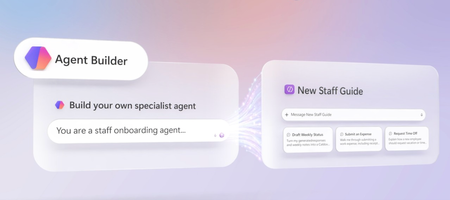
Describe what you want in one prompt, and Copilot Agent Builder generates the name, instructions, skills, and knowledge setup for you — grounded only in the SharePoint sites, files, and Copilot Connectors you choose. Teach your agent a Skill to handle recurring work, like drafting weekly status emails from your own template, then test it in Preview before you publish. Share it with people or groups and set exact permissions, track real usage in the new Monitor tab, and push your best agents into your org’s Agent Store catalog. Ned Friend, Group Product Manager for Copilot Agent Builder shares how to turn an agent into a tool your whole team can run, measure, and trust. One prompt. A fully configured agent. Agent Builder in Copilot auto-generates the name, instructions, skills, and knowledge grounding from your description. See how it works. No code. Just a prompt and a template. Agent Builder in Copilot turns that into a Skill your agent runs to generate standardized outputs, like status emails or reports, on demand. Check it out. Pin your agent to trusted sources only. Add SharePoint files, Outlook mail, Teams meetings, or connect business systems, so that it only uses information you give it, nothing else. See how it works. 👥 Who it’s for: Team leads and managers who want trusted, repeatable answers for their team, plus IT admins and Microsoft 365 power users building specialist Copilot agents without code. ⏱️ Chapters: 0:00 Build specialist agents inside Copilot 0:34 Ground agents in trusted org knowledge 1:31 Create a new hire onboarding agent 2:15 Natural-language agent creation 2:41 Ground answers in SharePoint knowledge 4:13 Skills for repeatable tasks 4:53 Precise knowledge grounding 6:37 Preview and test before publishing 7:03 Share your agent with set permissions 7:39 See the new hire’s agent view 8:22 Usage monitoring 8:41 Publish agents to your org catalog Copilot Agent Builder lets you create a specialist agent by describing what you want it to do in plain language. Agent Builder interprets that prompt and automatically generates the agent’s name, description, instructions, skills, knowledge sources, and suggested prompts, which you can review and edit directly. Ground every answer in the exact knowledge you choose: SharePoint and OneDrive files, Outlook email and calendar, Microsoft Teams chats and meetings, or external business systems connected through Copilot Connectors. Turn on web search only when you want the agent to research beyond your organization, like competitor or customer research. Add Skills to teach the agent repeatable, multi-step work — in this video, a weekly status update email built from a real template, matching its tone, sections, and formatting automatically. Preview and test the agent before publishing, then share it with people or groups and set whether they can use it or edit it. Once your agent is live, the Monitor tab tracks total sessions, daily active users, average messages per session, average duration, and which knowledge sources get used most. For agents with strong adoption, publish them to the Built by your org section of the Agent Store for wider use across your organization. Try Copilot Agent Builder for yourself — it’s included with Copilot. Subscribe to Microsoft Mechanics for more videos like this. Unfamiliar with Microsoft Mechanics? Microsoft’s Official Video Series for IT — Subscribe https://www.youtube.com/c/MicrosoftMechanicsSeries — Microsoft Tech Community: https://techcommunity.microsoft.com/t5/microsoft-mechanics-blog/bg-p/MicrosoftMechanicsBlog — Podcast: https://microsoftmechanics.libsyn.com/podcast Join us on social: — https://twitter.com/MSFTMechanics — https://www.linkedin.com/company/microsoft-mechanics/ — https://www.instagram.com/msftmechanics/ — https://www.tiktok.com/@msftmechanics Video Transcript: -You’re probably used to working with Copilot across Microsoft 365 for everyday tasks, but did you know that you can create your own specialist agents in minutes to provide informed, authoritative answers and produce consistent, standardized content for specific business scenarios? Think about the work you do every day. Maybe it’s reviewing content for compliance, creating customer or internal-focused communications, or answering work-related policy questions. While Copilot can help with these tasks using broadly available information, Agent Builder, on the other hand, which is included in Copilot, lets you build and use agents with a specific purpose, grounded in trusted organizational knowledge. Think of it as the difference between hiring a general contractor to remodel your home and bringing in a licensed electrician to design an electrical plan to rewire the house. -Both skill sets are valuable, but the specialist brings focused expertise, follows established standards, and is trusted for a specific type of work. Similarly, a specialist agent can be created to serve a specific purpose and configured to provide custom expert answers by only using the information sources you choose to ground them with. Specialist agents can generate standardized deliverables based on specific skills that follow your organizational guidelines, and creating one is as simple as describing what you want it to do and letting Agent Builder build it for you. -So let’s make this real. As a manager, instead of repeatedly walking new hires through team processes, resources, and responsibilities, I can create a new hire onboarding agent that provides trusted answers and consistent deliverables. It helps new employees get productive faster and deliver work aligned with our organization’s guidelines from day one. Here I’m in Copilot. I have a growing team with lots of new members, and agents are the best way to make team knowledge accessible. Before you build anything, it’s a good idea to check out the Agent Store for the agents you can already choose from, including ones shared with you by people on your team. And if nothing fits the bill, you can easily create your own custom agents from scratch. -So let’s start building. I’ll scroll back up and select create agent, and I’m taken to the Agent Builder experience, where I just need to describe what I want our agent to do. I’ll type, “You are a new staff onboarding agent to help answer questions about business processes, how to perform common tasks, and provide answers to product or service questions. Answer using information in these locations and files.” I want to give the agent access to the specific knowledge to inform its responses. I can either hit the plus sign or use a forward slash to reference content for this agent to use as it answers questions. So I’ll use the forward slash and use this SharePoint site where we already store official documents and files. -Now I’ll use the plus sign to add more content, such as files, meetings, chats, and more. This time I’ll choose a specific process document. Now the site and file will be the only information used for the agent’s responses. And when I hit send, this will take a moment to run, but what’s impressive is Agent Builder interprets my intent and it automatically generates an agent name, description, and detailed instructions for how the agent should behave. It also added skills, knowledge, and suggested prompts that I’ll cover in a minute. I can review everything and make edits directly here if I want to. -So right now, the agent can answer questions in chat with defined and approved expert knowledge. I want to go further. I want our agent to be able to author standardized weekly status emails. Skills are perfect for that, or any time that I want an agent to complete a repeatable task consistently following defined steps. I just need to describe the skill using natural language. Under its instructions, you can see skills. Based on our initial prompt, it’s generated a new staff onboarding skill automatically. I can also create or add my own skills to extend what the agent can do. -Here, I’ll write another prompt to create a weekly status update email skill based on generated responses and use this email as a template. And again, I’ll add a forward slash with the name of the file. This will teach the agent how to author the update using the right tone, altitude, sections, and formatting. And behind the scenes, it’s doing all the coding and configurations for me. And when it’s done, it will appear under the Skills section here. -As another option, if you’re already using skills from other places, you can also upload those files here. So my initial prompt updated the knowledge and now I’ll configure that further to make my agent even more of a specialist. Knowledge is the heart of an agent. Here you can see the sources that I specified in my prompt earlier. The quality of the agent depends on the quality of the knowledge you provide. If I wanted to, I could add additional sources, such as cloud files from SharePoint or OneDrive, the user’s Outlook email and calendar, as well as Microsoft Teams chats, channels, and recorded meetings. -I also have the option to connect to specific business systems using Copilot connectors. These could be enterprise intranet sites, SaaS apps like ticketing systems that we’re connected to, and more. This way, the agent will be able to find relevant information exactly where it’s stored. Optionally, I can select web search for when it makes sense for the agent to look up information on the internet, for example, things like competitor and customer research. In this case, I won’t do that because I only want the agent to use internal knowledge. -Additionally, I could manually add attachments from my local device if they are not already in the cloud. So I did all of that manually, but I could also ask the chat experience on the left to do more or click suggest improvements to trigger that, and the same applies to instructions. This last section contains suggested prompts that were generated automatically based on my initial prompt. These help new users learn how to use the agent and give existing users a shortcut to repeat the most common prompts for the agent. These are also editable. I want my users to build on these first three suggestions as well as use their own questions, so I’ll delete the rest. -At this point, in just a few minutes, I’ve defined and scoped my agent experience using the knowledge available to my team, and I can test it out before finalizing or sharing it. Clicking into the preview tab shows me what the agent will look like once it’s published. I’ll test it using a prompt. “What do I need to do to schedule my upcoming vacation time?” And it responds with the standard process. This preview shows how it will appear for people using the agent. If you don’t like how it responds or how it looks, like the icon, description, or the suggested prompts, you can just go back to the configure tab and make changes. -Now that our agent is tested and ready, I can create it and share it with my team. To do that, I just need to hit create. And in the background, that is going to register it as a private agent for my own personal use when I’m using Copilot Chat. Then, to share this agent with others in my organization, I can select share, and it’s just like sharing a file. I just need to add people or group names and I can control whether the people I share with can simply use the agent or also make edits to the agent. -From there, I just need to confirm and our agent is shared over email and in the Agent Store. With the agent shared, let me show you what a new hire would see. Here I’m signed in as that new hire, Katri, where I got an email with a link to the agent we just shared, so I’ll open it. I can see the suggested prompts that we added previously. In this case, I’ll ask it, “Summarize my previous week using my meetings and emails to help build a status report.” It reasons over the knowledge sources and reference email we added earlier and generates a standardized response with accomplishments, meetings attended, risks, and issues under review, as well as next steps and more. Once my agent has been in production for a while, I can see how much people are using it to know that it’s working as expected. -The new monitor tab in Agent Builder gives you visibility into how your agents are being used, including total sessions, daily active users, average messages per session, and average duration. And you can see how people are engaging over time and the knowledge sources used in conversations. For agents that get significant usage, you might want to publish it into the built by your org section of the Agent Store. That’s as easy as opening the agent menu and clicking submit to your org catalog. Here you can specify additional information like the terms of use and customize your developer name to be something more official. With that, it will go to my admin to approve and then get discovered and used by my organization for even more impact. -With Agent Builder in Copilot, it’s easy to create your own specialist agents in minutes that provide informed, authoritative answers and produce consistent, standardized content for specific business scenarios. It’s included with Copilot, so try it for yourself today, and subscribe to Microsoft Mechanics if you haven’t already. Thank you for watching.566Views0likes0CommentsMCP (Model Context Protocol)
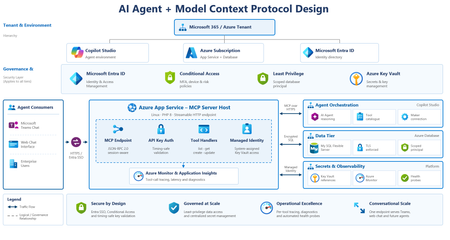
gave an AI agent write access to a production system. Not a demo. A real internal tool people depend on. It can now read, create, and update records - in plain language, from a chat window. Four things I learned building it with MCP (Model Context Protocol): 1. The tool description IS the interface. The agent doesn't read your code. It reads one sentence describing each tool, and decides from that alone whether to call it. Write "internal API test" → ignored forever. Write "creates and updates support tickets" → fires correctly. We spent 15 years designing UIs for humans. The design surface is now a sentence a model reads. 2. Agents can't click "Sign in." Any auth flow expecting a browser redirect silently breaks an agent connection. Machine access and human access need separate doors into the same house. 3. MCP errors don't mean what you think. My server returned success on every request -and the agent still failed. A "404" in MCP means session expired, not wrong URL. New protocol, new error vocabulary. 4. Least privilege stops being optional the moment an agent can write. A human with too many permissions makes occasional mistakes. An agent makes them at machine speed, confidently, while explaining why it was right. Why this matters: MCP turns "integrate AI into our systems" from a bespoke project into a standard interface. Expose capabilities, describe them clearly, and any compliant agent can use them. Same shift APIs caused 20 years ago - except the consumer isn't a program following rigid contracts. It's a model deciding at runtime what to call and why. The interfaces we built for humans aren't going away. They're just no longer the only way in. Activate to view larger image,69Views0likes0Comments
Copilot Licensing questions
NOTE: I selected the CP Studio category here since it is involved in this question, but not exclusively. My question is about licensing requirements for: creating sharing using Copilot "custom" agents. I am guessing that the answers will be different depending on whether we are talking about declarative agents or agents from Copilot Studio (remembering that there also might be different answers for the pro-code developer level with the Agents Toolkit). So now I have three questions for each of three levels of agents! So let's do this. What licensing is required for each of these? Agent type Creation Sharing Using declarative agents Copilot Studio agents agents from the Studio Toolkit I also read one place where it suggested that sharing of some agents requires my organization to have the Copilot Studio tenant license to do the sharing, but it was not very clear. This is a big question! I hope someone can answer this. I have looked high and low and even asked Copilot a few times, but unfortunately, I received different answers. At least I am not asking about pricing! 😮 Thank you in advance for the answer.Solved219Views0likes3Comments
Custom Agent can’t read scanned PDF/Image received from Flows
I'm trying to build a Flow in Copilot Studio that triggers when a PDF/image is uploaded to SharePoint/OneDrive, passes it to a Custom Agent, which is able to extract text from the PDF/image to generate a standardized filename. The Custom Agent works well standalone (drag-and-dropping scanned PDF/image directly into the Copilot chat box works fine!) But passing the file to the Custom Agent via Flow fails. What I tried Approach A (Base64): Used Get file content, converted it to Base64 via base64(...), and sent a JSON payload (fileName, mimeType, documentBase64) to the Agent. Approach B (SharePoint Link): Used Create share link and passed the file's webUrl to the Agent instead of raw file content The issues Issue with Base64: The Agent receives the payload, but fails on scanned/image-based PDFs, replying: "The uploaded file content is a base64 stream for a PDF and contains no extractable text... requires manual verification." Issue with SharePoint Link: The Agent can't open/read the link, replying: "Since I cannot read SharePoint content directly from just the path, please upload the PDF file here." (even after added a SharePoint MCP tool for the Agent). Questions How can I pass a scanned PDF/Image via Flow so the Custom Agent can read & extract the text (just like it does on direct chat upload)? Thanks for any help!102Views0likes0Commentshow to create a globally Shared ServiceNow Connector Connection in Copilot Studio
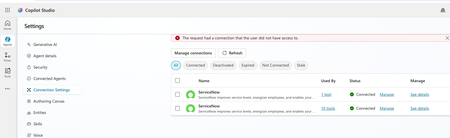
Hello, I have configured Microsoft entra ID oauth using certificate and shared this connection with everyone in my company since this is the only shared connection on the platform. https://learn.microsoft.com/en-us/connectors/service-now/#microsoft-entra-id-oauth-using-certificate. But, whey user's ( end users, agent maker, environment maker basically any user in copilot environment) are trying to use any servicenow tools ( e.g create record) which is using this shared connection in copilot studio/ teams, they are getting below error. https://learn.microsoft.com/en-us/connectors/service-now/ How to create a shared connection which can be shared across all enterprise users in my org for copilot AI agents which are using servicenow connector? Regards, Sachin94Views0likes0Comments