agent 365
1 TopicGovernance Is the New Bottleneck: What Agent 365 Means for Admins ?
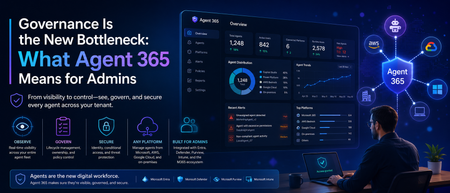
Hi all , following up on my last post about token limits, I wanted to write about something that's been on my mind a lot lately: the sheer number of agents quietly showing up across our tenant. Not just the ones we built deliberately in Copilot Studio, but ones people spun up in Power Platform, ones connected through Teams, and a few I genuinely couldn't trace back to an owner when I went looking. That's the moment this topic stopped being theoretical for me. For the last couple of years, the Microsoft AI conversation was mostly about capability -what can Copilot do, which model is better, how do I write a good prompt. That conversation hasn't gone away, but a second one has caught up to it fast: who's actually watching all of this. Microsoft's own 2026 Work Trend Index makes the shift explicit this isn't about saving a few minutes in Outlook anymore, it's about organizations redesigning how work gets divided between people and agents. And the moment agents start acting semi-independently across your tenant, "how many do we have, and what are they allowed to touch" becomes a real operational question, not a hypothetical one. That's exactly the gap Microsoft Agent 365 is built to close. It went generally available on May 1, 2026, alongside Microsoft 365 E7, and I think it's worth understanding properly especially if you're the one who ends up fielding the "wait, there's an agent doing what?" conversation. What Agent 365 Actually Is (and Isn't) The first thing worth clearing up: Agent 365 doesn't build agents. That's still Copilot Studio's job, or Foundry, or whatever platform your team is using. Agent 365 is the layer that sits on top of all of that it's a control plane, not a construction tool. Think of it less like "another AI product" and more like the admin and security backbone that was honestly missing from the picture until now. Microsoft frames it around three pillars: observe, govern, and secure. In practice, that means every agent in your tenant whether it was built in Copilot Studio, imported from AWS or Google Cloud, or even running locally on someone's Windows machine gets registered, gets its own identity through Microsoft Entra, and becomes something you can actually see and act on instead of just hoping it's behaving. That identity piece is the part I think gets underrated. Each agent gets its own Entra Agent ID, the same way a human user would. That's a meaningful shift it means conditional access policies, auditing, and compliance tooling that already exist for people can now extend to agents instead of treating them as some invisible background process. Why This Matters Right Now Here's the honest version of what's been happening across a lot of organizations, including bits of what I've seen firsthand: agent creation has gotten easy. Almost too easy. Between Copilot Studio, Power Platform, and now agentic mode built directly into Word, Excel, and PowerPoint, it doesn't take much for someone in a business unit to spin up something that's technically an AI agent with access to real data without IT or security ever being looped in. Microsoft has been fairly direct about this risk themselves, which I appreciated seeing in writing rather than just implied: the speed of agent development shows real value, but without guardrails, that pace turns into blind spots, lower ROI, and genuine security exposure. That's not vendor fear-mongering, that's just what happens when adoption outpaces oversight in any technology, and agents are no exception. What makes this particular moment different from past "shadow IT" waves is that agents don't just store or move data they can act on it. An agent with the wrong scope isn't just a compliance footnote, it's something that could send an email, modify a file, or trigger a workflow on its own. That's a different risk category than an unsanctioned spreadsheet sitting in someone's OneDrive. What You Actually Get With Agent 365 A few capabilities stood out to me as genuinely useful rather than just checkbox governance: The overview dashboard gives you a real-time view of your entire agent fleet total registered agents, active users, connected platforms, runtime hours, and risk signals, all in one place. Before this, getting even a rough headcount of "how many agents exist in our tenant" was a manual, frustrating exercise. Registry sync extends that visibility beyond Microsoft's own tools. It can pull in agents built on AWS Bedrock and Google Cloud, so you're not stuck with three different governance stories depending on where an agent happens to live. For organizations that are realistically never going to be 100% single-vendor, that matters. Lifecycle actions install, publish, block, unblock, delete, reassign ownership are now available directly from the registry. That's a big deal operationally. Before, tracking down who owned a rogue or abandoned agent could turn into an actual investigation. Now it's a few clicks. Local agent controls through Defender and Intune are rolling in too, extending management down to agents running on individual Windows endpoints, not just cloud-hosted ones. Given how much agent activity is starting to happen at the device level, this closes a gap that would've otherwise been a blind spot. Conditional access for agents, through Entra, means you can apply the same kind of dynamic, granular access policies to agents that you'd apply to a human user which is really the whole philosophical shift Agent 365 represents: agents aren't a separate, ungoverned category anymore, they're first-class identities in your tenant. What This Means for Admins, Practically If you're managing a tenant with any real Copilot or agent activity, here's where I'd actually start: Don't wait for "full autonomy" to engage. It's tempting to think governance can wait until agents are doing something more dramatic than they are today. Microsoft's own guidance pushes against that the advice is to establish visibility and guardrails early, while adoption is still accelerating, not after. Get a real inventory first. Before writing new policies, it's worth just knowing what already exists. I'd genuinely bet most tenants have more agents running than the admin team could name off the top of their head. The overview dashboard is the fastest way to close that gap. Loop in more than just IT. Agent 365 licensing and controls touch the M365 admin center, Entra, Defender, Purview, and Intune which means this isn't a single-team rollout. Security, compliance, and helpdesk all need to understand what's changing, especially the distinction between Frontier (preview, no production SLA) and GA (production-ready, supported). Understand the licensing model before you scope a rollout. Agent 365 is licensed per human user — the person who manages, sponsors, or is served by an agent rather than per agent. It's available standalone at $15 per user per month, or bundled into Microsoft 365 E7. Worth mapping that against your actual agent-using population rather than assuming it's a flat cost per bot. Treat this as incremental, not a one-time setup. Microsoft has said plainly that Agent 365's capabilities will keep evolving as adoption patterns and governance models mature. This isn't a project you finish and close out it's closer to how you'd think about identity and access management generally: ongoing, not a one-time rollout. The Bigger Shift Underneath All This What I find genuinely interesting about Agent 365 is what it signals about where Microsoft thinks this is all heading. They're not just selling a better Copilot anymore they're positioning Microsoft 365 as the place where AI-driven work gets governed, regardless of which vendor's model or platform an agent actually runs on. Whether that's the right long-term answer for every organization is a fair thing to debate. But the underlying problem it's solving that agents were multiplying faster than anyone's ability to see or control them is real, and I don't think it's specific to Microsoft shops. If your organization is building agents in Copilot Studio, experimenting with Foundry, or even just watching Copilot's agentic mode quietly take on more autonomous work in Word and Excel, this is worth getting ahead of. The teams that treat agent governance as a foundational layer now are going to have a much easier time scaling adoption later than the ones who bolt it on after something goes wrong. Curious whether others are already rolling out Agent 365, or still in the "let's figure out how many agents we actually have" phase I suspect a lot of us are somewhere in between. Would love to hear how your organization is approaching this. Cheers, and happy reading. Surya Vennapusa-MCT401Views0likes0Comments