advance analytics
33 TopicsAzure Local LENS workbook—deep insights at scale, in minutes
Azure Local at scale needs fleet-level visibility As Azure Local deployments grow from a handful of instances to hundreds (or even thousands), the operational questions change. You’re no longer troubleshooting a single environment—you’re looking for patterns across your entire fleet: Which sites are trending with a specific health issue? Where are workload deployments increasing over time, do we have enough capacity available? Which clusters are outliers compared to the rest? Today we’re sharing Azure Local LENS: a free, community-driven Azure Workbook designed to help you gain deep insights across a large Azure Local fleet—quickly and consistently—so you can move from reactive troubleshooting to proactive operations. Get the workbook and step-by-step instructions to deploy it here: https://aka.ms/AzureLocalLENS Who is it for? This workbook is especially useful if you manage or support: Large Azure Local fleets distributed across many sites (retail, manufacturing, branch offices, healthcare, etc.). Central operations teams that need standardized health/update views. Architects who want to aggregate data to gain insights in cluster and workload deployment trends over time. What is Azure Local LENS? Azure Local - Lifecycle, Events & Notification Status (or LENS) workbook brings together the signals you need to understand your Azure Local estate through a fleet lens. Instead of jumping between individual resources, you can use a consistent set of views to compare instances, spot outliers, and drill into the focus areas that need attention. Fleet-first design: Start with an estate-wide view, then drill down to a specific site/cluster using the seven tabs in the workbook. Operational consistency: Standard dashboards help teams align on “what good looks like” across environments, update trends, health check results and more. Actionable insights: Identify hotspots and trends early so you can prioritize remediation and plan health remediation, updates and workload capacity with confidence. What insights does it provide? Azure Local LENS is built to help you answer the questions that matter at scale, such as: Fleet scale overview and connection status: How many Azure Local instances do you have, and what are their connection, health and update status? Workload deployment trends: Where have you deployed Azure Local VMs and AKS Arc clusters, how many do you have in total, are they connected and in a healthy state? Top issues to prioritize: What are the common signals across your estate that deserve operational focus, such as update health checks, extension failures or Azure Resource Bridge connectivity issues? Updates: What is your overall update compliance status for Solution and SBE updates? What is the average, standard deviation or 95 th percentile update duration run times for your fleet? Drilldown workflow: After spotting an outlier, what does the instance-level view show, so you can act or link directly to Azure portal for more actions and support? Get started in minutes If you are managing Azure Local instances, give Azure Local LENS a try and see how quickly a fleet-wide view can help with day-to-day management, helping to surface trends & actionable insights. The workbook is an open-source, community-driven project, which can be accessed using a public GitHub repository, which includes full step-by-step instructions for setup at https://aka.ms/AzureLocalLENS. Most teams can deploy the workbook and start exploring insights in a matter of minutes. (depending on your environment). An example of the “Azure Local Instances” tab: How teams are using fleet dashboards like LENS Weekly fleet review: Use a standard set of views to review top outliers and trend shifts, then assign follow-ups. Update planning: Identify clusters with system health check failures, and prioritize resolving the issues based on frequency of the issue category. Update progress: Review clusters update status (InProgress, Failed, Success) and take action based on trends and insights from real-time data. Baseline validation: Spot clusters that consistently differ from the norm—can be a sign of configuration or environmental difference, such as network access, policies, operational procedures or other factors. Feedback and what’s next This workbook is a community driven, open source project intended to be practical and easy to adopt. The project is not a Microsoft‑supported offering. If you encounter any issues, have feedback, or a new feature request, please raise an Issue on the GitHub repository, so we can track discussions, prioritize improvements, and keep updates transparent for everyone. Author Bio Neil Bird is a Principal Program Manager in the Azure Edge & Platform Engineering team at Microsoft. His background is in Azure and hybrid / sovereign cloud infrastructure, specialising in operational excellence and automation. He is passionate about helping customers deploy and manage cloud solutions successfully using Azure and Azure Edge technologies.2.3KViews9likes4Comments
Codename Project Bose: Calculate Azure Cost of an Enterprise by cost centers, divisions, projects
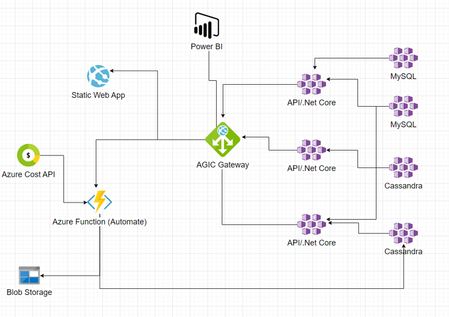
While working on various customer and partner facing roles, I felt the necessity of a simple and flexible solution to align Azure Cost to the customer’s organizational structure. “Project Bose” is a fully operational prototype derived from the same thought process. This is a side project I am working on during my leisure time. I found various customers derived similar solutions in-house, and there are ISV solutions as well. But there are a few fundamental differences between “Project Bose” and all the other solutions I found. “Project Bose” has a flexible backend and hence any changes in organizational structure can easily be implemented on it without disruption. It is also independent of using Resource Tags, which gives it the opportunity to remain non-vulnerable to erroneous values injected intentionally or non-intentionally by IT-Ops. Project Bose is dedicated to an eminent Indian physicist, who predicted (theoretically) a special behavior of atoms, which later became famous as Bose-Einstein condensates. He also discovered a sub-atomic particle, later named after him – Boson. Why Project Bose? To replace Azure specific hierarchy of Cost Analysis (Tenant>Management Group>Subscription>Resource Group) with organization specific hierarchy such as Business Unit>Department>Cost Center>Project/Application. Provide an alternative option to mark projects/applications under different divisions/departments – moving away from using resource tags. Flexible way to replicate organizational hierarchy through easy-to-use interface and change/edit the tree vertically or horizontally with minimum effort and no disruption. A great way of presenting ongoing and past expenses on different projects and slice and dice cost at different levels. Optional implementation of forecasting. How does it work? Admins – can create the hierarchy according to organizational structure (ex. BU>Division>Cost Center>Project) and add items at each level. This structure is flexible. They can change the hierarchy at any time. For example – can change name of a Division, add or remove a Cost Center etc. Project/Application Owners – can add their project under a specific branch of the organizational tree and then align Azure Resource Group(s) to it. Business Owners/Decision Makers – see current and past cost, trends and forecasting. Base Architecture Azure Deployment Sample Visualization The code base with IaC is available with my GitHub repo. I can share with anyone interested.13KViews7likes17Comments
Transform Insurance Industry Workflows Using Generative AI Models and Azure Services
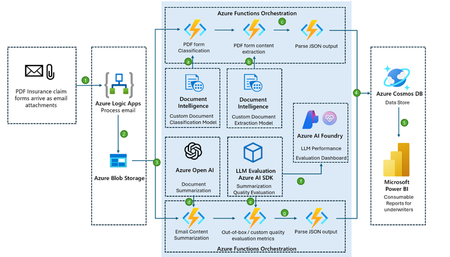
This article highlights an innovative automated solution designed to transform the processing of insurance claim forms for the insurance industry. Previously, underwriters were limited to handling just two to three claims per day, significantly hampering operational efficiency. With the implementation of this solution, companies have achieved a remarkable 60% increase in daily claim processing capacity. Built on Azure services, this architecture revolutionizes the management of claim forms submitted via email by automating critical tasks such as data extraction, classification, summarization, evaluation, and storage. Leveraging the power of AI and machine learning, this solution ensures faster, more accurate claim evaluations, enabling insurance companies to make informed decisions efficiently. The result is enhanced operational scalability, improved customer satisfaction, and a streamlined claims process. Scenario In the insurance industry, claim forms often arrive as email attachments, requiring manual processing to classify, extract, and validate information before it can be stored for analysis and reporting. This solution automates the process by leveraging Azure services to classify, extract, and summarize information from Insurance claim forms. Using Responsible AI evaluation, it ensures the performance of Large Language Models (LLMs) meets high standards. The data is then stored for further analysis and visualization in Power BI, where underwriters can access consumable reports. Architecture Diagram Components Azure Logic Apps: Automates workflows and integrates apps, data, and services. Used here to process emails, extract PDF attachments, and initiate workflows with an Outlook connector for attachment, metadata, and email content extraction. Azure Blob Storage: Stores unstructured data at scale. Used to save insurance claim forms in PDF and metadata/email content in TXT formats. Azure Functions: Serverless compute for event-driven code. Orchestrates workflows across services. Azure Document Intelligence: AI-powered data extraction from documents. Classifies and extracts structured content from ACCORD forms. Azure OpenAI: Provides advanced language models. Summarizes email content for high-level insights. LLM Evaluation Module (Azure AI SDK): Enhances Azure OpenAI summaries by evaluating and refining output quality. Azure AI Foundry: Manages Azure OpenAI deployments and evaluates LLM performance using Responsible AI metrics. Azure Cosmos DB: Globally distributed NoSQL database. Stores JSON outputs from Azure OpenAI and Document Intelligence. Microsoft Power BI: Visualizes Cosmos DB data with interactive reports for underwriters. Workflow Description The workflow for processing claims efficiently leverages a series of Azure services to automate, structure, and analyze data, ensuring a fast, accurate, and scalable claims management system. 1. Email Processing with Azure Logic Apps The process begins with a pre-designed Azure Logic Apps workflow, which automates the intake of PDF claim forms received as email attachments from policyholders. By using prebuilt Outlook connectors, it extracts key details like sender information, email content, metadata, and attachments, organizing the data for smooth claims processing. This automation reduces manual effort, accelerates claim intake, and minimizes data capture errors. 2. Secure Data Storage in Azure Blob Storage Once emails are processed, the necessary PDF attachments, email content, and email metadata are stored securely in Azure Blob Storage. This centralized, scalable repository ensures easy access to raw claim data for subsequent processing. Azure Blob’s structured storage supports efficient file retrieval during later stages, while its scalability can handle growing claim volumes, ensuring data integrity and accessibility throughout the entire claims processing lifecycle. 3. Workflow Orchestration with Azure Functions The entire processing workflow is managed by Azure Functions, which orchestrates serverless tasks such as document classification, data extraction, summarization, and LLM evaluation. This modular architecture enables independent updates and optimizations, ensuring scalability and easier maintenance. Azure Functions streamlines operations, improving the overall efficiency of the claims processing system. a. Document Classification: The next step uses Azure Document Intelligence to classify documents with a custom pretrained model, identifying insurance claim forms. This step ensures the correct extraction methods are applied, reducing misclassification and errors, and eliminating much of the need for manual review. The ability to customize the model also adapts to changes in document formats, ensuring accuracy and efficiency in later processes. b. Content Extraction: Once the insurance form is properly classified, Azure Document Intelligence extracts specific data points from the PDF claim forms, such as claim numbers and policyholder details. The automated extraction process saves time, reduces manual data entry, and improves accuracy, ensuring essential data is available for downstream processing. This capability also helps in organizing the information for efficient claim tracking and report generation. c. Document Intelligence Output Processing: The results are extracted in JSON format and then parsed and organized for storage in Azure Cosmos DB, ensuring that all relevant data is systematically stored for future use. d. Summarizing Content with Azure OpenAI: Once data is extracted, Azure OpenAI generates summaries of email content, highlighting key claim submission details. These summaries make it easier for underwriters and decision-makers to quickly understand the essential points without sifting through extensive raw data. e. Quality Evaluation with LLM Evaluation SDK: After summarization, the quality of the generated content is evaluated using the LLM Evaluation Module in the Azure AI SDK. This evaluation ensures that the content meets accuracy and relevance standards, maintaining high-quality benchmarks and upholding responsible AI practices. Insights from this evaluation guide the refinement and improvement of models used in the workflow. f. LLM Performance Dashboard with Azure AI Foundry: Continuous monitoring of the workflow’s quality metrics is done via the evaluation dashboard in Azure AI Foundry. Key performance indicators like Groundedness, fluency, coherence, and relevance are tracked, ensuring high standards are maintained. This regular monitoring helps quickly identify performance issues and informs model optimizations, supporting the efficiency of the claims processing system. g. Summarization Output Processing: After evaluation, the results from the OpenAI summarization output are parsed and stored in Cosmos DB, ensuring that all relevant data is saved in a structured format for easy access and retrieval. 4. Storing Data in Azure Cosmos DB The structured data, including parsed JSON outputs and summaries, is stored in Azure Cosmos DB, a fully managed, globally distributed NoSQL database. This solution ensures processed claim data is easily accessible for further analysis and reporting. Cosmos DB’s scalability can accommodate increasing claim volumes, while its low-latency access makes it ideal for high-demand environments. Its flexible data model also allows seamless integration with other services and applications, improving the overall efficiency of the claims processing system. 5. Data Visualization with Microsoft Power BI The final step in the workflow involves visualizing the stored data using Microsoft Power BI. This powerful business analytics tool enables underwriters and other stakeholders to create interactive reports and dashboards, providing actionable insights from processed claim data. Power BI’s intuitive interface allows users to explore data in depth, facilitating quick, data-driven decisions. By incorporating Power BI, the insurance company can effectively leverage stored data to drive business outcomes and continuously improve the claims management process. Related Use cases: Healthcare - Patient Intake and Medical Claims Processing: Automating the extraction and processing of patient intake forms and medical claims for faster reimbursement and improved patient care analysis. See the following article for more information on how to implement a solution like this. Financial Services - Loan and Mortgage Application Processing: Streamlining loan application reviews by automatically extracting and summarizing financial data for quicker decision-making. Retail - Supplier Invoice and Purchase Order Processing: Automating invoice and purchase order processing for faster supplier payment approvals and improved financial tracking. Legal contract and Document Review: Automating the classification and extraction of key clauses from legal contracts to enhance compliance and reduce manual review time. See the following article for more information on how to implement a solution like this. Government - Tax Filing and Documentation Processing: Automating the classification and extraction of tax filing data to ensure compliance and improve audit efficiency. To find solution ideas and reference architectures for Azure based solutions curated by Microsoft, go to the Azure Architecture Center and search with keywords like “retail”, “legal”, “healthcare”, etc. You’ll find hundreds of industry-related solutions that can help jumpstart your design process. Contributors: This article is maintained by Microsoft. It was originally written by the following contributors. Principal authors: Manasa Ramalinga| Principal Cloud Solution Architect – US Customer Success Oscar Shimabukuro Kiyan| Senior Cloud Solution Architect – US Customer Success4.3KViews5likes1CommentBuilding AI Agents: Workflow-First vs. Code-First vs. Hybrid
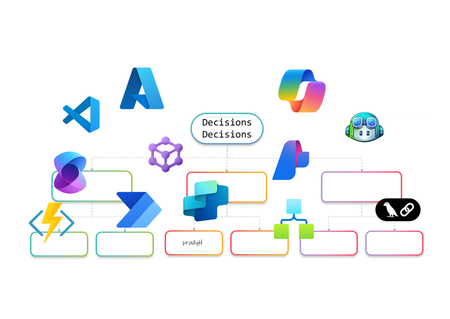
AI Agents are no longer just a developer’s playground. They’re becoming essential for enterprise automation, decision-making, and customer engagement. But how do you build them? Do you go workflow-first with drag-and-drop designers, code-first with SDKs, or adopt a hybrid approach that blends both worlds? In this article, I’ll walk you through the landscape of AI Agent design. We’ll look at workflow-first approaches with drag-and-drop designers, code-first approaches using SDKs, and hybrid models that combine both. The goal is to help you understand the options and choose the right path for your organization. Why AI Agents Need Orchestration Before diving into tools and approaches, let’s talk about why orchestration matters. AI Agents are not just single-purpose bots anymore. They often need to perform multi-step reasoning, interact with multiple systems, and adapt to dynamic workflows. Without orchestration, these agents can become siloed and fail to deliver real business value. Here’s what I’ve observed as the key drivers for orchestration: Complexity of Enterprise Workflows Modern business processes involve multiple applications, data sources, and decision points. AI Agents need a way to coordinate these steps seamlessly. Governance and Compliance Enterprises require control over how AI interacts with sensitive data and systems. Orchestration frameworks provide guardrails for security and compliance. Scalability and Maintainability A single agent might work fine for a proof of concept, but scaling to hundreds of workflows requires structured orchestration to avoid chaos. Integration with Existing Systems AI Agents rarely operate in isolation. They need to plug into ERP systems, CRMs, and custom apps. Orchestration ensures these integrations are reliable and repeatable. In short, orchestration is the backbone that turns AI Agents from clever prototypes into enterprise-ready solutions. Behind the Scenes I’ve always been a pro-code guy. I started my career on open-source coding in Unix and hardly touched the mouse. Then I discovered Visual Studio, and it completely changed my perspective. It showed me the power of a hybrid approach, the best of both worlds. That said, I won’t let my experience bias your ideas of what you’d like to build. This blog is about giving you the full picture so you can make the choice that works best for you. Workflow-First Approach Workflow-first platforms are more than visual designers and not just about drag-and-drop simplicity. They represent a design paradigm where orchestration logic is abstracted into declarative models rather than imperative code. These tools allow you to define agent behaviors, event triggers, and integration points visually, while the underlying engine handles state management, retries, and scaling. For architects, this means faster prototyping and governance baked into the platform. For developers, it offers extensibility through connectors and custom actions without sacrificing enterprise-grade reliability. Copilot Studio Building conversational agents becomes intuitive with a visual designer that maps prompts, actions, and connectors into structured flows. Copilot Studio makes this possible by integrating enterprise data and enabling agents to automate tasks and respond intelligently without deep coding. Building AI Agents using Copilot Studio Design conversation flows with adaptive prompts Integrate Microsoft Graph for contextual responses Add AI-driven actions using Copilot extensions Support multi-turn reasoning for complex queries Enable secure access to enterprise data sources Extend functionality through custom connectors Logic Apps Adaptive workflows and complex integrations are handled through a robust orchestration engine. Logic Apps introduces Agent Loop, allowing agents to reason iteratively, adapt workflows, and interact with multiple systems in real time. Building AI Agents using Logic Apps Implement Agent Loop for iterative reasoning Integrate Azure OpenAI for goal-driven decisions Access 1,400+ connectors for enterprise actions Support human-in-the-loop for critical approvals Enable multi-agent orchestration for complex tasks Provide observability and security for agent workflows Power Automate Multi-step workflows can be orchestrated across business applications using AI Builder models or external AI APIs. Power Automate enables agents to make decisions, process data, and trigger actions dynamically, all within a low-code environment. Building AI Agents using Power Automate Automate repetitive tasks with minimal effort Apply AI Builder for predictions and classification Call Azure OpenAI for natural language processing Integrate with hundreds of enterprise connectors Trigger workflows based on real-time events Combine flows with human approvals for compliance Azure AI Foundry Visual orchestration meets pro-code flexibility through Prompt Flow and Connected Agents, enabling multi-step reasoning flows while allowing developers to extend capabilities through SDKs. Azure AI Foundry is ideal for scenarios requiring both agility and deep customization. Building AI Agents using Azure AI Foundry Design reasoning flows visually with Prompt Flow Orchestrate multi-agent systems using Connected Agents Integrate with VS Code for advanced development Apply governance and deployment pipelines for production Use Azure OpenAI models for adaptive decision-making Monitor workflows with built-in observability tools Microsoft Agent Framework (Preview) I’ve been exploring Microsoft Agent Framework (MAF), an open-source foundation for building AI agents that can run anywhere. It integrates with Azure AI Foundry and Azure services, enabling multi-agent workflows, advanced memory services, and visual orchestration. With public preview live and GA coming soon, MAF is shaping how we deliver scalable, flexible agentic solutions. Enterprise-scale orchestration is achieved through graph-based workflows, human-in-the-loop approvals, and observability features. The Microsoft Agent Framework lays the foundation for multi-agent systems that are durable and compliant. Building AI Agents using Microsoft Agent Framework Coordinate multiple specialized agents in a graph Implement durable workflows with pause and resume Support human-in-the-loop for controlled autonomy Integrate with Azure AI Foundry for hosting and governance Enable observability through OpenTelemetry integration Provide SDK flexibility for custom orchestration patterns Visual-first platforms make building AI Agents feel less like coding marathons and more like creative design sessions. They’re perfect for those scenarios when you’d rather design than debug and still want the option to dive deeper when complexity calls. Pro-Code Approach Remember I told you how I started as a pro-code developer early in my career and later embraced a hybrid approach? I’ll try to stay neutral here as we explore the pro-code world. Pro-code frameworks offer integration with diverse ecosystems, multi-agent coordination, and fine-grained control over logic. While workflow-first and pro-code approaches both provide these capabilities, the difference lies in how they balance factors such as ease of development, ease of maintenance, time to deliver, monitoring capabilities, and other non-functional requirements. Choosing the right path often depends on which of these trade-offs matter most for your scenario. LangChain When I first explored LangChain, it felt like stepping into a developer’s playground for AI orchestration. I could stitch together prompts, tools, and APIs like building blocks, and I enjoyed the flexibility. It reminded me why pro-code approaches appeal to those who want full control over logic and integration with diverse ecosystems. Building AI Agents using LangChain Define custom chains for multi-step reasoning [it is called Lang“Chain”] Integrate external APIs and tools for dynamic actions Implement memory for context-aware conversations Support multi-agent collaboration through orchestration patterns Extend functionality with custom Python modules Deploy agents across cloud environments for scalability Semantic Kernel I’ve worked with Semantic Kernel when I needed more control over orchestration logic, and what stood out was its flexibility. It provides both .NET and Python SDKs, which makes it easy to combine natural language prompts with traditional programming logic. I found the planners and skills especially useful for breaking down goals into smaller steps, and connectors helped integrate external systems without reinventing the wheel. Building AI Agents using Semantic Kernel Create semantic functions for prompt-driven tasks Use planners for dynamic goal decomposition Integrate plugins for external system access Implement memory for persistent context across sessions Combine AI reasoning with deterministic code logic Enable observability and telemetry for enterprise monitoring Microsoft Agent Framework (Preview) Although I introduced MAF in the earlier section, its SDK-first design makes it relevant here as well for advanced orchestration and the pro-code nature… and so I’ll probably write this again in the Hybrid section. The Agent Framework is designed for developers who need full control over multi-agent orchestration. It provides a pro-code approach for defining agent behaviors, implementing advanced coordination patterns, and integrating enterprise-grade observability. Building AI Agents using Microsoft Agent Framework Define custom orchestration logic using SDK APIs Implement graph-based workflows for multi-agent coordination Extend agent capabilities with custom code modules Apply durable execution patterns with pause and resume Integrate OpenTelemetry for detailed monitoring and debugging Securely host and manage agents through Azure AI Foundry integration Hybrid Approach and decision framework I’ve always been a fan of both worlds, the flexibility of pro-code and the simplicity of workflow drag-and-drop style IDEs and GUIs. A hybrid approach is not about picking one over the other; it’s about balancing them. In practice, this to me means combining the speed and governance of workflow-first platforms with the extensibility and control of pro-code frameworks. Hybrid design shines when you need agility without sacrificing depth. For example, I can start with Copilot Studio to build a conversational agent using its visual designer. But if the scenario demands advanced logic or integration, I can call an Azure Function for custom processing, trigger a Logic Apps workflow for complex orchestration, or even invoke the Microsoft Agent Framework for multi-agent coordination. This flexibility delivers the best of both worlds, low-code for rapid development (remember RAD?) and pro-code for enterprise-grade customization with complex logic or integrations. Why go Hybrid Ø Balance speed and control: Rapid prototyping with workflow-first tools, deep customization with code. Ø Extend functionality: Call APIs, Azure Functions, or SDK-based frameworks from visual workflows. Ø Optimize for non-functional requirements: Address maintainability, monitoring, and scalability without compromising ease of development. Ø Enable interoperability: Combine connectors, plugins, and open standards for diverse ecosystems. Ø Support multi-agent orchestration: Integrate workflow-driven agents with pro-code agents for complex scenarios. The hybrid approach for building AI Agents is not just a technical choice but a design philosophy. When I need rapid prototyping or business automation, workflow-first is my choice. For multi-agent orchestration and deep customization, I go with code-first. Hybrid makes sense for regulated industries and large-scale deployments where flexibility and compliance are critical. The choice isn’t binary, it’s strategic. I’ve worked with both workflow-first tools like Copilot Studio, Power Automate, and Logic Apps, and pro-code frameworks such as LangChain, Semantic Kernel, and the Microsoft Agent Framework. Each approach has its strengths, and the decision often comes down to what matters most for your scenario. If rapid prototyping and business automation are priorities, workflow-first platforms make sense. When multi-agent orchestration, deep customization, and integration with diverse ecosystems are critical, pro-code frameworks give you the flexibility and control you need. Hybrid approaches bring both worlds together for regulated industries and large-scale deployments where governance, observability, and interoperability cannot be compromised. Understanding these trade-offs will help you create AI Agents that work so well, you’ll wonder if they’re secretly applying for your job! About the author Pradyumna (Prad) Harish is a Technology leader in the WW GSI Partner Organization at Microsoft. He has 26 years of experience in Product Engineering, Partner Development, Presales, and Delivery. Responsible for revenue growth through Cloud, AI, Cognitive Services, ML, Data & Analytics, Integration, DevOps, Open-Source Software, Enterprise Architecture, IoT, Digital strategies and other innovative areas for business generation and transformation; achieving revenue targets via extensive experience in managing global functions, global accounts, products, and solution architects across over 26 countries.12KViews4likes0CommentsAzure AI Foundry, GitHub Copilot, Fabric and more to Analyze usage stats from Utility Invoices
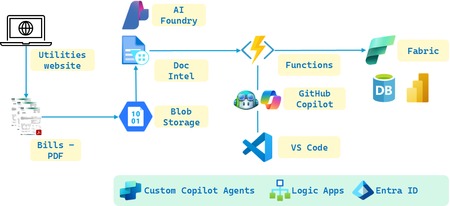
Overview With the introduction of Azure AI Foundry, integrating various AI services to streamline AI solution development and deployment of Agentic AI Workflow solutions like multi-modal, multi-model, dynamic & interactive Agents etc. has become more efficient. The platform offers a range of AI services, including Document Intelligence for extracting data from documents, natural language processing and robust machine learning capabilities, and more. Microsoft Fabric further enhances this ecosystem by providing robust data storage, analytics, and data science tools, enabling seamless data management and analysis. Additionally, Copilot and GitHub Copilot assist developers by offering AI-powered code suggestions and automating repetitive coding tasks, significantly boosting productivity and efficiency. Objectives In this use case, we will use monthly electricity bills from the utilities' website for a year and analyze them using Azure AI services within Azure AI Foundry. The electricity bills is simply an easy start but we could apply it to any other format really. Like say, W-2, I-9, 1099, ISO, EHR etc. By leveraging the Foundry's workflow capabilities, we will streamline the development stages step by step. Initially, we will use Document Intelligence to extract key data such as usage in kilowatts (KW), billed consumption, and other necessary information from each PDF file. This data will then be stored in Microsoft Fabric, where we will utilize its analytics and data science capabilities to process and analyze the information. We will also include a bit of processing steps to include Azure Functions to utilize GitHub Copilot in VS Code. Finally, we will create a Power BI dashboard in Fabric to visually display the analysis, providing insights into electricity usage trends and billing patterns over the year. Utility Invoice sample Building the solution Depicted in the picture are the key Azure and Copilot Services we will use to build the solution. Set up Azure AI Foundry Create a new project in Azure AI Foundry. Add Document Intelligence to your project. You can do this directly within the Foundry portal. Extract documents through Doc Intel Download the PDF files of the power bills and upload them to Azure Blob storage. I used Document Intelligence Studio to create a new project and Train custom models using the files from the Blob storage. Next, in your Azure AI Foundry project, add the Document Intelligence resource by providing the Endpoint URL and Keys. Data Extraction Use Azure Document Intelligence to extract required information from the PDF files. From the resource page in the Doc Intel service in the portal, copy the Endpoint URL and Keys. We will need these to connect the application to the Document Intelligence API. Next, let’s integrate doc intel with the project. In the Azure AI Foundry project, add the Document Intelligence resource by providing the Endpoint URL and Keys. Configure the settings as needed to start using doc intel for extracting data from the PDF documents. We can stay within the Azure AI Foundry portal for most of these steps, but for more advanced configurations, we might need to use the Document Intelligence Studio. GitHub Copilot in VS Code for Azure Functions For processing portions of the output from Doc Intel, what better way to create the Azure Function than in VS Code, especially with the help of GitHub Copilot. Let’s start by installing the Azure Functions extension in VS Code, then create a new function project. GitHub Copilot can assist in writing the code to process the JSON received. Additionally, we can get Copilot to help generate unit tests to ensure the function works correctly. We could use Copilot to explain the code and the tests it generates. Finally, we seamlessly integrate the generated code and unit tests into the Functions app code file, all within VS Code. Notice how we can prompt GitHub Copilot from step 1 of Creating the Workspace to inserting the generated code into the Python file for the Azure Function to testing it and all the way to deploying the Function. Store and Analyze information in Fabric There are many options for storing and analyzing JSON data in Fabric. Lakehouse, Data Warehouse, SQL Database, Power BI Datamart. As our dataset is small, let’s choose either SQL DB or PBI Datamart. PBI Datamart is great for smaller datasets and direct integration with PBI for dashboarding while SQL DB is good for moderate data volumes and supports transactional & analytical workloads. To insert the JSON values derived in the Azure Functions App either called from Logic Apps or directly from the AI Foundry through the API calls into Fabric, let’s explore two approaches. Using REST API and the other Using Functions with Azure SQL DB. Using REST API – Fabric provides APIs that we can call directly from our Function to insert records using HTTP client in the Function’s Python code to send POST requests to the Fabric API endpoints with our JSON data. Using Functions with Azure SQL DB – we can connect it directly from our Function using the SQL client in the Function to execute SQL INSERT statements to add records to the database. While we are at it, we could even get GitHub Copilot to write up the Unit Tests. Here’s a sample: Visualization in Fabric Power BI Let's start with creating visualizations in Fabric using the web version of Power BI for our report, UtilitiesBillAnalysisDashboard. You could use the PBI Desktop version too. Open the PBI Service and navigate to the workspace where you want to create your report. Click on "New" and select "Dataset" to add a new data source. Choose "SQL Server" from the list of data sources and enter "UtilityBillsServer" as the server name and "UtilityBillsDB" as the DB name to establish the connection. Once connected, navigate to the Navigator pane where we can select the table "tblElectricity" and the columns. I’ve shown these in the pictures below. For a clustered column (or bar) chart, let us choose the columns that contain our categorical data (e.g., month, year) and numerical data (e.g., kWh usage, billed amounts). After loading the data into PBI, drag the desired fields into the Values and Axis areas of the clustered column chart visualization. Customize the chart by adjusting the formatting options to enhance readability and insights. We now visualize our data in PBI within Fabric. We may need to do custom sort of the Month column. Let’s do this in the Data view. Select the table and create a new column with the following formula. This will create a custom sort column that we will use as ‘Sum of MonthNumber’ in ascending order. Other visualizations possibilities: Other Possibilities Agents with Custom Copilot Studio Next, you could leverage a custom Copilot to provide personalized energy usage recommendations based on historical data. Start by integrating the Copilot with your existing data pipeline in Azure AI Foundry. The Copilot can analyze electricity consumption patterns stored in your Fabric SQL DB and use ML models to identify optimization opportunities. For instance, it could suggest energy-efficient appliances, optimal usage times, or tips to reduce consumption. These recommendations can be visualized in PBI where users can track progress over time. To implement this, you would need to set up an API endpoint for the Copilot to access the data, train the ML models using Python in VS Code (let GitHub Copilot help you here… you will love it), and deploy the models to Azure using CLI / PowerShell / Bicep / Terraform / ARM or the Azure portal. Finally, connect the Copilot to PBI to visualize the personalized recommendations. Additionally, you could explore using Azure AI Agents for automated anomaly detection and alerts. This agent could monitor electricity bill data for unusual patterns and send notifications when anomalies are detected. Yet another idea would be to implement predictive maintenance for electrical systems, where an AI agent uses predictive analytics to forecast maintenance needs based on the data collected, helping to reduce downtime and improve system reliability. Summary We have built a solution that leveraged the seamless integration of pioneering AI technologies with Microsoft’s end-to-end platform. By leveraging Azure AI Foundry, we have developed a solution that uses Document Intelligence to scan electricity bills, stores the data in Fabric SQL DB, and processes it with Python in Azure Functions in VS Code, assisted by GitHub Copilot. The resulting insights are visualized in Power BI within Fabric. Additionally, we explored potential enhancements using Azure AI Agents and Custom Copilots, showcasing the ease of implementation and the transformative possibilities. Finally, speaking of possibilities – With Gen AI, the only limit is our imagination! Additional resources Explore Azure AI Foundry Start using the Azure AI Foundry SDK Review the Azure AI Foundry documentation and Call Azure Logic Apps as functions using Azure OpenAI Assistants Take the Azure AI Learn courses Learn more about Azure AI Services Document Intelligence: Azure AI Doc Intel GitHub Copilot examples: What can GitHub Copilot do – Examples Explore Microsoft Fabric: Microsoft Fabric Documentation See what you can connect with Azure Logic Apps: Azure Logic Apps Connectors About the Author Pradyumna (Prad) Harish is a Technology leader in the GSI Partner Organization at Microsoft. He has 26 years of experience in Product Engineering, Partner Development, Presales, and Delivery. Responsible for revenue growth through Cloud, AI, Cognitive Services, ML, Data & Analytics, Integration, DevOps, Open Source Software, Enterprise Architecture, IoT, Digital strategies and other innovative areas for business generation and transformation; achieving revenue targets via extensive experience in managing global functions, global accounts, products, and solution architects across over 26 countries.5.1KViews4likes1CommentData Validation at Scale with Azure Synapse
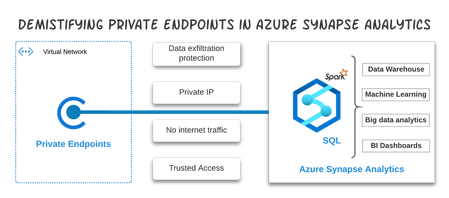
In the world of Artificial Intelligence and Machine Learning, data quality is paramount in ensuring our models and algorithms perform correctly. By leveraging the power of Spark on Azure Synapse, we can perform detailed data validation at a tremendous scale for your data science workloads.13KViews3likes0Comments
From Large Semi-Structured Docs to Actionable Data: In-Depth Evaluation Approaches Guidance
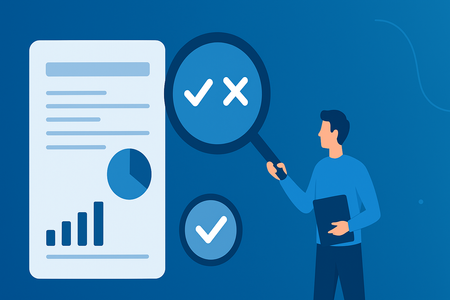
Introduction Extracting structured data from large, semi-structured documents (the detailed solution implementation overview and architecture is provided in this tech community blog: From Large Semi-Structured Docs to Actionable Data: Reusable Pipelines with ADI, AI Search & OpenAI) demands a rigorous evaluation framework. The goal is to ensure our pipeline is accurate, reliable, and scalable before we trust it with mission-critical data. This framework breaks evaluation into clear phases, from how we prepare the document, to how we find relevant parts, to how we validate the final output. It provides metrics, examples, and best practices at each step, forming a generic pattern that can be applied to various domains. Framework Overview A very structured and stepwise approach for evaluation is given below: Establish Ground Truth & Sampling: Define a robust ground truth set and sampling method to fairly evaluate all parts of the document. Preprocessing Evaluation: Verify that OCR, chunking, and any structural augmentation (like adding headers) preserve all content and context. Labelling Evaluation: Check classification of sections/chunks by content based on topic/entity and ensure irrelevant data is filtered out without losing any important context. Retrieval Evaluation: Ensure the system can retrieve the right pieces of information (using search) with high precision@k and recall@k. Extraction Accuracy Evaluation: Measure how well the final structured data matches the expected values (field accuracy, record accuracy, overall precision/recall). Continuous Improvement Loop with SME: Use findings to retrain, tweak, and improve, enabling the framework to be reused for new documents and iterations. SMEs play a huge role in such scenarios. Detailed Guidance on Evaluation Below is a step-by-step, in-depth guide to evaluating this kind of IDP (Indelligent Document Processing) pipeline, covering both the overall system and its individual components: Establish Ground Truth & Sampling Why: Any evaluation is only as good as the ground truth it’s compared against. Start by assembling a reliable “source of truth” dataset for your documents. This often means manual labelling of some documents by domain experts (e.g., a legal team annotating key clauses in a contract, or accountants verifying invoice fields). Because manual curation is expensive, be strategic in what and how we sample. Ground Truth Preparation: Identify the critical fields and sections we need to extract, and create an annotated set of documents with those values marked correct. For example, if processing financial statements, we might mark the ground truth values for Total Assets, Net Income, Key Ratios, etc. This ground truth should be the baseline to measure accuracy against. Although creating it is labour-intensive, it yields a precise benchmark for model performance. Stratified Sampling: Documents like contracts or policies have diverse sections. To evaluate thoroughly, use stratified sampling – ensure your test set covers all major content types and difficulty levels. For instance, if 15% of pages in a set of contracts are annexes or addendums, then ~15% of your evaluation pages should come from annexes, not just the main body. This prevents the evaluation from overlooking challenging or rare sections. In practice, we might partition a document by section type (clauses, tables, schedules, footnotes) and sample a proportion from each. This way, metrics reflect performance on each type of content, not just the easiest portions. Multi-Voter Agreement (Consensus): It’s often helpful to have multiple automated voters on the outputs before involving humans. For example, suppose we extracted an invoice amount; we can have: A regex/format checker/fuzzy matching voter A cross-field logic checker/embedding based matching voter An ML model confidence score/LLM as a judge vote If all signals are strong, we label that extraction as Low Risk; if they conflict, mark it High Risk for human review. By tallying such “votes”, we create tiers of confidence. Why? Because in many cases, a large portion of outputs will be obviously correct (e.g., over 80% might have unanimous high confidence), and we can safely assume those are right, focusing manual review on the remainder. This strategy effectively reduces the human workload while maintaining quality. Preprocessing Evaluation Before extracting meaning, make sure the raw text and structure are captured correctly. Any loss here breaks the whole pipeline. Key evaluation checks: OCR / Text Extraction Accuracy Character/Error Rate: Sample pages to see how many words are recognized correctly (use per-word confidence to spot issues). Layout Preservation: Ensure reading order isn’t scrambled, especially in multi-column pages or footnotes. Content Coverage: Verify every sentence from a sample page appears in the extracted text. Missing footers or sidebars count as gaps. Chunking Completeness: Combined chunks should reconstruct the full document. Word counts should match. Segment Integrity: Chunks should align to natural boundaries (paragraphs, tables). Track a metric like “95% clean boundaries.” Context Preservation: If a table or section spans chunks, mark relationships so downstream logic sees them as connected. Multi-page Table Handling Header Insertion Accuracy: Validate that continued pages get the correct header (aim for high 90% to maintain context across documents). No False Headers: Ensure new tables aren’t mistakenly treated as continuations. Track a False Continuation Rate and push it to near zero. Practical Check: Sample multi-page tables across docs to confirm consistent extraction and no missed rows. Structural Links / References Link Accuracy: Confirm references (like footnotes or section anchors) map to the right targets (e.g., 98%+ correct). Ontology / Category Coverage: If content is pre-grouped, check precision (no mis-grouping) and recall (nothing left uncategorized). Implication The goal is to ensure the pre-processed chunks are a faithful, complete, and structurally coherent representation of the original document. Metrics like content coverage, boundary cleanliness, and header accuracy help catch issues early. Fixing them here saves significant downstream debugging. Labelling Evaluation – “Did we isolate the right pieces?” Once we chunk the document, we label those chunks (with ML or rules) to map them to the right entities and throw out the noise. Think of this step as sorting useful clauses from filler. Section/Entity Labelling Accuracy Treat labelling as a multi-class or multi-label classification problem. Precision (Label Accuracy): Of the chunks we labelled as X, how many were actually X? Example: Model tags 40 chunks as “Financial Data.” If 5 are wrong, precision is 87.5. High precision avoids polluting a category (topic/entity) with junk. Recall (Coverage): Of the chunks that truly belong to category X, how many did we catch? Example: Ground truth has 50 Financial Data chunks, model finds 45. Recall is 90%. High recall prevents missing important sections. Example: A model labels paper sections as Introduction, Methods, Results, etc. It marks 100 sections as Results and 95 are correct (95% precision). It misses 5 actual Results (slightly lower recall). That’s acceptable if downstream steps can still recover some items. But low precision means the labelling logic needs tightening. Implication Low precision means wrong info contaminates the category. Low recall means missing crucial bits. Use these metrics to refine definitions or adjust the labelling logic. Don’t just report one accuracy number; precision and recall per label tell the real story. Retrieval Evaluation – “Can we find the right info when we ask?” Many document pipelines use retrieval to narrow a huge file down to the few chunks most likely to contain the answer corresponding to a topic/entity. If we need a “termination date,” we first fetch chunks about dates or termination, then extract from those. Retrieval must be sharp, or everything downstream suffers. Precision@K How many of the top K retrieved chunks are actually relevant? If we grab 5 chunks for “Key Clauses” and 4 are correct, Precision@5 is 80%. We usually set K to whatever the next stage consumes (3 or 5). High precision keeps extraction clean. Average it across queries or fields. Critical fields may demand very high Precision@K. Recall@K Did we retrieve enough of the relevant chunks? If there are 2 relevant chunks in the doc but the top 5 results include only 1, recall is 50%. Good recall means we aren’t missing mentions in other sections or appendices. Increasing K improves recall but can dilute precision. Tune both together. Ranking Quality (MRR, NDCG) If order matters, use rank-aware metrics. MRR: Measures how early the first relevant result appears. Perfect if it’s always at rank 1. NDCG@K: Rewards having the most relevant chunks at the top. Useful when relevance isn’t binary. Most pipelines can get away with Precision@K and maybe MRR. Implication Test 50 QA pairs from policy documents, retrieving 3 passages per query. Average Precision@3: 85%. Average Recall@3: 92%. MRR: 0.8. Suppose, we notice “data retention” answers appear in appendices that sometimes rank low. We increase K to 5 for that query type. Precision@3 rises to 90%, and Recall@5 hits roughly 99%. Retrieval evaluation is a sanity check. If retrieval fails, extraction recall will tank no matter how good the extractor is. Measure both so we know where the leak is. Also keep an eye on latency and cost if fancy re-rankers slow things down. Extraction Accuracy Evaluation – “Did we get the right answers?” Look at each field and measure how often we got the right value. Precision: Of the values we extracted, what percent are correct? Use exact match or a lenient version if small format shifts don’t matter. Report both when useful. Recall: Out of all ground truth values, how many did we actually extract? Per-field breakdown: Some fields will be easy (invoice numbers, dates), others messy (vendor names, free text). A simple table makes this obvious and shows where to focus improvements. Error Analysis Numbers don’t tell the whole story. Look at patterns: OCR mix-ups Bad date or amount formats Wrong chunk retrieved upstream Misread tables Find the recurring mistakes. That’s where the fixes live. Holistic Metrics If needed, compute overall precision/recall across all extracted fields. But per-field and record-level are usually what matter to stakeholders. Implication Precision protects against wrong entries. Recall protects against missing data. Choose your balance based on risk: If false positives hurt more (wrong financial numbers), favour precision. If missing items hurts more (missing red-flag clauses), favour recall. Continuous Improvement Loop with SME Continuous improvement means treating evaluation as an ongoing feedback loop rather than a one-time check. Each phase’s errors point to concrete fixes, and every fix is re-measured to ensure accuracy moves in the right direction without breaking other components. The same framework also supports A/B testing alternative methods and monitoring real production data to detect drift or new document patterns. Because the evaluation stages are modular, they generalize well across domains such as contracts, financial documents, healthcare forms, or academic papers with only domain-specific tweaks. Over time, this creates a stable, scalable and measurable path toward higher accuracy, better robustness, and easier adaptation to new document types. Conclusion Building an end-to-end evaluation framework isn’t just about measuring accuracy, it’s about creating trust in the entire pipeline. By breaking the process into clear phases, defining robust ground truth, and applying precision/recall-driven metrics at every stage, we ensure that document processing systems are reliable, scalable, and adaptable. This structured approach not only highlights where improvements are needed but also enables continuous refinement through SME feedback and iterative testing. Ultimately, such a framework transforms evaluation from a one-time exercise into a sustainable practice, paving the way for higher-quality outputs across diverse domains.498Views2likes1CommentModernizing Loan Processing with Gen AI and Azure AI Foundry Agentic Service
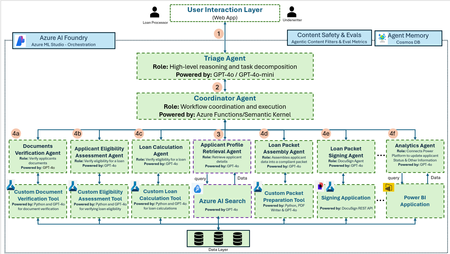
Scenario Once a loan application is submitted, financial institutions must process a variety of supporting documents—including pay stubs, tax returns, credit reports, and bank statements—before a loan can be approved. This post-application phase is often fragmented and manual, involving data retrieval from multiple systems, document verification, eligibility calculations, packet compilation, and signing. Each step typically requires coordination between underwriters, compliance teams, and loan processors, which can stretch the processing time to several weeks. This solution automates the post-application loan processing workflow using Azure services and Generative AI agents. Intelligent agents retrieve and validate applicant data, extract and summarize document contents, calculate loan eligibility, and assemble structured, compliant loan packets ready for signing. Orchestrated using Azure AI Foundry, the system ensures traceable agent actions and responsible AI evaluations. Final loan documents and metrics are stored securely for compliance and analytics, with Power BI dashboards enabling real-time visibility for underwriters and operations teams. Architecture: Workflow Description: The loan processing architecture leverages a collection of specialized AI agents, each designed to perform a focused task within a coordinated, intelligent workflow. From initial document intake to final analytics, these agents interact seamlessly through an orchestrated system powered by Azure AI Foundry, GPT-4o, Azure Functions and the Semantic Kernel. The agents not only automate and accelerate individual stages of the process but also communicate through an A2A layer to share critical context—enabling efficient, accurate, and transparent decision-making across the pipeline. Below is a breakdown of each agent and its role in the system. It all begins at the User Interaction Layer, where a Loan Processor or Underwriter interacts with the web application. This interface is designed to be simple, intuitive, and highly responsive to human input. As soon as a request enters the system, it’s picked up by the Triage Agent, powered by GPT-4o or GPT-4o-mini. This agent acts like a smart assistant that can reason through the problem and break it down into smaller, manageable tasks. For example, if the user wants to assess a new applicant, the Triage Agent identifies steps like verifying documents, calculating eligibility, assembling the loan packet, and so on. Next, the tasks are routed to the Coordinator Agent, which acts as the brains of the operation. Powered by Azure Functions & Sematic Kernel, this agent determines the execution order, tracks dependencies, and assigns each task to the appropriate specialized agent. The very first action that the Coordinator Agent triggers is the Applicant Profile Retrieval Agent. This agent taps into Azure AI Search, querying the backend to retrieve all relevant data about the applicant — previous interactions, submitted documents, financial history, etc. This rich context sets the foundation for the steps that follow. Once the applicant profile is in place, the Coordinator Agent activates a set of specialized agents, as outlined to perform specialized tasks as per the prompt received in the interaction layer. Below is the list of specialized agents: a. Documents Verification Agent: This agent checks and verifies the authenticity and completeness of applicant-submitted documents as part of the loan process. Powered by: GPT-4o b. Applicant Eligibility Assessment Agent: It evaluates whether the applicant meets the criteria for loan eligibility based on predefined rules and document content. Powered by: GPT-4o c. Loan Calculation Agent: This agent computes loan values and terms based on the applicant’s financial data and eligibility results. Powered by: GPT-4o d. Loan Packet Assembly Agent: This agent compiles all verified data into a complete and compliant loan packet ready for submission or signing. Powered by: GPT-4o e. Loan Packet Signing Agent: It handles the digital signing process by integrating with DocuSign and ensures all necessary parties have executed the loan packet. Powered by: GPT-4o f. Analytics Agent: This agent connects with Power BI to update applicant status and visualize insights for underwriters and processors. Powered by: GPT-4o Components Here are the key components of your Loan Processing AI Agent Architecture: Azure OpenAI GPT-4o/GPT 4o mini: Advanced multimodal language model. Used to summarize, interpret, and generate insights from documents, supporting intelligent automation. Empowers agents in this architecture with contextual understanding and reasoning. Azure AI Foundry Agent Service: Agent orchestration framework. Manages the creation, deployment, and lifecycle of task-specific agents—such as classifiers, retrievers, and validators—enabling modular execution across the loan processing workflow. Semantic Kernel: Lightweight orchestration library. Facilitates in-agent coordination of functions and plugins. Supports memory, chaining of LLM prompts, and integration with external systems to enable complex, context-aware behavior in each agent. Azure Functions: Serverless compute for handling triggers such as document uploads, user actions, or decision checkpoints. Initiates agent workflows, processes events, and maintains state transitions throughout the loan processing pipeline. Azure Cosmos DB: Globally distributed NoSQL database used for agent memory and context persistence. Stores conversation history, document embeddings, applicant profile snapshots, and task progress for long running or multi-turn workflows. Agentic Content Filters: Responsible AI mechanism for real-time filtering. Evaluates and blocks sensitive or non-compliant outputs generated by agents using customizable guardrails. Agentic Evaluations: Evaluation framework for agent workflows. Continuously tests, scores, and improves agent outputs using both automatic and human-in-the-loop metrics. Power BI: Business analytics tool that visualizes loan processing stages, agent outcomes, and applicant funnel data. Enables real-time monitoring of agent performance, SLA adherence, and operational bottlenecks for decision makers. Azure ML Studio: Code-first development environment for building and training machine learning models in Python. Supports rapid iteration, experimentation, and deployment of custom models that can be invoked by agents. Security Considerations: Web App: For web applications, access control and identity management can be done using App Roles, which determine whether a user or application can sign in or request an access token for a web API. For threat detection and mitigation, Defender for App Service leverages the scale of the cloud to identify attacks targeting apps hosted on Azure App Service. Azure AI Foundry: Azure AI Foundry supports robust identity management using Azure Role-Based Access Control (RBAC) to assign roles within Microsoft Entra ID, and it supports Managed Identities for secure resource access. Conditional Access policies allow organizations to enforce access based on location, device, and risk level. For network security, Azure AI Foundry supports Private Link, Managed Network Isolation, and Network Security Groups (NSGs) to restrict resource access. Data is encrypted in transit and at rest using Microsoft-managed keys or optional Customer-Managed Keys (CMKs). Azure Policy enables auditing and enforcing configurations for all resources deployed in the environment. Additionally, Microsoft Entra Agent ID, which extends identity management and access capabilities to AI agents. Now, AI agents created within Microsoft Copilot Studio and Azure AI Foundry are automatically assigned identities in a Microsoft Entra directory centralizing agent and user management in one solution. AI Security Posture Management can be used to assess the security posture of AI workloads. Purview APIs enable Azure AI Foundry and developers to integrate data security and compliance controls into custom AI apps and agents. This includes enforcing policies based on how users interact with sensitive information in AI applications. Purview Sensitive Information Types can be used to detect sensitive data in user prompts and responses when interacting with AI applications. Cosmos DB: Azure Cosmos DB enhances network security by supporting access restrictions via Virtual Network (VNet) integration and secure access through Private Link. Data protection is reinforced by integration with Microsoft Purview, which helps classify and label sensitive data, and Defender for Cosmos DB to detect threats and exfiltration attempts. Cosmos DB ensures all data is encrypted in transit using TLS 1.2+ (mandatory) and at rest using Microsoft-managed or customer-managed keys (CMKs). Power BI: Power BI leverages Microsoft Entra ID for secure identity and access management. In Power BI embedded applications, using Credential Scanner is recommended to detect hardcoded secrets and migrate them to secure storage like Azure Key Vault. All data is encrypted both at rest and during processing, with an option for organizations to use their own Customer-Managed Keys (CMKs). Power BI also integrates with Microsoft Purview sensitivity labels to manage and protect sensitive business data throughout the analytics lifecycle. For additional context, Power BI security white paper - Power BI | Microsoft Learn Related Scenarios Financial Institutions: Banks and credit unions can streamline customer onboarding by using agentic services to autofill account paperwork, verify identity, and route data to compliance systems. Similarly, signing up for credit cards and applying for personal or business loans can be orchestrated through intelligent agents that collect user input, verify eligibility, calculate offers, and securely generate submission packets—just like in the proposed loan processing model. Healthcare: Healthcare providers can deploy a similar agentic architecture to simplify patient intake by pre-filling forms, validating insurance coverage in real-time, and pulling medical history from existing systems securely. Agents can reason over patient inputs and coordinate backend workflows, improving administrative efficiency and enhancing the patient experience. University Financial Aid/Scholarships: Universities can benefit from agentic orchestration for managing financial aid processes—automating the intake of FAFSA or institutional forms, matching students with eligible scholarships, and guiding them through complex application workflows. This reduces manual errors and accelerates support delivery to students. Car Dealerships’ Financial Departments: Agentic systems can assist car dealerships in handling non-lot inventory requests, automating the intake and validation of custom vehicle orders. Additionally, customer loan applications can be processed through AI agents that handle verification, calculation, and packet assembly—mirroring the structure in the loan workflow above. Commercial Real Estate: Commercial real estate firms can adopt agentic services to streamline property research, valuations, and loan application workflows. Intelligent agents can pull property data, fill out required financial documents, and coordinate submissions, making real estate financing faster and more accurate. Law: Law firms can automate client onboarding with agents that collect intake data, pre-fill compliance documentation, and manage case file preparation. By using AI Foundry to coordinate agents for documentation, verification, and assembly, legal teams can reduce overhead and increase productivity. Contributors: This article is maintained by Microsoft. It was originally written by the following contributors. Principal authors: Manasa Ramalinga| Principal Cloud Solution Architect – US Customer Success Oscar Shimabukuro Kiyan| Senior Cloud Solution Architect – US Customer Success Abed Sau | Principal Cloud Solution Architect – US Customer Success Matt Kazanowsky | Senior Cloud Solution Architect – US Customer Success4.9KViews2likes0Comments